
When you hear "inbound call center services," it's easy to picture rows of agents with headsets. But it's so much more than just a phone system. Think of it as a complete toolkit for managing every single call that comes into your business, turning your phone line from a simple utility into a powerful asset for sales, support, and keeping customers happy.
From Country Road to Smart Superhighway

A standard business phone line is like a single-lane country road. It works fine when traffic is light, but as your business grows, that road gets congested. The result? Jams, frustrated drivers (your customers), and missed turns (lost opportunities).
Inbound call center services are what upgrades that country road into a smart superhighway. It’s no longer just a path for calls to travel; it's an intelligent traffic control system for your customer communications. Every call gets routed to the right destination quickly and efficiently, giving every customer a smooth ride.
Modern Tools for Every Business
Not long ago, this kind of sophisticated call management was only available to massive corporations with equally massive budgets. Thankfully, the shift to cloud-based technology has put these powerful tools within reach for businesses of all sizes, from scrappy startups to growing mid-sized companies. You don't need a server room or a clunky on-premise PBX system anymore.
This change means you can finally start orchestrating customer conversations instead of just reacting to them. For those with very specific needs, many providers offer specialized contact center solutions built for different industries.
In essence, you are moving from a reactive "call-and-answer" model to a proactive, data-driven approach. It’s about building a system that captures every lead, delivers exceptional service, and fosters lasting brand loyalty with every interaction.
The market reflects this shift. Valued at USD $352.4 billion in 2024, the global call center market is expected to hit USD $500.1 billion by 2030. This boom is fueled by e-commerce and customers who now expect instant, helpful support. It’s a clear sign that old-school phone systems just can't keep up.
To give you a clearer picture, let's compare the old way with the new.
Legacy Phone System vs Modern Inbound Call Center
| Feature | Legacy Phone System (Traditional PBX) | Modern Inbound Call Center (Cloud PBX) |
|---|---|---|
| Call Routing | Basic (e.g., ring all, sequential) | Advanced (skill-based, time-based, geographic) |
| Agent Location | Tied to a physical desk/office | Work from anywhere with an internet connection |
| Scalability | Difficult and expensive; requires new hardware | Easy and instant; add/remove users online |
| Data & Analytics | Limited or non-existent | Real-time dashboards, detailed call reports |
| Integrations | Minimal to none | Seamlessly connects with CRM, helpdesk, etc. |
| Initial Cost | High upfront hardware investment | Low monthly subscription fees |
As you can see, the difference isn't just an upgrade—it's a fundamental change in how you manage customer interactions. One is a static tool; the other is a dynamic, intelligent platform.
Key Benefits of a Modern System
Switching to an inbound call center platform is a strategic decision that pays off across the board. These systems are built to manage the entire call journey, which you can learn more about by understanding what is an inbound call. The core advantages include:
- Improved Customer Experience: Getting callers to the right person on the first try drastically cuts down on wait times and eliminates the dreaded "let me transfer you" loop.
- Increased Efficiency: Smart automation can handle the simple, repetitive tasks, freeing up your team to focus on the complex conversations where they can make a real difference.
- Enhanced Scalability: A cloud-based platform grows with you. Whether you’re hiring new people, opening another office, or just dealing with a seasonal rush, the system adjusts in minutes.
A Look Inside the Core Features of an Inbound Call Center
At its heart, a great inbound call center platform is all about turning a chaotic flood of calls into a series of smooth, positive customer conversations. These aren't just techy add-ons; they're the essential tools that boost efficiency, cut down on frustration, and ultimately, drive better results for your business. Let's pop the hood and see what makes a modern system tick.

The Auto Attendant: Your 24/7 Digital Receptionist
Think of an Auto Attendant as your company's virtual receptionist—one who never takes a coffee break or calls in sick. This feature, often called an Interactive Voice Response (IVR), is usually the first "voice" your customers hear, greeting them with a clear, professional menu to guide their call.
Its main job is to play traffic cop. By giving callers simple prompts like, "Press 1 for Sales, Press 2 for Support," the Auto Attendant gets every call headed in the right direction from the get-go. This simple sorting step stops calls from getting lost in the wrong department, saving precious time for both your customers and your team.
This one feature has a massive impact. It instantly makes your business sound polished and professional, no matter how big or small you are. For a growing company, a well-configured Auto Attendant can project the same level of credibility as a major corporation.
Smart Queue Management: A Virtual Velvet Rope
When call volumes spike and all your agents are busy, queue management is what keeps things from spiraling into chaos. Picture it like a virtual velvet rope at a popular restaurant. Instead of a frustrating busy signal, callers are welcomed into an organized, managed waiting line.
This is a non-negotiable part of any professional inbound call center service. A good queue system does more than just hold someone's spot; it keeps them in the loop, which is key to managing how long a wait feels.
- Wait-Time Updates: The system can tell a caller their estimated wait time or their position in line ("You are the third caller in line"). This transparency sets clear expectations and makes waiting far less aggravating.
- Custom On-Hold Music or Messages: Ditch the generic elevator music. Use that hold time to share helpful info about promotions, new products, or even answers to common questions. You can turn dead air into a real marketing opportunity.
A study found that 73% of consumers believe valuing their time is the most important thing a company can do to provide good service. Smart queue management shows customers you respect their time, even when you're swamped.
By keeping callers engaged and informed, you dramatically lower the odds they'll give up and hang up. That has a direct, positive impact on your call abandonment rate, a metric every team leader watches closely.
Queue Callback: The Feature Everyone Loves
If there's one feature that everyone universally appreciates, it's the Queue Callback. It solves the one thing nobody wants to do: wait on hold. The idea is brilliant in its simplicity. Instead of making someone listen to hold music, the system offers to save their place in line and have an agent call them back when it's their turn.
This is a total game-changer for the customer experience. The caller can get back to their day, feeling confident they haven't been forgotten. For your business, it’s a double win.
- Lower Call Abandonment: When people are offered a callback, they almost always take it. This means you capture nearly every single inbound call, even during your busiest hours.
- Smoother Call Volume: Callbacks help your team manage those intense peaks in call traffic. The system automatically dials the customer back when an agent is free, effectively spreading the workload out.
Imagine a customer calls your support line during a lunch rush and hears the wait is 15 minutes. The system offers a callback, they accept, and hang up. Fourteen minutes later, their phone rings, and an agent is on the line, ready to help. The customer is happy, and your call queue never got overwhelmed.
Intelligent Call Routing: The GPS for Your Calls
If the Auto Attendant is the front door, then intelligent call routing is the sophisticated GPS that directs every caller to the perfect person within your company. This is so much more than just sending a call to the "sales department." Modern systems use a custom set of rules to send calls to the right agent or group based on all sorts of criteria.
This routing logic can be as straightforward or as clever as you need it to be.
- Skills-Based Routing: Calls about a specific product can go straight to the agents who know it best. Complex technical questions? They're routed to your senior-level technicians.
- Time-of-Day Routing: Calls that come in after hours can be automatically sent to a dedicated voicemail, a third-party answering service, or even to an on-call agent’s mobile phone.
- Geographic Routing: A call from a Chicago area code can be sent directly to your Midwest sales team, connecting the caller with someone who understands their local market.
Think about this real-world scenario: a high-value prospect from a key sales territory calls your main number. The system instantly recognizes their area code and, instead of putting them in a general queue, routes the call straight to the mobile phone of your top salesperson for that region. That immediate, personal connection can mean the difference between landing a huge deal and losing them to a competitor. That’s the real power of intelligent routing.
How AI Is Revolutionizing Inbound Support
Artificial intelligence in customer support isn't some far-off idea anymore—it's here, and it's fundamentally changing how inbound call centers operate. The goal isn't to replace your team. Instead, think of AI as a co-pilot, giving your agents the tools they need to provide faster, smarter, and more personal service.
Essentially, AI becomes the ultimate assistant for your support staff. It takes over the repetitive, predictable tasks so your skilled agents can pour their energy into the complex conversations where a human touch really matters. This blend of smart technology and human expertise is quickly becoming the new gold standard for customer care.
Empowering Agents, Not Replacing Them
The true power of AI in a call center is how it enhances what your people can do. It can handle simple, routine questions with intelligent chatbots and instantly arm your agents with the right information from a smart knowledge base.
For instance, when a customer calls to ask, "What are your business hours?" an AI-powered assistant can answer immediately. That one simple interaction keeps the call out of the queue, freeing up your team for more urgent problems and cutting down wait times for everyone.
Businesses are catching on fast because the results speak for themselves. Right now, 50% of businesses are already using AI tools. They're seeing a 14% increase in issues resolved per hour and a 9% reduction in average handling time. By 2025, a staggering 80% of companies are expected to be using AI chatbots, which tells you just how vital this technology has become.
This infographic breaks down the real-world benefits AI delivers to inbound call center teams.
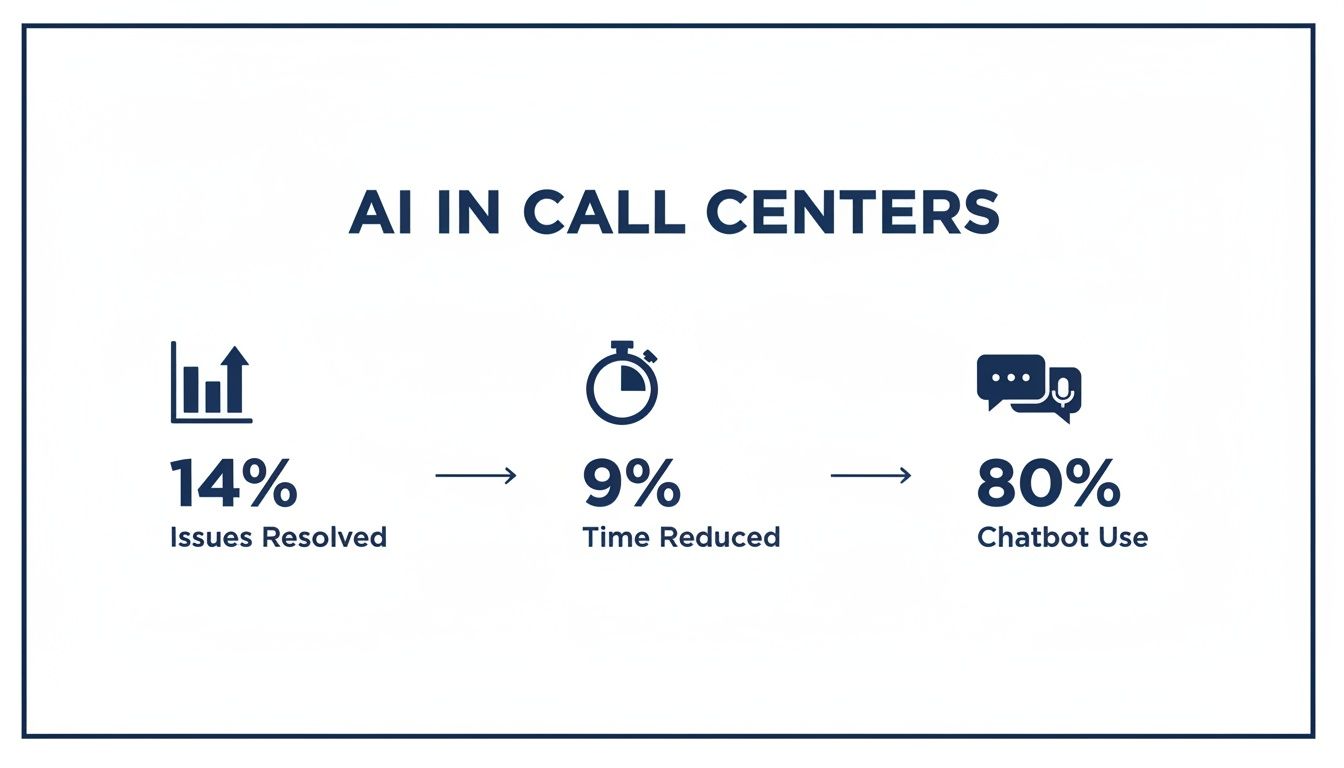
These numbers aren't just statistics; they represent a major leap in productivity and efficiency, letting your team get more done without burning out.
Key AI Capabilities for Your Call Center
You don't have to overhaul your entire operation overnight. A few key AI features can make an immediate difference in your inbound support.
- AI-Powered Chatbots and Voicebots: Think of these as your 24/7 front line. They can answer common questions and collect basic info from customers before they even speak to a person, making every interaction smoother.
- Sentiment Analysis: This technology is incredibly cool—it can actually gauge a caller's emotional state by analyzing their tone and words. It can flag a frustrated customer for a manager or give the agent cues on how to de-escalate the situation.
- Intelligent Knowledge Base: This is like a supercharged FAQ. As a customer explains their problem, the AI can listen and instantly surface the most relevant help articles or troubleshooting guides for the agent. No more long, awkward silences while they search for answers.
By handling routine tasks and serving up data in real-time, AI helps a support team shift from being reactive to becoming a proactive, insight-driven part of the business. It’s about future-proofing your customer service.
Making AI Sound Human
One of the biggest hurdles with AI in voice support has always been making it sound, well, human. A clunky, robotic voice can frustrate a customer before your team even has a chance to help.
Thankfully, modern AI has come a long way. Today's systems offer a wide range of voices that are clear, warm, and easy to understand, which makes for a much better first impression. You can see how customizable these tools are in our guide on how to choose from 10 AI voices for your organization.
This lets you pick a voice that actually fits your brand's personality, improving the customer's journey from the very first "hello." When you combine these advanced capabilities, your inbound call center services become not just more efficient, but more human-centric, too.
Measuring Success with Key Performance Metrics
Having all the bells and whistles in your call center setup is great, but how do you know if any of it is actually making a difference? The answer lies in the data. Key Performance Indicators, or KPIs, are the vital signs of your customer service operation. They give you a clear, honest look at what’s working and what isn’t.
Without tracking these numbers, you're just guessing. You might feel like your team is knocking it out of the park, but feelings don't tell the whole story. Hard data cuts through the noise, showing you exactly where you're excelling and where you need to make adjustments. It's the only way to make smart decisions that improve both your team's performance and, most importantly, your customers' experience.
To really get a handle on performance, you need to understand the most essential customer support KPIs. Let's dive into the big three every business should be watching.
Average Handle Time (AHT)
How long, on average, does it take for one of your agents to handle a call from start to finish? That's your Average Handle Time (AHT). It includes everything—the initial chat, any time the customer is on hold, and the post-call work like typing up notes or sending a follow-up email.
Think of AHT as an efficiency gauge. While a lower number often seems better, speed isn't the only goal. If AHT is too low, it could mean your agents are rushing people off the phone without actually solving their problems. This just leads to frustrated customers calling back, which is a waste of everyone's time.
The industry benchmark for AHT is right around 6 minutes and 10 seconds. The real win is finding that perfect balance: agents who are efficient but also thorough enough to get the job done right the first time.
Average Speed of Answer (ASA)
When someone calls your business, how long do they have to wait before a real person picks up? That wait time is your Average Speed of Answer (ASA). This single metric tells you a lot about how accessible and responsive your team is.
Nobody likes being stuck on hold. Long wait times are one of the fastest ways to frustrate a customer. That's why most top-performing call centers aim to answer 80% of calls within 20 seconds. If your ASA starts creeping up, it's often a red flag for staffing shortages or clunky call routing.
A consistently fast answer time sends a powerful message: you value your customers' time. In fact, 73% of consumers say that's the most important thing a company can do to provide good service.
Call Abandonment Rate
The Call Abandonment Rate is exactly what it sounds like: the percentage of people who hang up before they ever speak to an agent. This KPI is a major warning sign that your queueing process is failing your customers.
Are the wait times too long? Is the hold music driving them crazy? Are they not getting useful information while they wait? A high abandonment rate means lost sales, unresolved issues, and a tarnished reputation.
Generally, you want to keep this number below 5%. If you see it climbing higher, it’s time to take a hard look at what’s causing people to give up.
These are just a few of the core metrics you can track. For a much deeper dive, you can explore our guide to call analytics and reporting tools.
Key Inbound Call Center KPIs and Industry Benchmarks
To give you a clearer picture, this table breaks down the most important metrics, what they measure, and the common industry benchmarks you should aim for.
| Metric (KPI) | What It Measures | Industry Benchmark | What It Tells You |
|---|---|---|---|
| Average Handle Time (AHT) | Average duration of an entire customer interaction (talk, hold, wrap-up). | Around 6 minutes | The efficiency of your agents and processes. |
| Average Speed of Answer (ASA) | How quickly incoming calls are answered by a live agent. | Under 28 seconds | Your team's responsiveness and staffing levels. |
| Call Abandonment Rate | Percentage of callers who hang up before reaching an agent. | Below 5% | The health of your queue and overall caller patience. |
| First Call Resolution (FCR) | Percentage of issues resolved on the very first contact. | 70-75% | Agent knowledge and empowerment. |
By keeping a close eye on these KPIs, you can stop putting out fires and start proactively managing your entire customer support operation. You’ll have the insights you need to coach your team, fine-tune your workflows, and ultimately turn your call center into a powerful asset for your business.
Your Step-By-Step Implementation Checklist
Jumping into a new inbound call center service can feel like a massive undertaking, but it doesn't have to be a headache. The secret to a smooth, zero-downtime transition is simply having a solid plan. This checklist breaks the whole process down into clear, manageable steps.
Think of this as your roadmap from start to finish. It’s designed to take the guesswork out of an upgrade that’s so critical to your business operations. Whether you’re starting from scratch or moving away from an old system, following these steps will set you up for success.
Define Your Goals and Audit Your Current Setup
Before you even glance at a single feature, you need to be crystal clear on what you want to accomplish. Why are you even making this change? Are you hoping to slash your call abandonment rates, boost first-call resolution, or just present a more polished, professional image to your callers?
Your goals become the lens through which you'll make every other decision. Get specific. Don’t just aim for "better customer service." Instead, set a concrete target like, "reduce the average speed of answer to under 20 seconds."
With your goals set, it's time to take an honest look at your current call flow.
- Map the Journey: How do calls actually get from a customer to an agent right now? Sketch it out. Pinpoint every transfer, every hold, and every place a call can get stuck.
- Identify Pain Points: Where are your customers and agents getting frustrated? Is it the long wait times? Getting bounced between departments?
- Gather Feedback: Go talk to your team. They’re on the front lines and have a firsthand account of where the current system is failing them.
This initial audit provides your baseline. It's not just about what you need, but why you need it, which is crucial for picking a solution that solves your real-world problems.
Design Your Ideal Call Flow Logic
Armed with your goals and your audit, you can start mapping out how your new system will operate. This is the creative part—where you get to design the "smart highway" for your incoming calls. A great place to start is with your Auto Attendant (IVR) menu.
The key here is to keep it simple and intuitive. Your goal is to get callers where they need to go in as few steps as possible. A tangled menu with a dozen options is a one-way ticket to caller frustration.
Next, you'll want to plan out your call routing rules. Think about how you’ll direct different types of calls.
- Sales Calls: Should they all funnel into a single sales queue, or would it be better to route them based on the caller's location?
- Support Calls: Could you route these based on an agent's specific product knowledge (skills-based routing)? And what happens to these calls after hours?
- Billing Inquiries: Do these need to go straight to your finance team’s dedicated queue?
Pro-Tip: Start simple. You can always layer in more complexity once your team gets the hang of the new system. The best inbound call center platforms make it incredibly easy to tweak routing rules on the fly, no IT degree required.
Prepare Your Team for the Transition
New tech is only half the battle—your team is the other, more important half. A seamless rollout hinges on great communication and solid training. After all, nobody enjoys being hit with a new tool they have no idea how to use.
Begin by bringing key team members into the design process early on. This creates a sense of ownership and ensures the final setup is practical for the people who will be using it day in and day out. Once the system is configured, it's time for training.
Make sure your sessions cover:
- Core Functionality: The basics of how to answer, transfer, and place calls on hold.
- Advanced Features: How to use the queue callback feature, read the real-time dashboards, and handle after-call work.
- Best Practices: A quick refresher on your company's service standards and how they apply to the new platform.
Finally, pick a go-live date and have a support plan ready for the first few days. Designate an internal expert or have someone from your provider on standby to field questions and sort out any minor hiccups. This level of preparation helps your team feel confident and supported, paving the way for a truly smooth launch.
How to Achieve Enterprise-Grade Customer Support
So, how do you get the kind of customer support firepower that Fortune 500 companies have? It used to be out of reach for smaller businesses, requiring massive budgets and complex hardware. Not anymore.
Modern inbound call center services, built on a Cloud PBX, completely level the playing field. They give your small or mid-sized business the exact same sophisticated tools—but without the eye-watering price tag or the need for a dedicated IT army to manage it all. This isn't just a phone system upgrade; it's about giving your team what they need to deliver truly exceptional service and build a reputation that drives growth.
A Unified Platform for Modern Teams
Think back to the old way of doing things: a closet full of clunky hardware and a different, disconnected system for every little function. A modern approach flips that script, bringing everything under one roof in a single, intuitive dashboard you can manage yourself.
From this one central hub, you can add new users in seconds, map out complex call routing flows, and pull detailed reports on your team's performance. This gives you incredible agility. Need to onboard a new hire or tweak your call queues for a seasonal rush? You can make those changes in minutes, not days.
This unified approach is a total game-changer, especially for businesses with multiple locations. It guarantees every single customer gets the same professional, consistent experience, regardless of which office or number they dial. It’s also a lifeline for remote and hybrid teams, giving them the power to take and manage business calls from anywhere, on any device they choose.
A truly unified system doesn't just connect calls; it connects your people. It creates a cohesive communication structure that supports your team whether they are in the same room or spread across the country.
Transparent Pricing and Expert Support
Enterprise-grade technology shouldn't come with enterprise-level headaches, especially when it comes to billing. Look for providers who offer simple, all-inclusive pricing. This transparent approach means you won't get hit with surprise fees for essential features like call recording or analytics, which makes budgeting predictable and scaling up a breeze.
Just as crucial is the support you get when you need it most. When your communication system hits a snag, you can't afford to wait. The best providers offer 24/7 assistance from a knowledgeable, US-based support team that you can actually reach by phone.
It's this combination—powerful tools, straightforward pricing, and reliable human support—that finally makes top-tier service accessible. It lets you build a customer support engine that doesn't just keep up with your growth but actively fuels it, turning every inbound call into an opportunity to strengthen your brand.
Frequently Asked Questions
It's natural to have questions when you're looking into something as central to your business as a phone system. Let's tackle some of the most common ones we hear from business owners just like you.
Can My Small Business Really Benefit from These Services?
Without a doubt. Gone are the days when sophisticated call center features were only for massive corporations. Modern cloud-based systems are built to be flexible and affordable, putting enterprise-level tools right into the hands of small and growing businesses.
The immediate impact is a huge boost in professionalism. Think about it: even a simple feature like an Auto Attendant can make your three-person shop sound as polished and capable as a Fortune 500 company. It’s all about building that crucial customer confidence from the moment they dial your number.
Is It Difficult to Switch from My Old Phone System?
That’s a common fear, but with the right provider, it’s a non-issue. A good partner doesn't just sell you software; they manage the entire transition for you. Look for "white-glove" service, which means they do all the heavy lifting to ensure a smooth, disruption-free switch.
This isn't just about flipping a switch. It includes critical tasks like porting over your existing phone numbers (so you don't lose them) and setting up your call routing exactly how you want it. The whole point is to get you upgraded without any downtime that could cost you sales or frustrate your customers.
This hands-on approach takes the technical headache and guesswork completely off your plate.
What Kind of Support Can I Expect If I Run into Issues?
This is one of the most important questions you can ask. When your phones are your business's lifeline, you can't afford to be stuck waiting on an email reply or navigating a frustrating automated menu.
You should insist on a provider that offers support from real, live experts. Having 24/7 assistance from a knowledgeable, US-based team means you can pick up the phone and get a problem solved right now. It’s the peace of mind you need, knowing that real help is always just a quick call away.
Ready to see what an enterprise-grade phone system can do for your customer communication? Explore the all-inclusive features of SnapDial and see how our white-glove setup and 24/7 Texas-based support can make a real difference for your business. Learn more at snap-dial.com.