

Are high phone bills, missed customer calls, and the chaos of connecting a scattered team starting to feel familiar? You're not alone. The good news is that modern small business voip solutions were built to solve exactly these problems by moving your phone system from those outdated copper wires to your much more flexible internet connection.
Your Guide to Modern Business Communication

If your old phone system feels like it's holding you back, think of it as a fixed wall map—reliable for one spot, but completely rigid. A VoIP (Voice over Internet Protocol) system, on the other hand, is like having a dynamic GPS in your pocket. It adapts instantly to any route, location, or device your team uses, making sure your business is always connected and sounds crystal clear.
This guide is your roadmap to understanding this powerful technology. We’ll cut through the technical jargon and focus on what VoIP actually does for your daily operations. For a growing number of businesses, the right communication system is becoming a real competitive advantage, not just another line item on the budget.
Why VoIP Matters for Small Businesses Today
With so many teams working in flexible or hybrid models, having a reliable way to communicate has never been more critical. A modern phone system isn't just about making and receiving calls anymore; it’s the central nervous system for your customer interactions and team collaboration. For a growing company, it’s all about presenting a professional, unified front—no matter where your people happen to be working from.
VoIP pulls this off by giving you features that were once only available to massive corporations, but at a price point that actually makes sense for a small business. The core benefits are pretty compelling:
- Significant Cost Savings: You can drastically cut your monthly phone bills by ditching expensive landline contracts and the maintenance that comes with them.
- Enhanced Professionalism: Tools like auto-attendants and custom call routing ensure every single caller has a smooth, professional experience.
- Ultimate Flexibility: Give your team the power to work from anywhere. Mobile apps turn their personal smartphones into secure business lines.
- Effortless Scalability: Need to add a new employee or open a new office? You can do it in minutes, not weeks, without calling a technician to run new wires.
By switching from a traditional landline system, small businesses can reduce their communication costs by as much as 40% on local calls and up to 90% on international calls.
Throughout this article, we’ll explore how these benefits translate into real-world success. We'll break down the must-have features, give you a checklist for a smooth migration, and help you choose the right small business voip solutions to fuel your growth. It's time to build a communication system that can keep up with your ambition.
What Is VoIP and How Does It Actually Work?
Let's cut through the jargon and get straight to what powers modern business communication. In the simplest terms, VoIP (Voice over Internet Protocol) is the technology that takes your voice, turns it into digital data, and sends it across the internet. This one simple change frees your business from the physical chains—and high costs—of old-school copper phone lines.
Think of it like the difference between mailing a letter and sending an email. One is slow, clunky, and tied to a physical system with tons of limitations. The other is instant, flexible, and comes packed with powerful features. That's really the heart of what small business VoIP solutions bring to the table: a smarter, more agile way to talk to your customers and your team.
And this shift isn't just a trend; it's a full-blown migration. By 2025, an impressive 61% of small businesses had already made the switch to VoIP, a crystal-clear sign of its value. This is driven by a real need for affordability and the ability to grow without friction, with around 60% of businesses having already ditched their legacy phone services. You can see more details on the trends driving VoIP adoption on frejun.com.
Understanding the Cloud Phone System
You’ll hear a lot of terms thrown around, like "Hosted PBX" or "Cloud Phone System." Don't let the technical-sounding names throw you off. They all point to the same core idea: your entire business phone system is managed for you in the cloud by a provider.
Instead of a dusty closet full of expensive, complicated hardware that needs constant babysitting, all the intelligence and features of your phone system live on secure, professionally managed servers. This approach gives you access to incredibly powerful tools without the headache and capital expense of actually owning the equipment.
A cloud phone system is your business's communication command center, delivered as a service right over the internet. It handles everything from call routing and voicemail to advanced analytics, and you manage it all through a simple web portal.
For a small business, this is a total game-changer. It means you can have a professional, enterprise-grade phone system without an enterprise-sized budget. You can learn more about the mechanics in our complete guide on what a cloud phone system is.
How Calls Actually Travel Over the Internet
So, how does your voice actually get from your phone to the person on the other end? The whole process happens in a blink of an eye and follows a few key steps.
- Speaking: When you talk into a VoIP phone or a softphone app on your computer, your voice creates a standard analog sound wave.
- Digitizing: The device instantly chops that sound wave up into tiny digital packets of data. Think of it like breaking a sentence down into individual words to send it across the internet much faster.
- Transmitting: These little data packets zip across the internet to their destination, each one finding the quickest and most efficient route available. This is the "IP" or "Internet Protocol" part of VoIP in action.
- Reassembling: Once the packets arrive on the other end, the receiving device puts them back together in the right order, instantly converting them back into crystal-clear audio for the listener.
This lightning-fast process is what allows you to make and receive calls from anywhere with a decent internet connection—whether you're at your office desk, working from home, or sitting in a coffee shop halfway across the world. It’s the foundation for a truly flexible and modern way to run your business.
The Real Benefits of Switching to a VoIP System

Once you get past the technical jargon, the real-world advantages of a modern phone system start to click. For most small businesses, the decision to switch really boils down to three huge wins: a dramatic drop in costs, the ability to scale without headaches, and true freedom for remote work.
These aren't just small tweaks. They represent a fundamental shift in how you operate and grow your business. Instead of seeing your phone system as another utility bill, you can start treating it like a strategic asset. The right small business voip solutions directly boost your bottom line, make your team more efficient, and give you the agility to jump on new opportunities.
Let's break down how these benefits actually play out.
Slash Your Communication Costs
The first thing you’ll notice—and the one that gets any business owner's attention—is the serious cost savings. Traditional phone systems are famous for their bloated monthly fees, surprise long-distance charges, and pricey maintenance contracts for that dusty old PBX box in the server closet.
VoIP completely flips that model around by simply running over the internet connection you already pay for.
This gets rid of the need for separate, expensive phone lines and clunky hardware. The impact on your budget is immediate and often massive. For instance, businesses that switch to VoIP can see their bills for local calls drop by up to 40% and international calls by a staggering 90%. For companies ditching a legacy system, usage-based plans have been shown to cut communication spending by 68% over two years. You can dig into more of these VoIP savings statistics on sheerbit.com.
That's real capital you can pour back into marketing, hiring, or other parts of your business that actually drive growth.
Scale Your Business Effortlessly
Growth should be exciting, not a logistical nightmare. With an old-school phone system, bringing on a new employee meant calling a technician, waiting around for them to run new wires through the walls, and then paying a hefty bill for the installation. The whole process was slow, disruptive, and expensive.
VoIP transforms scalability from a major project into a simple administrative task. Need to add a new team member? You can provision a new line and have them ready to make calls in minutes, directly from a web-based portal.
This kind of agility is a game-changer for businesses with seasonal rushes, rapid growth spurts, or plans to open new locations. You can add or remove lines on demand, which means you only ever pay for what you're actually using. This "grow-as-you-go" model offers a level of flexibility that legacy systems just can't touch.
Empower Your Remote and Hybrid Teams
In today’s world, your team needs to be just as productive from a home office as they are from headquarters. A VoIP system is the backbone of a truly mobile and connected workforce. It untethers your business phone number from a physical desk and attaches it to the employee, no matter where they are.
This all works through powerful mobile and desktop apps, often called "softphones." An employee can use their smartphone or laptop to make and receive calls using their official business number. This keeps your company looking professional, protects your team's personal privacy, and makes sure critical customer calls never get missed.
Think about the key advantages for a distributed team:
- Unified Presence: Coworkers can see who is available, on a call, or away at a glance, regardless of their physical location.
- Seamless Call Transfers: A call can be handed off from the main office to a remote employee's mobile app just as easily as if they were sitting in the next cubicle.
- Consistent Functionality: All your essential business features—like call recording, voicemail-to-email, and call routing—work exactly the same on the app as they do on a desk phone.
This capability ensures your communication stays professional and consistent, whether your team is all under one roof or spread across the country.
VoIP Features That Fuel Business Growth
Understanding the big-picture benefits of a small business VoIP solution is one thing, but seeing the actual tools in action is where it all clicks. This isn't just about swapping out your old desk phone for a new one. It's about arming your team with a powerful communication suite that, until recently, was way out of reach for smaller companies.
Think of it like this: if your old phone system was a basic hammer, a VoIP system is a complete, professional-grade toolkit. It gives you the perfect instrument for any communication job, from greeting callers like a Fortune 500 company to getting deep insights into every customer conversation. Let's dig into the must-have features that directly drive business growth.
Your 24/7 Digital Receptionist
First impressions matter, and for a lot of your customers, that first contact is a phone call. An Auto-Attendant, sometimes called a digital receptionist or IVR (Interactive Voice Response), makes sure every single call is answered instantly and professionally—even long after you’ve locked up for the night.
This tool greets callers with a clear, automated menu to get them to the right person or department. Think: "Press 1 for Sales, Press 2 for Support, Press 3 for Billing." That simple setup immediately makes your business sound more organized and established.
More importantly, it frees up your team from the constant distraction of answering and transferring calls all day. An HVAC company, for instance, could use its auto-attendant to route routine appointment requests to the office manager while sending emergency calls straight to an on-call tech's cell phone. Urgent problems get handled immediately, while everything else is managed efficiently.
Intelligent and Flexible Call Routing
So, what happens after a caller presses "2" for support? That’s where intelligent call routing takes over. This is much more than just forwarding a call to a single phone; it’s about setting up smart rules that guarantee no customer call ever falls through the cracks.
With a modern VoIP system, you can build rules based on all sorts of logic:
- Time of Day: Send calls to your main office during business hours, an after-hours support line in the evening, and directly to voicemail on weekends.
- Caller ID: Automatically route calls from your VIP clients straight to their dedicated account manager, letting them skip the main menu entirely.
- Simultaneous Ring: Make multiple phones ring at once—like a desk phone and a mobile app—so whoever is free can grab the call. This is a game-changer for reducing missed calls and customer wait times.
This degree of control ensures your business is always available and that every caller gets to the best person to help them, fast. That's how you improve first-call resolution and keep customers happy.
A well-configured call routing strategy is like having a perfectly trained traffic controller for your business communications. It directs every interaction to the right destination without delays or confusion, creating a smooth experience for both your customers and your team.
The Power of Mobile and Desktop Apps
For any modern business, one of the most powerful features is the ability to take your office phone number anywhere you go. VoIP mobile and desktop apps, often called softphones, turn an employee's smartphone or computer into a full-blown business phone.
This means your team can make and receive calls on your official business line, no matter where they're working from. They get access to all the same tools they'd have at their desk, like call transferring, voicemail, and the company directory. It’s absolutely essential for supporting remote and hybrid teams.
Imagine a sales rep making follow-up calls from their personal smartphone while on the road. The customer’s caller ID shows the main office number, not the rep's private cell. This keeps things professional and protects your employee's personal information. It’s a simple feature that makes a huge impact on keeping your team connected and productive.
Call Recording and Performance Analytics
How do you know if your customer service is really hitting the mark? Call recording gives you the answer. By recording incoming and outgoing calls, you can review conversations for quality control, settle disputes with a clear record of what was said, and use real-world examples to train your team.
But it goes beyond just recording. Analytics and reporting give you a bird's-eye view of your entire communications hub. These dashboards serve up critical data points, including:
- Call Volume: Pinpoint your busiest days and times so you can staff up accordingly.
- Wait Times: See exactly how long customers are sitting on hold before they connect with someone.
- Missed Calls: Figure out when and why calls are being missed so you can tweak your routing rules.
- Call Duration: Understand how long different types of conversations typically take to resolve.
These insights let you stop guessing and start making data-driven decisions about staffing, training, and your overall customer service strategy. It's the kind of business intelligence that helps you fine-tune your operations for peak performance.
Now that we've covered the core tools, let's look at how they come together to solve real business problems. The table below summarizes these essential features and the direct impact they can have on your day-to-day operations.
Essential VoIP Features and Their Business Impact
| Feature | What It Does | How It Helps Your Business |
|---|---|---|
| Auto-Attendant (IVR) | Greets callers with a professional menu to direct their call. | Creates a polished first impression, reduces manual call transfers, and ensures 24/7 call answering. |
| Call Routing | Uses smart rules (time, caller ID) to send calls to the right person or group. | Reduces missed calls and wait times, improves first-call resolution, and provides a better customer journey. |
| Mobile & Desktop Apps | Turns any smartphone or computer into a full-featured business phone. | Enables seamless remote and hybrid work, protects employee privacy, and maintains a professional image. |
| Call Recording | Captures audio of inbound and outbound calls for later review. | Provides valuable material for agent training, quality assurance, and dispute resolution. |
| Analytics & Reporting | Tracks key metrics like call volume, wait times, and missed calls. | Offers data-driven insights to optimize staffing, improve customer service, and boost operational efficiency. |
Seeing how these features function individually is helpful, but their real power is unlocked when they work together. A great VoIP system integrates these tools into a single, cohesive platform, allowing you to build a truly intelligent and responsive communication strategy.
How to Choose the Right VoIP Solution
Picking a small business VoIP solution from the sea of options out there can feel like a chore, but it doesn’t have to be. The secret is to change your mindset. You're not just buying a "phone service"—you're choosing a communications partner for the long haul.
With that frame of reference, you can cut through the marketing noise and find a system that actually fits how your business operates. The whole process starts by sizing up providers on a few non-negotiable criteria. Think of these as the foundation of any reliable phone system. Without them, even the slickest platform will end up causing headaches.
Start with the Essentials
Before you even glance at a feature list, make sure any provider you're considering meets these fundamental standards. A great phone system is one you don't even have to think about because it just works, day in and day out.
- System Reliability and Uptime: Your phone system is a lifeline to your customers. Look for providers that back up their service with a Service Level Agreement (SLA) guaranteeing 99.99% or higher uptime. This ensures your lines are always open when opportunity rings.
- Robust Security Measures: Your business conversations contain sensitive information. The provider must use strong encryption to protect calls both in transit and when stored. This is non-negotiable for keeping your communications private and secure from prying eyes.
- Responsive Customer Support: When something goes wrong, you need real help from a real person—fast. Prioritize providers with 24/7 support you can actually reach by phone, not just by submitting an email ticket and hoping for the best.
- Transparent Pricing Models: Don't fall for providers with confusing pricing tiers riddled with hidden fees and à la carte charges. The best partners offer clear, all-inclusive pricing so you know exactly what your bill will look like every single month. No surprises.
Choosing a VoIP provider is like hiring a key employee. You need someone who is reliable, trustworthy, and there to support you when you need it most. Prioritizing these core qualities ensures a successful long-term relationship.
Assess Your Own Business Needs
Once you have a shortlist of providers that meet these core standards, the next step is to look inward. The "best" VoIP solution isn't a one-size-fits-all product; it's the one that aligns perfectly with your team's size, your daily workflow, and your plans for the future.
Taking the time to map out your current communication challenges and future goals is the most important step you can take. A detailed understanding of your needs will make comparing your options much easier and far more effective.
Build Your Evaluation Scorecard
To get that clarity, answer these key questions. This will give you a blueprint of exactly what you need from a provider, making it simple to objectively compare your options.
- How many users do you have right now? Get a precise count of every single employee who will need a phone line or extension.
- What is your projected growth? Think about your hiring plans for the next 12–24 months. A good system should make it simple and affordable to add new users as your team expands.
- What is your typical call volume? Are you a low-volume professional service or a high-volume call center? This will help you figure out if a per-user plan or a metered plan makes more sense.
- Which features are "must-haves"? Look back at the features we've discussed and list your non-negotiables. Is call recording an absolute must for compliance? Is an auto-attendant your top priority to sound more professional?
- Do you have multiple locations or remote staff? If you're not all under one roof, powerful mobile and desktop apps are essential for keeping everyone connected on a single, unified system.
With these answers in hand, you'll be ready to evaluate providers like a pro. For a side-by-side look at how leading services stack up, our small business phone system comparison guide offers a detailed breakdown. This practical approach ensures you pick a VoIP solution that not only solves today’s problems but is ready to support your business as it grows.
Your Simple Migration Checklist
Thinking about switching from an old phone system to a modern small business VoIP solution can feel like a huge project. I get it. But the truth is, it's a lot less painful when you break it down into a clear, step-by-step plan.
A well-thought-out migration is the secret to a smooth transition with absolutely zero downtime, keeping your business running without a hitch. This simple checklist gives you a practical roadmap, taking the guesswork out of the process and making the switch feel completely manageable.
The whole process really comes down to four phases, each with a clear goal.
Phase 1: Assess Your Current Setup
Before you can plan your move, you need a crystal-clear picture of where you are right now. This first step is all about gathering the right information to make sure your network is ready for high-quality calls and to document how your team communicates today.
- Audit Your Network: Flawless, crystal-clear calls depend entirely on a solid internet connection. Run a speed test and get a feel for your network's capacity. For a deeper dive, you can learn more about how much bandwidth you need for VoIP.
- Inventory Your Equipment: Make a quick list of all your current hardware—phones, headsets, and any clunky old PBX equipment you have tucked away. This tells you what needs to be replaced.
- Map Call Flows: This is crucial. Document how calls are actually handled right now. Who answers the main line? What happens after hours or on holidays? This map will be your guide for setting up the new system perfectly.
This infographic breaks down the high-level process for picking the right VoIP partner.
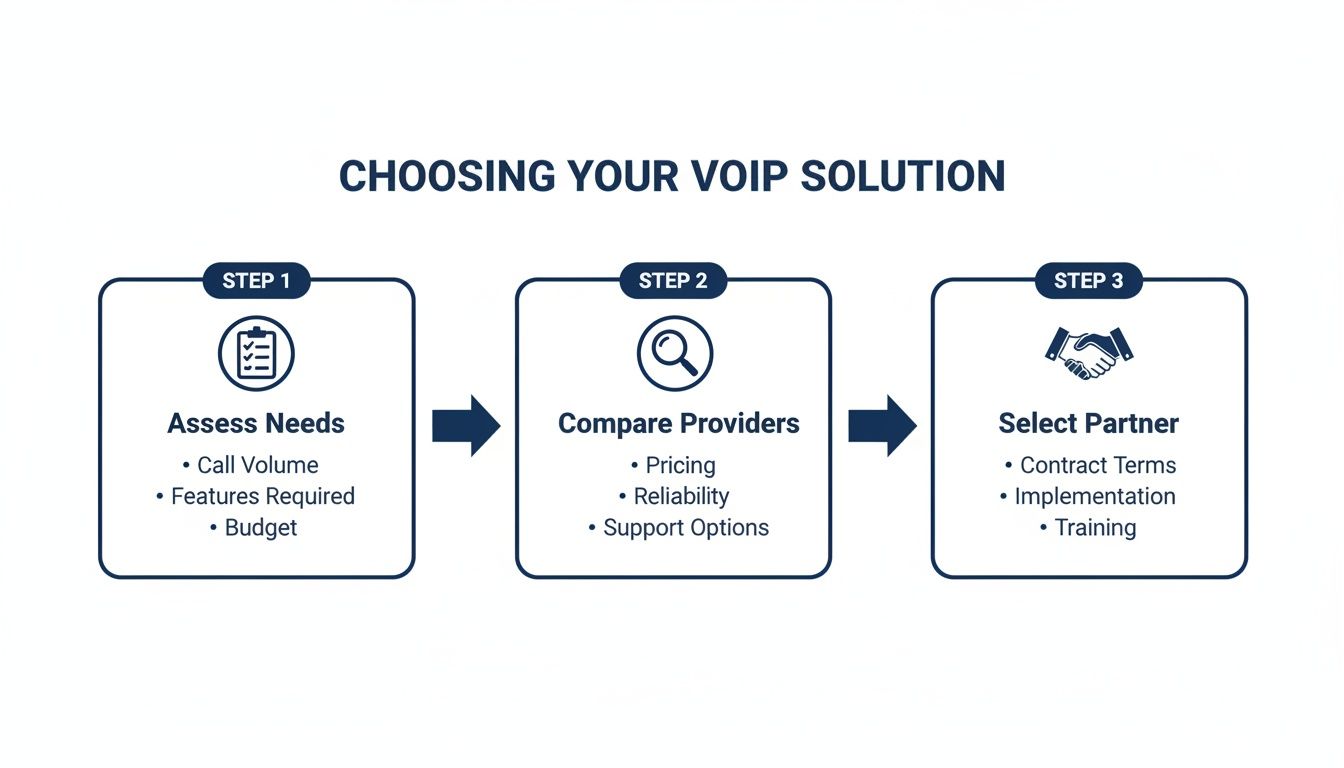
This visual just reinforces that a successful switch starts with understanding what you truly need before you even start looking at providers.
Phase 2: Plan and Prepare
With your audit done, you can now start planning the actual migration with confidence. This phase is all about making the key decisions and getting your ducks in a row for a seamless switch.
- Choose Your Provider: Use the needs you identified in phase one to pick a provider that aligns with your goals on features, support, and, of course, price.
- Initiate Number Porting: To keep your existing business phone number (and you absolutely should), you'll need to kick off the porting process. Your new provider will walk you through it, but you’ll need a copy of a recent phone bill to get the ball rolling.
- Order New Hardware: If you need new IP phones or headsets, get them ordered so they arrive well before your "go-live" date. Nothing worse than a last-minute scramble.
Pro Tip: Whatever you do, do not cancel your old phone service until your numbers have been successfully ported over and your new VoIP system is fully up and running. Canceling too early is the fastest way to lose your business number for good.
Phase 3: Implement and Test
This is the hands-on part where your new system actually comes to life. Your provider should be doing the heavy lifting here, but your team will be involved in the final setup and testing.
First, you'll get the new IP phones plugged in and configure core features like your auto-attendant and call routing rules, using that handy map you created earlier. Then, it's time to test everything. And I mean everything. Make test calls, check your voicemail, and run through every option in your call menu before the official launch.
Phase 4: Train Your Team
Finally, make sure your team feels comfortable and confident with their new tools. Set aside a little time for a quick training session to show them how to make calls, use the mobile app, and manage their voicemails.
A little bit of training goes a long, long way. It ensures everyone adopts the new system quickly and you start getting the full value out of it from day one.
Got Questions? We've Got Answers
Making the final call on a new phone system can feel like a big step. I get it. It’s a core part of your business, and you need to feel completely confident before you make a move. To help you get there, we’ve put together straightforward answers to the questions we hear most often from business owners just like you.
Let’s tackle the practical stuff—internet speed, phone numbers, and security—to give you the final pieces of the puzzle.
Can I Keep My Existing Business Phone Number?
Yes, absolutely. This is one of the first and most important questions people ask, and the answer is a firm yes. The process is called number porting, and it’s how your new VoIP provider transfers your existing business number from your old phone company over to their service.
This means you can upgrade your entire phone system behind the scenes without disrupting your business or confusing your customers. You get to keep the number that’s on your website, your business cards, and all your marketing materials. It makes for a completely seamless transition, and your new provider will walk you through the simple paperwork to make it happen.
Is My Internet Connection Good Enough for VoIP?
For the vast majority of businesses today, the answer is yes. Modern VoIP technology is incredibly efficient and doesn't hog a ton of bandwidth. A single VoIP call typically uses less than 100 Kbps (that's just 0.1 Mbps) of both your upload and download speed.
To put that into perspective, even a basic business internet plan is many, many times faster than that. The more important factor isn't just raw speed, but the quality and stability of your connection. A stable connection with low latency is what really ensures you get crystal-clear, jitter-free calls every time.
As a solid rule of thumb, plan for at least 1 Mbps of dedicated bandwidth for every 10 simultaneous calls you expect. This builds in more than enough of a buffer to keep call quality perfect, even when things get busy.
What Security Measures Protect My Calls?
That’s a great question, and any reputable VoIP provider takes it very seriously. Unlike old-school analog phone lines that could be physically tapped, modern VoIP systems use multiple layers of digital security to shield your conversations from anyone trying to listen in.
The two key security protocols you'll see are:
- Transport Layer Security (TLS): This encrypts all the setup information for the call—the "who is calling who" data—between your phone and the provider.
- Secure Real-Time Transport Protocol (SRTP): This is what encrypts the actual audio of your conversation, scrambling the voice packets as they fly across the internet.
These technologies work in tandem to create a secure, private communication channel. When you're evaluating providers, always make sure they use both TLS and SRTP as a standard part of their service.
How Difficult Is It to Manage a VoIP System?
This is one of the best parts of a modern hosted VoIP solution: it’s incredibly simple. You absolutely do not need a dedicated IT department or any deep technical knowledge to manage the system day-to-day. Providers design their platforms with busy owners and office managers in mind.
You'll get access to a user-friendly online portal where you can handle pretty much any administrative task with a few clicks. Adding a new employee, changing how calls are routed, updating your auto-attendant greeting, or listening to call recordings—it's all designed for you to do it yourself, instantly, without ever needing to call a technician.
Ready to see how a modern, secure, and easy-to-manage phone system can elevate your business? The team at SnapDial offers white-glove setup at no cost to ensure your transition is completely seamless. Explore our all-inclusive VoIP solutions and discover how simple business communication can be.