

When people talk about business phone systems, you'll hear the term "seat" thrown around a lot. So, what exactly is a hosted VoIP seat?
Think of it as a personal user license—an all-access pass that gives one of your employees a connection to your company's cloud-based phone system. It covers everything from their desk phone to their mobile app, all bundled under a single, predictable monthly fee.
Demystifying the Hosted VoIP Seat
Let's use an analogy. Imagine your business communication platform is a fully-furnished digital office. A hosted VoIP seat is simply a reserved, fully-equipped desk for one of your employees. It's not just a phone line; it's the personal license that connects a single user to all their communication tools.
This one license ties together their physical desk phone, the softphone app on their computer, and the mobile app on their smartphone. All these devices ring under one user, one extension, and one account. This "one user, one license" model is the fundamental building block for pricing and features in pretty much every modern cloud phone system.
Getting a handle on this concept is the first real step toward managing your communication costs and scaling your team without headaches. When you buy a hosted VoIP seat, you're buying a complete communications toolkit for one person. This approach makes sure every employee has the exact tools they need to do their job, whether they're at their desk, working from home, or on the road.
Why the Seat Model Matters
The per-seat model is designed to make your life easier, especially when it comes to budgeting and administration. Instead of trying to track separate costs for phone lines, individual features, and hardware maintenance, you just pay a consistent monthly fee for each user. This predictability is a huge win for small and mid-sized businesses trying to keep operational expenses in check.
Here’s why it works so well:
- Predictable Monthly Costs: Budgeting becomes dead simple with a flat fee per user. No more surprise charges.
- All-Inclusive Features: Each seat usually comes packed with a full suite of features like voicemail-to-email, call forwarding, and auto-attendant access.
- Effortless Scalability: Need to bring on a new hire? Just add another seat. Team size changing? You can remove seats just as easily, so you only ever pay for what you actually use.
- Unified Communications: A single seat follows a user across all their devices, creating a seamless communication experience no matter where they are.
By tying a license to a person instead of a physical phone line, a hosted VoIP seat gives you flexibility that was unimaginable with old-school systems. It lets an employee be reachable on their business number from any device, anywhere they have an internet connection.
Ultimately, understanding the hosted VoIP seat helps you make smarter decisions when you're comparing providers. It’s the key to comparing pricing tiers, calculating what your team really needs, and building a communication setup that can actually support your business as it grows. For a deeper dive into the tech that makes this all possible, you can learn more about what a cloud phone system is in our detailed guide.
Choosing Your Pricing Model: Per-Seat vs. Per-Channel
When you start looking at hosted VoIP providers, you'll run into two main ways they charge for their service. Getting a handle on the difference isn't just a technical detail—it's the key to controlling your costs and making sure your phone system actually works the way your business does. The two models you'll see everywhere are per-seat and per-channel.
The per-seat model is, by far, the most common approach for modern cloud phone systems. It’s simple: you pay a flat monthly fee for each person on your team. That fee gives each user a complete, all-inclusive package of features and, almost always, the ability to make as many calls as they need. It’s a straightforward and predictable way to budget.
On the flip side, the per-channel model works very differently. Instead of paying for each user, you pay for a set number of simultaneous call paths—or "channels"—that everyone in the company has to share. The focus here is on your company's maximum call volume at any given moment, not the number of people you have.
The Car Analogy: A Simple Comparison
To make this crystal clear, let's think about it in terms of company cars.
-
Per-Seat Model: This is like giving every single employee their own dedicated company car. Each person has guaranteed, unrestricted access to transportation whenever they need it, with all the features included. It doesn't matter if everyone needs to drive at the exact same time; there's a car waiting for each of them.
-
Per-Channel Model: This is like having a small fleet of shared company cars for the whole office. If you have five cars (channels) and ten employees, only five people can be on the road at once. If a sixth person needs a car, they have to wait until one is returned. This can create a serious bottleneck, especially during rush hour.
This flowchart helps visualize how an employee (the user) is tied to a license (the seat), which then powers all of their communication tools—from their desk phone to their mobile app.
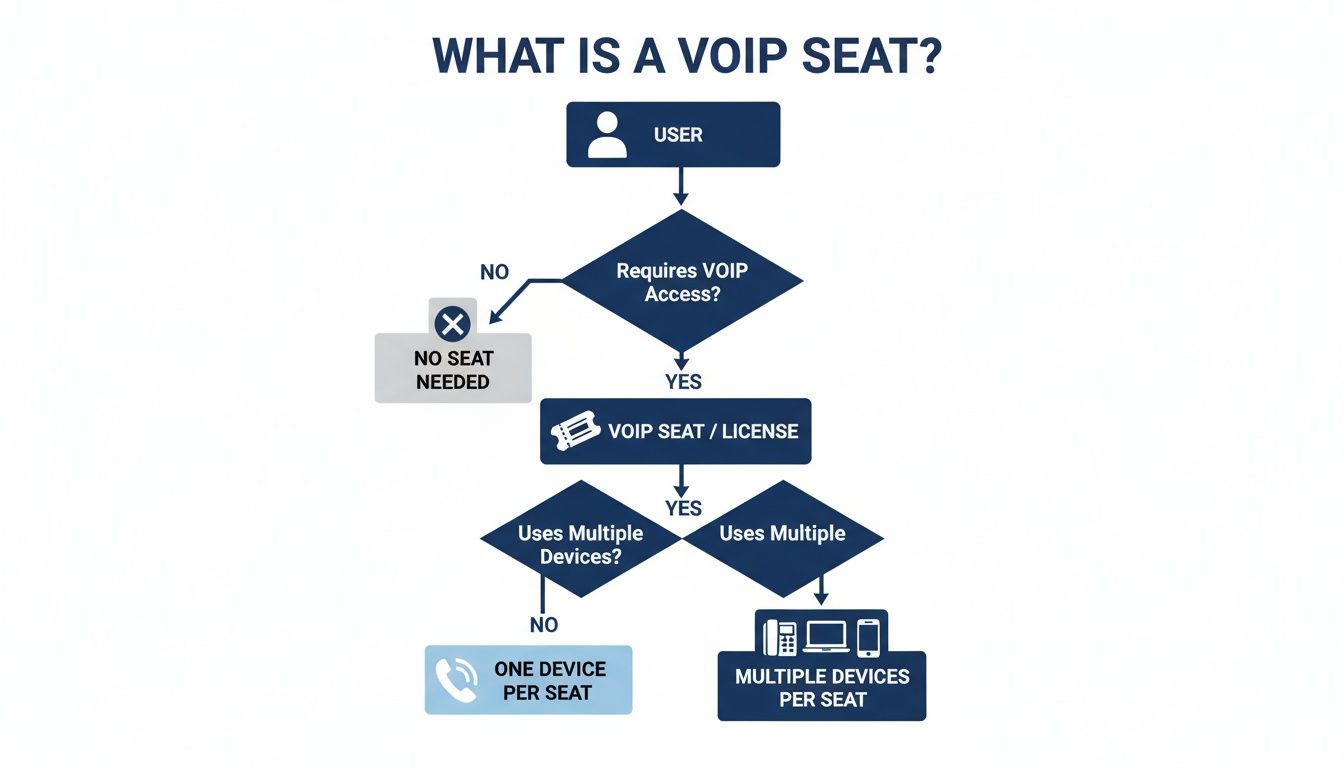
This one-to-one relationship is the heart of the per-seat model. A single purchase empowers an individual across every device they use, making it incredibly simple to manage.
Per-Seat vs. Per-Channel Pricing at a Glance
Choosing between these two models comes down to how your business communicates. This table breaks down the core differences to help you see which approach is a better fit for your team's workflow and budget.
| Aspect | Per-Seat (Per-User) Model | Per-Channel (Concurrent Call) Model |
|---|---|---|
| Billing Structure | Predictable, flat monthly fee per user. | Billed based on the maximum number of simultaneous calls. |
| Best For | Most businesses, especially those with remote teams or high individual call needs. | Businesses with many users but very low, predictable call volume (e.g., a warehouse). |
| Key Advantage | Simplicity and scalability. Every user gets a full feature set without call capacity limits. | Potentially lower initial cost if call volume is consistently low. |
| Main Risk | None related to call capacity. | High risk of busy signals for customers during peak times if you underestimate your needs. |
| Feature Access | All features are typically included for every user. | Features may be limited or shared, not tied to individual users. |
For most businesses, the clarity and predictability of the per-seat model deliver far more value and eliminate the risks that come with trying to guess your peak call volume.
Making the Right Choice for Your Business
So, how do you decide what's best for you? The choice really hinges on your company's communication patterns and your plans for growth.
The per-seat model is the clear winner if:
- You want predictable, flat-rate monthly billing with no surprises.
- Your team members each need consistent access to a full suite of communication tools.
- You absolutely cannot risk your customers getting a busy signal.
- You have a remote or hybrid workforce that needs flexibility across multiple devices.
You might consider a per-channel model if:
- You have a very large number of employees with extremely low individual call volume.
- Your call traffic is highly predictable and never spikes unexpectedly.
- Your number one priority is the absolute lowest upfront cost, and you're willing to manage the risk of hitting your call capacity.
For the vast majority of small and mid-sized businesses, the all-inclusive nature and worry-free scalability of the per-seat model provide far superior value and peace of mind. It makes sure every team member is fully equipped to do their job and guarantees you’ll never miss a customer's call because of an artificial system limit.
How to Accurately Calculate Your Required VoIP Seats
Figuring out the right number of hosted VoIP seats is one of the most important things you'll do when designing your phone system. Get it right, and you’ll have a lean, cost-effective setup. Get it wrong, and you’re either bleeding money on licenses you don’t use or underequipping your team and frustrating customers.
It’s about more than just a simple headcount. Think of it like drawing up the floor plan for a new office. You wouldn't just count employees and assign desks; you’d also plan for common areas, conference rooms, and future growth. The same logic applies to your phone system.

A precise calculation is your blueprint for a system that scales with you, preventing unnecessary monthly expenses and guaranteeing every communication point is ready to go.
Start With a User-Based Inventory
The foundation of your count is straightforward: who needs a phone line to do their job? This is the core of your required hosted VoIP seat count.
Start by listing every full-time and part-time employee who needs their own unique phone extension. Each of these people will need their own seat, which gives them a direct number, voicemail, and access to all their connected devices—desk phone, mobile app, and computer softphone.
But don’t just stop at the employee roster. Think through these common scenarios:
- Part-Time Staff: If two part-timers share the same role but work on different days, they can often get by with a single shared VoIP seat and extension. However, if they ever need to be reachable at the same time or need separate voicemails, they’ll each need a dedicated seat.
- Volunteers or Interns: For temporary team members, the flexibility of a monthly seat license is perfect. You can add a seat for the few months they're with you and then remove it, only paying for the time it was actually active.
- Shared Role Phones: Think about a customer support or sales queue. Multiple agents might answer calls coming into a general line, but each individual agent still needs their own seat to log in, manage their availability, and handle calls professionally.
Account for Common Area and Utility Phones
Next, take a walk through your physical workspace. Look for any phones that aren't assigned to a specific person. These are the devices in shared spaces that just need a dial tone but don’t require all the bells and whistles of a full user license.
These "utility extensions" are a key area for potential cost savings.
Most VoIP providers, including SnapDial, offer a lower-cost license for common area phones. These are perfect for devices in lobbies, breakrooms, warehouses, or conference rooms that only need basic dial-tone functionality.
Accurately counting these ensures you aren’t paying for premium features on a phone that will only be used for occasional, basic calls. It’s a small step that can make a big difference to your monthly bill.
Plan for Future Growth and Scalability
Finally, a smart calculation always looks beyond today. Where do you see your business in the next 6 to 12 months? Are you planning to hire new team members? Open a new department?
You have two main ways to handle that growth:
- Purchase Extra Seats Now: Buying a small buffer of seats upfront can make onboarding new hires a breeze. The license is ready and waiting, so you can get them set up immediately.
- Rely on On-Demand Scalability: This is one of the biggest advantages of cloud VoIP. You can add a new hosted VoIP seat in minutes. With a provider like SnapDial, you just log into your portal and provision a new user on the fly. This way, you only pay for seats as you actually need them.
For most small and mid-sized businesses, the on-demand approach is far more cost-effective. It keeps your expenses perfectly aligned with your headcount, preventing you from paying for "empty desks." The key is to confirm your provider offers instant, self-service scalability without locking you into a long-term contract. And of course, make sure your network can handle the new users; you can learn more in our guide on how much bandwidth you need for VoIP.
Connecting Seat Tiers to Business Features and Costs
A hosted VoIP seat isn't a one-size-fits-all product. The best way to think about it is like a software subscription—a basic plan gets you the core features, while premium plans unlock advanced tools for power users. VoIP providers structure their offerings the same way, with tiered packages where each higher-priced seat puts a more powerful set of business tools at your team's fingertips.
Getting this connection right is the key to aligning your communication budget with what your team actually needs. It stops you from overpaying for features that will just sit there unused. The more you invest per user, the more capabilities they have to work with.

This tiered model also makes your monthly operational expenditure (OpEx) incredibly predictable. Because each seat has a clear, fixed cost, budgeting becomes a breeze. This is a huge reason why so many businesses have made the switch; it transforms the large, upfront capital expense (CapEx) of old phone hardware into a scalable, manageable monthly bill.
Mapping Features to Common Seat Tiers
While providers might use different names, most VoIP seat tiers fall into a few familiar categories. By looking at the features included in each, you can match the right license to each employee's specific role in your company.
-
Basic or Essential Tier: This is your entry-level seat, built for users who just need reliable calling. It typically covers a phone number, extension dialing, voicemail, and standard call management like transfers and holds. It's the perfect, cost-effective choice for common area phones or team members with minimal communication needs.
-
Professional or Business Tier: This is the sweet spot for most businesses. This mid-range tier usually adds powerful unified communications tools to the mix. You’ll often find features like mobile and desktop apps (softphones), business SMS texting, and integrations with everyday tools like Google Workspace or Microsoft 365.
-
Premium or Enterprise Tier: This top-tier license is designed for roles that demand advanced functionality. It includes everything from the lower tiers plus specialized tools like call recording, deep-dive analytics dashboards, and integrations with CRM platforms like Salesforce.
The market has voted with its wallet, overwhelmingly embracing this cloud-based model. Hosted and cloud PBX services now account for 52.3% of all revenue in the global VoIP services market. Projections show that hosted business services are on track for a 12.5% compound annual growth rate through 2030, a trend driven by CFOs who prefer manageable operational costs. This shift is especially powerful for small and medium-sized businesses, which now make up over 45% of all VoIP customers. You can dig into more details about this growing market preference on Mordor Intelligence.
The Call Center Example: High-Tier Seats in Action
Nowhere is the value of high-tier seats more obvious than in a call center or customer support department. These specialized licenses carry a higher monthly cost, sure, but they deliver a massive return on investment through better efficiency, smarter coaching, and a superior customer experience.
Think about a support team supervisor. Their premium-tier hosted VoIP seat might give them access to:
- Real-Time Call Monitoring: The power to listen in on live calls to coach agents or "whisper" advice without the customer ever hearing a thing.
- Queue Analytics: Detailed reports on call volume, wait times, and agent performance to help optimize staffing and workflows.
- Call Recording and Transcription: An invaluable tool for quality assurance, compliance checks, and training new hires on best practices.
In this scenario, the higher seat cost isn't just an expense; it's a strategic investment. The features unlocked by a premium seat directly help resolve customer issues faster, improve agent skills, and boost overall satisfaction.
Ultimately, picking the right seat tier comes down to a role-specific cost-benefit analysis. A basic seat for the lobby phone is just smart savings. But a premium seat for your sales leader is a tool for driving revenue. When you carefully match features to job functions, you ensure every dollar spent on your phone system is actively working for your business's success, making the hosted VoIP seat a vital part of your productivity toolkit—not just a dial tone.
Your Essential VoIP Seat Buyer Checklist
When you’re navigating the crowded VoIP market, asking the right questions makes all the difference. It’s incredibly easy to get tangled up in marketing jargon and end up with a phone system that doesn’t quite fit your team or your budget. I’ve put this buyer checklist together to help you cut through the noise during sales calls, compare providers apples-to-apples, and find a partner who values transparency as much as you do.
Think of these questions as your roadmap to finding a hosted VoIP seat solution that’s genuinely right for your business.
Pricing and Contract Transparency
Let's be honest: the advertised per-seat price is almost never the final number on your bill. Hidden fees and confusing contract terms can quickly turn what looks like a great deal into a financial headache. Getting absolute clarity on the total cost of ownership before you sign anything is non-negotiable.
- Are taxes, E911 fees, and other regulatory surcharges included in the sticker price? Push for a complete, itemized quote to see the true all-in cost per seat.
- What are the actual contract terms? You need to know the initial term length, the auto-renewal policy, and any penalties for ending the contract early.
- Is there a money-back guarantee or a real trial period? A provider who’s confident in their service will almost always let you test-drive it risk-free.
Scalability and User Management
Your business isn't static, and your phone system shouldn't be either. Adding a new employee or tweaking a user’s features should be a simple, quick process—not a support ticket marathon that takes days to resolve. You need to dig into how easily the system can adapt to your team's changes.
One of the biggest advantages of the per-seat model is its flexibility. You should be able to add or remove a hosted VoIP seat in just a few minutes through a self-service portal, making sure you only ever pay for what you actually use.
Here are the critical questions to get straight answers on:
- What’s the exact process for adding or removing a seat? Can I do this instantly myself through a web portal, or do I have to contact your support team and wait?
- How quickly can a new user actually be onboarded? Ask for a live demo of the new user setup process. See for yourself how intuitive it is.
- Are there any fees for changing a user's seat tier or features? You should have the freedom to upgrade or downgrade a license without getting hit with a penalty.
Features, Support, and Onboarding
Finally, the real value of a hosted VoIP seat goes way beyond just a dial tone. It’s about the features that make your team more productive and the support that keeps your business running when you hit a snag. It's crucial to confirm exactly what you're getting for your investment.
- Which specific features are included in each pricing tier? Don’t let them get away with vague descriptions. Get a detailed, side-by-side list comparing the different seat packages.
- What does your onboarding and implementation process actually look like? At SnapDial, for instance, we provide a full white-glove setup at no extra cost to make sure the transition is completely seamless.
- What are your support hours and what channels are available? Ask about their average response times and, most importantly, find out if you can speak to a real person 24/7.
Frequently Asked Questions About Hosted VoIP Seats
When you start digging into hosted VoIP, a few common questions always pop up about how a "seat" actually works in the real world. Let's clear up the details around devices, call capacity, and those oddball phones in the lobby so you can plan with confidence.
Can One User Have Multiple Devices on a Single Hosted VoIP Seat?
Yes, absolutely. This is one of the biggest perks of a seat-based model. A single hosted VoIP seat—think of it as a user license—can power several devices at the same time.
An employee can have their desk phone, a smartphone app, and a softphone on their laptop all tied to their one extension. When a call comes in, all their devices ring simultaneously, letting them pick up wherever it’s most convenient. This kind of built-in flexibility is a game-changer for mobility, and it doesn't cost you a dime extra.
What Happens If We Need More Phone Lines Than We Have Seats?
This question gets to the heart of what makes the per-seat model so powerful. A "seat" is for a user, not a single, old-fashioned "line." Each seat is designed to handle multiple calls at once, like putting someone on hold to grab another incoming call.
Better yet, the system’s total capacity for concurrent calls is usually pooled across all your users and is much, much higher than your total number of seats. This design all but guarantees your customers will never hear a busy signal, which is a massive improvement over per-channel models where call paths are strictly limited. To get a better handle on the numbers that make this work, check out our guide on what is a VoIP phone number.
A hosted VoIP seat isn't just a one-to-one replacement for a phone line; it's a gateway to a much larger, shared pool of calling resources. You're buying user access, not renting a limited number of call paths.
How Are Common Area Phones Licensed?
Great question. Phones in shared spaces like a lobby, breakroom, or conference room are handled a bit differently. Since these devices don't belong to a specific person, they don't need all the bells and whistles of a standard user seat.
Providers typically offer a lower-cost "utility" or "common area phone" license for these situations. These licenses give you the basics—a dial tone and an extension—without advanced features like voicemail-to-email or mobile apps. The result is a much lower monthly price. Just be sure to count these phones separately from your main user seats to get an accurate quote.
Ready to build a flexible, scalable communication system that fits your business perfectly? SnapDial offers all-inclusive pricing, white-glove setup, and 24/7 Texas-based support to make your transition seamless. Get a quote today!