

When you connect your VoIP phone system directly to your customer relationship management software, you're not just linking two tools—you're creating a single, powerful platform. This integration makes things like automatic call logging, instant on-screen caller info (screen pops), and click-to-call possible right from a customer's record.
The biggest win? It completely eliminates manual data entry and gives your team critical context for every single conversation.
Why VoIP CRM Integration Is a Business Game Changer

Let's cut through the technical jargon. At its core, this is all about making every customer interaction smarter, faster, and far more personal.
Imagine your sales team no longer has to juggle applications or waste precious minutes after each call manually typing notes into the CRM. Instead, every call logs itself automatically. This frees them up to focus on what they actually do best: building relationships and closing deals.
But it’s more than just a convenience. This is a fundamental shift in how your teams operate. When a call comes in, your support agent doesn't just see a phone number. They see a complete customer profile pop up on their screen—purchase history, past support tickets, recent interactions—all before they even say "hello."
The Real-World Impact on Your Teams
For a sales rep, this means having the immediate context to personalize their pitch. They can reference a customer's past interest in a product or follow up on a previous chat without skipping a beat. That level of preparedness turns what could be a cold call into a warm, relevant conversation.
Support teams see a massive benefit, too. With a full interaction history at their fingertips, agents resolve issues faster and more effectively. There’s no more asking customers to repeat information they’ve already given five times, which is a huge win for the customer experience. Plus, features like linking call recordings directly to support tickets create an invaluable resource for training and quality assurance.
This kind of synergy is no longer a luxury for big enterprises; it’s a critical advantage for any business that’s serious about efficiency and providing a superior customer experience.
Let's take a quick look at the tangible benefits your business can expect after integrating your phone and customer relationship management systems.
Immediate Wins from a Unified VoIP and CRM System
| Benefit Area | Impact on Daily Operations | Real-World Example |
|---|---|---|
| Productivity Boost | Agents spend less time on manual data entry and more time talking to customers. | A sales rep makes 20% more calls per day because all notes and call details are logged automatically. |
| Smarter Conversations | Screen pops provide instant access to the caller's complete history, enabling personalized interactions. | A support agent greets a caller by name and immediately references their recent purchase without having to ask. |
| Data Accuracy | Automated logging eliminates human error, ensuring your CRM data is clean and reliable. | Call durations, times, and outcomes are recorded perfectly for every interaction, improving sales forecasting. |
| Enhanced CX | Customers don't have to repeat their issues, leading to faster resolutions and less frustration. | An agent resolves a complex support issue on the first call because they can see all previous tickets and notes. |
Ultimately, a unified system ensures everyone is working from the same playbook, armed with the best information.
From Basic Logging to Intelligent Insights
The value of a VoIP CRM integration is only growing. This connection has evolved from simple call logging to sophisticated data orchestration that pulls deep business insights from your daily conversations.
It's no surprise that industry forecasts show the global VoIP services market is set to reach nearly $415.20 billion by 2034. That growth is largely driven by powerful integrations that turn conversations into actionable data.
This evolution is why platforms like SnapDial are making this connection a core part of their offering. The goal is to create a seamless flow of information that empowers your team, delights your customers, and drives real business growth. You can discover more about the advantages of unified communications and see how they contribute to a more connected workplace. By bridging the gap between your phone system and your customer database, you create a single source of truth that benefits everyone.
Laying the Groundwork for a Seamless Integration
A great VoIP CRM integration doesn't start with clicking "connect." It begins with a clear plan. Think of it like drawing the blueprint for a house—getting it right on paper first prevents costly and frustrating problems down the line. I've seen too many teams jump straight into the tech, and it's a common misstep that can undermine the entire project.
This foundational work is what ensures your integration delivers real value from day one. Instead of just linking two pieces of software, you're intentionally designing a smarter workflow for your sales and support teams. The goal here is to move beyond a simple technical connection and create a genuine operational advantage.
Define Your Integration Goals
Before you touch a single setting, you have to ask the most important question: "What problem are we actually trying to solve?" Vague goals like "improve efficiency" just don't cut it. You need specific, measurable objectives that will guide your configuration and help you prove the ROI later.
A well-defined goal acts as a North Star for the entire project. It keeps your technical setup tied to real business outcomes, ensuring every feature you enable serves a distinct purpose.
Here are a few practical examples of what strong goals look like:
- Reduce manual call logging time by an average of 30 minutes per sales rep, per day.
- Increase our first-call resolution rate for support tickets by 15% within three months.
- Improve data accuracy by ensuring 100% of outbound sales calls are automatically logged in the CRM.
- Decrease new lead response time by triggering an instant follow-up task for the assigned rep after the initial call.
Assemble Your Integration Team
Even with today's user-friendly tools, a VoIP CRM integration isn't a solo mission. You need input from different stakeholders to make sure the final setup meets everyone's needs. A small, dedicated project team can make all the difference between a smooth rollout and a frustrating one.
Consider pulling in these key players:
- An IT Lead or Administrator: This is the person who will handle the technical side of the connection, managing API keys and user permissions.
- A Sales Manager: They can provide critical insight into the sales team's workflow and tell you what data is most valuable to them during a live call.
- A Customer Support Lead: This individual lives and breathes the support process and can help map features like screen-pops to the right CRM data fields.
- A "Power User": Involve a top-performing sales or support rep who can act as a champion for the project and provide real-world feedback during testing.
The business VoIP market is exploding for a reason. Valued at $219.7 billion in 2025 and projected to surge to $909.7 billion by 2034, its growth is fueled by these exact kinds of integrations. When agents achieve up to 30% better first-call resolution and 40% reductions in handle time, the impact is undeniable. Read the full research about these market trends to see how central this technology has become.
Map Your Data Flow
Finally, you need to decide exactly what information should move between your phone system and your CRM. This data mapping process is crucial for making features like automatic call logging and screen-pops genuinely useful. To make sure your integration is robust and reliable, it’s smart to follow established data integration best practices from the get-go.
Start by getting your team together and asking some critical questions:
- When a call ends, what specific fields in the CRM should be updated? (e.g., Call Duration, Outcome, Call Notes, Recording Link)
- For an incoming call, what CRM information is most critical for the agent to see on their screen-pop? (e.g., Contact Name, Company, Last Purchase Date, Open Ticket Number)
- Should a call from an unknown number automatically create a new lead or contact in the CRM?
Documenting these flows creates a clear guide for the configuration phase. It ensures that the automated data is not just there, but is actively helpful, providing the right context at precisely the right moment. For a deeper dive into the technology powering this, you might be interested in our guide on what a cloud phone system is and how it facilitates such powerful connections.
Connecting Your VoIP and CRM Systems
With the groundwork complete, it's time to actually forge the connection between your VoIP system and CRM. This is where your planning turns into action, transforming two separate platforms into a single, unified communication hub. We'll walk through the three main ways to get this done, each suited for different technical comfort levels and business needs.
The goal here is to demystify the process. You don't need to be a developer to make this happen. Modern tools have made the voip crm integration process more accessible than ever, allowing managers to confidently oversee or even execute the setup themselves.
Before you dive into the technical side, your prep work should already be done—moving from auditing your current systems, to defining your goals, and finally to mapping out the data flow.
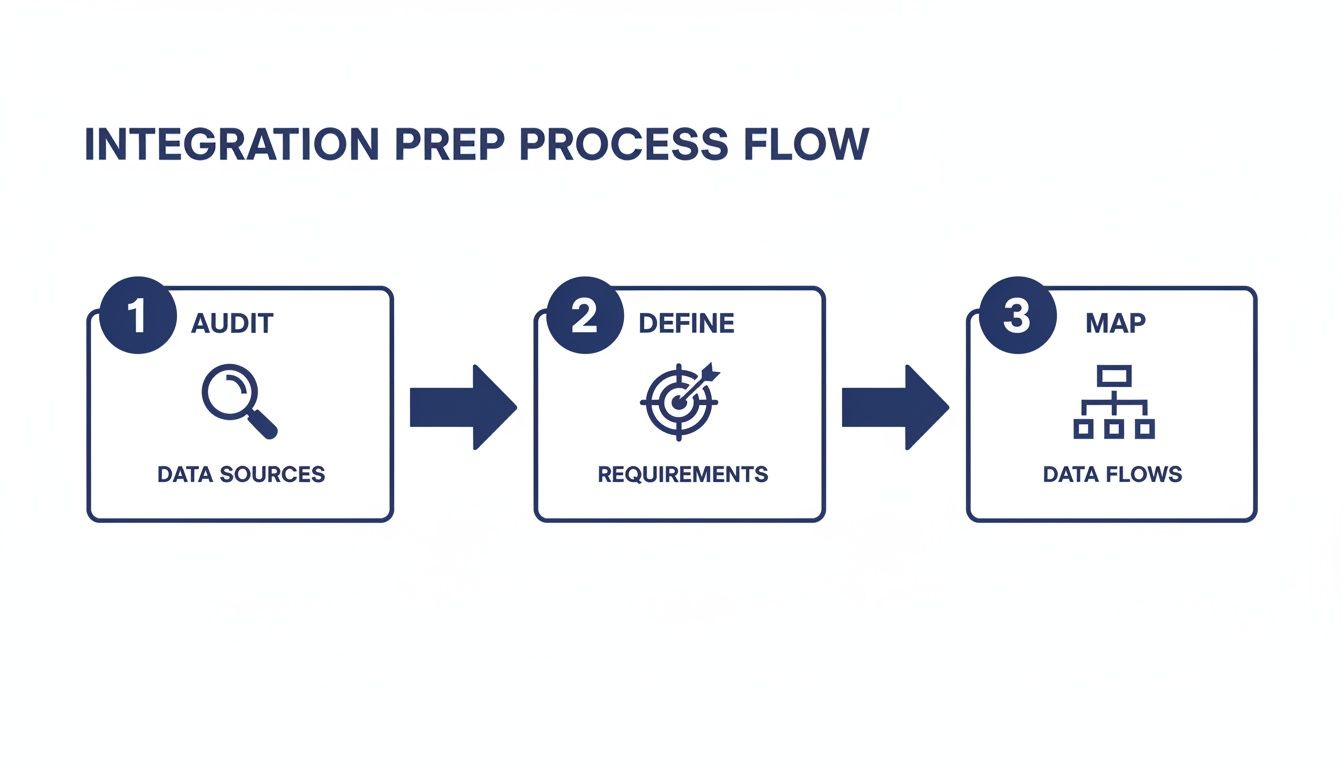
This visual just reinforces that a successful technical hookup starts with solid strategic planning. You need to be sure the integration is serving clear business objectives from the get-go.
Exploring Native Connectors
The most straightforward path is almost always through a native connector. These are pre-built integrations developed by your VoIP provider (like SnapDial) or your CRM (like Salesforce or HubSpot). Think of them as official, plug-and-play bridges designed to work seamlessly right out of the box.
Because they are purpose-built, native connectors typically require the least amount of technical fuss. The process usually boils down to a few simple steps:
- Finding the Integration: Look for the app or connector in your VoIP provider's marketplace or your CRM's app exchange.
- Authorizing Access: Log into both accounts and grant permission for them to share data. This is often handled through a secure process called OAuth, where you never have to manually share passwords.
- Configuring Basic Settings: Toggle on the core features you need, like call logging, click-to-call, and screen pops.
The biggest benefit here is reliability. Since the connection is officially supported by one or both software vendors, it's generally stable, secure, and updated regularly to stay compatible. For most businesses, this is the ideal place to start.
Leveraging Third-Party Automation Tools
What if a native connector isn't available for your specific VoIP and CRM pairing? Don't worry, you're not out of luck. This is where third-party automation platforms like Zapier, Make, or Integrately come into play. These tools act as universal translators, allowing thousands of different web applications to talk to each other.
This approach gives you incredible flexibility. You can build custom workflows—called "Zaps" in Zapier—that are triggered by specific events. For instance, you could create a workflow where a "Completed Call" in your VoIP system triggers an action to "Create a Follow-up Task" in your CRM.
The setup involves:
- Connecting both your VoIP and CRM accounts to the third-party platform.
- Choosing a "trigger" event in one app (e.g., a new call log in SnapDial).
- Selecting a corresponding "action" in the other app (e.g., find or create a contact in Zoho CRM).
- Mapping the data fields between the two systems, telling the tool exactly what information to move where.
The sheer number of available apps on platforms like Zapier makes it a powerful option for creating a highly customized voip crm integration. This path is perfect for businesses that need more granular control over their automated workflows or use a less common CRM that lacks a native connector. When connecting your systems this way, it helps to understand the broader principles of Customer Data Platform Integration to ensure you build a robust and scalable setup.
The Custom API Integration Route
For organizations with truly unique requirements or proprietary in-house software, a custom integration using APIs (Application Programming Interfaces) offers limitless possibilities. An API is essentially a set of rules that lets different software applications talk to each other directly. This route definitely requires development resources, but it gives you complete control over the integration.
You would typically go this route if:
- You have a complex, non-standard workflow that pre-built connectors can't handle.
- You need to integrate with a custom-built, internal CRM system.
- You require deep, bidirectional data syncing that goes far beyond standard call logging.
Key Takeaway: While incredibly powerful, the custom API path is also the most resource-intensive. It demands careful planning, development time, and ongoing maintenance. For most small and mid-sized businesses, native connectors or third-party tools offer a much more practical and cost-effective solution.
No matter which path you choose, a couple of initial steps are fundamental: authenticating accounts and matching users. Make sure the user email addresses in your VoIP system match those in your CRM. This simple but critical step is the foundation for accurate reporting and effective workflow automation, ensuring call logs are assigned to the correct sales or support rep every time.
By carefully selecting your connection method, you can build a reliable bridge between your two most important business tools.
Automating Workflows Beyond Basic Call Logging
Alright, you’ve connected your systems. Now the real fun begins. Moving past the foundational features like screen pops and automatic call logging is where a voip crm integration stops being a simple convenience and starts acting like a strategic asset for your business.
We're talking about building smart, hands-off automations that slash administrative time, cut down on human error, and actively help you close more deals. It's about making your systems anticipate what needs to happen next, not just recording what already happened. This isn't some far-off dream; it's what happens when you properly link your communication and customer data.
Instantly Capture New Leads
One of the biggest wins you can get right away is automatically creating new leads from unknown numbers. Think about it: a call comes in from a number your CRM has never seen before. Instead of a rep scribbling it down on a sticky note (and maybe losing it), the integration gets to work instantly.
In the background, the system can:
- Automatically create a new lead or contact record.
- Populate that record with the caller's phone number.
- Assign the new lead to the right sales rep or queue based on rules you’ve already set up.
This one workflow single-handedly closes a massive gap in most sales processes. It ensures 100% of inbound inquiries are captured, nothing falls through the cracks, and your team can follow up immediately.
Triggering Context-Aware Follow-Up Tasks
The end of a call should kick off the next action, not a scramble to remember what to do. A well-configured integration uses call outcomes as triggers for creating immediate, relevant follow-up tasks in your CRM.
For example, a sales rep finishes a call and marks it with a disposition like "Demo Scheduled" or "Sent Proposal." Right away, the automation can:
- Create a task for the rep to prep for the demo, due 24 hours before the meeting.
- Schedule a reminder to follow up on that proposal in three business days.
- Add the contact to a specific nurture campaign in your marketing automation tool.
This takes the mental load off your team and enforces a consistent, effective follow-up process across the board. It’s a simple change that dramatically improves sales discipline and makes sure promising leads never go cold. To see how dialing tech feeds into this, check out our guide on the power of click-to-call functionality.
This proactive, automated approach is a game-changer for team productivity. Rather than relying on memory or manual note-taking, your workflow itself guides the next best action, ensuring consistency and efficiency across every customer interaction.
Linking Call Recordings for Quality and Training
Basic call logging tells you a call happened. Advanced automation attaches the actual call recording directly to the contact's activity timeline in the CRM. This creates a priceless, searchable library of every customer conversation.
Having the recording linked right there serves a few critical functions:
- Quality Assurance: Managers can easily review specific calls to provide targeted coaching without hunting through a separate system.
- Dispute Resolution: If a disagreement comes up, the recording provides an objective source of truth tied directly to the customer's record.
- Onboarding and Training: New hires can listen to real-world examples of great sales pitches or support calls, helping them get up to speed much faster.
This simple link turns every conversation into a valuable asset for your entire organization.
Using Call Data to Drive Smarter Marketing
Your voip crm integration can also be a powerful engine for your marketing. The data flowing from your phone system—call outcomes, how long you talked, how often you connect—offers rich behavioral insights you can use to create hyper-targeted campaigns.
Imagine running automations like these:
- A customer calls support asking about an advanced feature. The call outcome automatically adds them to a marketing list for an upcoming webinar on that exact topic.
- A prospect has several long conversations with sales but doesn't buy. They're automatically dropped into a long-term lead nurturing sequence.
- An account manager hasn't called a key customer in over 90 days. A task is automatically created for them to schedule a check-in call.
When you use call behavior to inform your marketing, you move from generic email blasts to personalized, timely communication that actually resonates with your audience. Your phone system transforms from a simple tool for talking into a source of powerful business intelligence.
Here's the rewritten section, designed to sound like an experienced human expert while following all your requirements.
How to Test and Maintain Your Integration
Connecting your systems is a huge milestone, but the real value of a voip crm integration comes from its day-to-day reliability. An integration that’s buggy or inconsistent quickly becomes more of a headache than a help. That’s why a solid testing and maintenance routine isn't just a "nice-to-have"—it's absolutely essential.
The good news is you don't need a dedicated QA team to keep things running smoothly. A straightforward, proactive approach will ensure your integration remains a dependable asset, not a source of frustration. Think of it as protecting the investment you've already made in creating a more efficient workflow.
Building Your Initial Testing Plan
Before you announce the integration is live, you need to put it through its paces. A thorough testing phase catches those little gremlins before they impact your customers or throw a wrench in your team's daily activities. The goal is simple: simulate real-world scenarios to confirm every feature works exactly as you expect.
Your testing checklist should be practical, covering the core functionality you’ve set up. I always recommend grabbing a "power user" from your team to help with this—their feedback is invaluable for getting a realistic sense of how it performs.
Here are the essential functions to verify:
- Inbound Call Screen Pop: Call into your system from an external number that you know is a contact in your CRM. Does the correct contact record pop up on the agent's screen instantly?
- Unknown Number Handling: Now, try calling from a number that is not in your CRM. Does the system correctly trigger the workflow for a new lead or contact, assuming you configured one?
- Outbound Click-to-Call: From a contact record inside your CRM, use the click-to-call feature. Does it correctly initiate the call through your VoIP softphone or desk phone?
- Automatic Call Logging: After both an inbound and outbound test call, check the corresponding CRM record. Is the call logged with the correct time, duration, and direction (inbound/outbound)?
- Call Recording Linkage: If you enabled this feature, confirm that a link to the call recording appears in the CRM activity log. Just as important, does the link actually work?
Running through these basic scenarios a few times with different users and contacts is the single best way to build confidence in your setup. It helps you catch minor configuration errors—like a mismatched user email—before it affects your entire team.
Troubleshooting Common Integration Issues
Even with careful testing, you might run into the occasional hiccup. Knowing what to look for can turn a panicked support ticket into a quick, five-minute fix. In my experience, most problems stem from just a few common areas related to user permissions, data formats, or API settings.
To help you out, I've put together this quick-reference guide for solving some of the most frequent problems that can pop up.
Troubleshooting Common Integration Issues
| Symptom | Likely Cause | How to Fix It |
|---|---|---|
| Screen pop shows the wrong contact | The phone number is associated with multiple contacts in the CRM. | Clean up your CRM data by merging duplicate contacts or ensuring the number is unique to one primary record. |
| Calls are not logging for one specific user | The user's email in the VoIP system doesn't exactly match their email in the CRM, or their permissions are incorrect. | Verify that the user's email address is identical in both systems. Check their integration permissions in the VoIP admin portal. |
| Click-to-call works, but no calls are logged | The integration might have write permissions disabled, or there's an API authentication issue. | Re-authenticate the connection between the VoIP and CRM systems. Confirm the API user has permissions to create new records (call logs). |
| No new leads are created from unknown numbers | The automation rule or workflow for handling unknown callers is either disabled or misconfigured. | Review the workflow trigger in your CRM or third-party tool (like Zapier). Ensure it's active and the logic is set up correctly. |
Think of this table as your first line of defense. More often than not, the solution is simpler than you think.
Simple Maintenance Routines
A voip crm integration is not a "set it and forget it" tool. It needs a little light but regular upkeep to ensure it continues to function flawlessly, especially as your team and software evolve.
A simple monthly check-in is usually all it takes to stay ahead of any potential problems.
- Monitor System Logs: Briefly check the integration logs in your VoIP or CRM admin panel for any recurring error messages. This can be an early warning sign of a brewing issue.
- Manage User Access: As employees join or leave, update their access promptly. Deactivate users who have left to maintain security and ensure your licenses are freed up.
- Stay Informed on Updates: Keep an eye out for software update announcements from both your VoIP and CRM providers. Sometimes an update can affect the integration, so it's good to be aware of what's changing.
By adopting this simple three-part strategy—test, troubleshoot, and maintain—you ensure your integration remains a powerful and reliable engine for your business communications.
Answering Your VoIP CRM Integration Questions
Diving into a new workflow like a VoIP CRM integration always brings up a few questions. That’s smart—it means you’re thinking through the real-world impact before you commit. We get these questions all the time from business owners and managers, so we’ve put together some direct, practical answers to help you see the full picture.
These aren't just generic talking points; they come from years of helping businesses get this right.
Which CRMs Integrate Best with VoIP Systems?
The good news is, the field is wide open. Most modern, cloud-based CRMs with open APIs are prime candidates for a VoIP CRM integration. You’ll find the smoothest path with the big players like Salesforce, HubSpot, Zoho, and Freshworks. Because they're so widely used, most reputable VoIP providers have already built native, plug-and-play connectors for them.
But what if your CRM isn't on that list? Don't sweat it. Middleware tools like Zapier have become the universal translator for the software world. They can build a solid bridge between your systems without you having to touch a single line of code.
Key Takeaway: My advice is always this: pick the CRM that’s the best fit for your actual business process first. The integration part is more flexible than ever, so you can almost always make the connection work for your specific tech stack.
What Is the Real ROI of Integrating VoIP and CRM?
The return you get from a VoIP CRM integration is about so much more than just convenience. It creates real, tangible value that you’ll feel across the whole organization.
The most immediate win is in time savings. Think about it: by killing manual call logging, your sales and support reps can reclaim a huge chunk of their day—we often see this add up to 30-60 minutes. That’s time they can now spend on activities that actually generate revenue, like selling or delivering amazing customer support.
Beyond that, the impact on customer satisfaction is massive. Support teams often see a huge jump in first-call resolution rates simply because they have the caller’s entire history pop up on their screen instantly. No more putting people on hold to look things up.
The true ROI is a powerful mix of:
- Increased Productivity: More time focused on core tasks, less time spent on admin work.
- Higher Sales Conversions: Reps who are better informed simply have more effective conversations.
- Improved Customer Loyalty: Faster, more personal service is what builds strong, lasting relationships.
How Does This Integration Affect Data Security?
That's a crucial question, and the short answer is that a properly configured integration is incredibly secure—as long as you partner with reputable providers. Both your VoIP and CRM vendors should be compliant with major data protection regulations like GDPR and CCPA. That’s table stakes.
When you're setting up the connection, always use secure authentication methods. The industry standard is OAuth 2.0, which lets the two systems authorize access without ever sharing actual passwords. It's also critical to stick to the principle of least privilege, meaning you only grant user permissions for what’s absolutely necessary for their role.
Any reputable VoIP provider will encrypt your call data and recordings, both while they're in transit and when they're stored. This ensures your sensitive customer information stays protected, whether it's sitting in your phone system or your CRM.
Ready to unify your communications and see what your team can really do? SnapDial makes VoIP CRM integration simple and powerful. Our experts provide a white-glove setup at no extra cost, guaranteeing a perfect connection to your CRM from day one. Discover how SnapDial can transform your business communications today.