
AI customer support agents are smart automation tools that jump in to handle customer questions around the clock.So, what exactly are AI customer support agents? Think of them as intelligent automation tools designed to handle customer inquiries 24/7, which slashes wait times and, just as importantly, frees up your human team to focus on bigger issues. They plug right into your business phone system to answer routine calls, book appointments, and give out instant information, making them a seriously powerful asset for small and mid-sized businesses.
Why Your Business Needs Smarter Customer Support

Let's be real—today's customers expect answers, and they expect them now. Long hold times and having to repeat the same question over and over aren't just minor annoyances anymore. They're business risks that can send customers straight to your competition. For SMBs, that pressure is even more intense. Every call you miss could be a lost sale, and every frustrated customer is a potential one-star review waiting to happen.
The old-school approach of just hiring more people to answer more calls simply doesn't scale. It's expensive and inefficient. This is exactly where AI customer support agents change the game. They aren't here to replace your team; they're here to act as a powerful force multiplier.
Beyond Basic Chatbots
First, forget the clunky, keyword-based chatbots from a few years ago. Modern AI agents are a different breed entirely. They understand natural language, actually learn from their conversations, and can handle a huge chunk of your inbound questions without any human help. They become your new front line, always on and ready to help customers with the common stuff.
Just consider these immediate wins:
- 24/7 Availability: Your business can provide support and capture leads long after your team has gone home for the day. You never miss an opportunity.
- Instant Resolutions: A well-trained AI can instantly solve up to 40-60% of routine tickets, from answering "What are your hours?" to checking on an order status.
- Reduced Agent Burnout: By taking the repetitive tasks off their plate, your skilled human agents can finally focus on the complex, high-value problems that require real empathy and critical thinking.
This isn't just about cutting costs. It’s about reallocating your most valuable resource—your team's time—toward the activities that actually build customer loyalty and drive growth.
A Practical Tool for SMBs
Integrating AI with your cloud phone system is no longer some complex, enterprise-level project. It's now a completely accessible strategy for SMBs looking to punch way above their weight class. These intelligent agents can be set up to manage how calls are routed, pull answers from a knowledge base, and—critically—hand off conversations to the right human agent when a situation needs a personal touch.
For a deeper look into the specific benefits of AI chatbots in customer service, you'll see why this shift is happening so quickly. This technology turns your phone system from a simple utility into a smart, efficient engine that improves the customer experience from the very first ring. Of course, it helps to know how to improve business communication with the right foundational tools in the first place. At the end of the day, this approach empowers you to deliver the faster, more consistent support that keeps customers happy and coming back.
Blueprint Your AI-Powered Customer Journey
It’s tempting to jump straight into vendor demos, but hitting the ground running without a clear plan is a recipe for frustration. Before you even look at a single AI customer support agent, you first need to map out exactly where and how it will slot into your existing customer conversations.
Think of it like drawing up a blueprint for a house. You wouldn't let a builder start hammering without one, right? The same goes here. A solid plan ensures your new AI agent enhances—not complicates—your customer experience.
The goal isn't to automate every single conversation. It's about being smart and strategic. You're looking for the repetitive, high-volume, low-complexity tasks that are currently tying up your human agents. That’s where you’ll find the quickest wins and the most immediate return on your investment.
Find the Automation Sweet Spots
Start by digging into your call logs and support tickets. What are the top five or ten questions your team gets asked over and over again, every single day? These are your low-hanging fruit—the perfect starting point for your AI agent's skillset.
For most small or mid-sized businesses, these often fall into a few common buckets:
- Basic Info Queries: "What are your hours?" or "Where are you located?"
- Status Updates: "Where's my package?" or "Can you confirm my appointment?"
- Simple Troubleshooting: "How do I reset my password?"
- Initial Lead Qualification: "I'm interested in your services, can you tell me more?"
By letting the AI handle these, you free up your skilled human agents to tackle the nuanced, emotionally charged, or complex problems that truly need a personal touch. This division of labor is the absolute foundation of a successful AI integration.
Scenario: A Multi-Location Retail Business
Imagine you run a retail business with five different locations. Your phone lines are constantly ringing with customers asking store-specific questions, trying to book appointments, or checking if an item is in stock. This is a perfect real-world scenario for an AI agent hooked into your VoIP system.
Here’s what your blueprint might look like:
- Instant Greeting and Triage: The AI agent answers every call immediately, greets the customer, and asks, "How can I help you today?" No more waiting on hold.
- Figuring Out the 'Why': The customer says, "I'd like to book a styling appointment at the downtown store." The AI instantly recognizes the intent ("book appointment") and the key detail ("downtown store").
- Taking Automated Action: The agent connects to your scheduling system through an API, checks for open slots at that specific store, and offers them to the customer. The whole booking is handled right then and there, without needing a human.
- Routing with Intelligence: What if the customer asks, "Do you have the new running shoes in stock at your northside location?" The AI can check a central inventory database. If the answer is a simple yes or no, it provides it. But if inventory is low or the question is tricky, it knows to route the call directly to a sales associate at the northside store.
The key is creating a system where the customer never feels trapped. The AI handles what it can and intelligently escalates what it can't, passing the human agent the full context so the customer never has to repeat themselves.
Designing the Handoff Triggers
A seamless handoff from AI to a human is the most critical part of your blueprint. Get this wrong, and you'll create more frustration than a long wait time ever could. You need to define crystal-clear triggers that prompt an immediate and smooth escalation.
Establish rules for when the AI needs to pass the conversation along:
- Trigger Words and Phrases: If a customer says anything like "complaint," "manager," "unhappy," or "frustrated."
- Multiple Misunderstandings: If the AI fails to understand the customer's request two times in a row.
- A Direct Request: If the customer explicitly asks, "I need to speak with a person" or "transfer me to an agent."
- High-Value Opportunities: When a question points to a big sales opportunity or a critical support issue that needs a specialist's touch.
The growth in this space is staggering, and it's because businesses are seeing real results. The AI customer support market is projected to hit $47.82 billion by 2030, and a big driver is the fact that AI agents can successfully handle up to 80% of routine queries. This allows service pros using generative AI to save over two hours daily—a massive productivity boost for any team. You can dig into more of these numbers in these extensive AI customer support statistics on chatmaxima.com.
Ultimately, this blueprinting phase is all about being intentional. By thoughtfully mapping the journey, scripting the interactions, and defining your escape hatches, you create an AI-powered system that feels helpful and efficient, not robotic and obstructive.
Integrating an AI Agent with Your Cloud Phone System
With your customer journey blueprint in hand, it’s time to bridge the gap between planning and reality. This is where you connect your chosen AI customer support agents directly into the heart of your business communications—your cloud phone system.
A successful integration is all about making sure calls are handled intelligently, information flows freely, and your human team is empowered, not overwhelmed.
The key to a smooth process, especially for a small or mid-sized business, is picking a vendor whose technology plays well with others. You're not looking for a standalone gadget; you need a solution that feels like a natural extension of the tools you already use every day.
Choosing the Right AI Vendor for Your Business
Not all AI platforms are created equal, especially when it comes to voice. As an SMB, your focus should be on practicality, ease of use, and a clear return on investment. It's easy to get distracted by flashy features that don't actually solve your core problems.
When you're sizing up potential vendors, keep these critical capabilities at the top of your list:
- Native VoIP/SIP Integration: Your absolute top priority. Does the platform connect seamlessly with your cloud phone system? Can it handle SIP trunking without a bunch of complex workarounds? This is non-negotiable for routing calls effectively.
- User-Friendly Admin Interface: You shouldn't need a team of developers to make simple changes. Look for a vendor with an intuitive dashboard where a non-technical manager can easily tweak scripts, adjust call flows, and check performance.
- Transparent and Scalable Pricing: Avoid vendors with confusing, usage-based pricing that makes it impossible to predict your monthly bill. You want clear, per-agent or flat-rate pricing that scales predictably as your call volume grows.
- Robust Knowledge Base Connectivity: The AI is only as smart as the information it can access. Make sure the platform can easily plug into your existing knowledge base, CRM, and FAQ documents to pull real-time, accurate answers.
A critical mistake I see businesses make is choosing an AI solution based on its conversational ability alone. True success comes from how well that AI integrates into your specific operational workflow, especially how it handles the all-important handoff to a human agent.
To help you organize your evaluation, I've put together a checklist. Use this to compare vendors head-to-head and make sure you're asking the right questions.
AI Agent Vendor Selection Checklist for SMBs
| Evaluation Criteria | Key Questions to Ask | Why It Matters for Your Business |
|---|---|---|
| Cloud Phone System Integration | Does it offer native integration with my VoIP provider? Does it support SIP trunking? | This is the most important factor. Without seamless integration, calls get dropped, data gets lost, and the whole system fails. |
| Admin & Management Interface | Can a non-technical person update scripts and call flows? How easy is it to review performance analytics? | You need to be able to make quick adjustments without waiting for a developer. Agility is key for optimizing performance. |
| Pricing Model | Is the pricing a predictable flat rate or a complex usage-based model? Are there hidden fees for setup or support? | Predictable costs are crucial for SMB budgeting. Avoid surprise bills that can kill your ROI. |
| Knowledge Base & CRM Connectivity | How easily can the AI access our existing knowledge base, FAQs, and CRM data? | The AI's effectiveness depends on its ability to pull accurate, real-time information to answer customer questions correctly. |
| Human Handoff Capabilities | How does the AI escalate a call to a live agent? Does it pass along the conversation context? | A clunky handoff frustrates customers and agents. The transition should be seamless, with the human agent knowing exactly what the issue is. |
| Voice Quality & Customization | How natural does the AI's voice sound? Can we customize the voice, language, or accent to match our brand? | A robotic or unnatural voice can be off-putting. A high-quality voice makes the experience feel more professional and personal. |
| Reporting & Analytics | What kind of data can we track? Can we see call containment rates, common issues, and escalation reasons? | You need data to understand what's working and what isn't. Good analytics help you continuously improve the AI's performance. |
This checklist isn't exhaustive, but it covers the core areas that will make or break your AI agent's success. Focusing on these practical points will steer you toward a partner that truly understands the needs of a growing business.
The Integration Checklist: From API to Live Agent
Once you’ve picked a vendor, the technical integration begins. While the exact steps will vary, the core process is pretty consistent. Think of it as building the digital plumbing that lets your AI and your phone system talk to each other flawlessly.
The entire process really boils down to three core stages, which this simple graphic illustrates perfectly.
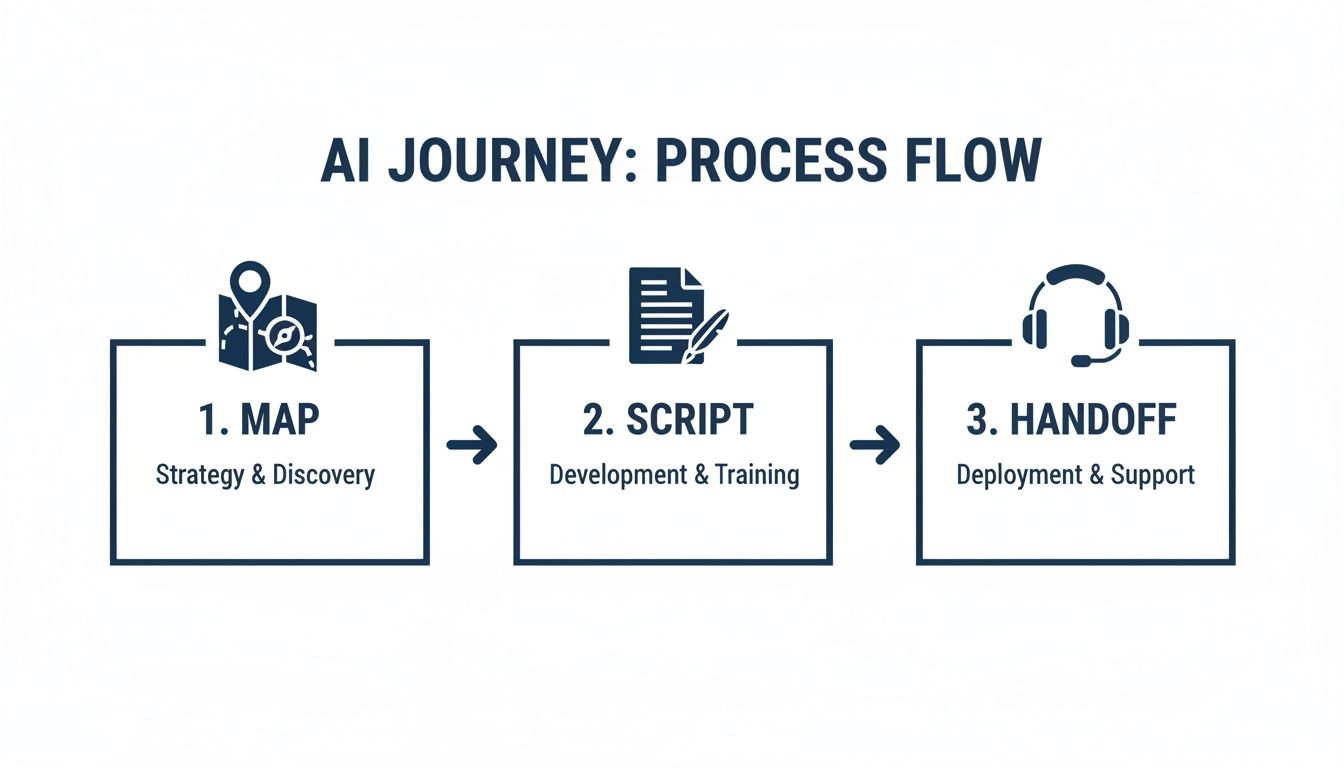
You map the customer's path, script the AI's interactions, and define exactly when and how to hand off to a human. These are the foundational pillars of a successful setup.
On the technical side, you'll need to configure a few things to make sure calls flow exactly where they're supposed to.
API Connection and Authentication: First up is establishing a secure link between the AI platform and your cloud phone system using an API (Application Programming Interface). This is what allows the two systems to swap data, like caller info and conversation history.
Configuring Call Forwarding Rules: Next, you'll jump into your phone system's admin portal. Here, you’ll set up rules to route all incoming calls to your main support number to the AI agent first. This makes the AI the initial point of contact for every customer.
Setting Up the Human Fallback Queue: This is probably the most important step. You absolutely must create a dedicated call queue for escalations. When the AI figures out a caller needs a human, it will transfer the call to this specific queue, ensuring an agent is ready to take over without missing a beat.
For many businesses, just getting a handle on their communications stack is the first step. If you're new to this, it’s worth taking a moment to learn more about what a cloud phone system is and how its features enable this kind of advanced integration.
Voicebots vs. Chatbots: What’s the Difference?
While people often use the terms interchangeably, voicebots and chatbots play distinct roles in a modern support strategy. Knowing the difference helps you put the right tool on the right channel.
A voicebot is an AI built specifically to interact with customers over the phone. It uses tech like Natural Language Processing (NLP) to understand what people are saying and Text-to-Speech (TTS) to respond out loud. This is the agent that actually answers your calls.
A chatbot, on the other hand, lives in text-based worlds like your website's live chat, SMS, or social media messaging. The underlying AI might be the same, but the interface is completely different.
Many modern AI platforms offer omnichannel capabilities, which is a huge plus. This lets you build the core logic for your AI once and then deploy it as both a voicebot and a chatbot. This creates a consistent experience, whether a customer calls you or messages you on your website. For an SMB, this unified approach ensures that no matter how a customer reaches out, they get the same smart, efficient response—and that's what turns a good support system into a great one.
How to Train and Optimize Your AI Agent
Getting your AI customer support agent live is just the starting line, not the finish line. An out-of-the-box AI is a great foundation, but its real power emerges from a constant cycle of training, feedback, and fine-tuning. This is what transforms a decent bot into a genuinely smart member of your support team.
The initial training is basically your AI's education. It has to learn the ins and outs of your business, your products, and most importantly, your customers. The best part? You already have the perfect curriculum.
You’re not starting from a blank slate. You’re sitting on a goldmine of training material. Your existing call logs, support tickets, and knowledge base articles are the textbooks your AI will use to understand the real problems your customers have and the best ways to solve them.
Fueling Your AI with the Right Data
To make your AI smart, you need to feed it smart data. The quality of your training material has a direct impact on how well it performs. Start by pulling together these key resources:
- Existing Support Tickets and Call Logs: These are pure gold. They show you the exact words your customers use, the questions they ask all the time, and the answers that actually work.
- Your Internal Knowledge Base: This is your company's single source of truth for product info, policies, and troubleshooting guides. Your AI needs full access to it.
- Website FAQ Pages: These are often the first place customers look for answers, and they provide a solid foundation for handling common, straightforward questions.
By digging into this data, the AI starts to see patterns and connect certain customer phrases to the right solutions. This is the core of intent recognition—the AI's ability to figure out what a customer really wants, even if their wording isn't perfect.
For example, a customer might say, "My bill is wrong," "You charged me too much," or "What is this charge?" A well-trained AI gets that all three phrases mean the same thing: a billing question. It then knows to pull up account details or offer to connect them to the billing department.
Key Metrics to Monitor for Success
You can't improve what you don't measure. As soon as your AI agent is live, you need to start tracking its performance with a few critical numbers. These KPIs tell you what’s working, what’s not, and where you need to focus your efforts.
Your dashboard should have these three metrics front and center:
- Containment Rate: What percentage of chats or calls does the AI handle all by itself, without needing to pass it off to a human? A good starting benchmark to aim for is 40-50%.
- Escalation Rate: On the flip side, how often does the AI have to hand off a conversation to a live agent? A high escalation rate might mean the AI’s knowledge is incomplete or it's getting stuck on certain types of questions.
- Customer Satisfaction (CSAT): After the conversation, are customers happy with the help they got? A simple "Did this solve your problem?" survey gives you instant feedback on whether the AI is actually being helpful.
The goal isn't a 100% containment rate. In fact, a high containment rate paired with low CSAT is a major red flag. It probably means your AI is trapping frustrated customers in automated loops. The sweet spot is a healthy containment rate combined with happy customers.
Creating a Human-in-the-Loop Feedback System
The absolute best way to make your AI smarter over time is by building a simple, effective feedback loop with your human support team. Your agents are on the front lines every day; they know better than anyone when the AI gets something wrong or completely misses the point.
So, empower them to be part of the solution.
Set up a dead-simple process where human agents can flag incorrect or incomplete AI answers with a single click. When an agent takes over an escalated call, they should be able to quickly tag it with a reason, like "AI misunderstood the question" or "Knowledge base article was outdated."
This feedback doesn't just fix one mistake. It gets fed right back into the AI's training data, teaching it to avoid that same error down the road. This human-in-the-loop system creates a powerful cycle: the AI handles more of the easy stuff, which frees up your agents to tackle complex problems and give high-quality feedback, which in turn makes the AI even better. It’s a team effort that ensures your AI continuously gets better at meeting your customers' needs.
Measuring the True ROI of Your AI Investment

Putting an AI customer support agent to work feels like a big step forward, but how do you actually prove it was the right one? To justify the investment, you have to look beyond the initial setup bill and measure the real, tangible value it’s bringing to your business. This means moving past simple cost savings and digging into the operational metrics that tell the full story.
A solid ROI calculation connects the dots between your AI’s performance and your bottom line, giving you a clear picture of its impact on efficiency, customer happiness, and your team's bandwidth.
Quantifying the Hard ROI
The most direct way to measure your return is by looking at the "hard" metrics—the numbers you can pull straight from your cloud phone system and support platform reports. These numbers tell a clear story of time and money saved.
Start by tracking these key data points before and after your AI agent goes live:
- Reduction in Call Handling Time: How much faster are issues getting resolved? This is a direct measure of efficiency. We've got a great guide on how to calculate this effectively when you're looking at your average handle time.
- Increase in First-Contact Resolution (FCR): Are more customers getting their problems solved on the very first try? A higher FCR means fewer follow-up calls and much happier customers.
- Lowered Call Volume to Human Agents: Track the percentage of inbound calls the AI successfully handles on its own. This is a direct indicator of your team's reduced workload.
Calculating the Value of Reallocated Time
Let’s put this into a real-world context. Imagine you have a 15-person support team. Before AI, each agent spent roughly three hours a day answering the same repetitive questions about order status, business hours, and password resets. That’s 45 hours of team time every single day spent on low-value, easily automated tasks.
Now, you bring in an AI agent that successfully automates 30% of all incoming calls. This doesn't just cut down wait times; it reclaims a massive amount of your team’s most valuable resource—their time. That 30% automation frees up more than 13 hours of agent time daily, or nearly 300 hours every month.
This is the hidden superpower of AI in customer support. You aren't just deflecting calls; you are reallocating hundreds of skilled human hours from repetitive tasks to complex problem-solving, proactive customer outreach, and revenue-generating activities.
Don't Overlook the Soft ROI
While hard numbers are crucial, the "soft" ROI is just as important for understanding the full picture. These are the benefits that are a bit harder to quantify but have a massive impact on your brand's health and customer loyalty.
Consider the ripple effects in these areas:
- Improved Customer Satisfaction (CSAT) Scores: Are customers happier with your support? A well-implemented AI agent provides instant answers 24/7, which can drastically improve the customer experience.
- Enhanced Brand Perception: A modern, efficient support system makes your business look professional and customer-focused, building trust and a positive reputation.
- Reduced Agent Burnout: When your team isn't bogged down by monotonous questions, morale improves. This leads to lower turnover and a more engaged, effective support staff.
The data backs this up. Organizations using AI-powered customer service tools have reported an average 6.7% boost in CSAT scores, with some businesses estimating efficiency gains of up to 50%. For a deeper look at these figures, you can find more insights about AI agent statistics on masterofcode.com.
By combining these hard financial savings with the softer, long-term benefits to your brand and team, you can paint a complete and compelling picture of your AI investment's true worth.
Common Questions About AI for Customer Support
Bringing an AI customer support agent into your business can feel like a big step, especially when you're growing. It's totally normal to have questions about security, how complex it all is, and whether a bot can really get the finer points of a customer conversation. Let's tackle some of the most common worries we hear to clear up the confusion.
One of the first questions that always comes up is, "Will our customer data be secure?" It’s a great question. You should know that reputable AI vendors build their platforms with serious, enterprise-grade security. This means things like data encryption, both when it's being sent and when it's stored.
When you're picking a partner, always ask about their compliance with standards like SOC 2 and GDPR. Your customer data is a sensitive asset, and it should never be used to train AI models outside of your own, private environment.
Another big one is the learning curve for your team. Do they need to suddenly become AI experts? Not at all. Modern AI platforms are built with easy-to-use dashboards. The idea is to empower your support managers, not turn them into coders. Most of the day-to-day stuff, like tweaking a response or looking over a conversation log, is no more complicated than using any other business software.
What About Complex Customer Emotions?
This is a really important one: how can an AI possibly handle a customer who's truly frustrated or upset? The short answer is, it shouldn't have to. A well-designed AI system knows its limits. Its job is to handle the predictable, common questions that eat up your team's time.
The second a conversation gets emotionally charged, the AI's only job is to recognize it and escalate to a human—fast. This isn't guesswork; it's programmed with specific triggers.
- Sentiment Analysis: The AI is trained to pick up on negative language, frustrated tones, or keywords like "unhappy" or "complaint."
- Keyword Triggers: Certain phrases like "I want to speak to a manager" are hard-coded to immediately start a handoff.
- Loop Detection: If a customer has to repeat their question more than twice, the system flags it as a failure and escalates to avoid a frustrating dead end.
The goal isn’t for the AI to fake empathy. It’s to intelligently get sensitive situations to the people best equipped to provide it—your human agents. This makes sure customers feel heard right when it matters most.
How Does This Differ From a Basic Chatbot?
It's easy to picture those old, clunky chatbots when you hear "AI," so it's important to understand just how far the technology has come. To see the full picture, it helps to understand what a virtual agent is and how it actually works in a modern support setup.
Unlike older, rule-based chatbots that could only respond to specific keywords, today's AI agents understand context and intent.
This means a customer can ask the same question five different ways, and the AI will still figure out what they need. It’s the difference between a rigid, frustrating script and a genuine, albeit automated, conversation. This ability to grasp natural language lets AI agents resolve a much wider range of issues on their own, making them a far more powerful tool for your team.
Ready to see how SnapDial can integrate intelligent AI agents into a powerful, reliable cloud phone system for your business? Our team provides white-glove setup to ensure a seamless transition, empowering you to deliver smarter, faster customer support. Learn more about SnapDial.