
Think of customer support AI agents as your most reliable employees. They're like digital concierges—always on, 24/7, never needing a break, and capable of handling thousands of conversations at once. Their job is to provide instant answers to common questions, intelligently pass complex issues to human experts, and guide customers toward a solution without missing a beat.
What Are Customer Support AI Agents?

Imagine a customer lands on your website with a simple question about a recent order. Instead of digging for a contact form or waiting on hold, they’re greeted by a smart assistant that instantly pulls up their details and provides the answer. That’s a customer support AI agent in action.
These aren't the clunky, script-bound chatbots from a few years ago. We're talking about sophisticated programs built to understand, process, and respond to customer needs across every channel—from phone calls and website chats to emails and social media. They act as your first line of defense, efficiently fielding the high volume of routine requests that can overwhelm a team.
This immediate, automated support frees up your human agents to focus on what they do best: solving the complex, high-stakes problems that require real empathy and critical thinking. By automating the predictable, you empower your people to manage the exceptional.
Before we dive deeper, it helps to understand the core functions these agents perform. The table below breaks down their key capabilities and the direct impact they have on a business.
Key Capabilities of AI Support Agents
| Capability | Description | Business Impact |
|---|---|---|
| 24/7 Availability | Provides instant support around the clock, even outside of normal business hours and on holidays. | Increases customer satisfaction by meeting demands for immediate help; captures leads that would otherwise be lost. |
| Instantaneous Responses | Delivers answers to common questions in seconds by accessing a centralized knowledge base. | Drastically reduces customer wait times and improves First Contact Resolution (FCR) for simple queries. |
| Scalable Interactions | Manages thousands of concurrent conversations simultaneously without any decline in performance. | Eliminates the need to overstaff for peak hours and efficiently handles unexpected surges in volume. |
| Intelligent Routing | Identifies complex issues or frustrated customers and seamlessly transfers them to the right human agent with full context. | Reduces customer frustration, improves agent efficiency, and ensures experts handle the right problems. |
| Data Collection | Gathers valuable customer information and interaction data from every conversation. | Provides actionable insights into common pain points, customer behavior, and service gaps. |
| Personalization | Integrates with CRM and other business systems to provide personalized responses based on customer history. | Creates a more relevant and engaging customer experience, fostering loyalty and trust. |
As you can see, these capabilities go far beyond just answering questions. They create a more efficient, responsive, and data-driven support operation.
The Driving Force Behind AI Adoption
The move toward AI-powered support isn't just a fleeting trend; it's a fundamental shift in business operations. The market for AI in customer service is exploding, with projections showing it will hit $47.82 billion by 2030. Already, 30% of global businesses use AI agents, and another 44% plan to get them running by 2026, which shows just how fast this is becoming standard practice.
So, what’s behind this massive shift? It all comes down to meeting modern customer expectations. Today’s consumers demand:
- Immediate Availability: They want answers now, not hours or days from now. AI agents deliver true 24/7 support.
- Effortless Interactions: They’d rather get a quick answer themselves for simple things than navigate a phone menu or wait on hold.
- Consistent Accuracy: AI pulls from a central source of truth, giving the same correct information every single time.
By handling these core demands, customer support AI agents don't just cut costs; they build a foundation for a better overall customer experience. They ensure every customer gets a prompt and helpful first interaction, setting a positive tone right from the start.
To get a feel for how this works in the real world, it’s useful to explore various AI agent use cases and see how businesses are putting them to work. This guide will walk you through everything else you need to know about these powerful tools.
Choosing the Right Type of AI Agent
Not all customer support AI agents are created equal. Just like you wouldn’t hire a graphic designer to do an accountant's job, picking the right AI agent comes down to the specific role you need it to fill. Making the right choice is about meeting your customers where they are, with an experience that feels genuinely helpful, not clunky and robotic.
Think of it like building a customer service team. You need a fast typist for quick text chats, an articulate voice for phone calls, and maybe a versatile coordinator who knows exactly when to loop in a human expert. Understanding these distinct roles is the first real step in creating an automated support strategy that actually works.
The decision isn't just a technical one; it’s about aligning the agent's strengths with how your customers prefer to communicate. Get this alignment right, and you create a smooth, efficient experience. Get it wrong, and you risk frustrating customers and torpedoing your own goals.
The Chatbot: Your Swift Text-Based Problem Solver
When most people think of AI support, chatbots are usually the first thing that comes to mind. These are the text-based workhorses of the digital world, perfectly at home on websites, in messaging apps like Facebook Messenger, and even handling SMS conversations. Their main superpower is handling written queries with speed and precision.
A well-built chatbot acts like a digital concierge, instantly pulling answers from your knowledge base to field common questions. For an e-commerce store, this means effortlessly handling the daily flood of inquiries like:
- "What's your return policy?"
- "Where is my order right now?"
- "Do you ship internationally?"
By knocking out these high-volume, low-complexity questions on the spot, chatbots can deflect a massive number of support tickets. In fact, research shows AI agents can successfully resolve 40-60% of support tickets automatically, which frees up your human agents to focus on the trickier, more sensitive issues.
The Voicebot: Your Articulate Phone Assistant
While chatbots have mastered the written word, voicebots are built for actual spoken conversations. These AI agents are the natural evolution of those clunky old Interactive Voice Response (IVR) systems. Instead of forcing callers to mash buttons—"press 1 for sales, press 2 for support"—a modern voicebot uses Natural Language Processing (NLP) to understand what someone is actually saying.
Voicebots are a game-changer for any business that gets a lot of inbound phone calls. They can handle tasks like booking appointments, checking account balances, or routing a caller to the right department based on a simple spoken request.
Imagine a busy medical clinic deploying a voicebot to manage appointment scheduling around the clock. A caller can just say, "I need to book a check-up for next Tuesday afternoon," and the voicebot can find and confirm an open slot right then and there. It creates a seamless experience for the patient and ensures no call ever goes unanswered.
The Hybrid Agent: The Best of Both Worlds
For many businesses, the most powerful setup is a hybrid model. A hybrid agent is a system designed to start with automation but knows exactly when to pass the baton to a human agent. This approach acknowledges a simple truth: while AI is incredibly efficient, it can't (and shouldn't) replace human empathy and complex problem-solving.
This handoff has to be seamless. A customer should never feel like they're being bounced around or, even worse, have to repeat their entire story. The AI agent should package up the whole conversation history and context and pass it to the human agent, who can jump in and pick up right where the AI left off. This approach blends the 24/7 availability and speed of AI with the expert judgment and empathy of your human team, creating a customer experience that’s truly top-notch.
Integrating AI Agents with Your Business Phone System
Picking the right AI agent is a great start, but the real magic happens when you connect it to your core communication channels. For any business that lives and breathes by phone calls, this means plugging your customer support AI agents directly into your business phone system. This is the connection that turns a simple website tool into an intelligent hub for every voice conversation.
Think of it like this: your cloud phone system is the nervous system of your business communications. It’s the network that carries every call and every customer's voice. The AI agent, on the other hand, is the brain. A brain is powerful, but without the nervous system, it can't receive information or send commands.
When you bring them together, you create a powerful synergy where the AI can listen, understand, and act on phone calls in real-time. It's the difference between a clunky, pre-recorded menu and a dynamic assistant that actively thinks about how to manage your calls.
The Technical Handshake: API Integration
So how does this connection actually work? It all comes down to something called an Application Programming Interface, or API. An API is like a secure bridge that lets two different software systems—your AI agent and your cloud phone system—talk to each other and swap information.
It’s like hiring a skilled translator who not only speaks both languages but can also relay complex instructions in a split second.
- A Call Comes In: A customer dials your business number, which is handled by your cloud phone system like SnapDial.
- The API Handoff: Instead of just ringing a phone, the system instantly shoots the call information (like the caller’s number) over to the AI agent through the API.
- The AI Takes Over: The AI agent picks up, figures out what the customer needs using Natural Language Processing (NLP), and decides on the best next step.
- Intelligent Action: The AI then sends a command back to the phone system via the API. This could mean routing the call to the billing department, answering the question directly, or even pulling up the customer's last order from your CRM to personalize the conversation.
This seamless, instant exchange is what makes a modern phone system truly intelligent. If you want to get a better handle on the underlying technology, it's worth understanding what a cloud phone system is and how it makes these advanced connections possible.
Way Beyond a Smarter Auto-Attendant
This level of integration is a giant leap past what a traditional auto-attendant or IVR can do. A standard IVR is a blunt instrument; it gives callers a fixed menu and forces them down a rigid, often frustrating, path. An integrated AI agent is more like a surgical tool, capable of nuanced, context-aware actions.
Let's look at what this means in the real world.
- Proactive Personalization: When a call comes in, the AI can use the caller's phone number to look them up in your CRM. Instead of a generic "Thanks for calling," the AI can say, "Hi Sarah, I see you have a recent order. Are you calling about that today?" This simple step makes the experience immediately more personal and efficient.
- Priority Routing: The AI can spot your high-value clients based on CRM data. If a VIP customer calls, the system can bypass the normal queue and send them straight to their dedicated account manager. White-glove service, every time.
- Contextual Handoffs: If a problem is too complex for the AI, it doesn't just dump the call on a human agent. It passes along the entire conversation's context—who the customer is and what they've already talked about. The agent can then pick up the thread without forcing the customer to repeat everything, which is a massive point of frustration for most people.
By connecting the AI 'brain' to the phone system's 'nervous system,' you create a support infrastructure that doesn't just react to calls—it anticipates needs and intelligently manages interactions from the very first second.
This deep integration is the key to turning your phone lines into a truly effective channel for customer support. It ensures every caller, whether they talk to an AI or a human, gets the fastest, most relevant, and most helpful experience possible. Suddenly, your phone system becomes one of your most valuable customer service assets.
Your Practical AI Implementation Roadmap
Getting your first customer support AI agent up and running can feel like a huge project, but it’s much easier when you break it down into a clear, step-by-step process. The roadmap below is all about a phased approach that ensures a successful launch without burning out your team. The philosophy is simple: start small, scale smart.
This journey kicks off with setting clear goals and moves through building the AI's knowledge, integrating it with your tools, and then refining it over time. Follow these steps, and you'll build a powerful AI assistant that starts delivering real results from day one.
Phase 1: Define Your Objectives
Before you look at a single platform or write any code, you have to define what success actually looks like. What specific problem are you trying to solve with a customer support AI agent? Vague goals like "improve customer service" won't cut it. You need to get specific.
Are you trying to:
- Slash response times for common email questions from hours down to just a few minutes?
- Automate 40% of routine inquiries like "Where is my order?" so your team can focus on complex issues?
- Offer 24/7 support for basic troubleshooting to help customers in different time zones?
Setting a clear, measurable goal will steer every other decision you make, from the type of AI you choose to the metrics you track. That initial clarity is the bedrock of a successful rollout.
Phase 2: Build Your AI's Brain
An AI agent is only as smart as the information it can pull from. That’s why a crucial part of your implementation plan is figuring out how to build a knowledge base that acts as the single source of truth for your bot. This is where your AI will go to find answers.
Start by gathering all of your existing resources, like:
- Frequently Asked Questions (FAQs)
- Product documentation and user manuals
- Canned responses from old support tickets
- Company policy documents (e.g., return policies, shipping info)
The more comprehensive and organized this information is, the better your AI will be at resolving customer problems on its own. In fact, a well-structured knowledge base can directly boost AI resolution rates by 15-25%.
Phase 3: Integrate With Key Business Systems
To provide genuinely helpful, personalized support, your AI can't work in a silo. It needs to connect to your other business tools. This is where integrating it with your CRM and cloud phone system becomes absolutely essential.
This flowchart shows how these systems talk to each other.
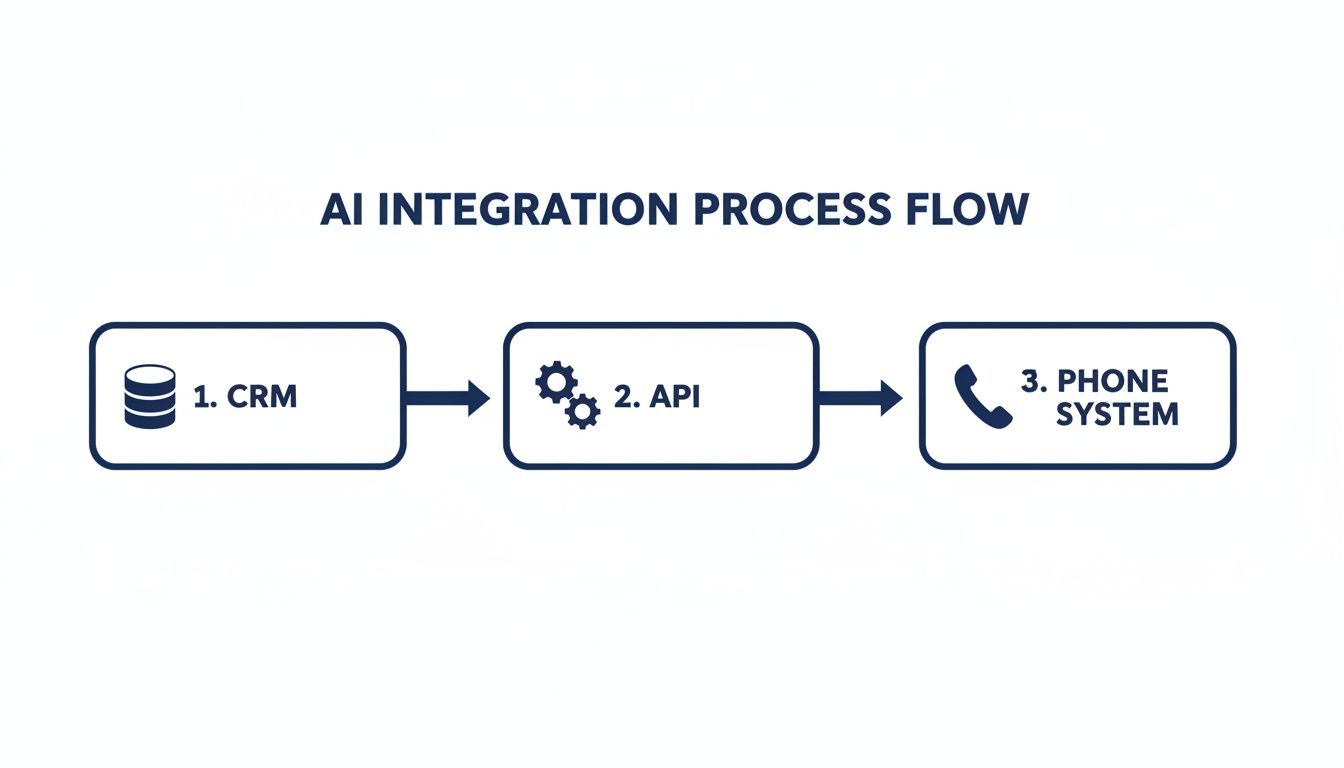
Here, the AI acts as a central hub. It pulls customer data from your CRM and uses that context to intelligently manage conversations happening in your phone system. Through APIs, these tools share information in real-time, letting the AI see a customer’s full history and provide support that’s actually relevant. You can get a deeper understanding of this by exploring guides on VoIP CRM integration and seeing how connected systems create a truly seamless customer experience.
Phase 4: Test, Launch, And Refine
Finally, it’s time to bring your AI agent to life. But this isn't a one-and-done task; it’s a continuous cycle of testing, launching, and improving.
An AI agent is not a "set it and forget it" tool. Think of it as a new employee that requires ongoing training and feedback to perform at its best. The most successful AI deployments are those that are constantly monitored and optimized based on real-world interactions.
Here’s a simple launch and refinement cycle to follow:
- Internal Testing: Before your AI ever speaks to a real customer, have your team try to break it. Ask it every weird question you can think of and push its logic to the limits. This is the best way to find any major gaps in its knowledge or workflow.
- Pilot Launch (Beta): Next, release the AI to a small, controlled group of customers. This limited launch lets you gather real-world data and feedback without risking your entire customer base's experience.
- Analyze and Refine: Dive into the conversation logs from the pilot. Where did the AI do well? Where did it get stuck and have to escalate to a human? Use these insights to update its knowledge base and tweak its conversational flows.
- Full Launch and Monitor: Once you're confident in its performance, roll it out to everyone. But the work isn't over. Keep a close eye on its key performance indicators (KPIs), like resolution rate and customer satisfaction scores, to guide ongoing improvements.
To help you stay organized, here's a quick checklist that breaks down the entire process.
AI Implementation Checklist for SMBs
| Phase | Key Action Items | Success Metric |
|---|---|---|
| 1. Planning & Strategy | Define 1-2 specific, measurable goals (e.g., reduce ticket volume by 30%). Identify the top 5-10 repetitive questions to automate. | Clear, documented business objectives. |
| 2. Knowledge & Data | Gather all FAQs, product docs, and policy info. Structure the data into a clean, searchable knowledge base. | A centralized knowledge base is created and populated. |
| 3. Tech & Integration | Choose an AI platform that fits your needs. Connect the AI to your CRM and VoIP phone system via API. | Successful API connection and data sync between systems. |
| 4. Testing & Launch | Conduct rigorous internal testing with your team. Launch a pilot program with a small segment of customers. | Internal bugs are fixed; pilot user feedback is positive. |
| 5. Monitoring & Refinement | Track KPIs like resolution rate and CSAT. Review conversation logs weekly to identify areas for improvement. | KPIs meet or exceed initial goals. |
Following a structured plan like this takes the guesswork out of launching an AI agent and sets you up for long-term success.
Best Practices for a Successful AI Deployment
Getting a customer support AI agent up and running is more than a technical checklist; it’s about creating an experience that builds trust, not frustration. A successful launch hinges on a smart, human-centric strategy. The goal is to build an assistant customers find genuinely helpful, not a digital roadblock.

This requires a delicate balance. You want to use AI for the speed and efficiency customers crave, but you also need to ensure complex or emotional issues get the empathetic touch only a person can provide. Nailing this is what separates a truly great AI from a frustrating one.
Give Your AI a Personality
Your AI agent is often a customer's first point of contact, making it a direct extension of your brand. Giving it a distinct personality—whether you’re going for helpful and professional, or friendly and casual—ensures a consistent brand voice in every conversation.
An AI doesn't have to sound robotic. Customer expectations are changing, and research shows that 67% of consumers believe traits like creativity and friendliness are important in AI agents. At the same time, 68% expect chatbots to have the same expertise as a skilled human agent. This highlights the need for both personality and competence.
Design a Frictionless Handoff
Let's be realistic: no AI can solve every problem, and it shouldn't try to. One of the most critical parts of any AI deployment is designing a seamless, transparent handoff to a human agent. This is the moment where customer trust is either won or lost.
The handoff should feel like a coordinated team play, not a dropped call. The AI has to transfer the full conversation context, so the customer never has to repeat themselves. This simple step turns a potential point of frustration into a smooth, supportive experience.
Key elements of a great handoff include:
- Context Preservation: The AI passes the entire chat or call history over to the human agent.
- Clear Expectations: The AI lets the customer know they’re being transferred to a human specialist who can better assist them.
- Intelligent Routing: The system directs the customer to the right department or agent based on the context of the issue.
Manage Customer Expectations Proactively
Transparency is everything. Always be upfront with customers that they are interacting with an AI agent from the very beginning. Trying to pass an AI off as a person is a recipe for disaster; it erodes trust the moment the illusion breaks.
Set realistic expectations for what the AI can actually do. Position it as a fast and efficient tool for handling common requests, while making it obvious how to reach a person for more complex needs. This approach plays to the AI's strengths—speed and availability—without overpromising. This is especially important for voice agents, as you can read more about in our guide on compliant and secure enterprise AI calling.
Implement Continuous Training and Refinement
An AI agent is not a "set it and forget it" tool. Think of it as a new team member that needs ongoing training to stay sharp. The most successful AI deployments involve a continuous feedback loop.
Regularly review conversation logs to identify:
- Questions the AI struggled with.
- New customer issues that need to be added to its knowledge base.
- Opportunities to refine its conversational flow for better clarity.
This cycle of analysis and improvement ensures your AI becomes smarter and more helpful over time, constantly adapting to your customers' real-world needs.
Measuring the ROI of Your AI Agents
So, you’ve decided to bring an AI agent onto the team. That's a big step, but it's an investment, and every investment needs to prove its worth. To move past the "wow, that's cool" phase and get to real business value, you need to track the right numbers—the key performance indicators (KPIs) that connect what the AI does directly to your bottom line.
This isn't about fuzzy feelings; it's about translating AI actions into tangible results. When an AI agent resolves a customer’s problem all on its own, it’s not just a neat party trick. It's a direct reduction in your operational costs and a measurable boost to your human team's productivity. Let’s break down how to measure that impact.
Core AI Performance Metrics
First things first, you need to measure how well the AI is doing its primary job: handling customer issues without needing a human to step in. These numbers form the foundation of your ROI calculation and show the immediate impact on your support workload.
Containment Rate: This is the big one. It’s the percentage of customer chats or calls that the AI fully resolves without ever escalating to a person. A strong containment rate—often in the 40-60% range—is a clear signal that your AI is successfully deflecting tickets and freeing up your team.
First Contact Resolution (FCR) Rate: This tracks how many problems are solved in the very first interaction. A high FCR rate driven by your AI means customers get the right answers instantly, which is a massive win for satisfaction.
AI Resolution Time: How fast is your AI? This metric measures the time from when a customer starts an interaction to when their issue is marked as solved. It showcases the sheer speed advantage of automation, with AI often slashing resolution times by 40-60% compared to manual support.
Measuring the Impact on Your Human Team
A successful AI agent doesn't replace your human team; it makes them better. It acts as the first line of defense, filtering out the simple, repetitive questions so your people can focus on what they do best: solving complex, high-value problems.
When your AI handles the endless stream of "what's my order status?" or "how do I reset my password?" questions, your human agents are freed up to become expert problem-solvers. You’re not just saving a few bucks on simple tickets; you’re elevating the skill set and impact of your entire support team.
Here are the key metrics that show how AI is empowering your people:
- Reduced Agent Handle Time: With the AI gathering initial information and providing context, human agents can resolve escalated issues much more quickly when they do get involved.
- Increased Agent Capacity: By taking routine queries off their plate, each agent can now manage a higher volume of meaningful, complex customer interactions every day.
- Ticket Escalation Rate: Keep an eye on the percentage of conversations that ultimately need a human. As your AI learns and improves, you should see this rate steadily decline over time.
Connecting Metrics to Business Value
The final piece of the puzzle is tying these operational numbers to real financial results. This is where you build the undeniable business case for your customer support AI agents.
It can be surprisingly straightforward. To calculate direct cost savings, just multiply your containment rate by your average cost per ticket. For instance, if your AI handles 5,000 tickets a month and your average cost to resolve a ticket manually is $5, that’s a direct saving of $25,000 right there.
Don't forget to watch your Customer Satisfaction (CSAT) scores, too. If you see CSAT scores climb after you've rolled out the AI, it's a strong indicator that customers appreciate the faster, 24/7 support. This improvement can be directly linked to better customer loyalty and retention, proving your AI isn't just a cost-cutter—it's a powerful tool for building a better customer experience.
Your AI Agent Questions, Answered
Even with a clear plan, stepping into the world of customer support AI is bound to bring up some questions. Let’s tackle the most common ones we hear from business leaders, so you can move forward with confidence.
How Much Technical Skill Do I Actually Need?
A lot of business owners assume they’ll need a team of developers on standby to get an AI agent running. While the technology itself is complex, modern platforms are built for people who aren't coders.
With a system like SnapDial, the heavy lifting is handled through pre-built connectors and a guided setup. Your team’s role isn’t to write code; it’s to provide the business knowledge. You’ll be focused on supplying the FAQs, product info, and support workflows that train the AI—think of it more like content management than a technical project.
Will an AI Agent Replace My Human Team?
This is probably the biggest myth out there. The goal of a customer support AI is to augment your team, not replace it. Think of the AI as a force multiplier that never sleeps. It’s brilliant at handling the high-volume, repetitive questions and providing instant answers 24/7.
This frees up your human agents to handle the complex, high-stakes, and emotional conversations that truly require a human touch. The result? A more efficient support operation and a more engaged team that can focus on building real customer relationships.
The biggest mistake businesses make is setting and forgetting their AI. An AI agent isn't a one-time setup. The most successful implementations involve continuous monitoring and refinement, treating the AI like a new employee who requires ongoing training to stay effective.
How Does The AI Understand My Specific Business?
An AI’s real-world value comes down to one thing: its training. You "teach" the AI by feeding it your company's own data. This is the secret sauce that ensures it gives accurate, relevant answers that sound like your brand and follow your rules.
The core training materials are things you already have:
- Your Knowledge Base: This is the AI's primary textbook for product information and company policies.
- Product Documentation: Detailed guides and manuals help the AI grasp all the technical specifics.
- Past Support Logs: Anonymized chat and email transcripts teach the AI how your customers talk and what problems they run into most often.
- Company FAQs: Direct answers to your most common questions give it a solid foundation to build on.
Simply put, the more high-quality, relevant data you provide, the smarter your AI will be at understanding your business and helping your customers.
Ready to see how a smart, integrated AI can transform your customer communications? The experts at SnapDial offer white-glove setup to seamlessly connect intelligent voice agents with a powerful, reliable cloud phone system. Learn more at SnapDial.com.