
Imagine having a coworker who knows every customer's history, suggests the perfect answer on the spot, and handles all the tedious note-taking for you. That’s no longer a fantasy—it’s what it’s like for customer support agents with AI, a powerful new teammate designed to amplify human skills, not replace them.

Your New AI Teammate Is Here to Help
The term "AI" can feel a little intimidating, but in the world of customer support, it’s best to think of it as a highly capable assistant. This technology works as a silent partner, running alongside human agents to make their jobs easier and far more effective.
It takes over the repetitive, data-heavy tasks that slow agents down. This frees them up to focus on what people do best: building real relationships and solving complex problems with genuine empathy.
This isn't about replacing your team; it's about empowering them. By handling routine questions and pulling up information in a flash, AI helps slash agent burnout and actually makes the job more satisfying.
Agent-Assist AI vs. Virtual Agents
It's really important to know the difference between the two main types of AI you'll run into. They play different, but complementary, roles on the team.
Let's break them down.
Agent-Assist AI vs Virtual Agent A Comparison
The best way to understand the two main flavors of AI in customer support is to see them side-by-side. One works behind the scenes to help your human agents shine, while the other steps up to the front line to handle common questions on its own.
| Feature | Agent-Assist AI (The Sidekick) | Virtual Agent (The Frontline Specialist) |
|---|---|---|
| Primary Role | Works with a human agent during a live conversation. | Interacts directly with customers to resolve issues. |
| Core Function | Provides real-time suggestions, data, and sentiment analysis. | Answers common questions and handles simple, repeatable tasks. |
| Who It Helps | Your human agent. | The customer. |
| Example | Listening to a call and popping up a link to the right help article. | Answering a "Where is my order?" question through a website chat. |
Ultimately, these two types of AI are designed to work together. The Virtual Agent filters out the simple, high-volume inquiries, which frees up your highly-skilled human agents to tackle the tougher, more nuanced problems with their Agent-Assist sidekick guiding them.
The core idea is simple: Let virtual agents handle the high-volume, low-complexity queries so your skilled human agents can dedicate their time to high-value, complex customer needs.
This creates a smarter, more efficient workflow and a much better experience for everyone involved. To really nail this, understanding the foundational role of AI chatbots is essential.
The market for this tech is exploding. The global AI agents market is on track to blow past USD 10.9 billion this year, with customer service leading the charge.
In fact, 30-35% of mid-to-large companies now use AI agents for first-line support, where they autonomously handle an impressive 50-65% of all inquiries without a human ever getting involved.
This powerful duo of AI assistance and automation is fundamentally changing how support teams work. It lets businesses scale their operations, offer 24/7 help, and deliver consistently great service without burning out their people. The result is a faster, smarter, and more empathetic support experience.
Unlocking Agent Superpowers with Practical AI Use Cases

Understanding the idea of an AI sidekick is one thing, but seeing it in action is where the real value becomes clear. For customer support agents, AI isn't some abstract concept—it's a set of practical tools that solve daily frustrations and completely reshape their workflow.
Think of these AI applications as superpowers. They don't replace an agent's skills; they amplify them, making it possible to deliver faster, smarter, and more empathetic service.
Imagine an agent fumbling to remember a specific policy detail during a tricky call. Instead of putting an irritated customer on hold to dig through a clunky knowledge base, AI serves up the exact answer instantly. This is where the technology stops being theory and becomes a tangible, stress-reducing reality.
Each AI-powered feature is designed to fix a specific problem, turning operational headaches into opportunities for efficiency and happier customers. Let's dig into the most impactful applications empowering agents right now.
Real-Time Assistance and Smart Prompts
Picture an expert whispering helpful advice in an agent’s ear during a live conversation. That's exactly what agent-assist AI does. It listens to the discussion in real-time, figures out what the customer needs next, and gives the agent the precise information to solve the problem quickly.
This isn’t just basic keyword matching. The AI understands the context and intent behind the conversation.
- Before AI: An agent frantically searches through dozens of articles for the correct return policy while the customer on the line grows more impatient by the second.
- After AI: The moment the customer says "return," the AI instantly pushes the right policy and step-by-step instructions directly onto the agent’s screen.
This real-time guidance ensures every agent provides consistent, accurate information and cuts down on human error. More importantly, it lets the agent stay fully engaged with the customer instead of getting lost in a sea of documentation.
Automated Call Summarization
One of the most draining parts of a support agent's job is all the "after-call work." This is the tedious process of manually typing up call notes, summarizing the problem, and documenting the fix, which can eat up several minutes after every single interaction.
AI-driven call summarization completely gets rid of this task.
By automatically transcribing and summarizing every call, AI frees up a huge amount of an agent's time. This lets them jump to the next customer faster and reduces the burnout that comes with repetitive admin work.
The AI generates a short, accurate summary that captures all the key details: the customer's issue, the steps taken, and the final outcome. This not only makes agents more productive but also creates a perfect, searchable record for the future, so any agent can pick up exactly where the last one left off.
AI-Powered Sentiment Analysis
Knowing a customer's emotional state is key to calming down tense situations and building a real connection. But it can be tough to read tone over the phone or in a chat. Sentiment analysis tools act like an emotional compass for your agents.
By analyzing word choice, tone of voice, and even how fast someone is talking, the AI can tell if a customer is happy, neutral, or getting frustrated. It shows a simple visual cue on the agent's dashboard, allowing them to adjust their approach on the fly. For example, if the AI flags rising frustration, it might suggest the agent use more empathetic language or offer a specific solution to de-escalate.
To truly unlock these superpowers, a key step is to understand how to automate repetitive tasks with AI agents, freeing human agents for more complex interactions that require a delicate touch.
Intelligent and Dynamic Routing
We've all been trapped in those clunky phone menus, pressing buttons and getting more frustrated with each option. Intelligent routing uses AI to get customers to the right person on the first try, based on a lot more than just the button they pushed.
The system can look at a customer's history, the complexity of their past issues, or even the first few words they say to a virtual agent. Using this data, it sends them to the agent with the specific skills or product knowledge to help them best.
This completely bypasses the dreaded multi-transfer shuffle, which is a major source of customer anger and a key reason why 80% of customers have switched brands due to poor service.
Measuring the Real-World Benefits of AI Integration

While the technology behind AI is impressive, its real value is measured in tangible business outcomes. Bringing AI into your support team isn't just about having the latest tools; it’s a strategic move that directly impacts your bottom line.
The key is to connect AI's capabilities—like automated summaries or real-time prompts—to the key performance indicators (KPIs) that define success in your contact center. It’s time to move beyond the hype and focus on concrete metrics. How does AI actually make your operation faster, more efficient, and more satisfying for customers? The answer is in the data.
Supercharging Core Support Metrics
The most immediate impact of AI shows up in the core metrics every contact center manager obsesses over. These are the numbers that tell you how effectively your team is resolving customer issues.
One of the first KPIs to improve is First-Contact Resolution (FCR). When an agent has an AI sidekick feeding them the right information at the right moment, they are far more likely to solve a customer's problem on the very first try. No more follow-up calls or frustrating transfers.
At the same time, Average Handling Time (AHT) drops significantly. Think about all the time agents spend on manual work: digging through knowledge bases, typing up call notes, and navigating clunky systems. AI automates or speeds up these tasks, letting agents resolve issues faster and move on to the next customer.
A common misconception is that faster service equals lower quality. With AI, the opposite is true. Agents are quicker because they are better equipped with accurate, instant information, leading to better outcomes for everyone involved.
Enhancing Customer Satisfaction and Engagement
Ultimately, faster resolutions and fewer transfers lead to happier customers. This is reflected directly in Customer Satisfaction (CSAT) scores. When customers get their problems solved quickly and without hassle, their perception of your brand improves dramatically.
The data backs this up. In fact, 75% of organizations using AI in customer service report a direct improvement in their CSAT scores. These aren't minor tweaks, either. On average, businesses see a 6.7% boost in CSAT, while AI-powered virtual agents can handle up to 80% of routine queries on their own.
This dual impact speeds up overall resolution times by 25-40% and cuts operational costs by 20-30%. It creates a positive feedback loop: higher CSAT scores lead to better customer loyalty, repeat business, and positive word-of-mouth referrals.
Strategic Advantages for SMBs
For small and mid-sized businesses, the benefits go beyond just efficiency metrics. AI offers a powerful strategic advantage by helping you scale without having to proportionally increase your headcount.
- Offer 24/7 Support: SMBs can use AI-powered virtual agents to provide round-the-clock help for common questions, a service that was once only possible for large enterprises.
- Reduce Operational Costs: Automating repetitive tasks means you can handle a higher volume of inquiries without needing to hire more staff.
- Improve Agent Retention: By taking tedious administrative work off their plates, AI helps create a more satisfying job for your agents, which can lower stress and reduce turnover.
These benefits are amplified when you can track them effectively. Tying every AI feature to a measurable outcome builds a powerful business case that proves its value time and time again. You might be interested in our guide on how advanced call analytics can help you measure these very KPIs, providing clear evidence of your AI investment's success.
Navigating AI Risks and Data Privacy
Bringing artificial intelligence into your support operations offers some incredible advantages, but it also comes with a new set of responsibilities. Your customer support agents—and the AI that helps them—are handling sensitive information every single day, from personal details to financial data. Keeping that information safe isn't just a technical task; it's the bedrock of customer trust.
A proactive mindset toward data privacy is non-negotiable. Before you even think about implementing an AI tool, you need to understand exactly how it handles the data it touches—how it's processed, where it's stored, and what protections are in place. This means asking vendors the tough questions and expecting clear answers about their security and compliance.
Without a solid data governance framework, you’re not just risking a data breach. You're facing potentially massive financial penalties and doing irreparable harm to your brand's reputation. Responsible AI starts with putting security first.
Protecting Sensitive Customer Data
The biggest worry when weaving AI into customer support is, without a doubt, protecting personal data. For AI to be effective, it often needs access to conversation transcripts, customer histories, and account information. This creates a huge responsibility to shield that data from any unauthorized access.
To get a handle on this risk, you need to establish clear data governance policies from day one. These are the rules of the road that dictate who can access data, how it’s used, and for how long it’s kept. Think of it as creating a digital chain of custody for every piece of customer information the AI interacts with.
Here are a few critical steps you must take:
- Data Anonymization: This is the process of scrubbing personally identifiable information (PII) from data before the AI even sees it. It’s a powerful way to protect customer identities while still getting valuable insights.
- Access Controls: Implement strict, role-based permissions. Not everyone needs to see everything. Ensure only authorized personnel can view sensitive customer data within the AI platform.
- Vendor Vetting: Don't just take a vendor's word for it. Partner exclusively with AI providers who can prove their commitment to security with recognized certifications like SOC 2 or ISO 27001.
For any business that's serious about protecting its customers, these steps are table stakes. To go a bit deeper, you can learn more about how to secure enterprise AI calling with compliant voice agents and the specific measures required.
Avoiding Over-Automation and Algorithmic Bias
Another major pitfall is the temptation to automate too much, too fast. AI is fantastic for handling routine, repetitive tasks, but over-automating can easily strip the human element right out of customer service. The result? Interactions that feel cold, robotic, and frustrating. Given that 43% of customers say they’d jump to a competitor after just one bad support experience, getting this balance wrong is a risk you can't afford.
The goal of AI should be to empower human agents, not to create a fully robotic support system. A "human-in-the-loop" approach ensures that a person can always step in to handle complex or emotionally charged situations.
This model not only maintains the quality of your service but also helps you sidestep another hidden danger: algorithmic bias. If an AI is trained on data that is biased or incomplete, it can learn to produce unfair or inaccurate responses, potentially discriminating against certain groups of customers.
The best defense is a good offense. Regularly auditing your AI's performance and maintaining human oversight are the most effective ways to catch and correct these issues before they become real problems. By keeping people in the driver's seat, you ensure the technology serves your customers ethically and effectively, strengthening relationships instead of eroding them.
Your AI and Cloud Phone System Integration Checklist
Connecting powerful AI tools with your cloud phone system can feel like piecing together a complex puzzle, but it really doesn't have to be a headache. If you break the process down into manageable steps, you can create a seamless tech stack where your communications platform and AI work in perfect harmony. Think of your cloud phone system as the solid foundation and AI as the smart, high-performance addition you build right on top.
A successful integration isn't just about plugging in new software and hoping for the best. It takes careful planning, starting with a clear-eyed look at what you already have and a sharp vision of what you want to achieve. This checklist is designed to turn a potentially daunting project into a clear, actionable plan.
Assess Your Current Infrastructure
Before you can add any new technology, you need a complete picture of your existing setup. A robust cloud phone system is the ideal launching point for layering on AI capabilities because it provides the clean data and stable connections that AI absolutely needs to function effectively.
Start by evaluating your current communications platform. Does it offer open APIs or have pre-built integrations with other software? An API, or Application Programming Interface, is like a universal adapter that lets different systems talk to each other. Without one, connecting AI tools becomes dramatically more difficult and expensive.
Key Takeaway: Your cloud phone system's ability to integrate with other tools is the single most important factor for a successful AI rollout. A closed, rigid system will block your progress before you even start.
Also, take an honest look at your network's capacity. AI tools that process real-time audio for transcription or sentiment analysis demand a stable, high-quality internet connection. Any weakness here will completely undermine the AI's performance, no matter how good the software is.
Define Your Goals and Vet Your Vendors
With a clear view of your infrastructure, the next step is to nail down exactly what you want AI to accomplish. Vague goals like "improve efficiency" just won't cut it. You have to get specific. Are you trying to reduce agent onboarding time by 20%? Do you want to shave 30 seconds off your Average Handling Time?
Once you have specific, measurable goals, you can start vetting AI vendors. Not all AI providers are created equal, and compatibility is absolutely critical.
- Compatibility Check: Confirm that the AI vendor's software works seamlessly with your specific cloud phone or VoIP provider. Don't be afraid to ask for case studies or references from other clients using a similar setup.
- Feature Alignment: Does the vendor’s AI directly address your goals? If your main objective is to automate call summaries, don't get distracted by flashy features you'll never use.
- Security and Compliance: Ask direct questions about their data security protocols. How do they handle sensitive customer information? Do they hold certifications like SOC 2 or ISO 27001?
Understanding how your different systems connect is essential. For instance, a well-planned VoIP and CRM integration can provide the rich customer data that makes AI even smarter and more effective.
Getting ready to integrate AI is all about asking the right questions before you sign a contract. This checklist helps you organize your thoughts and ensures you’ve covered all the critical bases, from your existing tech to your future goals.
| AI Integration Readiness Checklist |
|---|
| Checklist Item |
| 1. Current Phone System Review |
| 2. Network Capacity Audit |
| 3. Specific Goal Definition |
| 4. Vendor Compatibility Check |
| 5. Data Security & Compliance Verification |
| 6. Phased Rollout Plan |
| 7. Training Program Development |
| 8. Performance Monitoring Setup |
Using this table will give you a clear, at-a-glance view of where you stand and what still needs to be addressed, turning a complex process into a series of simple checks.
Plan a Phased and Measured Rollout
Trying to launch every AI feature for every single agent all at once is a recipe for chaos. A phased rollout is a much smarter approach that minimizes disruption and allows your team to learn and adapt as you go.
- Start with a Pilot Program: Choose a small group of tech-savvy agents to test a single, high-impact AI feature, like call summarization. This creates a controlled environment where you can work out any kinks without disrupting your whole operation.
- Gather Feedback: Actively collect feedback from your pilot group. What’s working well? What’s frustrating them? Use their real-world insights to refine your processes and training before a wider launch.
- Provide Comprehensive Training: Don’t just show agents a new screen and expect them to figure it out. Provide hands-on training that explains not just how to use the tool, but why it makes their job easier and benefits the customer.
- Monitor and Optimize: Once the AI is live, keep a close eye on your key metrics. Compare the performance of agents using the new tools against your baseline data to prove the ROI and spot areas for improvement.
A Phased Roadmap to Successful AI Adoption
Bringing AI into your support team doesn't have to be a massive, disruptive overhaul. The smartest way to do it is with a gradual, phased approach that builds confidence and proves its value at every step, making sure your team is completely on board.
Think of it less like flipping a switch and more like climbing a ladder. Each rung brings new capabilities and clear returns on your investment. This methodical journey prevents overwhelm and allows you to learn as you go, tweaking your approach based on real-world results. The key is to start small with a single, high-impact problem to solve, building momentum and a solid business case before you go any further.
Phase 1: Laying the Groundwork
The first step is all about discovery, not deployment. Start by digging into your current support workflow to find the biggest pain points. Where do your agents burn the most time on repetitive, manual tasks? What are the simple, common questions that constantly tie up your phone lines?
Your goal here is to find the "low-hanging fruit"—a problem that AI can solve well and deliver a quick, measurable win. This could be anything from automating after-call work summaries to setting up a simple chatbot to handle order status questions. Once you have a clear target, you can set specific, measurable goals for it.
Phase 2: Launching a Pilot Program
Instead of pushing a new tool out to everyone at once, pick a small, enthusiastic group of agents to run a pilot program. Introduce them to a single AI tool that directly addresses the pain point you identified in Phase 1. For example, you might start by giving them access to an AI-powered tool that automatically summarizes their calls.
This controlled test environment lets you:
- Gather honest feedback from agents on how the tool actually works and if it's genuinely helpful.
- Work out any technical kinks without disrupting your entire operation.
- Measure the initial impact on a specific KPI, like Average Handling Time.
This approach also turns your pilot team into internal champions. When it’s time for a wider rollout, they can help train their peers and make the whole process much smoother.
The infographic below shows the key stages of a structured AI integration timeline, from the initial assessment all the way to a full-scale launch.
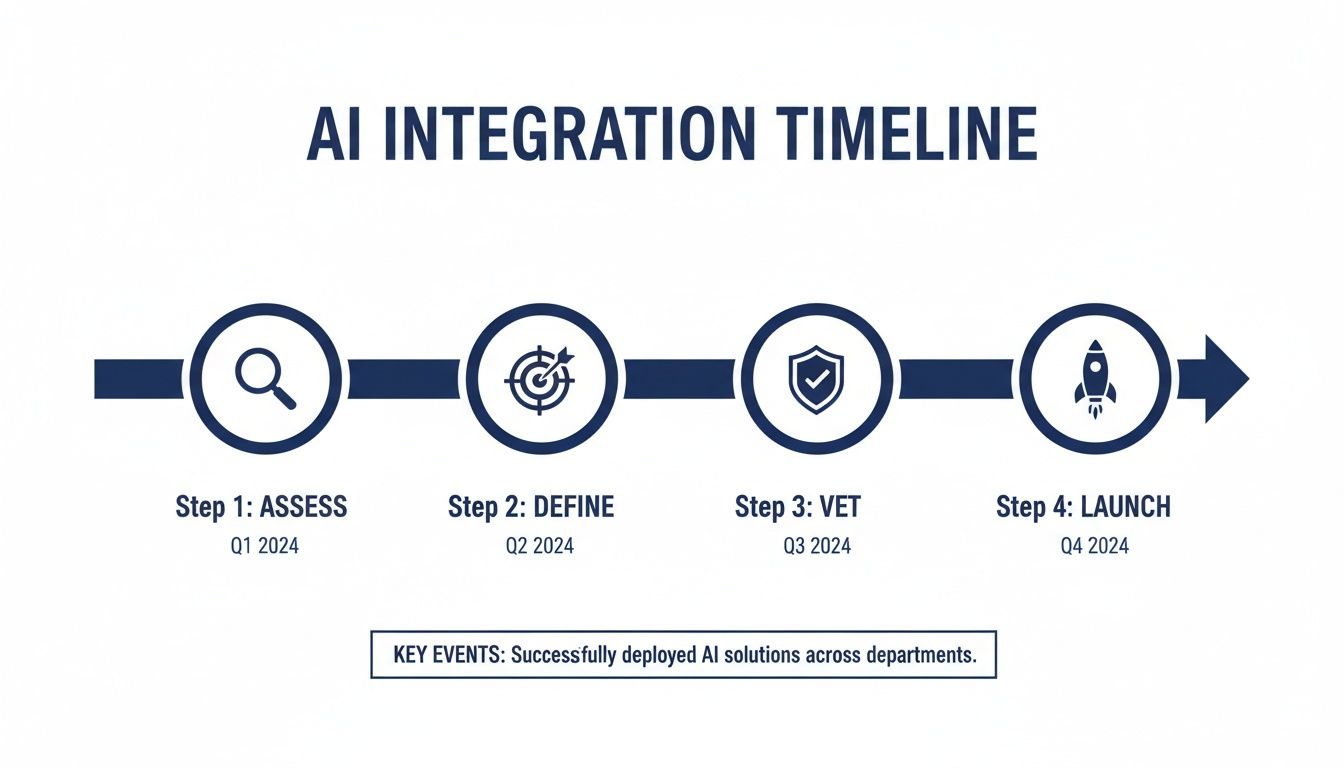
This visual roadmap lays out a deliberate, step-by-step process that helps ensure a successful and sustainable AI adoption.
Phase 3: Scaling and Training
Once your pilot program has proven itself, it’s time to start a gradual, wider rollout. The most critical part of this phase is comprehensive training. Don't just show your agents a new dashboard; explain the "why" behind the technology. Frame the AI as a powerful assistant designed to make their jobs easier and more rewarding.
Provide hands-on workshops, clear guides, and ongoing support. As more agents start using the tools, keep a close eye on your performance data. The goal is to scale thoughtfully, making sure every team member feels confident and supported as they get used to the new workflow.
The most advanced customer support agents ai is an elevation, not a replacement. New "AI coach" roles are emerging where staff handle complex issues while AI copilots suggest answers and automate notes, saving agents over two hours daily.
This evolution is already showing incredible results. Agentic AI is now capable of autonomously resolving up to 80% of routine tickets. The efficiency gains are clear, as 84% of reps report AI makes responding to tickets significantly easier. You can find more insights about the future of AI in customer support. By following this phased roadmap, you can introduce these powerful tools in a way that truly empowers your team and drives sustainable growth.
Got Questions About AI in Customer Support? We’ve Got Answers
Stepping into the world of AI always brings up a few big questions. It's smart to wonder about the real-world details—the costs, the setup time, and how it will actually affect your team day-to-day. Let's cut through the noise and get you some straightforward answers to the questions we hear most often.
How Much Does AI for Customer Support Cost?
The price tag on AI tools can swing pretty widely because it all depends on what you need them to do. Some cloud phone systems and CRMs bundle basic AI features, like call transcription, right into their standard plans. But if you’re looking for more advanced tools like real-time sentiment analysis or smart call routing, you’ll typically see pricing on a per-agent, per-month basis.
For most small businesses, you can find great entry-level solutions starting around $20 to $50 per agent, per month. Of course, enterprise systems with deep, custom integrations will cost more. The key is to start with a clear budget and pinpoint the one feature that will give you the biggest and fastest return on your investment.
How Long Does It Take to Implement?
This really comes down to the complexity of what you're trying to do. A simple, out-of-the-box integration—like flipping a switch to turn on automated call summaries in your phone system—can often be up and running in a couple of days.
A bigger project, like training a virtual agent on your company’s entire knowledge base or building custom workflows, might take a few weeks. The best way to tackle this is with a phased rollout. Start small with a pilot program, prove the value, and then expand. It’s the smoothest way to get your team on board.
Key Takeaway: A successful AI adoption isn't about a massive, overnight overhaul. It’s a series of small, manageable steps. Each step should deliver clear value before you move on to the next. This approach minimizes disruption and gets your agents excited about the new tools, not scared of them.
Will AI Replace My Human Agents?
This is the number one concern we hear, and the answer is a firm no. The best AI tools are designed to be a partner to your agents, not a replacement for them. They take on the draining, repetitive work that leads to burnout, which frees up your team to focus on what they do best: solving complex problems and building real relationships with customers.
Think of it this way: AI is great at handling the "what" (finding an order number, quoting a policy), so your agents can focus on the "why" (understanding a customer's frustration and offering a genuinely helpful, empathetic solution).
What Kind of Training Do My Agents Need?
The best training isn’t just a technical walkthrough; it’s focused on how these new tools make an agent’s job easier. Frame the training around the benefits. Show them how automated summaries mean no more tedious after-call work, or how real-time prompts help them find answers in seconds instead of minutes.
Hands-on sessions are a must. Let your agents play with the tools in a safe test environment. When they see for themselves how AI can be a helpful sidekick, they’ll gain the confidence to use it effectively.
Ready to see how a modern, AI-ready communication platform can transform your support team? SnapDial integrates powerful features into a simple cloud phone system, giving your business the tools to deliver exceptional service. Learn more about what SnapDial can do for your business.