

At its heart, a business VoIP provider is your modern-day phone company. But instead of relying on old-school copper landlines, they deliver a more powerful, flexible, and affordable phone service directly over the internet you already pay for.
This isn't just a simple tech upgrade. Moving to a cloud communication platform gives your team powerful tools like mobile apps, smart call routing, and video conferencing, all managed from a simple web portal. It's a strategic move that helps you work smarter and support a modern, distributed team.
Why Modern Businesses Are Choosing VoIP

The days of needing a dedicated server closet for a clunky PBX system are thankfully behind us. Switching from a traditional phone system to Voice over Internet Protocol (VoIP) has become a core business strategy, and for good reason—it delivers a real competitive edge that goes far beyond just a lower monthly bill.
This mass migration to the cloud is fueling some incredible market growth. The global VoIP market has exploded into a massive industry, valued at around $161.79 billion in 2025 and projected to climb to an incredible $415.20 billion by 2034. This growth is almost entirely driven by businesses of all sizes finally ditching expensive, rigid hardware for cloud solutions that let them scale on demand.
Quick Look: Legacy PBX vs. Hosted VoIP
To get a clearer picture of why this shift is happening, it helps to see the two technologies side-by-side. This table breaks down the key differences between the old way and the new way of handling business communications.
| Feature | Legacy PBX System | Hosted VoIP System |
|---|---|---|
| Initial Cost | Very high (hardware purchase & installation) | Low to none (subscription model) |
| Maintenance | Requires on-site IT staff or expensive vendor contracts | Fully managed by the provider in the cloud |
| Scalability | Difficult; requires buying new hardware and licenses | Simple; add or remove users instantly online |
| Remote Work | Not supported natively; requires complex workarounds | Fully supported with mobile and desktop apps |
| Features | Basic calling; advanced features are costly add-ons | All-inclusive (IVR, call recording, analytics, etc.) |
As you can see, the operational models are night and day. One requires you to become a phone system expert, while the other lets you focus on what you do best—running your business.
Unleashing Enterprise-Grade Power for Everyone
Not too long ago, advanced communication tools were something only giant corporations with massive budgets could afford. Hosted VoIP completely changed the game, leveling the playing field for good. Now, even a five-person startup can sound and operate like a polished, Fortune 500 company.
Suddenly, capabilities that once cost a fortune are built right in:
- Auto Attendant (IVR): Your 24/7 virtual receptionist that greets every caller professionally and routes them to the right person or department without you lifting a finger.
- Mobile & Desktop Apps: These apps transform any employee's smartphone or laptop into their office phone, letting them make and take calls on their business line from anywhere.
- Advanced Call Routing: This is the brain of the system. It intelligently directs calls based on business hours, who's available, or even where the call is coming from, ensuring you never miss an important opportunity.
- Visual Voicemail & Transcription: Get voicemails sent to your email as audio files or even as transcribed text. You can read a voicemail in seconds, which is a huge time-saver.
When you sign on with a VoIP provider, you aren't just buying a dial tone. You're investing in a communication platform that supports agility, growth, and a modern work culture. You can learn more about the nuts and bolts by reading our guide on what a cloud phone system is.
The real power of VoIP is its flexibility. A business can scale from five employees to five hundred without ever needing a technician to install a new phone line. The system grows with you, not against you.
This kind of scalability is a total game-changer. As your team expands or shifts to new locations, adding a new user is as simple as a few clicks in a web portal. This agility allows you to adapt instantly to market demands—a feat that was simply impossible with the rigid, hardware-bound phone systems of the past.
Defining Your Business Communication Needs
Before you even think about comparing VoIP providers, you have to look inward. I’ve seen countless businesses jump straight to pricing pages and feature lists, and it almost always ends the same way: they either pick a system that can’t keep up or end up paying for a bunch of shiny tools they never use.
This first step is about creating a practical blueprint for what your ideal communication setup actually looks like.
First, take a hard, honest look at your current phone system. Don’t just ask if it “works.” Pinpoint exactly where it’s failing you. Are customers complaining about getting lost in a confusing phone menu or sitting on hold forever? Are your remote employees struggling to stay connected to the main office? These frustrations are your starting point.
A great way to uncover these weak spots is to literally map out your most common call flows. How does a call from a new sales lead travel through your system from the first ring to the final conversation? What about a customer support call? Documenting the journey often reveals surprising bottlenecks you never knew you had.
Pinpointing Current Communication Breakdowns
To get the real story, you need to talk to the people on the front lines: your team. They're the ones who deal with the day-to-day headaches and can give you the most valuable insights. Don't just ask them if they like the phones; get specific.
Put together a quick survey or hold brief one-on-one chats with key people from different departments. Ask targeted questions that dig for the real problems:
- For Your Sales Team: How many calls have you missed because you were on another line or away from your desk? Is that a lead you can afford to lose?
- For Your Support Staff: How much time do you burn just trying to transfer a customer to the right person? Can you see if a colleague is actually available before you transfer the call?
- For Your Remote Workers: How easy is it to make and receive calls on your business number from home? Do you feel disconnected from the rest of the team?
- For Everyone: When you’re out of the office, how do you check your work voicemail? Is it a quick, painless process or a time-consuming chore?
The answers will quickly show you where an outdated system is holding your business back. You might discover your sales team is losing revenue to busy signals or your support staff is accidentally creating frustrated customers. This is the exact data you’ll use to guide your search.
Differentiating Must-Haves from Nice-to-Haves
Once you’ve identified your problems, you can build your requirements list. It’s absolutely critical to separate what you need from what would be nice to have. This discipline stops you from getting distracted by flashy features that don't solve your core business issues.
A "must-have" feature directly solves a problem you’ve already identified. A "nice-to-have" feature might make a process a little better, but it isn’t essential for your daily operations. Nail down the must-haves first.
For example, if your remote team is currently using their personal cell numbers for work calls (a huge no-no), a mobile app that extends their office extension to their smartphone is a must-have. But if your team rarely holds internal video meetings, a high-end video conferencing suite for 100 people is probably a nice-to-have.
Create a simple two-column list to get your thoughts organized:
| Must-Have Features | Nice-to-Have Features |
|---|---|
| Mobile app for remote workers | AI-powered call transcription |
| Auto-attendant to route calls | Integration with a project management tool |
| Call recording for training/compliance | Advanced call center analytics |
| Visual voicemail sent to email | Cloud faxing |
This simple framework turns your internal audit into an actionable checklist. It becomes the lens through which you'll evaluate every potential VoIP solution, allowing you to quickly disqualify vendors that don't meet your core needs. You'll be able to focus only on those that truly align with how your business operates. Ultimately, this process is about improving your internal and external interactions, and you can read our thoughts on how to improve business communication for more ideas.
A clear definition of your needs ensures you choose a partner that not only solves today's problems but is ready to support your growth for years to come.
Unpacking Must-Have VoIP Features for Your Team
A potential VoIP provider's feature list can feel endless. It's easy to get lost in a sea of marketing buzzwords. The key is to cut through that noise and match each tool to a real-world problem you identified in your needs assessment.
Don't get dazzled by features that sound impressive but don't actually make someone's job easier or improve a customer's experience. The right system will deliver a clear return on investment by boosting efficiency, giving your company a more professional polish, and making your team more agile.
Core Features That Build a Professional Foundation
Some features are so essential they've become the absolute baseline for any modern business. Think of these as the building blocks of a professional communication platform. They ensure you sound organized and polished from the very first ring.
An Auto Attendant—often called a virtual receptionist or IVR—is one of the most powerful tools in the box. It greets every caller with a consistent, professional message and gives them a simple menu to get to the right person or department (“Press 1 for Sales, Press 2 for Support”). This instantly frees up your team from manually transferring calls so they can focus on more important work. Even better, it guarantees no call ever goes unanswered, even after hours.
In today's world of hybrid and remote work, a solid mobile app is non-negotiable. It turns your employees' smartphones or laptops into a full-featured office extension, allowing them to make and receive calls on their business line from literally anywhere. The app displays your company's caller ID, not their personal number, which maintains a professional boundary while keeping your entire team connected and responsive.
Productivity Tools That Empower Your Team
Once you have the foundation in place, the next step is to find tools that help your team work smarter, not harder. These features are all about clawing back valuable time from small, repetitive tasks that drain energy and focus.
For example, many modern VoIP systems offer features like voicemail to text transcription. Instead of dialing in and listening to messages one by one, your team can scan a voicemail in their email inbox in just a few seconds. They can instantly prioritize what’s important and even forward the text for quick delegation. This simple change saves minutes on every single message, which adds up to hours of reclaimed time across your team.
Key Takeaway: The best VoIP features eliminate small, repetitive tasks that drain your team's time and energy. Features like Visual Voicemail and one-click call-backs from a digital call log are prime examples of how technology can streamline communication.
The productivity gains are well-documented. Businesses that switch to VoIP see massive improvements, with 91% of organizations reporting better collaboration and 72% seeing higher worker productivity. These systems also drive 30% faster response times by seamlessly integrating tools like mobile apps and user-controlled portals.
Advanced Capabilities for Sales and Support Teams
If your business has a dedicated sales or customer support team, you need to look beyond the basics and focus on call center features. These powerful tools, once reserved for massive enterprises, are now accessible to businesses of any size and are built to manage high volumes of inbound calls without breaking a sweat.
Here are the key call center features to look for:
- Smart Call Queues: Don’t just put callers on hold in silence. An intelligent queue can play custom messages, announce estimated wait times, and—most importantly—offer a queue callback option. This lets a caller hang up, keep their place in line, and get an automatic call-back when an agent is free. It’s a game-changer for customer satisfaction.
- Real-time Analytics: A manager’s dashboard gives you a live look at what’s happening. You can see how many callers are waiting, the average hold time, and which agents are active. This visibility allows supervisors to make on-the-fly adjustments to handle unexpected call spikes.
- Detailed Reporting: Go far beyond simple call logs. Advanced reports let you track everything from call outcomes and agent performance to peak call times throughout the day. This data is pure gold for scheduling staff, identifying coaching opportunities, and making your entire operation more efficient. You can dive deeper into how these systems connect with other business tools in our guide to VoIP CRM integration.
Making Sense of Pricing, Security, and Support
The sticker price for a VoIP service is often just the beginning of the story. To find a true partner among the sea of providers, you have to look past the advertised monthly rate. A great provider is transparent, secure, and supportive—qualities that don't always show up on a pricing sheet but are absolutely vital for your business.
When you dive into the fine print, you'll find that pricing models can vary dramatically. What looks like a bargain at first can get expensive fast once you account for hidden fees or charges for features you thought were standard. This is about arming yourself with the right questions to find a partner who is both reliable and crystal clear about costs.
Demystifying VoIP Pricing Models
Most business VoIP providers use a per-user, per-month subscription model. The devil, as always, is in the details. Some plans are tiered, where the cheapest option gives you only the most basic calling features. Want something like call recording or analytics? That’ll require upgrading to a more expensive package.
Another common approach is à la carte pricing. You start with a bare-bones plan and add the features you need one by one. This can feel cost-effective if your needs are minimal, but the costs can spiral out of control if you find yourself needing more tools than you first planned. Be wary of things like:
- Extra Phone Lines: Some providers charge extra for additional phone numbers or direct-dial lines, which can be a nasty surprise.
- Essential Feature Upcharges: A low base price might not include an auto-attendant or a mobile app—tools most businesses consider non-negotiable.
- Taxes and Regulatory Fees: These are unavoidable, but a good partner explains them upfront, not just tacking them on as a surprise at the end of the month.
The single most important question you can ask any potential provider is, "What is not included in this price?" This simple question forces transparency and helps you uncover potential hidden costs before you sign on the dotted line.
A truly transparent provider will offer all-inclusive pricing. With this model, one flat fee covers everything. This predictability makes budgeting a whole lot easier and removes the constant worry of getting nickel-and-dimed for every little feature you need.
Prioritizing Security and Compliance
When your business conversations move to the cloud, securing them is non-negotiable. Your phone system handles sensitive information, from customer credit card details to internal strategy discussions. A security breach could be devastating, not just financially, but to your company’s hard-earned reputation.
Start by asking about encryption. Your calls should be protected by end-to-end encryption (E2EE) and protocols like SRTP (Secure Real-time Transport Protocol). This ensures that even if a call were somehow intercepted, the audio would be scrambled and completely unreadable. The signaling data that sets up and manages the call should also be protected by TLS (Transport Layer Security).
But don't just take their word for it. Look for proof of their commitment to security. Do they conduct regular third-party security audits? Are they compliant with the industry standards that matter to your business?
- HIPAA: This is absolutely essential for any healthcare organization or business that touches protected health information (PHI).
- PCI-DSS: A must-have if your team ever processes credit card payments over the phone.
- SOC 2: This report validates a provider's internal controls over security, availability, processing integrity, confidentiality, and privacy.
A provider who takes security seriously will be happy to show you their documentation and discuss their protocols in detail. If they get evasive or dismissive, it's a major red flag.
Evaluating Support and Service Level Agreements
When your phones go down, your business effectively stops. That’s why the quality of customer support is just as important as any feature or price point. Don't just settle for a provider that offers "24/7 support"—you need to dig deeper and understand what that actually means.
There's a world of difference between standard support and a "white-glove" service. Standard support might mean submitting a ticket to a faceless online portal and waiting hours—or days—for a response. White-glove service, on the other hand, means you can speak to a real, knowledgeable person right away. This is especially critical during the initial setup and migration.
Finally, you need to scrutinize the Service Level Agreement (SLA). This is the contract that spells out the provider's commitment to you. The single most important metric in any SLA is the uptime guarantee. You should be looking for a guarantee of 99.999% uptime, often called "five nines" reliability. Anything less is a gamble for a business-critical service. The SLA should also clearly outline what happens if they fail to meet this guarantee—which should be service credits back to you. It’s your insurance policy against costly downtime.
Planning a Headache-Free VoIP Migration
Thinking about overhauling your business phone system can feel overwhelming. I get it. But a successful switch from an old, clunky setup to a modern cloud solution doesn't happen by accident—and it definitely shouldn't grind your business to a halt.
The secret is having a solid, step-by-step plan. A smooth transition is all about mapping out the journey before you take the first step. With a little forethought, you can get to day one with zero downtime, a confident team, and customers who never even notice the change.
Get Your Network Ready and Secure Your Numbers
Before you do anything else, you have to make sure your office's internet connection is ready for prime time. While a single VoIP call only sips about 100 kbps of bandwidth, call quality is extremely sensitive to network hiccups like latency (delay) and jitter (inconsistent delay). Any good VoIP provider will insist on testing your network to ensure it can deliver crystal-clear voice before you sign on the dotted line.
Next comes the single most critical logistical step: number porting. This is the regulated process of moving your existing phone numbers to the new service. Losing the numbers your customers have known for years is simply not an option.
In my experience, the biggest source of day-one stress comes from a number porting process that was rushed or mismanaged. You need to work closely with your new provider to get the paperwork submitted well in advance. Porting can take anywhere from a few days to several weeks, depending on who your old carrier is.
A great provider will take charge of this entire process for you. They’ll coordinate directly with your old carrier to ensure your numbers flip over seamlessly at the exact moment of the switch, preventing any dropped calls or dead air.
Nail the Cutover and Get Your Team On Board
Timing is everything. You’ll want to schedule the final “cutover”—the moment you officially go live on the new system—for a period of low call volume. For most companies, this means after hours on a weekday or over a weekend. This creates a buffer to test everything and iron out any surprise kinks without affecting your customers.
But a successful migration isn't just about the tech—it's about the people. Your team has to feel comfortable and capable with their new tools from the get-go. Just sending a welcome email and hoping for the best is a recipe for a rocky start.
Invest in some focused training to ensure everyone is ready.
- Hands-on Demos: Host quick, informal sessions to show staff how to use the new desk phones and, just as importantly, the mobile app.
- Cheat Sheets: Create simple, one-page guides covering the most common tasks—transferring a call, checking voicemail, setting up a conference.
- Find Your "Champions": Pick a few tech-savvy employees in different departments to be the go-to people for their colleagues' questions.
When you put a little effort into training, you turn a potentially stressful IT project into an exciting upgrade for the whole company. It ensures your team actually uses the powerful new features you’re paying for and sees the benefits in their daily work.
Your Vendor Evaluation Checklist
You’ve done the hard work internally. You know what you need, what you want, and which features will actually move the needle for your business. Now comes the tricky part: turning all that insight into a tool that helps you cut through the marketing fluff from the army of voip providers business owners have to sort through.
This isn't about just collecting brochures. It's about having structured, confident conversations to find a true partner, not just a dial tone. The right questions transform this from a guessing game into a data-backed business decision.
Creating Your Comparison Framework
Before you hop on a single sales call, build your scorecard. A simple spreadsheet is perfect for this. List the providers you're considering across the top, and list your must-have features and key questions down the side.
This simple step creates a visual way to compare vendors apples-to-apples. It quickly separates the real contenders from those who can't meet your core needs.
The migration process itself is one of the most critical areas to grill vendors on. This decision tree highlights the key checkpoints you need to ask about.
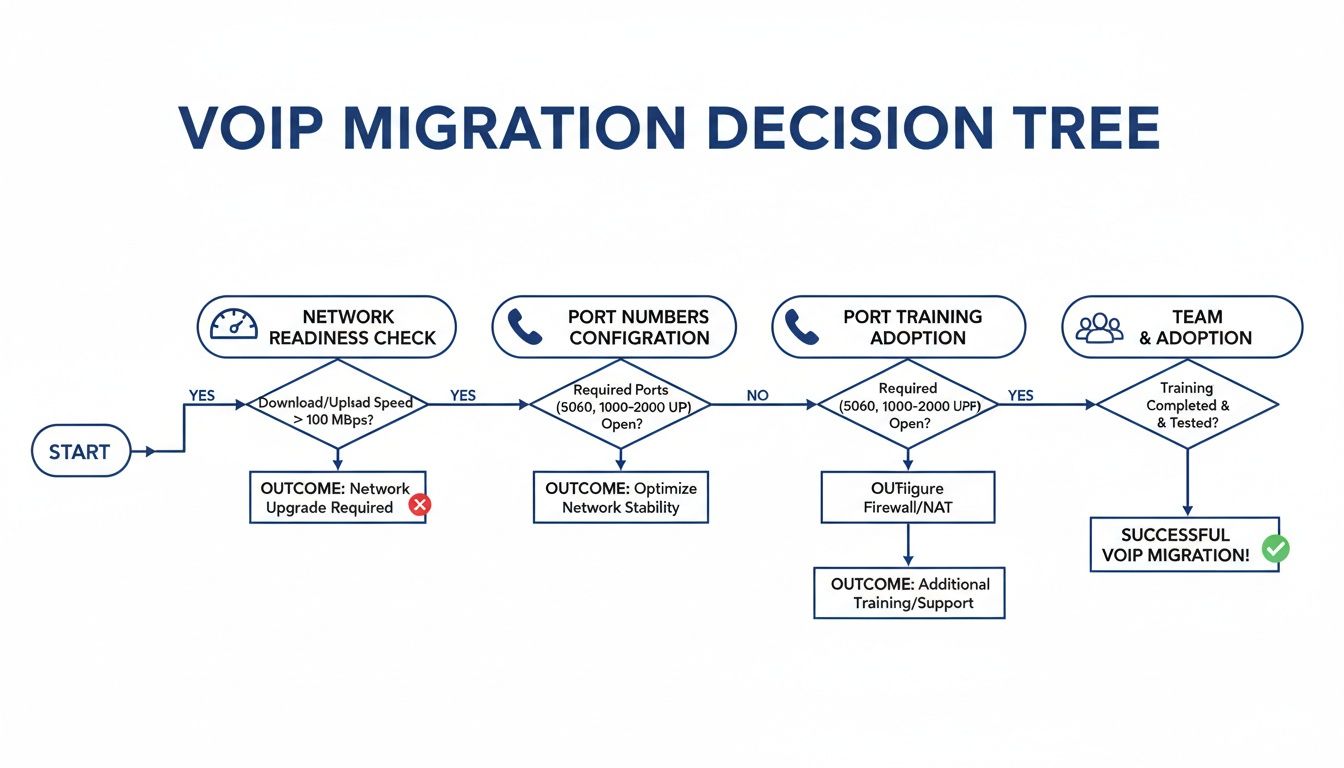
As you can see, a provider's plan for network checks, number porting, and team training is a massive part of their value. Don't let them gloss over it.
The Vendor Evaluation Checklist
Use this checklist to structure your spreadsheet and guide your calls. Don't be afraid to dig deep; a provider who welcomes detailed questions is confident in their service and their process. Vague answers, especially around security or support, are a huge red flag.
| Category | Question for Provider | Provider A Response | Provider B Response |
|---|---|---|---|
| Pricing & Transparency | Can you provide a full quote showing every single monthly charge, including all taxes and fees? What features in the demo are not in my tier? | ||
| Security & Compliance | What specific encryption (SRTP/TLS) do you use? Can you provide documentation for your HIPAA, PCI, or SOC 2 compliance? | ||
| SLA & Support | What is your guaranteed uptime percentage in the Service Level Agreement (SLA)? If I call support at 3 PM on a Tuesday, will I speak to a person? What's the process? | ||
| Migration & Onboarding | What is your exact process for number porting? Who is my dedicated point of contact? What specific training resources do you provide for my team? | ||
| Features & Functionality | How does your system handle [Your Key Feature #1, e.g., Queue Callback]? Can you demo it for me right now? | ||
| Hardware & Phones | Can I use my existing IP phones? If not, do I have to buy or rent new phones from you? What are the costs? |
By methodically filling this out for each vendor, you'll move past the slick sales pitches and feature lists. You'll be comparing them on the practical and technical points that actually matter for your long-term success.
A pro tip: It's not just about getting a "yes" or "no." Pay close attention to how they answer. Hesitation on a security question or a roundabout answer on hidden fees tells you everything you need to know.
Got Questions? We've Got Answers
Making the final call on a new phone system can feel like a big step. It's completely normal to have a few last-minute questions, even after you've done all the research. To help you feel confident in your choice, we’ve put together straightforward answers to the questions we hear most often from businesses just like yours.
Can We Keep Our Existing Business Phone Numbers?
Yes, absolutely. You don't have to give up the numbers your customers already know and trust.
The process is called number porting, and it’s a standard, regulated procedure that lets you move your current local, long-distance, and toll-free numbers to your new provider. A good partner will handle the entire porting process for you. Their job is to make sure the switch happens behind the scenes with zero downtime, so your business keeps running and your customers won't notice a thing.
What Kind of Internet Connection Do We Really Need?
For clear, reliable VoIP calls, a stable, business-class connection like fiber or cable is what you want. A single call only uses about 100 kbps of data, so the quality really depends more on low latency (delay) and minimal jitter (instability) than it does on raw speed.
The good news is that most modern business internet plans are more than enough to handle it. Before you sign anything, your provider should offer to test your network to confirm it's ready to support high-quality voice traffic.
The biggest misconception is that you need a massive, expensive internet pipe. In reality, a stable, consistent connection is far more important than sheer bandwidth for ensuring crystal-clear call quality.
Is a Cloud Phone System Hard to Manage?
Not at all. In fact, it's worlds easier than managing a traditional on-premise PBX.
Most VoIP providers give you a simple web portal where an administrator can add new users, change how calls are routed, update the auto-attendant greeting, and pull call reports with just a few clicks. This puts you in the driver's seat, eliminating the need to call (and pay) a technician every time you need a minor change. You can manage the entire system yourself, from anywhere. That's true business agility.
Ready to make the switch without the headache? SnapDial offers a complete cloud phone system with white-glove setup, transparent pricing, and 24/7 Texas-based support. See how we can simplify your business communications at snap-dial.com.