

The signs usually show up before a business owner decides to replace the phone system. Calls ring at an empty front desk while staff work from home. Customers hit a voicemail box that nobody checks quickly enough. Adding a new employee means patching together call forwarding rules, spare handsets, and sticky-note instructions. The system still works, but it stops fitting how the business operates.
That mismatch is why so many teams are reevaluating their phones now. Modern voip systems for business are not just a cheaper dial tone. They change how calls move across locations, devices, and workflows. Done well, they make a small company sound organized and reachable. Done poorly, they create jitter, dropped audio, and support headaches that owners did not bargain for.
The difference is rarely the feature list alone. It comes down to deployment choices, network readiness, and whether the provider helps you implement the system properly. That is where most first-time buyers need the most guidance.
Why Your Business Phone System Needs an Upgrade in 2026
An outdated phone system does not fail all at once. It chips away at the business in small ways.
A missed transfer sends a prospect to voicemail. A remote employee gives out a personal cell number because the desk phone cannot follow them. A second location uses a different setup, so callers get a different experience depending on which office they reach. None of this feels dramatic in the moment. Over time, it becomes a drag on sales, service, and staff coordination.
Legacy PBX setups also lock businesses into old assumptions. They assume people sit at one desk, work from one office, and handle calls through hardware that lives in a closet down the hall. That is not how most SMBs operate anymore.
The market has moved accordingly. The global VoIP services market is projected to grow from around $161 to $178.9 billion in 2025 to over $400 billion by 2034, and SMB adoption has increased by over 15% since 2019, according to Brightlio’s VoIP market statistics. That matters because it shows the shift is no longer early adoption. It is mainstream infrastructure planning.
Why staying put is its own risk
Keeping an old system often feels safer than changing it. In practice, the opposite is true.
When your phones are tied to aging hardware, every office move, staffing change, and workflow update gets harder. Even simple requests become mini projects. Route calls to a mobile device. Add a hunt group. Split inbound calls between locations. Record calls for training. None of this should require a specialist visit or hardware guesswork.
Cloud communications also fit better with how teams now combine voice, messaging, apps, and mobile access. If you are still evaluating whether that broader shift matters, this overview of the key advantages of unified communications is a useful reference point.
Practical takeaway: If your current system makes common changes slow, expensive, or dependent on one person who “knows the phones,” you are already paying the upgrade cost. You are just paying it in friction instead of invoices.
A phone upgrade in 2026 is less about replacing handsets and more about removing operational bottlenecks. That is why cloud VoIP has become the default path for most growing businesses.
Understanding Business VoIP The Core Technology
Traditional phone service reserves a dedicated path for every call. Imagine hiring a private courier to drive one envelope from one office to another, even when nobody is speaking for part of the trip.
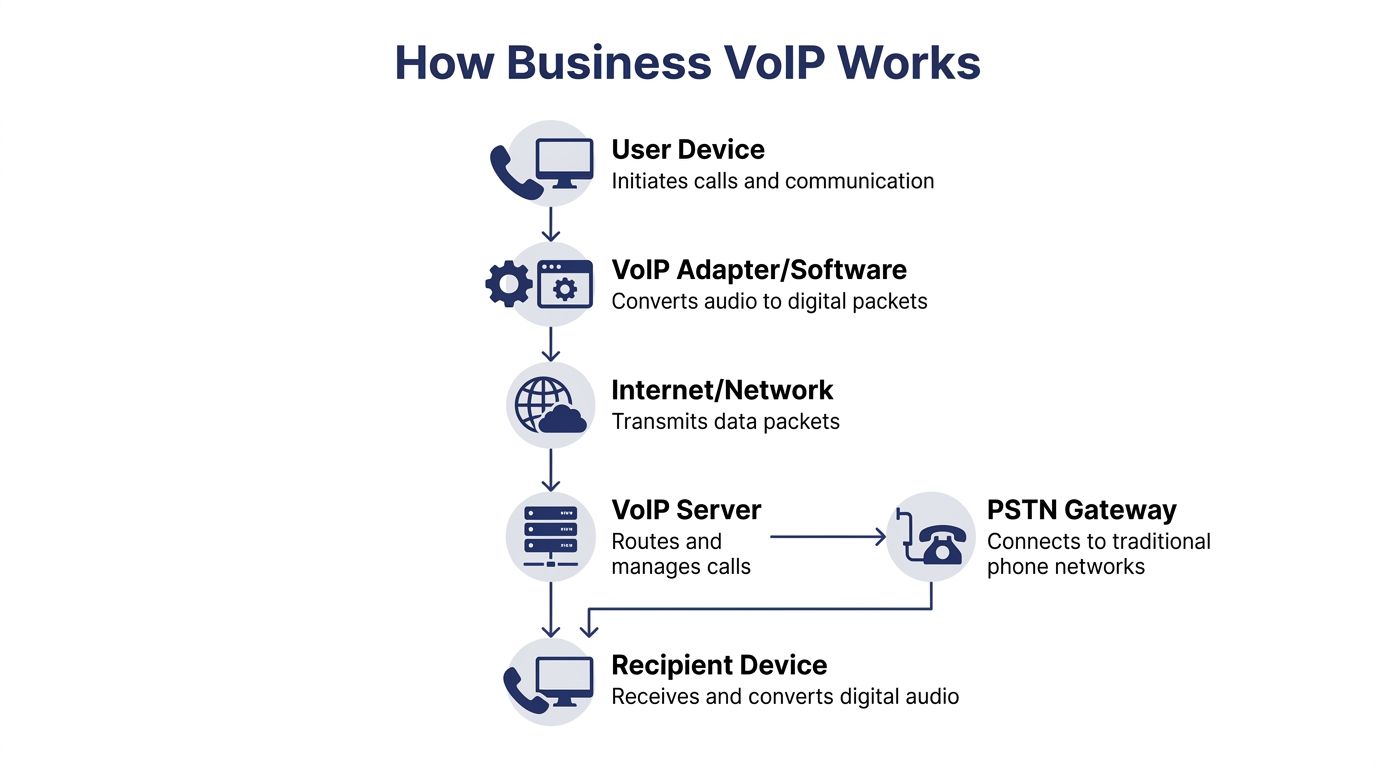
VoIP works differently. It takes your voice, converts it into digital packets, sends those packets across your internet connection, and rebuilds the audio almost instantly on the other end. It is closer to a parcel network than a private courier. The system uses shared infrastructure far more efficiently.
Why packet switching matters
This design is a big reason businesses move off landlines. VoIP systems can generate 30 to 50% cost savings over traditional landlines because packet-switched networks do not keep transmitting full call bandwidth during silence, and about 50% of a voice conversation is silence. That explanation comes from Intelecom’s breakdown of business VoIP efficiency.
That sounds technical, but the business meaning is simple. You stop paying for a communications model built around waste.
The core pieces you will hear about
Most buyers do not need to become telephony engineers. They do need to understand a few terms that vendors throw around.
- SIP: The signaling method that helps start, manage, and end calls.
- Codecs: The methods used to compress and deliver audio. The codec affects quality, bandwidth use, and resilience.
- RTP: The part that carries live audio in real time once the call is active.
- Softphones: Apps on laptops or smartphones that work like business desk phones.
- Gateways: Bridges that connect internet-based calling to traditional phone networks when needed.
If you remember one thing, remember this: VoIP is not “phone service, but online.” It is a different delivery model with different strengths and different failure points.
What changes for your business
With old systems, location drove the setup. With VoIP, identity drives the setup.
Your phone number, extension, call routing, voicemail, and permissions follow the user. An employee can answer from a desk phone, desktop app, or mobile app without customers needing to know where they are physically sitting. That is a major operational shift for firms with field staff, hybrid teams, or more than one office.
A few practical examples:
- A front office can route overflow calls to another location without exposing separate numbers.
- A salesperson can call from a mobile app while still presenting the main business number.
- A service team can share queues instead of relying on whichever desk phone happens to ring first.
Key point: The technology matters because it changes what is easy. Good systems make mobility, routing, and administration routine instead of improvised.
That is why businesses that switch successfully rarely go back. Once the phone system behaves like software instead of fixed wiring, day-to-day operations become much easier to manage.
Beyond Dial Tone Core and Advanced VoIP Features
A buyer’s mistake is to compare VoIP systems for business by counting features. Nearly every provider claims auto attendants, voicemail, and mobile access. The better question is which features solve today’s pain, and which ones will matter once the business grows.

Foundational essentials
These are the tools most companies should treat as baseline requirements, not premium add-ons.
Auto attendant and call routing
A good auto attendant does more than greet callers. It sends people to the right team without relying on one receptionist or one extension list taped to the wall.
What works is simple routing with a clear after-hours rule set. What does not work is a maze of menu trees that sounds impressive internally and irritates customers externally.
Visual voicemail and transcription
Voicemail is still useful. The old habit of checking it from a desk phone is not.
Visual voicemail with email delivery and transcription helps teams triage faster, especially when managers spend the day away from a handset. If your current setup hides messages inside a device, follow-up will lag.
Mobile and desktop apps
Many businesses experience the upgrade's impact first here. Staff can place and answer business calls from a laptop or mobile phone while keeping their professional caller ID.
That helps remote work, but it also helps ordinary business movement. Owners walking a warehouse, clinicians moving between rooms, and managers traveling between sites all benefit from not being tethered to one desk.
Call forwarding and ring groups
These are basic, but they have to be easy to manage. If nobody on your team can change routing without opening a support ticket, the feature exists on paper only.
Advanced growth engines
As call volume rises, feature priorities change. The focus moves from reachability to control, visibility, and throughput.
- Call queues: Better than hunt groups for sales and service teams because they manage volume intentionally.
- Queue callback: Lets callers keep their place without waiting on hold. That improves the experience during spikes.
- Real-time dashboards: Supervisors can see queue conditions and respond before callers stack up.
- CRM integrations: Useful when call handling depends on account history, notes, or ticket context.
- Call recording: Important for training, dispute review, and process consistency.
- Reporting tools: Necessary if you want to improve staffing or routing based on actual behavior rather than guesswork.
Matching features to maturity
A five-person office does not need the same setup as a support team or multi-site operation. Buyers get into trouble when they purchase either too little or too much.
A simple approach:
| Business stage | Features that matter most |
|---|---|
| Early small business | Auto attendant, voicemail transcription, mobile app, call forwarding |
| Growing office | Ring groups, call recording, user management portal, shared inbox habits |
| Service-heavy team | Queues, reporting, queue callback, supervisor visibility |
| Multi-location company | Centralized routing, consistent caller ID, role-based administration |
Tip: Buy for the next stage of the business, not just the current headcount. Replacing a weak system twice is more disruptive than buying a system with room to grow.
The strongest feature stack is the one your team will use. A shorter list, implemented well, usually outperforms a bloated system full of neglected options.
Choosing Your Deployment Model Hosted Cloud vs On-Premise
This is the first decision that narrows the field. Do you want the phone system hosted in the cloud by a provider, or installed on your own equipment and managed in-house?
For most SMBs, the answer is straightforward. Hosted cloud is the practical default. On-premise still has a place, but that place is narrower than many buyers assume.
If you need a refresher on the underlying terminology, this overview of what a PBX system is helps frame the difference.
Hosted Cloud VoIP vs On-Premise VoIP Comparison
| Factor | Hosted Cloud VoIP | On-Premise VoIP |
|---|---|---|
| Upfront cost | Lower upfront commitment, usually subscription-based | Higher upfront spend on hardware and implementation |
| Maintenance | Provider handles core platform updates and system management | Your team or contractor maintains the PBX environment |
| Scalability | Adding users, locations, and features is usually straightforward | Expansion can require more equipment, configuration, and planning |
| Remote work fit | Strong fit for hybrid and mobile teams | Often possible, but usually more complex to support cleanly |
| Control | Less direct infrastructure control | More direct control over system configuration and environment |
| IT burden | Lower day-to-day burden on internal staff | Higher reliance on in-house telecom or IT skill |
| Business continuity | Provider-managed redundancy can help, but internet and power still matter | You control local setup, but local failures can hit hard without planning |
| Best fit | Most SMBs, multi-location firms, lean IT teams | Businesses with special control needs and capable IT support |
Why cloud wins for most businesses
Hosted systems remove a major operational burden. You are not buying telephony gear and then hoping someone on staff can maintain it for years. You are buying managed service, user access, and administration tools.
That matters more than many first-time buyers realize. Phone systems are rarely strategic enough to justify heavy in-house maintenance, but they are mission-critical enough to create pain when neglected.
When on-premise still makes sense
There are legitimate reasons to keep more control.
Some organizations want local infrastructure because of policy, internal standards, or a specialized integration environment. Others already have staff who can administer telephony confidently and prefer managing the stack directly.
The trade-off is clear. More control usually means more responsibility. If that responsibility lands on a general IT manager who already handles everything else, the system tends to age poorly.
Practical rule: If your business does not already have the people and appetite to manage telephony infrastructure, do not choose on-premise because it sounds more “professional.” Choose the model your team can run well.
Cloud systems are not magic. They still depend on internet quality, good implementation, and sensible policy choices. But for the average business replacing a legacy PBX, hosted VoIP is the cleaner, lower-friction path.
A Practical Guide to VoIP Implementation and Migration
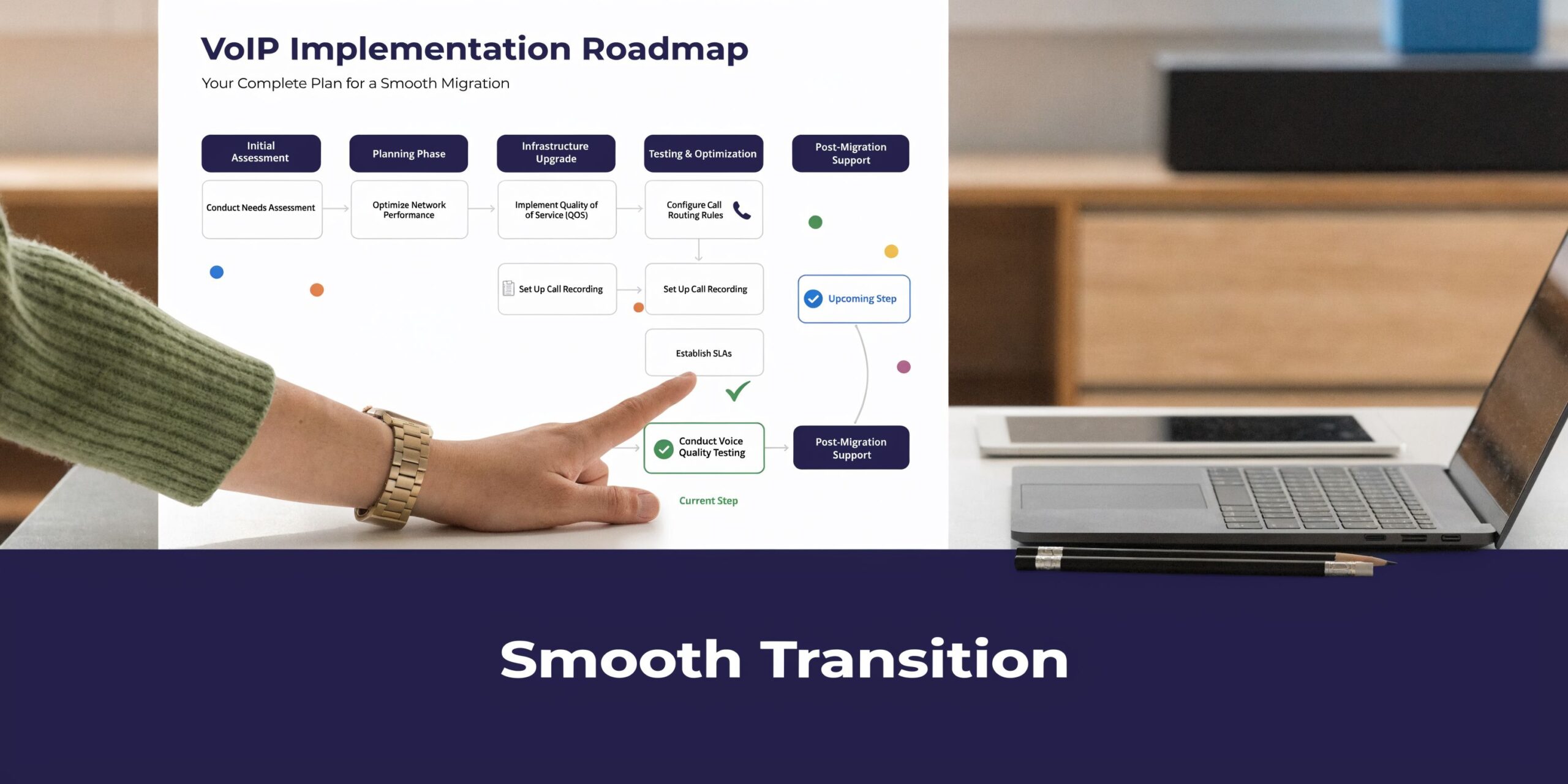
Most VoIP rollouts succeed or fail before the first call goes live. The mistake is treating migration like a phone purchase. It is a network project, a workflow project, and a change-management project at the same time.
Step 1 starts with the network, not the phones
Before choosing handsets or recording greetings, test whether your connection can support voice consistently.
For reliable VoIP, businesses should aim for jitter below 30ms, packet loss under 1%, and a MOS above 4.0 to avoid echo and dropouts. Prioritizing voice traffic with QoS can prevent these issues, which can increase agent handling time by 20 to 30%, according to Simplicity VoIP’s guidance on business VoIP performance.
Those numbers matter because poor quality rarely shows up as a total outage. It shows up as people talking over each other, clipped audio, and callers asking staff to repeat themselves.
If you are unsure what your current connection can handle, use a practical bandwidth planning reference like this guide to how much bandwidth you need for VoIP.
Step 2 maps call flows before migration day
Do not rebuild your old system exactly as it exists.
List how calls should move in the new environment:
- Main number handling: Who answers first, and what happens after hours?
- Department routing: Which teams need direct options versus shared queues?
- Failover rules: Where should calls go if someone does not answer?
- Remote access: Which users need desk phones, apps, or both?
This is the point where many businesses discover that their current setup contains years of accumulated workarounds. Migration is the right time to remove them.
Tip: The cleanest implementation comes from redesigning around current operations, not preserving every historical extension and transfer habit.
Step 3 handles porting, devices, and training
Number porting is routine, but it needs planning. Billing records, authorized contacts, and carrier details need to match. Delays usually come from administrative mismatches, not technical impossibility.
Then comes device planning. Some users need a physical desk phone. Others are better served by a softphone and mobile app. Reception desks, executives, warehouse staff, and remote workers rarely need the same hardware profile.
Training should be brief and role-specific. A receptionist needs transfer, hold, park, and directory confidence. A manager may need voicemail, mobile use, and recordings. A call queue agent needs a different workflow entirely.
A short explainer can help teams visualize the migration path before rollout:
Step 4 uses a staged cutover
Full cutovers can work, but many SMBs benefit from phased activation.
Start with internal testing, then pilot a small user group, then move main call paths once routing, voicemail, and app behavior look right. This limits surprises and gives your team time to catch issues with call handling, not solely line registration.
The businesses that have the smoothest migrations usually do three things well. They validate the network early, simplify call flows before porting, and train by role instead of dropping a user manual on everyone’s desk.
Recommended VoIP Setups for Different Business Needs
Monday opens with three missed calls from patients, two sales calls that rang out at the wrong branch, and a remote employee taking customer calls over unstable home Wi-Fi. That is usually the point when a business owner realizes a phone system problem is not a phone problem. It is a call flow, device, and network problem.
The right setup depends less on industry labels and more on call patterns, staffing, and how much day-to-day administration your team can realistically handle. A 12-person medical office, a 12-person law firm, and a 12-person property manager can need very different voip systems for business because their call pressure points are different.

Small business or startup
Small teams usually need a system that sounds organized without creating admin work they cannot support.
A hosted setup is usually the right starting point. Use one main number, a short auto attendant, voicemail transcription, mobile app access, and a few ring groups. Keep the call path simple so callers reach a person fast. Long menus make a five-person company sound harder to do business with, not larger.
Good fit:
- Shared main number with basic routing
- Mobile and desktop calling for owners and staff
- Simple admin changes handled in-house
Poor fit:
- Queue logic built for a service center
- Desk phones assigned by title instead of actual work style
Multi-location company
Multi-site businesses need consistency more than complexity.
Customers should hear the same brand voice no matter which office answers. Standardize greetings, extension patterns, business hours, caller ID, and after-hours routing across every location. Then check the network at each site before rollout. I have seen otherwise solid cloud deployments get blamed for poor call quality when the actual issue was one branch running voice traffic across congested internet circuits with no QoS policy in place.
A cloud platform such as SnapDial can fit this model because it puts cloud PBX, mobile calling, call routing, visual voicemail, and a self-service portal under one hosted system. For a business without a network engineer at every office, that is usually easier to manage than separate local PBXs and site-by-site carrier coordination.
Support desk or call-heavy team
Once calls drive revenue or service delivery, basic ring groups stop being enough.
Use queues, supervisor views, call recording, reporting, and callback options. Those tools affect staffing decisions in real time, which means they affect wait times and customer experience directly. This is also where implementation discipline matters. Queue design, timeout rules, overflow routing, and headset quality will have more impact on results than a long feature list on a pricing page.
A common mistake is forcing a support desk onto the same setup used for a front desk. That usually leads to uneven call distribution, weak visibility, and frustrated callers.
Key takeaway: If your team lives on the phone, build around queues, reporting, and call quality controls from the start.
Remote or hybrid workforce
Remote teams need flexibility, but they also need standards.
Softphones, mobile apps, business caller ID, and clean handoff between devices matter more than giving everyone a desk phone. Standardize approved headsets, define where staff should take calls, and test home internet quality for employees who spend large parts of the day on voice. Cloud VoIP works well for distributed teams, but poor local Wi-Fi, overloaded consumer routers, and cheap audio gear still show up in every customer conversation.
Set clear operating rules too. Decide which users need recording, how voicemail transcription should be handled, when calls should ring the mobile app, and what happens after hours.
Regulated office environments
Healthcare, finance, and legal firms need configuration discipline, not vague security claims.
Ask providers to explain support for HIPAA or PCI DSS in operational terms. Focus on recordings, retention, user permissions, device policies, audit controls, and how sensitive calls are handled in desktop and mobile apps. In regulated environments, the wrong default setting can create more risk than the phone system itself.
For most SMBs in this category, cloud still makes more sense than maintaining on-premise infrastructure. The trade-off is vendor scrutiny. You need a provider that can explain exactly how the service is configured, supported, and governed in day-to-day use.
Evaluating VoIP Providers Your Checklist and Key Questions
A business usually starts shopping for a new phone system after a failure that customers noticed. Calls dropped during a busy hour. A port stalled and the old carrier shut service off first. Remote staff could place calls, but audio broke up because nobody checked Wi-Fi coverage, headset quality, or router settings. Those problems rarely come from the feature list. They come from weak implementation, weak support, and a provider that treats deployment like account setup.
Provider evaluation should focus on operational fit. The right vendor helps you avoid bad call quality, messy call routing, and support gaps before go-live. For SMBs without an in-house network engineer, that matters more than whether one plan includes three more minor features than another.
Your shortlist checklist
Use this to narrow the field.
- Deployment fit: Does the platform match your need for cloud simplicity or in-house control?
- Call quality discipline: Can the provider explain network readiness, QoS, Wi-Fi limits, and troubleshooting in plain language?
- Admin usability: Can an office manager or IT generalist handle routine changes without opening a ticket every time?
- Mobility: Do the mobile and desktop apps hold up in day-to-day use, not just in a polished demo?
- Queue maturity: If you run sales or service teams, are queues, routing rules, and reporting built in and usable?
- Migration support: Will the provider own the porting timeline, user setup, device prep, and cutover plan?
- Compliance clarity: If you work in healthcare, finance, or legal, can they explain HIPAA or PCI DSS support in workflow terms?
- Support model: Who answers when service degrades, what is the escalation path, and how fast do they respond?
Questions to understand providers
Ask these early. Good vendors answer directly and with specifics.
How do you handle onboarding and number porting?
Look for a documented process, named ownership, and clear status updates. Porting problems are common, and vague reassurance is a warning sign.What happens if our internet degrades but does not fully fail?
This question separates providers that understand voice traffic from providers that only sell seats. Packet loss, jitter, and saturated uplinks cause more day-to-day pain than a total outage.Who helps us design call flows before launch?
Bad routing creates missed calls, voicemail loops, and angry staff. Someone should review ring groups, overflow rules, holiday schedules, and after-hours handling before the switch goes live.How are mobile users supported without mixing personal and business calling?
Hybrid teams and field staff need a clean answer here. Business caller ID, app reliability, and device policy all matter.What administrative tasks can we handle ourselves?
Ask what can be changed in the portal versus what requires support. Hunt groups, auto attendants, user permissions, and number assignments should not become billing events.How do you support regulated environments?
Ask for concrete examples tied to recordings, retention settings, user roles, and app controls. General security language is not enough.What is included in the price, and what triggers extra charges?
Extra costs often appear in hardware, implementation scope, recording storage, contact center functions, and international calling.
Cost and ROI without wishful thinking
A phone system pays for itself through fewer missed calls, faster call handling, less admin friction, and fewer support escalations. The savings from cloud VoIP can be meaningful because you avoid buying and maintaining PBX hardware, but cost alone is a weak buying filter if the rollout is sloppy or call quality is inconsistent.
I tell buyers to treat the vendor conversation like an operations review. Ask how they validate network readiness. Ask who owns the porting schedule. Ask what happens during cutover day if one location has poor audio or a firewall issue. If the answers stay high level, expect problems later.
Practical advice: The best provider is the one that can explain trade-offs clearly before the contract is signed.
If you are comparing hosted options, SnapDial is worth a look for businesses that want a cloud PBX with white-glove setup, predictable pricing, and managed support rather than a self-assembled phone stack. It is a practical fit for teams replacing legacy systems, especially when mobile calling, call routing, voicemail transcription, and queue tools need to work together without a heavy in-house telecom burden.