

If you are shopping for business VoIP service providers right now, you are not doing it for fun. A phone system gets attention when something breaks operationally. Calls ring to the wrong person. Remote staff use personal cells. A second location opens and nobody wants another patchwork setup. Finance sees one monthly bill. Operations sees five workarounds behind it.
That is why a provider comparison should start with business fit, not feature count. The right system reduces missed calls, cleans up routing, supports mobile work, and stays predictable as you add users, numbers, and locations. The wrong one looks affordable on the pricing page, then gets messy once your team depends on it.
| Provider | Best fit | Key strength | Main trade-off | Pricing visibility | Notable differentiator |
|---|---|---|---|---|---|
| SnapDial | SMBs replacing legacy PBX, multi-location teams, support-heavy buyers | White-glove setup, predictable packaging, call handling features | Less brand recognition than larger vendors | More straightforward, all-inclusive positioning | Queue management, callback, cloud fax, admin portal |
| RingCentral | Businesses needing deep app connectivity | 300+ integrations and strong analytics (arphost.com) | Tiering can push needed features upmarket | Public starting plans exist, but advanced needs can add cost | Broad ecosystem fit |
| Nextiva | Teams wanting bundled communications and support-oriented deployment | Visual call flow and 24/7 support positioning | Important details may require a sales conversation | Less transparent than buyers often want | Good fit for buyers who want bundled CX tooling |
| Dialpad | Teams that value AI-driven call workflows | AI coaching, transcription, device switching (arphost.com) | Some functionality depends on higher plans | Public plan structure, but watch minimums and upgrades | Strong modern agent experience |
| AVOXI | Global operations and distributed call flows | 99.995% uptime SLA and 150+ countries coverage (arphost.com) | More specialized than a simple SMB phone replacement | Quote-driven for many buyers | International reach |
Why Choosing a VoIP Provider is a Critical IT Decision
A common pattern looks like this. A growing company keeps its old phone system because replacing it feels disruptive. Then a salesperson works from home and misses calls tied to a desk phone. The front office cannot see who picked up a voicemail. A customer calls one location while the right person sits in another. Nobody notices the phone system has become an operating constraint until customers feel it.

That is why the move is larger than a phone upgrade. It is an IT decision that touches sales response time, customer support coverage, remote work, and day-to-day administration. If your team needs a plain-language refresher on how modern cloud calling works, this overview of a cloud phone system is a useful starting point.
The market shift confirms what most business owners feel on the ground. The global VoIP market is projected to reach USD 161.79 billion in 2025 and is projected to surpass USD 415.20 billion by 2034, with over 60% of businesses already having switched and citing 50-75% cost savings over traditional services, according to Speedflow’s VoIP industry review.
Why legacy systems fail growing teams
Legacy phone environments break in the same places:
- Remote access is awkward: Staff end up forwarding desk phones to personal numbers or juggling separate apps.
- Routing is brittle: One receptionist or one hunt group becomes the single point of failure.
- Changes take too long: Adding users, adjusting hours, or updating call flow turns into a ticket instead of a quick admin task.
- Reporting is weak: Managers know calls were missed, but not where or why.
A phone system affects revenue faster than many IT tools because customers notice failure immediately.
Business consequences
Missed calls are not just a telecom issue. They become slower sales follow-up, poorer service coverage, and a harder time supporting hybrid staff. Choosing among business voip service providers is really a decision about how reachable your business stays when schedules, locations, and call volumes change.
How to Evaluate Business VoIP Service Providers
At 9:05 on a Monday, the true test starts. Sales is taking inbound calls, the front desk is routing overflow, a manager wants yesterday’s missed-call report, and a remote employee cannot get the desktop app to register. That is the moment a provider proves whether it fits your business or only looked good in a demo.
Feature grids help with a shortlist. They do not tell you how hard the system is to run, how much support you will need after go-live, or how the provider behaves when call volume spikes and something breaks. For a growing SMB, those operational details matter as much as the feature list.
Start with reliability and call quality
Call quality problems show up as lost revenue and frustrated staff long before anyone opens a ticket. Providers should be able to explain how they monitor uptime, packet loss, jitter, and voice quality, and they should give admins some visibility into those metrics. AIS outlines the key voice quality benchmarks businesses should ask about in its guide to top VoIP quality metrics.
The practical question is simple. Can the provider show you how they catch and isolate problems, or do they ask you to trust broad promises?
Look past hosted versus on-prem labels
A lot of buying confusion starts with terminology. Hosted VoIP, cloud PBX, and business phone service often overlap. The core decision is who owns the day-to-day work: updates, routing changes, failover planning, user setup, and support.
If you are still deciding which operating model fits your team, this comparison of hosted VoIP vs PBX explains the trade-offs in business terms.
Evaluate support like you would any managed service
For many SMBs, support quality shapes the experience more than the app interface. Telecom is one of those categories where a decent platform with strong support often creates less disruption than a polished platform with weak follow-through.
The same vendor discipline used for outsourced IT applies here. This guide on how to choose a managed service provider is a useful parallel because it pushes buyers to assess responsiveness, accountability, and scope before signing.
Seven areas worth scoring
Reliability in writing
Ask for the SLA. Then ask what you can see in the admin portal.
Good providers expose service status, call logs, and quality indicators. Weak providers rely on sales language and give admins very little visibility once the system is live.
Security and compliance fit
Security is more than encrypted calling. Check role-based permissions, recording controls, retention settings, and account recovery procedures. Businesses in healthcare, finance, legal, and field services should also ask whether the provider’s setup matches their compliance process and continuity requirements.
A provider can be technically capable and still be a poor operational fit for your industry.
Call handling depth
Basic auto-attendants are enough for some offices. Others need queues, ring groups, schedule-based routing, callback options, overflow rules, and supervisor views.
Many SMBs underbuy at this stage. A system that works for a ten-person office can become awkward fast when one location turns into three teams with different hours and call volumes.
Mobile and remote usability
Mobile apps and desktop apps need hands-on testing. Check answering, transferring, voicemail playback, device switching, and login stability. If staff move between desk phones, laptops, and mobile devices, even small friction points create workarounds that managers never planned for.
That raises support load and slows response times.
Admin simplicity
A long feature list does not mean the system is easy to manage. During the demo, ask the provider to perform routine tasks live:
- Add a user
- Change business hours
- Update call routing
- Pull a report
- Review recordings or voicemail
If those tasks require multiple menus, vendor intervention, or a support ticket, your internal admin cost will be higher than the monthly price suggests.
Integration value
Integrations matter when they remove repeated manual work. CRM screen pops, call logging, and helpdesk syncing can save real time for sales and service teams. But extra integrations only pay off if your staff will use them and if setup stays manageable.
Ask which integrations are included, which require a higher plan, and who supports them when they fail. That answer affects both adoption and total cost of ownership.
Support quality under pressure
Support promises are easy to make during procurement. The better test is to ask how the provider handles difficult days:
- Who answers after hours
- How are ports and cutovers managed
- What happens during a bad rollout day
- Can you reach a person who can fix routing
A smooth demo does not predict a smooth migration. Judge providers by how they handle change, not just how they sell.
What works and what usually does not
The strongest evaluation process is a weighted scorecard based on your actual workflow. Include reception coverage, remote use, reporting needs, compliance requirements, billing clarity, and the amount of admin effort your team can realistically absorb. Have the people who answer calls every day test the system. They usually spot friction faster than the buying committee.
What fails is choosing from a generic “best provider” list and assuming the lowest advertised price or longest feature list will hold up as your company grows. Business voip service providers can look similar in marketing. They feel very different once your office manager has to maintain them every week, train new users, and explain the invoice to finance.
Analyzing the True Cost of Ownership for VoIP Services
The monthly per-user number on a pricing page is the least useful part of the buying process. It helps with a quick shortlist. It does not tell you total cost of ownership.
A key question is what happens when your company grows, adds phone numbers, needs recording, wants CRM integration, or opens another site. That is where many otherwise solid platforms become expensive or annoying to operate.
Where VoIP bills usually expand
Some providers keep the base price low and monetize the edges. That model is not always wrong, but it creates planning risk for SMBs.
According to Quo’s provider roundup, hidden costs can cause expenses to “spiral out of control”, with examples such as $9 per month for each additional number and providers like Vonage starting low but adding taxes and fees that are not clear up front. The same source notes that these charges can erode the promised 45-75% savings over traditional systems (Quo).
That matters because scaling rarely happens in a straight line. A team adds one new department number, then a backup line, then a toll-free number, then recording, then another admin user who needs reporting. Each decision looks small by itself.
TCO questions that expose the truth
When reviewing business voip service providers, ask for a sample bill based on your likely operating model, not just your current headcount.
Use questions like these:
- How are extra local and toll-free numbers billed
- Are taxes and fees estimated before contract
- Which features require plan upgrades
- Do integrations sit behind a higher tier
- Is call recording included or limited
- Are there seat minimums on certain plans
- What changes when we add a second location
- What support is included during rollout
A better way to compare providers
Do not compare “price per user.” Compare “price for our actual workflow.”
A simple SMB model might include front-desk routing, a shared support queue, mobile access for managers, voicemail transcription, one or two recordings policies, and a few extra numbers. If a provider needs multiple plan jumps to support that setup, the cheap base plan is irrelevant.
What transparent pricing looks like
Transparent pricing does not always mean lowest price. It means fewer surprises. Buyers should be able to tell, before signing, how costs change when they add users, locations, call handling needs, and numbers.
If finance cannot model the bill for the next phase of growth, the pricing is not transparent enough.
Operational fit and cost fit overlap in this scenario. A provider can be feature-rich and still be a poor TCO choice for an SMB if routine scaling events trigger repeated add-ons, support charges, or plan changes.
A Detailed Comparison of Leading VoIP Providers
A growing business usually feels the provider difference after signing, not during the demo. One system looks affordable until the second location opens, the support queue needs reporting, and the mobile app rollout turns into an internal IT project. Another costs more on paper but takes less staff time to deploy and maintain.
That is the right lens for a provider comparison. Feature lists matter, but operational fit and long-term cost matter more.
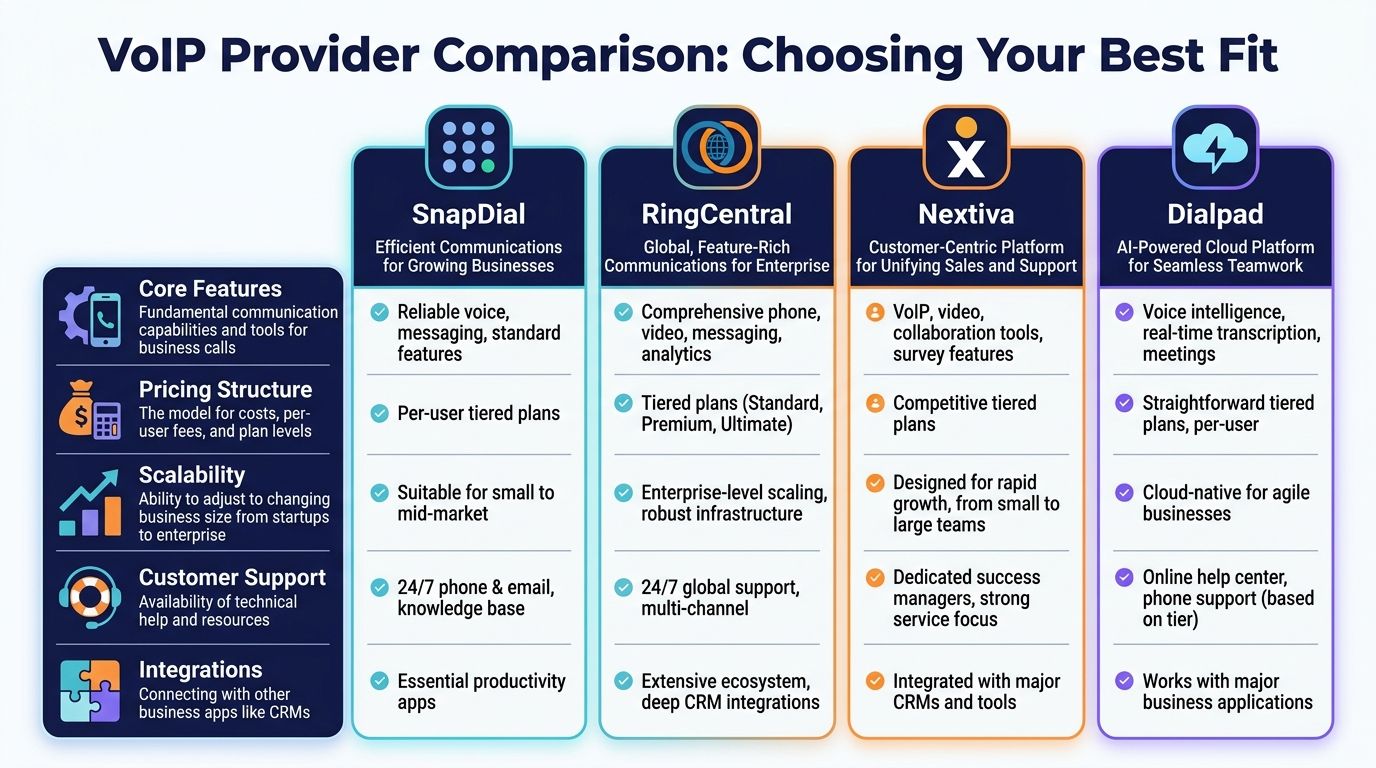
Quick comparison of provider fit
| Provider | Reliability and scale | Features that stand out | TCO risk to watch | Ideal buyer |
|---|---|---|---|---|
| SnapDial | Built for cloud PBX replacement and ongoing admin simplicity | Auto attendant, call recording, mobile apps, queue management, callback, cloud fax | Need to confirm fit if you require an unusually large app ecosystem | SMBs replacing PBX and wanting managed rollout |
| RingCentral | Strong enterprise-style platform breadth | Integrations, analytics, multi-level IVR, queues | Feature access may depend on plan tier | Businesses with CRM-heavy workflows |
| Nextiva | Broad bundled communications approach | Visual call flow, support-oriented setup, unified app experience | Public pricing detail can be less direct | Teams wanting one vendor for more of CX stack |
| Dialpad | Modern agent and AI workflow experience | Real-time coaching, transcription, device switching | Some buyers outgrow lower tiers quickly | Sales and support teams focused on conversation workflow |
| AVOXI | Strong global footprint | International coverage, routing, CRM integrations | May be more than a domestic SMB needs | Distributed or international operations |
SnapDial
For a business replacing an aging PBX, SnapDial fits the buyer who wants a working phone system without turning the migration into a side job for the office manager or IT generalist. The platform includes hosted voice, setup support, mobile apps, call routing, call recording, voicemail transcription, queue management, callback, cloud fax, and a self-service admin portal.
A key advantage is lower operating friction. Teams with limited IT bandwidth usually care less about how many settings exist in theory and more about whether numbers port cleanly, routing is built correctly, and everyday changes do not require support tickets.
Strong fit for SMBs that want to modernize calling and keep rollout overhead under control.
The trade-off is straightforward. Buyers who prioritize a huge third-party app marketplace above all else may compare it against larger ecosystem vendors first.
RingCentral
RingCentral stays on many shortlists because it covers a wide range of use cases, from standard office calling to more layered routing and reporting needs. It is often a practical fit for companies that already run core work inside CRM, helpdesk, and productivity platforms and want those systems connected to calling activity.
That breadth can support growth well, but it can also raise the true monthly cost if the features your team needs sit in a higher plan tier. I usually tell buyers to test the exact workflow, not the brand promise. If sales, support, and front-desk staff all need different capabilities, packaging matters as much as the product itself.
Analysts at Arphost note RingCentral's large integration catalog and also cite AVOXI's international coverage and uptime positioning. Data for both RingCentral and AVOXI from Arphost.
Best fit for businesses that will use the integration depth and analytics, not just admire them during procurement.
Nextiva
Nextiva appeals to teams that want a broader communications relationship, not just a dial tone replacement. The platform is often considered by buyers who value guided setup, a unified app experience, and tools that extend beyond basic voice service.
From a TCO standpoint, the main question is pricing clarity. Some companies are comfortable working through a sales process to map the right package. Others need clean forecasting before they involve procurement or finance. If your business falls into the second group, ask for a written breakdown of what changes when you add users, locations, recordings, and integrations.
That extra step matters. A provider can be operationally solid and still create budgeting friction if the packaging is hard to model.
Dialpad
Dialpad stands apart for businesses that manage performance through conversation review. Real-time coaching, transcription, and device flexibility make more sense for sales managers and support leads than for a small office that mainly needs stable routing and voicemail.
Fit becomes expensive here if you get it wrong. A coaching-focused platform can justify its cost when managers use transcripts, monitor calls, and improve rep performance every week. If that discipline does not exist inside the business, those features often become shelfware.
Good fit when calling is tied to coaching, QA, and team performance management.
The trade-off is simple. Some SMBs pay for sophistication they never operationalize.
AVOXI
AVOXI is easier to justify when the business has an international footprint, regional number requirements, or routing rules that change by geography. That is a narrower use case than a standard SMB phone replacement, but it is a real one.
For companies hiring across countries or serving customers in multiple regions, global coverage and uptime commitments carry obvious operational value. For a single-country office, those same strengths may not improve day-to-day outcomes enough to offset added complexity or broader platform scope.
Fit is the whole question here. AVOXI can be well aligned for distributed operations and excessive for a domestic team that just wants reliable calling and easier administration.
Practical trade-offs that shape the shortlist
If app and CRM connections affect daily work
RingCentral deserves a close look. Integration depth helps when call activity needs to sync with existing systems across sales, support, and management reporting.
If rollout cost includes staff time, not just subscription fees
A managed deployment model often wins. Number porting, routing setup, user onboarding, and post-launch adjustments all have labor costs, even when they do not show up on the vendor quote.
If managers coach from calls
Dialpad has a clear operational case. Teams that review conversations every day should test how transcripts, coaching tools, and supervisor workflows perform in practice.
If the company serves multiple countries
AVOXI merits attention. A domestic SMB may never use its stronger international capabilities.
If non-technical staff will own the system
Look closely at the admin portal, support responsiveness, and how easily someone can update hours, routing, or users without engineering help. That is where long-term admin cost usually shows up.
What buyers often overvalue
Buyers often overvalue feature volume and undervalue implementation effort. A system with fifty capabilities your team will never configure is usually a worse investment than one that handles your real call flows cleanly and stays easy to manage after go-live.
They also overvalue entry pricing. If the business immediately needs queues, recordings, reporting, extra numbers, or integrations, the meaningful comparison is the working configuration, not the cheapest advertised seat.
The strongest choice is usually the provider that fits your operating model with the lowest ongoing admin burden and the fewest pricing surprises as you grow.
Which VoIP Provider is Best for Your Business Scenario
A provider can look strong in a generic comparison and still be wrong for your team. Fit changes based on call patterns, internal IT capacity, and how your staff works day to day.

For a multi-location company
A business with multiple offices needs centralized administration, consistent call routing, and one place to manage hours, recordings, and users. The wrong system turns each site into its own mini telecom project.
RingCentral is worth a look if app integrations and analytics across locations matter most. A provider like SnapDial fits well if the main priority is replacing legacy phone infrastructure with unified routing, mobile access, and less migration overhead.
For a customer support team
Support teams need more than phones. They need queues, callback options, reporting, and sensible routing rules so callers do not pile up in one blind line.
Dialpad is a good match when team leaders want AI-assisted review and coaching built into daily operations. AVOXI can make sense if support traffic spans regions or countries and routing complexity rises with that footprint.
Support environments should test queue behavior and supervisor visibility before signing. Basic calling features do not tell you enough.
For a fully remote or hybrid workforce
Remote teams expose weak mobile and desktop experiences quickly. A platform should let users answer, transfer, review voicemail, and switch devices without creating personal workarounds.
Dialpad stands out when mobility and conversation review both matter. RingCentral also deserves consideration if remote workers live inside other apps all day and the integration layer removes manual follow-up.
A short explainer can help teams visualize what modern business calling looks like in practice:
For a small business replacing an old PBX
This buyer wants fewer surprises. Not more knobs to turn. The right provider should cover core call handling, voicemail, mobile use, and admin access without forcing the business into several paid upgrades just to match its old system’s behavior.
That makes support quality, setup help, and pricing clarity more important than an oversized feature catalog. If your office manager will own the system after launch, choose the provider they can run.
For regulated or continuity-sensitive environments
Healthcare groups, service businesses with heavy inbound traffic, and teams that cannot afford missed calls should push harder on failover, admin controls, and operational continuity questions. In these environments, “good enough” voice service becomes risky once outages or routing mistakes occur.
The best fit is rarely the most famous vendor. It is the one that aligns with your call flow, staffing model, and tolerance for administrative overhead.
A Practical Checklist for a Smooth VoIP Migration
A VoIP migration goes well when the team treats it like an operations project, not only a software signup. The planning work is what prevents number-port surprises, bad routing, and first-day confusion for staff.
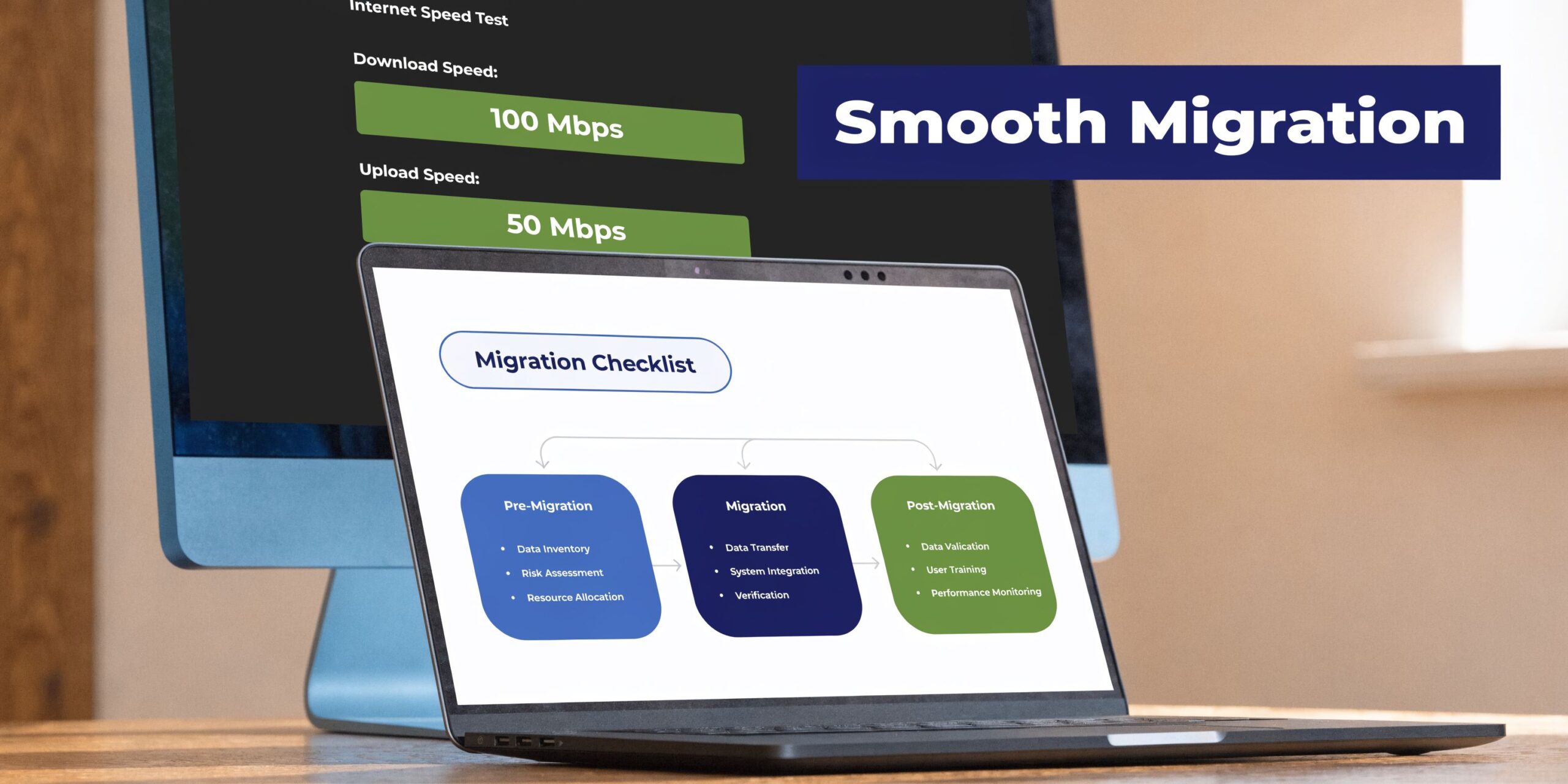
A successful VoIP migration produces meaningful operational upside. 91% of organizations report improved collaboration and 72% report higher worker productivity after implementation, according to Netlink Voice.
Before you sign
- Audit your current call flow: List main numbers, extensions, ring groups, business hours, voicemail boxes, fax lines, and after-hours rules.
- Identify must-keep numbers: Porting is possible, but the provider needs accurate records early.
- Check network readiness: Run a proper bandwidth and stability review. This guide can help estimate how much bandwidth you need for VoIP.
- Decide who owns the rollout: Name one internal owner from operations or IT.
During implementation
Build the routing first
Do not start with handsets. Start with call logic. Map receptionist flow, sales, support, after-hours handling, holiday schedules, and voicemail destinations.
Stage users in groups
Move a pilot group first. Include one admin, one manager, and one heavy phone user. Their feedback catches issues that a generic demo will not.
Confirm devices and apps
Some teams prefer desk phones. Others can live in desktop and mobile apps. Most mixed environments do best with clear role-based standards.
Before launch day
- Test number port timing: Verify dates and temporary forwarding plans.
- Test every route: Main line, direct numbers, voicemail, recordings, queue behavior, mobile answering, and after-hours calls.
- Train the staff on only what they need: Answer, transfer, hold, check voicemail, update status, and use the mobile app.
- Prepare a backup communication plan: If one part of the rollout slips, staff should know how calls will be handled.
The cleanest migrations are boring. Boring is good. It means nobody is improvising on cutover day.
After go-live
Have managers review call logs, missed call patterns, and user questions during the first week. Small routing fixes early prevent bad habits from becoming your new process.
Common Questions About Switching to a VoIP System
Can I keep my current business phone numbers
Yes. Most businesses port their existing numbers to the new provider. The key is starting early and making sure your current account details match exactly. Number porting problems are usually paperwork problems, not technical ones.
What kind of internet connection do I need
You need a stable connection more than a flashy advertised speed. Voice quality depends on consistency, congestion control, and how your network handles real-time traffic during busy periods. If your office already struggles with video calls or large uploads at peak times, test before you migrate.
Do I need to buy new phones
Not always. Many teams can work well with desktop apps and mobile apps alone. Others still want physical handsets for reception, common areas, or users who spend all day on calls. The right answer depends on job role, not trend.
How secure is a cloud phone system
Security depends on provider practices and your own admin controls. Look for clear answers on permissions, recording access, account management, and support processes. Businesses in regulated fields should ask more detailed continuity and compliance questions before signing.
Will my team need a lot of training
Not typically, if the system is configured well. Most problems blamed on training are setup problems. If call flow, user roles, and app access make sense, most employees need only a short introduction.
If your business is replacing an aging phone system, adding locations, or trying to support remote staff without more telecom headaches, SnapDial is worth a look. It offers hosted business calling with white-glove setup, predictable pricing, mobile-ready access, call routing, queue tools, cloud faxing, and ongoing support designed for teams that need a practical business phone system rather than another complex IT project.