

Monday starts with a voicemail from Friday afternoon. Sales says a prospect tried three times and gave up. Support says the main line rang at the front desk while the service team was remote. Your office manager says the phone vendor cannot come out until next week. Nobody is surprised, which is a significant problem.
That is what aging phone systems do to growing companies. They normalize friction. Missed calls become routine. Transfers break. A storm, office outage, or internet handoff turns into a business interruption. If you have remote staff, the gap gets worse because the phone system still behaves as if everyone sits near the same wiring closet.
Modern voip solutions for business fix that, but not because internet calling sounds trendy. They fix the operational problems that old systems create: missed revenue, inconsistent customer experience, and too much dependence on aging hardware.
Is Your Phone System Holding Your Business Back
A ten-person office can limp along on an old PBX for years. Then growth exposes every weak point at once. A second location opens. A manager wants calls on a mobile app after hours. Customer support needs call recordings. Suddenly the “phone system” is no longer a utility. It is part of sales, service, and staffing.
Legacy systems fail in quiet ways first. Calls hit a busy signal when more lines are needed. Employees give out personal cell numbers because transfers are unreliable. The front desk becomes a human router. None of that shows up neatly on a monthly bill, but the cost is substantial.

What businesses are replacing
Traditional business phone setups were built around fixed lines, fixed desks, and fixed office hours. That model breaks when your team works across locations or needs to answer from anywhere.
A practical comparison is this. Old systems are hardware-first. VoIP is workflow-first. It lets you decide how calls should move through the business, then supports that plan with apps, routing rules, recordings, and reporting.
If you are weighing the shift from analog lines to cloud calling, this breakdown of VoIP vs POTS phone systems is useful because it frames the decision around business fit, not telecom jargon.
Why the shift is accelerating
This is not a niche change. The global VoIP services market was valued at $132.47 billion in 2023 and is projected to reach $326.27 billion by 2032 at a 10.8% CAGR, driven by businesses replacing legacy systems to support remote and hybrid work, according to Nextiva’s VoIP statistics overview.
If your phone system makes growth harder, it is no longer “good enough.” It is operational debt.
Understanding Business VoIP A Simple Analogy
The easiest way to understand VoIP is to compare it to email.
A traditional phone call is like sending a paper letter through a dedicated postal route. It works, but the path is rigid. VoIP is like email. Your message still arrives, but it travels over the internet infrastructure your business already uses.
How a call moves
When someone speaks into a VoIP phone or app, the system breaks that audio into small digital packets and sends them across the network. On the other end, those packets are reassembled fast enough that the conversation feels natural.
Two technical terms matter, but only at a business level:
- SIP handles call setup. It is the signaling layer that says who is calling whom and where the call should go.
- RTP carries the audio itself once the call is live.
That is the engine under the hood. Most buyers do not need to live inside the engine. They need to know whether the call is clear, stable, and easy to route.
Why codecs matter
A codec is the method used to encode and compress audio. This is one of the biggest reasons modern VoIP can sound excellent without demanding perfect conditions.
A good example is the difference between G.711 and G.729. As detailed by Ringy’s VoIP solutions article, G.711 delivers Mean Opinion Score ratings of 4.1 to 4.3, which is considered toll-quality audio, while G.729 maintains about 3.9 MOS while using 85 to 90 percent less bandwidth.
Here is the practical takeaway:
| Codec | Business impact |
|---|---|
| G.711 | Prioritizes voice quality when bandwidth is available |
| G.729 | Preserves good call quality while using much less bandwidth |
What MOS means in plain English
MOS, or Mean Opinion Score, is the industry’s report card for call quality. Higher is better. You do not need to memorize the scale. You only need to know that modern VoIP platforms can deliver the kind of audio quality people expect from a professional business line.
That is why the old idea that “internet phones sound cheap” is outdated. Poor business VoIP comes from poor deployment, weak network design, or bad provider choices. It is rarely the concept itself.
If email replaced the fax machine for everyday communication, VoIP is doing the same job to legacy phone lines.
Why this matters to non-technical teams
This flexibility is what makes VoIP so useful. A desk phone, desktop app, and mobile app can all act like the same business extension. The system can ring a receptionist first, a service queue second, and an on-call manager after hours, without anyone rewiring the office.
That is the difference between a phone line and a communications system.
Hosted Cloud VoIP vs On-Premise PBX The Core Decision
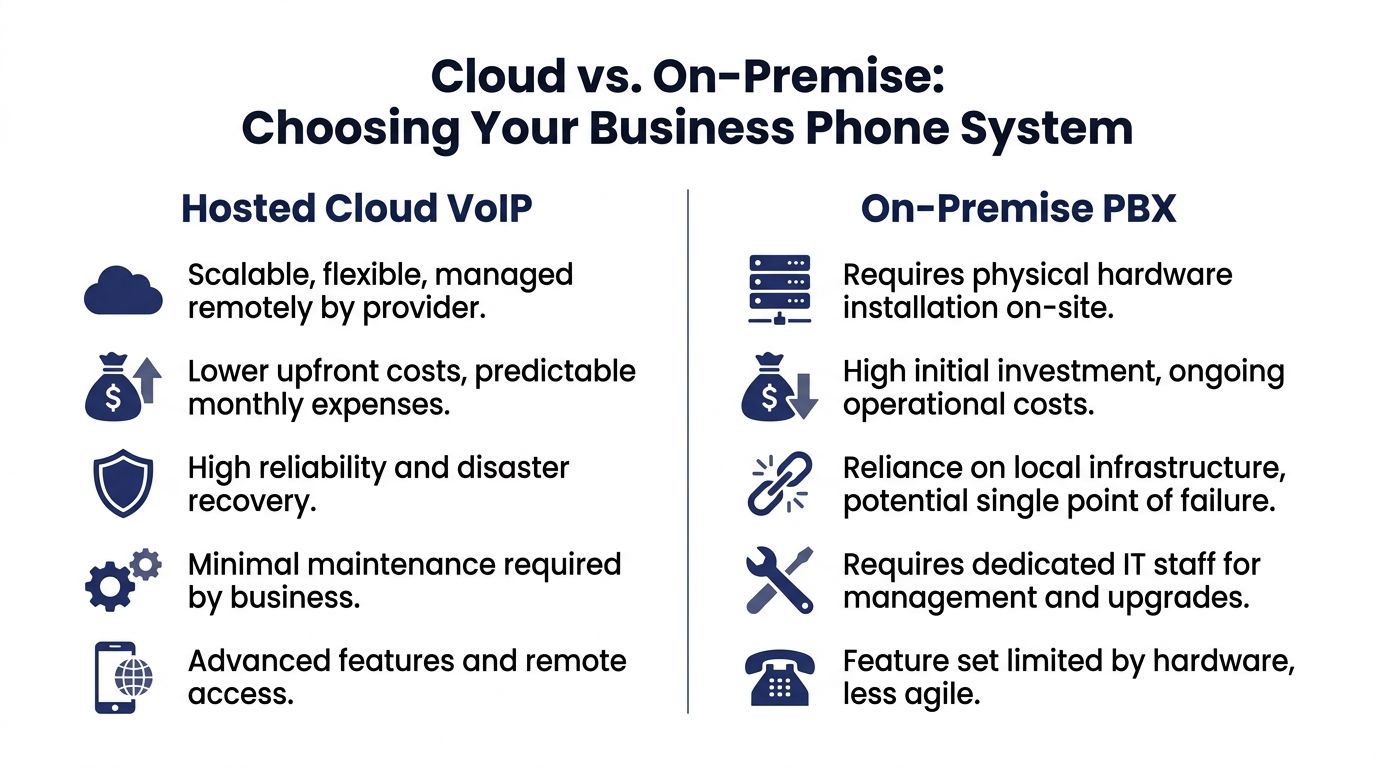
This is the choice that shapes everything else. Do you want your business phone system hosted in the cloud by a provider, or installed on your premises and managed by your team?
For most small and mid-sized companies, this is less about “technology preference” and more about who owns the complexity.
The strategic difference
A hosted cloud VoIP system moves the PBX into the provider’s environment. Your team uses phones, apps, and a web portal, but the core platform runs off-site.
An on-premise PBX keeps the core phone system in your building. That can make sense for organizations with specialized internal requirements and telecom staff who want direct control. It also means your business owns maintenance, upgrades, redundancy, and recovery planning.
Side-by-side trade-offs
| Decision area | Hosted cloud VoIP | On-premise PBX |
|---|---|---|
| Cost structure | Predictable monthly operating expense | Larger upfront capital expense plus ongoing upkeep |
| Maintenance | Provider handles platform management | Your IT team or vendor handles updates and repairs |
| Scaling | Add users, locations, and routing changes quickly | Expansion often involves hardware planning and more implementation work |
| Remote work | Built for mobile and desktop access | Often possible, but usually more complicated |
| Disaster recovery | Better positioned for off-site continuity | Depends heavily on your local infrastructure |
| Feature delivery | New capabilities typically roll out faster | Features may depend on hardware and upgrade cycles |
When hosted makes the most sense
Hosted usually wins when a company wants:
- Less telecom overhead because there is no appetite for managing phone hardware in-house
- Faster changes such as adding users, opening locations, or adjusting call flows
- Remote flexibility so staff can work from desk phones, laptops, or mobile devices
- Cleaner budgeting with fewer surprise hardware events
A cloud platform such as SnapDial’s hosted VoIP vs PBX comparison becomes relevant here. It reflects the strong appeal of hosted service for SMBs: fewer moving parts inside the business.
When on-premise can still fit
I would not dismiss on-premise outright. It can fit organizations that already have telecom expertise, strict internal control preferences, or existing systems closely tied to other on-site infrastructure.
But many companies underestimate what “control” means in practice. Control includes patching, hardware replacement, failover planning, backup power, and the burden of troubleshooting during an outage. If the business does not have time for that, on-premise control becomes on-premise liability.
The hidden cost most buyers miss
The most expensive phone system is the one that seems paid for. Leadership looks at an old PBX and says, “We already own it.” What they own is a box with aging parts, limited support options, and workflows that force people to work around it every day.
That hidden cost shows up as:
- manual transfers
- slower response times
- no useful reporting
- dependence on a few people who know the quirks
- poor support for remote staff
A practical rule
If your company wants telephony to behave like software, choose hosted. If your company wants telephony to behave like infrastructure and has the staff to manage it, on-premise can still work.
The core decision is not cloud versus hardware. It is whether your business wants to run a phone platform or use one.
Essential VoIP Features That Drive Business Growth
Most businesses do not need more phone features. They need the right features tied to a business outcome.
That distinction matters. A long feature list looks impressive in a sales demo, but growth usually comes from a smaller set of tools used consistently by sales, service, and operations.

According to Market.us on the VoIP services market, 93% of businesses adopting VoIP report heightened productivity, and small businesses save an average of 32 minutes per employee daily through features such as visual voicemail transcription and intelligent call routing.
Productivity features that remove friction
Some VoIP features save time in small bursts all day long. That is where the gains tend to come from.
- Mobile and desktop apps let staff answer the business line without being tied to a desk.
- Visual voicemail with transcription cuts down on callback delays because employees can scan messages quickly.
- Find me and follow me routing keeps important calls moving when someone is away from the office.
- Self-service admin portals reduce dependence on a vendor for every extension, user, or schedule change.
For a manager, this means fewer manual workarounds. For an employee, it means less jumping between personal and business numbers.
Customer experience features that make you sound bigger
A small business can sound disorganized on the phone even when the team is excellent. The right system fixes that quickly.
Auto attendant and smart routing
An auto attendant gives callers a clean first step instead of a ring group that depends on whoever happens to be available. Done well, it routes by department, time of day, or business hours without feeling robotic.
Queue tools and callbacks
If your team handles inbound demand, queue management matters. Wait-time announcements and queue callbacks are especially useful because they reduce frustration without forcing customers to sit on hold.
A capable platform can also support call recording, reporting, and routing logic that changes based on staffing schedules or service needs.
Here is a useful walkthrough of what modern business calling can look like in practice:
Growth features that keep pace with the business
Scaling a phone system should not require a forklift project. The best VoIP deployments make expansion routine.
Consider the kinds of changes growing companies make every year:
| Change | Legacy response | VoIP response |
|---|---|---|
| Add a new employee | Program extension and possibly adjust hardware | Add user and assign device or app |
| Open a second office | New local setup and coordination between systems | Extend the same phone environment across locations |
| Launch a support queue | Add third-party tools or reconfigure heavily | Turn on queue functions and reporting inside the platform |
One provider in this category is SnapDial, which offers cloud PBX features such as auto attendant, call recording, visual voicemail transcription, mobile apps, smart queue callbacks, real-time statistics, and built-in cloud faxing. Those are the kinds of tools that move a company from “phone service” to managed communications.
What does not work
Businesses get into trouble when they buy features they will not operationalize.
Common examples include:
- Complicated IVRs that annoy callers instead of routing them
- Call recording without review habits so recordings pile up unused
- Mobile apps without policy which creates confusion about availability
- Reporting with no owner so nobody acts on the data
The best setup is not the one with the longest checklist. It is the one your team will use.
A good VoIP deployment changes behavior, not just hardware. Calls get answered faster, handoffs improve, and managers can finally see what is happening.
How to Choose The Right Business VoIP Provider
Price matters. It is just not the first filter.
I have seen businesses save money on paper and lose far more through weak support, poor onboarding, or a platform that becomes fragile the moment call volume rises. Choosing a VoIP provider is really an exercise in risk management.
Start with reliability, not rates
A low monthly quote looks attractive until your office loses service and nobody can tell you what failed or when it will be fixed.
Look for signs that the provider treats reliability as an operating discipline:
- Published uptime commitments and a clear explanation of how they maintain service continuity
- Redundant architecture so your business is not tied to one point of failure
- Thoughtful failover options for users, locations, and inbound routing
- Clear escalation paths when something breaks
If a provider talks mostly about pricing and barely mentions continuity, take that seriously.
Security should be visible
A business phone system now carries customer conversations, internal discussions, recordings, voicemails, and often fax traffic. Security cannot be a hidden back-office topic.
Ask direct questions:
- How are calls and related data protected?
- How are mobile apps managed and updated?
- What controls exist for recordings, voicemails, and admin access?
- How does the platform support regulated workflows if your industry requires them?
A provider does not need to drown you in jargon. They do need clear answers.
Support quality decides the actual experience
Most businesses only discover support quality when they are under pressure. That is late.
A provider with real phone support, knowledgeable technicians, and hands-on onboarding costs more than a bare-bones self-service platform. In many environments, that is a good trade.
Questions worth asking on the sales call
| Ask this | Why it matters |
|---|---|
| Who handles onboarding? | Tells you whether setup is guided or dumped on your staff |
| Who answers after hours? | Reveals whether support is real or outsourced ticket intake |
| How are number porting and cutover managed? | Shows whether migration risk is understood |
| What happens if our internet fails at one site? | Exposes whether failover planning is mature |
Features should fit your next phase, not just today
A provider can satisfy your current needs and still be the wrong choice if your business is changing fast.
A growing company should evaluate whether the system can support:
- multiple locations
- remote employees
- call queues
- recordings
- role-based routing
- admin self-service
- app-based calling
- integrations with the broader collaboration stack
The vendor should reduce work, not create more
The right provider leaves your office manager and IT team with fewer headaches. The wrong one gives them another portal, another bill, another support queue, and another thing to babysit.
Buy the provider that makes daily operations simpler. Savings from a low quote disappear quickly when your team becomes the support department.
VoIP in Action Real-World Business Use Cases
The best way to judge voip solutions for business is to look at the operational before-and-after. Different companies hit different pain points, but the pattern is consistent. A better system shortens response time, removes handoff errors, and gives managers more control.

The small business that needs to sound organized
A local service company often starts with a basic line, a few cell phones, and a lot of informal call handling. That works until call volume picks up.
Before VoIP, calls bounce between voicemail boxes or ring unanswered when staff are in the field. After VoIP, the business can use an auto attendant, business-hour routing, and mobile app access so calls reach the right person without exposing personal numbers.
The shift is not cosmetic. It changes how reliably the business captures inbound demand.
The multi-location company that wants one phone environment
A company with two or three offices often inherits different local setups over time. Transfers between locations feel awkward. Reporting is fragmented. Moves and changes depend on whoever remembers the old vendor process.
A unified cloud system fixes that by giving every location one dial plan, one admin view, and one set of routing rules. The business still operates locally, but the phone experience becomes consistent.
The support team that needs smarter call handling
Customer support and contact-center teams need more than dial tone. They need a way to match callers to the right agents and keep queues from becoming a bottleneck.
As noted by Sheerbit’s guide to advanced VoIP features, AI-driven skills-based call routing can improve first-call resolution by 20 to 30 percent and reduce average handle time by 15 percent by matching callers to the best-suited agent.
That matters in practice because support teams struggle with two things at once:
- getting the customer to the right person
- controlling handle time without rushing the conversation
Smarter routing helps both.
The hybrid team that cannot depend on one office
A hybrid workforce needs a business number that travels with the employee, not with the desk. Staff may answer from a laptop one day and a mobile app the next. Managers still need the same caller ID, transfer behavior, voicemail access, and visibility across the team.
That is where cloud calling earns its keep. The office becomes one endpoint, not the center of the system.
Good VoIP use cases are not about replacing one handset with another. They are about removing the moments where communication breaks down.
Planning a Seamless Migration to VoIP
Migration is where most business owners get nervous, and for good reason. The technology is the easy part. The risk sits in cutover planning, number porting, failover design, and who owns the process.
A poorly managed migration can interrupt sales and support on day one. A disciplined one feels boring, which is exactly what you want.
Why planning matters so much
According to VoIPcom on the role of VoIP in business, a 2025 study found that 62% of VoIP migrations experience significant outages due to inadequate redundancy planning. That is the warning sign buyers should pay attention to.
The lesson is simple. Do not treat migration as a handset swap. Treat it as a business continuity project.
A practical migration sequence
Audit the current environment
Start with what you have, not what people assume is in place.
List:
- every phone number
- every extension
- call flow rules
- fax dependencies
- hunt groups
- after-hours routing
- recording needs
- hardware that still matters
You are building the map for the new system.
Check network readiness
VoIP rides on your data network, so voice quality depends on network discipline. Review bandwidth, switching, Wi-Fi coverage, and traffic prioritization. If your collaboration environment also includes wireless and meeting tools, resources on Cisco Meraki Webex Integration can help frame how network and communications platforms should work together operationally.
Stage the cutover
The safest migrations use a staged plan. Test devices first. Confirm routing. Validate voicemail and failover behavior. Port numbers according to a schedule that protects customer-facing lines.
Do not assume every user needs the same setup. Front desk, field staff, leadership, and support teams usually need different call flows.
Train users on the small things
Most migration friction comes from simple behavior changes:
- how to transfer
- how to check voicemail
- how the mobile app behaves
- where to find recordings
- what to do if internet access changes
Short, role-based training works better than one long generic session.
Why managed migration changes the risk profile
A hosted system with white-glove onboarding reduces the number of decisions your internal team has to get right under pressure. That is the value of a managed provider. They own the build, the porting coordination, the cutover sequence, and the troubleshooting path.
For businesses replacing a legacy PBX, that is often the cleanest route. If you want to see what a managed cloud deployment looks like, this overview of a hosted business phone system is a practical reference point.
The smoothest migrations have one common trait. One party owns the plan from discovery through cutover and support.
The Future of Your Business Communications
A phone system used to be an isolated utility. Now it sits inside the operating model of the business. It affects how quickly sales responds, how support handles volume, how remote staff stay reachable, and how leadership measures service quality.
That is why voip solutions for business are no longer just an IT upgrade. They are a competitive tool.
The strongest business case is not just lower telecom cost. It is better execution. Calls reach the right people. Teams work from anywhere without improvising around old limits. Customers get a more consistent experience. Managers gain visibility that legacy hardware never provided.
This matters even more as companies refine hybrid working models. A communications system that assumes everyone is in one building is already behind the way many teams operate.
If your current setup creates friction, the answer is not another patch, another maintenance visit, or another workaround. It is a system designed for how your business runs today.
If you are replacing a legacy PBX and want a fully managed cloud phone system with white-glove setup, predictable pricing, and 24/7 support, take a closer look at SnapDial.