
The easiest phone issues are usually the ones that clog an IT queue the fastest. Someone needs a voicemail reset, another person forgot to update call forwarding before a flight, and a manager wants a new speed dial added before a client call. None of those requests feel strategic in the moment, but together they eat away at time, momentum, and patience.
A unified communications self care portal gives those routine changes back to employees without handing over the keys to the whole phone system. In Cisco environments, the portal is the browser-based control layer where users manage personal telephony settings, while IT keeps the deeper system rules in place. That shift matters because it cuts friction on both sides, employees move faster, and admins stop acting as the middle layer for every small change.
Ending the Endless Stream of IT Phone Requests
Every office has the same pattern. A help desk agent finishes one password reset, then gets a call about voicemail notifications, then another about a missed forwarding rule, then a request to update a contact list. The phone system itself isn't broken, but the workflow around it is.
That's where the unified communications self care portal earns its place. Cisco's documentation shows that the portal lets end users manage speed dial numbers, contact lists, phone services, voicemail notifications, call forwarding, and call history from a standard browser-based sign-in, and Jabber users can open it directly from the client as a cross-device control layer Cisco Self Care Portal guide.
The real problem is administrative drag
Phone support tickets are rarely dramatic, but they're constant. Each one interrupts a technician who could be working on call routing, site moves, or larger service issues. The self-care model shifts those low-risk, high-frequency changes to the person who needs them.
Practical rule: if a request only changes how one employee uses their own phone, it usually belongs in self-service, not in a ticket queue.
That's also why the portal fits modern work patterns so well. Distributed teams don't want to wait for office hours just to change a ring setting or update where calls route during travel. A browser-based portal gives them a direct path to those changes, without altering the underlying telephony platform.
For readers evaluating a broader unified communications strategy, the portal fits naturally into a more complete business phone stack, like the one described in this unified communications overview. It's the same basic operational idea, give people control over the settings they touch every day, while keeping IT in charge of policy and architecture.
What Exactly Is a UC Self Care Portal
It functions as an online banking dashboard for business calling. Employees don't need a technician to change a savings transfer or update a profile detail, they sign in, make the change, and move on. A unified communications self care portal works the same way for phone settings, but inside a controlled enterprise environment.
Cisco CUCM treats the portal as a browser-based control plane. Users can independently manage settings like speed dials, call forwarding, ring settings, phone contacts, call history, and services, and in CUCM those options appear through separate tabs that expose per-phone configuration without administrator intervention Cisco CUCM phone settings guide.
How the model actually works
The portal doesn't replace the phone system, it sits on top of it. That means the user changes the preference, the system applies it, and IT doesn't have to open a manual ticket for every adjustment. For large environments, that's the difference between support being reactive and support being controlled.
The browser-based design also makes the experience easier to standardize across devices. Cisco's Release 14 documentation still presents the portal as a normal sign-in experience, and notes that Jabber users can open it directly from the client, which reinforces the portal's role as a shared control layer rather than a device-specific add-on Cisco Self Care Portal guide.
If you're comparing how self-service models work in other digital channels, Yellow.ai's guide to autonomous CX experiences is a useful parallel. The same logic applies here, users want direct control, but only inside clear guardrails.
Why IT teams care
The benefit isn't just convenience. The portal changes the shape of support work. Instead of handling repetitive configuration requests manually, IT can define what users are allowed to touch, then let the system enforce those boundaries. That's a cleaner operating model for any company with multiple sites, hybrid schedules, or frequent onboarding.
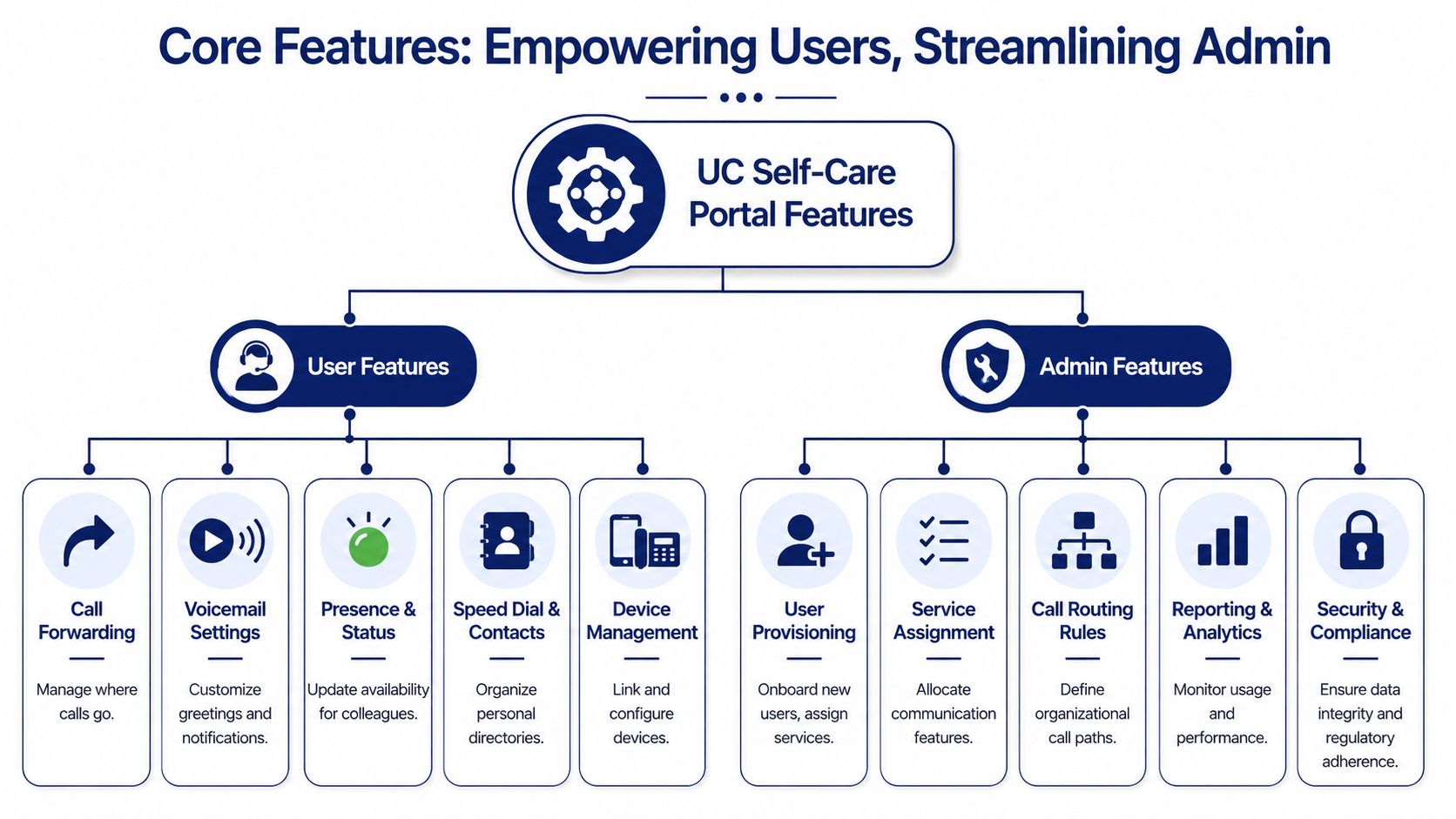
Core Features for Users and Admins
A good portal is useful because it separates personal control from administrative authority. Users get the settings they need. Admins keep the rules that protect the environment. That balance is what turns a portal from a nice-to-have into a practical communications tool.
User-facing controls that matter every day
Cisco's documentation makes the user side plain. Employees can configure things like speed dial numbers, contact lists, voicemail notifications, call forwarding, and call history, and in CUCM they can do that without waiting for IT if their account has the right access Cisco Self Care Portal guide.
A practical portal usually gives users room to manage:
- Call forwarding rules, so calls route to the right place during meetings, travel, or remote work.
- Voicemail handling, including notification preferences and greeting-related settings.
- Speed dials and contacts, which reduce friction for frequent internal and external numbers.
- Call history access, so employees can review recent activity without asking for support.
- Device-linked preferences, which keeps personal calling behavior aligned across phone and softphone use.
Cisco's own portal guidance shows how this plays out in day-to-day administration. Users can edit phone-related settings through web tabs, while administrators decide which access group can enter the portal and which features are visible Cisco CUCM self-care configuration guide.
A portal works best when the user journey is short. The more clicks it takes to change a simple calling preference, the more likely people are to go back to emailing IT.
What admins still control
Admins don't lose authority, they gain structure. They can define access through the Standard CCM End Users group, use password or PIN controls, and toggle portal capabilities with parameters so only the right settings are exposed Cisco CUCM self-care configuration guide.
That separation is what makes the portal valuable in regulated or multi-site environments. Users get autonomy over personal communication behavior, but not the ability to alter the underlying system design. In a managed deployment, that's exactly the trade-off you want.
The Business Benefits of Empowering Your Team
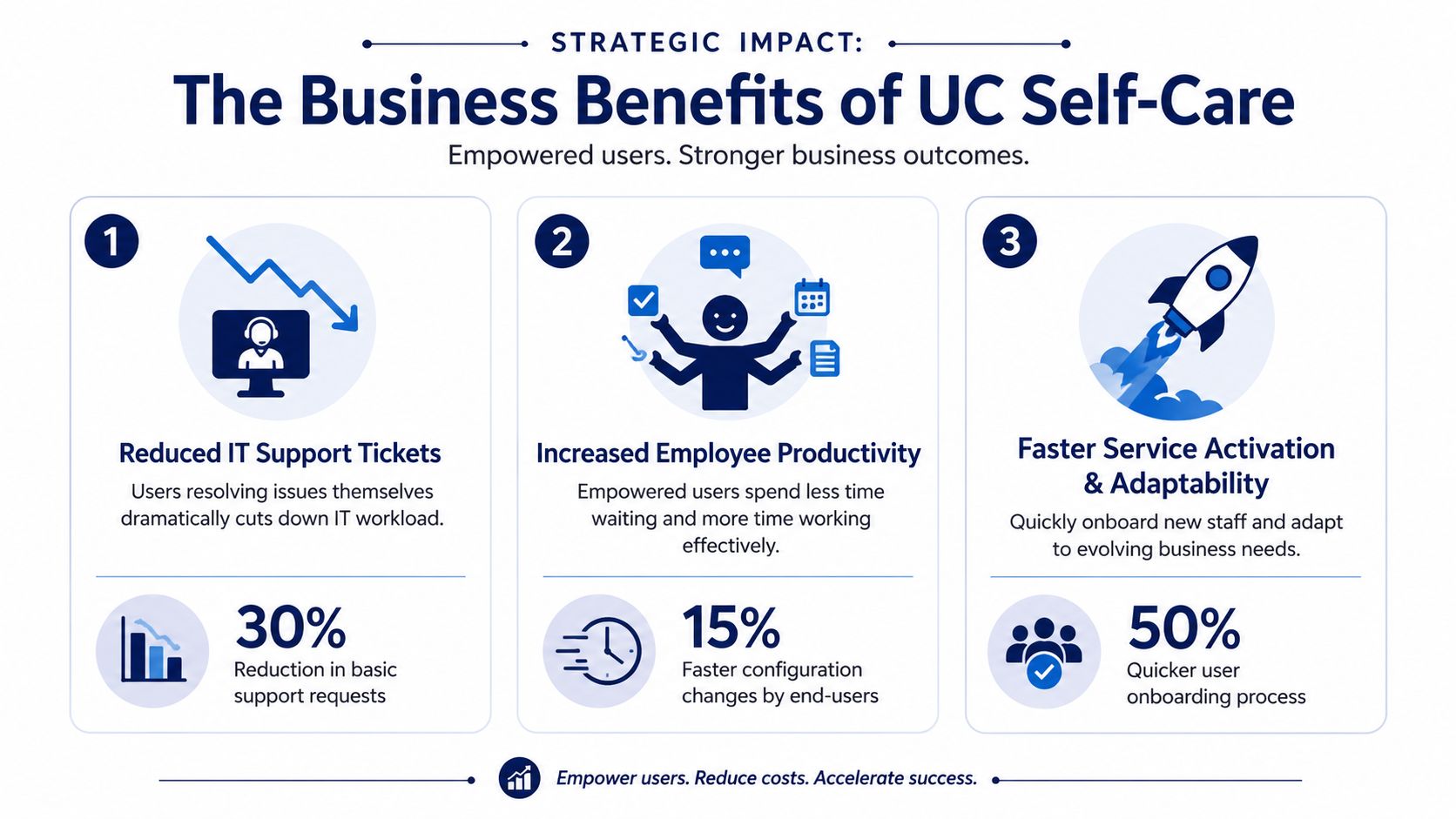
The strongest argument for self-service is operational, not cosmetic. A portal that lets employees manage their own calling settings removes repetitive work from IT, shortens the wait for simple updates, and gives staff a faster path to getting back to work. It also creates a better daily experience for people who rely on phones as part of their job.
Cisco's feature documentation is clear on the mechanics. The portal centralizes settings that would otherwise require IT tickets, which is why it functions as a practical support reducer in the first place Cisco Self Care Portal guide.
Less admin friction, more useful IT work
When employees can change their own call forwarding or speed dials, IT stops acting as a manual switchboard for routine requests. That frees the team to focus on higher-value work, like improving call flows, tightening policy, or supporting new office rollouts. The change sounds small, but in practice it resets where technical attention goes.
It also helps reduce the mismatch between urgency and workload. A caller who needs a voicemail notification fixed before a meeting doesn't want to wait in a queue, and an IT manager doesn't want those requests stacking up behind more complex tasks. Self-service gives both sides a cleaner path.
Faster onboarding feels different for the employee
New hires don't just need a phone number, they need a phone setup that matches how they work. A portal lets them customize their calling behavior early, which helps them feel functional faster in the role. That matters in environments where phone contact is part of customer service, sales, or operations.
For teams evaluating a broader business case, the portal pairs well with SnapDial's self-service portal benefits overview, especially if the priority is to give employees control over common calling tasks while keeping administration centralized. The strategic point is simple, fewer bottlenecks at the user level usually mean fewer bottlenecks everywhere else.
Better support for hybrid work
Remote and hybrid employees don't need more complexity, they need more control from wherever they're working. A portal lets them handle calling preferences without relying on a desk visit or a back-and-forth with support. That makes the communications stack feel less tied to a building and more tied to the employee.
Your Implementation and Migration Checklist
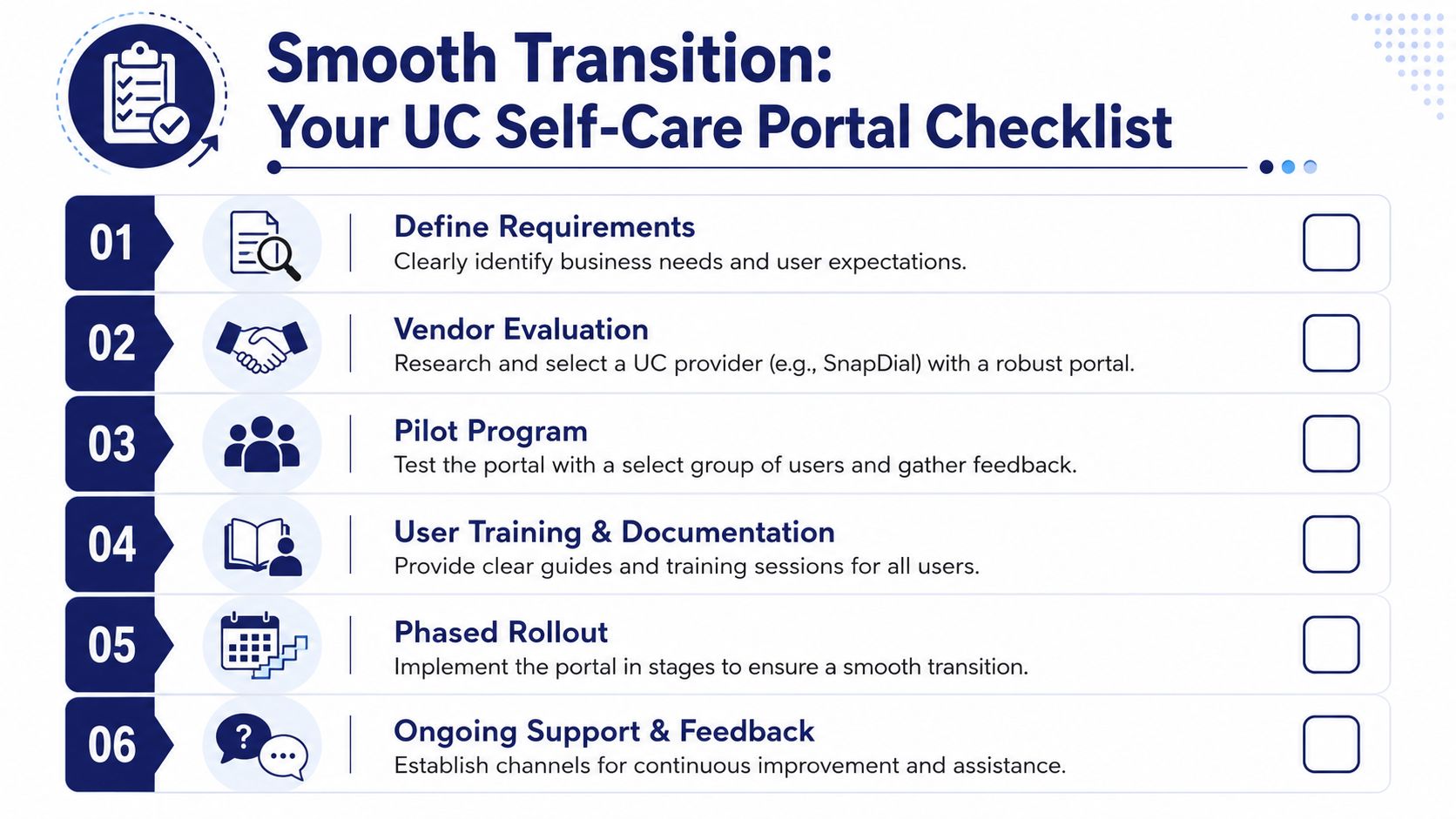
A self-care portal rollout works best when the business treats it like an operational change, not just a software toggle. The portal has to match user roles, permission rules, and support habits. If those pieces aren't planned together, adoption slows down and the help desk ends up fielding questions that self-service was supposed to absorb.
Cisco's access model makes the implementation logic pretty clear. Portal access depends on identity controls, including membership in Standard CCM End Users, and admins can adjust capabilities with feature parameters so users only see what they're allowed to change Cisco CUCM self-care configuration guide.
A practical rollout sequence
- Define roles first. Decide which groups need access to personal calling controls, which settings should stay admin-only, and where exceptions are allowed.
- Set permissions carefully. Match the portal's visibility to business policy, not just user preference.
- Prepare a simple launch message. Tell employees what they can do in the portal, and how it saves time for routine changes.
- Train with specific tasks. Show people how to update the calls they care about most, not every menu in the system.
- Roll out in stages. Start with one department or site, then use real feedback to refine the setup.
- Keep a feedback loop open. The first month after launch usually reveals where wording, layout, or permissions need adjustment.
Why adoption needs deliberate planning
Cisco's documentation also raises the right caution. Documentation often focuses on feature access, but the critical question is whether employees use the portal and whether the interface is easy enough to operate for everyday tasks Cisco adoption and usability note.
That's why the launch process should be simple from the user's point of view. If people need a long training session just to change call forwarding, the portal will feel like another system to learn instead of a shortcut. If the first few tasks are obvious, adoption gets much easier.
Security and Compliance Best Practices
A self-service portal gives employees more control, which makes security more important, not less. The portal is a user-facing administrative surface, so it needs the same discipline you'd apply to any other business system that can change configuration data. If access is too broad, or input validation is weak, the convenience can turn into exposure.
Cisco disclosed CVE-2021-1399 for its Self Care Portal, describing a flaw that could let an authenticated remote attacker modify data because of insufficient validation of user-supplied input. The advisory also states that affected versions ran from 10.5(2) through before 12.5(1)SU4, with the fix included in 12.5(1)SU4 CVE-2021-1399 advisory.
Security controls that should be non-negotiable
The first control is identity. Don't expose the portal broadly and hope users behave. Use strong authentication, keep access tied to the right user group, and review who still needs access after role changes or departures.
The second control is scope. Keep permissions narrow enough that users can adjust their own calling behavior without touching organizational settings. That's the least-privilege principle in practice, and it's exactly how the portal is designed to be managed in CUCM.
The third control is review. Regular audits help confirm that portal parameters still match policy, especially after changes to onboarding processes, site structures, or calling rules.
Security doesn't work as a single gate. It works when identity, permissions, and review all line up.
For organizations trying to simplify sign-in while keeping control tight, SnapDial's unified global unified login overview is a relevant reference point. The broader lesson is the same, easier access only works when access itself is governed properly.
Simple Strategies for Driving User Adoption
A portal can be technically sound and still sit unused if employees don't understand why it matters. The adoption message should be personal and practical. People are more likely to use self-service when they see it as a way to save time on their own phone setup, not as another system IT wants them to learn.
Start with clear language. Tell employees they can change their own calling settings without opening a ticket, and show them the most common actions first. That framing matters because it connects the tool to a real benefit they'll feel on day one.
Keep the first experience short
One-page quick-start guides work well for common tasks like updating voicemail notifications, changing call forwarding, or editing speed dials. Short video walkthroughs can help too, especially for teams that prefer to watch rather than read. The goal is to remove hesitation before it starts.
Build momentum through visible wins
Early adopters are often your best advocates. When someone uses the portal successfully and avoids a support delay, that story is more persuasive than a generic announcement. Share those examples internally, and keep the tone focused on convenience, not compliance.
Make support part of the launch
A rollout doesn't end when the portal goes live. Give employees a simple place to ask questions, and make sure the answers stay consistent. If support teams respond quickly during the first wave of adoption, users learn that self-service is reliable and worth repeating.
The most effective portals don't feel imposed. They feel useful, immediate, and easier than the old way.
If you're planning a portal rollout or looking to reduce phone-related admin work, review how your current call controls, permissions, and onboarding steps are handled today, then compare them with a self-service model that keeps IT in charge and gives users more independence. If you want a practical starting point, contact SnapDial to discuss how a managed cloud phone system can centralize calling tools, self-service, and admin control in one place.