
You've got the right phone system on paper, but the main failure point usually shows up on install day. The phones are unboxed, the provider portal is ready, and yet customers still hear busy signals because the old PBX, the porting window, the wiring, or the network never got treated as one coordinated project.
That's why business phone system installation isn't a hardware swap. It's a continuity decision, and the cost of getting it wrong shows up fast, missed calls, confused staff, and a cutover that drags on longer than anyone budgeted for. Modern hosted systems changed the mechanics, too. U.S. businesses added more than 35 million VoIP lines between 2010 and 2018, reaching 41.6 million lines, and one market estimate projected global VoIP growth from about $20 billion in 2018 to roughly $55 billion by 2025 (in-telecom.com). In practice, installation has shifted from heavy premise hardware toward remote provisioning, porting, and configuration.
A clean rollout follows a chain, not a single event. It starts with site readiness, moves through network checks and handset staging, then number porting, cutover planning, testing, training, and a real monitoring window after go-live. Skip one step and the problem usually returns later, only now it's harder to untangle because the team has already started relying on the new system.
Why a Smooth Installation Is a Business Decision
The first time a business owner notices the problem, it usually isn't a cable issue. It's the moment a customer calls twice, gets a busy signal, and hangs up. Or a sales rep says they never saw the missed call because the old PBX had no sane alerting path. That's when the phone system stops being “IT equipment” and starts looking like a revenue leak.
A solid install protects more than voice service. It protects inbound lead capture, customer service continuity, and the handoff between departments. If the phone system goes live badly, the damage isn't limited to a few hours of inconvenience. Staff build workarounds, managers lose trust in the rollout, and the eventual fix takes longer because everyone is now operating around the broken process instead of inside it.
Practical rule: if the phone system touches sales, support, or after-hours routing, installation is a business continuity task, not a technical chore.
That's why the right mental model is a lifecycle, not a checklist. A real rollout starts with a site survey, then moves into inventory, network validation, handset staging, number porting, cutover planning, testing, training, and a post-launch watch period. Missed-call handling matters here too, because a system that routes well but fails to surface unanswered calls still leaves revenue on the table. If your current setup is weak on that front, a missed call notification workflow can be the difference between a salvageable lead and a lost one.
The businesses that do this well treat installation as sequence management. They know the old system has to stay stable long enough for the new one to prove itself, and they don't let enthusiasm for the new platform outrun the boring work that makes the switch safe.
Pre-Installation Planning and Requirements
The discovery call should sound more like operations planning than a product demo. Start by counting active users, live lines, and any shared resources such as reception, queues, conference rooms, and analog devices. Then map what happens to a call, who answers first, where overflow goes, what happens after hours, and which groups need voicemail, ring groups, or queues.
What to capture before anything ships
| Category | What to Capture | Why It Matters |
|---|---|---|
| Users | Named users, shared devices, remote staff | Prevents under-provisioning and extension confusion |
| Numbers | Main number, DIDs, fax lines, toll-free numbers | Avoids porting surprises and routing gaps |
| Call flow | Reception, department routing, after-hours path, overflow | Keeps the new system aligned with how calls are handled today |
| Features | Auto-attendant, recording, mobility, conferencing, queues | Stops last-minute add-ons from delaying go-live |
| Sites | Offices, warehouses, remote workers, branch locations | Defines scope and physical readiness |
| Physical constraints | Metal-heavy spaces, multi-floor coverage, analog endpoints | Flags where standard office assumptions fail |
The physical site questions matter more than most guides admit. A warehouse with long aisles, a multi-floor building, or a mixed analog and IP environment changes the installation plan. You need to know whether there are enough Ethernet drops, whether power-over-Ethernet is available where phones will sit, and whether analog devices still need adapters or ATA support.
A good installer will ask for an inventory of every number and every location that's in scope. They'll also want a cutover date, not just a vague “sometime next month,” because number porting and user provisioning both depend on a real target. In many SMB rollouts, the practical planning window starts weeks ahead, not days, because there's more coordination than people expect once legacy numbers and site constraints are involved (Phone.com installation guide).
If a building isn't office-standard, assume the phone system will expose the weakness. Missing drops, weak coverage, and unlabeled patching almost always show up at the worst possible time.
For site surveys, I also like to check whether the facility's electrical and low-voltage planning has been treated seriously. A resource such as commercial electrical panel installation can be useful when you need to think beyond the phones themselves and into the building's power and distribution layer.
Network Readiness and QoS Checks
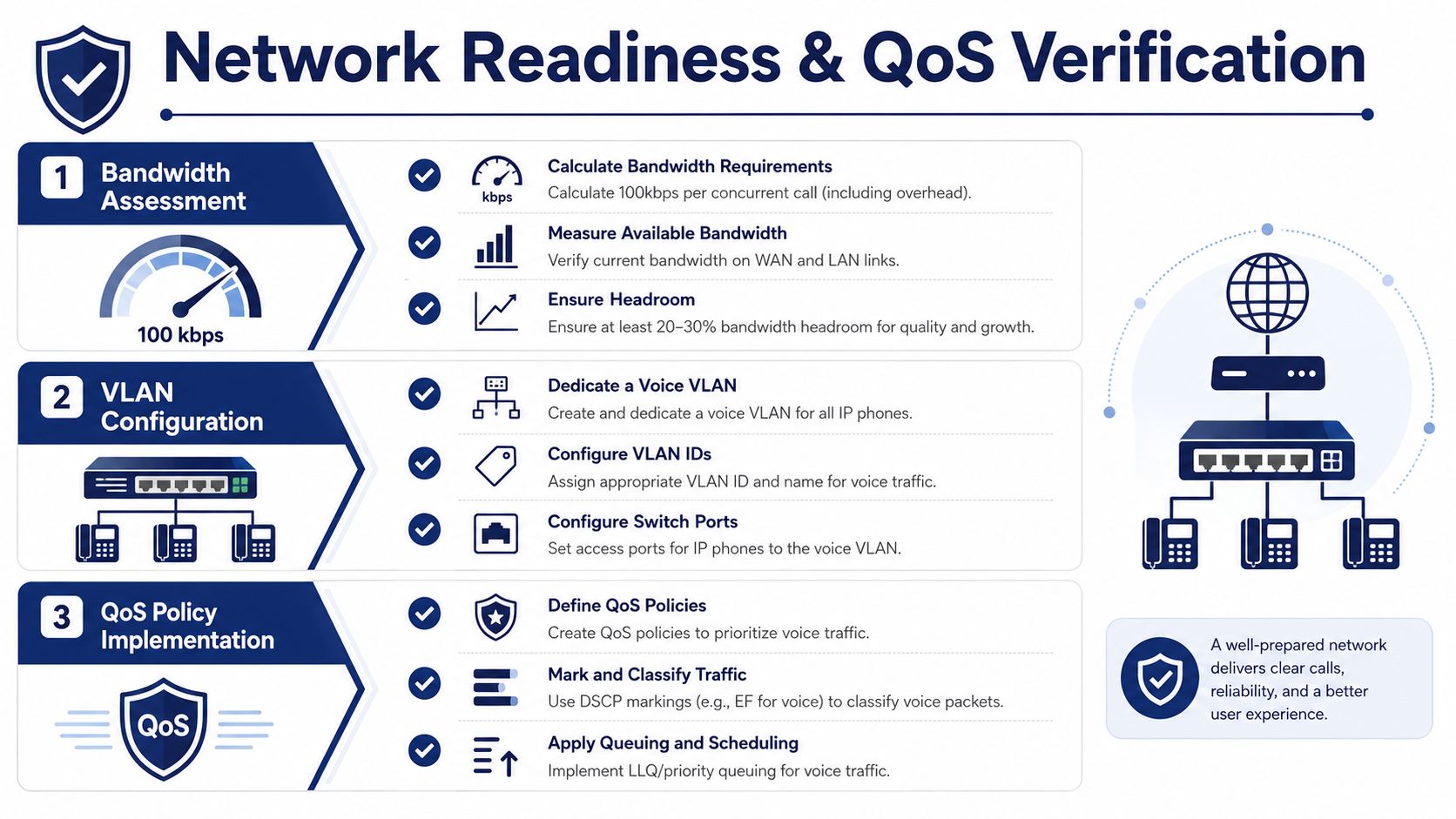
Phones fail because the network was treated as if voice traffic would somehow behave itself. Before cutover, verify that the circuit can carry calls cleanly during the hours your team uses it, not just in a quiet afternoon test. A practical planning reference from the SnapDial bandwidth guide uses about 100 Kbps per concurrent call as a rule of thumb for VoIP capacity planning.
The checks that catch most problems early
Start with QoS, voice VLANs, and the PoE budget. Even on managed switches, phones should not be left competing with backups, file sync, or guest traffic that chews up upload capacity. Voice VLAN segregation keeps signaling and media traffic more predictable, and PoE capacity has to match the planned handset count, especially when the phones include displays, sidecars, or video features.
Test from a real desk, not from the closet. Run ping and jitter checks from a sample endpoint, then register a softphone at each site. Review firewall and NAT behavior for SIP and RTP traffic, and confirm that SIP ALG is not enabled if your provider does not want it there. Double-NAT still causes plenty of cutover pain, especially when a router was added behind a firewall and nobody remembered it was there.
Troubleshooting crib sheet: if audio is one-way, inspect NAT and SIP handling first. If phones register but calls fail under load, look at QoS and upload headroom. If one site behaves differently from another, compare switch power, VLAN design, and firewall policy before blaming the provider.
A clean power layer matters too. On larger or more complex sites, the voice rollout may depend on broader electrical readiness, especially if PoE switches, UPS backup, and rack power share constraints with other business-critical systems. That is where a field electrician can matter as much as the IT team, especially on sites that already need work on the commercial electrical panel installation.
The network should be a known quantity before hardware ships. If it is not, you are troubleshooting two projects at once, the phone system and the infrastructure underneath it.
Hardware Setup and Handset Provisioning
The physical part of the rollout should feel boring. That's a good sign. Phones get staged, tagged, powered, and checked against the model list before anyone starts pushing extensions into the portal. If you're using Yealink or comparable IP phones, confirm firmware compatibility before the first handset is handed to a user, because mixed hardware generations can behave very differently once they're on the same hosted platform.
Desk phones usually belong at individual workstations, conference phones go where group calls happen, and executive video devices make sense only when the room layout supports them. DECT handsets can solve mobility in warehouses or wide common areas, while analog ATAs still have a place for elevator handsets, fax machines, alarms, or legacy devices that can't be retired yet. If you need old gear removed responsibly, a service such as telecom services near me can be part of the physical cleanup plan.
Once the hardware is staged, provisioning should move in a strict order. First assign users and extensions, then voicemail boxes, then presence and BLF keys, then ring groups, then any device-specific keys or sidecar mappings. Don't configure around exceptions before the base profile works. That only creates a support maze later.
Skipping firmware standardization across mixed phone models is one of the fastest ways to create provisioning errors and odd audio behavior. The system may appear to work during setup, then break only after the first real call path hits a device mismatch.
A self-service admin portal changes the labor model here. Instead of touching every handset manually, an admin can add a user, assign the device, and push the correct profile from the portal. That's where hosted systems pay back the setup effort, especially in environments with rotating staff or multiple small teams. For an overview of hosted architecture and what a SIP trunk is in that stack, the SnapDial SIP trunk definition is worth a look before you finalize your device map.
The rule is simple. Stage the hardware, standardize the firmware, then provision the users. If you reverse that order, you end up debugging individual phones instead of deploying a phone system.
Number Porting, SIP Trunks, and Cutover Strategy
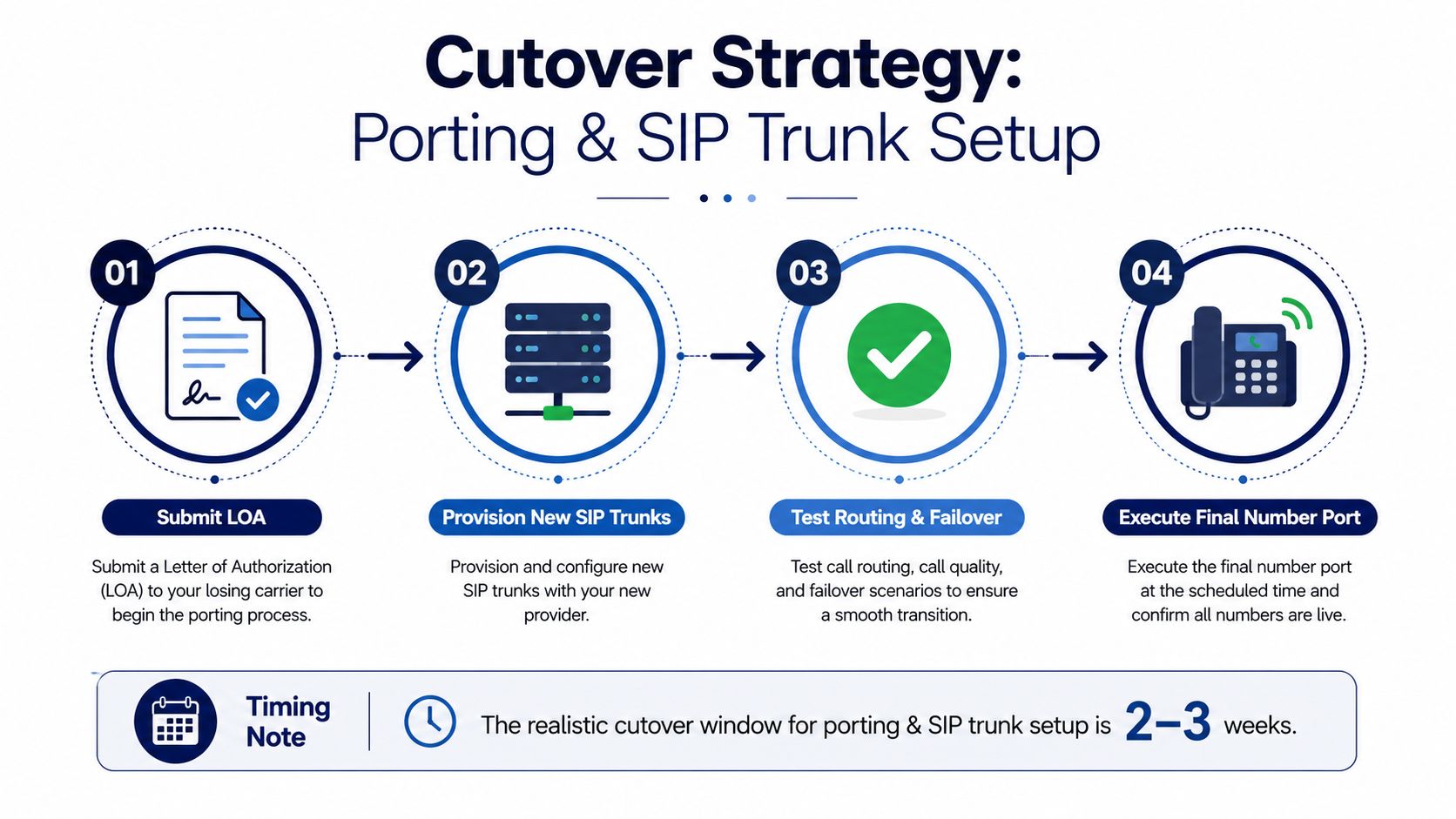
A clean install can still stall at the porting stage. The carrier will not release numbers without the right authorization, and the new provider cannot finish routing until that handoff is complete. For SMBs, a realistic port window is often 2 to 3 weeks, so the safe move is to start the Letter of Authorization process early and keep temporary forwarding in place while the port runs (Accutech office phone installation guide).
Build the cutover around reality, not optimism
Start by provisioning the new SIP trunks and mapping DIDs to the right destinations. A SIP trunk definition only matters if the routing plan is already aligned with the way the business answers calls. Confirm E911 address records before anyone goes live, because a system that completes calls but points emergency services to stale location data is not ready for traffic. Dial-plan normalization belongs in the same pass, since outside-line access codes, internal extension patterns, and international dialing habits often change when a legacy PBX gives way to hosted service.
A parallel run is usually safer than an abrupt switch. Let the old system forward to the new one while the port completes, then flip DID routing only after the provider confirms the release. That gives you a fallback path if one part of the port or routing plan behaves badly. The earlier work on network readiness and handset provisioning still matters here, because number porting is only one piece of a functioning cutover.
There are three practical strategies. Big-bang is the simplest on paper, but it asks everyone to change at once, which is risky if the company depends heavily on inbound calls. Phased by department reduces the blast radius, since reception or sales can move first while other groups stay on the old platform. Phased by site works better for multi-location organizations that can isolate branches cleanly, though it demands tighter routing discipline across locations.
Project manager rule: if callers cannot tolerate confusion, choose the smallest blast radius you can support operationally, even if the rollout takes longer.
DNS timing also matters for any SIP FQDNs in the path. Keep failover paths warm before cutover so service does not depend on a last-minute cache change. For a compact explanation of hosted call architecture, the F1Group guide to hosted phones is a useful reference when you are turning the technical plan into the actual rollout sequence.
Testing, Training, and Rollback Planning
A go-live isn't real until the call paths work under the same conditions users will create on day one. The test matrix should include inbound calls to the main number, overflow to the auto-attendant, after-hours routing, voicemail-to-email delivery, hunt groups, call queues with callback behavior, mobile app registration, fax sending where applicable, and 911 address confirmation. If any of those fail, the rollout is not done.
What the first day training should cover
Keep training short and operational. Show staff how to answer and transfer calls, check voicemail, use the mobile app, and recognize whether the system is online or degraded. Hand them a one-page reference that details the call flow they'll use every day, not the admin settings they'll never touch.
Call recording playback is useful here too. It gives supervisors a concrete way to coach greeting quality, transfer habits, and queue handling without turning the session into abstract policy talk. That's especially helpful when support staff are learning a new queue or when managers want to standardize how calls get handled after a transfer.
Rollback has to be boring and fast
A rollback plan should say exactly what gets reverted, in what order, and who has authority to trigger it. In practice, that usually means restoring forwarding behavior, keeping the legacy system warm for the first week, and stepping back to the old call path if the new one exposes a routing problem that can't be fixed quickly. Don't improvise this live.
Before anyone declares success, the operations lead should sign a go/no-go checklist the morning of cutover. That checklist should confirm the ports are scheduled, the network is clean, the handsets are staged, the test calls pass, the staff have been briefed, and the rollback path is still available if something unexpected happens.
If the team can't describe the fallback in one minute, the fallback isn't ready.
When a White-Glove Managed Installation Makes Sense
A self-managed rollout works when the site is simple, the network is clean, and someone on the team already understands phones, switching, and porting pressure. Once the environment gets more complicated, warehouses, multiple floors, mixed devices, or a staff that can't absorb a lot of setup pain, the managed path starts looking less like a luxury and more like risk control.
SnapDial is one example of a hosted VoIP provider that bundles end-to-end setup, including number porting, device prep, and queue configuration, while also giving customers access to the admin portal after go-live. That kind of handoff matters because the business doesn't lose visibility, it just avoids having its internal team do every low-value task itself.
The common objection is control. In reality, a good managed installer should hand back the things you need: a documented dial plan, user access, training, and a rollback path. You're not giving up ownership of the system; you're outsourcing the first-mile complexity.
If the rollout depends on a site survey, porting coordination, and device staging, a managed install is usually the safer option. If the environment is small, flat, and well-documented, self-install can still make sense.
A CTA for SnapDial if you're replacing a legacy PBX, don't start with the handset. Start with a rollout plan that includes the site, the network, the port, and the first week of monitoring, then talk to a provider that can handle the install end to end and hand you a working admin model when it's done.