
If you're trying to replace a legacy phone system, you probably already know the frustration. Calls bounce between offices, a rep working from home sounds like they're on a personal line, and someone in support keeps asking why customers still hit voicemail after hours. A cloud PBX system is the cleanest way to stop treating phone service like a pile of disconnected parts and start treating it like a managed business tool.
The important shift is simple. Instead of owning a box in the network room and nursing it through upgrades, your company uses a provider-hosted platform to route calls, manage extensions, run voicemail, record conversations, and connect remote staff through the same business number. Market forecasts show why this category matters now, with the global Cloud PBX market valued at USD 16.86 billion in 2024 and projected to reach USD 36.33 billion by 2030, while another forecast places it at USD 22.29 billion in 2025 and USD 57.02 billion by 2032 (GII Research).
What changes on day one is less glamorous than the sales page suggests, but far more useful. The company stops maintaining separate phone lines and starts managing one system that can follow employees wherever they work. That's the core buying decision, not “phones in the cloud” as a slogan, but whether your business wants call control, scaling, and remote access without owning the whole stack.
What a Cloud PBX System Actually Does for Your Business
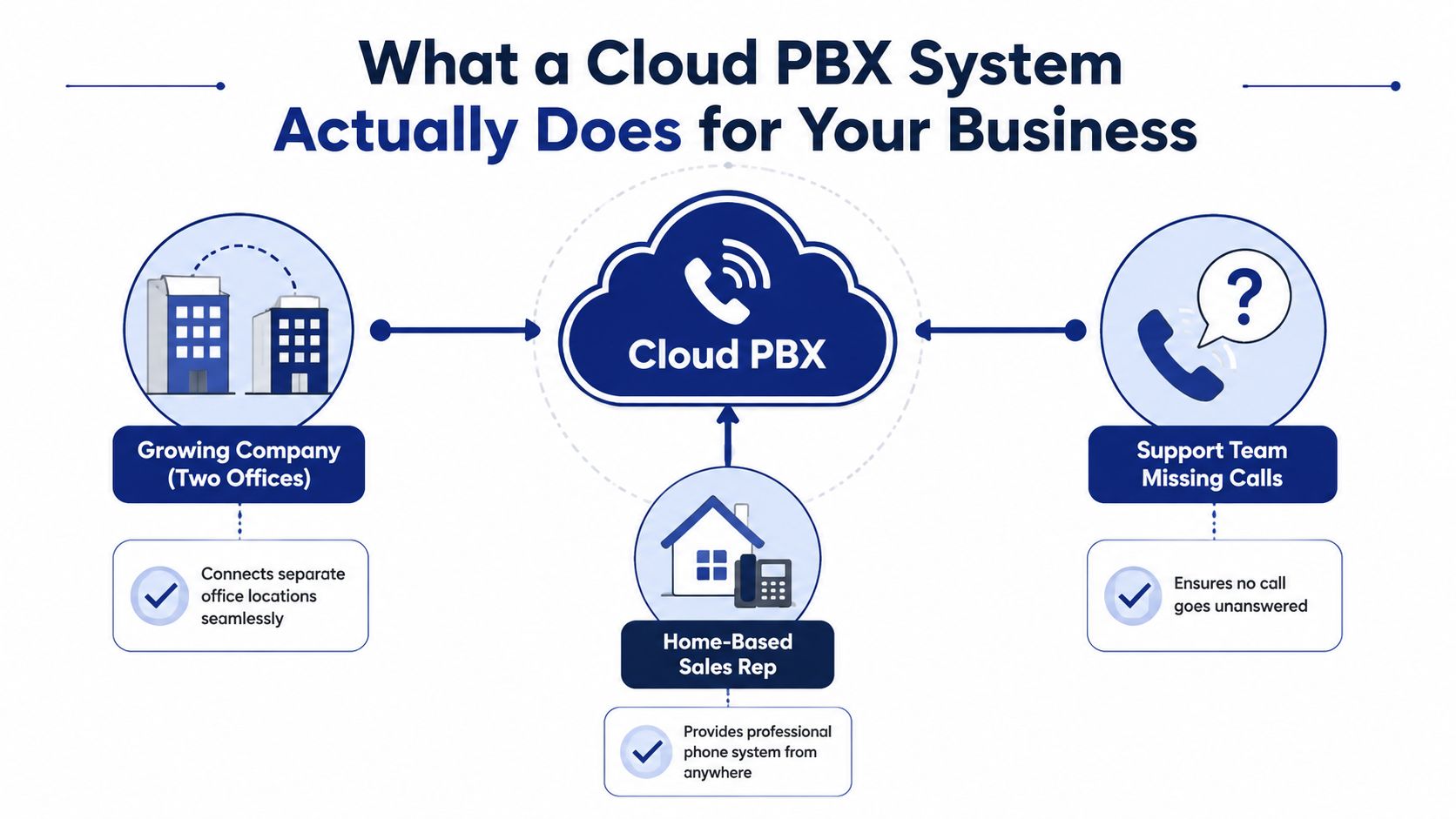
A growing company usually feels the pain before it names the cause. Two offices are answering calls differently, a home-based sales rep is missing transfers, and support has no clear way to keep a caller from disappearing into voicemail. The business still looks professional from the outside, but inside it's a mess of extensions, handoffs, and people guessing who should pick up next.
That's where a cloud PBX system earns its keep. It acts like the business phone layer that ties together call routing, voicemail, conferencing, faxing, recording, and extensions without requiring a physical PBX box in your office. The practical result is that one main number can reach the right person, department, or queue whether they're in the office, at home, or on a mobile device.
What disappears when the system goes live
The biggest change isn't a feature list. It's the removal of daily friction that used to be “normal” with old phone gear. Reception no longer needs to manually juggle transfers, managers don't need to chase down voicemails across devices, and a remote rep can answer under the same company identity as someone sitting at a desk.
A useful way to explain it to a non-technical owner is this. A cloud PBX gives the company a shared phone brain, so calls are no longer tied to a specific room, a specific circuit, or a specific receptionist. If you want a plain-language definition to hand to stakeholders, the cloud phone system overview works well as a companion reference.
Practical rule: If the business needs one main number, internal extensions, and reliable routing across locations, a cloud PBX is usually the starting point, not the finish line.
The reason this model has become mainstream is scale. In 2024, over 68% of enterprises with more than 100 employees had deployed cloud-based PBX systems, and cloud PBX accounted for 52.7% of all business phone deployments (Market Growth Reports). That doesn't mean every company should buy it automatically. It does mean the technology is now normal enough that your purchase request won't sound experimental.
Inside the Cloud PBX Architecture
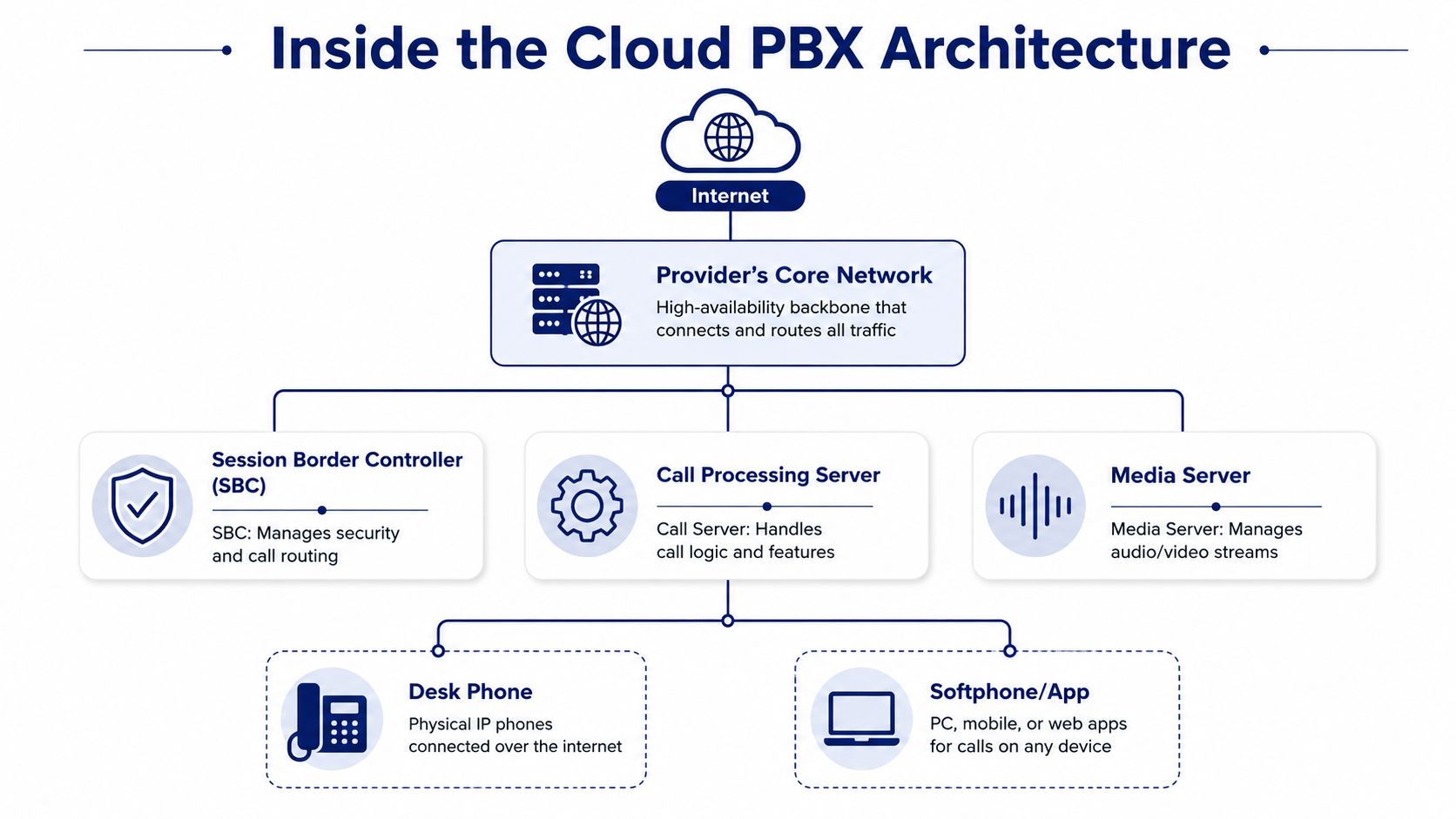
A cloud PBX works like an airline control tower. The phones and softphone apps sit at the edge, but the routing decisions happen in the provider's platform. A legacy PBX was closer to a switchboard fixed inside one building, with one set of cables and one local box to maintain. A cloud PBX is managed elsewhere, which gives the business more flexibility, but it also puts more pressure on the local network to behave properly.
How the pieces fit together
At the edge, a desk phone or softphone app starts the call. The device uses SIP signaling to tell the cloud platform who is calling whom, while the voice stream is handled separately. From there, the provider's core network processes routing, voicemail, conferencing, recording, and other features before handing the call off to the public telephone network.
That separation matters because different faults show up in different parts of the path. If the call will not set up, the problem may be in signaling. If the conversation sounds broken, the issue may be latency, jitter, or packet loss on the media path. If calls reach the right place but recordings are missing or delayed, the troubleshooting path changes again. For teams that want a plain-language definition of the platform itself, the PBX system overview is a useful reference point.
Where failure points live
Cloud does not remove telecom risk, it shifts where the risk shows up. The platform can be healthy while a weak router, a bad cabling run, or an overloaded Wi‑Fi link creates the user complaint. That is why the network room and endpoint setup deserve the same attention as the contract terms.
A cloud voice rollout also sits inside the broader network design, not outside it. The Splash Access cloud network for businesses material is useful here because it frames cloud networking as an operating environment, not just a product label.
Your troubleshooting mindset has to change. In a cloud PBX environment, the first question is rarely “is the phone system up?” It is usually “which layer, endpoint, local network, provider core, or carrier interconnect, is failing?”
For an IT manager, that model is the value. Once you can draw the call path on a whiteboard, call-quality complaints become easier to isolate, explain, and defend. The other practical benefit is visibility. You can separate a handset problem from a switching issue, and both from an outside-carrier problem, instead of treating every dropped call as one vague failure.
Cloud PBX vs On-Premises PBX vs Hosted VoIP
The comparison gets messy because vendors use the words loosely. A traditional on-premises PBX is hardware you own and run in your office or data center. Hosted VoIP and cloud PBX are often used interchangeably in the market, because both rely on provider-hosted voice infrastructure delivered over the internet. The buying decision is usually between owning the stack and renting the stack.
| Criteria | On-Premises PBX | Hosted VoIP / Cloud PBX |
|---|---|---|
| Hardware ownership | You own the box, cards, and related gear | The provider owns the core platform |
| Software patching | Your team or partner handles upgrades | The provider handles platform updates |
| Scaling | Usually means more hardware and more planning | Usually means adding users or locations in software |
| Remote workers | Often awkward or limited | Built for mobile and distributed use |
| Internet dependency | Can be less dependent, depending on architecture | Depends on stable internet access |
| Multi-site rollout | More local infrastructure work | Usually easier to centralize |
The old PBX still has a place in some environments. If a company needs tight on-prem control, has a telecom team in house, or runs a highly specialized voice environment, owning the equipment can make sense. But for most SMBs, the key operational win is not that cloud is fashionable. It's that the provider carries the platform maintenance and the company stops buying hardware just to add people.
A simple way to keep the categories straight is this. On-premises PBX is a capital asset. Cloud PBX is a service. Hosted VoIP sits in the same family as cloud PBX because the voice system is managed off-site and consumed over the network. For a deeper glossary-style explanation, the PBX system guide is a useful internal reference.
When I talk to IT buyers, I usually frame it this way. If your growth pattern is uncertain, your locations are spread out, or your staff works from home, cloud wins on operational flexibility. If your company prizes local control above everything else, on-prem still deserves a fair look.
Features That Actually Move the Needle for SMBs
The feature list looks endless until you group it by the job it does. A small company doesn't need “enterprise telephony” in the abstract. It needs fewer missed calls, simpler admin work, and better visibility into what the phone team is doing.
Call flow features that reduce missed calls
Auto attendant, IVR, hunt groups, queues, and smart routing do one thing well, they stop callers from getting lost. A customer shouldn't have to know who works in billing, and a receptionist shouldn't have to hand-route every call all day. If the system can answer, direct, and queue intelligently, the business sounds more organized immediately.
That matters even for small teams. A ten-person company can use the same call-handling logic that once belonged to a much bigger contact center, without bolting on a separate switchboard. Call recording is also useful here, not as a trophy feature, but as a way to review customer conversations, settle disputes, and train new reps.
Admin and supervisor tools that save time
The administrative value lives in the web portal. If users, routing rules, call logs, voicemails, and recordings can be managed from one place, the IT or office admin doesn't need to open tickets for every small change. Supervisors also benefit when the platform provides live queue visibility, wait-time announcements, historical reports, and callback options.
Cloud faxing deserves a mention because it's often overlooked until someone needs it. A well-designed fax workflow with collision avoidance helps reduce the awkward edge cases that still show up in healthcare, legal, logistics, and certain B2B workflows. You may not celebrate fax, but you'll notice when it's missing.
Useful filter: If a feature doesn't reduce handling time, missed calls, or admin tickets, it's probably decoration rather than value.
Remote reachability is where the platform becomes practical for hybrid work. Mobile apps, softphones, visual voicemail with transcription, and call flip between devices let employees keep the same business identity whether they're at a desk or not. That consistency is often what managers are really buying when they ask for “modern calling.”
SnapDial fits this category as one option among many because it includes cloud PBX functions like auto-attendant, call routing, call queues, ring groups, voicemail, call recording, DID, call logs, call analytics, and a dial plan editor. That kind of bundle matters when the goal is less vendor sprawl, not just more features.
Network, Hardware, and Sizing the System Right
This is the section that usually gets skipped in sales demos and then shows up as a problem after cutover. A cloud PBX still depends on the local network, and the local network can ruin a good platform if the basics are wrong. In practical terms, each voice call typically consumes about 90 Kbps of bandwidth, and providers recommend one or more broadband Internet connections so call handling doesn't depend on a single access link (Telnet World Wide).
Start with the LAN, not the license
Before go-live, the network team should disable SIP ALG on the firewall, update router and switch firmware, deploy packet prioritization, test Ethernet jacks, and run a VoIP readiness test. Those aren't fancy tasks, but they matter more than a lot of feature bullets on a pricing page. The cloud platform can only be as clean as the path it receives.
If the company is using softphones heavily, headset quality also becomes part of the system design. A separate buying guide for call headsets can help the team standardize equipment choices, and the Nerds 2 You Edmonton guide to call is a practical place to start if you need a user-facing reference.
Size compute and storage like a production service
Sizing guidance for production cloud PBX deployments shows a useful baseline. Smaller systems commonly start around 2 vCPUs and 4 to 8 GB RAM, while larger systems move toward 8 to 10+ vCPUs and 16 to 34+ GB RAM, with SSD storage increasing from 80 GB to 640+ GB as extensions, call recording, and log retention grow (3CX hardware guidance). Those numbers are a reminder that call processing, signaling state, and recording all consume resources.
A simple procurement checklist helps here:
- Check WAN resilience: Use more than one internet connection where possible, so a single access failure doesn't take down active calls.
- Validate switching and cabling: Bad jacks and stale firmware create more complaints than the PBX license ever will.
- Match device choice to usage: Desk phones, softphones, and headsets all affect support load in different ways.
- Plan for storage growth: Recording and logs grow steadily, then suddenly become a problem when retention is part of compliance.
The blunt version is this. Cloud PBX doesn't eliminate network engineering. It makes good network engineering essential.
Pricing Models, Contracts, and Hidden Costs
Most buyers compare the monthly sticker price and stop there. That's a mistake, because the pricing model determines how the bill behaves as the company grows, adds locations, or expands internationally. Per-user subscription pricing is the most familiar shape, but some providers price by concurrent call capacity or bundle phones and service together.
A per-user plan is easier to forecast for office teams with stable headcount. A concurrent-call model can work well where many users are occasional callers but only a few are active at once. Bundled packages may simplify procurement because the hardware is included, but they can lock you into a device refresh cycle you didn't need.
The hidden line items are what usually change the total cost conversation. Number porting, toll usage, call recording storage, advanced call-center modules, international routing, hardware replacement, and early termination terms can all shift the economics after the first quote. That's why the question should never be “what's the monthly price?” It should be “what happens to the bill when we add users, keep numbers, store more recordings, or open another office?”
A clean way to evaluate quotes is to ask these questions:
- Which features are included by default? Don't assume recording, analytics, or queues are part of the base plan.
- What's excluded from the package? Toll charges and storage caps often hide here.
- How are phones handled? If hardware is included, find out what happens when devices need replacement.
- What are the exit terms? Early termination can erase the savings you thought you were getting.
One more thing matters for global teams. A vendor that looks cheap in one country may become expensive once the company starts adding international numbers or local dialing requirements. If expansion is on the roadmap, pricing has to be judged against rollout flexibility, not just month one cost.
Implementation Roadmap, Security, and ROI
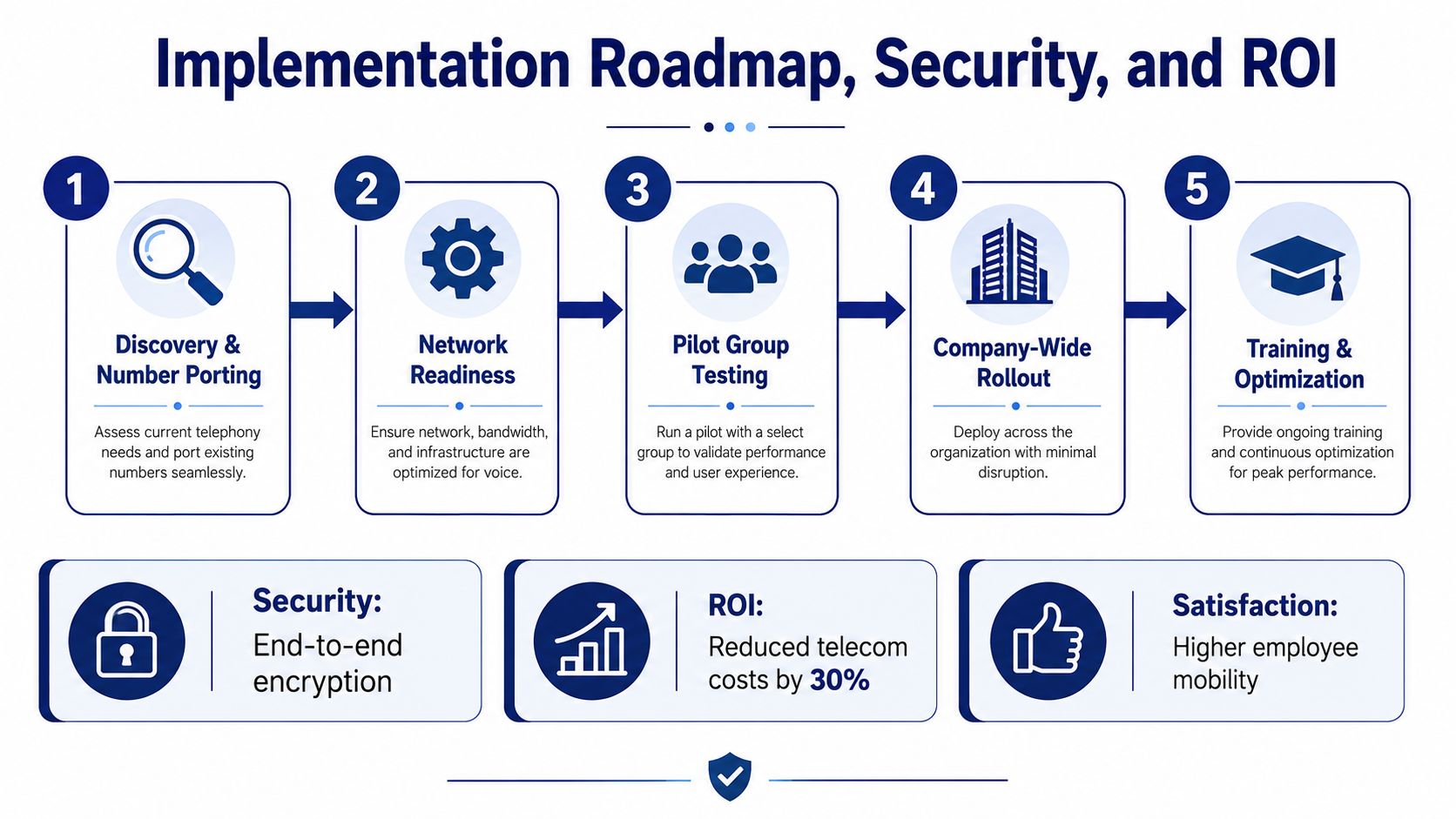
A cloud PBX rollout succeeds when the project is treated like a communications change, not just a software purchase. Discovery and number porting come first, because you can't plan a clean cutover if the current call paths and numbers aren't mapped. After that, the network has to be ready, a pilot group needs to test the system, the company cuts over in stages, and then the admin team fine-tunes routing and training.
What a healthy rollout looks like
The pilot group should include real users, not just friendly testers. If support, sales, and a remote worker all use the system before company-wide cutover, you'll learn where routing, headset choice, or training needs adjustment. That's far cheaper than discovering the issue after everyone has moved.
Security belongs in the implementation plan, not a separate hope. Signaling and media should be encrypted, admins should control call recording and retention, and the platform should offer failover routing and redundant data centers so one outage doesn't become a company-wide outage. If your business depends on phone continuity, internet failure planning has to be explicit.
The ROI argument finance will actually accept
ROI is easier to defend when it's framed in operational terms. Mobile-ready calling reduces missed opportunities for remote staff, centralized routing cuts transfer waste, and a provider-managed platform avoids the next hardware refresh cycle. Those are real business effects, even when they're harder to squeeze into a spreadsheet than license fees.
ROI gets credible when you tie it to work the team already does, answering calls, returning voicemails, routing customers, and keeping continuity during outages.
If you need a reference implementation video for stakeholders, this walkthrough is useful context.
The payoff isn't just lower telecom overhead. It's fewer missed calls, less admin drag, and a phone environment that doesn't punish a company for growing or moving.
Buying Checklist and Common Questions
The safest purchase decision is the one that survives a steering meeting. Use the checklist below to separate real requirements from nice marketing language, and keep the discussion grounded in business risk.
Must-have
- Uptime and redundancy: Confirm how the provider handles outages and failover.
- Call routing control: Make sure the admin team can change routing without opening a support ticket.
- Number porting: Verify that existing business numbers can move cleanly.
- Security controls: Check encryption, access management, and recording retention settings.
Nice-to-have
- Multi-device support: Desk phones, desktop apps, and mobile apps should work together.
- Analytics and reporting: Supervisors need usable call logs, queue data, and performance views.
- Integration options: CRM or helpdesk connections can save manual work.
- Cloud faxing: Still useful in workflows where fax hasn't disappeared.
Deal-breaker
- Weak contract flexibility: Early termination clauses and locked device commitments can trap you.
- Unclear support model: You need to know who answers when the system breaks.
- Poor global coverage: Distributed companies need a platform that can handle international presence, not just a domestic line.
For a vendor-selection angle, the cloud VoIP provider guide is a good companion resource when you're comparing support, flexibility, and deployment fit.
Common questions usually come down to four things. Cutover timing depends on how much testing and number porting is involved. If the internet goes down, calls need a documented fallback path. Existing numbers can usually be ported if the provider supports it. Multi-location and international rollouts should be judged on routing control, coverage depth, and how visible call quality is across regions.
If you're evaluating a move from a legacy PBX, SnapDial can be one of the providers you review for cloud-based calling, centralized admin controls, and hosted voice features. Visit SnapDial to compare the platform against your current phone setup and start a practical purchase conversation with your team.