
At 2:00 a.m., your monitoring system reports that a production server has stopped responding. By 7:00 a.m., the factory floor is idle, customer calls are piling up, and someone discovers that the nightly backup job has been failing for weeks. The backup console says there are copies. The business still can't operate.
That scenario is more common than most owners want to admit. Backup and disaster recovery isn't a storage problem. It's a restore-confidence problem. Your plan matters only if your team can recover the right systems, in the right order, within the time the business can survive, while people are under pressure.
The 2 AM Phone Call That Changes How You Think About Backups
The team had done what many small businesses do. They had a tape rotation, a NAS snapshot, and an offsite sync. Every component looked responsible in isolation. The reports were filed, the hardware was paid for, and nobody had received an alarming notification.
Then the production servers wouldn't boot.
The tapes contained data, but no one had recently confirmed that the required applications could be rebuilt from them. The NAS snapshot sat on infrastructure affected by the same failure. The offsite sync had preserved files, but not necessarily the operating system, application dependencies, permissions, network settings, or the sequence required to bring production online.
By sunrise, the business didn't have a backup problem. It had a recovery problem.
Practical rule: A completed backup job proves that a process ran. It doesn't prove that the business can reopen.
A widely cited benchmark reports that only 57% of backups succeed completely, while only 61% of restores succeed. Just 35% of organizations achieve full recovery of all data, and only 15% conduct backup tests daily, according to CrashPlan's 2026 backup and recovery statistics guide. Those figures describe the gap between having a copy and having a usable recovery capability.
The comforting assumption
“We have backups” is a statement about possession. It says nothing about restoration speed, data integrity, application dependencies, access credentials, or who has authority to start the recovery.
An untested backup is an unproven theory. It may be valid, or it may fail because a database is inconsistent, an encryption key is missing, the backup account is locked, or the documentation depends on an employee who isn't available during the incident.
The standard that survives an incident
Treat every backup as a recovery claim that must be demonstrated. Restore representative files, rebuild critical applications, verify user access, and record the elapsed time. Then update the plan when systems, vendors, staff, or network arrangements change.
That is the central discipline of backup and disaster recovery. Recovery confidence is earned during calm periods, not improvised during an outage.
What Backup and Disaster Recovery Actually Mean
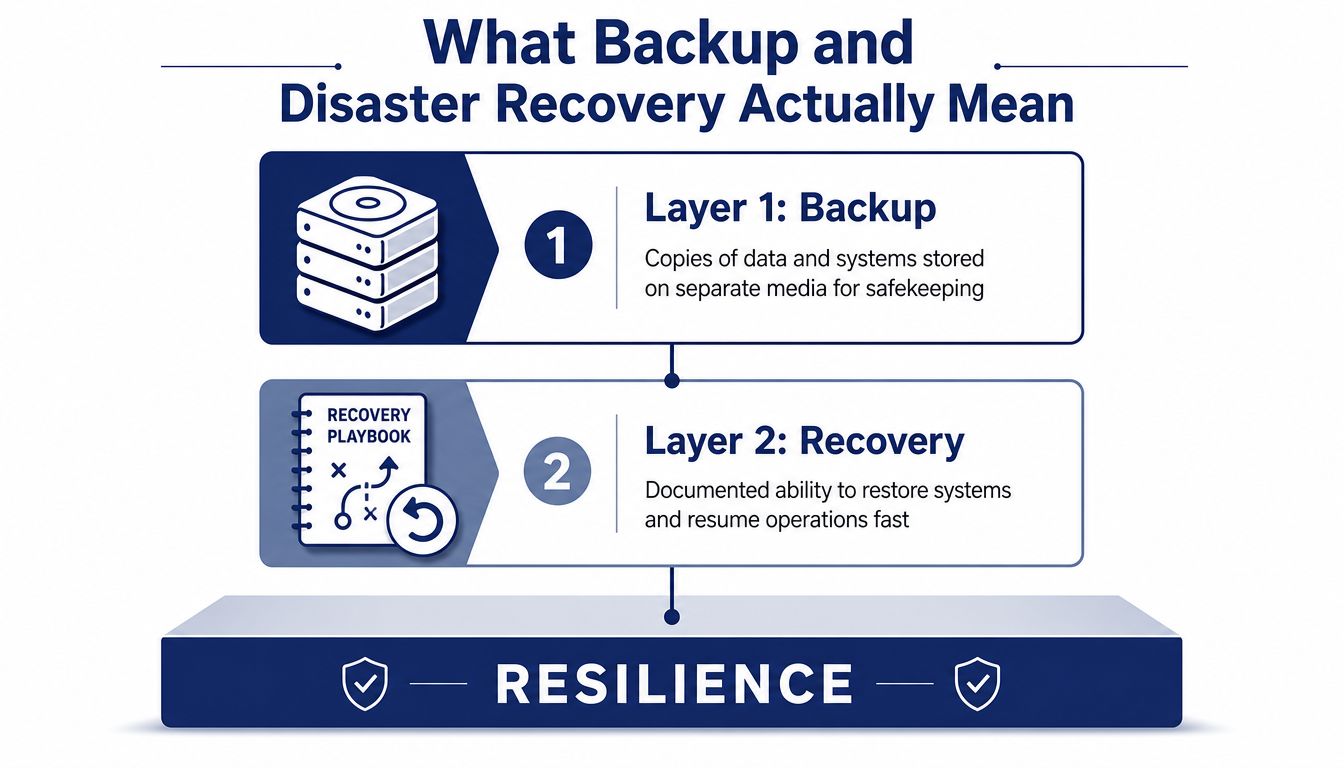
Backup and disaster recovery is a layered operating model. It isn't a single appliance, subscription, or cloud destination.
Layer one is backup. Backup creates copies of data and systems and stores them on separate media or systems. It protects files, databases, virtual machines, configurations, and other information against deletion, corruption, hardware failure, and certain security events.
Layer two is recovery. Recovery is the documented ability to restore those copies onto functioning infrastructure. It includes the restore sequence, credentials, dependencies, validation checks, and a realistic time target. Recovery protects operating hours because it turns stored data into a working service.
Layer three is continuity. Continuity keeps the business moving while technical recovery is underway. It includes employees, customer communications, alternate work locations, manual procedures, suppliers, payment processes, and decisions about which services receive priority.
Separate the layers in your planning
A synchronized folder isn't automatically a backup. Services such as OneDrive and Google Drive provide valuable collaboration and versioning features, but a synchronization mistake, malicious deletion, or compromised account can propagate unwanted changes. You still need independent retention, access controls, and restore procedures.
Replication has a similar limitation. If ransomware changes the primary workload, replication can copy the damaged state to the recovery target. Replication supports availability, but it doesn't replace protected historical recovery points.
Use this simple test:
- Backup protects information: Can you retrieve an earlier, clean version?
- Recovery protects operations: Can you rebuild the application and its dependencies?
- Continuity protects the business: Can staff serve customers while systems are unavailable?
The same thinking applies to systems outside traditional IT. A hotel, for example, may need to evaluate passwordless WiFi security for hotels alongside its access, identity, and guest-connectivity dependencies. The point isn't to place every system in one backup job. The point is to identify every service the business relies on and define how it continues.
Why Downtime Is an Existential Risk for SMBs
For an SMB, a single prolonged outage can erase a year of revenue in days. The immediate loss is only part of the exposure. Blocked transactions, idle employees, delayed shipments, missed calls, contractual penalties, and damaged customer trust can continue after systems return.
Historical disaster recovery reporting shows how quickly a technology failure can become a business failure. According to Gitnux's disaster recovery statistics reference, 93% of companies losing a data center for 10 days or more filed for bankruptcy within one year, with 50% filing immediately. The same source reports that 40% of businesses experiencing a critical IT failure go out of business within one year, while 80% of businesses suffering a major disaster fail within three years.
These figures describe historical outcomes, not a forecast for every outage. They still establish the management issue: recovery speed affects solvency. A backup that exists but cannot restore applications, identities, communications, and customer access under pressure offers limited protection.
Count the cost your spreadsheet misses
Build a practical hourly model before choosing a recovery design:
Hourly downtime cost = lost productivity + blocked transactions + idle labor + immediate response expense.
Use the model to identify which services need the fastest recovery. Do not pretend it provides accounting precision. It should also inform the wider risk response, including whether resources that help owners protect their business income belong in the plan. Insurance can reduce financial exposure, but it cannot restore an application or answer a customer call.
| Cost Category | What to Count | Example SMB, 40 employees |
|---|---|---|
| Lost productivity | Work employees can't complete without systems | Staff unable to access applications, files, or identity services |
| Blocked transactions | Orders, payments, shipments, or service work delayed | Orders held because the database or payment workflow is unavailable |
| Idle labor | Paid time with no productive workflow | Production, support, or administrative teams waiting for access |
| Customer impact | Missed calls, delayed responses, and service failures | Customers unable to reach the right department |
| Response expense | Emergency vendors, overtime, equipment, and transport | Recovery specialists, replacement hardware, or temporary connectivity |
Set recovery targets from business tolerance, not product brochures. If customer service depends on phone availability, compare the assumption with an explicit uptime guarantee and test what happens when the office, broadband connection, or power fails.
Ask one executive question: What has to be working first for us to keep serving customers? The answer should determine recovery order and test scenarios.
BDR Architectures and How to Choose Between Them
Architecture is a trade-off, not a loyalty test. The right design depends on bandwidth, regulatory exposure, internal IT skill, application dependencies, and the downtime each workload can withstand.
| Architecture | Strengths | Weaknesses | Best Fit For |
|---|---|---|---|
| On-premises | Fast local restores, direct control, local access | Vulnerable to site loss, local hardware failure, and attacks that reach connected backups | Organizations with strong facilities and a deliberate external recovery plan |
| Cloud-native | Offsite resilience, flexible capacity, remote access | Depends on provider security, account access, bandwidth, and recovery transfer capacity | Distributed teams and workloads designed for cloud recovery |
| Hybrid | Fast local recovery plus offsite resilience | More components, policies, credentials, and procedures to manage | SMBs running important local applications with meaningful downtime costs |
On-premises recovery
Local appliances and backup servers can restore large workloads quickly when the building and network remain available. They become a weak plan when a fire, flood, theft, power event, or ransomware attack affects both production and backup infrastructure.
On-premises-only can be valid. It must be a deliberate choice supported by site protection, isolated copies, replacement hardware access, and a documented offsite recovery route. Inertia isn't an architecture.
Cloud-native recovery
Cloud platforms can protect against the loss of a physical office and support remote administration. They also introduce dependencies. Your team needs secure access to the provider account, sufficient bandwidth to retrieve data, clear ownership of encryption keys, and confidence that the provider's isolation and retention controls work as expected.
A broader data backup solutions guide for 2026 can help compare product categories, but don't select a service by feature count. Ask the vendor to demonstrate a restore of your actual workload.
Hybrid is often the practical middle ground
For many SMBs, a local recovery tier handles urgent application restoration while a separate cloud or offsite tier handles site destruction. That design makes sense for a business running a line-of-business database, manufacturing system, file server, or local identity service.
Communications deserve the same architectural scrutiny. If your company is evaluating a cloud PBX system, ask where call routing, voicemail, recordings, user settings, and administrative access live during an office outage. A phone system that can route calls away from a failed site may reduce continuity pressure, but your team still needs to test the route.
For a small office with minimal local infrastructure, cloud-native protection may be the cleanest option. For a business with operational applications on site, hybrid usually provides a better balance. Whatever you choose, write down the failure scenarios it handles and the ones it doesn't.
RPO and RTO Without the Jargon
Two questions determine whether a recovery design is appropriate:
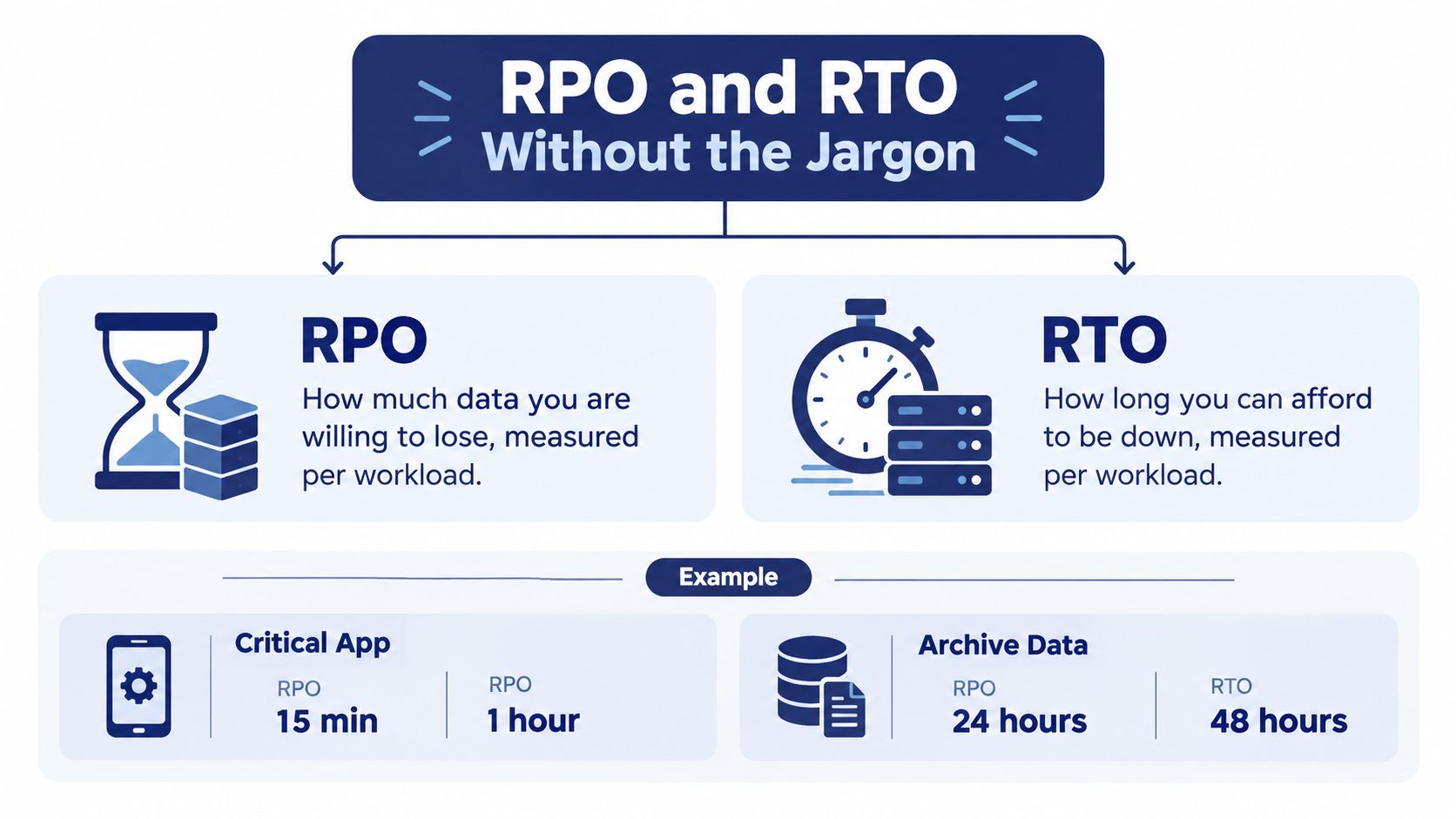
RPO, or Recovery Point Objective, asks how much data you can afford to lose. An RPO of one hour means the business accepts losing up to an hour of changes if recovery begins after a failure.
RTO, or Recovery Time Objective, asks how long a workload can remain unavailable. A four-hour RTO means the recovery process must return that workload to an acceptable operating state within four hours.
Set both targets per workload, not once for the entire company. Expert guidance from backup and disaster recovery best practices emphasizes workload-specific objectives and scheduled restore validation, including quarterly testing for critical systems.
Turn business tolerance into technical design
Consider how different systems behave:
- Email: The business may accept a moderate data gap and a longer restore if staff can use temporary messaging.
- Order processing: A recent transaction history and faster availability may be essential because delays affect customers and cash flow.
- File shares: Some shared files may tolerate a less frequent recovery point than an active transactional system.
- Communications: Inbound calls and emergency routing may need a separate continuity path if customers can't wait for application recovery.
Those examples are decision prompts, not universal targets. Your operations manager should identify the consequences, finance should assess the cost, and IT should map the architecture required to meet the decision.
A shorter RPO may require more frequent automated backups or near-continuous replication. A shorter RTO may require prebuilt infrastructure, a hot standby, or a tested orchestration workflow rather than a cold restore from distant storage.
A target you haven't priced is a guess. Calculate the people, infrastructure, bandwidth, licensing, and vendor support needed to meet it.
Finally, test the target with a stopwatch. If the runbook says an application recovers within the RTO but the last exercise took longer, the plan doesn't meet the objective. Change the design or change the approved business target.
Best Practices That Close the Recovery Gap
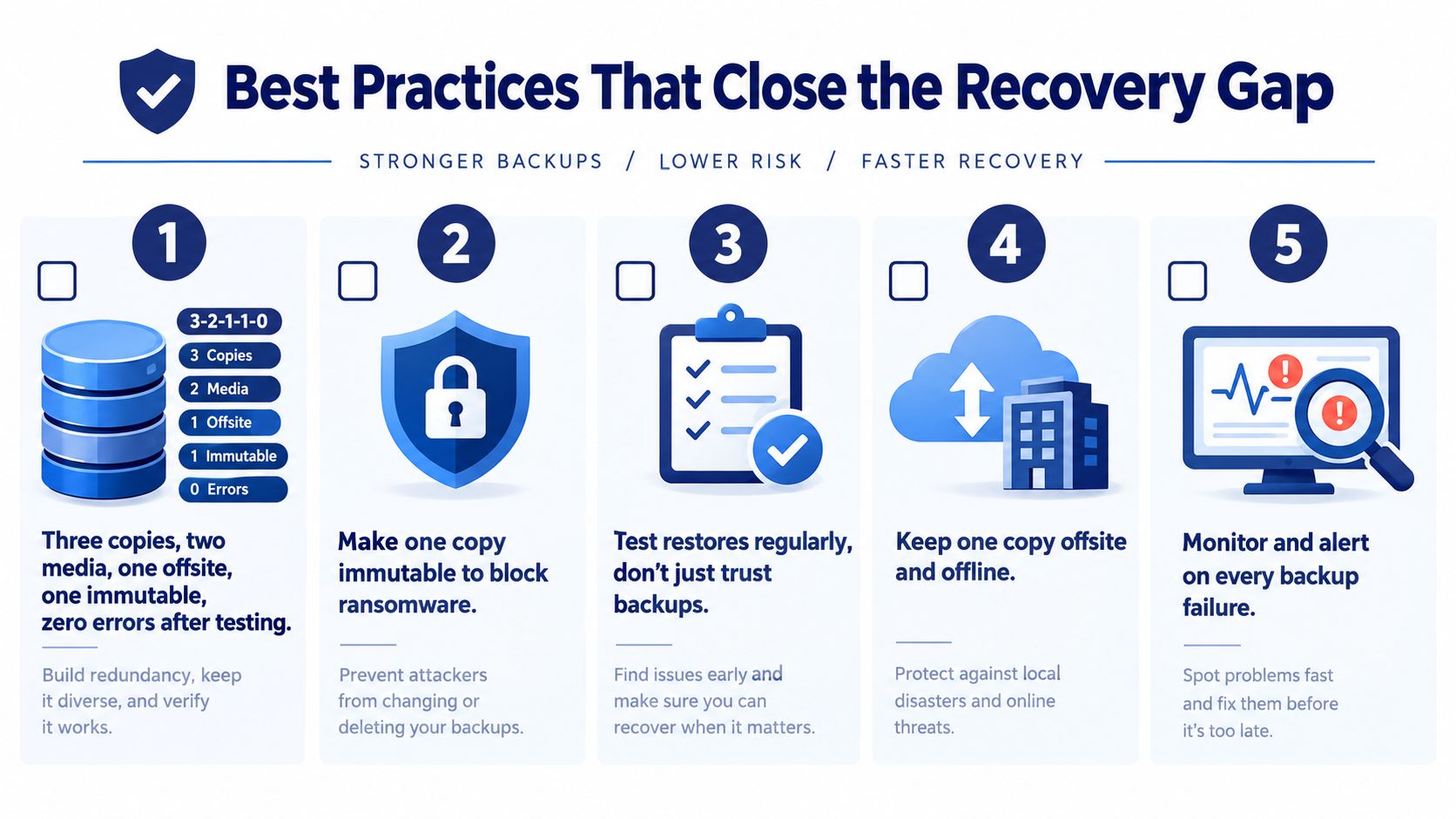
The most reliable program starts with 3-2-1-1-0. The model calls for three total copies, on two different storage media or systems, with one copy offsite, one copy immutable or air-gapped, and zero verified errors after restore testing, as defined by CASRAI's 3-2-1 backup strategy.
The last element matters most. It prevents a team from treating a green backup job as proof that recovery works.
Build protection that survives the failure
Separate the blast radii. Keep copies on distinct systems and place at least one outside the primary site. A local snapshot won't help if the building, storage array, or shared credentials are compromised.
Make one copy immutable or isolated. Immutability prevents approved recovery points from being altered during their retention period. Air-gapped or separately controlled storage adds another barrier when an attacker has reached the production network.
Use separate identities. Backup administration shouldn't depend on the same domain administrator credentials used to manage production. Restrict deletion rights, protect recovery keys, and document break-glass access without leaving those details in an exposed shared folder.
Alert on failure, not just completion. Monitor missed jobs, unusual data volume, authentication errors, retention changes, and storage capacity. Someone must own each alert and know when to escalate.
Test in layers. Run automated file restores frequently, perform application-level recovery exercises on a planned schedule, and simulate a site loss at least once a year. Critical services deserve more attention than archives.
Make the test prove something
A useful restore test checks more than whether a file opens. Verify permissions, database consistency, application startup, user authentication, integrations, network paths, and the records created around the recovery point.
Maintain retention that matches the business requirement, such as daily, weekly, monthly, or yearly recovery points where those periods matter. Then document who restores each workload, who approves failover, who communicates with customers, and who decides when normal operations can resume.
An untested backup is hope stored on a disk. A tested restore is a control that someone can defend during an incident review.
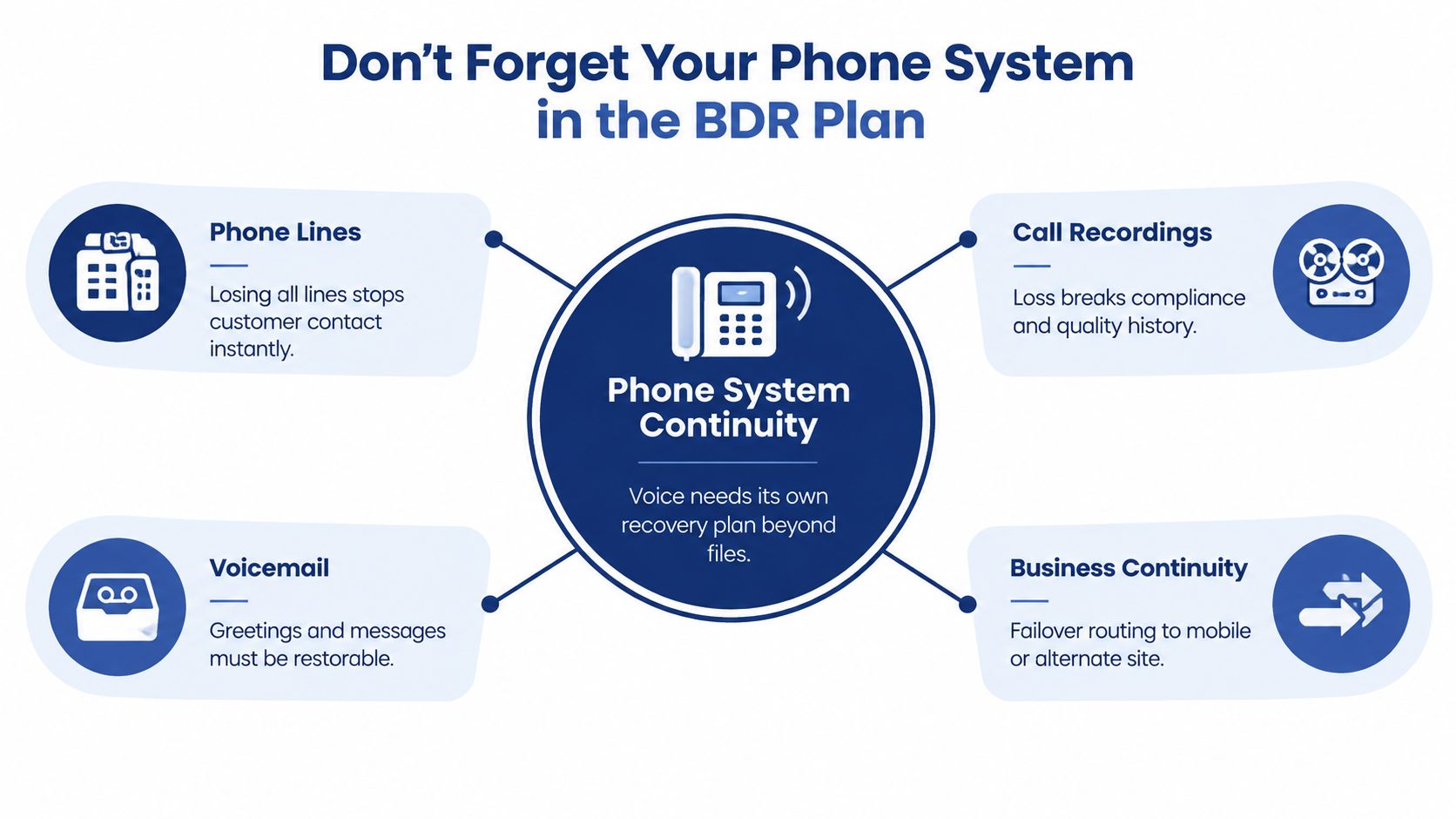
Don't Forget Your Phone System in the BDR Plan
File servers and databases get most of the attention because they look like conventional IT assets. The phone system often gets ignored until every customer call fails at once.
Voice has its own recovery path. You need to account for hosted VoIP, on-premises PBX equipment, SIP trunks, carrier services, call queues, internet connectivity, network switches, handsets, voicemail, and recordings. Losing email can slow work. Losing the inbound number, auto-attendant, queue, and extension logic can stop customer contact immediately.
Treat communications as separate workloads
Document where each element is hosted and who controls it. For a hosted service, identify the provider's emergency calling, number diversion, alternate routing, configuration export, and call-record access procedures. For an on-premises PBX, include the hardware, licenses, configuration backups, carrier settings, and replacement process.
Your configuration inventory should cover:
- Users and extensions: Names, permissions, devices, and assignments.
- Routing logic: Auto-attendants, business hours, holidays, queues, and overflow rules.
- Records: Voicemail, call recordings, call logs, and retention requirements.
- Carrier dependencies: Numbers, trunks, provider contacts, and failover options.
- Network access: Internet circuits, firewall dependencies, power, and remote administration.
A provider's service-level agreement doesn't restore your office broadband or power. It also doesn't guarantee that your staff knows how to activate forwarding under pressure.
Test the conversation, not just the dashboard
A communications drill should verify inbound calls, outbound calls, voicemail, recordings, emergency calling, administrative access, and the ability to reach users on mobile devices or from an alternate location. Test the customer experience by calling the published number and following the menu.
For businesses reviewing what a cloud phone system is, the key question is operational: what happens to calls when the office disappears? SnapDial is one example of a hosted phone platform that provides call routing, mobile access, voicemail, recording, and administrative controls. Evaluate any provider against your own RTO, routing requirements, access controls, and test results.
Create fallback routes before you need them. Forward calls to mobile phones, use an alternate number, establish a cloud queue, or route customer traffic to a secondary site. Then assign a person to activate and verify the change.
A Honest BDR Readiness Checklist
A credible BDR plan tells people what to restore, in what order, using which access, and who owns the decision. It isn't a folder of diagrams that nobody has opened since the last audit.
Start with a workload inventory. For every critical service, record the business owner, acceptable data loss, acceptable downtime, dependencies, recovery location, and validation test. Include identity, DNS, networking, security tools, operating systems, application configurations, databases, file stores, and communications. A database restore that can't authenticate users isn't a recovered service.
Prioritize the work
Use this sequence during a readiness review:
Name the business services. Don't begin with backup products. Begin with order processing, production, customer support, finance, communications, and the services employees need to work.
Assign RPO and RTO per workload. Record what the business accepts, then confirm the selected backup cadence and recovery architecture can meet it.
Apply 3-2-1-1-0. Keep three copies across two media or systems, place one offsite, protect one with immutability or isolation, and verify that restores complete without errors.
Map dependencies. Identify identity, network access, licensing, databases, integrations, certificates, configuration files, and vendor support. Restore in dependency order.
Test the actual recovery path. Perform file, application, communications, and environment tests. Record results, elapsed time, missing prerequisites, and corrective actions.
Maintain runbooks. Keep contacts, access instructions, escalation paths, manual workarounds, customer communications, and approval authority current.
Put ownership above documentation
The plan should name an executive owner who can authorize downtime, emergency spending, customer notices, and service prioritization. IT can execute recovery, but the business must decide what “good enough to reopen” means.
Review the plan after infrastructure changes, new applications, provider changes, security incidents, and staff turnover. Include the phone system in recurring checks, especially inbound routing, voicemail, call queues, and mobile access.
Recent ransomware reporting reinforces why this discipline matters. Sophos found that only 54% of ransomware victims restored data from backups in 2025, while Unitrends reported that more than 60% of organizations believed they could recover within hours, but only 35% could, and 25% tested disaster recovery once a year or less, as summarized in the Sophos State of Ransomware 2025 report.
Paper confidence is cheap. Restore confidence comes from repeated evidence, assigned ownership, and a recovery process that works when the office, network, or primary systems don't.
SnapDial can help SMBs keep business communications available through hosted calling, mobile access, call routing, voicemail, recording, and outage forwarding that can be included in continuity planning. Review your communications recovery requirements, then visit SnapDial to assess whether its cloud phone system fits your restore and continuity plan.