
If the switch lives in a provider's data center, why can one bad outlet still silence your office? A hosted phone system is business phone service where the provider runs the hosted PBX, or cloud PBX, and your team reaches it over the internet. In the United States, most business calling now rides on internet-based VoIP rather than copper lines.
The switch left the closet. The call still crosses your side. It works like electricity from a utility: the grid can be strong while your own breaker is tripped. Broadband, the router, Wi-Fi or switching, firewall settings, backup power, and the address used for emergency calling are all links you still control.
A Hosted Phone System in Plain Terms
Say a four-person design studio is done with a beige box in a closet that only one technician understands. They don't want to buy another switch, cool it, and schedule a visit every time someone joins. They want extensions, a greeting, and voicemail that follow people home. That's the job a hosted phone system is built for.
Think of renting a fully serviced office instead of building your own. A legacy PBX is the building you own. You pay for the switchboard, the maintenance contract, and every upgrade. A hosted system is the serviced office. A recurring fee covers the infrastructure, and someone else keeps the lights on, pushes updates, and watches the platform. You still choose who sits where, which is your extensions and your call rules.
What you actually get
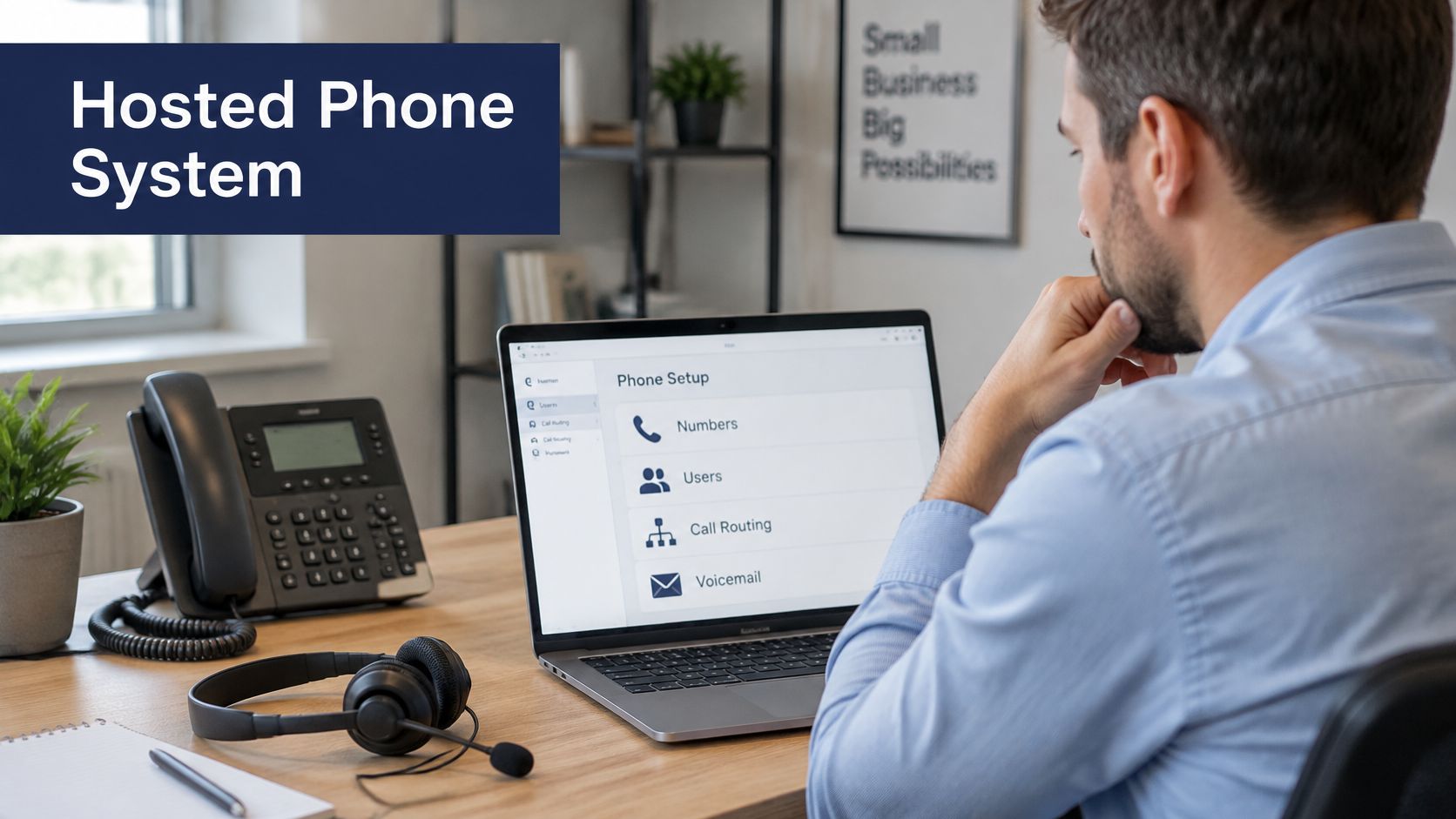
The provider runs the call-processing platform in a remote data center. Over your internet connection you get extensions, voicemail, an auto attendant, call routing, and conferencing, plus the admin work that used to live on site. The same extension can ring a desk phone, a laptop softphone, or a mobile app. "Hosted" names where the switch runs. It doesn't mean calls are free, and it doesn't name every feature you'll be billed for.
Three labels get mixed up in sales calls, and they aren't the same thing.
- Hosted PBX: the service. The provider operates the phone system and you configure users online.
- VoIP: the technology that carries the voice. If you want the mechanics of signaling and media, how business VoIP phone systems work is a clear walkthrough of that layer.
- UCaaS: calling plus chat, meetings, and presence. You can buy a hosted phone system without buying the whole collaboration suite.
Under the federal definition, this kind of service is interconnected VoIP: real-time, two-way voice that needs a broadband connection, IP-compatible equipment, and the ability to place and receive calls on the public phone network, as set out in 47 CFR Part 9. The FCC's voice-services report also found that business connections were about 62% of 85 million fixed retail voice subscriptions, so this isn't only a household product. Those subscriptions aren't all hosted PBX accounts. They do show internet voice replacing traditional fixed lines at scale.
A hosted phone system turns the phone system from a box in a closet into a service you configure online.
Hosted Phone Systems Versus Legacy PBX
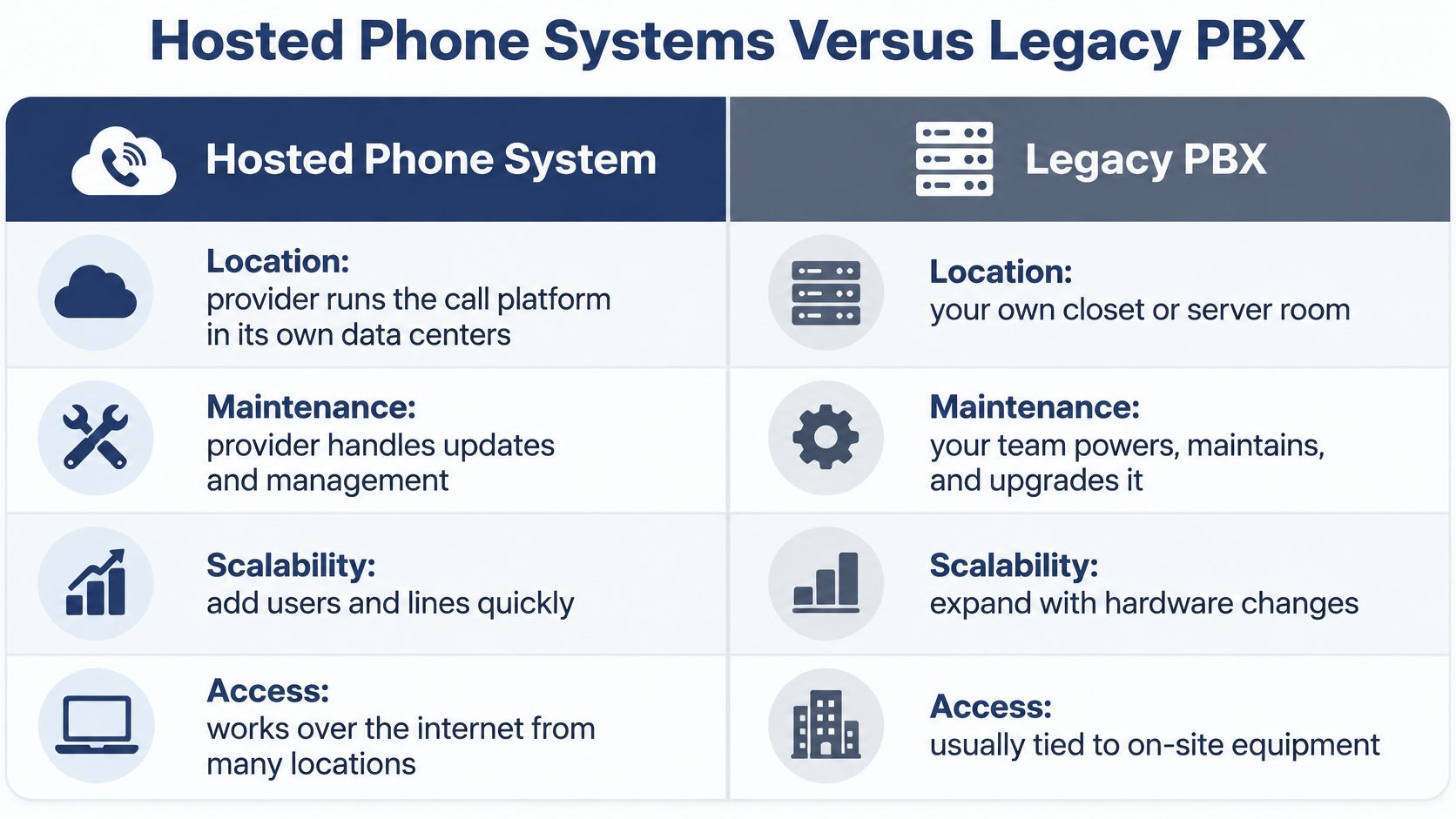
Location is the root difference, and every other row follows from it. A legacy switch sits in a closet or server room your team must power, cool, and lock. A hosted switch sits in the provider's data center and is reached over your internet connection. Buyers often compare monthly totals and miss that split.
Commercial momentum is real even if it doesn't pick your architecture for you. Grand View Research valued the global hosted PBX market at USD 11.20 billion in 2023 and projected USD 12.32 billion in 2024. Growth of that size is why vendors push cloud first. It still doesn't tell a one-office shop with a paid-off switch to rip it out this month.
| Factor | Legacy on-premise PBX | Hosted phone system |
|---|---|---|
| Where the switch runs | Closet or server room at your site | Provider's remote data center |
| Upfront cost | Capital purchase of hardware, licences and installation | Little or no hardware; recurring subscription |
| Adding a user | Hardware capacity check, often a technician visit | Extension added in an online admin portal |
| Software updates | Scheduled on site by your IT team or vendor | Pushed by the provider |
| Connecting several offices | Trunks or VPN links between each PBX | One system with central routing across sites |
| Remote and mobile staff | Extra setup, often a VPN for softphones | Same extension on desk phone, laptop or mobile app |
Why the rows aren't just price
Cost differs more in its line items than in a single total. A legacy purchase bundles hardware, licences, and installation into one capital outlay, then you keep paying to maintain it. A hosted subscription is usually per user or per line each month and covers hosting, maintenance, and updates. Before you sign, ask whether desk phones are bought or leased, whether softphone apps need separate licences, whether number porting has a fee, and whether calling minutes are included.
Growth follows the same split. A legacy extension may need a capacity check or a technician visit. A hosted extension is created in the portal, often the same afternoon. Multi-site firms feel that gap hardest. Each legacy PBX needs its own trunks or VPN links. One hosted plan routes calls between offices from a single admin panel.
Remote staff are the sharpest contrast. A hosted extension rings a laptop or mobile app with the company number. A legacy setup often needs a VPN before a softphone will register. If you're still weighing copper lines against internet calling, the practical differences are laid out in this comparison of VoIP and POTS phone systems.
There's an honest exception. A single site with stable legacy hardware, no growth, and no remote users can keep the PBX until that hardware nears end-of-life. Switching early just to match a market trend spends money you don't have to spend yet.
The short clip below walks through the same architectural split if you'd rather see the closet-versus-cloud contrast than read another row.
How a Hosted Call Reaches Your Team
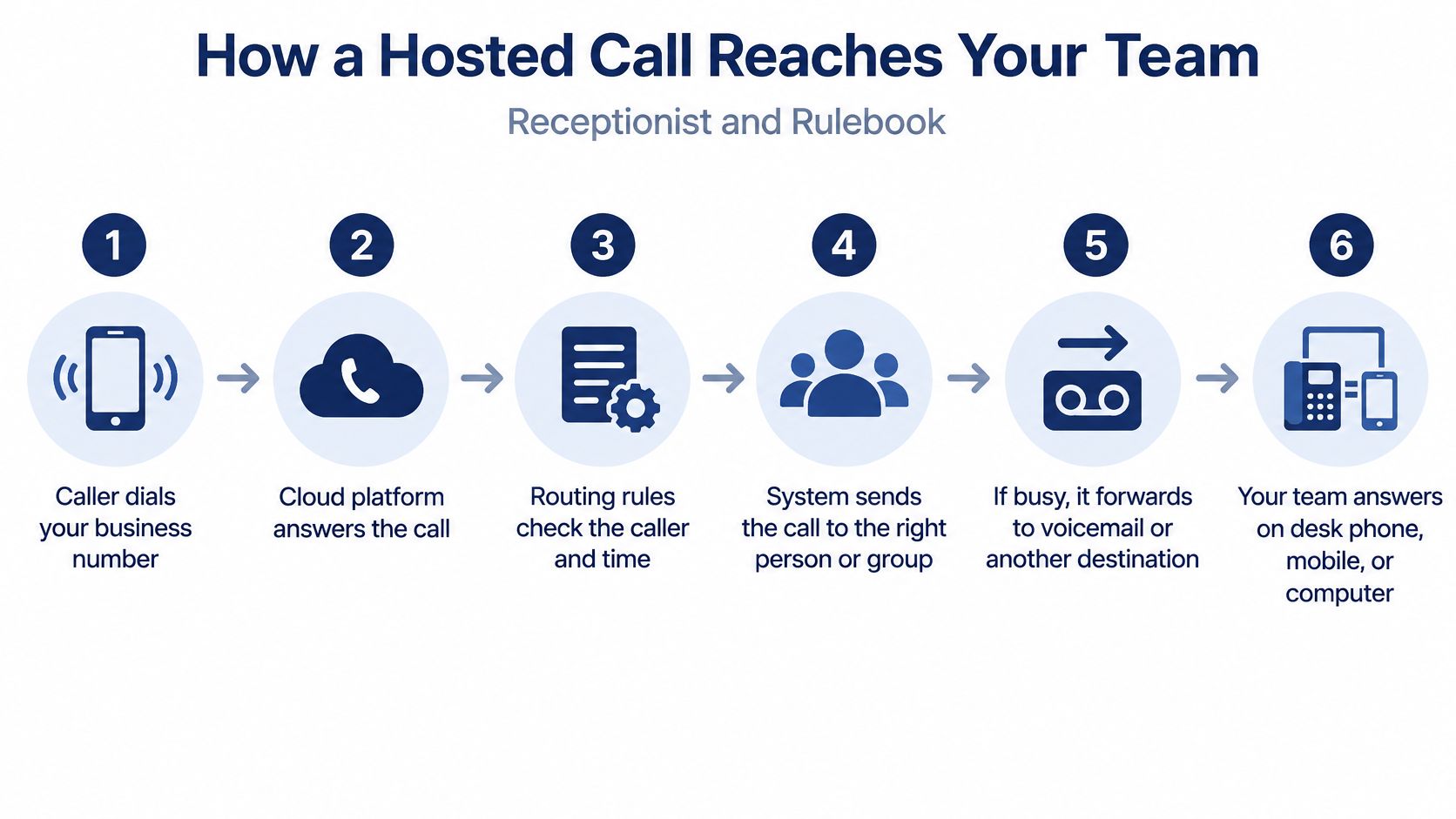
Picture the cloud platform as a receptionist with a rulebook. The receptionist doesn't sit in your lobby. The rulebook is your business hours, holiday calendar, menus, and fallbacks. The caller never sees any of that. They just hear a greeting and then a person, or a voicemail.
Take a dental practice at 5:30 p.m. The front desk is empty. A parent calls about a knocked-out tooth. The system should not ring an unmanned desk until the caller hangs up. It should play the after-hours greeting and send urgent calls to the on-call dentist's mobile, while routine calls land in voicemail.
Six handoffs, then your network
- The caller dials your number. The carrier delivers that call into the provider's network, not into a box on your wall.
- The cloud PBX checks the rules. It matches the dialed number against routing, business hours, and holiday schedules.
- The auto attendant speaks. It plays the greeting and collects a menu choice, such as "press 1 for an emergency."
- SIP sets up the session. Session Initiation Protocol is the signaling that rings the target endpoint. It isn't the voice itself. A plain account of how VoIP works separates that setup from the audio that follows.
- RTP carries the voice. Real-time Transport Protocol moves the audio packets. Jitter and packet loss become choppy sound here, not in the menu.
- Fallback if nobody answers. A ring group, the mobile app, or voicemail with transcription takes the call so it doesn't vanish.
The last mile is still yours
After the platform picks a destination, the call still crosses your broadband, router, and switch before it reaches a desk phone. The internet connection is part of the call path, not an optional extra you can ignore once the portal looks right.
The division of labor is simple. The cloud handles routing and features. The office network handles the last mile. If that last mile is congested or dark, step 5 fails even though steps 1 through 4 succeeded in the provider's data center.
Features Worth Checking Before You Buy
A longer feature list is not a better system. A feature earns its place only when a named person uses it on a normal day. Score before you shop, or you'll pay for a contact-center toolkit a three-person office will never open.
Score the work, not the brochure
Work in three passes.
- Name three daily tasks. Examples include answering a sales line, working a support queue, or reaching field staff on a mobile.
- Score each feature 0 to 2. Zero means no effect on those tasks. One means helpful. Two means the task fails without it.
- Mark mandatory items first. Call recording required by a contract, or emergency location required by rule, stays on the list even if the daily score is low.
Then compare only the top scorers across providers. A three-person accounting office with one main line will score an auto attendant near zero. Partners who return calls between client meetings will score visual voicemail with transcription as a 2. A 20-agent support desk will score call queues, callback, and real-time reporting as 2, and may ignore cloud faxing entirely.
| Feature | What it does | Who needs it most |
|---|---|---|
| Auto attendant and IVR | Greets callers and routes them by menu choice | Businesses with several departments |
| Call routing and ring groups | Sends calls to a person, team or mobile | Teams and hybrid staff |
| Visual voicemail with transcription | Shows voicemails as text and audio in an app | Sales and field staff |
| Call recording | Records calls for training, compliance or disputes | Customer-facing and regulated teams |
| Mobile app and softphone | Turns phones and laptops into extensions | Remote and hybrid workforces |
| Call queues, callback and wait-time announcements | Manages inbound volume | Call centers and support desks |
| Real-time statistics and reporting | Tracks answer rate, wait time and agent load | Managers who staff by data |
| Cloud faxing | Sends and receives faxes as digital files | Industries still exchanging faxes |
| Number porting | Moves existing numbers to the new service | Any business changing providers |
| Self-service admin portal | Adds users, changes routing and reviews call logs | IT managers and office administrators |
| Standard IP phone support | Works with existing desk phones | Offices with fixed workstations |
| Emergency location registration | Records the physical location of each line | Every US business, especially remote users |
Hardware and who clicks Save
Check whether the service works with the desk phones you already own before you buy a new fleet. Standard IP phone support, including common Yealink sets many offices already have, can avoid a full hardware refresh. If office managers must change routing themselves, the self-service admin portal is a 2, not a nice extra. Platforms such as SnapDial put auto attendant, recording, visual voicemail, a mobile app, cloud faxing, and that portal in one subscription. That bundle only helps if those rows scored high for your tasks.
Uptime, Security and Emergency Calling Risks
Cloud does not mean always available. Reliability is end-to-end. The provider can have redundant data centers while your office goes silent because a circuit, a router, Wi-Fi, a PoE switch, or the power feeding them failed. Those failures are independent. Fixing one doesn't fix the others.
The FCC's consumer guide on VoIP and 911 warns that VoIP may not work during a power outage, an internet failure, or network overload, and it recommends backup power plus an alternative way to call. Treat that as a buying issue, not a footnote.
| Failure point | What breaks | Mitigation |
|---|---|---|
| Office broadband circuit | Calls drop or degrade at that site | Second internet line or cellular failover |
| Local power | Desk phones and router go dark | Battery backup for router, switch and adapters |
| Wi-Fi or PoE switch | Phones lose connection | Wired Ethernet for desk phones and redundant switching |
| Network congestion | Choppy audio, delay and jitter | QoS to prioritize voice and traffic segmentation with VLANs |
| Provider data center | Service interruption | Choose a provider with redundant data centers and a written SLA |
| Firewall or NAT | One-way audio or failed registration | Validate SIP and RTP handling during testing |
| Emergency calling | Location data missing or incorrect | Register the physical location of every line and test 911 routing |
A firm with one fiber line
Say a 12-person law firm has two offices and a single fiber circuit at the main site. The provider's cloud can be healthy while that office can't place or receive a call. A second path, such as cellular failover, plus a UPS on the router and switch, turns a full outage into a short interruption. Mobile-app calling and forwarding to external numbers cover the gap while the circuit is down. Write that procedure down. "Someone will figure it out" is not a plan when a client is on hold.
Security is part of call quality
NIST's guide to securing voice over IP treats voice as an engineered application, not leftover internet traffic. Prioritize time-sensitive packets so jitter stays under control. Use authenticated signaling, lock down admin access, and segment voice from ordinary data. Secure RTP (SRTP) adds confidentiality, message authentication, and replay protection for the media. Encryption also adds packet overhead and processing delay, so test it on your network instead of assuming it is free.
Emergency location is an operations job
US interconnected VoIP has to support 911, collect the customer's physical location, and send the callback number with that registered location. You also have to tell users about the limits. Keep a current address for every office and for nomadic endpoints. A laptop in a home office is not "the downtown suite." If you need the practical side of registration and testing, start with E911 for VoIP.
Before go-live: pull the internet cable, then cut power to the phone closet, and time how long calls take to come back on the failover path.
Migrating From a Legacy PBX Without Dropping Calls
A clean cutover is a series of small protections around live calls, not a single weekend flip. Do the work in parallel with the old system so a bad route has somewhere to land.
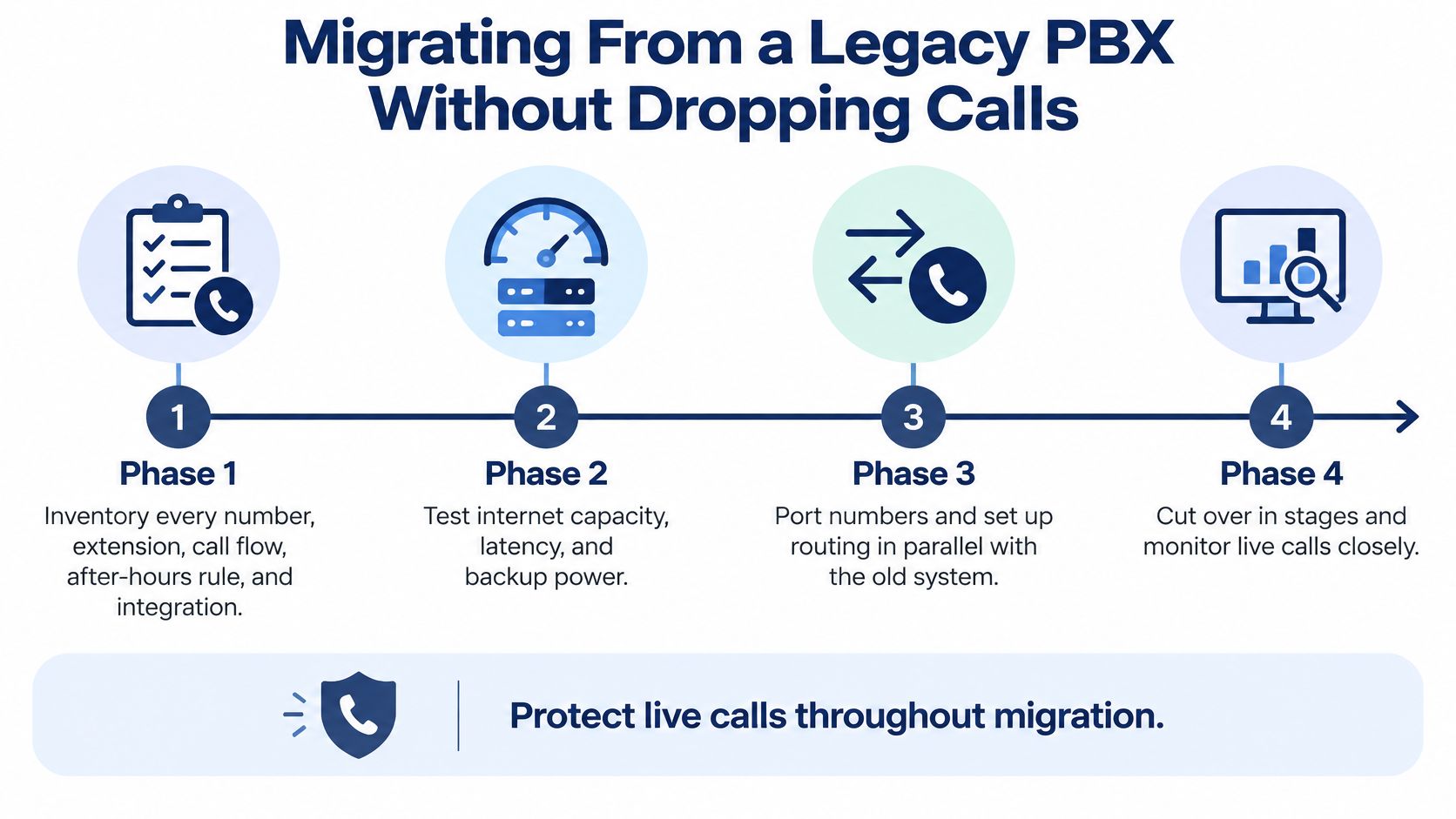
- Inventory everything that rings. List every number, extension, call flow, after-hours rule, and integration with the CRM or help desk. A missed holiday schedule is how Monday morning calls hit a closed greeting. On that same list, record the registered emergency address for every line and endpoint.
- Prove the network before you move people. Test capacity, latency, and jitter at each site, then set QoS and VLAN rules so voice isn't competing with backups. If the numbers are ugly, fix the circuit first.
- Match endpoints to the new platform. Confirm which desk phones will register, and budget for mobile apps and any licences those apps need.
- Start number porting early. Ports often take several weeks. Confirm the lead time, the paperwork, and any rejection rules with the provider before you promise a go-live date.
- Build flows in the portal and call them yourself. Walk every menu, ring group, and voicemail box with internal calls. You're looking for dead ends, not a demo.
- Pilot one team for a week. Watch missed calls, voicemail delivery, and audio quality. Confirm 911 routing during that pilot, because a cutover can move numbers onto new locations.
- Cut over in a low-volume window. Keep the legacy system, or simple call forwarding, as a fallback so a bad route doesn't become a missed customer.
- Leave the old lines in place briefly. Keep the legacy contract or spare lines for a short period, then decommission once you're sure nothing still points at the closet.
- Write the outage card and share it. Name who calls whom and which forwarding numbers to use. Every team should have that card, not only IT.
When not to flip the switch
Don't cut over during month-end close or a seasonal peak. That's when a misrouted call costs the most, and it's when you have the least patience to debug a menu. A quiet Tuesday beats a perfect plan on the busiest Friday of the quarter.
Decide Whether to Switch Before You Shop
More than 62% of newly deployed enterprise telephony solutions were cloud-hosted or hybrid in 2025, according to DataIntelo. That trend doesn't decide the question for every business. Match the verdict to how you work, then shop.
| Your situation | Verdict | Why it matters |
|---|---|---|
| Several offices or remote staff | Switch | One directory, one admin panel and no site-to-site hardware |
| Single site, stable legacy PBX, no growth | Wait | Replacement can wait until the hardware nears end-of-life |
| High inbound call volume | Switch with queue features | Callbacks and real-time reporting are hard to build on legacy |
| Strict uptime needs, no backup connection | Switch only after failover is designed | Cloud does not replace local redundancy |
| Fax-dependent or regulated workflow | Switch if the provider confirms recording and cloud faxing | Compliance and feature fit must be verified first |
Multi-site and remote teams should switch, because one directory removes duplicate phone systems. A stable single site can wait. High call volume belongs on queues and reporting you won't bolt onto an aging switch. Strict uptime means the failover design comes before any switch date. Fax-heavy or regulated work stays put until the provider confirms recording and cloud faxing in writing.
Do four things before you request pricing. Audit current lines and numbers. Count sites and remote users. Write the uptime plan, including who fails over to what. Ask for quotes that include a migration timeline and a written SLA.
If you run several sites or remote staff, start that migration audit this quarter. Waiting for the closet box to fail is how you cut over on the worst day of the year.
SnapDial is a hosted phone system for teams that want calling, conferencing, and day-to-day admin in one cloud service, with setup handled for you and support available around the clock. If you're replacing a legacy PBX or tying several offices to one extension list, the same portal covers routing, voicemail, recording, and mobile calling. Visit SnapDial to see how a move would look for your lines.