
Business VoIP plans ran USD 10 to USD 50 per user per month in 2025, and a 50-person office on a USD 20 plan pays USD 1,000 a month, or USD 12,000 a year, before a single phone, fee, or battery is added. Both figures are real, and neither one is your budget.
The technology's own history explains the gap. In 2004, one company's monthly cost to support a single call-center agent fell from about $2,000 to $100, a 95% reduction, as Computerworld reported on corporate VoIP economics. The same report carried the warning that regulation could push customer prices up through Universal Service Fund contributions, emergency-calling obligations, access charges, and other fees.
Two decades later the shape hasn't changed. The per-user price is the part a provider can advertise and the part you can compare across vendors. Everything else sits outside it and lands on the invoice eventually: emergency fees by jurisdiction, a circuit that can carry the calls, batteries for the switches, and the labor to install the thing.
A six-person office and a 40-seat call center can buy the same platform and end up with budgets that differ by a factor of three. That gap lives in charges that never appear on a pricing page.
What VoIP Phone Systems Cost Per User
In 2025, typical business VoIP plans were reported at USD 10 to USD 50 per user per month, with basic plans at USD 10 to USD 20, mid-tier plans at USD 25 to USD 40, and enterprise plans at USD 50 or more, according to AIS Now's pricing survey. The spread is wide enough that the tier matters more than the provider name you pick inside it.
| Plan tier | Price per user per month (USD) | Typical buyer |
|---|---|---|
| Basic | 10–20 | Small teams with simple calling needs |
| Mid-tier | 25–40 | Growing teams that need call routing and mobile apps |
| Enterprise | 50 or more | Multi-site companies and contact-center teams |
What separates the tiers
Basic plans cover the call and not much else: a softphone or desk phone, voicemail, and domestic dialing. Mid-tier plans add auto attendant, call routing, mobile apps, and visual voicemail with transcription. Enterprise plans switch on call recording, contact-center queues, and multi-site administration.
One feature can move an entire seat up a tier. If a sales manager needs recording for training calls, everyone who needs that same function pays the higher rate, not just the manager. Read each plan for the two or three features you'll use in month one, then check which tier contains them.
The monthly math and where it breaks
Multiply the per-user price by headcount, then by 12. Eighteen users at USD 30 comes to USD 540 a month and USD 6,480 a year. The arithmetic is correct and still understates the bill in three common cases.
- A feature pushes users up a tier. Recording and queues are the usual triggers.
- Lines outnumber people. A conference room, a warehouse door phone, a fax line, or a lobby handset each need a line, and not every provider bills those at the seat rate.
- Add-ons arrive after the sale. Analytics, extra numbers, international minutes, and recording storage are commonly quoted separately.
SnapDial prices on an all-inclusive model that covers a unified communication solution, call statistics and call recordings in one monthly figure, which removes most of that second category from the comparison.
The market behind these plans is crowded. Credence Research valued the global VoIP market at USD 43,945 million in 2024 (Credence Research), which is why two quotes for the same headcount can land 40% apart before you look at what's inside them.
Treat the per-user price as the opening figure. The rest of the VoIP phone system cost gets built from charges that never appear on the pricing page.
Annual Budget for a 50-User Office
For 50 users on a USD 20-per-user plan, the base subscription comes to USD 1,000 a month, or USD 12,000 a year. That figure is straightforward; the full office budget is not. Lines, connectivity, power protection and equipment can change the total.
| Cost item | Annual amount (USD) | What drives it |
|---|---|---|
| Base subscription at USD 20 per user per month | 12,000 | Advertised price for 50 users |
| Emergency calling fees | Varies by line and jurisdiction | Number of lines and applicable state and local fees |
| Dedicated internet connection | Quoted per circuit, per site | Call volume and number of sites |
| Backup power for network and phones | One-time quote plus scheduled battery replacement | Combined equipment load and required runtime |
| Phones and installation | Quoted per device, per site | Device model and migration effort |
Emergency calling fees are charged per line, not per user. The amount depends on the applicable jurisdiction, so get the provider's per-line rate and confirm how many lines it will bill. Don't budget a guessed figure based on headcount.
Internet capacity affects call quality and outage exposure. A 50-person office that needs 20 simultaneous calls has different requirements from one that peaks at five. Use call logs to estimate concurrency, then request a circuit quote for each site.
Backup power has both an upfront and a replacement cost. Size it for the network equipment and phones that need to stay online, and account for battery replacement as runtime declines. Phones and installation are also one-time costs, with new spending when you add a site, shift or reception area.
Practical rule: calculate the subscription from the quoted user rate, confirm emergency fees per line, and get written quotes for connectivity, backup power, phones and installation.
Compare the estimate with invoices each month during the first quarter. A budget vs actual reporting process can show where billed amounts differ from budgeted ones and help identify a surcharge before renewal.
The subscription is only one part of the annual cost. Site-specific quotes and recurring line charges determine how closely the final budget matches the advertised price.
Emergency 911 Fees and Taxes Outside the Ad Price
911 charges can add a separate monthly cost to a VoIP subscription. The amount varies by state and local jurisdiction, so a national average is a planning reference, not a quote for your office. The FCC's annual report on 911 fees found that jurisdictions collected approximately USD 3.176 billion in 911 fees and related charges in calendar year 2020 (FCC annual 911 fee report).
Why the same line bills differently in two places
States, territories, and local governments set their own 911 fee structures. Federal policy requires that VoIP subscribers not be charged a higher total 911 fee than comparable traditional telephone subscribers with the same outbound 911 capability (FCC 911 fee parity order).
For a multi-location business, each site may have a different emergency fee and tax treatment. Remote staff can add another jurisdiction to the bill if they work from a different state.
An account with three offices in three states can carry three different emergency fees and tax treatments on the same monthly invoice.
Billing is only part of the cost. Each site needs an accurate dispatchable address associated with its phone lines. When a phone moves or a remote employee changes location, update the address so emergency calls are routed to the right place. Review how the provider handles E911 address registration for VoIP service as part of setup.
Before comparing quotes, ask each provider to list emergency fees by jurisdiction and show which charges are included in the advertised price. Keep these fees as a separate budget line, especially when comparing an “all-inclusive” quote with one that itemizes charges.
Bandwidth Costs That Raise the Monthly Bill
A VoIP subscription is only one part of the monthly cost. If the internet connection is already saturated, calls may cut out or sound distorted even while the phone service remains available.
Plan capacity around the number of calls your team may handle at once and the bandwidth each call uses after network overhead. A codec's raw audio rate does not include all the data added by network protocols, so use the provider's quoted per-call bandwidth figure rather than the codec rate alone.
What to measure before you blame the plan
Check network performance during your busiest calling period:
- Peak simultaneous calls, based on your current call records.
- Upload and download utilization, including other traffic competing for bandwidth.
- Latency to your provider's media gateway.
- Jitter, which can make call delay inconsistent.
- Packet loss, which can make voices sound distorted or drop out.
Then price the likely remedies together. A faster circuit may help, but traffic prioritization, a voice VLAN, managed switches, or a dedicated voice connection may also be needed. Broadband costs can range from roughly USD 35 to several hundred dollars a month (Quo's VoIP cost guide), so the connection can shift the total more than the phone subscription.
A cited floor of about 0.5 Mbps may indicate that a call can connect, but it does not account for competing traffic such as backups or video meetings. For guidance on sizing a connection for concurrent calls, review SnapDial's VoIP bandwidth requirements.
If call quality stays inconsistent after traffic prioritization and network configuration changes, check the physical network too. Cabling, switch ports, and power can all contribute to trouble; practical steps to fix flaky small business networks start there.
For a call center or sales floor where dropped calls have a direct cost, compare a second connection with the cost of relying on one circuit. The right choice depends on how much disruption the business can absorb.
Backup Power and Setup Costs to Budget
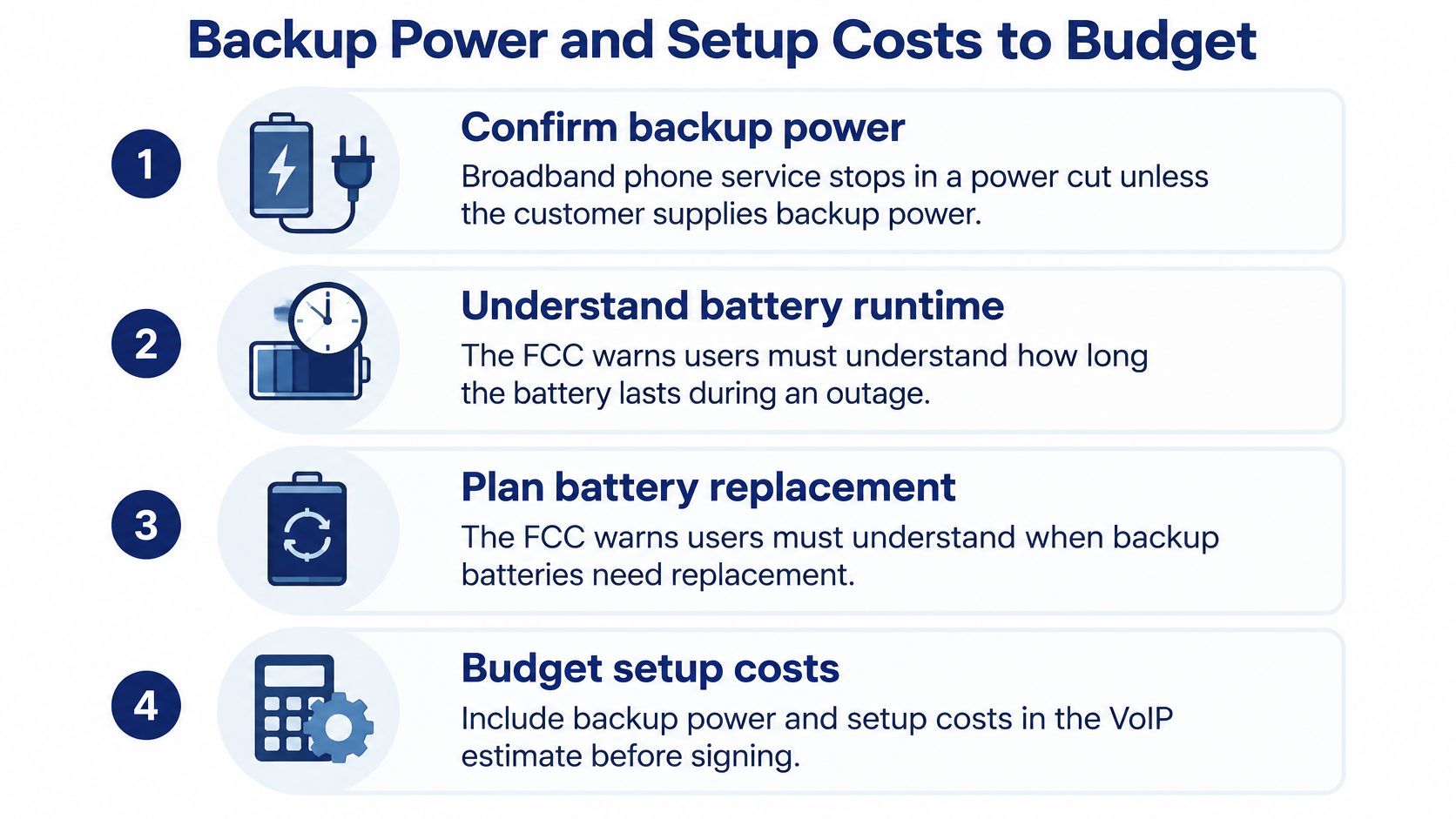
Broadband-enabled telephone service generally stops working during an electrical outage unless the customer supplies battery or other backup power. The FCC warns users to understand both battery runtime and replacement requirements before they rely on the service (FCC backup power rules).
The rulemaking gives you useful benchmarks even though it targets residential service. Covered facilities-based fixed residential voice providers must offer backup-power options supporting at least 8 hours of standby, with a 24-hour option required within three years. Treat those durations as a resilience test for your own site, not as evidence that a hosted provider keeps your office dialing in a blackout.
Every device that must stay powered
Work through the rack and the desks before you buy anything:
- The internet modem or fiber ONT, because nothing downstream works without it.
- The firewall and core switch, including any PoE budget feeding the phones.
- Wireless access points, since cordless handsets and softphones depend on them.
- Every desk phone and conference unit, which pull power over Ethernet.
- The phone system's edge hardware, if any part of it lives on your premises.
A UPS sized only for the router keeps the internet light on and leaves every phone dead if the PoE switch loses power. That's the worst outcome available: you pay for batteries and still can't answer.
Size from watts, not from the box label
Total the combined watt load of everything on that list. Multiply by the hours of runtime the site needs. Then add a reserve for battery aging and peak draw, because a pack rated for 30 minutes at 100 watts doesn't deliver 30 minutes at 80% capacity two winters later.
Runtime curves are where buyers get caught. A guide to choosing a UPS for your NAS is a decent primer on reading watt-hour ratings against real load, and the same logic applies to a phone closet.
Setup is a line item, not a footnote
There's no single national price for phones and installation, so quote each piece separately: desk phones, switches, cabling, number porting, and migration labor. Ask for purchase and rental pricing on the handsets, because leasing runs indefinitely while buying depreciates. Ask what a replacement handset costs in year three, when the model you bought is discontinued.
Phones, switches, and cabling are the physical half of setup, and VoIP equipment costs breaks down which items you buy, which you rent, and which you skip by going softphone-first. SnapDial's team of techs handles setup, configuration and replacement of a business's existing VoIP phone system from start to finish, at no cost to the customer, which takes the largest unknown off the quote sheet.
Build Your VoIP Cost Estimate Before You Sign
The whole estimate fits on one page if you build it in this order, and the order matters because each step changes the numbers in the next.
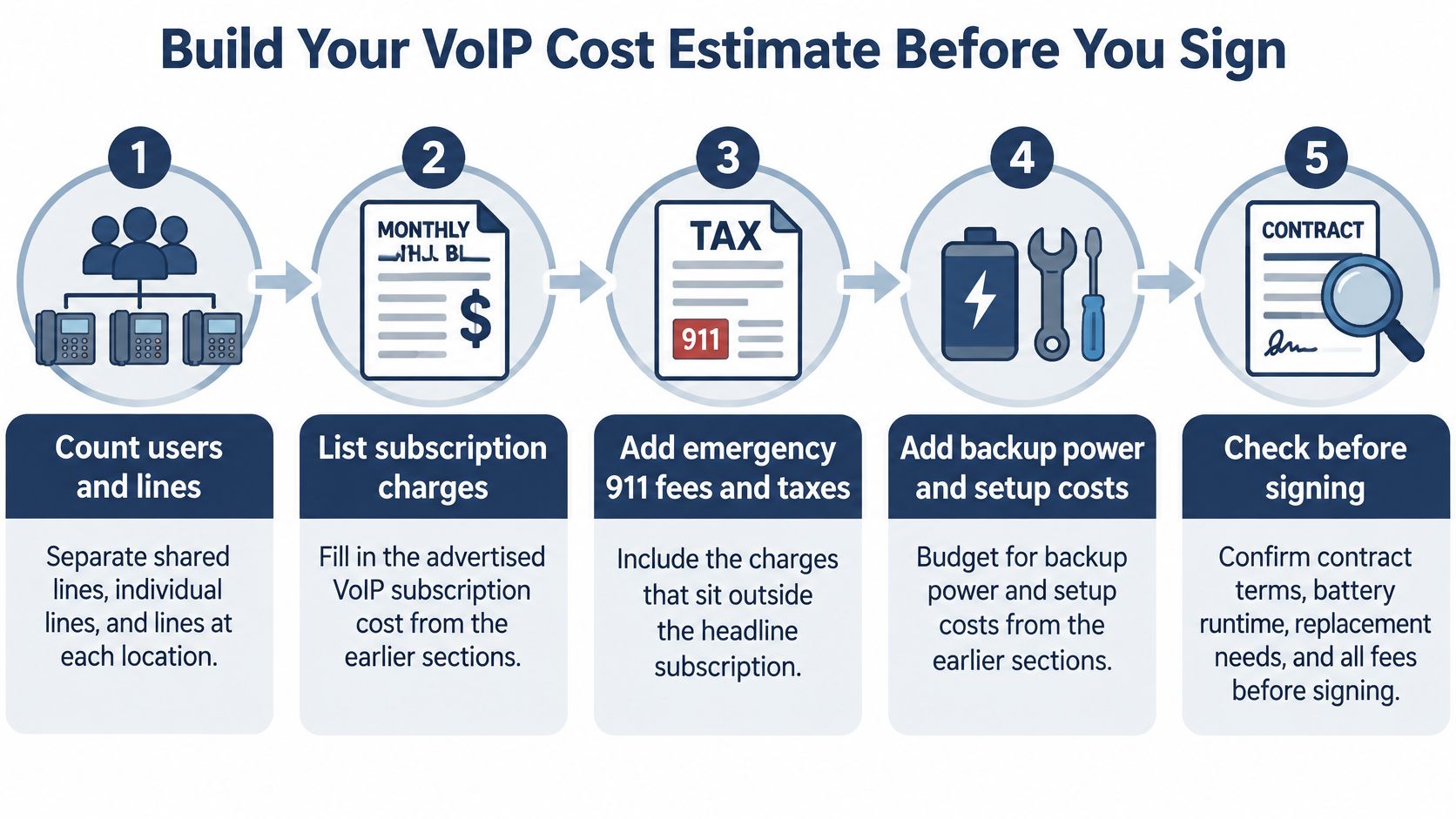
- Count users and lines separately. Shared lines, individual lines, and lines at each site all bill differently, and emergency fees follow lines and locations while licences follow people. In 2024, 54% of U.S. small and midsize businesses surveyed by Verizon Business had added or upgraded services to integrate mobile and desktop phone lines (Telco Solutions), which means mobile-only staff now count as users without a desk phone.
- Multiply each quote's tier price by users and by 12. Keep providers on identical seat counts or the comparison is fiction.
- Add each site's emergency fee per line, using the jurisdiction breakdown rather than a national average, then put taxes on their own row.
- Size the circuit from measured concurrency, using the provider's packetized rate and a headroom margin for growth.
- Size backup power from combined load and required runtime, then add a reserve for aging and peak draw.
- Add one-time hardware and migration, and subtract only what the written quote explicitly includes.
- Price the outage. Multiply outage hours by affected staff, labor cost, missed opportunities, and support impact, then compare that figure against a secondary connection or cellular failover.
- Total three years, not one. Year one hides setup inside an attractive monthly figure. Year three exposes the battery replacement, the renewal price, and the support tier you needed.
Then ask every provider for the same written list: licences per user, emergency fees by jurisdiction, taxes, hardware, replacement, support hours, and call-recording charges. Compare quotes at identical user and line counts. A provider that won't itemize on paper is telling you something useful.
Here's the calculation walked through if you'd rather watch it than read it:
The single most useful question in the whole process is the one most buyers skip: what isn't in this price. Ask it of the subscription, the emergency fees, the hardware, and the support plan, and write the answers down. Visitors can request a quote or schedule a call with SnapDial to put their own headcount against a price that includes the recording and statistics rather than charging for them later.
SnapDial gives growing teams a hosted cloud phone system with all-inclusive pricing, automated setup at no cost, and 24/7 Texas-based support, so the number on the quote is the number you budget. If your current bill keeps growing lines you didn't plan for, compare what an all-inclusive monthly price looks like against your last three invoices. Start at SnapDial and ask for a quote sized to your headcount and your sites.