
An auto attendant is an automated phone system that answers inbound calls, plays a menu, and routes each caller to a person, department, or service without a human operator. Instead of leaving callers listening to an unanswered ringtone or bouncing between desks, it directs every call according to rules you set in advance.
You've probably felt the headache this solves. Your office line rings right as your small team steps out for lunch, or two customers call at the same moment while everyone is already tied up. One caller hangs up and tries a competitor, while the other lands on the wrong person's desk and has to repeat their story twice.
When business owners first look up what is auto attendant technology, they often worry it's a complicated call center tool built only for huge enterprises. In practice, it's a straightforward call-navigation tool, and knowing how it works, where callers get stuck, and when you still need a live voice makes setting one up far easier.
What an Auto Attendant Does on Every Call
A customer calls an insurance agency at 6:15 p.m., fifteen minutes after the front desk closes. The greeting states the agency's regular hours and offers a choice: reach the after-hours claims desk or leave a callback request for the morning. The caller needs help with a claim, so the menu gives them a route to someone who can help.
That greeting and routing flow forms the automated front desk of a phone number. Like a receptionist pointing visitors down a hallway, it directs callers to an extension, team, voicemail box, or recorded information message. The Wikipedia overview of automated attendants describes this as a basic form of interactive voice response (IVR), typically using keypad selections such as “press 1 for sales,” with spoken commands available in some deployments.
The destination still matters. Sending someone to a claims desk helps only if that desk can answer or has a useful fallback.
Every auto attendant handles three core jobs:
- Answering immediately: It answers inbound calls according to your configured schedule, giving callers a greeting instead of leaving them ringing.
- Routing by rule: It sends callers to a person, department, directory, or announcement based on their selection.
- Capturing messages as a fallback: It can direct unanswered calls to voicemail, or offer voicemail as a menu choice.
A plain voicemail box records messages. An auto attendant provides choices and distributes calls, with voicemail serving as one possible destination. That distinction matters when you want customers to reach an available team rather than leave every request in the same inbox.
How Keypad Menus Became Standard
As touch-tone keypads spread through telephone networks, callers gained a practical way to send instructions to computer-controlled systems. Each key supplied a recognizable signal. A phone menu could use that signal to select a destination instead of relying on an operator to make every connection.
Commercial voice-prompting systems later brought automated menus into businesses, while cloud and virtual phone services made these tools available to smaller companies. Morgan Systems' history of phone customer service traces this shift toward automated routing and changing telephone-service roles.
The underlying idea remains straightforward: a caller makes a selection, and the system follows a predefined route.
Why Businesses Rely on Automated Answering
An auto attendant covers answering gaps outside office hours and applies the same routing rules consistently. It can greet incoming callers while employees are occupied, but answering a call does not mean a person is available to handle it.
Menu design determines whether that first answer is useful. A billing caller can get stuck if the options mention only sales and shipping. A correct selection can still lead nowhere if its destination goes unanswered without a fallback. The system follows the path you configure; it cannot repair a confusing choice on the caller's behalf.
Practical rule: An auto attendant works like traffic control. Before relying on a menu, check that callers can recognize their option, reach the intended destination, and leave a message when nobody answers. If any check fails, fix that route before adding more choices.
How an Auto Attendant Routes a Call Step by Step
The IETF SIP call-control framework describes general SIP call-control concepts that help explain the plumbing behind many phone systems. An auto attendant works like a call-navigation tool built from separate call-control and media parts. Session Initiation Protocol (SIP) handles call signaling and dialog state, while an IVR engine, often described using VoiceXML, plays audio and reads keypad or voice input. The caller hears a simple menu, but the system is tracking where the call came from, what the caller chose, and where it should go next.
The diagram below traces the five high-level stages a caller moves through before reaching a destination.
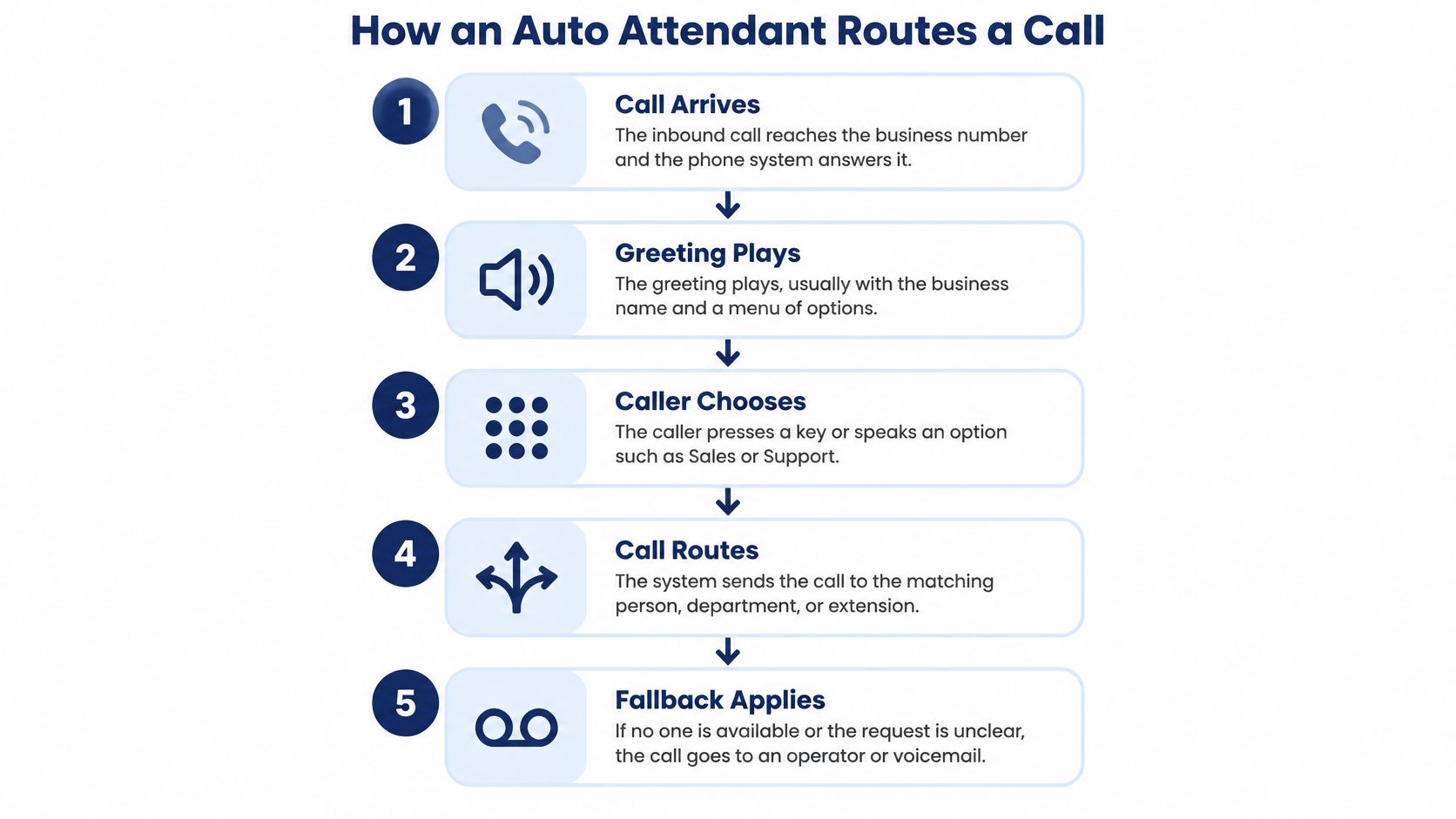
In a real business phone setup, that journey breaks down into seven concrete steps that decide whether the caller reaches help or hangs up in frustration.
- The system answers the inbound call. As soon as someone dials your published number, the phone platform picks up after your chosen ring count. A fast answer reassures the caller that they reached the right company before patience runs out.
- The welcome greeting plays. A brief message states your business name and, when helpful, your operating hours or urgent notices. Confirming the company name right away helps wrong-number callers realize they should hang up before taking up menu time.
- Schedule and availability rules run in the background. Before presenting options, the system checks the current day, time zone, holiday calendar, and whether staff are available. This check keeps a caller at 8 p.m. from being sent to an empty sales floor.
- The menu collects the caller's choice. The prompt lists clear choices, and the caller enters a dual-tone multi-frequency (DTMF) keypad digit or speaks a department name where speech recognition is turned on. Plain labels matter here because callers should not have to guess whether billing sits under accounting, payments, or customer service.
- SIP signaling transfers the call. Once the input registers, the system hands the call off to a direct extension, a ring group, a call queue, or an informational recording. Understanding how call routing works behind this handoff helps you design destinations that match your team's real capacity.
- Timeout and invalid-input rules catch mistakes. If a caller presses nothing or hits an unmapped key, the system repeats the prompt once or twice and then moves to a default destination. Silence may mean the caller is distracted, unsure, or using a device that makes keypad entry awkward. Without an explicit fallback rule, callers get trapped in an endless menu loop and abandon the call.
- Unanswered transfers trigger a final backup. When nobody picks up at the chosen department, the call rolls over to a live operator, a backup ring group, or a team voicemail box. That safety net keeps a busy afternoon from becoming a dead end.
Why Reliability Beats a Fancy Greeting
First-time admins often spend hours polishing their welcome script and far less time checking what happens when a transfer fails. Callers usually forgive a plain voice prompt. They are less patient with dropped SIP transfers, muffled audio, broken timeouts, or loops with no exit.
A useful way to test the flow is to follow one real request from start to finish. A caller who needs an invoice copy should press the billing option, reach the billing queue or extension, and get a clear fallback if billing is closed. Now run the failure paths: the caller presses nothing, presses the wrong key, or reaches billing after hours. If each path ends with a person, a useful recording, voicemail, or a clear next step, the menu is doing its job.
For a larger support desk or multi-department flow, Yellow.ai's guide to smarter contact center routing explains how platforms pair menu logic with skill-based and availability rules. You can also watch this quick walkthrough of how an auto attendant behaves from the caller's side.
A well-tuned setup has a simple finish line: the caller reaches the right person or answer in one or two keypresses, without guessing or repeating themselves.
Core Features Every Auto Attendant Includes
Most modern phone menus run as cloud software rather than on-premise hardware. According to a Mordor Intelligence IVR market report, the global interactive voice response market reached USD 5.39 billion in 2025, with cloud deployments holding 62.48% of the market in 2024. That cloud shift means small teams now get enterprise-grade routing tools inside a standard browser dashboard.
When you first configure a phone menu, start with business-hour routing and holiday schedules, because those two controls immediately stop after-hours calls from ringing empty desks. A local plumbing company, for instance, can route daytime callers to the main booking desk while automatically sending calls after 6 p.m. to an on-call emergency technician and an informational message for routine quotes. Home-service businesses looking at voice automation options beyond basic schedules can also explore Expressify AI for home services to see how specialized tools handle urgent dispatch requests.
Once your hours are set, check every feature in the table below so you know what comes built in and how teams usually configure it.
| Feature | What it does | Typical setting |
|---|---|---|
| Business-hour routing | Switches greeting and destination when the office is closed | Open hours set per day |
| Holiday schedule | Overrides regular hours for closures | Dates entered in advance |
| Keypad menu (DTMF) | Caller presses a digit to choose an option | One digit per option, four or five options per menu |
| Speech recognition | Caller says a department name instead of pressing a key | Enabled with keypad (DTMF) fallback |
| Directory search | Caller spells or says a staff name | Built from the extension list |
| Ring group or queue | Spreads calls across available staff | Set per team or department |
| Voicemail fallback | Captures a message when nobody answers | Transcription optional |
| Operator key | Sends the caller to a person on request | Usually key 0 |
| Call recording | Keeps a record for quality checks | Enabled per line or team |
Features That Protect Callers From Getting Stuck
A clean feature list only helps if callers can get through it under real-world conditions, such as driving, calling from a loud job site, or dealing with hearing, speech, or language barriers. A telephone-menu usability study hosted by Union College found that adding visual support helped callers move through menus 36% faster and reduced errors by 75%, and that callers made selections before the spoken menu even finished more than 60% of the time.
Because standard phone calls don't have a screen, your menu design has to carry that weight through a few specific features:
- Short keypad menus with shallow depth: Stick to one keypress per option and no more than three menu levels total, since callers tune out or mistype when forced to memorize six choices at once.
- Dial-by-name directory search: Let repeat callers spell the first few letters of an employee's name (such as "S-M-I" for Smith) so they don't need an internal extension sheet.
- Ring groups and queues: Distribute calls evenly across an entire team rather than hammering one receptionist's desk phone while three coworkers sit idle.
- Voicemail fallback with transcription: Turn missed messages into readable text emailed to the team so urgent requests aren't buried inside an audio inbox.
- Dedicated operator key and call recording: Keep 0 mapped to a live person whenever staff are available, and enable call recording on key lines so supervisors can hear where callers get confused.
Before picking any phone platform, confirm that you can edit business hours, holiday overrides, keypad options, directory entries, ring groups, operator escape routes, voicemail transcription, and call recording from one web dashboard without calling IT support.
Auto Attendant Versus a Live Receptionist and Its Limits
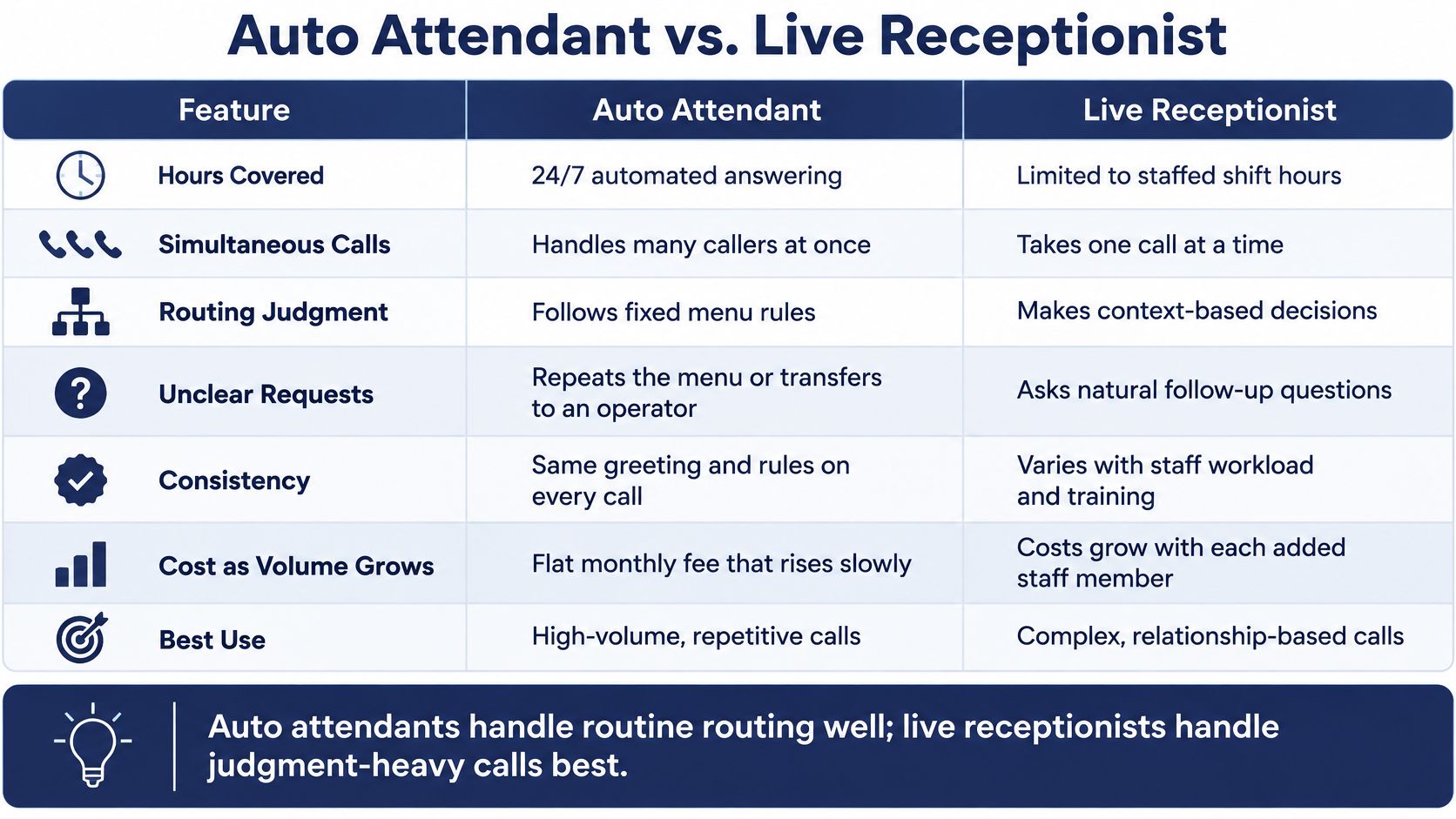
Choosing between automated routing and a live front desk isn't an all-or-nothing battle. Each shines in opposite situations, and putting either one in the wrong job frustrates callers fast.
| Criterion | Auto attendant | Live receptionist |
|---|---|---|
| Hours covered | 24/7 once configured | Only staffed hours |
| Simultaneous calls | Many at once | One call per person |
| Routing judgement | Fixed rules, menus and business-hour schedules | Reads context and adapts |
| Handles unclear requests | Weak unless AI is added | Strong |
| Consistency | Same greeting and routing every time | Shifts with staff workload and training |
| Cost as call volume grows | Low extra cost per call | Rises with staff |
| Best for | High-certainty destinations such as sales, billing and hours | Complex, sensitive or emotional calls |
The verdict is straightforward: an auto attendant wins on predictable routing and round-the-clock coverage, while a live receptionist wins on unclear, emotional, or high-stakes calls.
Rule-Based Menus Versus AI Voice Agents
Business owners often blur a standard auto attendant with an AI voice agent, even though the two behave very differently. A conventional auto attendant strictly follows configured menus, hours, queues, and fallback rules; it doesn't understand open-ended sentences or resolve problems on its own. (If you want to see where menus stop and interactive self-service starts, review how an IVR system differs from a basic phone menu.)
That line matters more as voice automation grows. In Think Digital's State of Voice AI 2025 summary, a 2025 survey reported that 97% of respondents were already using some form of voice technology, with more than half relying on traditional voice agents for customer service or task automation. A separate 2025 customer-experience report cited in the same summary found that 60% of contact-center and CX leaders were actively considering AI voice agents for customer-service calls, while 14% were already running one in the call center.
Use a rule-based menu for high-certainty destinations like sales, billing, store locations, hours, or known extensions, because menus are transparent and easy to audit. Consider conversational AI only for ambiguous requests, multilingual triage, or after-hours screening, and only when you pair it with clear disclosure, logged outcomes, and strict human handoff rules to contain risks like misrecognition or inconsistent answers.
Three Misconceptions and the Numbers to Watch
Even a well-built menu fails when teams fall for three common myths:
- More options equal better service: Cramming eight or nine choices into a top-level menu forces callers to listen past what they want and lowers the chance they pick the right branch. Keep top menus to four or five plain-language options.
- You can set it and forget it: Phone menus go stale without anyone noticing. When a department renames, an employee leaves, or winter hours begin, an outdated prompt sends callers into dead extensions.
- It replaces your receptionist completely: An auto attendant filters routine traffic, but it can't calm an upset customer or untangle a problem that spans three teams.
Poor interface design carries a steep penalty. A live-deployment study in MIT's evaluation of IVR call data reported task success rates swinging from 0% to more than 75% depending on how the voice interface was designed. Every unclear label or extra confirmation adds cognitive load until the caller hangs up or mashes zero.
Treat your phone menu like a human-factors system, not a static IT checklist. High-confidence routing with a short exit to a real person always beats trying to automate 100% of calls.
Rather than guessing whether your menu works, review end-to-end call logs segmented by menu branch, time of day, language, and caller type. Watch caller-path distribution, invalid-input frequency, no-input timeouts, transfer completion, repeat visits to the same menu, and escape-to-agent rate. When trouble spots show up, fix them with simpler wording, a consistently announced operator key, and keypad (DTMF) fallback on every speech-enabled prompt so accents, noisy streets, or poor cell connections never lock a caller out.
Most growing teams settle on a hybrid model: the auto attendant triages routine calls and handles after-hours coverage, while live staff step in immediately for escalations and complex questions.
Auto Attendant in Practice Across Three Businesses
Abstract routing diagrams make more sense once you see how real offices put them to work. Picture three everyday businesses with completely different call patterns.
The Evening Dental Practice
Consider a neighborhood dental practice open from 2 p.m. to 9 p.m. to serve working families. Before adding an auto attendant, morning callers hit an endless ringtone and booked appointments elsewhere. With business-hour routing turned on, anyone calling before 2 p.m. hears a short greeting stating clinic hours, presses 1 to leave a scheduling voicemail for the front desk, or presses 2 to reach the on-call dentist for urgent tooth pain or bleeding.
That setup saved the clinic from hiring a morning receptionist just to answer basic scheduling calls, and it stopped emergencies from sitting unheard in a general inbox. What it couldn't do was reassure an anxious patient at 10 a.m. who wasn't sure whether mild swelling counted as an emergency and needed a calm human voice to advise them.
The Three-Store Local Retailer
Now picture a sporting-goods retailer operating three shops across one metro area under a single published phone number. Callers press 1 for the downtown store, 2 for the westside store, 3 for the northside store, or 4 for a dial-by-name directory to reach buyers and managers directly.
One unified menu let the owner avoid staffing a dedicated switchboard operator at each location while still giving customers fast access to local inventory checks. Where the menu hit its limit was a frustrated shopper calling about an online order picked up at one store and partially returned at another, a tangle that immediately needed a store manager's judgment.
The Multi-Practice Law Firm
Finally, take a mid-sized law firm handling real estate, family law, and estate planning. Its top-level menu groups calls by practice area, keeps key 0 open for existing clients who need the main receptionist right away, and uses a holiday override to announce court and office closures ahead of long weekends. Writing clean, calm prompts is essential in legal settings, so teams often start from proven auto attendant script templates before recording their audio.
The menu shielded paralegals from constant misdirected cold calls and kept holiday announcements accurate without someone remembering to swap voicemails on Friday evening. Still, it couldn't sort an upset first-time caller who didn't know which legal category covered a dispute over a family home and needed a compassionate intake specialist immediately.
Across all three cases, the same winning pattern stands out: a short menu built around how callers really think, clear destinations that answer reliably, and one obvious path to a live person.
Decide Whether an Auto Attendant Fits Your Business
If you've never configured a phone menu before, don't start inside the software settings. Grab a notepad and work through these six steps first so your rules mirror real customer habits instead of your internal org chart.
- List the top five reasons people call you. Ask the people who currently answer your phones what callers want over a normal week. Most businesses discover that three or four topics account for the majority of inbound calls.
- Map each reason to one clear destination. Pair every common topic with a direct person, a ring group, a queue, or a short recorded answer (like directions and parking). If a topic has no obvious owner, fix that internal handoff before putting it on a phone menu.
- Define your business hours and holiday calendar. Write down your exact open and closed times for every day of the week, plus every planned closure for the next twelve months. Decide where after-hours calls should go, whether that's voicemail, an answering service, or an emergency line.
- Cap your top menu at four or five options plus an operator key. Put the most frequent request first so callers don't wait through irrelevant choices, and keep 0 clearly announced for reaching a person during business hours.
- Check your phone provider against your checklist. As you compare systems, verify support for business-hour routing, holiday schedules, operator access, and DTMF keypad fallback. SnapDial includes an Auto Attendant feature inside its hosted cloud VoIP service alongside a Web Portal for updating call routing and reviewing call logs, free 24/7 call recording, Visual Voice Mail with text transcription, and end-to-end setup handled by our technicians at no cost with 24/7 support.
- Test in messy conditions and audit after thirty days. Have someone who doesn't work for you call from a mobile phone on a windy street or in a noisy cafe, press wrong keys on purpose, and try reaching a live person. After the first month live, pull your call logs and transfer history to trim unused branches and reword anything causing repeat prompts or hang-ups.
Decision rule: If most of your inbound calls have a clear, repeatable destination (like sales, billing, locations, or hours), an auto attendant is a strong fit. If most calls require empathy, diagnosis, or nuanced judgment right from the first hello, keep a live receptionist on the front line or run a hybrid setup where callers can reach a person in a single tap.
Ready to turn missed calls and messy transfers into clean, predictable call routing without wrestling with technical setup? SnapDial's hosted cloud VoIP platform includes customizable Auto Attendant menus, Visual Voice Mail with transcription, free 24/7 call recording, and white-glove configuration handled from start to finish by our team at no cost, backed by 24/7 support. Visit SnapDial to request a quote or schedule a quick call and see how a phone flow built around your needs can work for your team.