
If you're shopping for business voip providers right now, you're probably already feeling the friction of your current phone system.
Calls hit a busy signal when two departments need the same line. A receptionist becomes the human patch cable between sales, service, and billing. Remote staff use personal cell phones because the office system doesn't travel well. Someone asks for call recordings, queue reports, or a simple menu that says “press 1 for support,” and suddenly you're talking about extra hardware, a telecom vendor visit, and a project nobody wants to own.
That’s usually the moment companies realize they’re not buying “phone service.” They’re replacing a workflow bottleneck.
Why Switching Your Business Phone System Is No Longer Optional
A lot of businesses limp along with an aging PBX longer than they should. It still makes calls, so the thinking goes, why touch it? Then one small failure exposes the whole problem. A storm knocks out the office. A location expands and needs new lines. A manager wants after-hours routing to an on-call mobile. The old setup can’t adapt without cost, delay, or both.

I see the same pattern in first-time migrations. The company doesn't start by wanting cloud telephony. It starts by wanting fewer missed calls, better routing, and one phone identity that follows employees between the office, home, and mobile app. That operational need is exactly why the market has shifted so hard toward hosted systems.
The global VoIP market reached an estimated USD 161.79 billion in 2025 and is projected to surpass USD 415.20 billion by 2034, reflecting the move from legacy phone systems to internet-based communications, according to Speedflow’s VoIP industry review. That isn’t a niche technology curve anymore. It’s the mainstream direction of business communications.
What legacy systems stop you from doing
Old phone systems usually fail in ordinary ways, not dramatic ones:
- They trap users at a desk. That breaks down fast when supervisors, sales reps, or service staff work across locations.
- They make routing rigid. Basic changes often require vendor tickets or old admin interfaces nobody wants to touch.
- They separate voice from the rest of the business. Calls don't flow cleanly into CRM, ticketing, or reporting processes.
- They age expensively. Repairs, line provisioning, and partial upgrades start stacking up around a platform you already plan to retire.
A practical primer like this hosted VoIP phone system for business guide is useful if you’re still sorting out the difference between hosted service and an on-prem setup.
Practical rule: If your phone system makes basic changes feel like a special project, it's already costing more than the invoice shows.
Why the provider matters as much as the technology
The wrong migration creates a new mess. You replace old hardware with a flashy platform, then discover support is slow, the admin console is clumsy, and half the features you expected are paid add-ons.
The right starting point is understanding what a modern cloud phone system changes inside the business. It centralizes calling, routing, voicemail, user management, and mobility in one managed platform. That gives you flexibility. It also makes provider choice more important, because you're not just buying dial tone. You're trusting someone else to run a communications system your staff and customers depend on every day.
Evaluating Core Differentiators Beyond the Feature List
Most business voip providers look similar on a comparison page. They all mention mobile apps, auto attendants, call forwarding, and analytics. Those features matter, but they don't tell you how the system behaves when your office internet degrades, a number port stalls, or a remote employee can't make an emergency call.

The three differentiators that decide whether a provider works in practice are reliability, support, and security.
Reliability means more than provider uptime
A provider can run a strong network and you can still have a bad calling experience. That's because 25% of VoIP outages stem from ISP issues rather than provider faults, and post-2025 FCC mandates require enhanced E911 for cloud PBX, yet only 15% of SMB-focused content discusses geo-redundancy or dedicated support centers, according to Nickel Group’s review of business VoIP providers.
That matters for one reason. Buyers often blame the wrong layer.
If your calls fail because your office circuit is unstable, switching brands may not solve anything. Good providers help you diagnose the path. Weak providers just say their cloud is up.
When I evaluate reliability, I want these answers:
- Failover behavior. Where do calls go if the office loses internet or power?
- Site dependence. Can users continue on mobile or desktop without the physical office?
- Routing control. Can admins reroute calls quickly without opening a support case?
- Troubleshooting depth. Will support help isolate LAN, Wi-Fi, ISP, and endpoint issues?
A “reliable” phone system is one that keeps your business reachable when one part of the environment fails.
Support quality shows up on bad days
Phone support isn't about friendliness. It's about resolution under pressure.
A vendor with scripted frontline support and slow escalation can turn a minor routing error into a lost day. That’s especially painful for front-desk teams, appointment-driven businesses, and support departments that live on inbound call flow. Ask where support sits, how after-hours tickets are handled, and whether the team can make live routing changes during an incident.
If your team depends on CRM workflows, integration support matters too. A plain connector isn’t enough. You need to know what call data lands where, how screen pops work, and who owns the handoff when it breaks. For teams reviewing this part of the stack, it helps to understand the practical side of Salesforce app integration before assuming “integration available” means “integration solved.”
Here’s a useful walkthrough on what to scrutinize during evaluation:
Security and compliance are operating requirements
Security claims get fluffy fast. What matters is whether the provider has a mature process for access control, call handling, and emergency service compliance. E911 deserves direct attention, especially with hybrid staff who work from changing locations. If the provider can't clearly explain how user locations are handled and updated, keep pressing.
Use this short vendor filter:
| Area | What to ask |
|---|---|
| Reliability | How do calls fail over during ISP or site outages? |
| Support | Is support in-house, and can they change routing live? |
| Security | How are admin access and user permissions controlled? |
| Compliance | How is E911 managed for remote and hybrid users? |
A Comparative Matrix of Leading VoIP Provider Capabilities
A provider list is only helpful if it compares like with like. The right way to review business voip providers is to line them up against daily operating needs. Can they route calls cleanly? Can managers administer users without a ticket? Can the platform support front-office calling today and a higher-volume support workflow later?
Start with a benchmark. RingCentral offers a 99.999% uptime SLA, which translates to less than 5.26 minutes of annual downtime, and more than 300 pre-built integrations, according to Arphost’s provider review. That doesn't make it the right fit for every company, but it sets a clear standard for what a mature platform looks like in reliability commitments and ecosystem depth.
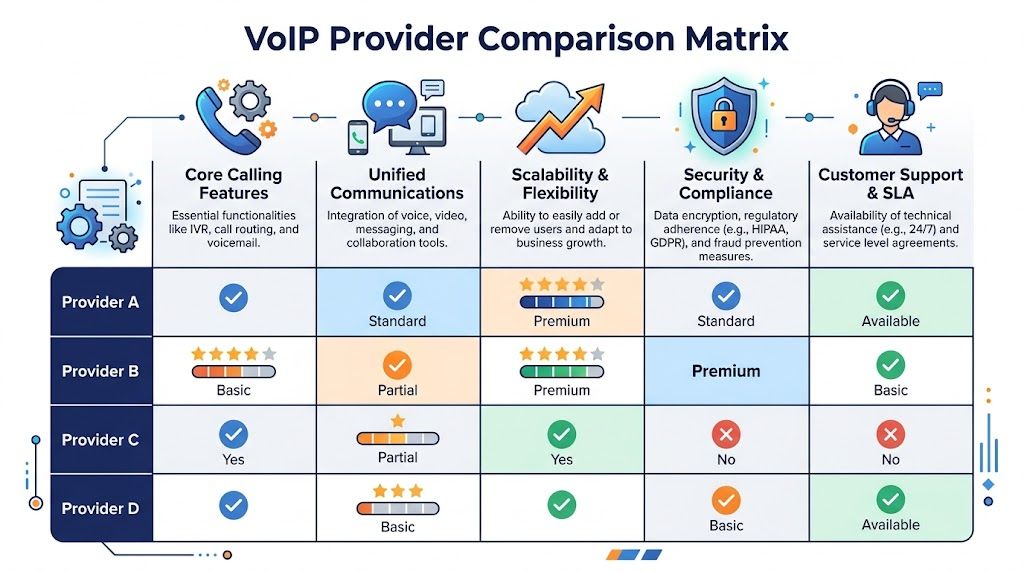
Business VoIP Provider Feature & Pricing Comparison
| Feature | Provider A (e.g., SnapDial) | Provider B (e.g., RingCentral) | Provider C (e.g., Nextiva) | Provider D (e.g., 8×8) |
|---|---|---|---|---|
| Core calling | Auto attendant, call routing, call recording, visual voicemail | Multi-level IVR, call queues, unlimited US/Canada calling | Business calling, video, team communication | Multi-level auto-attendants, calling, messaging |
| Mobile and desktop access | Mobile apps and desktop access for remote use | Mature mobile and desktop apps | Unified app experience | UC-focused cross-device access |
| Admin control | Self-service web portal for users, routing, logs, recordings | Mature admin tools and analytics | Admin controls suited to growing teams | Enterprise-oriented management features |
| Call center functions | Smart queue management, queue callback, wait-time announcements, real-time statistics, reporting | Sophisticated queues and analytics | Available in broader CX tiers | Contact center and supervisor analytics |
| CRM and platform integrations | CRM integration available | 300+ pre-built integrations | Integrations available depending on plan and setup | Enterprise integrations available |
| Support model | Managed setup and ongoing support | Large-platform support model | SMB to enterprise support model | Quote-led enterprise support model |
| Pricing visibility | Evaluate all-inclusive structure and setup scope | Premium pricing, generally $20+/user/month in benchmark reviews | Plans start around $15/user/month in cited market coverage | Plans start around $15/user/month in cited market coverage |
How to read the matrix correctly
The table isn't meant to crown a winner. It helps you match platform maturity to business complexity.
A small office replacing key systems may care most about straightforward routing, easy administration, and migration help. A larger distributed company may care more about analytics, integration depth, and governance controls. A support team may ignore video meetings entirely and focus on queue behavior, callback, and reporting.
Three capability groups usually matter most.
Core calling and routing
If the provider can't handle this well, stop there.
Look for:
- Multi-level auto attendant. Useful when callers need to reach departments without a receptionist.
- Time-based routing. Critical for after-hours handling and seasonal schedule changes.
- Hunt groups and queueing. Needed when multiple people answer a shared function like support or reservations.
- Call recording and voicemail transcription. Valuable for quality control and follow-up.
A lot of providers technically offer these features. The difference is how easy they are to configure and change without outside help.
Admin control and reporting
Here, platforms diverge sharply.
A strong admin layer gives office managers and IT leads real control over users, devices, call flows, recordings, and logs. Weak platforms bury simple tasks in support tickets. That’s frustrating in a stable office. It’s unacceptable when you're opening a new location or reassigning departments during a reorg.
Buy for the admin who has to run the system on a Tuesday afternoon, not for the demo that sales showed on Thursday morning.
Integrations and growth path
Integration depth matters more as teams scale. Sales wants calls logged in CRM. Support wants records tied to tickets. Managers want reporting that combines call activity with operational context.
Extensive features often justify the cost of larger platforms. RingCentral’s large integration library helps mid-market and enterprise teams standardize around existing business systems. But smaller organizations don't always need that breadth on day one. They need a provider whose native calling workflow is clean, whose setup won't drag, and whose pricing won't punish growth.
One option in that practical middle ground is SnapDial, which offers hosted business calling, mobile apps, routing, call recording, visual voicemail, a self-service web portal, and queue-based features for teams that need more than basic line replacement.
What works and what doesn't
What works:
- A provider whose admin portal matches your internal skill level
- Queue and routing tools that fit your call patterns
- Integration scope tied to actual workflows, not wishlist features
- Support that understands migration and day-two operations
What doesn't:
- Buying an enterprise suite because it looked impressive
- Choosing the cheapest plan before mapping feature tiers
- Assuming every “unified communications” platform is equally easy to manage
- Ignoring how the provider handles shared numbers, call groups, and reporting
Uncovering the True Cost of Your Business Phone System
Most VoIP pricing pages are built to make the monthly seat price look simple. It rarely is.
The headline number might be acceptable, even attractive. Then the proposal arrives and starts growing. Call recording is in a higher tier. Advanced routing costs more. CRM integration is limited to a premium plan. International usage is billed differently than you expected. Desk phones, setup help, and bandwidth improvements sit outside the quote. That’s how a “cheap” platform becomes an expensive operating decision.
The warning sign isn't just anecdotal. VoIP can offer upfront savings up to 45%, but 30% to 50% of SMBs face unexpected overages from add-ons, international surcharges, or per-user scaling, according to The Network Installers’ review of VoIP pricing pitfalls.
Where TCO usually gets distorted
The issue isn't that providers charge for features. The issue is that buyers often compare sticker prices instead of full operating cost.
Common blind spots include:
- Feature tier traps. The basic plan covers simple calling, but the business needs recording, queueing, analytics, or CRM access.
- Growth penalties. Pricing looks fine at your current headcount, then scales poorly as departments expand.
- International and toll usage. “Unlimited” usually deserves follow-up questions.
- Migration labor. Number porting, handset rollout, and call-flow design consume internal time even when vendor setup is included.
- Network upgrades. A weak office network can turn a low software quote into a larger infrastructure project.
A better way to compare cost
Ask every provider for a real operating model, not just a seat count quote. Have them price the system you’ll use after go-live, not the smallest package they can put on a proposal.
That means pricing should reflect:
- All required users
- Call recording and reporting needs
- Auto attendant and routing complexity
- Queue or contact-center functions
- Desk phones or device reuse
- Implementation help and training
- Expected changes over the contract term
A hosted seat only tells part of the story. If you’re evaluating line-item structures, it helps to understand how a hosted VoIP seat fits into overall deployment cost.
Cheap VoIP is expensive when you discover the real plan you need is two tiers higher than the one in the ad.
What to watch for in vendor proposals
Read the proposal for friction, not just price.
If the quote uses vague labels like “advanced features available,” “contact center optional,” or “integration support upon request,” ask for the exact commercial impact before moving forward. Also ask what happens at renewal. Some providers are reasonable on expansion but aggressive after the initial term.
The cleanest deals usually have predictable packaging, clear implementation ownership, and fewer dependency fees. That doesn't always mean lowest monthly cost. It often means fewer unpleasant surprises after month three.
Matching a VoIP Solution to Your Business Profile
The right provider depends less on brand recognition and more on how your business uses phones. A ten-person office, a growing multi-location company, and a service desk all need different things from business voip providers.
That distinction matters because the broader market now serves all of those buyers. By 2025, the VoIP services market reached USD 169.38 billion, with providers like Nextiva and 8×8 offering plans starting around $15 per user per month, while mobile VoIP is projected to hit USD 327.5 billion by 2031, according to Nextiva’s VoIP statistics roundup. The options are there. The challenge is fit.

Small business and startup teams
If you’re replacing a handful of lines, don’t overbuy.
You probably need a system that’s easy to launch, easy to change, and forgiving for non-technical admins. The core questions are simple. Can someone answer calls from a mobile app? Can you route by business hours? Can voicemails and recordings be accessed without a complicated process?
Use this checklist:
- Prioritize simplicity. The admin portal should feel usable on day one.
- Check setup ownership. Small teams don't have time for telecom project management.
- Validate shared-call handling. Front desk, owner, and office manager often overlap.
- Review real feature tiers. Make sure basics like routing and recording aren't hidden upsells.
Scaling mid-market companies
This group tends to outgrow entry-level platforms faster than expected. They add departments, locations, and workflow requirements that expose weak administration fast.
The provider should support centralized management, role-based access, analytics, and CRM alignment. You also want a credible growth path. Not because you need a full contact center now, but because you don't want to migrate again in a year.
Ask harder questions here:
| Need | Why it matters |
|---|---|
| Admin delegation | IT and operations may need different control levels |
| Multi-location routing | Offices often need local handling with centralized visibility |
| Reporting | Managers need call logs and operational visibility |
| Integration path | Sales and service teams want calls tied to business systems |
Customer-facing sales and support teams
If your team lives on inbound and outbound calls, judge platforms by workflow, not brochure features.
Queues, callbacks, wait-time announcements, real-time statistics, and reporting matter more than chat or video. Supervisors need visibility. Agents need calls delivered intelligently. Customers need a path that doesn't trap them in loops or voicemail.
If revenue or service quality depends on answering calls fast, treat queue design like an operations decision, not a phone feature.
These teams should test call routing logic in realistic scenarios. Lunch rush. Monday morning backlog. After-hours escalation. Overflow between branches. A provider can look polished in a demo and still fall apart when call patterns get messy.
Planning a Seamless Migration and Implementation
A VoIP migration goes smoothly when the business treats it like an operational cutover, not an app signup.
The technical side matters, but most failed projects come from bad sequencing. Numbers are ported before routing is tested. Phones arrive before templates are built. Users get login emails before anyone explains what changes on day one. Good implementation fixes that with a phased plan and clear ownership.
Start with an audit of what you already have
Before you compare handsets or apps, map the current environment.
Document every phone number, extension, call path, auto attendant greeting, hunt group, fax line, conference bridge, and after-hours rule. Also identify the odd exceptions that never show up in invoices but matter in real life, like a side-door intercom line, a credit-card line at reception, or a direct inward number that an old customer still uses.
A migration checklist should include:
- Number inventory. Know what must be ported, forwarded, or retired.
- User inventory. Identify who needs desk phones, softphones, or both.
- Routing logic. Capture business hours, emergency paths, and overflow rules.
- Network readiness. Confirm the office internet and internal network are stable enough for voice.
Build the future state before port day
Don't wait for the carrier cutover to decide how calls should flow.
Set up your menus, ring groups, voicemail boxes, business hours, mobile apps, and failover rules in advance. If you're moving to a managed hosted business phone system, insist on a test environment or staged configuration review before final activation.
I usually recommend a simple sequence:
- Create the user and device plan
- Design call flows with department owners
- Pre-provision phones and apps
- Test internal and pilot external calling
- Schedule the port with a rollback contact list
- Train users before the cutover, not after
Treat user training as part of deployment
Employees don't need a telecom seminar. They need practical answers.
Show them how to answer on desktop and mobile, transfer a call, check voicemail, record when policy allows, and switch devices if they leave the office. Front-desk staff and supervisors need deeper training because they’ll hit edge cases first.
Train for the five tasks people do every day. Answer, transfer, park, check voicemail, and escalate. Everything else can come later.
The best migrations also have a short hypercare period after go-live. For a few days, someone should own fast fixes for routing changes, app sign-in issues, and handset quirks. That small layer of attention prevents a lot of “the new phone system is broken” complaints that are really just launch-day cleanup.
Essential Questions to Ask Every VoIP Provider
Sales demos are designed to show what works. Your questions should expose what happens when things don't.
Start with support. Ask whether technical support is in-house, how after-hours issues are handled, and who can make live routing changes during an outage. If the answer is vague, assume escalation will be slow when you need it most.
Then move to implementation. Ask them to describe the porting process from contract signature to cutover day. You want specifics about responsibilities, timing, temporary forwarding, and what happens if a carrier delay affects the schedule. A provider that handles migrations well can explain this clearly.
Use questions like these in every vendor call:
- Who owns the migration plan? Ask whether they provide a dedicated implementation lead or expect your team to coordinate carriers, routing, and user setup.
- What features require a higher tier or add-on? Make them identify pricing boundaries early.
- How do you handle E911 for remote users? The answer should be operational, not marketing language.
- What happens during an ISP outage at one location? You're testing practical resilience.
- How are support tickets prioritized for call-flow failures? Missed inbound calls should never be treated like a cosmetic bug.
- What changes at renewal? Ask directly about rate protection and contract-term pricing.
One more question separates solid providers from smooth talkers: ask them to show how a real admin changes routing for a sick-day absence, weather closure, or after-hours emergency. If they can’t demonstrate that quickly, the platform may be harder to run than it looks.
Frequently Asked Questions About Business VoIP
Can I keep my existing business phone numbers
Usually, yes. Most businesses port their existing numbers into the new platform. The important part isn't whether porting is possible. It's whether the provider manages the sequence carefully enough to avoid a service gap. Always confirm which numbers are portable, how temporary forwarding will be handled, and who monitors the cutover window.
How does 911 work on a VoIP system
VoIP systems can support emergency calling, but the business has to handle it correctly. That’s especially important with hybrid staff, shared workspaces, and employees who move between office and home. Ask the provider how user locations are assigned, updated, and verified. If they answer in generalities, keep digging.
Do I need special phones
Not always. Many businesses run VoIP through desktop apps, mobile apps, or a mix of apps and IP phones. The right setup depends on how each role works. Reception, warehouse, front desk, and common-area users often still benefit from physical handsets. Mobile staff usually don't.
How much internet capacity do I need
Enough for stable voice traffic and a healthy internal network. Raw bandwidth matters, but consistency matters more. Call quality problems often come from local Wi-Fi congestion, poor switching, or ISP instability rather than the phone platform itself. Test your network before rollout and ask the provider what they need from your environment to support clear audio.
Can I mix office, remote, and mobile users on one system
Yes, and that’s one of the main reasons companies switch. The better question is how easy it is to manage routing, voicemail, presence, and emergency settings across those user types. Some platforms handle mixed environments cleanly. Others make them awkward to administer.
Is a desk phone still worth it
For some roles, absolutely. A desk phone still makes sense where employees handle frequent transfers, shared reception duties, or high call volume at a fixed location. For others, a softphone is cleaner and cheaper. Most well-designed deployments use both.
If you're narrowing down business voip providers and want a practical second opinion, SnapDial is worth a look for companies that want hosted calling, predictable packaging, and white-glove migration support without treating setup like an internal DIY project.