

Your team is probably feeling this already. Calls come in faster than people can sort them, customers repeat themselves, supervisors stitch together reports from three different tools, and the old phone system still gets treated like “good enough” because replacing it feels risky.
That's usually the wrong frame.
Choosing call center solutions isn't a phone-system upgrade decision. It's an operations decision. It affects labor efficiency, customer experience, reporting discipline, and how well your business scales when demand gets messy. If you're a growing SMB, the right platform brings order. The wrong one locks you into more work, more patching, and more customer frustration.
What Are Call Center Solutions Really
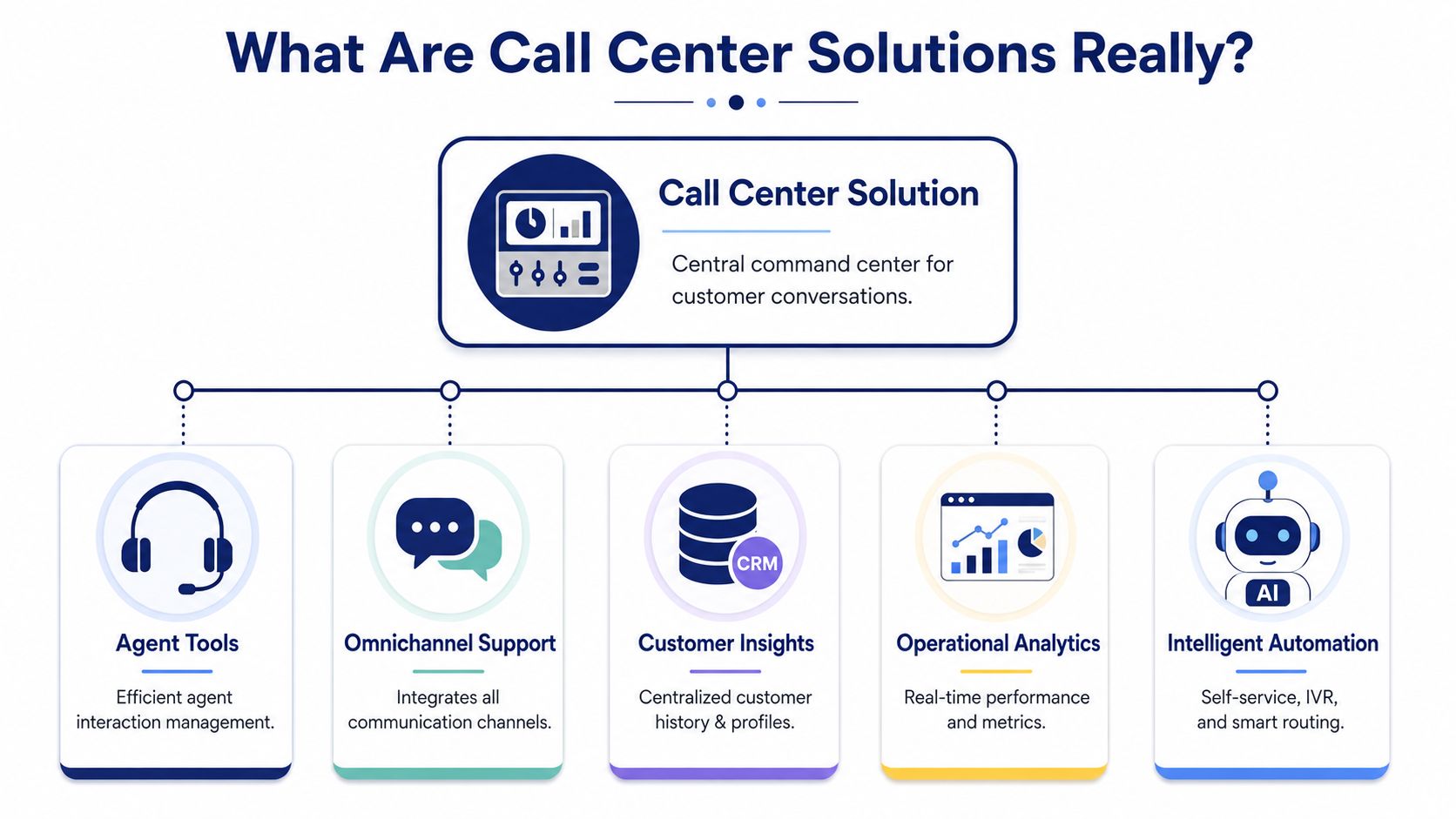
A real call center platform is less like a desk phone system and more like air traffic control for customer conversations. It doesn't just let people answer calls. It tracks incoming volume, routes each interaction to the right destination, gives agents context, and shows managers where delays or breakdowns are happening before the queue turns into a problem.
That distinction matters. A standard multi-line business phone system is built to make and receive calls. A call center solution is built to manage a service operation.
The business function behind the technology
When I evaluate systems for SMBs, I look past the feature sheet first. The important question is simple: can the platform help your team control customer demand instead of reacting to it?
A strong system centralizes a few critical jobs:
- Routing work intelligently so billing calls don't land with technical support and sales inquiries don't sit in a general voicemail box
- Managing agent activity so supervisors can see who's available, who's overloaded, and where service is slipping
- Preserving customer context so callers don't have to explain the same issue to three different people
- Measuring performance in real time so problems get fixed during the day, not discovered in a monthly report
That's why the market keeps moving this direction. The global call center market was valued at $352.4 billion in 2024 and is projected to reach $496 billion by 2027, driven by analytics-led engagement and the shift to more advanced customer experience operations, according to Ringly's call center statistics overview.
How it differs from a regular business phone system
A basic phone setup answers the question, “Can someone pick up the call?”
A call center platform answers harder questions:
| Need | Basic phone system | Call center solution |
|---|---|---|
| Incoming call handling | Rings extensions | Routes by rules, intent, queue, and agent skill |
| Agent workflow | Individual user behavior | Structured team workflow |
| Reporting | Limited call logs | Operational visibility and performance tracking |
| Customer history | Often separate | Better connected to service context |
| Scalability | Usually manual | Built for managed growth |
Practical rule: If your customer conversations affect retention, revenue, or compliance, you've outgrown a simple phone system.
Many businesses also get tripped up by terminology. If you're comparing voice-first support with broader omnichannel support, this breakdown of call center vs contact center is a useful way to separate the two models without getting lost in vendor jargon.
And if your support stack also includes ticketing, chat, and knowledge base workflows, a practical Zendesk help desk software comparison can help you think through how the service desk layer should connect with your calling platform.
The Core Features Every Business Needs
Most buying mistakes happen because teams get distracted by flashy extras before they lock down the operational basics. If the foundation is weak, advanced tools won't save you.
Three features do the heavy lifting in almost every environment: IVR, ACD, and queuing.
IVR is your digital front desk
Interactive Voice Response, or IVR, is the menu system callers reach before they hit an agent. When it's designed well, it acts like a trained receptionist. It collects intent early, directs people to the correct queue, and can answer simple needs without tying up live staff.
What doesn't work is the bloated version. Long menu trees, vague options, and dead ends create friction fast. Good IVR design is short, clear, and tied to the way customers ask for help.
A practical way to think about it is this: IVR should sort, not stall.
ACD decides who gets the call
Automatic Call Distributor, or ACD, is the routing engine. It decides which available person or team should receive the interaction based on rules you define.
Many SMBs experience their first significant operational jump. Skill-based routing matters because not every call should be handled by the next idle person. Billing issues, renewals, technical support, and claims all demand different strengths. When the system routes by capability instead of by accident, service quality gets steadier.
Integrating ACD and IVR is critical for reducing Average Speed of Answer to the 28-second benchmark, and skill-based ACD can directly produce a 15 to 20 percent drop in call abandonment rates, according to Hit Rate Solutions' benchmarking report.
Queues keep demand from turning into chaos
Queuing sounds simple, but it's where customer patience gets tested. A queue is more than a line of waiting callers. It's a controlled holding pattern.
A solid queue setup should include:
- Priority logic that handles urgent or high-value interactions appropriately
- Estimated wait communication so callers know what's happening
- Overflow rules that prevent one team from becoming a sinkhole
- Callback options when holding is likely to frustrate the customer
Without clear queue design, supervisors end up solving the same problem manually all day. They move calls around, apologize for delays, and try to guess staffing pressure from incomplete information.
A call center without routing logic is like a front office that hands every visitor to whoever walked past the desk first.
If you're comparing architectures and feature sets, this overview of VoIP call center solutions is a useful reference point for what these core building blocks should look like in a modern environment.
What to prioritize first
If your budget is tight, don't start with every add-on. Start with the engine room:
- Clean IVR paths that match real customer intents
- Skill-based ACD rules so the right agents get the right calls
- Queue controls that protect the customer experience during peaks
Once those three are stable, the rest of the platform becomes much easier to justify and much easier to use well.
Choosing Your Deployment Model Cloud vs On-Premise
This is the architectural choice that shapes almost everything after purchase. Not just setup, but budgeting, staffing, maintenance, expansion, and how quickly your team can adapt when the business changes.
For SMBs, the practical decision usually comes down to whether you want to run communications infrastructure or consume it as a managed service.
How the two models differ in practice
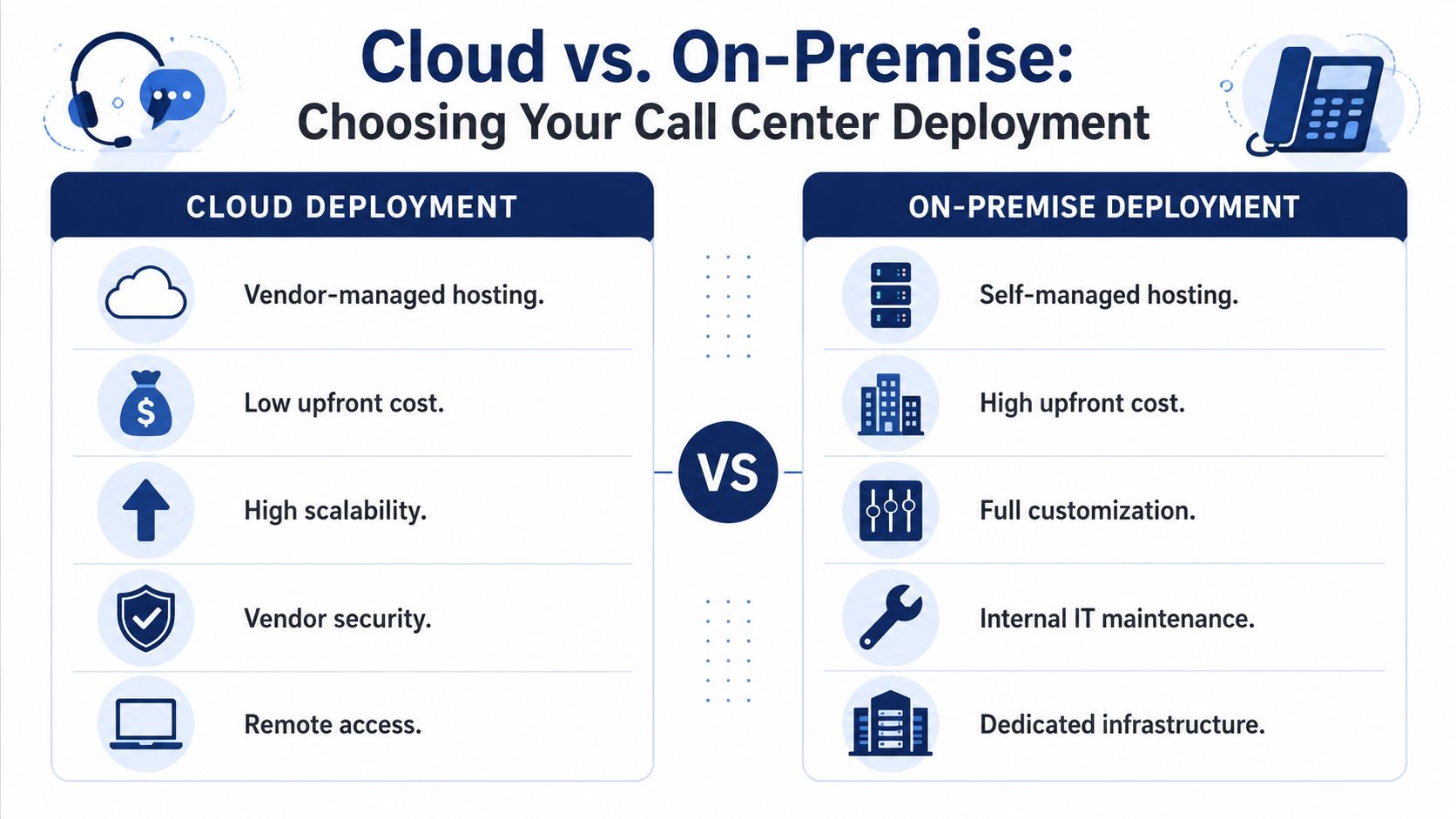
A cloud system lives in the provider's environment. Your team accesses it over the internet, and the vendor handles the underlying platform operations.
An on-premise system lives in your environment. Your team owns the infrastructure, the maintenance burden, and much of the upgrade process.
Here's a practical comparison:
| Decision area | Cloud deployment | On-premise deployment |
|---|---|---|
| Spending model | Lower upfront commitment, ongoing operating expense | Higher upfront capital investment |
| Scaling | Faster to add users, locations, and features | Usually slower and more manual |
| Maintenance | Vendor handles updates and platform care | Internal IT or outside partners handle upkeep |
| Remote access | Naturally better suited for hybrid teams | Often requires more configuration |
| Control | Standardized platform choices | More direct infrastructure control |
Why cloud usually wins for growing companies
If you're a growing SMB, cloud tends to match how you already run the rest of the business. You probably don't want your operations manager chasing telecom hardware issues. You don't want every office move or headcount change to become a mini infrastructure project.
Cloud systems fit better because they simplify three things that become painful under legacy setups:
- Expansion across sites without rebuilding the environment each time
- Remote and hybrid staffing without forcing awkward workarounds
- Change management when you need to update routing, users, or hours quickly
That last point gets overlooked. A lot of old systems “work” until the business changes. New team, new office, seasonal spike, after-hours coverage update. Suddenly the system is rigid, and every change requires a specialist.
Where on-premise still makes sense
On-premise isn't automatically wrong. Some organizations still prefer it because they want tighter infrastructure control, deeper customization, or internal ownership of the full environment.
But SMBs should be honest about the trade-off. Control sounds attractive until the server needs attention, the software needs patching, or a location outage reveals how dependent the whole setup is on local hardware.
Buy on-premise because you want the responsibility and have the team for it. Don't buy it because it feels familiar.
A practical decision filter
If you're deciding between the two, use this short filter:
- Choose cloud if you want predictable operations, easier scaling, and less telecom overhead on your internal staff.
- Choose on-premise if your business has a strong technical reason to keep communications infrastructure in-house and you're prepared to manage it continuously.
- Pause the project if your team is still evaluating based mainly on handsets or menu features. That's not the strategic question.
In most SMB environments, modern cloud call center solutions outperform legacy systems for the same reason managed power tools outperform a shed full of old equipment. They reduce setup friction, keep maintenance centralized, and let your team spend time on customer work instead of system care.
Advanced Capabilities That Drive Growth
Once the core routing engine is stable, the next layer determines whether the operation merely handles calls or improves over time. At this stage, call center solutions stop being a utility and start becoming a management system.
The most valuable advanced capabilities are the ones that help leaders make better decisions while agents handle conversations with more context.
Real-time dashboards change supervisor behavior
Without live visibility, supervisors spend the day guessing. They hear that hold times are up. They suspect one queue is overloaded. They wait for reports, then find out too late.
Real-time dashboards solve that operational blind spot. Good dashboards show queue depth, agent availability, active wait conditions, and performance trends while the day is still unfolding. That lets managers reassign people, adjust routing rules, or intervene before service quality drops.
What works is immediate clarity. What doesn't is a dashboard packed with decorative metrics that nobody uses during a live shift.
Historical reporting helps you staff smarter
Live views help you react. Historical reporting helps you plan.
Over time, strong reporting answers questions like:
- Which call types create the most repeat contacts
- Which hours routinely strain service levels
- Which teams resolve issues cleanly and which ones transfer too often
- Which process changes reduced friction and which ones only moved it elsewhere
That matters because many staffing problems aren't really staffing problems. They're classification problems, routing problems, or training problems that only show up when you look at patterns across weeks and months.
Recording and transcription improve quality faster
Call recording used to be treated mainly as a compliance or dispute tool. That's too narrow. In a modern setup, recording and transcription support coaching, quality review, and process correction.
A manager can review how agents explain a policy, how often customers ask the same clarifying question, or where calls drift into unnecessary hold time. That kind of review turns vague feedback into usable coaching.
The best quality program doesn't just score agents. It exposes broken workflows, weak scripts, and customer confusion that leadership can actually fix.
CRM integration gives agents context
When agents answer with no context, every call starts cold. The customer restates their issue, the agent hunts through systems, and the interaction loses momentum.
CRM integration changes that by connecting the conversation to account history, prior interactions, notes, and status details. That creates a more informed exchange and reduces the “let me look that up” dead space customers hate.
A good integration should make the next best action clearer. It shouldn't force agents to click through a maze just to confirm who the customer is.
Here's a useful product walk-through to see how modern hosted calling tools package these capabilities in practice:
Don't ignore multilingual performance and AI fairness
Two areas are still underserved in many buying guides.
First, if your business supports customers in more than one language, don't settle for generic “multilingual support.” You need language-tagged reporting, side-by-side QA, and routing logic that lets you compare service quality by language group without fragmenting the whole operation.
Second, be careful with AI positioning. Automation can improve consistency and self-service, but teams should still ask how models are governed, whether outputs are reviewed for bias, and whether the deployment serves all customer groups and agent populations fairly. Efficiency alone isn't the full measure of a good system.
How to Measure Success and Calculate ROI
A call center platform earns its budget in operations, not in demos. The right way to judge performance is through a small set of metrics that connect directly to labor cost and customer experience.
Too many teams track everything and learn nothing. Start with the measures that tell you whether customers are getting help quickly and whether your team is resolving issues without waste.

The KPIs that matter most
These are the core operating metrics I'd put in front of any SMB leadership team:
- First Call Resolution measures whether the customer's issue gets resolved in one interaction
- Average Handle Time tracks how long the conversation and related work take
- Average Speed of Answer shows how quickly customers reach a live person
- Customer Satisfaction reflects how the experience felt from the customer side
- Call Abandonment Rate shows how many people gave up before getting help
None of these metrics should be viewed alone. A low handle time can be good, or it can mean agents are rushing callers off the phone. A fast answer speed can look strong while resolution quality remains weak.
Why FCR is the metric with the most financial weight
If I had to prioritize one leadership metric, it would be First Call Resolution. It captures whether the organization is solving problems or just moving them around.
Achieving an FCR rate of 80% or higher directly correlates with CSAT scores rising to 85% or above, while reducing blended voice contact costs from $16 down to as low as $9 per interaction, according to ReveSoft's call center metrics analysis.
That's why FCR matters so much. Every repeat contact consumes another slice of labor, queue capacity, and customer patience.
Better resolution is usually the cleanest path to lower cost. Faster calls alone don't guarantee that.
If you're evaluating software built to expose and improve these operational metrics, this overview of call center management software is a helpful reference for what to expect from the reporting layer.
A simple ROI framework
You don't need a complicated finance model to evaluate return. Use a practical before-and-after framework.
| ROI area | What to look for |
|---|---|
| Labor efficiency | Fewer repeat calls, cleaner routing, less supervisor fire-fighting |
| Customer protection | Fewer abandoned calls, less frustration, stronger retention support |
| Management visibility | Faster intervention when queues or agent performance slip |
| Process improvement | Better coaching, better scripts, clearer training needs |
Start with three questions:
- Are we reducing avoidable work? Repeats, transfers, and queue confusion are all expensive.
- Are we protecting revenue-sensitive interactions? Missed or mishandled calls often hurt more than leaders realize.
- Are managers spending less time diagnosing problems manually? If reporting is better, leadership time gets redeployed into improvement instead of troubleshooting.
That's the ultimate return. Better systems don't just lower telecom pain. They make the support operation easier to run.
How to Evaluate and Choose the Right Vendor
Most platforms look good in a sales demo. The differences show up during implementation, daily administration, and the first stressful week when call flow changes unexpectedly.
That's why vendor selection should focus less on the feature parade and more on whether the provider can support your business like a long-term operating partner.
Judge the rollout, not just the software
Implementation quality has an outsized effect on whether the project succeeds. A vendor that leaves your team to map call flows, port numbers, train admins, and troubleshoot edge cases on its own creates risk immediately.
Ask blunt questions:
- Who owns setup tasks
- Who builds routing and queue logic
- How are cutovers handled
- What training is included for managers and front-line users
What works is a guided rollout with clear ownership. What doesn't is a handoff to your office manager with a knowledge base and a support email.
Test support before you buy
Support quality is easy to promise and hard to fake under pressure. Don't accept generic claims.
Try this during evaluation:
- Call support with a real pre-sales question and see how quickly you reach a knowledgeable human.
- Ask about after-hours help for outages, routing failures, or urgent user issues.
- Probe escalation paths so you know what happens when the first-line answer isn't enough.
A vendor's support model tells you a lot about the relationship you're buying into.
If you can't get a clear answer during the sales process, service won't improve after the contract is signed.
Demand pricing that survives real use
A cheap starting number often gets expensive once the proposal expands to include recordings, analytics, queue features, support tiers, or mobile access.
Look for pricing that answers these questions plainly:
| Pricing question | Why it matters |
|---|---|
| What's included by default | Prevents feature surprises later |
| Which items trigger extra charges | Helps you model actual operating cost |
| How are added users handled | Important for growth and seasonal shifts |
| Are support and onboarding separate fees | Hidden services can distort total cost |
If you want a good reminder of how pricing transparency shapes buyer confidence, even outside telecom, it's worth reviewing how other software providers view subscription options in a direct, easy-to-compare format.
Choose for the next stage of your business
The best vendor for a ten-person office isn't always the best vendor for a multi-location support team. You want a provider that can absorb growth without forcing a rebuild.
Pay attention to whether the platform can support:
- New locations without creating isolated phone silos
- Remote and mobile users without awkward exceptions
- More structured reporting as leadership becomes more metrics-driven
- Workflow changes when your support model matures
A good vendor helps you grow into better operations. A weak one gets in the way the moment your business becomes more complex.
The safest buying mindset is simple. Don't ask only, “Does this system have the features we need today?” Ask, “Will this provider help us run a cleaner operation a year from now when the easy phase is over?”
If you're replacing a legacy PBX or trying to bring order to a growing support team, SnapDial is worth a close look. It gives SMBs a cloud-based calling platform with predictable pricing, white-glove setup, and 24/7 support, so you can modernize communications without turning the rollout into an internal IT project.