
Think of it like a sports team reviewing game tapes to find the winning plays—that's exactly what call recording for business does for your company. It’s no longer just about hitting a record button. It’s about capturing a treasure trove of raw, unfiltered feedback to sharpen your training, lock down compliance, and perfect your customer experience.
This is how you turn everyday conversations into a real strategic advantage.
Why Call Recording for Business Is a Strategic Tool

In the not-so-distant past, call recording was seen as a complex and expensive tool, really only accessible to massive call centers with deep pockets. Today, modern cloud-based phone systems have completely changed the game, making it affordable and easy for businesses of any size.
This shift has turned call recording for business from a niche add-on into a must-have tool for any company serious about competing on customer experience. By capturing your customer interactions, you're building an incredible library of information—direct, unfiltered insights into what your customers actually want, what your team is nailing, and where you have room to get better.
The Core Benefits of Recording Business Calls
Putting a call recording system in place delivers immediate, tangible benefits that you'll feel across multiple departments. It's about more than just having a record; it's about using that record to drive real, meaningful change.
Here are some of the biggest reasons businesses are jumping on board:
- Improved Quality Assurance: Managers can finally stop using generic training scenarios. Instead, they can review actual customer interactions to give specific, actionable feedback that helps agents improve fast.
- Faster Dispute Resolution: When a disagreement pops up over an order or what was said in a conversation, having an objective recording provides instant clarity. It protects your business and gets everyone on the same page.
- Effective Sales Coaching: Ever wonder what your top sales reps are doing differently? Analyzing their calls lets you identify those winning tactics and build a playbook you can use to train the entire team.
- Verifiable Regulatory Adherence: For industries like finance and healthcare, recorded calls aren't just a good idea—they're often mandatory. They serve as concrete proof that your team is following compliance scripts and legal protocols to the letter.
To give you a better idea of these drivers, the following table summarizes the key business impacts.
Top Reasons to Implement Business Call Recording
| Driver | Business Impact |
|---|---|
| Quality & Training | Elevates agent performance with real-world coaching examples. |
| Dispute Resolution | Provides objective evidence to resolve disagreements quickly. |
| Compliance & Liability | Creates an audit trail to prove regulatory adherence. |
| Sales Performance | Uncovers winning sales tactics to replicate across the team. |
| Customer Insights | Gathers unfiltered feedback directly from your customers. |
These benefits aren't just nice-to-haves; they are powering a massive industry shift.
This technology is no longer a luxury. The global market for business call recording software was valued at $2.5 billion in 2025 and is on track to hit $6.2 billion by 2033, growing at a compound annual growth rate of 12%. This boom is driven by tougher compliance rules, the big move to cloud solutions, and the rise of AI-powered analytics.
Modern platforms like SnapDial now bundle unlimited recording with tools like voicemail transcription and real-time statistics, making it simple for any business to tap into these benefits. You can learn more about the trends shaping the call recording market growth to see just how fast this space is moving.
By analyzing customer interactions, you’re not just solving today's problems—you’re gathering the intelligence needed to anticipate tomorrow's needs and stay ahead of the competition.
Ultimately, call recording for business acts as a mirror, giving you an honest reflection of your customer conversations. It shows you exactly how your brand is being perceived and empowers you to make smart, data-driven decisions that improve every part of your operation, from individual performance to your company's overall strategy.
A Look Under the Hood: How Call Recording Actually Works
To pick the right call recording system, you first have to understand what’s happening behind the scenes. It’s not magic. At the end of the day, any system is just capturing the audio from a phone call and turning it into a digital file you can listen to later.
The first big decision you’ll face is where those files are going to live. Think about it like this: do you save your documents directly on your computer's hard drive, or do you use a service like Google Drive? That’s the perfect analogy for the two main ways call recording systems are set up: on-premise vs. cloud-based.
This diagram lays out the two paths you can take.
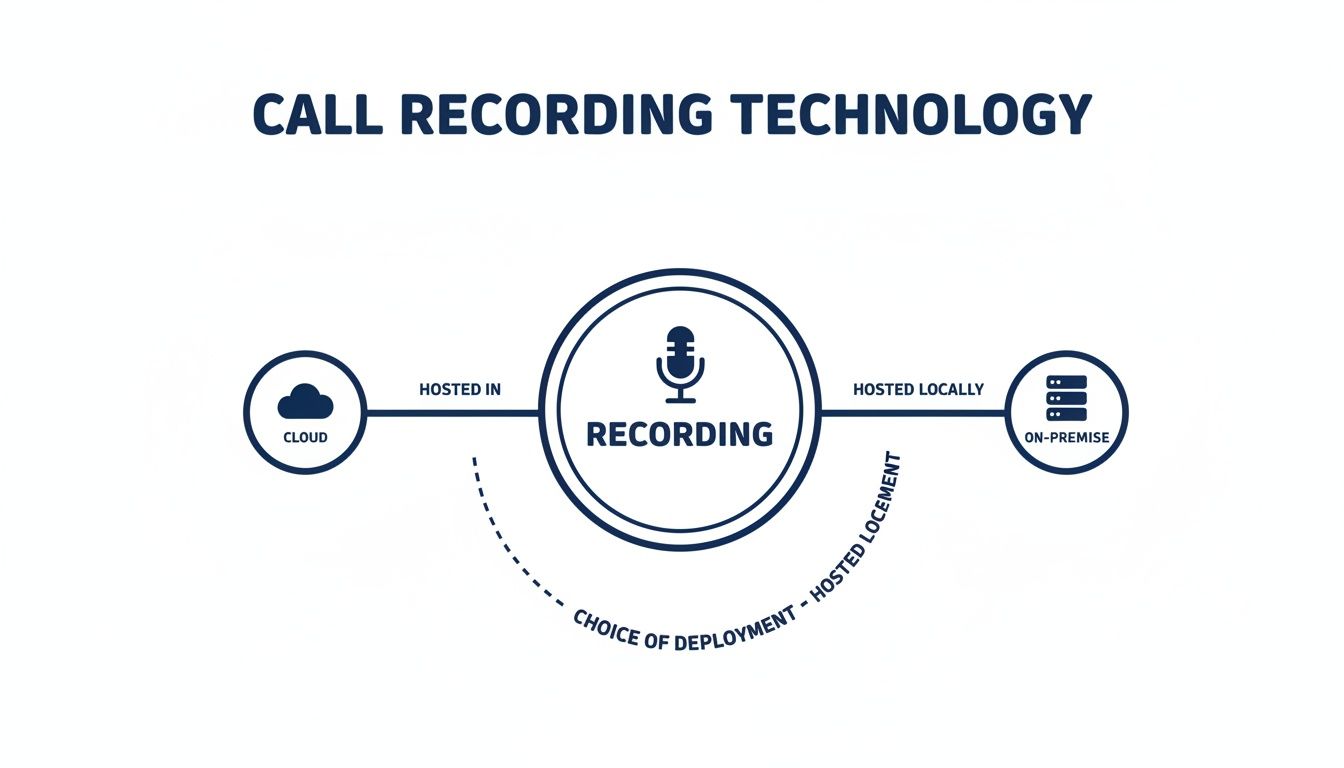
As you can see, the on-premise route means hardware in your office, while the cloud route lets a provider handle everything for you off-site.
Cloud vs. On-Premise: The Hardware Headache
An on-premise system is like that local hard drive. You buy physical servers and storage drives, install them in your office, and your IT team is responsible for keeping them running. You have total control, but you also own all the headaches—maintenance, security patches, and upgrades.
A cloud-based system works like Google Drive. The provider manages all the hardware in their own secure data centers. You just log in to a web portal or an app to access your recordings. There's nothing for you to buy or maintain; the provider handles all the security, updates, and storage infrastructure for you.
For most small and growing businesses, the choice is pretty clear. Cloud solutions get rid of the big upfront cost, they scale with you instantly, and they let your team access recordings from anywhere.
Key Takeaway: Cloud-based call recording takes the technical burden off your shoulders. It's a more scalable and accessible approach that lets you focus on using the recordings to improve your business, not on managing servers.
Recording Methods: Universal vs. On-Demand
Once you know where the recordings will be stored, you have to decide what gets recorded. This really comes down to two different strategies: Universal Recording and On-Demand Recording.
- Universal Recording: This is the "set it and forget it" option. It automatically captures every single incoming and outgoing call, no exceptions. It’s perfect for businesses with strict compliance needs, busy call centers, or any company that wants a complete record for quality checks and dispute resolution. You never have to worry about someone forgetting to press the record button.
- On-Demand Recording: This approach puts the control in your agents' hands. They can manually start and stop recording at any point during a conversation. This is great for situations where you only need to capture certain parts of a call for training or want to save on storage space by not recording every routine interaction.
Your choice here really depends on your goals. For ironclad legal protection and comprehensive quality control, universal recording is the way to go. For more targeted coaching or occasional documentation, on-demand offers more flexibility. Many modern platforms, including SnapDial, actually give you both, so you can set different rules for different teams.
Essential Features: Turning Audio into Intelligence
A great call recording platform does a lot more than just save audio files. It has features that turn those raw conversations into real, actionable business intelligence. These are the tools that unlock the true value.
Here are the key components that work together to create a powerful system:
- Encrypted Storage: Security has to be priority one. The best systems encrypt recordings both as they're being captured and while they're sitting in storage. This locks down sensitive customer and company data, protecting it from anyone who shouldn't have access.
- Automated Transcription: This feature is a massive time-saver. It automatically converts the audio from your calls into searchable text. Instead of spending hours listening to recordings, you can just scan a transcript for keywords to pinpoint the exact moment you need.
- AI-Powered Analytics: This is where things get really interesting. AI tools can automatically analyze call transcripts to gauge customer sentiment (was the customer happy or frustrated?), spot trends in complaints, and even score how well your agents are performing based on criteria you set.
These features create a powerful workflow. A call is recorded (Universal or On-Demand), stored safely (Encrypted Storage), turned into text (Transcription), and then analyzed for deep insights (AI Analytics). This process transforms a simple audio file into a goldmine of data for improving your entire business.
Navigating the Legal Landscape of Call Recording
Putting a call recording system in place is a smart business move, but it comes with a serious responsibility: you have to know and follow the law. Navigating legal compliance can feel like walking through a maze, but it’s completely manageable once you get a handle on the core rules around consent and privacy.
The single most important concept here is consent. Before you record a single call, you need to understand the patchwork of state and federal laws that govern the legal implications of call recording. These rules exist to protect a person's reasonable expectation of privacy and spell out exactly who needs to agree to being recorded.
One-Party vs. Two-Party Consent States
In the United States, call recording laws are a mix of federal and state regulations. At the federal level, the law follows a one-party consent rule. This means a recording is perfectly legal as long as at least one person in the conversation knows it’s happening and agrees to it. If you're on the call, you are that one party.
However, things get more complicated at the state level, where many have much stricter laws. This is where the difference between one-party and "two-party" (or all-party) consent really matters.
- One-Party Consent: In most states (around 38 states plus D.C.), you only need permission from one person involved in the conversation. This means an employee can legally record a call with a customer without having to get the customer's explicit permission.
- Two-Party (All-Party) Consent: Around 11 states, including heavyweights like California, Florida, and Pennsylvania, demand that every single person on the call must consent to being recorded. This is the strictest standard you'll find.
The safest bet, no matter where your business is located, is to always act like you're in a two-party consent state. Announcing that the call is being recorded removes all legal gray areas, especially when your calls cross state lines.
When a call involves people from states with different rules—say, your agent is in a one-party state but the customer is in a two-party state—the strictest law almost always wins. To stay in the clear, getting explicit consent from everyone on the line is the only surefire approach.
Best Practices for Legal Compliance
Making sure your call recording for business is fully compliant doesn't have to be a headache. A few straightforward best practices can protect your company while also building trust with your customers.
The most effective tool is a simple, automated announcement at the start of every call. A clear message like, "This call may be recorded for quality assurance and training purposes," leaves no room for doubt. If the other person stays on the line and continues the conversation after hearing that, it's widely considered implied consent.
It's also crucial to have a clear internal policy written down. This document should spell out:
- When calls are recorded (e.g., all support calls, specific sales lines).
- How recordings are stored securely.
- Who has access to the recordings and for what reasons.
- How long recordings are kept before they are automatically deleted.
Just having the policy isn't enough; you need to train your team on these rules. For a detailed look at how we handle data, you can read more in the SnapDial privacy policy.
Industry-Specific Regulations
Beyond the general consent laws, some industries have to deal with an extra layer of compliance rules. If your business handles any kind of sensitive information, you need to be aware of regulations designed to protect that data.
For example, any organization in healthcare must follow the Health Insurance Portability and Accountability Act (HIPAA), which has strict rules on protecting patient health information. In finance, the Payment Card Industry Data Security Standard (PCI DSS) mandates that sensitive credit card details must never be stored. That means your recording system must be set up to automatically pause recording when an agent is taking a payment.
At the end of the day, while this guide gives you a solid starting point, it isn't a substitute for professional legal advice. You should always talk with a qualified attorney to make sure your call recording practices are completely compliant with all the federal, state, and industry-specific rules that apply to your business.
Driving Real Results with Call Recording

Getting the technical and legal side of call recording right is important, but the real magic happens when you start turning those recordings into business results you can actually measure. A solid call recording for business strategy moves beyond theory and delivers a tangible return on investment that echoes across your entire company.
It’s all about connecting the dots between conversations and outcomes. Think of it as creating a powerful feedback loop that constantly sharpens performance, makes customers happier, and drives revenue.
Supercharging Your Customer Support Team
Your support team is on the front lines every single day. Call recordings are, without a doubt, their most valuable coaching tool. Instead of using abstract training scenarios, managers can review actual customer interactions to see exactly what’s working and what’s not.
This process is a game-changer for improving key metrics. When an agent masterfully de-escalates a tense call or perfectly explains a complex feature, that recording becomes a gold-standard example for the rest of the team to learn from.
On the flip side, when a call goes south, the recording offers a blame-free way to give constructive feedback. It lets managers pinpoint specific areas for improvement, like fine-tuning agent scripts or beefing up product knowledge.
By analyzing conversations, teams can spot recurring customer problems that lead to repeat calls. This insight lets you fix the root cause, which directly boosts first-call resolution rates and elevates the entire customer experience.
Phone calls are still the undisputed king of customer service, with 57.7% of call centers worldwide using them as their main channel. A key benchmark for success is a first-call resolution rate of 68%, but without recordings, agents often miss the chance to see how they could have hit that target. As highlighted in these business phone system statistics on globalcallforwarding.com, a built-in recording feature turns these missed opportunities into clear wins.
Building a High-Performance Sales Engine
In sales, the gap between a top performer and an average one can come down to subtle differences in approach. Call recordings demystify what your best reps are doing, allowing you to clone their success across the entire sales floor.
Imagine building a curated playlist of your "greatest hits" sales calls. This collection becomes an incredible training asset for new hires, slashing the time it takes for them to start closing deals.
- Objection Handling: Listen to how your top reps navigate tough questions and skillfully turn skepticism into genuine interest.
- Closing Techniques: Break down the exact language and timing they use to seal the deal.
- Value Proposition: Hear how they articulate your product's value in a way that truly clicks with prospects.
This data-driven approach to sales coaching goes way beyond generic advice. It provides concrete, replicable strategies that directly grow your bottom line. And with cold calling data showing that 63% of buyers actually prefer a call over an email, it's a channel you can't afford to ignore.
By tying recordings to your performance data, you create a powerful feedback system. You can get even more out of this information when you learn more about call analytics in our comprehensive guide.
Resolving Disputes and Informing Product Strategy
Beyond training, call recordings serve two other crucial functions: they provide undeniable proof to resolve disputes and offer a treasure trove of unfiltered customer feedback for your product team.
1. Dispute Resolution
When a customer disputes a charge or disagrees on what was promised, a recording is your objective source of truth. It can instantly clear up misunderstandings about order details, pricing, or service terms, protecting your business from liability and helping to save the customer relationship.
2. Product Development Insights
Your customers are constantly telling you what they want—you just have to listen. Call recordings are a goldmine of feedback. When you hear multiple customers asking for the same feature or complaining about the same bug, that's a crystal-clear signal for your product team.
This direct line to customer sentiment helps you make smarter, data-driven decisions for your product roadmap. By systematically analyzing conversations, you ensure your development efforts are focused on what your users actually care about, leading to a better product and stronger loyalty.
Integrating Call Recording into Your Daily Workflows
The best tools are the ones your team uses without even thinking about it. They need to blend into daily habits so seamlessly that they feel like a natural part of the job, not another chore to manage. This is exactly the goal when you introduce call recording for business—to make it an invisible part of your operation that boosts productivity without getting in the way.
Standalone recordings are fine, but their real value gets unlocked when you wire them into the other systems your business depends on every single day. By connecting your recording platform with other software, you create a single source of truth that gives you a complete, 360-degree view of every customer interaction.
This turns isolated audio files into a rich, contextual dataset that helps you make smarter decisions across the entire company.
Connecting Recordings to Your CRM
For most businesses, the Customer Relationship Management (CRM) system is the command center for all customer information. Integrating call recordings directly into your CRM enriches this data in a huge way.
Imagine a sales rep is about to call a prospect. Instead of just scanning notes from past emails, they can hit play on the prospect’s last conversation with a support agent. This gives them invaluable context, prevents the customer from having to repeat themselves, and makes for a much smoother, more personal experience.
By linking recordings to your CRM, you tear down the information walls between departments. Sales, support, and marketing can all access the full history of a customer's journey, which leads to more cohesive communication and stronger relationships.
This unified view is a total game-changer. It means anyone who talks to a customer can quickly get up to speed on past problems, promises, and conversations. You can dig deeper into how this works in our guide on the benefits of a CRM with VoIP integration.
Powering Up Quality Assurance and Coaching
For managers, weaving call recording into Quality Assurance (QA) platforms makes the whole coaching process far more efficient and impactful. Instead of randomly spot-checking calls and hoping to find something useful, managers can use intelligent software to flag conversations for review based on specific criteria.
For example, a QA system could automatically highlight:
- Calls with long stretches of silence, which might mean an agent is struggling to find an answer.
- Conversations where a customer mentions a competitor’s name.
- Interactions with negative sentiment, flagging a customer who might be at risk of leaving.
This lets managers focus their time where it’s needed most. They can score calls against a scorecard right in the platform and add time-stamped notes to give specific, actionable feedback. Training sessions become way more productive because managers can point to the exact moment in a call to illustrate a coaching point.
Your Step-by-Step Implementation Checklist
A smooth rollout is the key to getting your team on board and seeing a return on your investment from day one. A rushed or confusing implementation will only create resistance. Use this checklist to make sure your deployment is successful and doesn't disrupt your business.
A little planning here goes a long way in ensuring your new system is a strategic tool, not just another piece of tech.
| Phase | Action Item | Key Consideration |
|---|---|---|
| 1. Planning | Define your goals and KPIs. | What specific outcomes do you want (e.g., improve first-call resolution, reduce disputes)? |
| 1. Planning | Notify employees of the new policy. | Be transparent about why you're recording and how it will be used for positive coaching. |
| 2. Legal & Compliance | Update your privacy policy. | Clearly state that calls may be recorded for quality and training purposes. |
| 2. Legal & Compliance | Configure recording announcements. | Set up an automated message on all inbound lines to ensure you meet legal requirements. |
| 3. Technical Setup | Configure call routing rules. | Decide which departments or lines get universal recording vs. on-demand. |
| 3. Technical Setup | Set up integrations (CRM, QA). | Connect the platform to your core business systems to make data easily accessible. |
| 4. Training | Train agents on recording features. | Show them how to start and stop recordings (if applicable) and access their own calls. |
| 4. Training | Train managers on analytics. | Teach them how to find, review, and score calls to provide effective, data-driven feedback. |
| 5. Go-Live | Monitor initial performance. | Keep a close eye on system performance and gather early feedback from your team. |
Following these steps ensures that your call recording for business initiative starts on the right foot. It transforms the feature from a simple add-on into a deeply integrated and powerful asset for your entire organization.
How to Choose the Right Call Recording Solution
Picking the right call recording for business is a big deal. It’s a decision that hits your budget, your security, and your team’s daily workflow. This isn’t just about finding a tool that can hit the ‘record’ button. It’s about finding a platform that can grow with you, plays nice with the software you already use, and has your back with real support when you need it.
Think of it less like buying software and more like choosing a business partner. You need a solution that gets what you’re trying to do, fits into your workflows, and is genuinely invested in your success. To find that perfect fit, you have to look past the shiny feature list and dig into the criteria that really matter for the long haul.
Core Evaluation Criteria
When you start comparing vendors, it’s easy to get lost in a sea of features and buzzwords. To keep your head straight, you need to anchor your evaluation around a few non-negotiable pillars. These are the things that separate a merely adequate tool from a truly strategic one.
- Scalability: Can this system grow with you? A solution that’s perfect for a team of five needs to scale up to support fifty without breaking the bank or requiring a massive technical overhaul. Cloud-based systems usually have a big advantage here.
- Security and Compliance: How are they protecting your data? You should be looking for things like end-to-end encryption, secure storage, and features that help you stay compliant with regulations like PCI DSS and HIPAA.
- Ease of Use: A powerful tool is totally useless if your team finds it too confusing to operate. The interface for both agents and admins should be clean and intuitive, making it simple to find recordings, pull reports, and manage settings without a week of training.
- Integration Capabilities: Does it work with your other tools? Native integrations with your CRM and other key business software are essential. They create a unified view of every customer interaction and stop you from wasting time switching between apps.
A vendor’s commitment to security isn’t just another feature—it’s the foundation of their entire service. Make sure they can give you detailed documentation on their security protocols, data handling policies, and compliance certifications.
Understanding Pricing and Support
Pricing for call recording can be all over the map, so you have to know exactly what you’re paying for. Some vendors will charge you per user, per minute, or based on how much storage you use. This can lead to unpredictable bills that are impossible to budget for. Look for providers like SnapDial that offer all-inclusive pricing with unlimited recording. It makes budgeting simple and predictable.
Just as important is the quality of their support. When something goes wrong, you need to know you can get a real expert on the line—fast. Always test their support during your free trial or evaluation period. Are they responsive? Do they know what they’re talking about? A strong, reliable support team is an invaluable part of the whole package. As you weigh your options, it helps to check out guides on the best meeting recording apps, as they often cover features like transcription and analytics that are just as crucial for business calls.
Got Call Recording Questions? We've Got Answers
Thinking about call recording often brings up a few key questions, especially around the legal and technical nuts and bolts. To help you move forward with confidence, we’ve put together straightforward answers to the questions we hear most often.
Is It Legal to Record Business Calls?
Yes, as long as you handle consent properly. In the U.S., federal law only requires one-party consent, which means if you're part of the conversation, you can record it. The complexity comes from the fact that about 11 states follow stricter two-party consent laws, where everyone on the call needs to agree to be recorded.
The safest and most common practice is to simply notify everyone. A simple, automated message at the start of a call—like, "This call may be recorded for quality and training purposes"—is generally all you need. If the other person stays on the line, they've given their implied consent.
How Are Call Recordings Stored and Kept Secure?
Modern solutions handle this in the secure cloud. Your recordings are protected with encryption both while they're being transferred and while they're sitting in storage. This locks them down, preventing anyone without authorization from accessing sensitive customer or company data.
A reputable provider manages all the heavy lifting on the security front—firewalls, regular patches, and backups—in their own secure data centers. This takes the technical burden completely off your plate and ensures your recordings are protected according to the highest industry standards.
Key Takeaway: Secure storage isn't just a feature; it's a promise. Always work with a provider that offers end-to-end encryption to safeguard your call data and your customers' privacy.
Can I Record Only Certain Types of Calls?
Absolutely. You're in complete control. Most platforms give you the flexibility to choose how you want to record, typically with two main options:
- Universal Recording: This automatically captures every single incoming and outgoing call. It's the best choice for businesses focused on compliance or comprehensive quality assurance.
- On-Demand Recording: This lets your team members manually start and stop recording during a call. It's perfect for capturing specific moments for training or documentation without needing to store entire conversations.
Ready to transform your customer conversations into strategic assets? With SnapDial, you get unlimited call recording, advanced analytics, and seamless CRM integration, all with predictable pricing and 24/7 expert support. Learn more and see how SnapDial can help your business grow.