
It’s a simple idea that changes everything: turning a static phone number on a website or in an email into an interactive link. Instead of forcing customers to find, copy, and dial your number, click to call lets them connect with your business instantly with a single tap.
What Is Click to Call and How Does It Work

Think of click to call as the ultimate shortcut in the customer journey. It’s the digital handshake that closes the gap between someone's online interest and a real, personal conversation with your team. This simple but incredibly powerful feature removes the friction that loses you leads.
At its core, the technology is refreshingly straightforward. A special bit of code transforms a standard string of numbers into a clickable element. When a visitor on a smartphone taps the link, it automatically opens their phone's native calling app and dials the number. If they're on a desktop, it can fire up a VoIP application like Skype or a connected business phone system.
This single action has a huge impact. It caters to the "I want it now" expectation that defines modern customers, especially on mobile, where juggling apps to manually dial a number is a huge pain point.
Click to Call at a Glance
To see how the moving parts come together, here's a quick breakdown. This table shows how a simple technical feature can create a significant business advantage.
| Component | Description | Business Impact |
|---|---|---|
| The Trigger | A clickable phone number, button, or link on a website, app, or email. | Makes it effortless for high-intent visitors to initiate contact. |
| The Action | A single tap or click by the user. | Removes friction, dramatically increasing the likelihood of a call. |
| The Technology | Simple tel: links, JavaScript widgets, or CTI integrations. |
Offers a range of implementation options from basic to highly advanced. |
| The Connection | Instantly opens the user's phone dialer or VoIP app to start the call. | Captures leads at their peak moment of interest, boosting conversion rates. |
| The Outcome | A direct, real-time voice conversation between the customer and your business. | Turns passive website traffic into active, engaged sales conversations. |
As you can see, the feature is more than just a convenience; it's a strategic tool designed to convert digital engagement into tangible business results.
The Mechanics Behind the Connection
The most basic version of click to call uses a simple HTML link with a tel: prefix. For example, adding tel:+1-555-123-4567 to your code is all it takes to make that number callable. This fundamental method works universally across web browsers and email clients, which makes it incredibly easy to implement.
But the real power comes from more advanced implementations that offer far more than just a link. These can include:
- JavaScript Widgets: These are dynamic, interactive buttons you can style to match your brand. You can place them strategically on a page—like a sticky footer that’s always visible—or even set them to appear based on user behavior, like when someone is about to leave your site.
- CTI Integration: This is the pro-level stuff. Computer Telephony Integration connects your website directly to your business phone system. This unlocks sophisticated call routing, deep analytics, and personalization, making sure the call lands with the right person or department immediately.
By making it dead simple for motivated visitors to reach out, you capture leads when their interest is highest. This isn’t just about convenience; it’s a strategic way to turn your digital traffic into real business conversations.
A study by Google revealed that 70% of mobile searchers have used a click-to-call feature directly from search results. This shows just how vital it is as a primary channel for connecting with businesses—often more popular than filling out a form.
Ultimately, click to call technology gets one simple truth right: when someone wants to talk to you, the best thing you can do is make it as easy as humanly possible. Every single step you remove from the process increases the odds of a successful connection, turning a passive browser into an active, engaged lead.
Why Click to Call Is a Conversion Game Changer
A clickable phone number seems like a simple perk, but its real power is as a strategic conversion tool. It fundamentally changes the dynamic, turning a passive website visitor into an active, engaged lead. Think of it as opening a direct express lane to your sales team, letting high-intent customers bypass the traffic jam of contact forms and email inboxes.
That immediacy is its greatest strength. When a potential customer is on your site with a question or is ready to buy, their interest is at its absolute peak. Forcing them to fill out a form creates a delay—a window where that intent cools off, distractions pop up, or a competitor grabs their attention.
A click to call button slams that window shut. It capitalizes on the moment of maximum interest by providing an instant, direct line of communication. With this single feature, a passive browsing session becomes a proactive, real-time conversation.
Capturing High-Intent Leads Instantly
Traditional lead capture methods, like forms, are asynchronous. A customer sends their info into the void and waits, hoping for a quick response. Click to call is synchronous—it connects two people at the exact moment a decision is hanging in the balance.
This is critical for businesses with complex products, high-value services, or urgent customer needs. Someone shopping for emergency plumbing services isn't going to fill out a form and wait. They’re going to call the first company that makes it dead simple to do so.
Here’s how click to call directly boosts lead quality and conversions:
- Filters for Serious Buyers: The act of initiating a phone call is a much stronger signal of intent than just filling out a form. Callers are usually further along in the buying cycle and need immediate answers to make a final decision.
- Reduces Lead Drop-Off: Every extra step in your conversion process is another chance for a prospect to bail. By removing the need to copy-paste a number or fill out fields, you slash the friction and keep more people in your pipeline.
- Increases Conversion Velocity: It just shortens the sales cycle. Instead of a back-and-forth email chain that could drag on for days, a single five-minute phone call can resolve questions, build rapport, and move a lead straight toward a sale.
By providing a direct and immediate path to a real person, you're not just offering convenience—you're demonstrating that your business is accessible, responsive, and ready to help. That first impression is crucial for building trust.
Building Trust Through Human Connection
In an increasingly automated world, the sound of a human voice can be a powerful differentiator. A phone call creates a personal connection that a form or an email simply can't match. It allows your team to hear a customer's tone, address their specific concerns with empathy, and build genuine rapport from the very first interaction.
This human element is invaluable. It transforms a faceless digital transaction into a reassuring conversation, building the trust you need to close the deal. It also creates a direct feedback loop, giving you priceless, real-time insights into your customers' pain points and questions. For any business looking to master lead generation, understanding what drives people to pick up the phone is key. You can find detailed strategies for handling these valuable interactions in our guide on what inbound calls are and how to manage them.
This foundation of trust and understanding doesn't just boost your initial conversion rates. It fosters long-term customer loyalty, turning a single call into a lasting business relationship.
From Website Feature to Your Main Conversion Path
Not too long ago, a phone number on a website was just that—a string of digits. Its journey to a clickable, interactive button is one of the biggest little shifts in digital marketing. What began as a simple convenience has turned into a core customer expectation, driven almost entirely by the smartphone in everyone's pocket.
This isn't just about a change in technology; it's about a change in psychology. Mobile users are on the go, they have a sense of urgency, and they have zero patience for friction. The old dance of finding, memorizing, and manually dialing a number feels clumsy and slow on a device built for instant connections. Click-to-call collapses that entire process into a single, satisfying tap.
Modern consumer habits have totally rewired the path from seeing an ad to making a purchase. That journey doesn't end on a "Contact Us" page filled with forms anymore. For a huge chunk of your audience, the journey ends the moment they can press a button and hear a human voice. This makes your business phone system a direct, vital extension of your digital marketing.
The Mobile-First Mindset
On a desktop, filling out a form is manageable. On a smartphone, it’s a chore. People are pinching, zooming, and fighting autocorrect on tiny keyboards, creating a frustrating experience that leads straight to abandonment. A phone call, on the other hand, feels natural and direct on a device made for that exact purpose.
This isn't just a hunch; the data is overwhelming. Research from Google on mobile search behavior found that a staggering 70% of mobile searchers have used a click-to-call button directly from the search results to contact a business. This stat shines a light on a crucial reality: for most mobile users, the simplest path from discovery to a real conversation is tapping a phone icon, not typing into a form. You can dig into the full findings in the BIA/Kelsey sponsored research report.
This means every single call has to be treated as a high-value lead. An unanswered ring, a confusing phone menu, or a poorly routed call isn't just a missed connection. It's a lost sale, a damaged customer relationship, and a wasted marketing dollar.
From Static Info to an Active Funnel
This shift in user behavior forces us to see a business phone number in a whole new light. It's no longer static information, like your street address; it's now an active and primary conversion funnel.
Think of it this way: your website and digital ads generate interest, but the click-to-call button is often the final action that turns that interest into a tangible lead. It's the last, most critical step in the customer's journey.
This perspective changes everything. It means your call-handling process is just as important as your landing page design or your ad copy. Success isn't just about getting clicks to your website anymore; it's about successfully managing the calls that come from it.
Why This Shift Demands Action
Getting your head around this evolution is the key to staying competitive. Businesses that keep treating their phone system like a passive utility are getting left behind. The ones who recognize it as a core part of their digital strategy are the ones winning.
Here’s why adapting is no longer optional:
- Customer Expectation: People now expect instant, frictionless ways to connect. Failing to offer a click-to-call option can make your business seem outdated or hard to reach.
- Conversion Optimization: If the majority of your mobile traffic would rather call, then optimizing that path is the single most effective way to boost your mobile conversion rates.
- Marketing ROI: When you can directly trace calls back to specific campaigns, you get a much clearer picture of your marketing return on investment. Each call becomes a measurable outcome of your ad spend.
Ultimately, the rise of the smartphone has turned the humble phone call into a premier digital conversion event. By embracing click-to-call, you’re not just adding a button to your site; you are aligning your entire business with the powerful, immediate, and conversation-driven habits of the modern customer.
How to Add Click to Call to Your Website
Putting the power of click to call to work on your site is more accessible than you might think. Whether you're after a quick-and-dirty solution or a deeply integrated system, there's a method that fits your technical comfort level and business goals. Let's break down the three primary ways to get this done.
This visual guide is a great starting point for figuring out which path is right for your audience. For mobile users, an immediate call is often the path of least resistance.
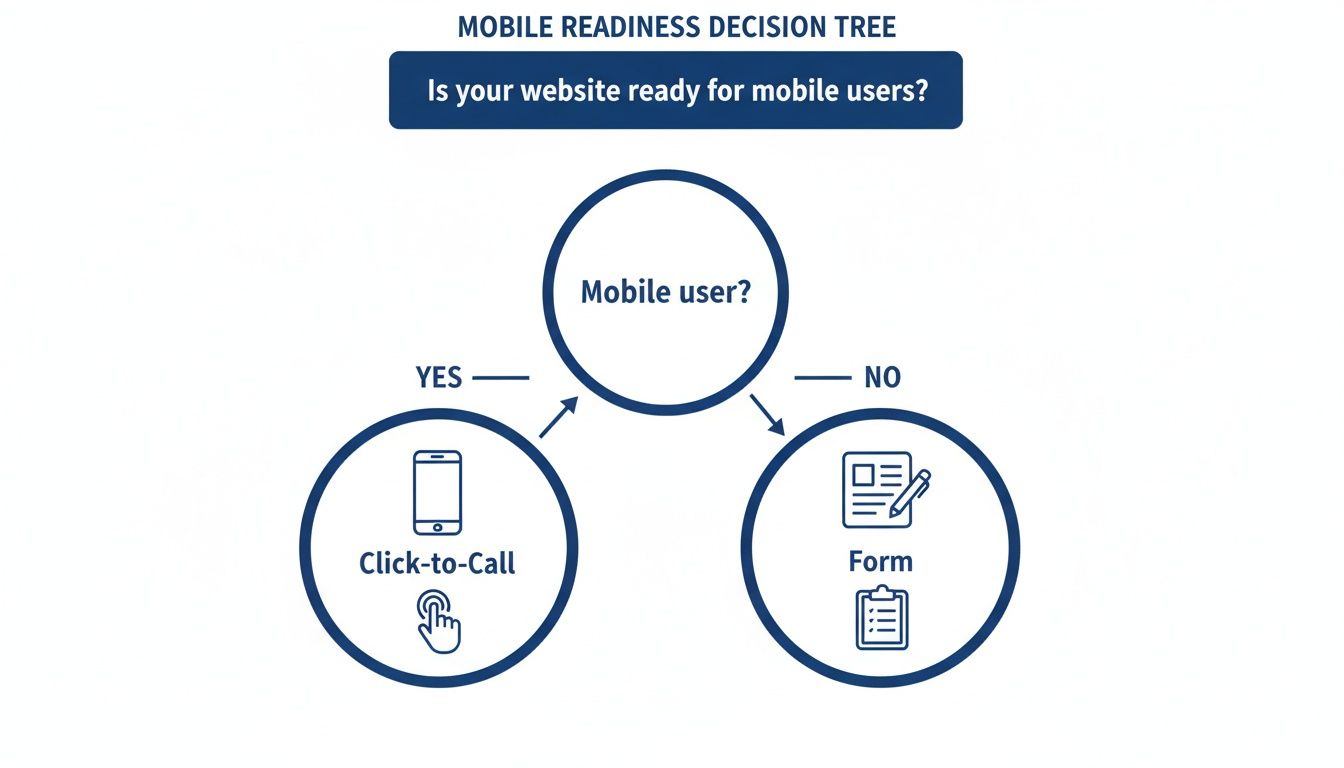
The decision tree nails a key insight: when your visitor is on a smartphone, click to call is the most direct and user-friendly conversion tool you have. Desktop users, on the other hand, might be more receptive to filling out a form.
Comparing Click to Call Implementation Methods
Choosing the right implementation method comes down to a trade-off between simplicity and power. A basic link is easy but limited, while a full integration offers deep analytics but requires more setup. This table breaks down the key differences to help you decide which approach aligns best with your team's skills and your business goals.
| Method | Technical Complexity | Key Features | Best For |
|---|---|---|---|
HTML tel: Link |
Very Low | Universal compatibility, zero cost | Quick, simple implementations on blogs, contact pages, or local business sites. |
| JavaScript Widget | Low to Medium | Customizable design, smart triggers (e.g., exit-intent), basic analytics | Marketers and businesses wanting more visual control and better engagement without deep technical setup. |
| CTI Integration | High | Full call attribution, CRM integration, advanced call routing, rich analytics | Data-driven businesses, call centers, and sales teams needing to track ROI and optimize every interaction. |
Each level builds on the last, moving from a simple instruction for a browser to a fully integrated communication channel that feeds critical data back into your business operations.
The Foundation: HTML tel: Links
The most straightforward way to create a click to call link is with a standard HTML anchor tag—the same kind you use for any hyperlink. The only difference is the prefix. Instead of http://, you use tel:.
It's incredibly simple to set up. All it takes is a single line of code added to your website's HTML. This method is universally supported across all modern browsers and devices, making it a reliable, can't-mess-it-up starting point.
Here’s what the basic code looks like:
When someone on a smartphone taps this link, their phone's native dialer will immediately pop open with the number pre-filled and ready to go. While it’s dead simple, this method offers no styling beyond what your site uses for normal links and provides no built-in way to track these calls as conversions.
Upgrading with JavaScript Widgets
For more control over how your call button looks and acts, JavaScript widgets are the next logical step up. These are dynamic, interactive buttons or banners that you can customize to perfectly match your brand's look and feel, offering a much richer user experience than a plain blue link.
But these widgets aren't just about looks. They introduce powerful features that basic HTML links simply can't touch. For instance, you can configure a widget to only appear after a visitor has been on a page for a certain amount of time or when they signal they're about to leave by moving their mouse toward the close button.
This level of control allows you to present the call option at the most strategic moments in the customer journey, significantly increasing the likelihood of engagement without being intrusive.
Many marketing platforms and call tracking services provide these widgets out of the box. You typically add a small snippet of JavaScript code to your website, and then you can configure the widget's behavior and appearance from a user-friendly dashboard—no deep coding knowledge required.
Advanced: Computer Telephony Integration (CTI)
The most powerful implementation by far is Computer Telephony Integration (CTI). This approach directly connects your website to your business phone system, like SnapDial. It transforms click to call from a simple website feature into a core part of your entire communications infrastructure.
With CTI, a click on your website can trigger all sorts of sophisticated actions within your phone system. For example, you can automatically route calls from a specific product page to the sales specialist for that exact product. This ensures customers connect with the right expert instantly, without having to navigate a frustrating phone menu.
This deep integration also unlocks a treasure trove of analytics. Because the website and phone system are talking to each other, you can:
- Attribute Calls: See exactly which marketing campaign, keyword, or webpage generated each and every call.
- Track ROI: Measure the true return on investment of your digital advertising by linking ad spend directly to inbound phone leads.
- Personalize Interactions: Arm your agents with on-screen information about the caller's browsing history before they even answer the phone.
While CTI requires a more advanced setup and a capable phone system, it provides unmatched intelligence and efficiency. It’s the ideal solution for data-driven businesses and call centers focused on optimizing every single customer interaction.
Nail Your Click to Call Strategy With These Best Practices
Putting a click to call button on your site is a great start, but just having it there isn't a strategy. If you really want to turn that little button into a lead-generating machine, you need to think through the entire experience—from the moment a visitor sees it to the second their call connects.
True success comes from a mix of smart design, clear communication, and solid analytics. It’s about putting yourself in your customer's shoes. Where would they expect to find a call button? What words will actually make them want to tap it? And what happens after they do? Answering those questions is how you build a click to call strategy that actually converts.
Optimize for User Experience and Visibility
The best click to call button is one that's impossible to miss and dead simple to use, especially on a phone. Don't just bury your number in the footer and hope for the best.
- Be Obvious: Place your call button where people’s eyes naturally go, like the top-right corner of your website header. For mobile visitors, a sticky header or footer is a game-changer. It keeps the button on-screen as they scroll, making sure the option to call is always just a thumb-tap away.
- Use Action-Oriented Language: The words on your button matter. Instead of a boring "Call Us," use a call-to-action (CTA) that speaks to what the user actually wants. Phrases like "Talk to an Expert Now" or "Get a Free Quote Today" create urgency and tell them exactly what to expect next.
A well-placed, clearly labeled click to call button doesn't just offer a function; it guides the user's next action. It removes ambiguity and friction, making the decision to connect with your business an easy one.
This focus on a smooth user experience has a huge impact. Research found that call-driven advertising generated $7.4 billion in revenue back in 2016, and that number shot up to $13.7 billion by 2020. You can dig into this multi-billion dollar trend in this detailed report on customer connection.
Set Clear Expectations and Manage Operations
A successful call is about more than just the click—it’s about what happens next. If a customer calls after hours only to hear the phone ring endlessly or get a generic voicemail, you’ve created a frustrating experience and probably lost that lead for good.
Set expectations right from the start. Always display your business hours right next to your click to call button. This simple move prevents after-hours calls from going unanswered and lets customers know the best time to reach you. It’s better for them, and it’s more efficient for your team.
Track Everything to Measure True ROI
You can't improve what you don't measure. The single most important best practice is to set up robust call tracking and analytics. Without it, you’re just guessing which of your marketing efforts are actually making the phone ring.
Modern phone systems let you assign unique, trackable phone numbers to different marketing campaigns—from specific landing pages to individual Google Ads. When a customer calls one of those numbers, the system automatically ties that call back to its source. This gives you invaluable data, allowing you to:
- Attribute Leads: Know exactly which channels are driving your most valuable inbound calls.
- Calculate ROI: Measure the true return on your ad spend by connecting campaign costs directly to the phone leads they generate.
- Optimize Campaigns: Double down on the strategies that bring in high-quality calls and cut the budget for the ones that don’t.
This level of insight is fundamental for making smart business decisions. To dive deeper, check out our guide on how to leverage powerful call analytics to grow your business. When you combine a thoughtful user experience with data-driven tracking, your click to call button becomes a measurable, high-performance asset.
Connecting Click to Call with a Modern Phone System
That initial click is just the beginning of the journey. What happens next is what determines whether you win or lose that lead. A simple click to call button is only as powerful as the phone system backing it up, and without a smart, modern system, that promising click can easily dead-end in a dropped call or a frustrating phone menu.
Think of your phone system as the engine that actually drives your click-to-call strategy. A robust, cloud-based PBX ensures every inbound call gets handled professionally and efficiently, turning a simple tap on a screen into a valuable business conversation. It’s the essential foundation for converting digital interest into real revenue.
From a Simple Click to a Smart Connection
A modern phone system gives you the tools to manage every call with absolute precision. Instead of just dumping every caller into a single, generic queue, you can build a seamless experience that gets them to the right person, right away.
This level of control is more important than ever as call volumes explode. The global call center outsourcing market was already valued at $97.31 billion in 2024 and is projected to hit a staggering $163.86 billion by 2030, driven almost entirely by the surge in calls coming from digital touchpoints. You can see the full story in this market analysis from Grand View Research.
Here are the key features that transform how you handle calls:
- Auto Attendant: This is your virtual receptionist. It creates a polished first impression and directs callers exactly where they need to go, all without tying up your staff.
- Smart Call Routing: This is the brains of the operation. It sends calls to the right department or individual based on business hours, who’s available, or even the specific webpage they clicked from.
- Mobile Apps: Give your remote and hybrid teams the power to answer business calls from anywhere. This ensures that no lead ever falls through the cracks just because someone is out of the office.
A robust phone system does more than just answer calls; it orchestrates the entire customer interaction, making your business appear organized, responsive, and ready to help from the very first ring.
Ultimately, a modern phone system is the operational backbone your business needs to grow. You can learn more about how this technology works by reading our guide on what a cloud phone system is and how it benefits your business. With tools like call recording for training and detailed analytics for tracking performance, you can make sure every single click-to-call interaction is a step in the right direction.
Got Questions? We've Got Answers
Jumping into any new tech, even something as straightforward as click to call, can bring up a few questions. That's perfectly normal. Getting clear, honest answers to the common concerns about cost, compatibility, and security is the best way to feel confident you're making the right move.
Let's cut through the noise and tackle the questions we hear most often from businesses exploring this feature for the first time.
How Much Is This Going to Cost?
The cost can range from absolutely free to part of a larger software subscription, which is actually great news. It means you can start wherever you're comfortable.
A basic HTML tel: link costs nothing—it’s just a simple line of code you can add to your website in minutes. For a business just dipping its toes in the water, this is a perfect starting point with zero investment.
If you want more advanced features, you might look at JavaScript widgets. Some of these are available through free plugins, while others are included in paid marketing or analytics platforms you might already be using. The most powerful option, a full CTI integration, is usually a built-in feature of a modern business phone system like SnapDial, where its cost is simply part of your overall plan.
The best way to think about the cost is in terms of scale. You can start with a free, basic setup and then move up to more powerful, data-rich solutions as your business grows and you see the value firsthand.
Will This Work with My Website?
Yes, absolutely. One of the best things about click to call is that it's designed to work with pretty much any website on the planet.
- HTML Links: The simple
tel:link is universal. It doesn’t matter if your site is built on WordPress, Shopify, Squarespace, or is completely custom-coded. It just works. - JavaScript Widgets: These are also built to be platform-agnostic. As long as you can add a small snippet of code to your site (usually in the header or footer), you’re good to go.
- CTI Integration: This type of integration connects to your phone system on the backend, not your website builder. That means it operates behind the scenes and won't interfere with your site's design or performance at all.
Is Click to Call Secure?
Security is always a valid concern, but the technology behind click to call is fundamentally secure. It doesn't create any new weak spots on your website or transmit sensitive data over the internet.
All it does is trigger the native, secure phone dialer on the user's own device. From that point on, the call is handled by their phone and their carrier. The call itself is just as secure as any other phone call they would make.
For businesses that want an extra layer of protection, using a reputable VoIP provider like SnapDial adds another safeguard. It ensures your calls are managed within a secure, encrypted network, adding protection for call data and any recordings.
Ready to turn your website traffic into real, valuable conversations? SnapDial makes it incredibly simple to pair a powerful click to call strategy with a modern, cloud-based phone system. See how you can start capturing more leads and delighting your customers by visiting https://snap-dial.com.