

Your office phone system is probably costing you more than the invoice shows. The hidden cost is the missed calls, the clumsy voicemail handoffs, the IT time spent babysitting aging hardware, and the pressure that hits during cutover week when nobody wants to be the person who breaks business calling.
If you're comparing cloud VoIP providers right now, stop reading feature pages like they're all equal. They aren't. The vendor that looks cheap on paper can turn expensive the moment you add porting delays, support gaps, surprise add-ons, or weak security controls. The right way to evaluate the market is to judge how a provider handles migration, pricing, support, and risk, not just how many icons it puts on a sales slide.
| Archetype | Pricing Model | Best For | Watch Out For |
|---|---|---|---|
| All-in-One Cloud Suites | Flat per-user subscription | SMBs and multi-location teams that want predictable billing | Feature bundles that look complete but hide setup friction |
| Flexible UCaaS Providers | Per-user tiers with add-ons | Companies that want calling plus collaboration in one stack | Paying twice for capabilities that should be standard |
| Usage-Led Platforms | Metered or per-channel pricing | Teams with uneven call volume and internal admins who watch usage closely | Surprise overages and billing complexity |
| Enterprise Contact Center Stacks | Tiered enterprise contracts | Support-heavy organizations with queueing and analytics needs | Long implementations and rigid contracts |
What Cloud VoIP Providers Actually Do for a Modern Business
A legacy PBX asks you to own the box, the upkeep, and the headaches. A cloud PBX shifts that load to a hosted platform, so your team gets calling, voicemail, auto-attendant, mobility, and admin controls through a subscription instead of a rack of equipment. That's the shift, not the vendor branding around it.
The market size tells you this is no longer fringe infrastructure. One independent estimate puts the cloud-based VoIP services market at $29.17 billion in 2026, rising to $45.57 billion by 2031 at a 9.32% CAGR. A separate report puts the broader business cloud VoIP and UC services market at $23.4 billion in 2025, growing to $65.0 billion by 2035 at 10.7% CAGR. That scale matters because mature markets attract serious vendors, deeper feature ecosystems, and better support for businesses that don't want to rip and replace again in two years. cloud-based VoIP services market estimate
The mental model that keeps you from buying the wrong thing
Cloud VoIP isn't just “phone service on the internet.” It's a business communications layer that centralizes administration, supports remote work, and bundles voice with collaboration tools. In practice, that means your decision is less about whether calling works and more about how the provider handles mobility, administration, security, and growth.
The category's growth also explains why buyers now expect app-based calling, voicemail forwarding, and call routing to be standard. Global VoIP usage has already moved into mass-market territory, with more than 1.8 billion subscribers and 3.6 billion mobile VoIP users expected by end-2026. Those numbers don't tell you which vendor to buy, but they do tell you the platform class is established, not experimental. VoIP services market and subscriber roundup
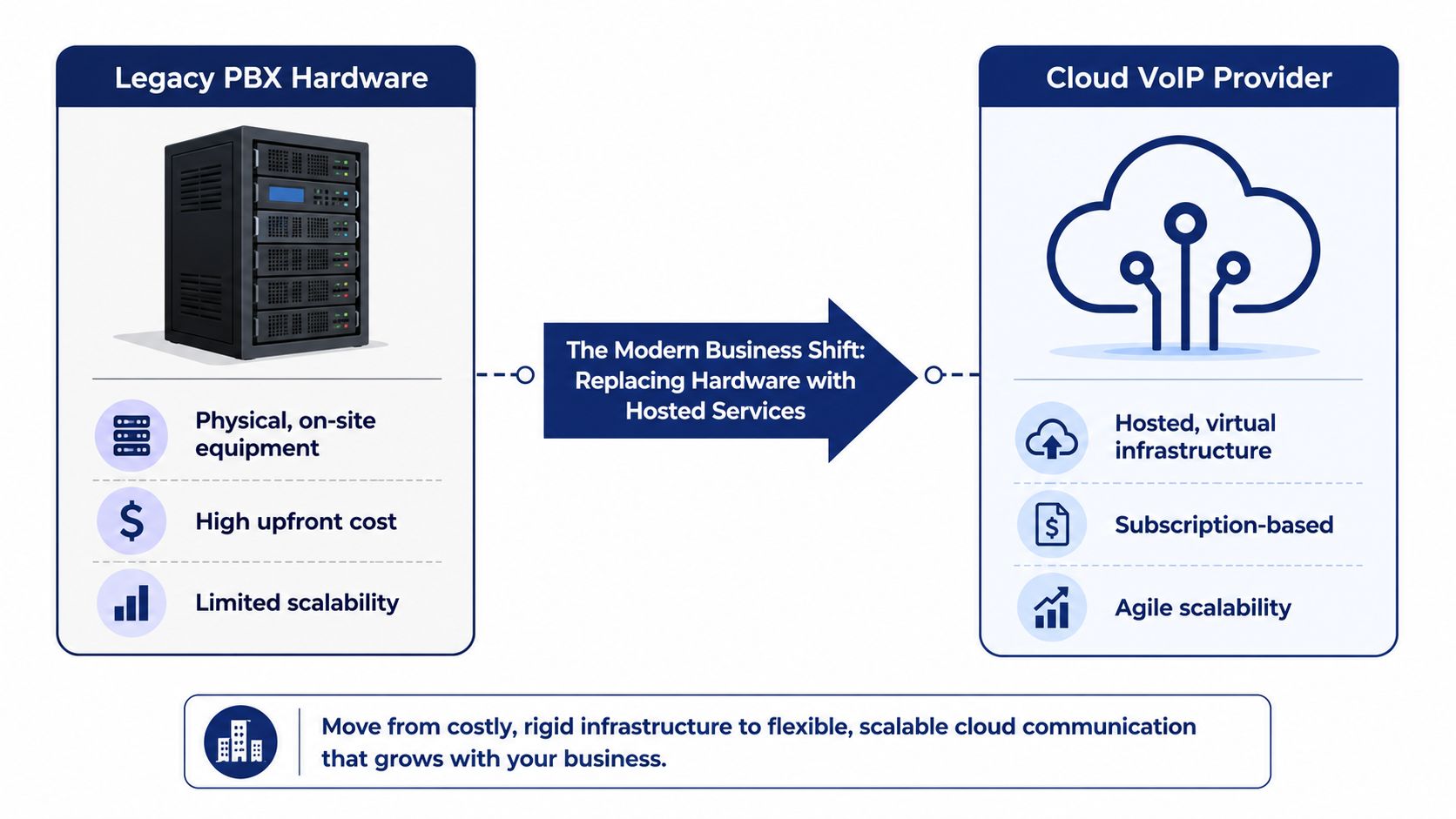
Use this lens: cloud VoIP replaces hardware dependence with software control. The rest of this guide is about the four things that determine fit, migration, cost structure, security, and operational support. If you want a plain-English primer on the basics first, read what a cloud phone system is.
The Evaluation Criteria That Separate Real Providers from the Rest
Start with reliability. If a provider can't explain its uptime commitments, failover design, and incident response in plain language, keep looking. A good vendor can tell you what happens when one region has trouble, how calls reroute, and what support path opens when your main number stops behaving.
Then look at pricing transparency. Flat, predictable billing is what most SMBs want. If the contract makes you guess at overages, add-on fees, porting charges, or premium support costs, the sticker price is a distraction.
What good looks like during a demo
A credible provider should also show feature breadth without making you pay for every basic function. Auto-attendant, call forwarding, voicemail, mobile apps, and reporting should feel native, not bolted on. If the demo keeps drifting toward “enterprise tier” for routine needs, that's a warning sign.
Pay close attention to mobility. Calls, voicemail, and routing should follow the user, not the desk. That matters for hybrid teams, field staff, and multi-site businesses that don't live in one building anymore.
Integration fit is next. Your phone system should connect cleanly with CRM and collaboration tools, or at least not fight them. If the vendor can't explain how call data moves into your existing workflows, your team will end up double-entering notes and missing context.
Security and compliance aren't optional. Expect role-based access, logging, encryption, and a clear answer on where data lives. If you handle regulated information, the provider should talk concretely about the controls that matter to your environment, not hide behind vague assurances.
Practical rule: if a vendor can't explain migration, support, and security without slipping into sales language, the rest of the promise is probably soft too.
Support quality matters just as much. Ask who answers the phone, what hours they cover, and whether implementation help is included or charged separately. Migration assistance is often where weak providers fall apart, because the gap between “signing” and “working” is where most of the pain lives.
Use those criteria as a weighted shortlist, then score vendors against your actual operating model. A call center, a remote-first startup, and a five-location professional services firm should not use the same weighting. That's how you avoid buying a platform that looks polished but doesn't fit the way your people work.
Comparing Deployment Models, Pricing, and Feature Bundles
The simplest comparison is between providers that package everything into a predictable subscription and those that break the service into a maze of usage rules and add-ons. If you want to understand call recording features, don't treat them as a standalone checkbox. Judge whether recording is included, searchable, retained in a usable format, and integrated into your reporting flow.
Here's the part most buyers learn too late, all-inclusive pricing often wins for SMBs because it cuts down on surprise charges. Metered plans can look inexpensive until your call volume, international numbers, or support needs push the bill higher than expected. Flat-rate subscriptions are easier to budget and easier to defend to finance.
| Archetype | Pricing Model | Best For | Watch Out For |
|---|---|---|---|
| Pure Cloud Subscription | Flat per-user | SMBs that want predictable spend and simple rollout | Paying for premium tiers if you need advanced admin controls |
| Hybrid Deployment | Subscription plus retained edge devices | Organizations that need a phased transition from legacy hardware | Complexity during cutover and duplicated management |
| Usage-Based Platform | Metered or per-channel | Teams with tight usage control and in-house admins | Overages and hard-to-predict monthly bills |
| Enterprise Bundle | Tiered contract | Large support organizations and contact centers | Long commitments and features locked behind upper tiers |
Predictable pricing beats clever pricing. Finance doesn't care that the base rate was low if month three comes with overages, porting fees, and paid support.
Deployment model matters too. Pure cloud is cleaner, but hybrid can make sense when you're not ready to move every location at once. The risk in hybrid is operational drift. Someone has to manage both the old world and the new one at the same time, and that usually means more tickets, not fewer.
International reach is where many sales decks get fuzzy. If you need local presence across borders, number inventory and porting rules matter more than glossy feature charts. Providers that offer broad geographic coverage, local and toll-free options, and porting support give multinational teams a more practical path than services built for domestic-only calling. For a useful external benchmark on global number coverage, review the comparison of virtual numbers across countries. The internal comparison between hosted architectures is also worth a look in hosted VoIP versus PBX.
Where AI, Mobile, and Collaboration Features Actually Create Value
Most “advanced” features are marketing noise. The ones worth paying for are the ones that reduce human labor or increase reach. AI voice intelligence does both when it's implemented well.
One reviewed platform includes real-time transcription on a $15/user/month Standard tier, with about 94% transcription accuracy, plus live sentiment analysis and AI-generated call summaries. That matters because transcription turns calls into searchable records, summaries cut after-call work, and sentiment signals help supervisors coach in near real time. AI voice intelligence benchmark details
The features that pay their way
AI transcription is useful when it's fast enough to support the work in front of the rep. If your support team is typing notes after every call, even a decent summary engine changes the economics of the shift. Sentiment analysis is less about fancy dashboards and more about spotting bad calls before they become escalations.
Mobile capability is the other feature that deserves real budget. Remote workers shouldn't need a different number, a separate app stack, or a clunky relay process just to stay reachable. The best systems make the extension move with the user, so voicemail, forwarding, and caller identity stay consistent whether the rep is at a desk, at home, or on the road.
For teams that want the iPhone to behave like a business endpoint, turn your iPhone into a PBX is a useful way to think about the category. That's the right mental model. The phone in someone's pocket should be part of the system, not a workaround for it.
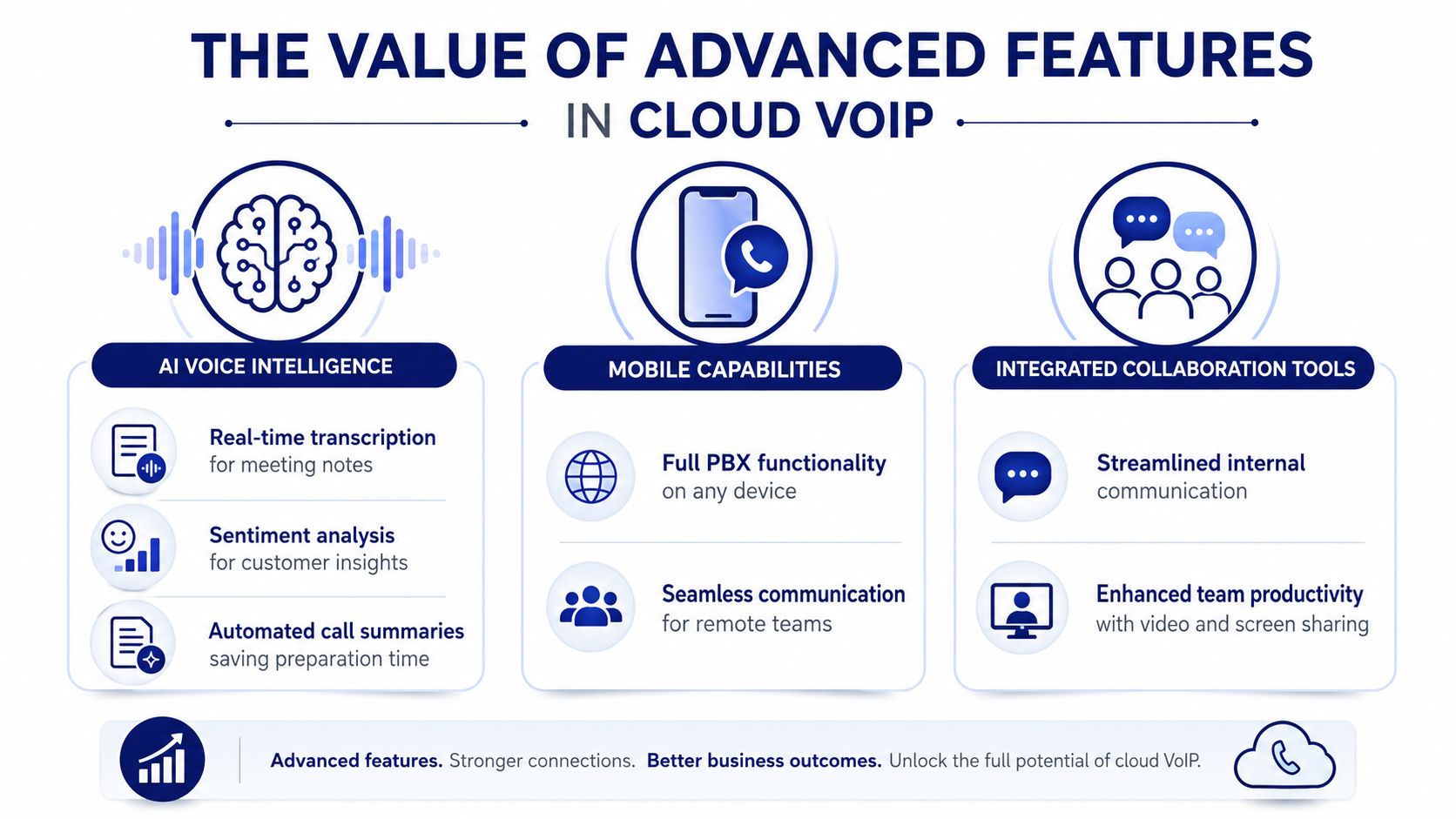
Collaboration features matter when they save time across teams, not when they duplicate software you already own. If your provider includes call handoff, conferencing, presence, or CRM logging in a way your staff will actually use, that's real value. If it's just a checkbox for the sales deck, skip it and keep the contract simpler.
Migrating from Legacy PBX Without Downtime
Migration fails when teams treat porting as a clerical task. It's an operational event. Discovery, number ownership checks, internal routing prep, and cutover scheduling all need to line up before the first number moves.
The biggest planning mistake is underestimating how long porting takes. Independent buyer guidance says U.S. local number portability typically takes 5 to 7 business days through most providers, and that timing makes the cutover date a real scheduling decision, not a casual admin step. cloud telephony buyer guidance If you need a practical porting checklist, review number porting guidance.
What the cutover window should look like
Keep the old system live until the new one passes live-call testing. That means greeting recordings, auto-attendant prompts, directory entries, hunt groups, voicemail, and device provisioning all get verified before you move traffic. The goal is boring service continuity, not a dramatic switch.
A clean migration usually follows five steps:
- Discovery and planning. Map numbers, users, locations, and call flows before anyone touches the contract.
- Number porting. Move business numbers with overlap between old and new service.
- System configuration and testing. Build extensions, IVRs, voicemail, and routing rules in the new platform.
- PSTN cutover. Switch live traffic during a low-risk window.
- Post-cutover verification. Watch quality, routing, and voicemail behavior closely until the system settles.
The safest cutover is the one where nobody in the business notices anything except fewer problems later.
International porting is a different conversation. Country rules vary, DID availability matters, and the path to continuity is rarely as straightforward as domestic number portability. If a vendor glosses over that, assume the implementation team hasn't done many cross-border migrations.
Security, Compliance, and the Questions to Ask During the Demo
A credible cloud VoIP provider should start with encryption in transit and at rest, not as a bonus but as a baseline. You also want role-based access control, audit logs, and a clear explanation of data residency and backup posture. If the vendor sells to regulated industries, ask how they map to the frameworks that matter in your environment, such as SOC 2, HIPAA, or GDPR where applicable.
VoIP systems also attract their own fraud problems. Toll fraud and caller ID spoofing are common enough that you should ask how the platform blocks suspicious routing, limits abuse, and monitors anomalies. If the provider doesn't have a direct answer, the controls probably aren't mature.
For teams that need to align telephony with broader governance, SIEM solutions for GLBA compliance is a useful adjacent read because phone events don't live in isolation anymore. Logs, alerts, and account activity need to fit into the rest of your security stack.
Questions to put in front of every vendor
- Where is call data stored, and who can access it?
- What encryption and access controls are standard?
- How do you handle fraud prevention and suspicious call behavior?
- What audit logs do admins get, and how long are they retained?
- Which compliance frameworks are supported for our use case?
- What happens during an outage, and how are calls rerouted?
- What support is included during migration and after go-live?
A strong vendor answers these questions directly. A weak one pivots back to features and pricing. That's usually enough information to keep shopping.
Matching Provider Archetypes to Common Business Profiles
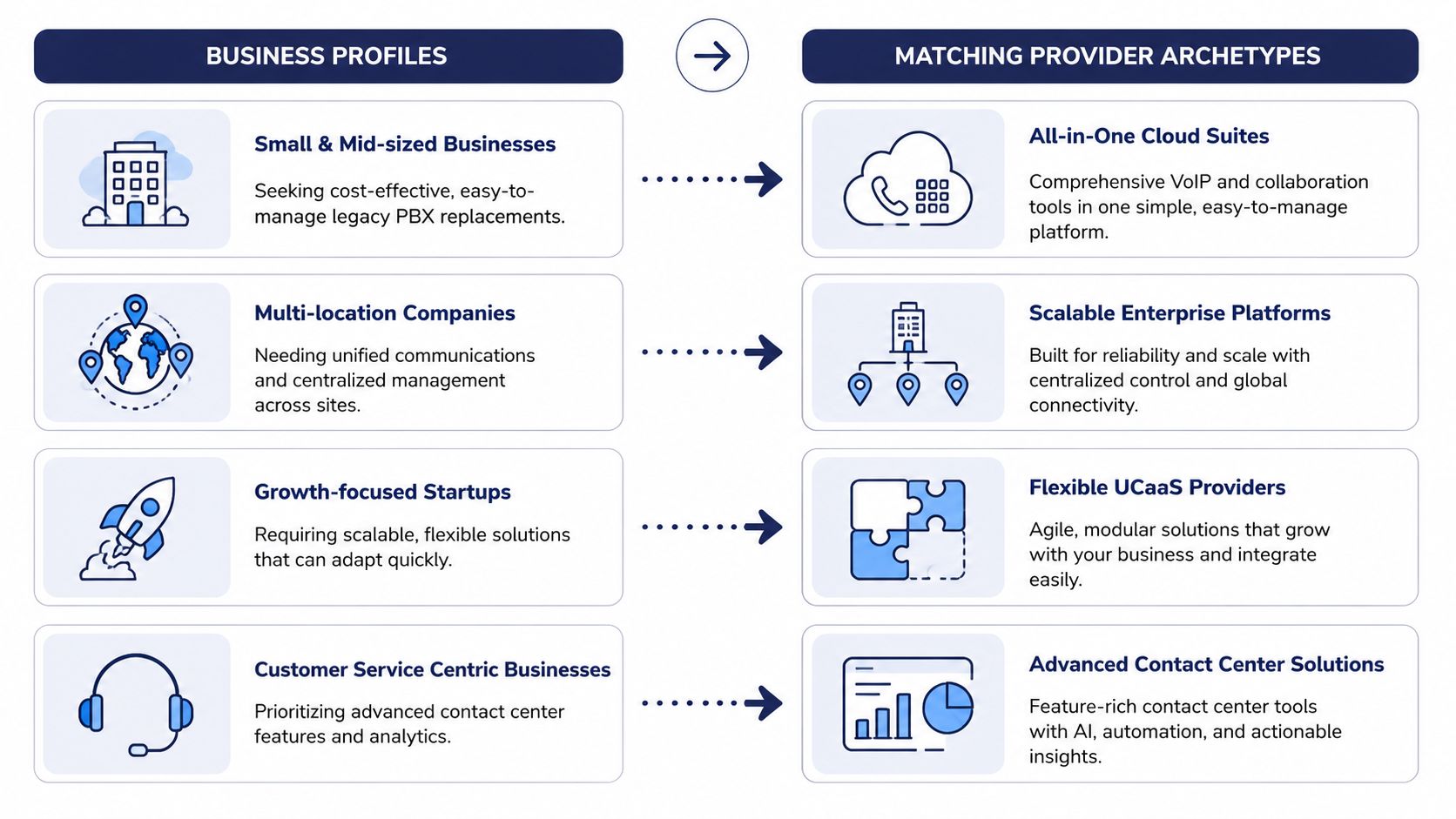
Small and mid-sized businesses replacing legacy PBXs should focus on predictability, not feature theater. They need easy administration, clean number porting, and support that doesn't vanish after the contract is signed. For that profile, an all-in-one cloud suite usually fits better than a complex enterprise platform.
Multi-location companies need centralized control. They care about consistent dialing plans, shared reporting, and the ability to manage users across sites without turning every branch into a special case. The big risk is fragmented service, where each location behaves like a separate phone business even though leadership wants one system.
Which profile needs what
Growth-focused startups should value flexibility. They need something that scales without forcing a rewrite every time headcount changes or a new region opens. They can tolerate lighter process, but they can't tolerate a platform that slows hiring or makes mobile work awkward.
Customer-service-centric businesses are a different animal. They care about queues, callbacks, reporting, and the ability to keep agents productive under load. An advanced contact center stack makes sense here because the phone system is part of the service model, not just an office utility.
SnapDial fits the SMB and multi-location profile because it combines all-inclusive pricing, free white-glove setup, 24/7 Texas support, and built-in call center capabilities in one hosted system. That matters for buyers who want a managed transition instead of a technical project disguised as telephony. If your business wants less admin drag and more operational clarity, that's the right kind of offer to put on the shortlist.
Your Evaluation Checklist and Next Steps
Use this checklist in every demo. Does the provider explain pricing without hedging, support without fine print, and migration without hand-waving. If the answer is no to any of those, keep moving.
Ask three questions before you sign anything. What happens during porting, what's included in support, and what happens to cost when usage changes. Those three answers usually separate serious vendors from polished sales teams.
For most SMBs, the fastest filter is predictable pricing, migration help, and real 24/7 support. If a provider can't give you all three, it's not ready for a production phone system. If you need a managed option that puts those pieces together in one platform, look at SnapDial's hosted VoIP approach and test it against your main numbers, your locations, and your support expectations.
If you're replacing a legacy PBX, don't buy another phone project. Visit SnapDial to request a demo and compare your current numbers, cutover plan, and support needs against a hosted system built for SMBs, multi-location teams, and call-heavy operations.