
Imagine your phone rings. Before you even say hello, your screen pops up with the caller’s entire story—their past purchases, open support tickets, and even notes from their last conversation. This isn’t some far-off fantasy; it’s the power of a CRM with VoIP integration, a connection that turns your business phone system into an intelligent communication hub.
Why Connecting Your CRM and Phone System Matters
Disconnected systems are a recipe for customer frustration. When your phone system is an island, completely separate from your Customer Relationship Management (CRM) platform, your team is flying blind on every single call. They have zero context, which leads to them asking repetitive questions and customers having to explain their situation over and over.
Integrating these two core tools bridges that gap. It puts an end to the frantic scramble of toggling between browser tabs just to find basic customer information, transforming every call into a smarter, more personal interaction.
The Problem with Disconnected Tools
Without integration, your team’s daily workflow gets bogged down in manual, error-prone tasks. Sales and support reps waste a shocking amount of time manually logging call notes, searching for customer records, and trying to piece together a conversation history from memory. This isn’t just inefficient; it’s a direct hit to your bottom line.
One study found that sales reps spend only about a third of their day actually selling. The rest? It’s eaten up by administrative busywork. A CRM with VoIP integration is designed to reclaim that lost time by automating the most tedious parts of the job.
By connecting your communication and customer data platforms, you’re not just adding a feature; you’re building a more cohesive, intelligent, and responsive organization. Every interaction becomes an opportunity to strengthen relationships rather than a test of the customer's patience.
Building a Foundation for Better Communication
This connection is fundamental to how modern businesses talk to their customers. It creates a single source of truth for every interaction, making sure everyone from sales to support is on the same page. This unified view is the backbone of exceptional service and a critical piece of any smart business strategy. Of course, it helps to know your options on the CRM side. To see what platforms can serve as the core of your customer data strategy, check out these best CRM programs for small business.
Ultimately, plugging these systems together is about more than just convenience. It’s about giving your team the right information at the exact moment they need it most. This guide will dig into how this vital connection solves common business headaches, making it an essential tool for any company trying to deliver outstanding service. For a broader look at creating a seamless communication environment, our guide on unified communications for business explores how all your different tools can work together.
How a VoIP and CRM Integration Works
So, how does a CRM with VoIP integration actually work? Think of it as opening a direct, secure line of communication between your phone system and your customer database. These two essential tools stop being siloed pieces of software and start actively sharing information in real time, making your team smarter and faster with every call.
When a customer calls, your VoIP system instantly pings the CRM, asking, "Hey, do we know this number?" In the fraction of a second before your agent even says hello, the CRM finds a match and sends back a whole package of customer data—their name, company, recent support tickets, purchase history, you name it. For outbound calls, it's just as slick. An agent clicks to call right from the CRM, and the VoIP system handles the dialing and then logs the entire interaction back to the customer's record automatically. No manual data entry needed.
This flowchart paints a pretty clear picture of the difference between an informed, integrated call and a disorganized, disconnected one.
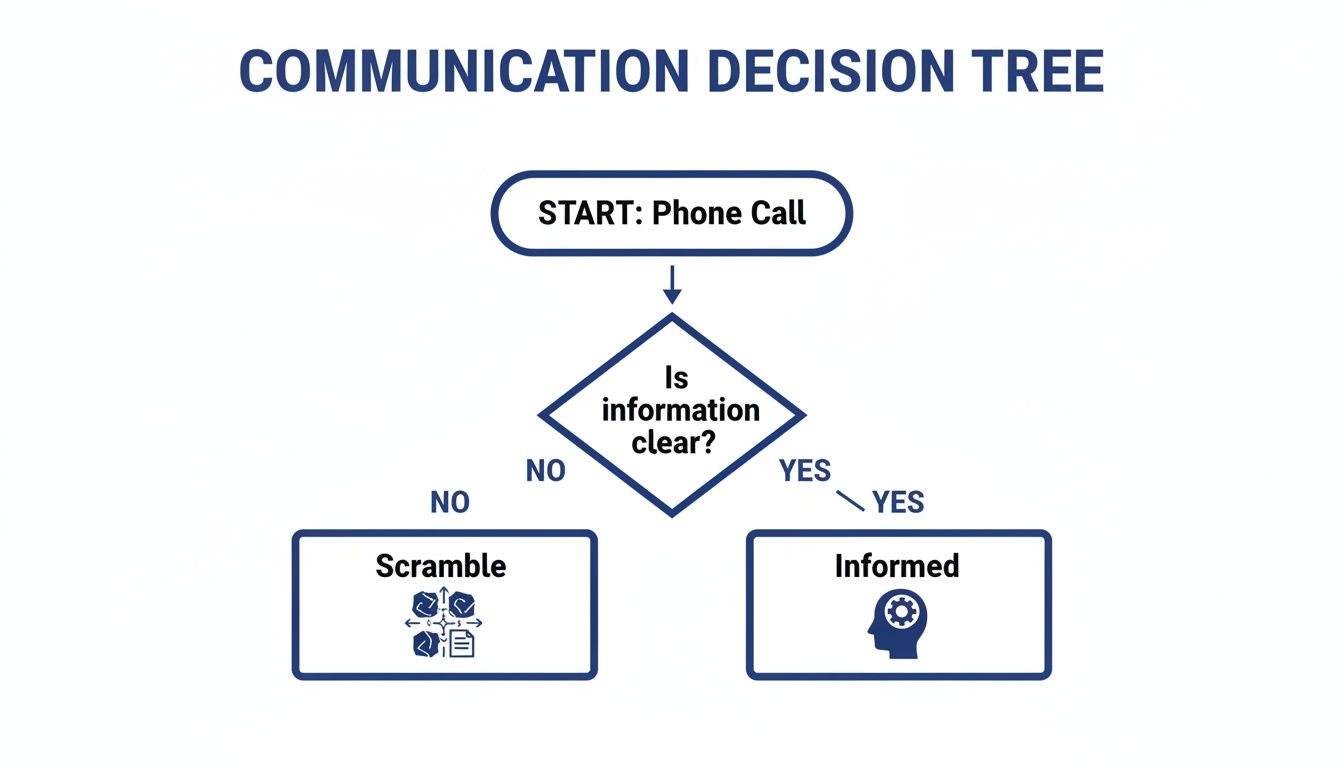
As you can see, having that integrated data is the critical fork in the road. It's what separates an efficient, helpful conversation from a chaotic scramble for information.
But how do you actually forge this connection? It really comes down to three main approaches.
Each method for linking your CRM and VoIP system comes with its own trade-offs in terms of simplicity, flexibility, and the resources required to get it running. Let's break down how each one stacks up.
Comparing VoIP and CRM Integration Methods
| Integration Method | How It Works | Best For | Complexity |
|---|---|---|---|
| Native Integration | A direct, pre-built connection created by the VoIP and CRM vendors. | Businesses using popular platforms that offer a direct, out-of-the-box integration. | Low |
| Middleware | A third-party service (like Zapier) acts as a bridge to translate data between the two systems. | Teams needing to connect niche apps or create custom workflows without developers. | Medium |
| Custom API | Developers use APIs to build a completely bespoke connection tailored to specific business needs. | Large organizations with unique requirements or proprietary software. | High |
Understanding these options helps you pick the right path for your business, balancing immediate needs with long-term goals.
Native Integrations: The Plug-and-Play Method
The simplest and most direct route is a native integration. Think of it like using a key that was made specifically for one lock. Your VoIP provider and CRM company have already done the heavy lifting, building a direct, ready-to-use bridge between their platforms.
Setup is usually a breeze, often just a few clicks to authorize the connection and sync your accounts. Because they're pre-built, native integrations are stable, reliable, and fully supported by both companies. This is the perfect path for businesses using popular tools that offer these direct connections—it gets you up and running fast with minimal fuss.
Middleware Integrations: The Universal Translator
But what happens if your CRM and VoIP system don't have a native integration? This is where middleware tools step in. Platforms like Zapier or Make act like universal translators, sitting between your two apps and helping them talk to each other.
You build simple, automated workflows—often called "Zaps" or "Scenarios"—that follow a basic "if this, then that" logic. For example: "When a call ends in SnapDial (the trigger), create a new activity log in HubSpot (the action)."
This approach gives you incredible flexibility, letting you connect hundreds of different apps that don't speak the same language directly. It's a powerful way to create custom workflows without needing a developer, but it does mean another subscription to manage in your tech stack.
Custom API Integrations: The Bespoke Solution
For businesses with truly unique needs or their own in-house CRM, a custom API integration is the most powerful option available. An API (Application Programming Interface) is basically a set of rules that lets different software programs communicate. Building a custom integration is like hiring an architect to design a bridge that’s tailored to your exact specifications.
This method gives you complete control over what data gets shared and how every feature works, allowing you to create a perfectly seamless experience for your team. The trade-off? It's also the most complex and resource-heavy approach, requiring skilled developers and ongoing maintenance. This path is typically reserved for larger organizations with specific workflow demands that off-the-shelf solutions just can't meet.
For most small and mid-sized businesses, a robust cloud phone system with strong native or middleware options provides the perfect balance of power and simplicity.
The Real-World Benefits of an Integrated System
Connecting your CRM and your phone system does a lot more than just clean up your software subscriptions; it delivers real, measurable results that show up in your team's performance and on your company’s bottom line. Let's move past buzzwords like "improved efficiency" and look at the actual advantages a CRM with VoIP integration brings to the table.
Think about the time your team sinks into manual data entry after every single call. Automatically logging call details, notes, and duration might save just three to five minutes per conversation. That sounds small, right? But for a team handling 50 calls a day, that adds up to over 20 hours of productive time reclaimed every single week. That's time they can put back into building relationships and actually closing deals.
Empower Agents with Instant Customer Context
One of the most powerful benefits is the screen pop. The moment a customer calls, their entire history flashes on your agent's screen—before they even pick up. This includes everything from past purchases and open support tickets to notes from their last conversation.
This immediate context is a complete game-changer. Agents can greet callers by name and instantly understand their situation without forcing them to repeat their life story. The customer feels heard and valued, which is the first step in turning a routine support call into a great brand experience.
This level of preparedness transforms your team from reactive problem-solvers into proactive relationship-builders. It’s the difference between a frustrating, impersonal interaction and a smooth, efficient one that reinforces customer loyalty.
And it goes deeper than that. This rich, centralized data is a cornerstone of any modern customer experience strategy. A key advantage here is how integrating your CRM and VoIP supports a true omnichannel customer service approach, where every conversation builds on the last, no matter which channel it came from.
Boost Productivity with Smarter Workflows
Manual tasks aren't just a time-suck; they’re a major source of errors and burnout. A fully integrated system brings in smart automation that simply erases these tedious steps from your team's day.
A perfect example is click-to-dial. Instead of manually typing or copy-pasting phone numbers, your sales team can launch calls directly from a contact record inside the CRM with a single click. This simple feature drastically cuts down on misdials and streamlines their outreach, letting reps move from one call to the next with almost no friction. To see this in action, you can explore the benefits of using a click-to-call dialer to speed up sales workflows.
This automation isn't just about making calls, either. Key workflow boosts include:
- Automated Call Logging: Every call—inbound and outbound—gets logged in the right customer record automatically, complete with its duration and outcome.
- Task Creation: Agents can create follow-up tasks, schedule appointments, or set reminders right from their call interface, making sure no opportunity ever falls through the cracks.
- Smart Call Routing: Incoming calls can be intelligently sent to the right person based on data in your CRM, like routing a high-value client directly to their dedicated account manager.
Gain a 360-Degree View with Unified Analytics
When your call data lives in one place and your customer data lives somewhere else, you’re only seeing half the picture. Integrating these systems creates a single source of truth, giving you a complete, 360-degree view of every single customer interaction.
This unified dataset lets you track metrics that actually mean something and uncover powerful insights. You can directly connect sales activities to revenue, measure how support calls impact customer retention, and spot trends in customer behavior. Managers get access to rich analytics dashboards that show not just call volume, but the outcomes of those calls.
The research backs this up loud and clear. When VoIP systems are integrated with CRM platforms, contact centers report up to 30% better first-call resolution rates and as much as a 40% reduction in handle time. These improvements lead directly to cost savings and happier customers. You can discover more insights about these VoIP statistics and their impact on Frejun.com. By combining communication and customer data, you aren't just making your team more efficient—you’re making smarter, data-driven decisions that fuel real business growth.
The Must-Have Features for Your Integrated Solution
Not all integrations are created equal. To get the most out of your CRM and VoIP setup, you need a specific set of features that work together to kill friction and empower your team. These tools are the building blocks of a truly efficient communication system, turning a good setup into an indispensable one.
Think of these features as the essential instruments in an orchestra. Individually, they're useful. But when they play together, they create a seamless and powerful experience for both your team and your customers. Let's break down the core features you should be looking for when you size up any integrated solution.
Screen Pops for Instant Context
Imagine a customer calls, and before your agent even says "hello," a window pops up on their screen with the caller's complete profile. That's a screen pop, and it's one of the most powerful features of an integrated system.
This isn't just about knowing the caller's name. A good screen pop delivers immediate, actionable intelligence, including:
- Contact Information: Name, company, and title.
- Interaction History: A log of previous calls, emails, and support tickets.
- Account Status: Details on their current subscription, recent purchases, or open opportunities.
This immediate context means your customers never have to repeat themselves, and your team can provide personalized, relevant service from the very first second.
Click-to-Dial for Effortless Outreach
Manually dialing is a productivity killer. It’s slow, tedious, and prone to human error—a misdialed number wastes time and shatters a sales rep's momentum. Click-to-dial completely eliminates this problem.
With this feature, any phone number inside your CRM becomes a clickable link. Your team members can launch a call with a single click directly from a contact record, lead list, or support ticket. This seemingly small function has a massive impact, letting sales reps fly through their call lists with speed and accuracy, maximizing their outreach efforts.
Automated Call Logging for Flawless Records
Forgetting to log a call is an easy mistake to make, but it creates huge gaps in your customer data. Automated call logging makes sure this never happens. The moment a call ends, the integration automatically creates an activity record right in the CRM.
This feature creates a perfect, time-stamped history of every single conversation. It logs key details like call time, duration, and outcome without requiring any manual work from your team, ensuring your customer records are always complete and up-to-date.
This hands-off approach not only saves countless administrative hours but also builds a reliable data foundation for accurate reporting and performance tracking.
Voicemail Transcription for Rapid Follow-Up
Listening to voicemails is a time-consuming bottleneck, especially for busy sales and support teams. Voicemail transcription converts audio messages into text and delivers them directly to your email or CRM.
This feature is a game-changer for efficiency. A sales rep can scan the text of ten voicemails in the time it would take to listen to just two or three. They can quickly spot urgent messages, prioritize callbacks, and respond to hot leads before they go cold. It turns a traditionally slow process into a fast, actionable workflow, ensuring no opportunity gets lost in a crowded inbox.
Your Step-by-Step Implementation Checklist
Bringing a CRM with VoIP integration to life can feel like a massive project, but breaking it down into a clear, manageable roadmap makes all the difference. A methodical approach helps you sidestep common pitfalls and roll out a system that your team will actually want to use. Think of this as your actionable checklist for every phase, from initial planning to post-launch fine-tuning.
This process is about more than just plugging in new tech; it’s a strategic business move. The growth here is explosive—the global VoIP services market hit $128.8 billion in 2023 and is projected to rocket to nearly $179.6 billion by 2026. CRM integration is a huge driver of this expansion. You can dig into these important VoIP statistics and their growth on Acefone.com. Following a structured plan is how you tap into this powerful trend effectively.
Phase 1: Define Your Goals and Scope
Before you even look at a single vendor, you need to know what winning looks like for your team. Clearly defining your objectives is the most critical first step, as it will steer every decision you make down the line.
Start by getting stakeholders from different departments in a room and asking the right questions:
- What specific problems are we trying to solve? Are you trying to kill manual call logging for good, boost first-call resolution rates, or just make sales outreach more efficient?
- Which teams will actually use this? Is this just for the sales team, or will customer support be living in it every day, too?
- What are our absolute must-have features? Do we absolutely need screen pops for every inbound call, or is automated call logging the top priority that will make the biggest impact?
Gathering this input from the ground up ensures the final solution meets real-world needs. It also creates a sense of ownership that is crucial for getting people on board.
Phase 2: Prepare Your Data and Select Vendors
With your goals locked in, it’s time to get your house in order. A successful integration runs on clean, accurate data. If your CRM is a mess of duplicate contacts, outdated info, or inconsistent formatting, the new system will only amplify those problems.
A clean CRM is the foundation of a successful integration. Dedicate real time to de-duplicating records, standardizing data fields, and archiving old contacts. This pre-launch cleanup will save you countless headaches later.
Once your data is clean, you can start evaluating vendors with confidence. Look for VoIP and CRM providers that offer robust, well-documented integrations. Check their compatibility lists, read user reviews, and always ask for a live demo to see the system in action. Don't be shy about asking tough questions about their support and setup process.
Phase 3: Execute the Technical Setup and Training
This is where the plan comes together. The technical legwork will vary depending on whether you chose a native, middleware, or custom API integration. For native connections, this phase can be as simple as a few clicks to authorize the systems to talk to each other.
For a smooth technical launch, follow these key steps:
- Run a Pilot Program: Before rolling the system out to everyone, test it with a small group of your power users. This is your chance to identify and squash any bugs or workflow issues in a controlled environment.
- Configure Your Settings: Customize features like screen pops, call dispositions, and automated workflows to perfectly match the processes you mapped out back in Phase 1.
- Provide Comprehensive Training: Don't just show your team how to use the new tools—explain why they’re a game-changer. Demonstrate exactly how the integration saves them time and helps them hit their goals.
Proper training is the absolute key to user adoption. When your team truly understands the value, they’ll be excited to use the new system to its full potential.
How to Measure the ROI of Your Integration
Making the leap to a CRM with VoIP integration is a big strategic move. But how do you actually prove it was the right one? Measuring the Return on Investment (ROI) is about more than just subtracting the monthly subscription cost from your budget. It’s about putting a real dollar value on all the new efficiencies and revenue streams you've just unlocked.
The trick is to track the right Key Performance Indicators (KPIs). These are the metrics that tell the true story of your integration's impact, turning fuzzy benefits like "better productivity" into hard, undeniable numbers.
Identifying Your Core KPIs
Before you can crunch any numbers, you have to know what to measure. The best place to start is with the specific problems you were trying to solve in the first place. Focus on tracking these essential KPIs, making sure you get a baseline before you flip the switch on your new system.
- Average Handle Time (AHT): How long does it really take an agent to get an issue resolved, from hello to goodbye? When customer info pops up on their screen instantly, you’ll often see AHT drop like a rock.
- First-Call Resolution (FCR): What percentage of customer problems are completely solved on the very first call? When your team has all the data they need, fewer calls get escalated or require a follow-up.
- Call Connection Rate: For any outbound sales team, this one is huge. How many of their calls actually connect? Click-to-dial eliminates fumbled numbers and massively increases the sheer volume of outreach.
- Time Spent on Manual Data Entry: Seriously, measure this. How many minutes or hours does your team burn just logging calls and typing up notes? Automation can get this number incredibly close to zero.
Tracking the "before and after" of these metrics gives you concrete proof of just how much more efficient your operation has become.
Calculating Your Return
Once you have your KPI data, you can start to figure out the financial return. The classic ROI formula is simple enough: (Net Gain – Cost of Investment) / Cost of Investment. Let's break down what actually goes into that calculation.
Cost Savings (The Gains):
This is where you turn your KPI data into dollars and cents. Take all that time saved from automation and multiply it by your team's hourly cost. For instance, if you save each of your 10 reps just 30 minutes per day on manual call logging, you’ve reclaimed 5 full hours of productive work time, every single day.
When calculating ROI, think beyond direct cost savings. Consider the value of increased customer loyalty from better service and the revenue generated from sales reps making more calls per day. These are powerful, tangible gains.
Productivity Gains (More Gains):
That boost in productivity isn't just about saving time—it’s about making more money. If your sales team can suddenly make 20% more calls each day because of click-to-dial, that directly translates into more conversations with prospects, more qualified leads in the pipeline, and ultimately, more closed deals. This is a direct return from your investment in a CRM with VoIP integration. When you can frame your system as a true revenue driver, its value becomes impossible to ignore.
Got Questions? We've Got Answers
Diving into a new technology stack, even one with obvious benefits, is bound to bring up a few questions. That's a good thing. Getting clear, straightforward answers is the best way to feel confident about connecting your CRM and VoIP systems.
Let's tackle the most common questions businesses ask when they're considering this kind of integration.
Which CRMs Can I Actually Connect to a VoIP System?
The short answer is: almost any modern one. Today’s VoIP providers are built to connect with the tools you already use. This includes all the big names like Salesforce, HubSpot, Zoho CRM, and Microsoft Dynamics. Many also have connections for more niche, industry-specific CRMs.
These connections usually happen in one of two ways:
- Native integrations offer a direct, out-of-the-box link that you can set up in minutes.
- Middleware platforms like Zapier act as a bridge, letting you connect the two systems without any code.
The most important step is to check a VoIP provider’s list of supported integrations to make sure your CRM is on it. This guarantees you'll get that seamless link you're looking for.
Is This Integration Secure Enough for Our Customer Data?
Yes, absolutely. For any reputable provider, security is non-negotiable. All call data is protected while it's in transit using powerful encryption protocols like Transport Layer Security (TLS) and Secure Real-time Transport Protocol (SRTP). Think of it as an armored car for your conversations.
The pipeline between your VoIP system and your CRM is also locked down. It uses authenticated APIs, which means only authorized applications are allowed to talk to each other and exchange data. It's crucial to pick a provider that is compliant with industry rules like HIPAA or PCI to ensure all your customer information stays private and protected.
How Much of a Tech Whiz Do I Need to Be to Set This Up?
This really depends on the path you choose. Native, pre-built integrations are designed for the non-technical user. They often just require a few clicks inside a settings menu to get everything connected. If you can follow a simple setup wizard, you can handle it.
Middleware tools might require you to get a little more hands-on with mapping fields—basically telling the system, "take the phone number from here and put it in that field over there." True custom API integrations, however, are a job for a developer. The good news? Many providers offer "white-glove" setup and support, where their team just handles the entire implementation for you.
Can We Connect a VoIP System to Our Own Custom-Built CRM?
You certainly can. While it takes a bit more technical elbow grease, it’s a common solution for businesses with unique workflows. This is where your VoIP provider's Application Programming Interface (API) and Computer Telephony Integration (CTI) toolkits come into play.
Your development team can use these tools to build a custom bridge that brings features like screen pops and automatic call logging right into your homegrown software. This approach gives you the ultimate flexibility, letting you mold the crm with voip integration to fit your business processes like a glove.
Ready to unlock the power of a fully integrated communication system without the technical headaches? SnapDial offers white-glove setup for all our powerful CRM integrations, ensuring your team gets up and running fast. Discover how SnapDial can transform your business communications today.