

Your phones ring all day, but that doesn't mean your phone system is helping your business.
A lot of companies are stuck in an awkward middle ground. The old desk phones still work, mostly. The front office knows which extension misbehaves. Someone in IT knows which closet holds the PBX box. Everyone has learned the workarounds.
But the costs show up elsewhere. Calls hit voicemail when they should reach a person. Remote staff use personal cell phones because the office setup doesn't follow them home. Simple changes, like adding a new user or changing call routing, turn into a ticket, a vendor call, or a delay no customer cares about.
That’s where hosted voip solutions have become more than a telecom upgrade. For many businesses, they’re now the practical way to make calling easier to manage, easier to scale, and easier to fit around how people work.
Is Your Old Phone System Holding Your Business Back
Monday starts with a missed call from a customer who needed a quick answer. By Tuesday, a supervisor is waiting on someone to change a call route. On Friday, your team is still working around the same phone quirks everyone has learned to tolerate.
That pattern is common in businesses with older phone systems. The system may still place and receive calls, but daily work gets slower around it. Small delays pile up in missed handoffs, longer response times, and extra admin work that has nothing to do with serving customers.
The bigger issue is operational risk.
Older setups often tie your phone service to equipment in one office, one vendor, and one employee or contractor who knows how the pieces fit together. That is a fragile design. If the office loses connectivity, if hardware fails, or if your go-to expert is unavailable, routine tasks suddenly become urgent problems.
The business problem goes beyond the handset
The key decision is about how your phone system is built and how easily your business can control it.
A hardware-centered system works like a filing cabinet in one room. If you need something, you have to go back to that room, use the right key, and hope the cabinet is in good shape. A hosted setup works more like a secure online workspace. The system still needs rules, permissions, and oversight, but access is far easier for the people who need it.
That difference matters when your business grows, adds locations, supports remote staff, or wants tighter control over call handling. If you need a plain-language overview before comparing options, this explanation of what a cloud phone system does is a useful starting point.
This is also where many articles stop too early. They talk about lower costs and modern features, then skip the harder questions. What happens during an internet outage? How long does number porting take? Which business apps will sync with call data? Who owns the configuration after setup? Those are the questions that affect day-to-day operations.
What holding on usually costs you
The cost of an older system usually shows up in four places:
- Slower response: Calls bounce to voicemail or wait in the wrong queue longer than they should.
- More manual work: Simple changes to extensions, greetings, or routing depend on outside help or special expertise.
- Less flexibility: Staff cannot handle business calls consistently across office, home, and mobile work.
- More exposure to single points of failure: One device, one office, or one person becomes too important to normal operations.
An old phone system does not need to be completely broken to hold the business back. It only needs to make everyday communication harder, slower, or riskier than it should be.
That is the point to focus on as you evaluate hosted voip solutions. The goal is not to buy newer phones. The goal is to reduce friction, improve reliability, and choose a system your team can manage as the business changes.
What Are Hosted VoIP Solutions A Plain-English Explainer
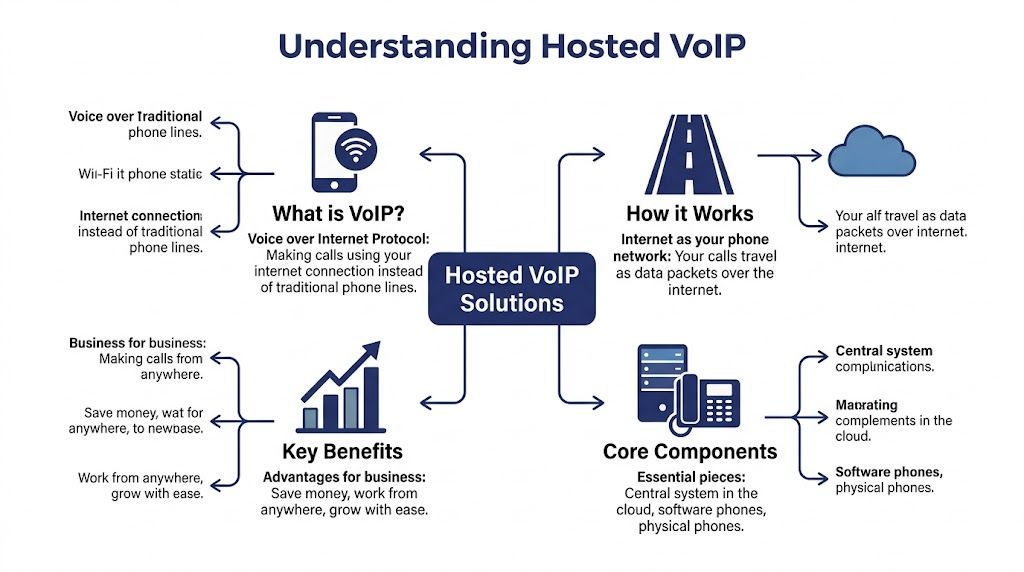
A hosted VoIP system gives you business phone service through your internet connection, with the core phone system run by a provider instead of equipment sitting in your office.
VoIP stands for Voice over Internet Protocol. In practical terms, your calls travel as digital data over the internet rather than through traditional phone lines.
Email is a closer comparison than a landline
A traditional phone line works more like mailing a paper letter through a fixed route. Internet calling works more like sending an email.
Your voice is converted into digital data, split into small packets, and sent across the internet to the other person. Their device rebuilds those packets into audio almost in real time. That approach is why one system can support desk phones, laptops, smartphones, and softphone apps without tying every call to one physical line in one building.
For a business owner, the useful takeaway is simple. Calls become easier to route, track, and deliver across different devices and locations.
What the hosted part actually means
This is the part vendors often explain too quickly.
With hosted voip solutions, your business does not run the phone system from a server or PBX in a back room. The provider runs the core platform off-site. That usually includes call routing, updates, administrative tools, and the underlying infrastructure that keeps the system available.
Your team signs in and uses the service through phones or apps.
A good analogy is electricity. You use it throughout the building, but you do not generate it on-site. Hosted calling follows a similar model. You use the phone system every day without taking on the full burden of maintaining the machinery behind it.
If you want a clearer picture of how that setup works day to day, this guide to a cloud phone system adds useful context.
What happens during a call
Here is the basic flow:
- A user places a call: They dial from a desk phone, desktop app, or mobile app.
- Speech becomes digital data: The system converts the voice into packets.
- The hosted platform routes the call: The provider sends those packets to the right destination.
- The receiving device turns it back into audio: The other person hears the conversation.
The technical steps matter less than the operational result. Calls can be routed based on time of day, employee availability, department, or location without your team manually managing physical phone lines.
That is also why migration questions matter. If your numbers, call flows, and app connections are not planned well, the technology can be sound while the rollout still causes disruption.
Why your internet connection matters
Hosted VoIP is flexible, but call quality depends on the network carrying the conversation.
A call is not just using internet access. It is using internet access that must deliver audio in the right order, with very little delay. A connection can feel fast for web browsing and still perform poorly for voice if video meetings, file uploads, guest Wi-Fi, or badly configured network priorities are competing for the same capacity.
This is one of the practical issues buyers should ask about early, not after signing a contract. What network conditions does the vendor recommend? How do they handle jitter, latency, and packet loss? What happens if the main office internet fails?
Hosted voip solutions are important because they address these day-to-day operational problems while giving you a phone system that is easier to manage, easier to extend, and better suited to how businesses work now.
Hosted VoIP vs On-Premise PBX A Head-to-Head Comparison
The most useful comparison isn't old versus new. It's control versus burden.
An on-premise PBX gives your business direct ownership of the phone hardware. A hosted system shifts that infrastructure responsibility to the provider. For some organizations, that trade is exactly the point.
On-Premise PBX vs Hosted VoIP
| Factor | On-Premise PBX | Hosted VoIP Solution |
|---|---|---|
| Upfront cost | Higher initial investment in hardware and setup | Lower upfront cost, usually subscription-based |
| Ongoing management | Your team or vendor maintains equipment on-site | Provider manages core system off-site |
| Scalability | Adding users or locations can require more hardware and planning | Adding users is typically faster and simpler |
| Remote work support | Often limited or more complex to extend | Built for use across office, home, and mobile devices |
| Updates and features | May depend on hardware and upgrade cycles | New features and changes are usually managed centrally |
| Business continuity | Tied more closely to on-site equipment | Can support distributed calling across multiple devices and locations |
| Admin effort | More hands-on for moves, adds, and changes | Usually handled through an admin portal and provider support |
Why businesses lean toward hosted
With an on-premise PBX, you're responsible for more than calls. You're responsible for the environment around the calls.
That includes hardware, maintenance, updates, local failures, and the practical problem of who fixes what when something breaks. For companies with lean IT teams, that burden often outweighs the benefit of owning the equipment.
Hosted voip solutions simplify that equation. The provider runs the platform, and your business focuses on users, call flows, and customer experience.
The cost discussion is broader than monthly price
People often compare phone systems by looking only at the invoice. That’s too narrow.
A PBX may look justified if you already own it. But the actual cost includes maintenance contracts, disruption during changes, support effort, replacement planning, and the fact that older systems often don't match how modern teams work.
Hosted systems shift spending toward operating expense. That makes budgeting easier, but a greater benefit is that it removes many surprise tasks.
The remote work gap is where old systems break down
If everyone sits in one office and rarely changes roles, an older setup can limp along for years.
But once your business has field staff, hybrid schedules, multiple sites, seasonal users, or rotating coverage, an on-premise model starts fighting the way you work. Routing a business number to the right person should be normal. So should using a mobile app without exposing a personal number.
A phone system should follow the employee's role, not the employee's desk.
Reliability isn't automatic in either model
Some readers assume hosted always means more reliable. Not automatically. Some assume on-premise is safer because it's local. Not automatically either.
The better question is where your risk sits.
With on-premise systems, the risk often sits in one building and one set of hardware. With hosted voip solutions, the risk often shifts toward network quality, provider design, and failover planning. That's why provider evaluation matters so much.
A simple way to decide
Hosted is usually the better fit when:
- Your team is distributed: Staff work across locations, homes, or mobile roles.
- You want less telecom maintenance: You'd rather not manage phone infrastructure.
- Your business changes often: New hires, new sites, and routing changes happen regularly.
On-premise may still appeal if:
- You want full local control: Your organization prefers to manage infrastructure directly.
- You have internal telecom expertise: Your team can support and maintain the system confidently.
- Your environment is very fixed: One site, stable staffing, and limited change.
For most small and midsize businesses, the deciding issue isn't technical purity. It's operational fit.
The Must-Have Features of Modern Hosted VoIP Solutions
A good hosted phone system doesn't win on buzzwords. It wins when the receptionist, office manager, sales rep, and support lead can all do their jobs with less friction.
That means the features worth paying for are the ones that improve reachability, shorten response time, and make administration easier.
Features that protect the customer experience
When customers call, the first job is simple. Get them to the right person without making them work for it.
That’s where these features matter most:
- Auto attendant: Greets callers and routes them by department, location, or time of day.
- Call routing: Sends calls based on business hours, user availability, or escalation rules.
- Voicemail to email or app access: Makes messages easier to catch and respond to.
- Ring groups and hunt groups: Let multiple people share responsibility for inbound calls.
These aren't flashy tools. They solve everyday failure points.
A missed call doesn't always happen because no one was available. It often happens because the call path was poorly designed.
Features built for busier teams
If your business handles higher call volume, basic routing isn't enough.
Advanced call center features in hosted VoIP, including smart queue management and callback options, can reduce call abandonment rates by 20% to 40%, and 94% of businesses report improved security after moving to cloud-based VoIP systems, according to Yeastar’s VoIP statistics roundup.
That matters because waiting is where many service experiences break down. A caller who hears silence, repeats information, or gets bounced between users starts losing trust quickly.
What to look for in queue-heavy environments
For support teams, schedulers, dispatchers, and reception-heavy offices, these tools are worth close attention:
- Queue callback: Lets callers keep their place without waiting on hold.
- Wait-time announcements: Sets expectations instead of leaving callers guessing.
- Real-time queue views: Helps supervisors react before a backlog turns into abandonment.
- Call recording: Useful for quality review, training, and dispute handling.
- Reporting dashboards: Give managers visibility into patterns, peaks, and staffing gaps.
One example in the market is SnapDial, which offers hosted calling with features such as auto attendant, call recording, visual voicemail, mobile apps, smart queue management, and reporting for businesses replacing legacy PBX systems.
Mobility isn't a bonus anymore
A lot of businesses still think of mobile features as optional. They aren't.
If a manager needs to answer from the road, if a salesperson works from a laptop, or if an employee splits time between office and home, your business line has to travel with them. That’s the point of mobile apps, softphones, and extension-based calling from multiple devices.
The best hosted voip solutions let the same business identity appear across desk phones, desktop apps, and mobile devices. Customers reach the company. They don't need to know where the employee is sitting.
If your team has to choose between being reachable and looking professional, the phone system is the problem.
Unified communication features that reduce app sprawl
Many businesses buy separate tools for calling, messaging, voicemail access, conferencing, and internal coordination.
Hosted systems can reduce that fragmentation by putting more communication functions under one roof. Even if you don't use every feature on day one, it's useful to know whether the platform supports a broader communications model as your needs change.
Look for practical functions such as:
- Business messaging: Keeps internal communication tied to work identities.
- Video and conferencing support: Reduces dependence on disconnected meeting tools.
- Shared admin controls: Makes user management less scattered.
- Call logs and searchable records: Helps teams track interactions more cleanly.
Security features that deserve plain questions
Security language gets abstract fast, so keep it practical.
Ask whether calls are encrypted. Ask how administrators control user access. Ask how recordings and voicemails are protected. Ask whether multi-factor authentication is available. Ask what happens when an employee leaves and access needs to be removed quickly.
A smaller business often assumes it can't get enterprise-grade security. In many hosted environments, the opposite is true. A capable provider may offer stronger safeguards than a small internal team could realistically build on its own.
Creating Your Hosted VoIP Buyer's Checklist
Most phone system evaluations go wrong for the same reason. The buyer focuses on features before they verify fit.
A product demo can make any platform look polished. The harder question is whether the provider can support your business on a normal Tuesday when calls are heavy, the internet is unstable, and someone in accounting needs a routing change before lunch.

Start with your own operating reality
Before talking to vendors, write down what your business needs.
Not the wish list. Not the marketing language. The actual call flows.
Include things like front desk coverage, after-hours handling, shared numbers, mobile workers, call recording needs, voicemail access, call queues, and who will administer the system.
A hosted plan is easier to price and compare when you understand your user types. If you want a sense of what a per-user service model looks like, this overview of a hosted VoIP seat gives a practical example.
Reliability questions most buyers forget to ask
This is the area vendors often skate past.
A 2025 FCC report noted that VoIP outages affected 15% of U.S. businesses quarterly due to ISP failures, and only 22% of hosted providers offered automatic PSTN failover in standard plans, as cited in Nextiva’s hosted VoIP overview.
That doesn't mean hosted calling is unreliable. It means you need to ask better questions.
Don't ask only whether the system is reliable. Ask how it behaves when your internet connection isn't.
Use questions like these in vendor calls:
- What happens during an ISP outage: Can calls fail over to mobile devices, another site, or backup numbers?
- Is failover included by default: Or does it require extra setup, extra cost, or a higher tier?
- How are outages communicated: Do you provide status alerts, incident updates, and post-issue reporting?
- What support do we get during a service issue: Who answers, when, and how quickly?
Integration and admin questions that save headaches later
The next weak point is integration. Many platforms mention CRM integration in broad terms but don't explain how setup really works.
Ask vendors to show, not tell.
Put these requests in front of them
- Show the admin portal: You want to see how a user is added, how voicemail is reset, and how call routing is changed.
- Demonstrate call flow editing: If greetings, schedules, and routing rules need specialist support for every change, that becomes expensive friction.
- Walk through integrations live: If you use a CRM, help desk, or productivity suite, ask how data moves.
- Clarify number porting ownership: Ask who handles the process and who coordinates timing.
A short buyer checklist you can use
Non-negotiables
- Call quality readiness: Confirm your network can support voice properly.
- Reliability planning: Ask for failover details in writing.
- Security controls: Verify access management and data protections.
- Support model: Know whether help is in-house, outsourced, business-hours only, or always available.
Nice to have, but valuable
- Mobile and desktop app consistency
- Reporting that managers can use
- Easy self-service administration
- Clean onboarding for new users and locations
The best buying decision usually comes from the least glamorous questions. Not "What features do you have?" but "What happens when something goes wrong?"
Planning Your Migration to Hosted VoIP
Migration anxiety is one of the main reasons companies delay replacing an aging phone system. That fear is understandable.
Phones feel mission-critical because they are. If email hiccups, people often wait. If calls fail, customers notice immediately.

Phase one defines the outcome
Good migrations start with discovery, not devices.
That means reviewing your current numbers, extensions, call paths, business hours, after-hours rules, user roles, and any special cases like faxing, overhead paging, or shared line behavior. It also means identifying weak spots in your network before you move live traffic onto it.
If your team is working through a broader technology change at the same time, a practical primer on cloud migration can help frame the planning mindset. Phone migration is smaller in scope than a full infrastructure move, but the same discipline applies. Inventory first, then design, then cut over.
Bandwidth should be checked early
A lot of migration trouble starts because the business buys the service before checking the connection.
Use a bandwidth calculator or network assessment before rollout. This guide to how much bandwidth you need for VoIP is useful if you're estimating call load and preparing the network side.
A smooth rollout usually follows four stages
Discovery and design
Your provider or IT lead maps the current environment and designs the new one. That includes users, extensions, call routing, greetings, devices, and porting requirements.
Setup and configuration
Accounts are created. Phones or apps are assigned. Auto attendants, business hours, ring groups, voicemail settings, and call queues are built in the new platform.
Training and controlled go-live
Users need a short, practical orientation. How to answer from mobile. How to transfer. How to check voicemail. How to switch devices. That matters more than long training documents.
After one or more test rounds, numbers are ported and the live cutover happens.
A short visual walkthrough can help teams understand the transition process before go-live:
Post-launch tuning
No migration is perfect on day one. Someone wants calls to ring longer. Another team needs a queue adjustment. A manager wants reports delivered differently.
That’s normal. The important thing is having a provider or internal owner who can make those adjustments quickly.
The cleanest migrations aren't the ones with zero questions. They're the ones with a clear owner, a tested plan, and fast follow-up after launch.
What businesses should do before cutover day
- Confirm number porting dates: Everyone involved should know the schedule.
- List critical inbound paths: Main number, sales, service, after-hours, and emergency contacts.
- Train admins separately from end users: The office manager needs different knowledge than the general staff.
- Test real scenarios: Transfers, voicemail, mobile answering, queue overflow, and after-hours routing.
Migration doesn't need to be chaotic. With planning, hosted voip solutions can be introduced as a controlled operational change instead of a disruptive rip-and-replace event.
Conclusion The Future of Business Communication is Here
It usually becomes obvious on an ordinary workday.
A customer calls the main number. The receptionist is out. A salesperson is working from home. Support needs calls to roll to a backup queue because one rep called in sick. On an older phone system, that kind of change can turn into a scramble. With hosted voip solutions, it is usually an admin setting.
That is the significant shift. Hosted voip solutions change business communication from a piece of office equipment into a service your business can adjust as it grows.
For a business owner, that matters because phone service is not just about dial tone. It affects how quickly customers reach the right person, how easily managers can update call flows, and how much effort your team spends keeping old hardware alive. A good hosted system reduces that operational drag.
Cost still matters, and hosted systems are often attractive for that reason. As noted earlier in the article, many businesses move to hosted VoIP because the monthly model and lower hardware burden can reduce communication costs. But the bigger question is whether the system fits how your company works day to day.
That is where many buying decisions go wrong. Vendors tend to focus on features in a demo. The harder questions show up later. What happens if your internet connection fails? How are calls rerouted during an outage? Who owns the migration plan? How well does the phone system connect with your CRM, help desk, or Microsoft and Google tools? Those are operational questions, not marketing questions, and they usually determine whether a rollout feels manageable or painful.
A useful way to judge any provider is simple: can they explain reliability, migration, and administration in plain language? If they cannot, you will probably feel that confusion again during setup.
Use the buyer's checklist. Ask vendors to show real admin tasks, not just polished screens. Ask how they handle number porting, training, failover, and post-launch support. Ask what your staff will need to learn and what your admins will need to manage. A phone system should work like a well-organized front desk. Calls go where they should, changes are easy to make, and no one has to guess what happens next.
The future of business communication is not about sounding more modern. It is about building a calling setup that your business can run without friction, adapt without delay, and outgrow more slowly.
If you're comparing providers and want a practical starting point, SnapDial is one option to review for hosted calling, cloud PBX features, and white-glove setup. Use it the same way you'd evaluate any vendor. Match the platform to your call flows, reliability needs, support expectations, and migration plan.