

Setting up a conference call is about more than just sending a calendar invite; it’s about creating a reliable space for your team to connect and get things done. When the setup is seamless—something a modern business phone system handles effortlessly—you avoid the classic headaches of lost productivity, frustrated clients, and missed opportunities. Honestly, getting this right has become a core skill for any modern business.
Why Nailing Your Conference Call Setup Is Non-Negotiable
In a business world now defined by hybrid teams and global clients, the conference call is the central nervous system of how we collaborate. What used to be an occasional task is now a daily ritual for most of us.
A fumbled call isn't just a minor inconvenience anymore. It can actively damage client relationships, bring projects to a grinding halt, and make your whole organization look unprofessional.
On the flip side, a flawlessly executed call feels completely effortless. It lets ideas flow freely, helps decisions get made quickly, and keeps teams feeling connected, no matter where they are. This is where a well-managed VoIP system stops being a utility and starts becoming a strategic asset.
The Modern Meeting Landscape
The sheer scale of this shift is staggering. Microsoft’s own data shows that the number of meetings has tripled since 2020, with a huge chunk of those discussions now spanning multiple time zones.
Even more telling is that 57% of meetings are now ad-hoc, happening on the fly without a formal calendar invite. This explosion in spontaneous collaboration really underscores the need for systems that can spin up an instant, reliable connection at a moment's notice. You can check out the full research about meeting trends to see just how much has changed.
This new reality demands a structured, almost formulaic approach to setting up every conference call. To help frame this, we can break down a successful call into three distinct pillars.
The Three Pillars of a Flawless Conference Call
Success in any call, whether it's a quick team huddle or a high-stakes client pitch, hinges on getting these three core areas right. This table provides a quick-reference framework for what we'll be diving into throughout this guide.
| Pillar | Key Action | Why It's Critical |
|---|---|---|
| Preparation | Define the purpose, prep the participants, and share an agenda. | Ensures everyone is aligned and the meeting stays on track, respecting everyone's time. |
| Configuration | Choose the right call type and dial in the security settings. | Prevents technical glitches, protects sensitive information, and makes joining effortless. |
| Management | Facilitate a productive conversation and handle post-call tasks. | Turns discussion into action, making sure key decisions and follow-ups don't get lost. |
Mastering these pillars is what separates a frustrating, time-wasting call from a productive, professional one. It's about turning a routine task into a powerful tool for moving your business forward.
Throughout the rest of this guide, we’ll give you the practical, actionable steps you need to excel in each of these areas. From quick team huddles to formal client presentations, you’ll learn exactly how to get it right, every single time.
Laying the Groundwork for a Flawless Call
The success of a conference call is often decided long before anyone actually dials in. Think of it like a project manager coordinating a critical client update—the real work happens in the planning phase to prevent chaos later on. A little bit of proactive preparation ensures your call starts on time, stays on target, and hits its goals without any unnecessary drama.
This whole process starts with one simple question: "What is the single most important outcome of this call?"
Answering this clarifies the meeting's purpose and instantly helps you decide who truly needs to be there. If the goal is a final decision on a marketing budget, you need the decision-makers, not the entire creative team. Keeping the invite list lean is one of the most effective ways to guarantee a productive conversation.
Building Your Pre-Call Checklist
Once you have a clear purpose and a focused attendee list, it's time to get everyone on the same page. Sending materials in advance isn’t just a courtesy; it's a strategic move. For a project update, this could be as simple as circulating the latest status report 24 hours beforehand.
This allows participants to actually review the data and come up with thoughtful questions. That’s a world away from having them see the information for the first time while you're talking, which usually just leads to dead air.
Good preparation also means nailing down the logistics, especially when you’re dealing with a distributed team. Coordinating across different time zones can quickly devolve into an endless, painful email chain.
A classic mistake is to just propose a time that works for you without thinking about anyone else. Always use a scheduling tool that visually shows time zone conversions, or at least suggest a few options in your initial invite to find a good slot quickly.
This small step shows respect for everyone's schedule and prevents the all-too-common problem of people joining late—or missing the call entirely—due to confusion.
Key Actions Before Every Call
To make this process second nature, it helps to have a simple, repeatable checklist. This isn't about adding more bureaucracy; it's about creating reliable habits that lead to better meetings.
- Define a Single, Clear Objective: Write down the main goal of the call in one sentence. If you can't, the meeting might not be necessary.
- Finalize the Essential Attendee List: If someone can be updated with a quick email afterward, they probably don't need to be on the live call.
- Distribute Key Documents: Send any relevant reports, agendas, or presentations at least a day in advance. No surprises.
- Confirm Time Zones: Use a tool to lock in a time that respects everyone's work hours.
- Prepare Your Equipment: Make sure you have the right hardware ready to go. If you're looking for reliable gear, it's worth exploring different types of conference phones for business to find a good fit for your meeting rooms.
By embedding these steps into your workflow for setting up a conference call, you transform a potentially chaotic meeting into a focused and professional collaboration.
Choosing the Right Conference Call Method
When you need to get a group on the phone, your business phone system gives you more than just one way to do it. Each method is built for a different situation, and picking the right one is the first step to making sure the call goes off without a hitch.
There's no doubt that conference calls are a huge part of how modern business gets done. The market for phone conferencing is set to reach $12.3 billion by 2025, and when you add in video, that number jumps to another $14.2 billion in 2024. Those numbers tell a story: getting this right really matters. For a deeper look at the industry's growth, you can check out these phone conference marketing statistics.
Before you do anything else, you have to know what you're trying to accomplish. The goal of the meeting dictates the best way to set it up, as this quick decision guide shows.
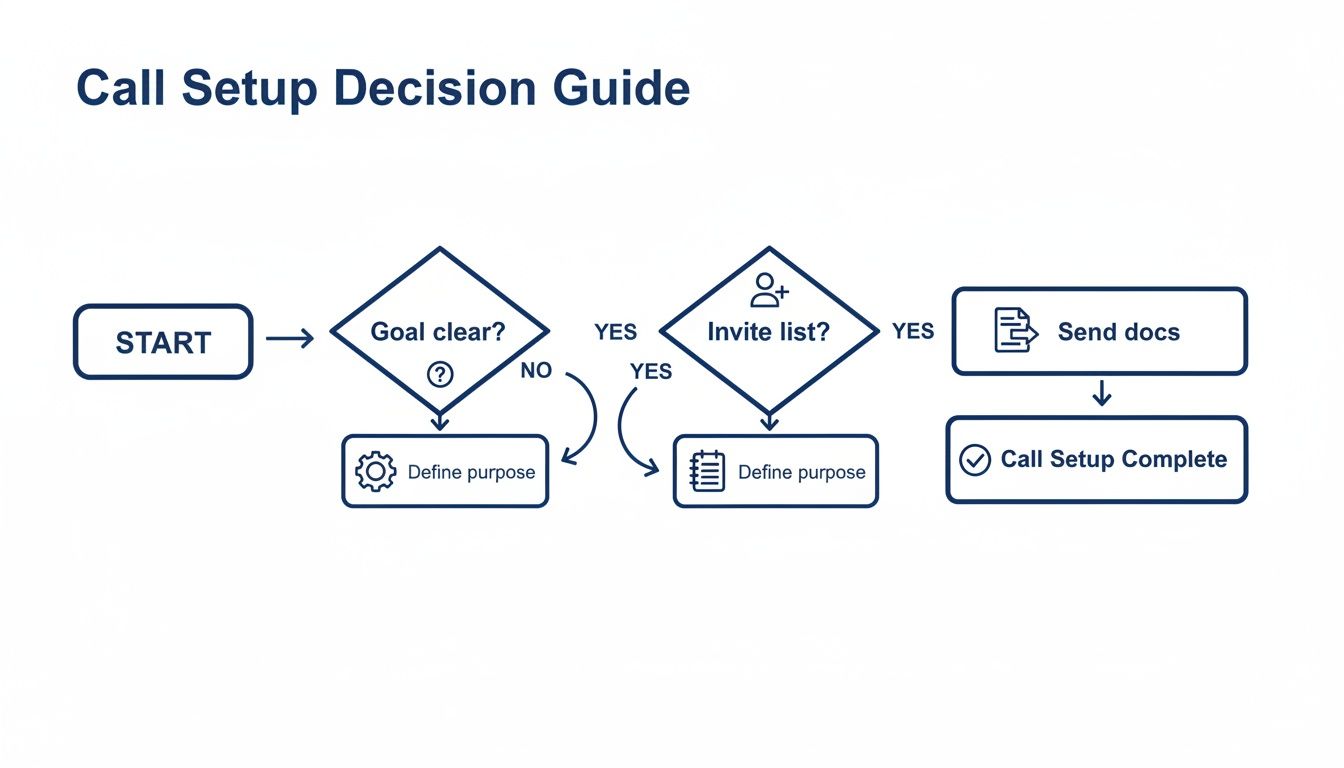
As you can see, the meeting's purpose and who's attending are the two biggest factors in choosing your setup.
Meet-Now For Spontaneous Collaboration
Think of a "Meet-Now" or instant conference as your digital huddle room. It’s perfect for those impromptu moments when a quick chat is way more efficient than a long email chain.
Let's say a project manager needs to get a designer and a developer on the same page for some urgent feedback. Instead of trying to find a time on everyone's calendar, they can fire up a Meet-Now call in seconds. Most systems generate a unique, temporary link or dial-in number that you can share right away. It's the go-to for speed, but that spontaneity means it’s less secure and won't have the heavy-duty features of a planned call.
Scheduled Conferences For Formal Meetings
When you're putting together a more formal discussion, especially with clients or partners outside your company, a scheduled conference is the professional way to go. This approach lets you book a specific time slot, send out proper calendar invites with all the necessary details, and attach an agenda.
You can also lock things down with security settings like unique PINs for each participant or a virtual waiting room to control who gets in. This is the right choice for board meetings, client presentations, or any structured event where you need control and everyone needs to come prepared. To get a better sense of all the available controls, you can explore the various SnapDial HD meeting functions in our documentation.
A scheduled call sends a clear signal to attendees: this is an important, planned discussion. It sets a professional tone from the get-go and encourages everyone to show up ready to contribute.
Dedicated Bridges For Recurring Check-Ins
For those regular, repeating meetings like a weekly team stand-up or a monthly project review, a dedicated conference bridge is your most efficient option by far. It gives you a permanent dial-in number and access code that never changes.
You just set it up once, drop the details into a recurring calendar event, and you're done. Your team always knows exactly how to connect, which means you're not scrambling to send out new information before every session. This "set it and forget it" method is a huge time-saver and makes joining the call completely frictionless for everyone involved.
Conference Call Method Comparison
Not sure which option is the best fit? This table breaks down the key differences to help you decide on the fly.
| Method | Best For | Key Features | Security Level |
|---|---|---|---|
| Meet-Now | Quick, unplanned internal huddles or troubleshooting sessions. | Instant link/number generation, no scheduling needed. | Low |
| Scheduled Conference | Formal meetings with clients, board meetings, presentations. | Calendar integration, agendas, participant PINs, waiting rooms. | High |
| Dedicated Bridge | Recurring team check-ins, weekly stand-ups, project updates. | Permanent dial-in number and PIN, "set it and forget it." | Medium |
Ultimately, choosing the right method comes down to matching the tool to the task. A quick internal chat doesn't need the security of a scheduled call, and a major client presentation shouldn't be left to an impromptu "Meet-Now" link.
Taking Control with Advanced Security and Management Features

Once you've picked your conference method, it's time to dial in the settings that separate a casual chat from a professional, secure meeting. These enterprise-grade security and management tools are where a good cloud phone system really shines. For any team handling sensitive information—think of a financial services firm discussing client portfolios—these features aren't just nice to have; they're absolutely essential.
Imagine their situation. A single stray participant on a call about confidential financial data could easily become a major compliance breach. This is where the simple but powerful controls in your phone system become your first line of defense. They give you complete command over who gets in and what happens during the call.
Securing the Virtual Room
The most direct way to control access is by using PINs. For any scheduled conference, your system lets you generate two different codes, creating a clear line between the host and the guests.
- Moderator PIN: This one's for the host. Punching in this PIN usually unlocks advanced privileges, like muting other people, starting or stopping the recording, and managing the waiting room.
- Participant PIN: This is the general access code you'll share with all your attendees. It gets them into the conference but without any special administrative powers.
This two-PIN setup is critical. It makes sure only the designated host can steer the meeting, preventing accidental disruptions and keeping the conversation on track.
For a financial team, this isn't just a feature; it's a fundamental security practice. It ensures that even if a calendar invite gets forwarded by mistake, an unauthorized person can't join and listen in on a sensitive client review without the right PIN.
For another layer of security, you can enable the waiting room feature. When it's on, anyone who dials in gets placed into a virtual holding area. The moderator sees a list of everyone waiting and can manually admit them one by one. It's the perfect tool for screening attendees, guaranteeing that only the intended people make it into the live discussion.
Managing the Call and Beyond
Controlling who gets in is just the start. Modern systems also give you powerful tools for managing the call itself and for handling things after everyone hangs up. One of the most critical is automatic call recording.
If you need a perfect record for compliance, training, or just to remember key decisions, enabling this when you create the conference is a game-changer. The system can start recording the moment the first person joins and automatically save the audio file to your web portal as soon as the call ends. No more forgetting to hit the record button on an important meeting.
Once the call is over, your work isn't done. Your phone system’s web portal becomes your command center for all your post-call tasks. Here, you can find:
- Detailed Call Logs: See exactly who joined, when they connected, and how long they stayed on the line.
- Audio Recordings: Download, share, or archive the full meeting audio for your records.
- Voicemail-to-Text Transcriptions: If a participant couldn't make it and left a voicemail, many systems automatically transcribe it so you can review it quickly.
These features give you a complete, auditable trail for every single meeting. To get a deeper look at how to use these tools during a live call, check out our documentation on advanced conference controls. Mastering these settings will transform a simple phone call into a secure, manageable, and professional business asset.
Essential Etiquette for Running a Smooth Call

You can have the most sophisticated business phone system on the planet, but it can't save a call that’s torpedoed by bad meeting habits. The small things—the adjustments that both hosts and participants make—are what truly separate a frustrating call from a focused, professional one.
This is where setting up a conference call moves beyond a technical task and becomes a strategic one.
For the host, it all starts with managing the agenda. A clear, time-boxed agenda sent out beforehand is non-negotiable. It sets expectations and keeps the conversation from spiraling off-topic. But once the call starts, your job shifts from planner to facilitator. You have to actively create space for everyone to contribute, especially the quieter folks on the team.
A simple "Sarah, what are your thoughts on this from a marketing perspective?" can break the spell of a few dominant voices and ensure you get the well-rounded input you need.
Mastering Mute and Minimizing Distractions
Let's be honest: the biggest disruptor on any conference call is background noise. As a host, don't be shy about using your moderator controls to mute people. A sudden dog bark or the roar of a coffee shop espresso machine can completely derail a critical point.
For everyone else on the call, mute etiquette is a must.
- Your Default Should Be Mute: Always keep your line muted unless you are the one speaking. Period.
- Invest in a Good Headset: Using a quality headset with a dedicated microphone makes a world of difference in cutting down ambient noise compared to your laptop's built-in mic.
- Choose Your Location Wisely: If you can, take the call from a quiet, private space. Don't be the source of the distraction.
These aren't just polite suggestions; they show respect for everyone else's time and attention. A clean, crisp audio experience allows the conversation to flow without the constant, jarring interruptions of someone's background chaos.
Troubleshooting Common Audio Problems
Even with perfect etiquette, tech glitches are bound to happen. Echo and feedback are the usual suspects, typically caused when a participant's microphone picks up the audio coming from their own speakers.
The fastest fix is to have everyone use a headset. If that’s not an option, ask the person causing the echo to lower their speaker volume or move further from their mic. As the host, you can also play detective by systematically muting participants one-by-one to pinpoint the source.
These practices are only becoming more important. A 2025 industry outlook shows that 52% of event planners expect to organize more meetings in 2025 than they did in 2024. This trend is pushing businesses toward platforms where conference calling is part of a bigger, more integrated strategy. Discover more insights about 2025 meeting trends. When you combine great technology with polished etiquette, you make sure every single call is a productive one.
Have Questions About Conference Calls? We’ve Got Answers.
Even when you think you have everything planned out, a few questions always pop up when you're trying to get a conference call off the ground. Getting straight, practical answers is the key to running your meetings like a pro and making sure every call goes off without a hitch. Let's tackle some of the most common questions we hear about call security, scheduling, and management.
How Do I Keep Uninvited Guests from Crashing My Call?
The best way to keep your calls private is to use the security tools baked right into your business phone system. First rule: never share your moderator PIN. Think of it as your master key. Instead, always generate a unique participant PIN for your attendees. This one simple step creates an effective first line of defense against unwanted listeners.
For conversations that are more sensitive, your best friend is the "waiting room" feature. This handy function puts everyone who dials in into a virtual holding area. You, as the moderator, can see a list of who's waiting to join and then manually admit each person one by one.
Combining unique PINs with a mandatory waiting room creates a powerful one-two punch for security. It’s the standard for making sure only the right people are in the room, which is absolutely critical when you're discussing confidential information.
What's the Best Way to Set Up a Recurring Team Meeting?
For any meeting that happens on a regular schedule—like a weekly team sync or a daily project huddle—a dedicated conference bridge is by far the easiest way to go. Just log into your system's web portal and create a permanent conference room. It will have the same dial-in number and PINs every single time.
Once you’ve got that set up, you just drop those details into a recurring calendar invite. This "set it and forget it" approach saves you the hassle of generating and sending out new information for every single meeting. It makes joining the call dead simple for your team, whether they're at their desk or dialing in from the mobile app.
Can I Record a Conference Call for People Who Can't Make It?
Yep, absolutely. Nearly all modern VoIP phone systems come with call recording built right in. When you're first setting up the conference, you can usually just check a box for an "auto-record" option. That way, the entire meeting is captured automatically, and you don't have to remember to hit a button.
If you prefer more control, moderators almost always have the power to start and stop recordings manually during a live call. This is usually done with a simple keypad command (like pressing * and then a number). As soon as the call ends, the audio file is automatically saved to your account portal, ready to download and share with anyone who missed it or to keep for your records.
How Can I Make Sure the Audio Quality Is Good for Remote Folks?
Great audio is a mix of good tech and good habits. While you can't control what's happening on every participant's end, you can definitely steer them in the right direction.
Encourage everyone to use your company's VoIP mobile app instead of a standard cellular call whenever they can. The app is designed to work with your system and usually delivers much more stable, high-definition audio. On top of that, it's smart to promote these best practices:
- Use a headset: This is the single biggest thing anyone can do to cut down on background noise and that annoying echo. A dedicated headset with a microphone makes a world of difference.
- Find a quiet spot: Ask people to join from a room where there isn't a lot of ambient sound.
- Master the mute button: Get everyone into the habit of muting their line whenever they aren't speaking.
These simple steps can make a massive difference in the audio clarity for the whole group, leading to a much more productive and professional meeting.
Ready to eliminate the guesswork from setting up a conference call? SnapDial provides a powerful yet simple cloud phone system with all the security, recording, and management features you need. Our white-glove setup and 24/7 Texas-based support ensure you're always ready for your next important meeting. Learn more about SnapDial and how it can streamline your business communications.