

A lot of small business owners start looking for a new phone system after one bad week, not one big strategy meeting.
A customer calls during lunch and gets a busy signal. A salesperson is on the road and can't answer the main line. A manager tries to pull an old voicemail and realizes the mailbox is full, the menu tree is confusing, and nobody knows who has admin access to the current setup. The phone system still works, technically. It just doesn't work for the way the business runs now.
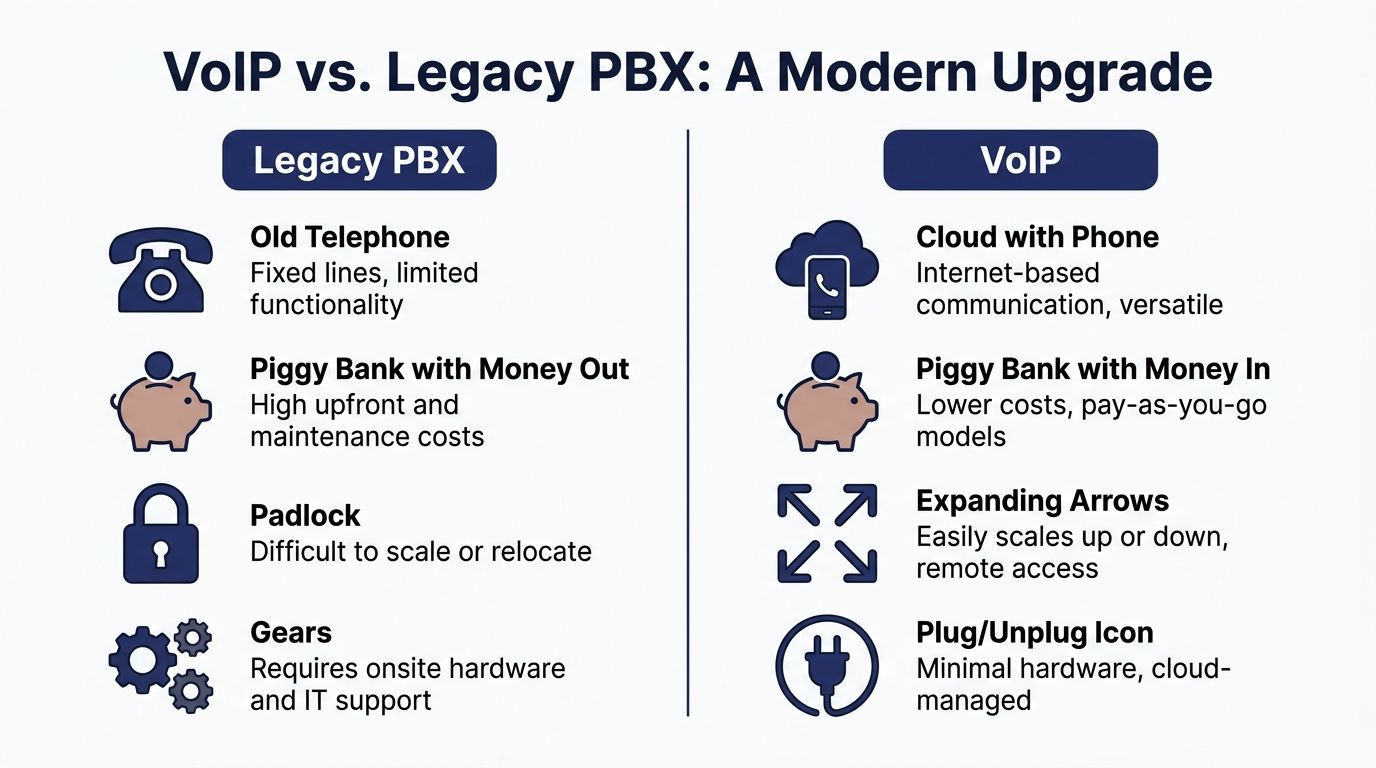
That's where a small business voip system changes the conversation. It isn't just a cheaper dial tone. It's a practical way to give your team one business phone presence across desks, laptops, and mobile devices, while removing the hardware bottlenecks that trap many growing companies.
Is Your Old Phone System Costing You Customers
The pattern is easy to spot. A company adds a second location, hires a few remote staff, or extends service hours. The old phone setup wasn't built for any of that.
Now calls pile up at the front desk. Staff forward calls manually. Customers hit voicemail too often. Nobody can tell whether the issue is staffing, routing, or the phone system itself. From the customer's side, it feels simple. They called, and your business wasn't easy to reach.
The daily problems that hurt revenue
A legacy setup usually fails in ordinary moments:
- Busy signals during peaks: One burst of inbound calls can make a healthy business sound unavailable.
- No clean remote access: Team members outside the office can't reliably answer the company number.
- Weak call handling: Transfers are clumsy, after-hours routing is limited, and voicemail turns into a dead end.
- Hard changes: Adding a user, moving a desk, or changing call flow often means waiting on a technician.
If your current system still depends on an old PBX cabinet, this overview of what is a PBX system helps explain why those limitations keep showing up.
Old phone systems rarely fail all at once. They fail at the exact moment a customer expects a quick answer.
Why more small businesses are moving now
The broader market tells the same story. The global VoIP market reached USD 161.79 billion in 2025 and is projected to grow to USD 415.20 billion by 2034, with small businesses drawn by the ability to cut initial communication costs by up to 90% compared to traditional hardware-based systems, according to Speedflow's VoIP industry review.
That matters because it confirms this isn't a niche upgrade. It's the standard replacement path for companies that have outgrown landlines and on-premise PBX gear.
A modern small business voip system solves the specific failures legacy systems create. It removes busy signals, makes remote answering normal, and turns call handling into something you can control instead of endure.
The Key Business Benefits of VoIP
The business case for switching is straightforward. A small business voip system lowers recurring phone costs, gives employees faster ways to communicate, and removes the friction that makes older phone setups hard to scale.
The savings are often what get owners to pay attention first. But the operational gains are usually what convince them to stay.
Lower phone spend without stripping capability
Small businesses adopting VoIP systems see 30-70% monthly savings on phone bills and an average of 30 minutes daily productivity gains per employee through unified communications features, while over 70% of UK businesses were expected to use VoIP as a core part of operations by 2025, according to Nextiva's VoIP statistics roundup.
That combination matters. Lower cost by itself is nice. Lower cost with better routing, mobile access, voicemail handling, and team collaboration is a business upgrade.
For many SMBs, the old system costs more because it creates hidden labor:
- Manual transfers waste front desk time.
- Missed calls create callback work.
- Separate tools force employees to jump between apps.
- Hardware issues turn simple changes into support tickets.
If you're comparing phone systems to broader communication workflows, this look at the advantages of unified communications is useful context.
Better support for hybrid teams
A phone system should not force employees to reveal where they are working. Customers shouldn't have to care whether the person answering is at headquarters, at home, or traveling between appointments.
With VoIP, the business number can ring the right person wherever they are. That keeps response times tighter and makes coverage easier across lunch breaks, field work, and after-hours schedules.
Growth without the usual phone-system pain
Legacy systems punish change. New users often mean rewiring, reprogramming, or replacing hardware.
VoIP handles growth much more cleanly. A new hire can be added with an extension, routing rules, voicemail, and app access without rebuilding the whole system. The same applies when a business opens a new office or reorganizes teams.
The strongest ROI usually comes from fewer missed opportunities, not just a cheaper monthly bill.
A more professional caller experience
This gets overlooked. Small companies often want to sound organized, not oversized.
A good VoIP setup helps with that by giving you structured call routing, professional greetings, department paths, voicemail transcription, and consistent answering rules. Customers stop bouncing between cell phones and generic mailboxes. They reach the right person faster, or they get handled properly when that person isn't available.
That's the primary payoff. A better phone system doesn't just save money. It removes friction for both your team and your customers.
Essential VoIP Features That Drive Growth
Feature lists are where buyers often get distracted. Providers throw around terms like IVR, softphone, analytics, queue callback, and CRM integration as if every business needs all of them in equal measure.
They don't.
The right way to evaluate a small business voip system is to ask a different question. Which features remove the exact bottlenecks your team deals with every day?
Auto-attendant and IVR that help callers
An auto-attendant isn't there to sound fancy. It's there to stop good calls from landing in the wrong place. That's where it offers the biggest value.
For a small company, this might be a simple greeting with options for sales, support, billing, and after-hours instructions. For a busier operation, it might route by time of day, holiday schedule, or location.
What works:
- Short menus: Keep options obvious and limited.
- Direct department paths: Let repeat callers reach the right team fast.
- After-hours logic: Send urgent calls one way and routine requests another.
What doesn't:
- Deep menu trees: Callers hate getting trapped.
- Generic recordings: If every option sounds vague, callers guess.
- No operator fallback: Some people need a human path.
Mobile and desktop apps for a true business number
A mobile app matters because staff don't live at their desks anymore. A desktop app matters because many office workers spend the day in front of a screen and don't want to juggle a separate handset for every call.
The practical benefit is consistency. Employees can place and receive business calls without exposing personal numbers, and managers can maintain one company identity across office, home, and field environments.
Many SMBs finally stop patching together call forwarding chains and personal cell phones.
Visual voicemail and transcription
Voicemail isn't dead. Bad voicemail management should be.
Visual voicemail lets users see messages in order and handle them quickly. Transcription helps staff triage without dialing into a mailbox every time.
A service manager can scan missed calls before walking into a job site. A sales rep can pick out the warm lead from a stack of routine follow-ups. An office admin can forward the exact message to the right person instead of paraphrasing it badly.
Call recording and searchable call history
Recording matters for more than compliance. It helps with training, dispute resolution, and handoff quality.
When a customer says, "I already explained this yesterday," the right system lets a supervisor find that interaction without turning the office upside down.
Call history is equally useful. Businesses need a usable record of who called, when they called, how long the call lasted, and where it went. Without that, performance discussions become guesswork.
Smart queues and callback options
Queues are where customer experience gets won or lost.
Advanced call queue management in VoIP systems uses smart routing to improve agent utilization by 25-40%, and can reduce abandonment rates from 10-15% in legacy systems to under 5%, according to TechnologyAdvice's review of small business VoIP platforms.
That matters most for support teams, appointment desks, and any business where call bursts are normal.
The most useful queue tools include:
- Wait-time announcements: Callers know what to expect.
- Queue callback: Customers keep their place without sitting on hold.
- Skill-based routing: Hard calls go to the right people first.
- Ring strategies: Round-robin or least-occupied routing can spread workload sensibly.
If your team reviews recorded calls for coaching, QA, or sales review, conversation intelligence platforms are worth understanding because they add structure to those conversations instead of leaving managers to sample calls manually.
A queue is not just a waiting line. It's a workflow. Build it badly and callers feel ignored. Build it well and the same call volume feels manageable.
Admin portal and self-service controls
Owners and office managers shouldn't need a support ticket for every small change.
A solid admin portal should let you manage users, call routing, business hours, greetings, voicemail settings, call logs, and recordings without digging through obscure menus. This is one area where usability matters more than feature count.
If basic changes take too long, your team stops making them. Then the phone system drifts out of sync with the business.
CRM integrations and reporting
The value of an integration is simple. It gives employees context before they say hello.
When a call pops with customer details or interaction history, your team doesn't start cold. That improves handoffs, reduces repeat explanations, and gives managers a cleaner view of what's happening.
Reporting closes the loop. It helps you answer practical questions such as:
| Question | Why it matters |
|---|---|
| Are we missing calls at certain times? | You may need schedule or queue changes |
| Which teams get overloaded? | Routing may need adjustment |
| How long are callers waiting? | Long waits often signal staffing or flow issues |
| Are callbacks being used? | This can reveal queue pressure and caller preferences |
One example in this category is SnapDial, which offers hosted VoIP with auto attendant, call recording, visual voicemail, mobile apps, smart queues, reporting, and cloud faxing for businesses replacing legacy PBXs.
The takeaway is simple. Don't buy features because they sound advanced. Buy the features that solve missed calls, poor routing, weak visibility, and inconsistent customer handling.
Ensuring Security Compliance and Unbreakable Reliability
Security and reliability are where cautious buyers slow down. That's reasonable. Your phone system carries customer conversations, internal discussions, and sometimes payment or health-related information. If the system goes down, your business feels it immediately.
The important distinction is this. Cloud VoIP introduces different risks than a legacy PBX, but it also removes some old ones, especially the single point of failure sitting in one office.

What reliable service looks like
Small business VoIP systems can achieve 99.999% uptime, which translates to less than 5.26 minutes of annual downtime, through redundant cloud networks that also enable instant failover to mobile apps, as outlined in GetVoIP's business phone systems guide.
That "five nines" figure matters because it reflects architecture, not marketing language. A well-built cloud system spreads risk across redundant infrastructure. If one component has trouble, traffic can be rerouted. A single onsite PBX cabinet can't do that on its own.
Security checks that deserve real attention
When evaluating providers, I look for whether they can clearly discuss controls and compliance, not just wave at the idea of security.
Ask direct questions about:
- Encryption practices: Voice traffic and stored data should be protected.
- Access control: Admin roles should be limited and auditable.
- Compliance support: If your business handles regulated data, ask about SOC 2, HIPAA, and PCI-DSS alignment.
- Data handling: Find out what gets stored, for how long, and who can access it.
- Incident response: If something goes wrong, you need a process, not a vague promise.
For businesses that think broadly about digital risk, this guide to real-time fraud detection is useful background because communications security is only one part of a wider trust and operations picture.
What to avoid when reviewing providers
A few warning signs come up often:
- No clear failover explanation
- Weak admin permissions
- Unclear compliance answers
- Support teams that can't explain outage procedures
Reliability is not just uptime on a status page. It's whether calls keep reaching your team when one office, one device, or one connection has a problem.
For most SMBs, modern VoIP is not less reliable than the old model. It's often more resilient, provided the provider architecture is strong and the deployment is planned properly.
Your Zero-Downtime Migration Checklist
Most phone migrations go wrong before the first number is ported. The business hasn't mapped call flows, nobody has tested the internet properly, and staff don't know what changes on launch day.
Zero downtime isn't luck. It's sequencing.

Step one starts before you shop
Before comparing providers, document what your current system does.
That means more than counting phones. List your numbers, extensions, hunt groups, after-hours routing, fax lines, call queues, voicemail boxes, holiday schedules, and any special paths for billing, dispatch, or emergencies. If you don't document the live environment, something important gets missed during cutover.
A hosted business phone system makes this easier to rebuild, but only if the design is clear at the start.
Treat the internet as part of the phone system
Recent analyses found that 35-40% of SMB VoIP complaints stem from network dependency, and one practical baseline is 100kbps per concurrent call plus automatic failover to PSTN or mobile numbers during outages, according to SIP.US guidance on choosing a small business VoIP phone system.
That doesn't mean you need exotic connectivity. It means you should stop treating bandwidth and voice quality as separate topics.
Check these items before rollout:
- Concurrent call capacity: Estimate how many calls may happen at once, not just how many employees you have.
- Location-by-location quality: One branch with weak internet can spoil the whole project.
- Wi-Fi reality: Staff using softphones on poor Wi-Fi will blame VoIP for a local wireless issue.
- Failover path: Decide where calls should go if a site loses connectivity.
Test the busiest location first. That's where routing mistakes and network weakness show up fastest.
Build the cutover plan in layers
A smooth migration usually follows this order:
Provision users and devices
Create extensions, assign apps, and label desk phones before any public-facing switch happens.Rebuild call flows
Record greetings, set business hours, create ring groups, and test every menu path internally.Stage number porting carefully
Porting is routine, but the timing has to be coordinated. Keep old service active until the new routing is verified.Run parallel testing
Make inbound and outbound test calls from mobile phones, outside lines, and internal extensions.Train the humans, not just the system
Show staff how to transfer, park, check voicemail, use the mobile app, and recognize business caller ID.
This short walkthrough is useful for teams that want to see the migration process in a more visual format.
Launch day checks that prevent ugly surprises
On go-live day, keep the checklist operational and short:
| Launch check | Why it matters |
|---|---|
| Main number rings correctly | Confirms inbound routing is live |
| Outbound caller ID is correct | Prevents confusion and missed callbacks |
| Voicemail delivery works | Catches mailbox and notification issues fast |
| Queue and after-hours rules trigger properly | Validates customer-facing logic |
| Mobile failover is active | Protects coverage if site conditions change |
What usually fails in bad migrations
Most avoidable issues come from three habits:
- Rushing port dates before testing
- Assuming old call logic is still accurate
- Ignoring one remote user or small branch until after launch
The businesses that switch cleanly don't wing it. They audit first, test in layers, and treat failover as mandatory, not optional.
How to Choose the Right VoIP Partner
The provider matters as much as the feature list. Two systems can look similar on paper and produce very different outcomes once number porting, setup, and support enter the picture.
Start with the operational basics.
Questions worth asking before you sign
Is pricing predictable?
Watch for plans that look affordable until recording, queues, analytics, or support are added separately.Who handles setup and migration?
Some providers expect a mostly DIY rollout. Others provide guided onboarding. That difference matters if you're replacing a live business number.How strong is support when something breaks?
Ask how support is reached, when it's available, and whether you can talk to someone who understands call routing.Does the platform fit your call pattern?
A small office, a field service team, and a busy support desk need different routing and device strategies.
The practical decision test
A good provider should be able to explain your migration path, number porting process, failover options, admin controls, and support model in plain language.
If the sales conversation stays abstract, that's a warning sign. Business phone systems are operational tools. The partner should be able to talk through real call flows, not just brochures.
Choose the provider that can map your current pain points to a clean deployment plan. That's usually the one that gives you the least disruption and the fewest surprises after go-live.
Frequently Asked Questions About Small Business VoIP
Can I keep my existing business phone number
Yes. In most cases, you can keep your current number through number porting. The important part is coordination. Don't cancel the old service before the new provider confirms the port and tests the routing.
Do I need special internet for VoIP
Not necessarily. You need stable internet that can support your call volume and good local network conditions. If your office has weak Wi-Fi, congestion, or inconsistent service, fix that before blaming the phone platform.
Can I use my existing desk phones
Sometimes. It depends on the phone model, firmware support, and whether the provider allows that hardware on its platform. Many businesses reuse compatible IP phones and replace older or locked-down models.
Is VoIP only for bigger companies
No. In many cases, smaller companies benefit more because they gain call routing, mobile access, and admin control that used to require more expensive systems.
What if my internet goes down
That depends on how the service is configured. The right setup routes calls to mobile devices or backup destinations so customers can still reach your team during an outage.
Do remote employees need separate business numbers
Usually not. A well-configured system lets remote staff answer the company number, direct lines, or queue calls from business apps while keeping the company identity consistent.
If your current phone setup is creating missed calls, awkward transfers, or headaches every time your team changes, it's worth reviewing a platform built for migration and daily operations. SnapDial offers cloud PBX and hosted VoIP for businesses replacing legacy systems, with features such as auto attendant, call recording, mobile apps, smart queues, cloud faxing, and end-to-end setup support.