

Unified solutions bring all your business communications—phone calls, video meetings, team chats—into one clean, easy-to-use platform. Instead of forcing your team to jump between a dozen different apps, you get one central hub to connect with clients and each other from anywhere.
This simple change keeps workflows moving and ensures no conversation ever gets lost in the shuffle.
What Are Unified Solutions And Why They Matter
Think about your company's current communication setup as a messy, cluttered desk. You've got a desk phone for calls, a separate app for video meetings, another for team messaging, and maybe even an old fax machine humming in the corner.
Each tool works on its own island, forcing you to switch contexts all day long. Information gets trapped, and real collaboration becomes a chore. For a lot of small and mid-sized businesses, this disconnected mess is just a normal day at the office.
Unified solutions are the Marie Kondo of business communications—they tidy up that messy desk and replace it with a single, powerful command center. It’s a strategy that integrates every communication channel into one cohesive system, letting information flow smoothly. This isn't just about making things tidier; it's about solving real-world business problems.
Solving Common Communication Headaches
For growing businesses, communication breakdowns are more than just annoying—they're expensive. These challenges pop up in a few common ways that unified solutions are built to fix:
- Missed Client Opportunities: A critical sales call rings on an empty desk phone instead of the rep's cell phone. That's a lost deal. Unified platforms route calls intelligently to any device, making sure your team is always ready to answer.
- Disjointed Team Collaboration: Trying to piece together a project from scattered emails, chat messages, and phone calls creates confusion and kills momentum. A unified hub keeps every conversation tied to the right project, making teamwork a whole lot easier.
- Difficulty Supporting Remote Work: Old-school phone systems chain your people to their desks. Modern unified solutions are designed for a flexible or fully remote workforce, offering mobile apps and softphones that deliver full office functionality from anywhere on the planet.
The goal is to stop treating communication as a series of separate tasks and start seeing it as one fluid, interconnected experience. By consolidating your tools, you cut down on the complexity and inefficiency that hold you back.
The Growing Demand for Unified Platforms
This move toward integrated platforms isn't just a fleeting trend. It’s a fundamental shift in how modern businesses have to operate to stay quick on their feet. The market is exploding as more companies realize they can't afford not to make the switch.
In fact, the global unified communications market, valued at USD 169.90 billion in 2025, is projected to skyrocket to USD 815.93 billion by 2035. This massive growth shows just how essential these integrated tools have become for supporting hybrid work and driving real operational efficiency. You can explore the full market projections on Precedence Research to see the data for yourself.
To get a clearer picture of this shift, let's quickly compare the old way with the new.
Traditional Phone Systems Vs Unified Solutions
This table breaks down the core differences between a legacy on-premise system and a modern, all-in-one solution like SnapDial. It's a snapshot of why so many businesses are making the move.
| Feature | Traditional PBX System | Modern Unified Solution (like SnapDial) |
|---|---|---|
| Core Functionality | Voice calls only; other tools are separate | Voice, video, chat, fax, and more in one app |
| Flexibility | Tied to a physical office location | Work from anywhere on any device |
| Cost Structure | High upfront hardware cost (CapEx) + maintenance | Predictable monthly subscription (OpEx) |
| Scalability | Complex and expensive to add new users | Add or remove users instantly with a few clicks |
| Maintenance | Requires in-house IT or expensive vendor contracts | Fully managed and updated by the provider |
| Integration | Limited or non-existent with other business apps | Seamlessly connects with CRMs and other tools |
The difference is night and day. One model keeps you bogged down with hardware and limitations, while the other gives you the agility to adapt and grow.
Ultimately, bringing a unified solution into your business is about preparing for the future. It gives your team the exact tools they need to deliver incredible service, collaborate without friction, and adapt to whatever comes next. Instead of being a bottleneck, your communication system becomes your biggest competitive advantage.
Understanding The Core Components
To really get why unified solutions are such a big deal, you have to look under the hood. While the tech might sound complicated, the individual parts are actually pretty straightforward and designed to work together like a well-oiled machine. Let's break down these essential pieces.
At the very heart of any modern communications platform is Voice over Internet Protocol (VoIP). Just think of VoIP as the engine that drives all your business calls. Instead of using those old-school copper phone lines, VoIP converts your voice into digital data and zips it across the internet. It’s this fundamental shift that lets your team make and take calls from a laptop, a mobile app, or a desk phone, freeing them from being chained to a physical office.
Now, if VoIP is the engine, then the Cloud PBX (Private Branch Exchange) is the smart, virtual traffic controller for your entire system. A traditional PBX was a clunky, expensive server box you had to keep in a closet. A Cloud PBX, however, lives securely in the cloud and is managed entirely by your provider. It’s the brain of the operation, making sure calls get routed to the right person or department, no matter where they are.
This diagram shows how these components take all your separate, scattered tools and pull them into a single, cohesive communications hub.
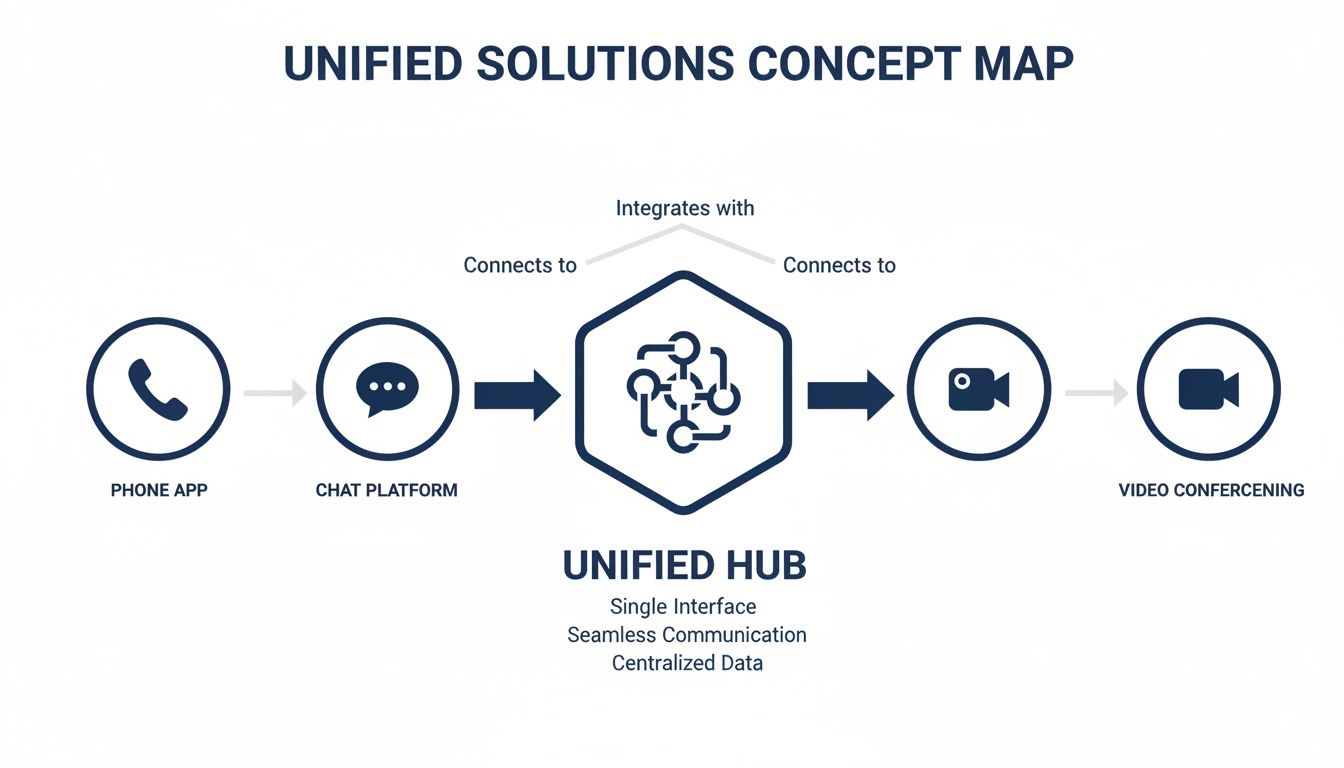
As you can see, instead of forcing your team to juggle different apps for phones, chat, and video, a unified solution creates one central command center. This integration is what transforms communication from a bunch of disconnected tasks into a smooth, connected workflow.
The Rise Of UCaaS
These core components all come together under a delivery model called Unified Communications as a Service (UCaaS). UCaaS simply bundles all your communication tools—voice, video, messaging, fax—into a single subscription service. You stop buying and managing a patchwork of technologies and instead get everything from one provider for a predictable monthly fee.
This "as a service" model is a game-changer, giving small businesses access to the kind of enterprise-grade features that used to be completely out of reach. Suddenly, powerful tools aren't just for the big corporations anymore. With UCaaS, you get capabilities like:
- Auto Attendants: Your virtual receptionist that greets callers and intelligently routes them where they need to go ("Press 1 for Sales, Press 2 for Support").
- Call Recording: The power to record and store calls for training, quality checks, or compliance, all accessible right from your admin portal.
- Seamless App Integration: The ability to connect your phone system to other crucial tools, like your CRM, to automatically log calls and keep customer data sharp.
For a deeper look at the underlying architecture, our guide explains in detail how a cloud phone system works. It'll give you a clearer picture of the technology making all these features possible.
Built-in Functionality For Modern Teams
Beyond the core tech, a great unified solution is defined by the practical features it unlocks. It’s not just about making calls; it’s about making communication smarter and more efficient. A system like SnapDial, for instance, comes packed with features that are non-negotiable for today’s fast-moving teams.
Visual voicemail with transcription, for example, turns your audio messages into text so you can quickly scan them like an email. Mobile apps turn any employee's smartphone into a full-featured office extension, ensuring you never miss a critical call just because you stepped away from your desk.
The real value of these components isn't the technology itself, but the practical capabilities they unlock. They empower a small business to present a polished, professional image and deliver a customer experience that rivals much larger competitors.
Of course, a fundamental piece of any robust unified solution is its security. It's a shocking fact, but 43% of cyberattacks are aimed at small businesses, which makes data protection an absolute must-have. Understanding what end-to-end encryption is and how it works is crucial when you're sizing up any modern platform. These systems have to safeguard your sensitive conversations and data, ensuring every call, message, and file you share stays confidential and locked down.
The Real Payoff: What Unified Communications Actually Does for Your Business
It's one thing to talk about technology, but it's another thing entirely to see how it hits your bottom line. Moving from a messy collection of apps to a single, integrated platform isn't just a tech project; it’s a strategic decision that pays real dividends. For most growing businesses, these benefits show up in three key areas.
Right away, you'll see a massive jump in team productivity. When your communication tools are all over the place, your team wastes an incredible amount of time just toggling between apps, hunting for old messages, and trying to track down colleagues. A unified system kills that friction. It creates one central hub where work just flows.

Fueling Team Productivity and Efficiency
Picture a field service tech who's always on the road. With the old setup, they might miss an urgent call from the office, have to dial into a clunky voicemail system, and then scribble notes before finally calling a customer back. It's a mess.
With unified solutions, that same tech gets a push notification on their phone, reads a transcribed voicemail instantly, and calls the customer back with a single tap—all while showing the main office number. That's the power of a connected system. It turns clunky, multi-step processes into smooth, productive actions. When done right, you can finally implement the kind of internal communication best practices that build high-performing teams.
Pulling calls, chats, and meetings into one spot cuts down on the "context switching" that eats up up to 40% of an employee's productive time. Your team spends less energy juggling tools and more time doing what they do best.
Elevating the Customer Experience
How your business talks to the outside world is just as critical as how your team talks internally. Unified communications gives even the smallest businesses the power to deliver a polished, professional customer experience that builds serious trust and loyalty. It’s all about making every single customer interaction feel effortless.
Think about a small e-commerce shop dealing with a flood of holiday orders. An intelligent call queue can automatically greet callers, give them an estimated wait time, and even offer to call them back so they don't have to wait on hold. This one feature turns a potentially frustrating moment into a positive one and keeps people from hanging up.
- Professional First Impressions: An auto attendant makes sure every caller is greeted professionally and sent to the right person or department, instantly. No more fumbling or missed connections.
- Faster Resolutions: When your phone system is tied into your CRM, your team sees a customer's entire history pop up on their screen. This leads to quicker, smarter, and more personal support.
- Never Miss a Lead: With advanced call routing, you can send calls to mobile devices or other team members if the first person is busy. A hot sales lead should never, ever hit a busy signal.
For a deeper look into the specifics, you can learn more about the advantages of unified communications in our detailed guide.
Unlocking Significant Cost Savings
Finally, let's talk about the money. Adopting a unified solution brings real, tangible savings by trimming unnecessary expenses and making your operations leaner. When you switch from an old on-premise PBX system to a cloud-based UCaaS platform like SnapDial, you say goodbye to expensive server hardware, painful maintenance contracts, and the need for dedicated IT staff just to keep the phones running.
This shift flips your communication costs from a huge, unpredictable capital expense (CapEx) to a simple, predictable operating expense (OpEx). You just pay a single monthly fee that covers everything: the service, all the features, 24/7 support, and every future update.
The numbers don't lie. Businesses often see up to 40% cost reductions and 25% productivity gains after making the switch to unified communications. For any IT manager trying to scale up efficiently without legacy hardware headaches, it's a no-brainer. By simplifying your tech stack, you don't just save cash on licenses and upkeep—you empower your team to get more done, every single day.
How To Choose The Right Unified Solutions Provider
Picking a unified solutions provider isn't just about buying software; it's about finding a long-term partner. The right one acts like an extension of your own IT team, helping you adapt and grow. But the wrong one? That leads to nothing but constant headaches, surprise costs, and friction that slows your whole operation down.
To find a provider that truly fits, you have to look beyond a simple feature list. It's about the complete picture: the quality of their support, the honesty of their pricing, and their commitment to keeping your communications secure and running smoothly. You need a partner who will make the transition painless and be there for you as your business evolves.
Evaluate The Quality Of Customer Support
When your communication system hits a snag, you can't afford to sit in a support queue for days. The quality of a provider's customer support is one of the most critical things to look at, yet it’s often overlooked until it’s too late. Before you sign anything, you need to know exactly what kind of help you’ll get when you need it most.
The real differentiator here is US-based, 24/7 live support. Many providers cut corners by outsourcing their help desks, which often results in communication barriers and frustrating delays. A provider with an in-house, around-the-clock team—like SnapDial's Texas-based support center—shows they're serious about customer success. It means you can talk to a knowledgeable expert who actually understands your setup, day or night.
Here’s a pro tip: try calling their support line during off-hours before you become a customer. See how quickly you get a real person on the line. That simple test tells you a lot about their service philosophy.
Analyze The Pricing Model For Transparency
Unified solutions providers have all sorts of pricing structures, and they are definitely not all created equal. Some will lure you in with a low base price, only to nickel-and-dime you with extra fees for essentials like call recording or even a mobile app. This lack of transparency can make your monthly bill balloon unexpectedly.
Look for a provider that offers all-inclusive, predictable pricing. This means a single, flat per-user fee covers everything—unlimited calling, auto attendants, future software updates, the works. A clear pricing model gets rid of the guesswork and makes budgeting a breeze.
Ask for a detailed breakdown of what’s included in the monthly price. Specifically, ask about taxes, regulatory fees, and any one-time setup or porting charges. That’s how you get the true picture of the total cost of ownership.
Verify Security And Reliability Commitments
Your business conversations are sensitive, and downtime is expensive. A provider’s commitment to security and uptime should be completely non-negotiable. Don’t just take their marketing claims at face value; ask for specific details about their infrastructure and security protocols.
Here are a few key questions you should be asking any potential provider:
- What is your guaranteed uptime? Look for a Service Level Agreement (SLA) that guarantees 99.999% uptime (often called "five nines") or higher.
- How is my data protected? Ask about their encryption methods for data both in transit (during a call) and at rest (when it's stored).
- What are your data center specifications? Top-tier providers use geographically redundant data centers. This ensures your service keeps running even if there’s a major outage in one region.
A provider worth their salt will be happy to share these details. It's a sign they're confident in their ability to keep your system secure and operational. Understanding how to create a unified login for global access can also give you a good sense of a provider's security and management capabilities.
Assess Scalability And Hardware Compatibility
Your business isn't going to stand still, and your communication platform shouldn't hold you back. The right unified solution should grow with you effortlessly. Adding a new employee or opening another location should be a simple task you can handle yourself in a web portal, not a complex project that requires days of back-and-forth with support.
On top of that, you need to talk about hardware compatibility. While many providers will try to push you into buying all new phones, a flexible partner like SnapDial can often work with your existing Yealink IP phones, saving you a significant amount of money upfront. Make sure the provider offers a good selection of modern hardware but doesn’t lock you into their own proprietary ecosystem. That gives you the freedom to choose what’s best for your team and budget as you expand.
Vendor Selection Checklist
Choosing the right partner requires a systematic approach. It's easy to get sidetracked by a flashy demo or a low introductory price. This checklist is designed to keep you focused on the criteria that have a real, long-term impact on your business operations, budget, and peace of mind. Use it to compare providers side-by-side and make an informed decision.
| Evaluation Criteria | What to Look For | Red Flags to Avoid |
|---|---|---|
| Customer Support | 24/7/365 US-based live support; dedicated setup & migration team. | Outsourced call centers; ticket-only systems; limited support hours. |
| Pricing Model | All-inclusive, flat per-user pricing; clear breakdown of all fees. | À la carte pricing for essential features; hidden taxes and surcharges. |
| Security & Uptime | 99.999% uptime SLA; end-to-end encryption; geo-redundant data centers. | Vague promises; no formal SLA; unwilling to discuss security protocols. |
| Scalability | Self-service portal to add/remove users instantly; multi-location support. | Manual processes requiring a support ticket; complex hardware requirements. |
| Hardware | Compatibility with existing IP phones; curated selection of modern devices. | Proprietary hardware lock-in; forcing you to buy all-new equipment. |
| Implementation | "White-glove" setup and number porting at no extra cost. | DIY setup guides; extra fees for migration assistance; downtime during porting. |
By using this framework, you move beyond a simple feature-for-feature showdown. You start evaluating providers based on their ability to be a true partner—one that simplifies your technology, supports your team, and scales with your ambition. This is how you find a solution that doesn't just work, but works for you.
Migrating To A Unified Platform Without Disruption

The single biggest fear holding businesses back from a critical tech upgrade is the thought of chaos. What if calls drop during the switchover? What if the new system is confusing and nobody uses it?
These are completely valid worries, but migrating to a unified platform doesn't have to be a painful ordeal. With the right partner and a rock-solid plan, the entire transition can be so smooth your customers won't notice a thing.
The secret is a managed approach that takes all the guesswork off your plate. A "white-glove" implementation process, like the one we offer at SnapDial, means you have a team of experts guiding you every step of the way. This ensures your business keeps running without a single hiccup while you get ready to unlock powerful new capabilities.
Phase 1: The Discovery and Planning Stage
A successful migration starts long before anyone flips a switch. It begins with a detailed discovery phase where your provider takes the time to truly understand how your business actually operates. This isn't just a technical audit; it's a deep dive into your unique communication workflows.
The goal here is to map out a clear blueprint for your new system. This initial step should cover:
- Your current setup and pain points: What’s working right now, and what’s causing friction for your team and customers?
- Future needs and goals: Where is your business headed, and how can this new system fuel that growth?
- Call flow design: How should calls be routed to guarantee every customer gets to the right person, every single time?
This collaborative planning makes sure the final setup is a perfect fit for your business from day one. It turns the migration from a simple tech swap into a genuine strategic upgrade.
Phase 2: Execution and Number Porting
Once the plan is locked in, the execution phase kicks off. This is where your provider builds out your new system entirely in the background, configuring everything from user extensions to your custom auto-attendant greetings. You shouldn't have to lift a finger; all this work happens in a secure sandbox, completely separate from your live operations.
A critical piece of this stage is number porting—the process of moving your existing phone numbers to the new service. This is often the most nerve-wracking part for business owners, but a skilled provider handles it seamlessly. The port is scheduled for a specific date and time, and the cutover to the new system happens instantly, with zero downtime.
The moment the port completes, your calls just start ringing on the new unified platform. To your customers, absolutely nothing has changed—they just dialed your number as usual.
Phase 3: Training and Go-Live
With the technical side ready to go, the focus shifts to your team. A smooth launch hinges on getting everyone on board, which is why clear training is so important. A great provider will offer live, guided training sessions to make sure every employee feels confident using the new tools—from the mobile app to the web portal.
This is your chance to build excitement and show your team how these new unified solutions will make their jobs easier. Once everyone is comfortable, it’s time for the final cutover. The provider flips the switch, and your business is officially live on its powerful new communication platform, ready to capitalize on every new feature from the get-go.
This cloud-first approach is quickly becoming the standard, especially as hybrid work models take hold. With over 60% of firms planning permanent remote options, organizations are embracing the scalability and reliability of the cloud. This shift is paying off, with businesses reporting 35-50% faster response times and a 20-30% boost in customer satisfaction after adopting unified communications. You can explore more data on these market trends at Mordor Intelligence.
Got Questions? We've Got Answers
Making the final call on a new communication system can feel like a big step. I get it. Even after seeing all the benefits, it's completely normal to have a few lingering questions before you change your business's communication backbone.
Let’s tackle the most common concerns we hear from business owners who are exactly where you are right now. We'll give you clear, straightforward answers to help you feel confident that this is the right move.
Are Unified Solutions Too Expensive For A Small Business?
This is easily the most common question, and it’s usually rooted in memories of old-school phone systems that required a massive check just to get started. The good news? Modern unified solutions, especially the cloud-based ones, completely flip the script on cost.
Instead of a huge upfront capital expense (CapEx), you're looking at a predictable, flat monthly fee per user. Think of it as an operating expense (OpEx). This all-in subscription covers everything—the service, all the enterprise-grade features, ongoing maintenance, automatic software updates, and 24/7 support.
When you actually compare that to the total cost of a legacy system—the hardware, installation, pricey maintenance contracts, and charges for every little change—the cloud model is almost always more affordable.
Many small businesses discover they actually save money by switching. They ditch multiple bills for different services (phone, video, fax) and roll them all into one simple, lower payment.
For example, a traditional system could set you back thousands upfront, plus hundreds more each month for line rentals and support. A unified solution bundles all that and more for a simple per-user fee, often leading to 20-30% lower total communication spending.
What Happens If My Internet Goes Down?
That’s a totally valid concern for any service that runs on the internet. But a robust unified platform is built with multiple layers of redundancy to make sure you never miss a critical call, even if your local internet connection goes out. This is actually a major advantage over traditional phone lines, which are completely dead if a physical line gets cut.
Modern systems are designed for business continuity with features like automatic call forwarding and failover. Here’s how it works:
- Automatic Mobile Failover: If the system detects your office internet is down, it can instantly and automatically reroute all incoming calls to pre-set mobile numbers or other locations.
- Mobile App Power: Your team just switches over to the mobile app on their smartphones, using cellular data (4G/5G). They’ll still have full access to their office extension, call logs, and voicemail, letting them work seamlessly from anywhere.
To your callers, the experience is completely uninterrupted. They dial your main business number, and the call connects without them ever knowing your office is offline. This built-in resilience ensures you stay open for business, no matter what.
Is This Kind Of System Secure Enough For My Business Data?
Security is non-negotiable, and it should be a deal-breaker for any provider you're considering. Reputable unified solutions providers invest a ton of money into security measures that are often far more robust than what a small business could ever build on its own. They know that protecting your sensitive conversations and data is their entire job.
You should look for a provider that offers a multi-layered security strategy. This needs to include:
- End-to-End Encryption: This scrambles call data and messages, making them unreadable to anyone except the people on the call.
- Secure Real-Time Transport Protocol (SRTP): This is the gold standard for securing voice and video as it travels across the internet.
- Geographically Redundant Data Centers: Housing your service in multiple, physically secure locations means if one center has an issue, your service keeps running from another without a hiccup.
- Regular Security Audits: The best providers are constantly testing their own systems against new threats to stay one step ahead of any vulnerabilities.
In reality, a well-managed cloud communication platform is often more secure than an on-premise system that leaves all the security updates and patches in your hands.
Is A Unified System 'Too Much' For My Small Team?
It's easy to look at a long list of features and think, "We'll never use half of that." But the beauty of a well-designed unified solution is that it scales to fit you. You don’t have to use every single feature on day one. A great system is intuitive and designed to grow right alongside your business.
Think of it like a smartphone. You probably don’t use every app and setting, but the core functions—calling, messaging, email—are simple and essential. The other features are there for you when you need them.
For a small team, the immediate benefits are incredibly practical and powerful:
- Professional Image: An auto attendant can instantly make your two-person shop sound like a much larger, more established company.
- Unmatched Flexibility: A single team member can answer a call on their laptop, then switch to their mobile app while running errands without missing a beat.
- Serious Efficiency: Visual voicemail with transcription lets a busy owner quickly scan messages between meetings instead of having to listen to them one by one.
The goal isn't to overwhelm you with complexity. It’s to give your team a simple, powerful toolkit that removes communication friction and lets you compete at a much higher level. The platform adapts to how you work, not the other way around.
Ready to see how a truly unified communication system can elevate your business? The team at SnapDial offers a white-glove setup process to make your transition seamless and disruption-free. Discover the SnapDial difference today.