
Your phone system usually looks fine right up until it costs you a customer.
A caller reaches your main number. The receptionist is at lunch. The sales rep is on a cell phone with no call history synced back to the office. Support is using personal mobiles after hours because the old PBX cannot route cleanly. Somebody says, “We should really fix the phones,” but the issue keeps sliding because replacing a phone system sounds disruptive, technical, and expensive.
That is the exact moment most SMB owners start researching voip phone service providers.
The problem is that most buying guides stay at the feature-demo level. They compare voicemail, auto attendant, mobile apps, and pricing tiers, then stop. Trouble starts after the contract is signed. Porting delays. Misrouted calls. A self-service portal nobody understands. Support queues that treat a down main number like a low-priority ticket. Confusing taxes, fees, handset provisioning charges, and training gaps that turn a good platform into a daily irritation.
A good VoIP decision is not just about what the software can do. It is about how the provider handles the messy parts of business communications once your team is live on the system. That means reliability during outages, number porting discipline, support quality, administration tools, and whether normal office staff can run the system without calling IT for every small change.
Why Businesses Are Replacing Their Old Phone Systems
The old phone closet becomes a problem gradually.
At first, it is just one dropped call, one desk phone that fails, one voicemail box nobody knows how to reset. Then the business adds a remote employee, opens another location, or asks a salesperson to answer calls from the road. Suddenly the PBX that worked for years starts fighting the business instead of supporting it.
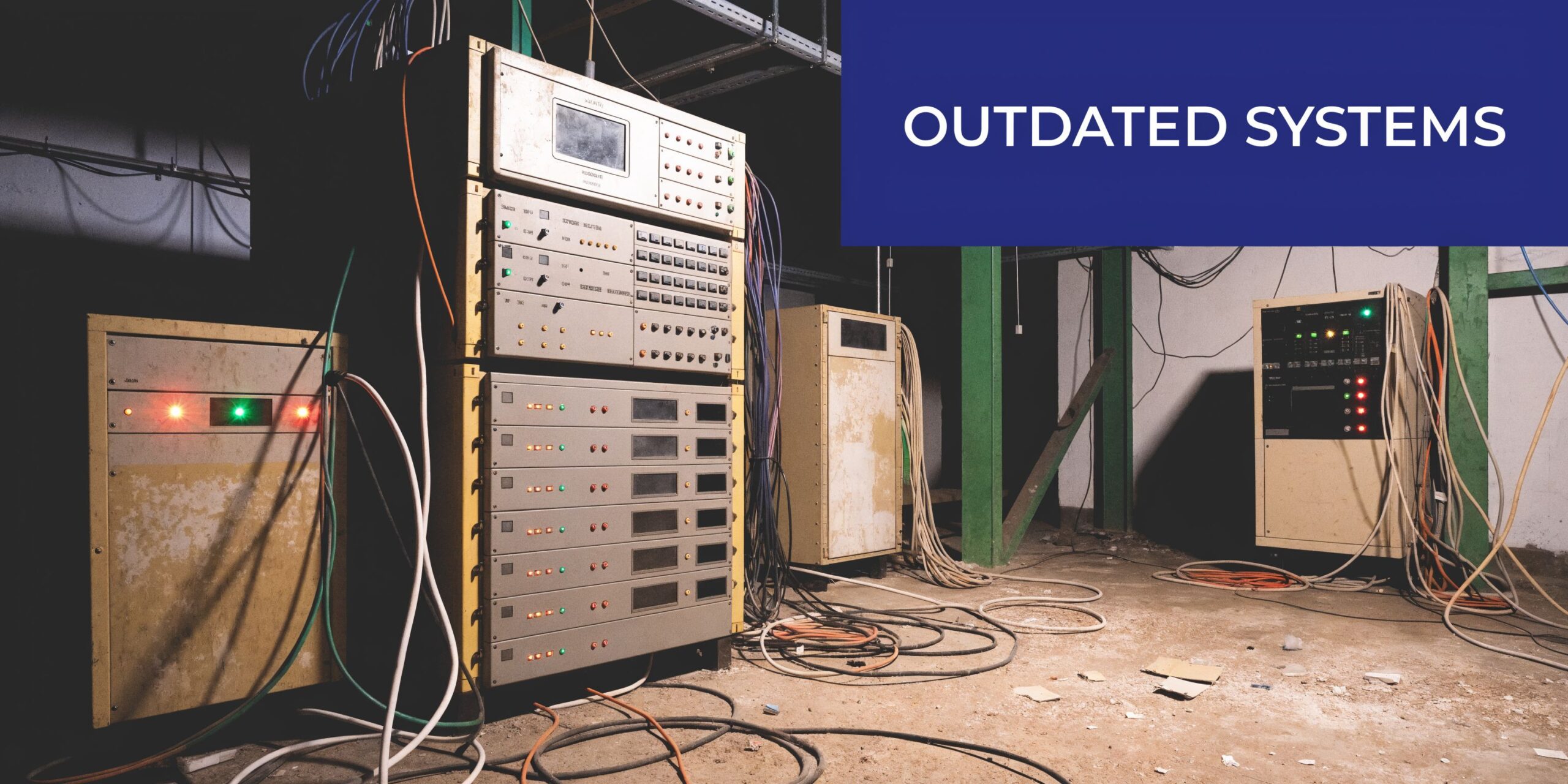
Legacy systems fail in predictable ways. They tie users to physical desks. They make simple routing changes feel like a service call. They turn office moves into telecom projects. They also create a blind spot around missed calls because reporting is weak or nonexistent.
Customers have less patience for that than they used to. If the phone tree is clumsy, if nobody can transfer a call cleanly, or if the business line rolls to a dead end after hours, buyers do not wait around to be impressed by your infrastructure challenges.
What pushes the decision now
Three changes usually force action:
- Work no longer happens in one office: Owners need staff to answer the same business number from a desk phone, laptop, or mobile app.
- Growth breaks fixed hardware: Adding users, departments, or locations should be an admin task, not a cabling job.
- The cost of staying put rises: Maintenance, replacements, downtime, and workaround behavior add up even when the monthly bill looks familiar.
The broader market confirms what most operators feel on the ground. The global VoIP phone market was valued at USD 60.53 billion in 2025 and is projected to reach USD 132.33 billion by 2034, growing at a CAGR of 9.08%, reflecting the shift away from legacy PBX systems, according to Fortune Business Insights on the VoIP phone market.
That growth does not matter because it is fashionable. It matters because businesses are replacing old systems for operational reasons. They need flexibility, simpler management, and fewer points of failure.
Practical takeaway: If your phone setup requires specialist intervention for ordinary changes, it is already too rigid for a growing business.
How a Cloud Phone System Works
A cloud phone system is a switchboard you do not own, maintain, or physically house.
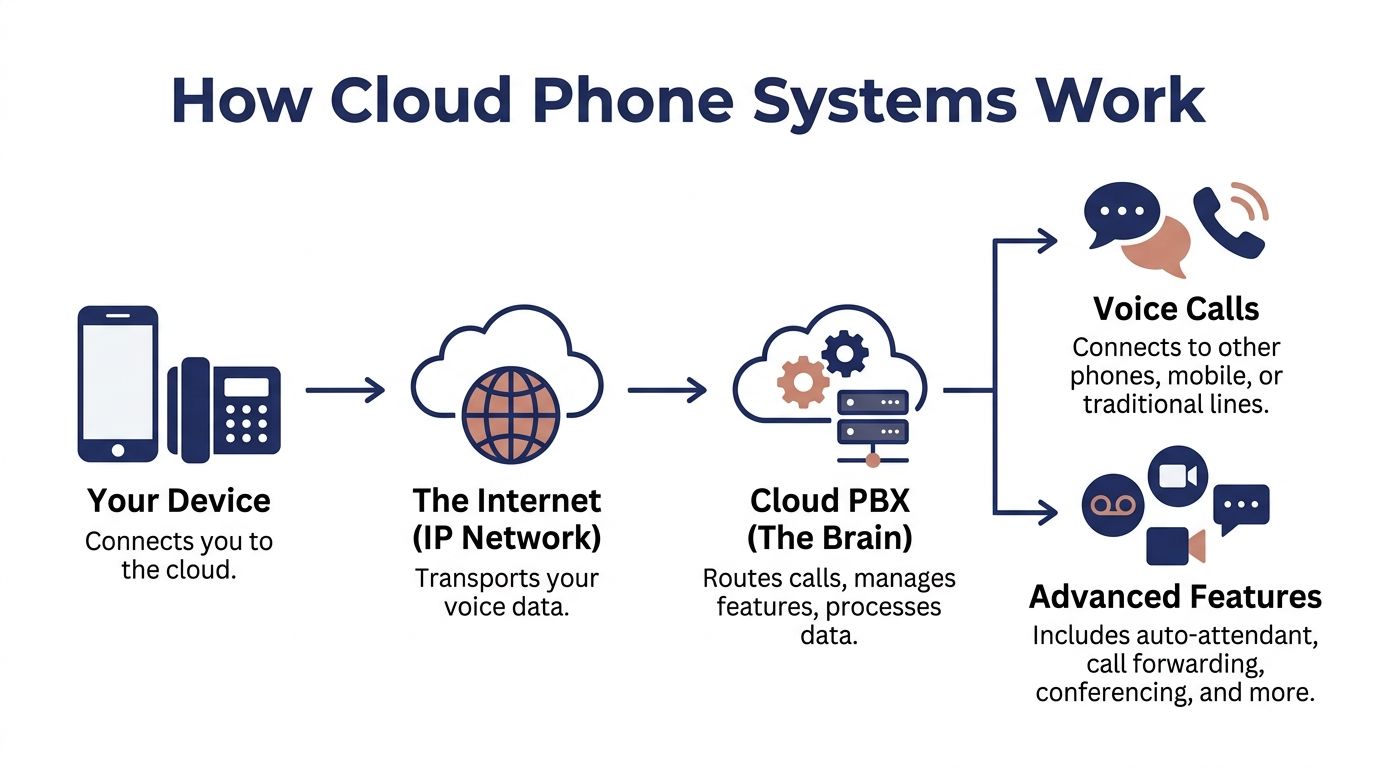
The easiest way to explain it is this. Instead of keeping the “brain” of your phone system in a back office closet, your provider runs that brain in secure data centers. Your desk phones, mobile apps, laptops, and conference phones connect to it over the internet. When someone calls your business, the platform decides where that call should go based on the rules you set.
The simple version
Here is the flow in plain English:
- A user places or receives a call: That can happen on a desk phone, softphone, or mobile app.
- The internet carries the voice traffic: Your voice is sent as data rather than over an old analog line.
- The cloud PBX applies your call rules: Auto attendant, ring groups, forwarding, voicemail, business hours, and routing logic all live there.
- The call lands where it should: Another employee, a queue, a voicemail box, a mobile device, or an outside number.
If you want a plain-language overview of the hardware side, this guide to an IP SIP phone is useful because it explains the device most businesses still use on desks even after moving the control layer into the cloud.
What changes for the business
The shift is administrative, not just technical.
With an on-premise PBX, changes often depend on physical gear, old programming methods, or a vendor who has to touch the system. With hosted VoIP, most routine tasks move into software. Add a user. Change a hunt group. Update office hours. Route after-hours calls to an answering service. Those become admin tasks inside a portal.
That does not mean every portal is good. Some are clean and usable. Others are clearly built for telecom specialists. The difference matters because your office manager may become the de facto phone admin.
For a more detailed primer on the operating model, this overview of a cloud phone system explains the hosted approach clearly: https://snap-dial.com/what-is-a-cloud-phone-system/
What does not change
A cloud phone system is still a business phone system. You still need:
- Good call flow design: Bad routing in the cloud is still bad routing.
- User training: People need to know how to transfer, park, forward, and manage voicemail properly.
- Network readiness: Voice traffic needs stable connectivity.
- Ownership of configuration: Someone must maintain business hours, emergency addresses, ring groups, and staff assignments.
Key point: Cloud PBX removes a lot of hardware burden. It does not remove the need for operational discipline.
The best implementations feel boring. Calls arrive where they should. Employees answer from anywhere. Admins can make changes without opening a support case. That is what most buyers want.
Must-Have VoIP Features That Drive Business Growth
Feature lists are where many evaluations go off the rails.
A provider shows fifty capabilities, the buyer checks boxes, and nobody asks which functions will reduce missed calls, improve response time, or make staff easier to manage. The right features are not the ones that look impressive in a demo. They are the ones your team will use every day without friction.
In 2020, 33% of businesses lost customers due to communication issues. To address that, 61% of businesses are migrating to VoIP for features like smart routing and real-time stats, which can boost remote team productivity by up to 62%, according to Novocall’s VoIP statistics roundup.

Auto attendant and IVR
A proper auto attendant does more than greet callers.
It reduces front-desk overload, sends callers to the right department faster, and gives a small company the structure of a larger operation. Done well, it prevents the common “let me transfer you” shuffle that wastes time and irritates callers.
What works:
- Clear menu design: Keep options obvious and tied to real departments.
- Business-hours logic: Route differently after hours, on holidays, or during lunch coverage.
- Fallback paths: Always give callers a way to reach a live person or leave a useful voicemail.
What does not work:
- Deep menus: If the caller has to drill through too many choices, the system is working for the business, not the customer.
- Generic greetings: “Press 1 for sales” is fine. A bloated greeting that buries the options is not.
- No ownership: If nobody reviews the menu after org changes, the IVR goes stale fast.
Call routing and ring groups
Smart routing is where many SMBs get their first payoff from VoIP.
A provider can give you unlimited options, but the useful setup is usually simple. Route new sales calls to the right team first. Send existing customer calls to support. Ring a branch office first during local business hours. Forward overflow to mobile if the office is closed.
That kind of setup does two things. It reduces abandonment, and it keeps your staff from playing switchboard all day.
A practical test during demos: ask the provider to show how long it takes to change call routes for a holiday schedule or a staff absence. If it is cumbersome in the demo, it will be neglected in actual life.
Mobile and desktop apps
The best mobile app is the one employees trust enough to use.
A lot of businesses move to VoIP because they want one business identity across office staff, remote workers, and field employees. Mobile and desktop apps make that possible. Staff can place and receive calls on the business number without exposing personal numbers, and managers can keep call activity visible in one system.
That helps in common day-to-day situations:
- a salesperson returning calls from the road
- a manager covering after-hours escalation
- a remote employee answering the main queue
- a branch office keeping one shared business presence
The weak point is usability. If signing in is clumsy, if call quality is inconsistent, or if presence status is unreliable, users will revert to personal phones. Once that happens, reporting and consistency break down.
Call recording and voicemail tools
Recording matters for more than compliance.
It helps with coaching, dispute review, handoff quality, and basic accountability. If a customer says, “I was told this would be done Friday,” managers need a way to verify what happened. If a new hire struggles on calls, supervisors need examples to coach from.
Visual voicemail is another everyday tool that people underestimate. When voicemail lives in a usable inbox and can be reviewed quickly, messages get acted on. When it is buried in old-school dial-in prompts, messages sit.
A short product walkthrough helps here:
Queue management for service teams
If your business handles any meaningful inbound volume, basic ringing is not enough.
You need queue behavior that tells callers what is happening and gives staff a manageable process. The useful features are not glamorous. They are operational.
| Feature | Why it matters |
|---|---|
| Queue callback | Lets callers keep their place without waiting on hold |
| Wait-time announcements | Sets expectations and reduces frustration |
| Real-time stats | Helps supervisors see backlog and staffing pressure |
| Detailed reporting | Reveals missed-call patterns and service bottlenecks |
These tools are especially important for support desks, multi-location service companies, medical offices, and any team where missed calls directly affect revenue.
Admin controls that save time later
This is the category buyers overlook most often.
A cloud phone system should let an authorized admin handle ordinary changes without opening a support case every time. That includes user creation, voicemail resets, schedule changes, routing updates, and access to logs or recordings.
If the platform hides all useful controls behind support tickets, you are not buying flexibility. You are renting dependence.
Good rule: Buy features your operation can maintain. A brilliant routing system nobody on your team can edit becomes tomorrow’s support problem.
Evaluating Providers Beyond the Feature List
Two providers can offer the same headline features and deliver completely different ownership experiences.
One gives you a usable admin portal, clear billing, and support that treats outages like outages. The other sells an attractive monthly rate, then adds fees, limits onboarding help, and sends every serious issue into a ticket queue. On paper they look close. In practice they are miles apart.

Pricing is rarely as simple as the homepage says
The advertised per-user rate is often the least useful number in the deal.
What matters is what is included, what is metered, what requires a higher tier, and what happens when you need help. Handset provisioning, implementation labor, training, storage, advanced routing, recording access, and support levels can all change the actual cost and the amount of work your staff absorbs internally.
Ask blunt questions:
- What is included in setup?
- Who builds the initial call flow?
- Are changes self-service or billed support events?
- What happens if we add a location or temporary users?
- How long is the contract, and what renews automatically?
If you are still comparing hosted and on-prem options, this breakdown of the operational trade-offs is worth reviewing: https://snap-dial.com/hosted-voip-vs-pbx/
Uptime claims need context
A flashy uptime number means less than buyers assume if the provider will not discuss failover.
Real-world reliability depends on failover planning during power and internet outages. VoIP requires a stable connection, and without a UPS and provider-level call routing to mobile, a local blackout can disable service entirely. That risk has increased with global grid instability reports showing 20-30% more outages post-2024, according to Dialpad’s discussion of VoIP advantages and disadvantages.
That point gets buried in marketing material because it is not as fun as talking about AI features. But it matters more on a bad day than almost anything else in the contract.
What to verify before signing
Use this quick screen when evaluating providers:
- Power-loss behavior: If your office loses power, where do calls go?
- Internet-loss behavior: Can calls fail over to mobile devices or alternate numbers?
- Admin control: Can your team trigger forwarding changes quickly without waiting on support?
- Support escalation: Do you call a real support line, or do you submit a case and wait?
- Implementation ownership: Who handles handsets, user setup, number porting, and test plans?
Operational reality: The right question is not “What is your uptime?” It is “What happens to my incoming calls when my office goes dark?”
Support quality is the Day 2 differentiator
Most systems look manageable during onboarding because the provider has resources focused on getting you live.
The true test comes later. A queue breaks on Monday morning. A receptionist leaves and nobody knows the portal. A holiday schedule routes calls incorrectly. A port stalls. A remote employee cannot register a phone from home. That is when support quality becomes part of the product.
There is a big difference between a help desk that reads scripts and a support team that understands call flow, user provisioning, routing logic, and business continuity.
If the provider cannot explain who handles those situations and how quickly, assume your office staff will be carrying more of the burden than expected.
Your Smooth Migration and Rollout Checklist
A good migration is boring. Customers keep calling. Staff keep working. The old system disappears.
A bad migration is memorable for all the wrong reasons. Numbers port before routing is ready. E-911 details are incomplete. The front desk cannot transfer. Employees use personal phones because the app setup was rushed.
Before you touch the numbers
Start with an audit.
List every main number, direct line, fax line, alarm-related line, conference room phone, and seasonal or rarely used number. Then map who uses each one, what hours they work, and what calls they handle. Businesses often discover they are paying for lines nobody owns and missing critical routing logic that lives only in one employee’s head.
Then confirm network readiness. Voice does not need mystery. It needs stable bandwidth and sane planning. If you need a practical way to estimate demand before rollout, use this bandwidth guide for VoIP planning: https://snap-dial.com/find-out-how-much-bandwidth-you-need-for-voip/
The rollout sequence that avoids chaos
A practical rollout usually follows this order:
- Design the call flow first: Main menu, ring groups, voicemail paths, business hours, overflow rules, and after-hours handling.
- Set up users and devices: Desk phones, softphones, mobile apps, shared lines, and any special roles like reception or dispatch.
- Test internally before porting: Transfer calls, voicemail delivery, ring group behavior, remote logins, recording access, and mobile app use.
- Schedule the port with a clear owner: One person should coordinate dates, documents, and provider communication.
- Run go-live with backup routes in place: Keep temporary forwarding or alternate contact paths ready in case anything lags.
Do not skip the human steps
Training is not optional just because the system is modern.
Each group needs role-specific instructions. Reception needs transfers, parking, and directory search. Sales needs mobile calling and voicemail handling. Managers need reporting and recordings. Admins need schedule changes, resets, and user management.
Use a short checklist for the final pass:
- Confirm greetings: Main menu, after-hours greeting, holiday message.
- Verify business hours: Double-check all schedules and time-based routing.
- Validate voicemail delivery: Make sure messages land where people check them.
- Review emergency settings: Every user location must be accurate.
- Test from outside: Call from a cell phone and follow the paths a customer would use.
Tip: Do not judge a rollout by whether calls work for IT. Judge it by whether the receptionist, the sales team, and remote staff can use it without asking for help every hour.
A Framework for Vetting VoIP Vendors
When owners compare voip phone service providers, they often end up with a spreadsheet full of features and no decision clarity.
A better method is to score vendors on what will matter after launch. Can they support the way your business works? Can your staff manage normal changes? Will support be competent when something breaks? Is the pricing transparent enough that finance will not be surprised later?
The benchmark for reliability
A serious uptime SLA is not fluff if the provider can explain the infrastructure and the operational meaning behind it.
A top-tier uptime SLA, like RingCentral’s 99.999% guarantee across 34 global data centers, translates to less than 5 minutes of annual downtime and is a key benchmark for reliability. This level of service can reduce dropped calls and boost first-call resolution by 10-15% through integrated coaching features, according to Expert Market’s comparison of VoIP phone systems.
That does not mean every SMB needs a giant-enterprise footprint. It does mean buyers should stop accepting vague language like “high availability” without asking what backs it up.
VoIP Provider Vetting Framework
| Evaluation Criterion | Key Question to Ask | What an Ideal Answer Looks Like |
|---|---|---|
| Implementation ownership | Who handles setup, number porting, handset provisioning, and call flow design? | The provider assigns onboarding help, documents the rollout, and owns the critical setup tasks with your team |
| Admin usability | Can a non-technical office admin make everyday changes? | The portal handles users, routing, schedules, voicemail, logs, and recordings without specialist knowledge |
| Pricing transparency | What is included versus billed separately? | Clear scope for licensing, setup, support, hardware, training, and any advanced functions |
| Support access | How do we reach support during an outage? | Real-time access by phone or live channel, plus escalation for service-impacting issues |
| Failover planning | What happens during office power or internet loss? | Calls can reroute to mobile devices or backup numbers through predefined rules |
| Feature fit | Which functions are standard for our use case? | The provider maps features to your workflow rather than pushing a generic bundle |
| Reporting and recordings | How do supervisors review call activity? | Easy access to logs, recordings, queue views, and user-level reporting |
| Remote work readiness | How do mobile and home users stay reachable? | Stable apps, straightforward login, and consistent business identity across devices |
| Emergency readiness | How is user location handled for emergency calling? | The provider supports address registration and gives admins a clear process for maintaining it |
| Contract flexibility | What happens if we grow, shrink, or change structure? | Terms are understandable, and adding users, sites, or temporary capacity does not create contract drama |
What a strong SMB fit looks like
For a small or mid-sized business, a good vendor usually looks less glamorous than the enterprise-heavy brands in comparison charts.
The strongest fit is often the provider that combines predictable pricing, a clean portal, practical call center tools, and support that answers. As one example, SnapDial offers hosted VoIP with all-inclusive pricing, white-glove setup, a self-service admin portal, call routing, visual voicemail, call recording, cloud faxing, and 24/7 Texas-based support. That is not a claim that it fits everyone. It is an example of the profile many SMBs should be looking for.
What to eliminate quickly
Cut vendors early if they do any of the following:
- Hide implementation details
- Treat support as a premium add-on
- Avoid direct answers on failover
- Show a cluttered or limited admin portal
- Push contract urgency before call-flow review
A phone system is not just software. It is an operating dependency. Evaluate it the way you would evaluate payroll, internet, or your core CRM.
Your Next Steps to a Better Business Phone System
Do not start with brand names. Start with your own operation.
Audit the current pain points first. Find the missed-call patterns, the routing problems, the unsupported devices, the maintenance headaches, and the places where staff are using workarounds. That gives you the standard to judge providers against.
Then shortlist two or three vendors using the vetting framework above. Not ten. A smaller shortlist forces better questions and better demos.
During demos, focus on what life looks like after launch:
- Show me the admin portal
- Show me how holiday routing changes
- Show me how mobile failover works
- Show me how support is contacted during an outage
- Show me what number porting looks like in practice
If a provider keeps steering back to generic feature slides, that is useful information. It usually means the operational side is weaker than the sales side.
A better phone system should reduce friction for customers and staff. If the buying process itself feels vague, slow, or hard to manage, the Day 2 experience probably will too.
Frequently Asked Questions About VoIP Services
Can I keep my current business number
Usually, yes. Most businesses port their existing numbers to the new provider. The important part is process control. Confirm who owns the port request, what documents are required, and what temporary routing exists if the port date shifts.
What internet setup do I need
You need stable internet and enough capacity for your expected call volume. Just as important, you need internal network planning that does not let voice compete poorly with everything else on the office connection. Test before rollout, not after complaints start.
What happens if the office loses power or internet
That depends on the provider and your setup. A well-planned system can reroute calls to mobile devices, voicemail, or backup numbers. A poorly planned one goes silent. Ask about failover before you sign, not during the first outage.
How does E-911 work for remote staff
Enhanced 911 for VoIP requires manual registration of an address for each user, which is especially important for remote workers. Misconfigured E-911 can delay emergency response, and compliance with laws like Kari’s Law, which requires on-site notifications, is a provider responsibility that is often poorly explained, according to Nextiva’s overview of VoIP advantages and disadvantages.
That means every remote or mobile user should have the right emergency location on file, and admins need a process to keep it current when people move.
Are VoIP calls secure
They can be, but security depends on the provider’s platform and your own internal practices. Ask how user access is controlled, how devices are managed, and what protections exist around recordings, voicemail, and admin permissions.
Do I need desk phones anymore
Not always. Some teams work well with mobile and desktop apps only. Others still benefit from physical phones, especially reception, shared spaces, and high-call-volume roles. Buy for the workflow, not for appearance.
If you are replacing an aging PBX or trying to standardize calling across office, remote, and multi-location teams, SnapDial is worth a look. Review the admin portal, ask how onboarding and number porting are handled, and test the support experience before making a final decision. That will tell you more than any feature sheet.