

Think about how you stream a movie on Netflix. Instead of a physical DVD player and a disc (like a traditional copper landline), your movie travels in digital bits and pieces over the internet. That's the simplest way to understand VoIP for small business—it’s a modern phone system that streams your conversations over your internet connection.
What Is VoIP and How Does It Work

At its core, Voice over Internet Protocol (VoIP) is the technology that turns your voice into digital data, just like an email or a web page. This simple shift means your calls can travel over the internet, completely ditching the need for a dedicated, expensive phone network and all the clunky hardware that comes with it.
It helps to think of it like this: a traditional phone system is like a private railway built just for your office. The tracks (copper wires) are rigid, expensive to lay down, and a real headache to expand. A VoIP for small business system, on the other hand, uses the public highway system—the internet—to get your calls anywhere they need to go, anytime.
This isn't just about a new phone. It’s a strategic move that gives small businesses access to powerful communication tools that were once only affordable for huge corporations. It’s all about gaining agility and punching above your weight.
The numbers don't lie. Small and medium-sized businesses are the fastest-growing group switching to VoIP, making up over 45% of all VoIP customers around the world. Here in the U.S., about 78% of small businesses now run on a VoIP phone system. Startups have even reported cutting their initial communication costs by up to 90%.
To help you decide, let's break down the fundamental differences between old-school phone lines and a modern VoIP solution. This quick comparison shows you exactly what you gain by making the switch.
Traditional Landline vs Small Business VoIP at a Glance
| Aspect | Traditional Landline | VoIP for Small Business |
|---|---|---|
| Technology | Analog signals over copper wires | Digital data over the internet |
| Hardware | On-site PBX server, complex wiring | Desk phones, computers, mobile apps |
| Flexibility | Tied to a physical office location | Work from anywhere with an internet connection |
| Cost Structure | High upfront cost, maintenance fees | Predictable monthly subscription per user |
| Features | Basic calling, voicemail | IVR, call recording, analytics, mobile app |
| Scalability | Difficult and expensive to add lines | Add or remove users instantly |
As you can see, the models are fundamentally different. One locks you into a physical location with high costs, while the other gives you the freedom to grow and adapt.
Ditching Hardware for the Cloud
The real magic of VoIP happens in the cloud. Instead of a messy server closet full of wires, your entire phone system is managed from a simple web portal. This is what's known as a cloud phone system or a hosted PBX.
This shift to software delivers some huge wins right out of the gate:
- Work From Anywhere: Your team can make and receive calls on a desk phone, a computer softphone, or a mobile app—all using the same business number. Their personal numbers stay private.
- Simple Management: You can add a new employee, change how calls are routed, or check voicemails from a coffee shop. All you need is an internet connection.
- Predictable Costs: Most services run on a clear per-user, per-month subscription. This gets rid of surprise maintenance bills and expensive hardware upgrades for good.
Once you grasp this core concept, it’s easy to see how VoIP lays the groundwork for a more mobile, professional, and cost-effective business. If you want to dig a bit deeper into the architecture, you can learn more about what a cloud phone system entails. This foundation sets the stage for the specific, game-changing benefits we’ll explore next.
Core Benefits of a VoIP System for Small Businesses

Switching your phone service to a VoIP system is a lot more than just a tech upgrade. It's a strategic move that pays real, measurable dividends. When you finally ditch the rigid, expensive world of traditional landlines, you unlock some serious financial savings, operational freedom, and a more polished image that lets you go toe-to-toe with the big guys.
Let's break down the advantages that make VoIP a no-brainer for growing businesses.
Substantial Cost Reduction
The first thing most small businesses notice is the immediate relief on their monthly bills. A VoIP system slashes costs in a few key ways, trading unpredictable invoices for a single, clear expense. Most companies see savings between 30% and 50% compared to what they were paying for old-school phone service.
This financial breathing room comes from a few places:
- No More Separate Phone Bills: Your voice calls simply ride on the internet connection you’re already paying for. This completely eliminates the cost of dedicated analog phone lines.
- Massively Reduced Call Charges: The majority of VoIP plans come with unlimited calling in the US, and international rates are a fraction of what you’re used to. You can stop watching the clock on long-distance calls.
- Zero Hardware Headaches: Since the entire system is managed in the cloud, you can say goodbye to that clunky PBX box in the closet that needed expensive repairs and specialized technicians.
In practical terms, this means you stop paying for a phone system that's a cost center and start using a communication platform that adds value. The money saved can be reinvested directly into marketing, inventory, or hiring.
Unmatched Scalability and Agility
Your business isn't static, and your phone system shouldn't be either. One of the biggest strengths of a VoIP business phone system is its incredible flexibility. Unlike traditional systems that make you wait weeks for a technician just to add a new line, VoIP puts you in the driver's seat.
Imagine you need to bring on three temporary staff for the holiday rush. With a VoIP dashboard, you can log in, add three new users, and have their lines active in minutes. When the season ends, you can remove them just as easily. That kind of on-demand agility is simply impossible with legacy hardware.
This freedom allows your communication setup to grow—or shrink—in perfect sync with your business needs. You only ever pay for what you actually use.
True Mobility for a Modern Workforce
In today's world, work doesn't just happen at a desk in an office. A VoIP system untethers your team, turning any place with an internet connection into a fully functional workspace. This is non-negotiable for companies with remote employees, people in the field, or multiple office locations.
Think about how this plays out in the real world:
- The Field Contractor: A project manager can answer calls to the main office number right from her smartphone at a job site, so clients always feel like they’re reaching a professional business line.
- The Real Estate Agent: An agent can take a call from a new buyer on her office line while showing a property, ensuring she never misses a lead.
- The Hybrid Team: An employee can start a call on their desk phone and seamlessly flip it to their mobile app to continue the conversation on their commute home.
This level of mobility keeps your business productive and responsive, no matter where your team is. In fact, research shows that managers report hybrid and remote teams using these tools are 62% more productive than their office-bound counterparts. It’s a core component of building a modern, efficient operation.
Beyond the big-picture benefits like saving money and working from anywhere, the real power of a VoIP system is in the specific tools it gives your business. These aren't just technical bells and whistles; they're practical solutions to the everyday headaches that slow you down and cost you money.
Think of these features less like a list and more like a team of specialists working 24/7. Each one is designed to make your business run smoother, look more professional, and grab every single opportunity that comes your way. Let’s break down how these tools solve real-world problems.
Your 24/7 Virtual Receptionist
One of the most powerful features you’ll get is the Auto Attendant. This is your always-on digital receptionist. It greets every single caller with a professional, custom message and gives them a simple menu to get where they need to go, just like a Fortune 500 company.
For example, a caller might hear, "Thanks for calling ABC Plumbing. For sales, press 1. For billing, press 2. For service and support, press 3." This gets customers to the right person instantly, without anyone having to play switchboard operator. It saves time and cuts down on frustration for everyone.
An Auto Attendant ensures you never miss a lead just because someone couldn't get to the phone. It projects a polished, organized image from the very first second, building caller confidence before they even speak to a person.
This single feature solves the crippling problem of missed calls. For a small business that can't afford a full-time receptionist but also can't afford to miss a single call, it’s an absolute game-changer.
Smart Call Routing for a Business in Motion
Next up is Advanced Call Routing, which acts as your company’s intelligent traffic controller. It gives you total control over where your calls go—and when—based on simple rules you create. For any modern, flexible business, this is essential.
Imagine these common scenarios for a small business:
- After-Hours Support: Set a rule to automatically forward calls that come in after 5 PM from your main office line directly to the on-call technician's mobile phone.
- Team-Based Routing: When a caller presses "2" for support, the system can ring the entire support team at once. The first person who answers takes the call, guaranteeing fast service.
- Find Me / Follow Me: Program the system to ring your desk phone first, then your mobile app after a few rings, and finally your home office line. You’re reachable wherever you are, without ever missing a critical call.
This adaptability is what makes a VoIP system so powerful. It ensures that important calls always find the right person, stops the endless game of phone tag, and makes your business far more responsive.
Mobile and Desktop Apps That Free Your Team
Perhaps the most liberating feature is the set of mobile and desktop apps—often called softphones. These apps effectively turn any smartphone, laptop, or tablet into a full-featured extension of your office phone system.
Your team can make and receive calls using your business number, look up company contacts, check voicemails, and even message colleagues from a single application. This means a sales rep on the road has the exact same communication power as someone sitting at their desk. An employee working from home is connected to the office just as if they were there.
Their personal cell number always stays private, and every outbound call shows your professional business Caller ID. This is the key to building a truly unified and mobile workforce.
Matching VoIP Features to Small Business Problems
It’s easy to get lost in a sea of features. To make it more concrete, let's connect the dots between the common pain points small businesses face every day and the specific VoIP tools designed to fix them. This table shows you exactly how these features deliver practical value.
| Common Business Problem | Solving VoIP Feature | How It Helps |
|---|---|---|
| Missing calls after hours or during busy times | Auto Attendant & Call Routing | Greets every caller professionally and directs them, ensuring no lead is lost. |
| Looking like a small, one-person operation | Auto Attendant | Creates a polished, big-company image with a menu-based greeting. |
| Inability to take business calls when out of the office | Mobile & Desktop Apps | Turns any smartphone or laptop into your office phone, with your business Caller ID. |
| Agents lack context on customer issues | CRM Integration & Call History | Puts customer information and past interactions right on the agent's screen. |
| Inconsistent service quality or training gaps | Call Recording | Provides real-world examples for coaching, quality assurance, and resolving disputes. |
| Wasting time listening to long voicemails | Voicemail-to-Email / Transcription | Sends voicemails as text to your email, letting you scan and prioritize callbacks instantly. |
| Customers getting stuck on hold for too long | Call Queues with Callback | Gives callers the option to get a call back instead of waiting, reducing frustration. |
| No way to measure team performance | Analytics & Reporting | Provides hard data on call volume, wait times, and agent performance to improve operations. |
As you can see, each feature is a direct response to a real-world business challenge. It’s not about technology for technology's sake; it’s about making your business work better.
Vital Tools for Training and Efficiency
Beyond just handling calls, a modern VoIP platform offers tools that directly improve your operations and team performance. Two of the most valuable are call recording and voicemail-to-email.
Call Recording is an invaluable tool for training new staff, settling customer disputes, and making sure your quality standards are being met. A manager can listen to a support call with a team member to point out areas for improvement or confirm the details of a verbal agreement made with a client.
Voicemail-to-Email (or Visual Voicemail) transcribes your voice messages into text and sends them right to your inbox, usually with the audio file attached. This lets you quickly scan messages on the go, prioritize who to call back first, and save important details without having to dial into a voicemail box.
These features are a core part of a much bigger shift. Modern VoIP systems are a key piece of the puzzle for any digital transformation for small businesses, helping them streamline how they work and paving the way for real growth.
Your Step-By-Step Plan for a Smooth VoIP Migration
Thinking about switching your phone system can feel like a massive project. I get it. But moving from an old, clunky setup to a modern cloud VoIP solution doesn't have to be a headache that grinds your business to a halt.
The secret is having a solid, step-by-step plan. A smooth transition is all about mapping out the journey before you take the first step. This ensures you start reaping the rewards of your new system right away, without any painful downtime.
Phase 1: Audit Your Needs and Your Network
First things first: you need a crystal-clear picture of what you have now and what you need for the future. This initial audit is the bedrock of a successful migration. It’s where you spot potential issues early on.
Start by taking inventory. How many phone lines and direct numbers are you using? What's your average monthly call volume? This gives you a baseline.
Next, think beyond just replacing what you have. This is your chance to build what you need. Create a "must-have" feature list. Is an auto attendant to greet and route callers a priority? Do you need call recording for training and quality control? Think about your daily workflow and the pain points you want to solve.
This initial assessment is crucial. It’s not just about replicating your old setup; it's about upgrading your capabilities. A clear grasp of your needs prevents you from overpaying for features you won't use or choosing a plan that falls short of your core requirements.
With your feature list ready, it's time to check your network. The quality of a VoIP call lives and dies by your internet connection. A business-grade internet plan is almost always enough, but you need to be sure. You can learn more about how to determine how much bandwidth you need for VoIP to guarantee crystal-clear conversations.
This flow shows how a call is no longer just sent to a ringing phone but is intelligently managed and directed by the system.
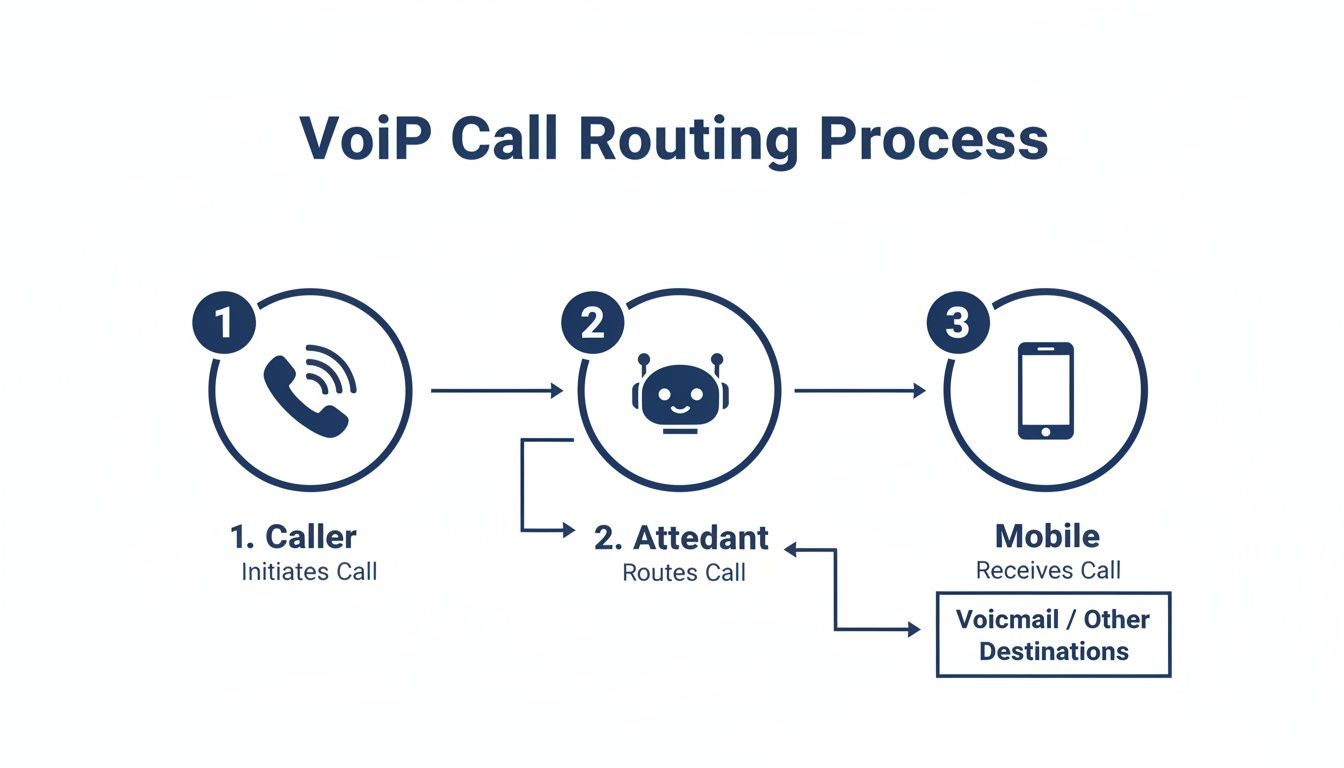
As you can see, the call is managed by an automated system that directs it to the right person on the right device—demonstrating the core flexibility that VoIP brings to the table.
Phase 2: Plan the Transition and Port Your Numbers
Once you've picked the right provider, it’s time to plan the actual switch. The most critical piece of this phase is number porting. This is the process of moving your existing business phone number to the new VoIP service.
For nearly every business, this is non-negotiable. Your phone number is part of your brand identity, and you have to keep it. Your new provider will handle the entire porting process, coordinating with your old carrier to ensure the transfer happens without any interruption.
Here’s a quick checklist to guide you through this stage:
- Confirm Your Call Flows: Work with your new provider to program your auto attendant script, call routing rules, and user extensions based on the map you created in Phase 1.
- Schedule the Port Date: Pick a "go-live" date. Many businesses choose a low-traffic time like a Friday afternoon or a weekend to minimize any potential impact.
- Set Up Your Hardware: If you're getting new IP phones, they often arrive pre-configured. In most cases, all you have to do is plug them into an internet connection.
- Train Your Team: Before you go live, hold a quick training session. Show your staff how to use the new phones, mobile apps, and web portal so they're confident from day one.
Phase 3: Go Live and Fine-Tune
On your scheduled launch day, the port will complete. All calls to your business number will start routing through your new VoIP system. A quality provider will have their support team on standby to make sure everything goes off without a hitch and to answer any immediate questions.
After going live, take some time to fine-tune the system. Listen to a few call recordings to check the audio quality. Call your main number and go through the auto attendant menu yourself. Ask your team for feedback on how the call flows are working. This is your chance to make small tweaks that will perfect your workflow and get the most out of your new communications platform.
How to Choose the Right VoIP Provider
Choosing a VoIP provider is about more than just finding the lowest monthly price. You’re not just buying a dial tone; you're bringing on a communications partner who can either accelerate your growth or become a constant source of technical headaches. Making the right call means looking past the marketing hype and digging into reliability, support, security, and how the platform can grow with you.
This isn't just a purchase—it's a strategic decision. Let's walk through the essential criteria to make sure you pick a provider who’s actually invested in your success.
Demand Unwavering Reliability and Uptime
Your phone system is your business's lifeline. If it goes down, you're not just missing calls; you're actively losing customers and revenue. That’s why the single most important factor is the provider's reliability, and the gold standard for measuring it is the Service Level Agreement (SLA).
An SLA isn't just a piece of paper; it's a formal contract guaranteeing a specific level of performance, most importantly, uptime. You should be looking for providers who offer a "five nines" SLA, which translates to 99.999% uptime. That means your service will be down for less than six minutes over an entire year. Anything less should be a major red flag.
A strong SLA isn't just a marketing promise; it's a financial commitment. If the provider fails to meet their uptime guarantee, they are contractually obligated to credit your account. This shows they have real skin in the game.
Don't just take their word for it, either. Ask about their network infrastructure. Do they have redundant data centers in different geographic locations? This is key. It ensures that if one center has an issue, your service seamlessly fails over to another, with zero disruption to your business.
Evaluate the Quality of Customer Support
When something goes wrong or you need help setting up a new feature, the quality of a provider's support team is suddenly all that matters. In a crisis, waiting days for an email response simply isn't an option. You need immediate access to expert help that can solve your problem fast.
Before you even think about signing a contract, test them. Call their support line. Is it easy to get a real person on the phone? Are they based in the US? A top-tier provider for any voip small business will offer 24/7/365 support from a team of knowledgeable technicians, not just a basic call center reading from a script.
When evaluating potential VoIP providers, especially those offering comprehensive support, it's beneficial to consider principles aligned with essential Managed Service Provider Best Practices to ensure reliable service and ongoing management. A provider that functions like a true partner will prioritize proactive monitoring and quick issue resolution.
Scrutinize Security and Compliance Measures
Your business conversations are filled with sensitive information—client details, financial data, and internal strategy. In an age where data breaches are front-page news, securing your voice data is just as critical as securing your email. Any reputable VoIP provider must have robust security protocols baked in.
Ask potential vendors about their specific security measures. You should be looking for:
- Call Encryption: They must use protocols like Transport Layer Security (TLS) and Secure Real-time Transport Protocol (SRTP). These encrypt both call signaling and the audio itself, making it nearly impossible for anyone to eavesdrop.
- Network Security: Inquire about their firewalls, intrusion detection systems, and whether they undergo regular third-party security audits.
- Compliance: If you operate in regulated industries like healthcare or finance, ensure the provider can support compliance with standards like HIPAA or PCI-DSS.
Key Questions to Ask Every Potential Provider
To cut through the marketing jargon and get to the heart of what each provider truly offers, you need to ask sharp, direct questions. This checklist will empower you to make a direct, apples-to-apples comparison and choose the right long-term partner for your business.
- What exactly does your monthly price include? Are there hidden fees for features like call recording, taxes, or e911 service?
- What does your Service Level Agreement (SLA) guarantee for uptime? Get this in writing and understand the compensation if they fail to meet it.
- How do you support new customers during setup? Do you offer a "white-glove" onboarding where you configure everything, or is it a DIY process?
- Can your platform grow with me from 5 to 50 employees? How simple is it to add or remove users, and does the cost scale predictably?
- Where is your support team located, and what are their hours? Can I speak to a live person immediately if I have an urgent issue?
Finding the best provider for your business is a critical step. For a detailed comparison, you might be interested in our guide on the top VoIP business providers to see how different options stack up.
Real-World Examples of Small Businesses Using VoIP
Features and specs are one thing, but the real magic of a VoIP small business system happens when you see how it solves everyday business headaches. The technology truly comes to life when you see how it helps real companies punch above their weight.
Let's look at how a few different small businesses put these tools into action. These aren't just hypotheticals—they're stories about solving real problems, removing friction, and building a more polished, efficient company.
The Connected Law Firm
Think about a small law firm where the partners are constantly on the move—shuttling between their office, the courthouse, and home visits. They were struggling with a constant stream of missed calls and a chaotic system for tracking billable hours, especially when calls were made on their personal cell phones. It was a billing nightmare and created a messy, unprofessional client experience.
Switching to VoIP gave them two game-changing tools:
- Mobile Apps: Every partner now has the VoIP app on their smartphone. They can make and take calls using the firm’s main number from literally anywhere. This protects their professional image and, just as importantly, keeps their personal numbers private.
- Call Recording: With a client’s permission, they can now record important calls. This is huge. It helps them capture every single billable minute and makes it easy to go back and reference specific case details. Nothing slips through the cracks, and their billing is always spot-on.
The Polished E-Commerce Store
Now, let’s picture a small but growing e-commerce shop. As more orders came in, so did the flood of customer questions about shipping, returns, and products. The single cell phone they were using for support was completely overwhelmed, leading to long waits and annoyed customers.
For a small online retailer, customer perception is everything. A VoIP small business system provides the tools to deliver a service experience that rivals major brands, building trust and encouraging repeat business.
Their new VoIP system delivered an instant professional makeover. An auto-attendant now greets every single caller with a polished menu, immediately getting them to "Order Status" or "Product Support." This one simple feature made them sound like a much larger, more established operation overnight.
Behind the scenes, call queues began managing the influx of calls. Customers are now told their place in line or even offered an automated callback. This small touch made a massive difference in customer satisfaction and stopped the team from feeling constantly swamped, letting them handle way more calls with the same number of people.
The Mobile Contractor Crew
Finally, imagine a general contractor who runs several construction crews scattered across town. The owner was sick of passing out different project managers' cell numbers, which just led to confusion for both clients and subcontractors. It was impossible to present a unified, professional front.
Their fix was a single business number powered by a VoIP small business phone system. This one number now acts as the brain of their operation, intelligently routing calls based on who's calling or what they select from a menu. A call from a specific client gets sent right to the correct project manager's mobile phone, while a new lead goes straight to the main office.
This completely streamlined their communication, ensuring the right person gets the right call every time and cementing their professional image.
Answering Your Top VoIP Questions
Even after seeing all the benefits, I get it. Making a switch to a core system like your phones can feel like a pretty big leap. It's only natural to have a few lingering questions and concerns.
So, let's tackle the most common questions we hear from business owners head-on. This isn't about throwing technical jargon at you—it's about giving you the straightforward answers you need to feel confident about moving forward.
Will My Call Quality Be as Good as a Landline?
Yes, and in most cases, it’s actually much better. Modern VoIP systems use a technology called HD Voice, which captures a far wider range of audio frequencies than a classic analog phone line ever could. The result is conversations that are richer, clearer, and more true-to-life, where you can easily pick up on the subtle nuances in someone's tone.
The key to getting that crystal-clear quality is a stable, high-speed internet connection. The good news? Almost any standard business internet plan today has more than enough bandwidth to handle VoIP traffic flawlessly. A quality provider will even help you test your network beforehand to guarantee you have consistently great call quality from day one.
Think of it like watching a movie in standard definition versus high definition. Both let you see the movie, but the HD version is a much sharper, more detailed, and more engaging experience. That's exactly what HD Voice does for your business calls.
What Happens If My Internet Goes Down?
This is probably the most common—and most valid—concern business owners have. But it comes with a simple and incredibly powerful solution: automatic failover. Unlike a landline that just goes dead during an outage, a quality VoIP system has redundancy built right in.
You can easily set up rules that kick in the moment your primary internet connection drops. For example, you can have all incoming calls automatically and seamlessly forwarded to a designated mobile number, a team member's phone, or even a line at another office. This ensures you never miss a critical customer call, even when your office is temporarily offline.
Can I Keep My Existing Business Phone Number?
Absolutely. This is a standard—and essential—part of any professional VoIP migration. The process is called "number porting," and it lets you bring your current local and toll-free numbers with you to your new service.
Your new VoIP provider will handle the entire transfer behind the scenes, coordinating with your old carrier to move the number over. There’s no disruption to your service, so your customers, vendors, and partners can keep calling the exact same number they've always used to reach you.
Ready to stop worrying about your phone system and start focusing on growth? The team at SnapDial offers white-glove setup at no extra cost, 24/7 Texas-based support, and all the advanced features you need with one predictable price. Learn more about how SnapDial can transform your business communications.