

If your business is still tethered to traditional phone lines, you’re probably missing calls, overpaying for outdated service, and hamstringing your team's ability to work effectively. Modern VoIP solutions for small business are internet-based phone systems that fix these exact problems, delivering big-company communication tools without the painful price tag.
Why Your Business Can No Longer Ignore VoIP
Think of a traditional landline like an old desktop computer chained to a desk. It works, but only if you're sitting right in front of it. A VoIP system, on the other hand, is like a powerful, cloud-connected laptop you can use anywhere.
This fundamental shift from clunky hardware to intelligent software is exactly why so many small businesses are finally cutting the cord.
This isn't just a trend; it’s a strategic move. A staggering 61% of small businesses have already embraced VoIP, with many slashing their communication expenses by up to 68% over two years. The driver is simple: modern teams aren't tied to a single office anymore, and they need tools that can keep up.
The Problem with Traditional Phone Systems
For a growing company, legacy phone systems often create more problems than they solve. They're notoriously rigid, surprisingly expensive to maintain, and introduce some major headaches:
- High and Unpredictable Costs: You’re stuck paying for physical lines, surprise long-distance charges, and hefty maintenance bills from specialized technicians.
- Zero Mobility: Calls are tied to a physical desk, making it impossible to effectively support remote or hybrid team members. If someone isn't at their desk, they just miss the call. Simple as that.
- Limited Professionalism: Essential features like an auto-attendant ("press 1 for sales…") or smart call routing are either unavailable or require pricey, complicated add-on equipment.
- Painful Scalability: Need to add a new employee? That means calling a technician to come out and install a new physical line—a process that's both slow and expensive.
How VoIP Solves These Core Issues
VoIP directly tackles these pain points by moving your entire phone system to the cloud. You can get a deeper look at how a cloud phone system works in our detailed guide. This approach fundamentally changes how your business communicates, offering immediate, tangible benefits.
Before we dive deeper, let's just lay out the core differences. It becomes pretty clear why the shift is happening so quickly.
Traditional Landlines vs Modern VoIP at a Glance
| Feature | Traditional Landline System | Modern VoIP Solution |
|---|---|---|
| Initial Cost | High (physical hardware & installation) | Low to none (subscription-based) |
| Mobility | Tied to a physical desk phone | Works anywhere on any device (desk phone, computer, mobile app) |
| Key Features | Basic calling, maybe voicemail | All-inclusive (auto-attendant, call recording, routing, analytics) |
| Scalability | Slow & expensive (requires a technician) | Instant (add or remove users with a few clicks) |
| Maintenance | Requires specialized IT or vendor contracts | Fully managed by the provider |
The table really tells the story. One system keeps you locked in place, while the other is built for the flexibility modern business demands.
A VoIP system untethers your business communications from a physical location. It empowers your team to stay connected and productive from anywhere, using any device, which is essential for modern business agility and customer responsiveness.
By routing calls over your existing internet connection, VoIP solutions for small businesses get rid of the need for costly phone lines and maintenance contracts. This single shift gives you the tools to build a more agile, responsive, and cost-effective organization that can easily compete with much larger companies.
Unpacking the Features That Drive Growth
A list of features doesn't tell the whole story. What really matters is how these tools help your business operate smarter, sound bigger, and move faster. A proper VoIP solution for a small business isn’t just about making calls; it’s about turning your communication into a strategic asset.
To see how this works in the real world, let's group these capabilities into three areas that directly impact your bottom line: Professionalism, Productivity, and Mobility. Each one solves a specific challenge that holds small businesses back from competing with the big players.
Projecting a Professional Image
First impressions are everything, and how you handle incoming calls speaks volumes about your company. VoIP gives you the tools to make even a five-person team sound like a Fortune 500 enterprise, building instant credibility with every caller.
- Auto Attendant (IVR): Think of this as your digital receptionist. An Auto Attendant, or Interactive Voice Response (IVR), greets callers with a professional message and a simple menu ("Press 1 for Sales, Press 2 for Support"). This gets calls to the right person instantly, cutting out frustrating transfers and making your whole operation feel polished and organized.
- Custom Greetings and Music on Hold: Instead of a generic ringing tone, you can use that wait time to your advantage. Share important company updates, promote a new service, or just play professional hold music that reinforces your brand.
Imagine a small accounting firm swamped during tax season. Instead of one person being overwhelmed by calls, their Auto Attendant routes clients directly to their specific accountant or offers an option to hear about new filing deadlines while on hold. This simple feature manages call volume and improves the client experience without the cost of a full-time receptionist.
Boosting Team Productivity
Beyond just sounding professional, VoIP features are designed to make your team work more efficiently. They turn everyday phone conversations into actionable data and smoother workflows, reclaiming hours of wasted time each week.
A key advantage of VoIP is its ability to integrate communication into your daily operations. Features like call recording and voicemail transcription aren't just conveniences; they are tools for training, quality control, and creating a verifiable record of important conversations.
These productivity boosters are built right into the system, ready to go from day one.
- Call Recording: With a single click, you can record important client calls for training, quality assurance, or to confirm crucial details later. For businesses that take complex orders or provide detailed support, this is an invaluable tool for accuracy and dispute resolution.
- Voicemail-to-Email Transcription: This feature automatically converts voice messages into text and sends them straight to your email inbox. Your team can quickly scan messages, prioritize callbacks, and archive key information without ever having to pick up a phone.
Enabling True Mobility
In a world where work happens everywhere, your phone system has to follow. VoIP untethers your business from the physical office, ensuring your team never misses a critical call, whether they're on a job site, working from home, or traveling between meetings. This is a fundamental shift from being tied to a desk.
Advanced mobility tools are central to any modern VoIP solution for small business and a primary reason so many companies make the switch.
- Mobile and Desktop Apps: Turn any smartphone, laptop, or tablet into a full-featured business phone. Your team can make and receive calls using their business number, access company contacts, and check voicemails from anywhere, keeping their personal numbers completely private.
- Advanced Call Forwarding: This goes way beyond basic forwarding. You can create intelligent rules, like having a call ring an employee's desk phone for 15 seconds, then their mobile app, and finally go to voicemail if it’s still unanswered. This "Find Me/Follow Me" capability ensures important leads always reach a real person.
Consider a plumbing contractor with technicians spread across the city. When a customer calls with an emergency, the system can automatically route the call to the mobile app of the technician closest to that location. The customer gets faster service, and the business operates with maximum efficiency—all powered by the intelligence built into its phone system.
Choosing Between On-Premise and Cloud-Hosted VoIP
One of the first big decisions you'll make when looking at a VoIP solution for your small business is where the system will actually live. This choice really boils down to two paths: setting it up on-premise or going with a cloud-hosted provider. The route you take is going to have a direct impact on your budget, how much work your IT team has to do, and how easily you can grow down the road.
Let's break it down with a simple analogy. An on-premise system is like owning a server rack in your office closet. You have total control over it, which is great. But you're also on the hook for absolutely everything—the initial setup, security, all the maintenance, and any expensive upgrades that pop up.
A cloud-hosted solution, on the other hand, is more like using Google Drive. You get all the power of the service without having to own a single piece of the hardware. The provider handles all the technical heavy lifting—the security, the updates, the upkeep—all for a predictable monthly fee.
This decision tree can help you visualize which path makes the most sense based on what you're trying to accomplish.
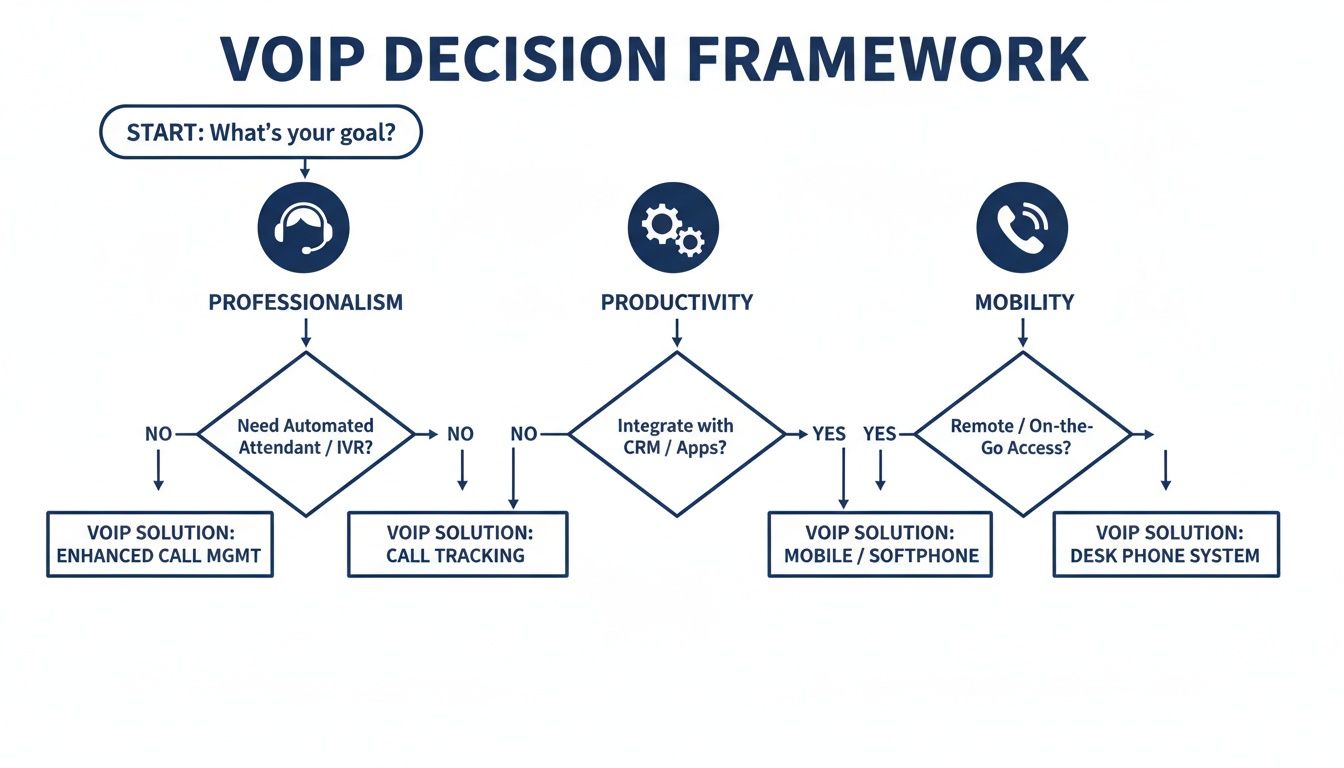
The key takeaway here is that for most small businesses, the main goals—projecting a more professional image, making the team more productive, or enabling people to work from anywhere—are best served by the features that come standard with cloud-hosted plans.
Understanding On-Premise VoIP Systems
An on-premise setup means you buy and keep all the necessary hardware in your own office. This includes the PBX (Private Branch Exchange) server, which is basically the brains of your entire phone system. This approach gives your internal IT team direct, hands-on control over how the system is configured and secured.
While having that level of control might sound good, it comes with some pretty heavy responsibilities.
- High Upfront Costs: You're responsible for buying all the servers, phones, and networking gear. This can easily run into thousands of dollars before you've even made a single call.
- Ongoing Maintenance: Your team has to handle all the software updates, security patches, and hardware repairs. If something breaks, fixing it is entirely on you.
- Limited Scalability: Adding a new employee often means buying new hardware or another license, which makes growing a slow and expensive process.
For a deeper dive into the hardware behind all this, our guide explains in detail what a PBX system is and how it works. This model was the standard for decades, but for modern, agile businesses, its rigidity is a major drawback.
The Power of Cloud-Hosted VoIP
With a cloud-hosted VoIP solution, your provider owns and manages all the complex infrastructure in their own secure data centers. You just connect to their service over the internet using IP phones or a softphone app on your computer or smartphone. For 99% of small businesses, this model is the smarter choice.
The greatest advantage of a cloud-hosted VoIP solution is the removal of the technical burden. It allows small businesses to access enterprise-grade communication tools without needing an enterprise-level IT department or budget.
The benefits are clear and directly solve the biggest headaches of an on-premise system.
- Low Initial Investment: There’s no expensive server hardware to buy. You simply pay a predictable monthly per-user fee, turning what would be a huge capital expense into a manageable operating expense.
- Expert Management and Support: The provider handles all security, updates, and maintenance. If you ever run into an issue, expert support is just a phone call away.
- Effortless Scalability: Need to add a new team member? You can add a new user to your plan in minutes right from a simple web portal.
- Built-in Business Continuity: Because the system lives in the cloud, it's protected from local problems like a power outage or internet disruption at your office. Calls can be automatically rerouted to mobile devices, making sure you never miss a customer call.
For any small business that's focused on growth, the flexibility, expert support, and cost-efficiency of cloud-hosted VoIP solutions for small business make it the clear winner.
Calculating the True Cost and ROI of VoIP
When you start looking at VoIP solutions for small business, it’s all too easy to get fixated on the monthly sticker price. But that number only tells a tiny part of the story. The real value of switching to VoIP comes from understanding the Total Cost of Ownership (TCO) and the Return on Investment (ROI), which go way beyond a simple subscription fee.
There’s a common myth that new technology is always a bigger expense. With VoIP, the opposite is almost always true. Legacy phone systems are masters of disguise, hiding costs in plain sight with separate line rental fees, shocking long-distance charges, and those surprise maintenance bills that pop up when old hardware finally gives out. VoIP flips that entire model on its head.
Beyond the Per-User Price Tag
Most modern, cloud-hosted VoIP providers operate on a simple per-user, per-month pricing model. For any small business trying to keep a tight grip on cash flow, this kind of predictability is a huge advantage. Instead of a phone bill that swings wildly from one month to the next, you get a single, all-inclusive payment.
This model rolls up a bunch of costs that used to be separate and unpredictable. Think about features like an auto-attendant, call recording, or detailed analytics—things that once required you to buy expensive, specialized hardware are now typically just baked into the service.
The real financial win with VoIP is the shift from unpredictable capital expenses (buying new hardware) and volatile operational costs (surprise repairs, fluctuating bills) to a single, predictable operating expense. This takes all the guesswork out of budgeting.
This fundamental shift is what allows you to get a much clearer, long-term picture of your real communication expenses.
Calculating Your Total Cost of Ownership
To see the savings in black and white, you need to calculate your TCO. It’s a pretty straightforward exercise that puts what you're currently spending head-to-head with what a VoIP system would cost. Start by adding up all your current phone-related bills:
- Line Rentals: That monthly fee you pay your old-school telecom provider for every single physical phone line.
- Long-Distance and International Calling Charges: These often add up fast and can be a huge variable in your monthly bill.
- Maintenance Contracts: Any service agreements you’re locked into for your on-premise PBX hardware.
- Hardware Repair or Replacement Costs: The average cost you budget for fixing or replacing broken desk phones or server parts.
- Charges for Extra Features: All those little fees for basic services like voicemail, call waiting, or three-way calling.
Once you have that total, compare it to the proposed monthly fee from a VoIP provider. For most small businesses, the direct cost savings are obvious right away. Just getting rid of line rentals and long-distance fees can lead to savings of 40% to 60%.
Finding the Hidden ROI in Productivity
While cutting costs is great, the true ROI often comes from gains in productivity. These aren't benefits you see on an invoice; they’re about empowering your team to work smarter, which has a direct impact on your bottom line.
Just think about the value of your team's time. What’s it worth to:
- Never Miss a Lead: With mobile apps and advanced call routing, sales calls always find the right person, even if they’re on the road.
- Reclaim Wasted Time: Voicemail-to-email transcription lets staff scan and prioritize messages in seconds instead of listening to them one by one.
- Improve Customer Service: Call queuing and intelligent routing slash wait times and get customers to the right department on the first try.
These small efficiencies stack up quickly. A team that can handle calls faster and more effectively is a team that can generate more revenue and build stronger customer relationships. Before you make the leap, it's also a smart move to make sure your internet connection is up to the task. You can check out our guide to find out how much bandwidth you need for VoIP to guarantee a smooth transition.
A solution like SnapDial is built to maximize this ROI with an all-inclusive pricing model that has zero hidden fees, combined with a white-glove setup that gets your team productive from day one. By looking at both the hard cost savings and the soft productivity benefits, you can see the powerful financial impact of upgrading your phone system.
How to Navigate VoIP Security and Compliance
Moving your business calls to an internet-based system is a smart move, but it's natural to wonder about security. When your team is discussing sensitive client details or hashing out internal strategy, you need to know those conversations are staying private. The good news is that top-tier VoIP solutions for small business are built from the ground up with serious security in mind.
Think of it like this: you trust your bank’s website with your financial information because it uses encryption to wrap your data in a secure, private tunnel. Modern VoIP operates on the exact same principle. It’s not just about sending your voice over the internet; it’s about sending it securely every step of the way.
The Foundation of Secure Calling
At the heart of VoIP security are two key technologies that work in tandem: Transport Layer Security (TLS) and Secure Real-Time Transport Protocol (SRTP). The names might sound technical, but what they do is actually pretty simple and incredibly powerful.
- TLS (Transport Layer Security): Think of this as the secure "handshake." It protects the initial connection when your phone communicates with the VoIP server, safeguarding things like your login credentials and call setup details. It's the same technology that adds the "s" to "https" in your web browser, creating a secure link.
- SRTP (Secure Real-Time Transport Protocol): Once that secure handshake is complete and the call connects, SRTP takes over. It encrypts the actual audio of your conversation, scrambling it into unreadable code. Even if someone managed to intercept the data packets, all they’d get is meaningless gibberish.
Together, these protocols create a fortress around your calls, protecting them from eavesdropping and unauthorized access. It’s a level of security that old-school landline technology just can't provide. A quality provider handles all this for you in the background, so your team gets secure, private communications without having to do a thing.
Meeting Industry Compliance Standards
For businesses in regulated industries, top-notch security isn't just a good idea—it's the law. If you're handling sensitive patient data or financial records, you have to meet strict compliance standards. A dependable VoIP provider gets this and will have solutions designed to help you tick every box.
When you're vetting a VoIP provider for a regulated industry, be direct. Ask them about their compliance posture. A good provider won't hesitate to be transparent about the physical, administrative, and technical safeguards they have in place to protect customer data and help you meet your legal obligations.
This is absolutely critical in fields like healthcare and finance.
- Healthcare (HIPAA): If your business handles Protected Health Information (PHI), your VoIP provider must be willing to sign a Business Associate Agreement (BAA). This is a formal, legally binding contract where they commit to implementing the safeguards required to protect patient data under HIPAA rules.
- Finance (PCI DSS, SOX): Financial firms need a provider that can show they comply with standards like the Payment Card Industry Data Security Standard (PCI DSS), especially if call recordings might capture payment information. Secure data centers and iron-clad access controls are non-negotiable.
This is where choosing a provider like SnapDial, which is built with security and compliance at its core, gives you real peace of mind. Their secure infrastructure and clear protocols mean your VoIP solution for small business isn’t just a powerful communication tool—it's a safe and compliant one.
A Practical Checklist for a Smooth VoIP Migration
Making the switch to a modern phone system shouldn't feel like a leap into the unknown. A successful transition to a VoIP solution for small business is all about smart planning, not technical wizardry.
By following a clear, step-by-step process, you can guarantee a seamless migration with zero downtime and have your team up and running from day one.

This practical checklist is designed to take all the guesswork out of the process. It breaks the entire move down into manageable phases, showing you exactly what to focus on at each stage.
Phase 1: Audit Your Current Setup
Before you can build something better, you need a crystal-clear picture of what you have right now. This initial audit is all about understanding your team's real-world needs and pinpointing the pain points your current phone system creates.
Start by asking a few fundamental questions:
- What works and what doesn't? Are dropped calls a constant headache? Do customers complain about getting stuck on hold?
- How many people need a phone line? Don't forget to include everyone from the front desk to your remote team members.
- Which features are absolute must-haves? Do you need call recording for compliance, or is a mobile app for field staff the top priority?
This isn't just a tech exercise; it's about aligning your new phone system with your actual business goals. Getting this right from the start ensures you pick a solution that solves real problems.
Phase 2: Verify Your Network Readiness
Because VoIP runs entirely over your internet connection, you need to make sure your network is up to the task. You don’t need to be a network engineer, but you do need to confirm a few basics to get that crystal-clear call quality you're after.
Your internet connection has two key speeds: download and upload. While most people fixate on download speed for things like streaming video, VoIP depends heavily on your upload speed to send your voice out clearly. A quick online speed test will give you both numbers.
As a rule of thumb, each simultaneous VoIP call needs about 100 Kbps of dedicated upload and download bandwidth.
A common mistake is assuming a fast download speed is all that matters. For VoIP, a stable and sufficient upload speed is the real key to preventing choppy, broken audio and ensuring a professional calling experience for your customers.
A good VoIP provider can help you assess your network and confirm it's ready for high-definition voice calls.
Phase 3: Plan the Logistics
With your needs defined and network confirmed, it’s time to get into the nuts and bolts of the switch. This phase is all about picking your provider, choosing the right hardware, and—most importantly—planning how you’ll keep your existing phone numbers.
-
Select Your Provider and Hardware: Choose a provider that offers the features and support you actually need. A provider like SnapDial can offer a white-glove setup, managing the entire process for you. They can also supply pre-configured IP phones that are ready to go right out of the box.
-
Plan Your Number Porting: This is the process of moving your existing phone numbers from your old carrier to your new VoIP provider. It is a critical step that has to be managed carefully to avoid any service interruption. Your new provider will handle the technical side, but you’ll need to give them a recent copy of your phone bill to get the ball rolling.
-
Design Your Call Flows: This is where you map out exactly how you want calls to be handled. Who answers first? What happens if they’re busy? This is where you'll script your Auto Attendant greeting ("Press 1 for Sales…") and set up hunt groups that ring multiple people to make sure every call gets answered.
Phase 4: Train Your Team
The final step is making sure your team feels comfortable and confident using the new system. A flawless technical rollout won't matter one bit if your employees don't know how to use the new tools.
Focus on practical, hands-on training for the features they’ll use every single day:
- How to transfer a call
- How to check voicemail from the mobile app
- How to start a three-way conference call
A hands-on provider will often include team training as part of the migration. This support ensures your business starts reaping the productivity benefits of your new VoIP solution for small business immediately.
Got Questions? We've Got Answers
Making the final call on a new phone system can feel like a big step. It's totally normal to have a few lingering questions before you flip the switch. When businesses explore a VoIP solution for small business, we find the same practical concerns pop up again and again.
Let's tackle the most common questions head-on. Getting clear, straightforward answers will help you move forward with confidence.
Will My Call Quality Be as Good as a Landline?
This is usually the first thing people ask, and the answer is simple: yes, as long as your internet connection is solid. In fact, modern VoIP often delivers better quality. It uses high-definition (HD) voice technology, which makes conversations sound richer and clearer than an old-school analog line ever could. The only real requirement is decent bandwidth.
Here's a good rule of thumb: if your team can stream videos or join a web conference without constant buffering, your network is more than ready for VoIP. Any choppiness or dropped calls on a VoIP system almost always points back to a shaky internet connection, not the phone service itself. A good provider will help you double-check your network's readiness before you even start.
Can I Keep My Existing Business Phone Numbers?
Absolutely. You don't have to give up the numbers your customers already know and trust. This process is called number porting, and it's a standard, crucial part of moving to any new provider. Your phone numbers are a core business asset, and they belong to you.
Your new VoIP provider manages the entire transfer for you. They coordinate with your old carrier behind the scenes to move the numbers over seamlessly. All you typically have to do is provide a copy of a recent phone bill to authorize the switch, and they handle the rest. The best part? There’s no disruption to your business while it happens.
Don't worry about losing your numbers. Porting is a well-established, regulated process. Federal rules ensure you can take your phone numbers with you to any new service provider you choose.
What Happens to My Phone Service if the Internet Goes Out?
This is a great question, and it actually highlights one of the biggest advantages of a cloud-hosted VoIP system. An old landline in your office is completely dead during an outage. A cloud system, however, has powerful fail-safes built right in.
Because the "brain" of your phone system lives in the cloud, not in your office, it keeps working even if your local internet goes down. You can have it automatically forward all incoming calls to other numbers, like your team's cell phones or even a backup line. This means your customers can still reach you, your business stays open, and you never miss an important call.
Ready to see how a modern phone system can actually simplify your business communications? The team at SnapDial offers a white-glove setup process, handling everything from number porting to team training at no extra cost. Discover a better way to stay connected with SnapDial.