
So you’re ready to move to a modern VoIP phone system, but you're staring at a mountain of perfectly good analog desk phones. Do you really have to throw them all out and start from scratch? Not necessarily. This is where a small but mighty device called a VoIP to analog phone adapter, or ATA, comes into play.
An ATA is a simple piece of hardware that acts as a translator, letting your old-school analog phones "speak" to a new, internet-based phone service like SnapDial. It's the bridge that connects your reliable, familiar hardware to the powerful features of a digital phone system.
What Is a VoIP to Analog Phone Adapter?
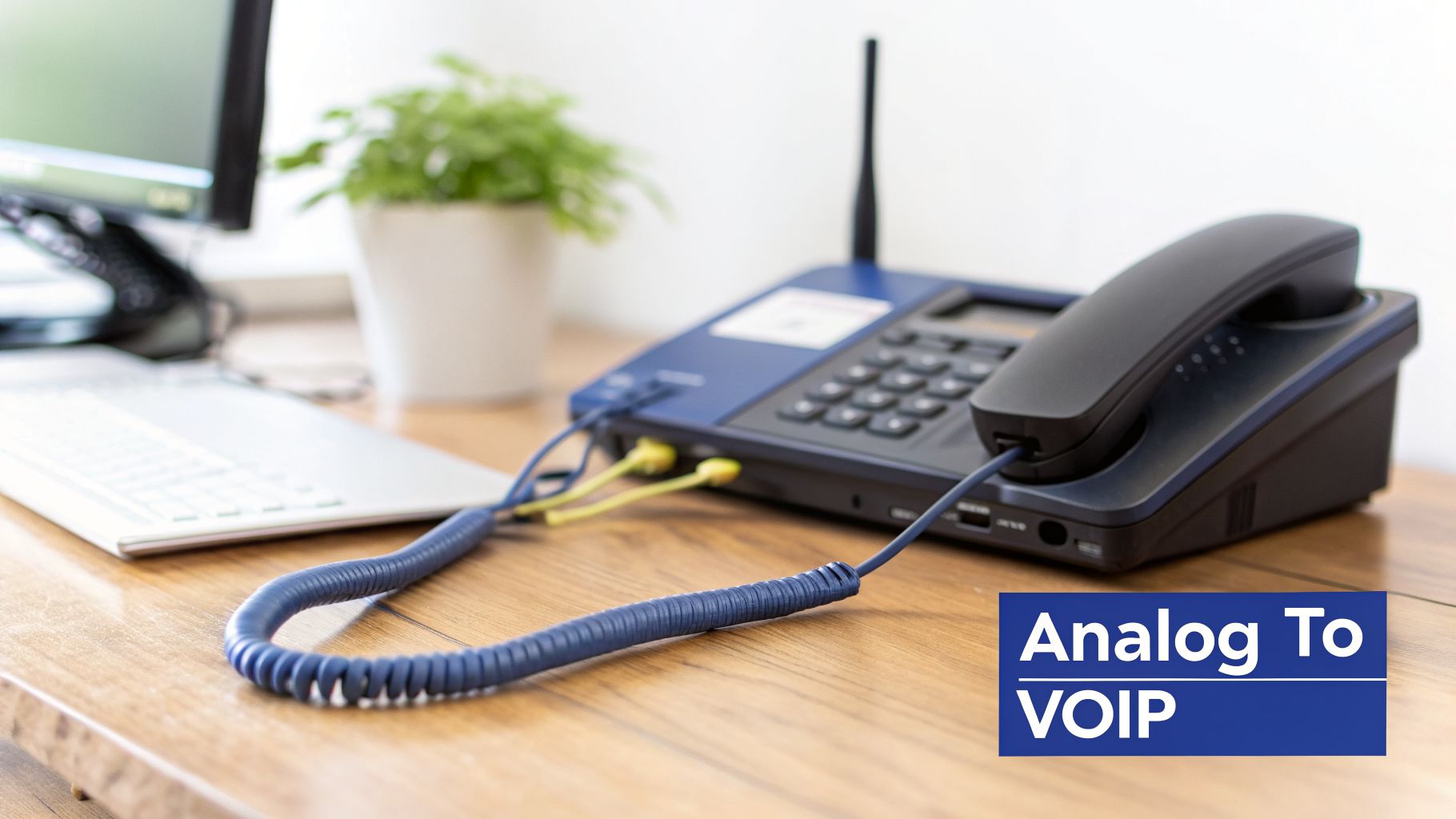
Think of an ATA as a language converter for your phone lines. Your traditional phones understand analog signals—the same technology that has powered landlines for a century. Modern VoIP systems, however, speak a digital language, sending call data in packets over the internet.
The adapter plugs into your internet router and your analog phone, bridging that communication gap. When a call comes in, the ATA grabs the digital signal from the internet, converts it into an analog tone your phone understands, and makes it ring. When you talk, it does the reverse, converting your analog voice into digital packets to send back out.
Bridging Old and New Technology
The main reason businesses use a voip to analog phone adapter is simple: to save money and avoid disruption. Many companies have a significant investment in hardware like desk phones, fax machines, or even overhead paging systems that still work perfectly fine.
An ATA is the key that unlocks modern business communication features for legacy hardware. It provides a cost-effective pathway to upgrade your phone system without the disruption and expense of a complete hardware overhaul.
This little box allows you to connect those trusty devices to a feature-rich VoIP platform. Suddenly, that basic desk phone that has been on your desk for years can tap into a whole new world of capabilities.
Some of the powerful features you can unlock include:
- Auto-Attendant (IVR): Greet callers with a professional menu to route them to the right department.
- Call Recording: Automatically record and archive important conversations for training or compliance.
- Mobile Integration: Route calls from your desk phone to your mobile device, so you never miss a call.
- Visual Voicemail: Receive voicemails as audio files and text transcriptions directly in your email.
The Signal Flow Demystified
The setup itself is surprisingly simple. The ATA just sits between your internet connection and your analog phone. For an incoming call, the journey looks like this:
- A call comes into your VoIP number and travels over the internet to your router.
- Your router passes the digital call data to the ATA.
- The adapter translates the digital signal into an analog one, making your phone ring.
- You pick up and have a conversation, just like you always have.
And it’s not just for phones. These adapters are versatile tools that can connect almost any traditional analog device to modern cloud-based phone systems like 3CX. This makes an ATA a smart, strategic tool for any business looking to modernize its communications without having to fund a massive hardware replacement project right away.
Why Your Business Might Need an ATA Adapter
Understanding what an adapter does is one thing; seeing how it solves real business problems is another. A VoIP-to-analog phone adapter is more than just a piece of tech—it's a smart, strategic tool for any business looking to modernize without breaking the bank. It's the perfect fix for some very common situations.
Take a small business with a dozen perfectly good analog desk phones. Switching to a VoIP service like SnapDial offers huge savings and powerful features, but the idea of replacing every single handset can be a dealbreaker. An ATA wipes that problem out, letting the business slash its phone bill immediately without a massive upfront hardware cost.
Embracing Practicality in Tough Environments
Let's be honest: in many work environments, a delicate, screen-based IP phone just isn’t going to cut it. An adapter lets you keep using simple, durable analog phones that can take a beating while still connecting to your modern cloud phone system.
Think about these places where an ATA is the obvious, practical choice:
- Warehouses and Manufacturing Floors: In loud, dusty, or high-traffic areas, a sturdy, button-based analog phone is far more resilient than a complex IP phone.
- Hotel and Motel Rooms: Outfitting hundreds of guest rooms with expensive IP phones is a major capital expense. ATAs let you provide reliable in-room phone service with cheap, easy-to-replace analog handsets.
- Service Counters and Common Areas: For places like lobbies, break rooms, or courtesy phones, a basic analog phone hooked up to an adapter gives you all the function you need without the unnecessary cost or complexity.
This approach gives you the best of both worlds: the rugged reliability of old-school hardware powered by the smarts of a cloud-based PBX.
By connecting existing analog hardware to a VoIP network, businesses can unify communications across multiple locations, cut telephony costs by 40-70%, and gain features that were once only available to large enterprises.
This trend is a huge reason the analog telephone adapter market is projected to hit USD 1.5 billion by 2033. It’s being driven by businesses all over the world looking for a cost-effective path to VoIP without tossing out perfectly good hardware.
Unifying Disconnected Systems
Another powerful use for ATAs is in companies with multiple locations. Imagine a business with offices in three different cities, each with its own old-school phone system. It’s a disconnected mess that makes it a pain to transfer calls or manage a single company directory.
A multi-port ATA, or VoIP gateway, can tie it all together. By installing adapters at each location, all the analog phones can be brought onto a single SnapDial cloud PBX. All of a sudden, an employee in one city can seamlessly transfer a call to a colleague's desk phone a thousand miles away, making the entire company operate as one cohesive system. It creates a unified front for your customers and simplifies life for your team. If you're weighing the pros and cons of this switch, you can learn more about the differences between VoIP and traditional phone systems in our guide.
Finally, an adapter is key for modernizing more than just phones. Lots of businesses still rely on fax machines for certain workflows. An ATA lets you connect your trusty fax machine to SnapDial's network, allowing it to work side-by-side with our integrated cloud faxing service. This ensures every piece of your communication hardware—new and old—is part of a single, modern platform.
How to Choose the Right VoIP Adapter
Picking the right VoIP to analog phone adapter isn't just a small technical detail—it’s the critical decision that ensures your reliable old phones work perfectly with your new, powerful VoIP service. A mismatch here can cause headaches like poor call quality or devices that just won't connect. Get it right, and your transition to a system like SnapDial will feel seamless.
So how do you choose? It really comes down to what you’re trying to connect. Are you hooking up a single phone in a quiet office, or are you bringing a whole floor of existing handsets into the modern era? The scale of your setup is the first thing to figure out.
Decoding Ports: FXS vs. FXO
When you start browsing for adapters, you'll immediately run into two terms: FXS and FXO. Getting these straight is the key to buying the right hardware.
Think of it like this:
- FXS (Foreign Exchange Station) Port: This is the port that gives you a dial tone. It's where you plug in your actual analog device, like your trusty desk phone or fax machine. The "S" is for "station" or "subscriber"—the end user's gear.
- FXO (Foreign Exchange Office) Port: This port is designed to connect to an outside phone line, like a traditional copper line from the phone company. It receives a dial tone. You'd only really need an FXO port if you were building a hybrid system or wanted a backup analog line.
For most businesses making the jump to a cloud VoIP provider like SnapDial, your focus will almost always be on the number of FXS ports. Each analog device you want to keep needs its own FXS port.
Single-Port ATAs vs. Multi-Port Gateways
This brings us to the next big question: how many devices are you connecting? Your needs will likely fall into one of two camps. A standard voip to analog phone adapter, often just called an ATA, usually has one or two FXS ports. This is perfect for a home office, a single desk, or connecting that one essential fax machine.
But what if you have a whole office full of analog phones? That's where a VoIP Gateway comes in. Think of these as supercharged ATAs built for business, offering anywhere from 4 to 32 or even more FXS ports in a single box. They're designed to handle a much higher volume of calls and are the go-to solution for connecting entire offices to a VoIP service.
The market for these more powerful analog VoIP gateways is growing fast and is on track to hit USD 3.2 billion by 2033. Why? Businesses are discovering they can cut costs by 40-70% by integrating their existing hardware with cloud phone systems. For a provider like SnapDial that offers a white-glove setup, these gateways are the perfect tool for migrating large offices efficiently. You can see more on the trends driving this market growth on verifiedmarketreports.com.
ATA vs IP Phone: A Quick Comparison for Your Business
When moving to a VoIP system, you’ll face a key decision: use an ATA to keep your old phones, or invest in new, native IP phones? Neither choice is inherently better; it all depends on your budget, your team's needs, and your long-term goals. An ATA is a great bridge, but a new IP phone unlocks the full potential of your cloud system.
This table breaks down the practical differences to help you decide which path makes the most sense for your business.
| Feature | VoIP to Analog Phone Adapter (ATA) | Native IP Phone (e.g., Yealink) | Best For |
|---|---|---|---|
| Initial Cost | Lower (preserves existing hardware) | Higher (requires new phone purchase) | Businesses on a tight initial budget looking to get started quickly. |
| Feature Access | Basic calling, voicemail, caller ID | Full access to advanced features (HD voice, BLF, video calls, presence) | Teams that need modern collaboration tools and high-definition audio. |
| Setup Complexity | Simple plug-and-play for a few devices; more complex for many | Very simple; phones are pre-configured and auto-provision | Businesses that want a zero-touch, "plug-it-in-and-it-works" experience. |
| Call Quality | Good, but limited by the analog phone | Excellent (HD Voice is standard) | Companies where crystal-clear audio quality is a top priority. |
| Scalability | Good for fixed setups; adding more requires new ATAs | Excellent; new users can be added and provisioned instantly | Growing businesses or those with changing staffing needs. |
Ultimately, an ATA is a fantastic, cost-effective tool for bridging the gap, especially for common area phones or fax machines. But for your power users—your sales team, your support agents, your executives—a native IP phone will deliver a richer, more efficient experience that justifies the investment.
Essential Features for Quality and Compatibility
Beyond just the number of ports, a few other features are absolutely non-negotiable. These are what guarantee a smooth experience and fantastic call quality with a service like SnapDial.
Choosing an adapter isn't just about making the phone ring; it's about ensuring every call is as clear, reliable, and secure as it would be on a native IP phone. Skimping on key features can undermine the benefits of your VoIP upgrade.
Make sure any adapter you consider has these critical capabilities:
- SIP Protocol Support: The Session Initiation Protocol (SIP) is the industry standard for VoIP. Your adapter must support SIP to work with virtually any modern provider, including SnapDial. It's the language all these systems use to talk to each other.
- HD Voice Codecs (G.722): A codec is what turns your voice into digital data and back again. Basic ones get the job done, but for that crystal-clear, "in the room" audio quality, you need support for HD codecs like G.722. Without it, calls can sound tinny or muffled.
- T.38 Protocol for Faxing: If you plan on connecting a fax machine, this is a must-have. The T.38 protocol is specifically designed to send faxes reliably over the internet. Standard voice codecs often fail, leading to incomplete or garbled transmissions, but T.38 solves that problem.
A Simple Guide to Setting Up Your Adapter
Getting your hands dirty with new hardware can feel a little daunting, especially when it involves your business phone line. But setting up a voip to analog phone adapter is actually one of the more straightforward jobs you'll run into.
Even if you have an IT pro handling the work, knowing how the pieces fit together gives you a better grasp of the technology. It really just comes down to plugging in a few cables and telling the device how to talk to your phone provider, like SnapDial. Once that's done, your trusty old analog phone is ready to make calls over the internet.
A High-Level Look at the Setup Steps
While the exact menus might look a little different between brands like Grandstream or Cisco, the basic playbook is almost always the same. It's a logical flow that takes you from an unplugged box to a working dial tone in just a few minutes.
Here’s a quick overview of what that process typically looks like:
Connect the Hardware: Start by plugging an Ethernet cable from the adapter's internet port into your router. Then, plug your analog phone's cord into the adapter's phone port (labeled "FXS"). Last, plug in the power.
Access the Configuration Interface: With the adapter powered on, you'll log into its setup page from a computer on the same network. This feels a lot like logging into your Wi-Fi router at home.
Enter Your SIP Credentials: This is the magic step. Your VoIP provider—SnapDial, in this case—will give you a unique SIP server address, username, and password. You'll type this info into the adapter's setup menu so it can get authorized on our network.
Save and Reboot: After you've entered the credentials, you just save the settings. The adapter will restart, and once it's back online, you’ll see a solid status light. That's your cue. Pick up the phone, and you'll hear a dial tone.
This simple guide breaks down the core pieces—Ports, Protocol, and Voice—that all come together for a successful setup.
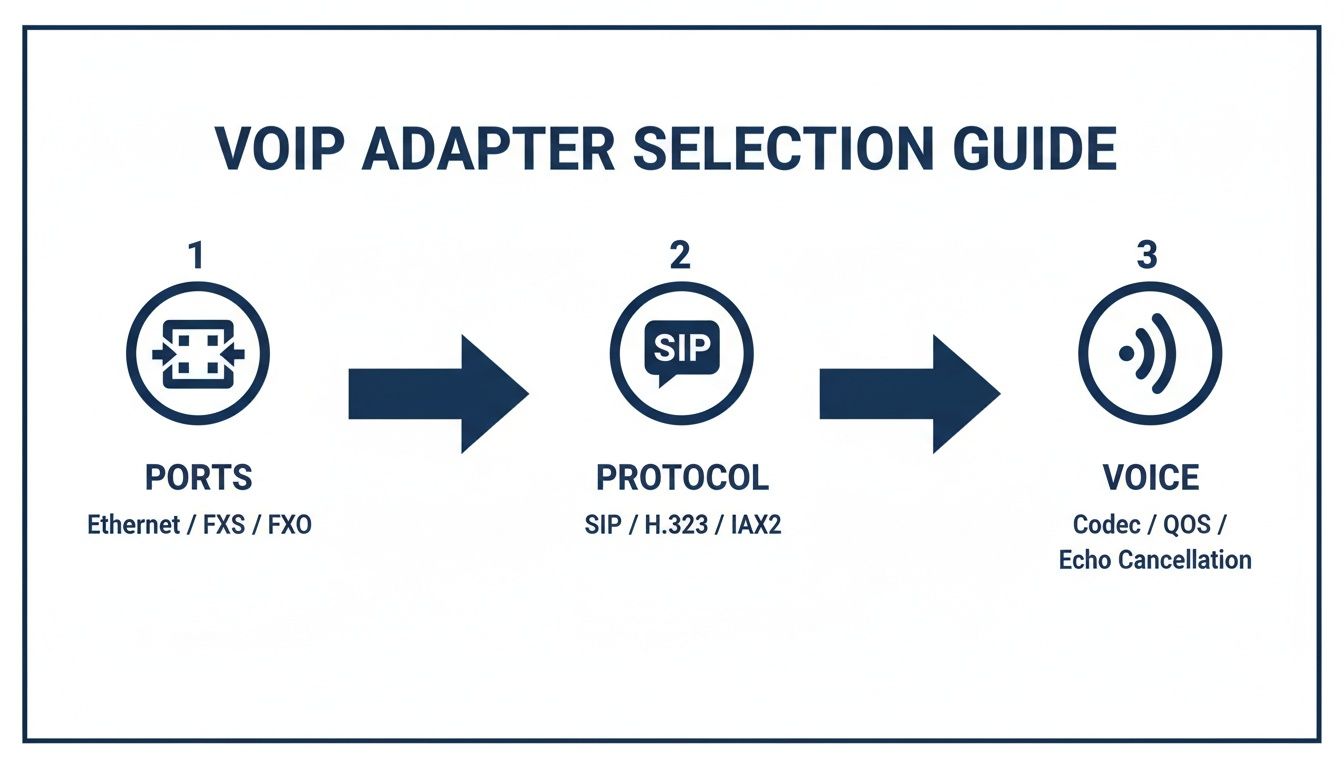
As you can see, a successful installation is all about making sure the hardware's ports and protocol (SIP) match your service's requirements to deliver that crystal-clear voice quality.
The White-Glove Advantage with SnapDial
Reading through those steps, you might be thinking that terms like "SIP credentials" and "web interface" sound like a job for an IT department. And that’s completely fair. While the process is logical, it does demand a certain level of technical comfort, and a small typo can lead to a lot of frustration.
This is exactly why SnapDial offers a 100% free white-glove setup for every single customer. We believe your switch to a modern phone system should be completely seamless, with zero technical headaches for you or your team.
What does that actually mean for you? It means you can forget the setup guide entirely. Our Texas-based provisioning team handles everything for you before a single box leaves our office. We pre-configure every adapter and phone specifically for your account.
When the hardware arrives at your door, it’s truly plug-and-play. With our service, the entire setup process is this simple:
- Step 1: We ship a pre-configured adapter directly to you.
- Step 2: You plug it into your router and your phone.
- Step 3: You pick up the phone and make a call.
There is no Step 4. We absorb all the technical complexity so you can stay focused on what you do best—running your business. This hands-off installation guarantees a zero-downtime migration, making your switch to VoIP effortless from day one.
Optimizing Performance and Securing Your Connection
So, your old analog phone has a new dial tone, thanks to the VoIP adapter. That’s a great first step, but getting it online is only half the battle. Now comes the important part: fine-tuning its performance for crystal-clear calls and locking down the connection to keep your business communications safe.
Think of your office internet like a highway. Just as a highway needs an express lane for emergency vehicles, your network needs to give voice calls top priority. This is where Quality of Service (QoS) comes in. By setting up QoS on your router, you're telling your network to let voice data zip past less urgent traffic, like big file downloads or emails.
Prioritizing Voice for Flawless Calls
Without QoS, your call data gets thrown into the slow lane with everything else. When the network gets busy, those voice packets can get stuck in traffic, delayed, or arrive out of order. The result? All those annoying call quality issues we’ve all experienced.
A proper QoS setup is your best defense against these common problems:
- Jitter: This is when voice packets show up in the wrong sequence, making the conversation sound choppy or garbled. QoS keeps them flowing in a smooth, orderly stream.
- Lag: Also called latency, this is that awkward delay between you speaking and the other person hearing you. Prioritizing voice traffic cuts this delay down significantly.
- Dropped Calls: During heavy network congestion, voice packets can get lost completely, causing your call to disconnect. QoS makes your connection far more resilient.
Of course, even the best traffic management can't fix an undersized road. You also need enough internet speed to handle your call volume. Check out our guide to find out how much bandwidth you need for VoIP and make sure your connection is up to the task.
Locking Down Your Adapter Security
A VoIP adapter is, at its core, a small computer connected to the internet. That means it needs the same security attention you’d give any PC on your network. Unsecured adapters are a prime target for hackers looking to make fraudulent calls on your dime or even eavesdrop on your conversations. Luckily, a few basic steps will dramatically improve your security.
Modern adapters are designed to be part of a secure system. With the right configuration, security upgrades are capable of blocking 95% of common threats. This is critical as 80% of SMBs report improved mobility and 25% fewer missed calls after switching to VoIP—benefits that depend on a secure, reliable connection.
These security practices are simply non-negotiable:
- Change Default Passwords: This is the very first thing you should do. Leaving the factory-set username and password on your adapter is like leaving the key to your office under the doormat.
- Enable Encryption: Make sure to turn on call encryption protocols like TLS (Transport Layer Security) and SRTP (Secure Real-time Transport Protocol). TLS encrypts the call signaling (the setup info), while SRTP encrypts the actual audio of your conversation, making it nearly impossible for anyone to listen in.
- Keep Firmware Updated: Manufacturers regularly release firmware updates to patch security holes. Routinely checking for and installing these updates is one of the easiest ways to protect your adapter from the latest known threats.
While you're at it, understanding the basics of network settings, including how to manage a TCP/IP port, can be helpful for fine-tuning your setup. Taking these steps, combined with SnapDial’s inherently secure platform, creates multiple layers of protection for your business communications. This reliability is a huge reason the VoIP phone adapter market continues its rapid expansion. You can read more about the VoIP market's projected growth on htfmarketinsights.com.
How to Troubleshoot Common Adapter Issues
Even the most reliable hardware can have a bad day. While your voip to analog phone adapter is built to be a workhorse, you might occasionally run into a hiccup—usually caused by a small network glitch or a simple misconfiguration.
The good news? Most of these problems have straightforward fixes you can handle in minutes. Before you start digging into complex settings, always check the basics first. Are the cables plugged in tight? Does the adapter have a solid green light, showing it’s powered on and registered? You’d be surprised how often just checking the physical connections solves the problem.
Solving No Dial Tone
Picking up the phone and hearing nothing but silence is one of the most common issues. It almost always means your adapter has lost its connection to your VoIP provider’s network.
Here’s a quick troubleshooting checklist to get your dial tone back:
- Check the Internet Connection: First, can you get online from a computer on the same network? If the internet is down, the problem is with your service provider, not the adapter.
- Verify SIP Registration: Log in to your adapter's web-based admin panel. Find the status page and look for the SIP account status. If it says "Unregistered" or "Failed," it's not connecting to the phone service.
- Reboot Your Hardware: The classic "turn it off and on again" works wonders for a reason. Unplug your internet router, the ATA, and your phone. Give it a full 60 seconds, then plug everything back in, in order: router first, then the adapter, and finally the phone.
Fixing One-Way or Choppy Audio
Ever been on a call where you can hear them perfectly, but they can't hear you? That's called one-way audio. This, along with sound that’s choppy or garbled, is a classic sign of a network problem where voice data packets are getting lost or blocked along the way.
The usual suspect is a router setting called SIP ALG (Application Layer Gateway). This feature is supposed to help VoIP traffic, but in reality, it often ends up corrupting it, causing one-way audio and dropped calls. The fix is usually as simple as turning it off. You can find out how in our guide on what SIP ALG is and how to disable it.
Quick Tip: If turning off SIP ALG doesn't do the trick, take a look at your router's firewall settings. A firewall that's too restrictive can block the very ports VoIP needs to send and receive audio, creating similar problems.
When You’re Never on Your Own
Let's be honest—troubleshooting is a hassle, and your time is better spent running your business. While these steps solve a lot of common adapter issues, you shouldn't have to play the role of your own IT expert. The most effective troubleshooting step is often the simplest: calling for help.
That's why at SnapDial, we don’t just sell you a phone service; we stand behind it. Our 24/7 Texas-based support team is always ready to hop on a call and solve any issue for you, big or small. We can securely access your adapter, figure out what's wrong, and get you back up and running fast—taking the entire troubleshooting burden off your shoulders.
Frequently Asked Questions About VoIP Adapters
Even after digging into the details, it's normal to have a few questions floating around. Making a change to your phone system is a big deal, and you want to be sure you have all the facts straight.
Let's tackle the most common questions we hear from business owners about using a VoIP to analog phone adapter, so you can feel confident in your decision.
Can I Keep My Business Phone Number with an ATA?
Yes, absolutely. Your phone number isn't chained to your old hardware; it's tied to your service. When you move to a modern VoIP provider like SnapDial, we can easily port your existing business number over.
The process is seamless. Your customers won't notice a thing, and you get to keep the number they already know and trust. The voip to analog phone adapter is just the bridge that makes your old phone work with the new cloud service. Our team at SnapDial handles the entire number porting process for you, taking care of all the technical details behind the scenes.
Will My Old Fax Machine Work with a VoIP Adapter?
You can definitely plug a traditional fax machine into an adapter's phone port (FXS). But, I'll be honest—sending faxes over the internet, known as Fax over IP (FoIP), can be a bit flaky.
While the T.38 protocol was designed for this, even small network hiccups can cause faxes to fail. For critical business documents, that's a risk you probably don't want to take. That's why SnapDial includes a dedicated cloud faxing feature with our service. It lets you send and receive faxes securely through email, which is far more reliable, efficient, and easier to track.
How Many Phones Can I Connect to One Adapter?
That all depends on the specific model you get. Standard adapters are meant for small-scale use and usually have one or two phone ports, which are called FXS ports. This is perfect for hooking up a single desk phone or maybe that one conference phone you can't part with.
If you need to connect an entire office full of analog phones, you'd actually use a 'VoIP Gateway.' Think of this as a super-sized adapter with anywhere from 4 to 32+ ports, built specifically for larger deployments.
These gateways are the go-to solution for bringing a whole fleet of existing phones onto a modern cloud system without having to buy all new hardware.
Is Call Quality Worse with an Adapter?
Not at all—as long as everything is set up correctly. The call quality you experience has less to do with the adapter itself and more to do with your internet connection and your service provider.
Modern ATAs fully support HD voice codecs like G.722, which deliver audio that's just as crisp and clear as a native IP phone. To get that great quality, you just need three things working together:
- A quality adapter that can handle HD audio.
- A stable, high-speed internet connection.
- A provider like SnapDial that delivers high-definition voice across its entire network.
When those three pieces are in place, the sound quality on your old analog phone will be fantastic, making sure every business conversation is crystal-clear.
Ready to modernize your business communications without replacing all your hardware? The team at SnapDial offers a completely free, white-glove setup to get you started, pre-configuring every device so your transition is truly plug-and-play. Learn more about how SnapDial can seamlessly integrate your existing phones into a powerful cloud system.