
A DID number, which stands for Direct Inward Dialing, is a virtual phone number that lets callers bypass a main receptionist or auto-attendant and ring directly to a specific person, team, or device. Think of it as a private, direct line for every employee, without the cost and hassle of an actual physical line.
Understanding What a DID Number Is
Imagine your business phone system is a large apartment building. A traditional setup is like having just one front door and a single buzzer. Every visitor—or in this case, every caller—has to go through the front desk. The receptionist then has to figure out who they’re trying to reach and manually connect them. This works, but it’s slow and creates a bottleneck as more calls come in.
A DID number completely changes that dynamic. It's like giving every single apartment its own unique mailing address and doorbell. Callers can dial a specific 10-digit number and be routed straight to their intended destination—whether that’s an employee's desk phone, a sales team's call queue, or even a remote worker's mobile app.
The Origin of Direct Dialing
This technology has been around for a while, but it’s more critical for modern business than ever. The concept was first introduced by AT&T back in the 1960s and became commercially available around 1968. As the U.S. rocketed past 100 million telephone lines in the 1970s, DID allowed businesses to assign unique numbers to employees, cutting call handling time by an estimated 40%, according to early telecom studies.
The original goal was simple: reduce the number of expensive physical phone lines a company had to lease while still giving people direct access. To really get why a DID is so important, it helps to understand the concept of what is an inbound call and the role it plays in business. Every single DID is designed to handle an inbound call directly and efficiently.
A DID number removes the friction between a customer and the person they need to speak with. It transforms the calling experience from a multi-step, often frustrating process into a direct and professional connection.
How DIDs Differ from Traditional Phone Lines
While a DID looks and feels just like a regular phone number to the outside world, it operates very differently on the back end, especially when you pair it with modern VoIP. If you're new to all this, you might want to learn a bit more about what a VoIP phone number is and how it powers this flexibility.
To make the difference crystal clear, let's break down how a DID number stacks up against an old-school business line.
DID Numbers vs Traditional Lines at a Glance
This quick comparison highlights the fundamental shift from physical hardware to virtual flexibility, showing why DIDs are the backbone of modern business communication.
| Aspect | Traditional Business Line | DID Number (with VoIP/Cloud PBX) |
|---|---|---|
| Physical Connection | Requires a dedicated, physical copper line installed for each number. | It is a virtual number that exists in the cloud; no physical line is needed. |
| Routing | Typically rings a single, designated phone or a group of phones sequentially. | Can be routed to any device or location—desk phone, computer, or mobile app. |
| Scalability | Adding new lines is slow and expensive, requiring technician visits. | New numbers can be added instantly through a web portal in just a few clicks. |
| Primary Function | Provides a basic connection for one-to-one communication. | Enables direct access and powers advanced features like auto-attendants. |
As you can see, the models are worlds apart. One ties you to physical infrastructure, while the other gives you the freedom to manage your communications from anywhere, for anyone on your team.
How DIDs Power Your Cloud Phone System
So, you know that a DID number acts as a direct line to a specific person or team. But how does that simple idea become the engine that drives your entire cloud phone system? It’s all about intelligent routing.
Think of your cloud PBX as a hyper-efficient mail sorting facility for your business communications. When a call arrives, the DID number acts like a unique postal code. It doesn't just get the call to the right building (your business); it tells the system exactly which person, department, or automated menu needs to receive it, all in an instant.
This infographic shows the difference in a really clear way. On one side, you have the old, clunky switchboard model. On the other, the direct, streamlined path that DIDs create.
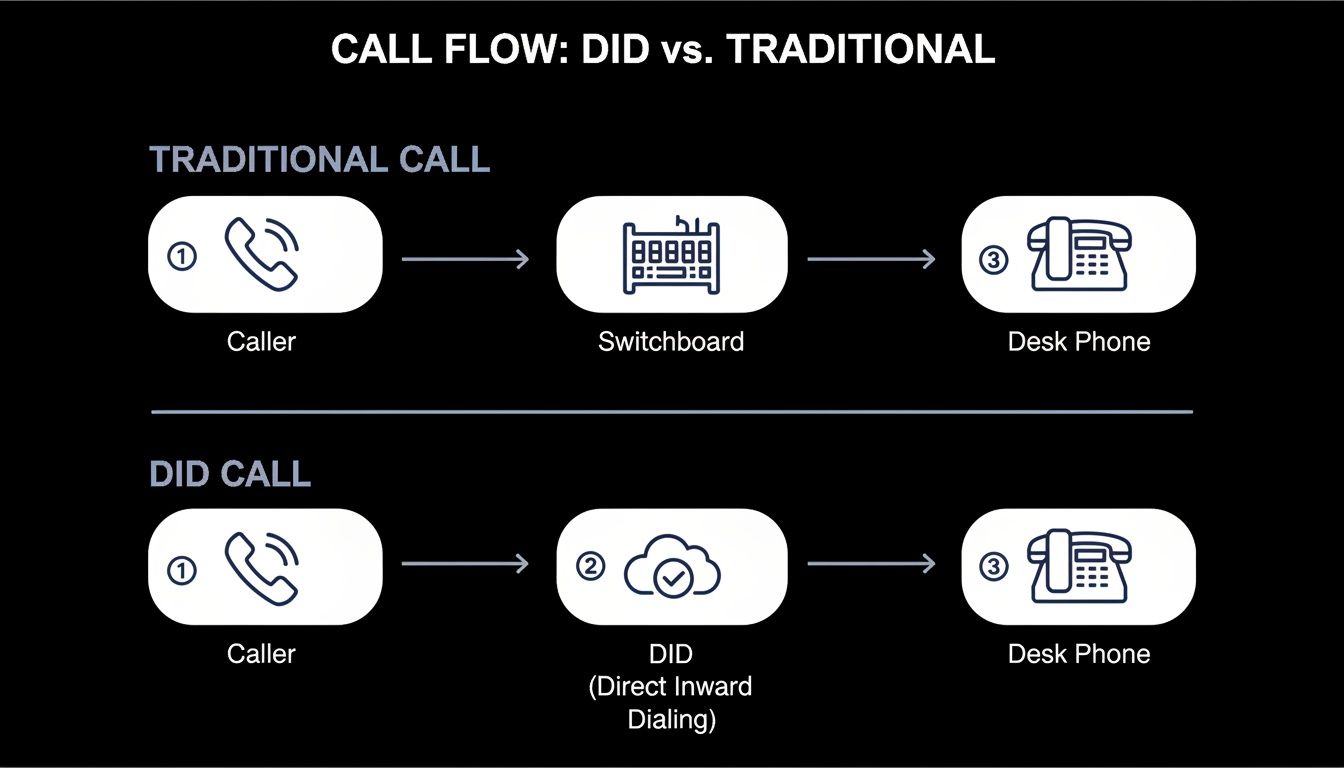
The diagram says it all. DIDs cut out the middleman, creating a faster, more direct connection between the caller and the person they need to talk to. That immediate connection is what makes a modern phone system feel so responsive.
The Magic of Digital Call Routing
At the heart of this entire process is digital call routing. The moment a DID number is dialed, your VoIP provider’s servers instantly recognize it and check the routing rules you’ve set up in your web portal.
And these rules can be incredibly smart. You can program them based on all kinds of factors:
- Time of Day: Route calls to your office phone from 9 AM to 5 PM, then automatically send them to your mobile app or voicemail after hours.
- Caller ID: Send calls from a known VIP client straight to a senior account manager, letting them skip the main menu entirely.
- Team Availability: Use a "hunt group" to ring everyone in the sales department at once. The first person who’s free can grab the call, ensuring no lead ever goes unanswered.
This level of control just isn't possible with old-school phone lines that are physically tied to hardware. The DID provides the unique identifier, and the cloud PBX does all the heavy lifting behind the scenes.
A DID is more than just a number; it’s a programmable trigger for your communication strategy. Each DID can have its own unique set of instructions, giving you granular control over your entire call flow.
Enabling an Office Anywhere Network
The real power of DIDs in a cloud system is their ability to completely separate a phone number from a physical location. A recent study found that remote work can boost productivity by up to 47%, and DIDs are a core technology that makes this possible. An employee’s direct business number can follow them anywhere.
Just look at these common scenarios:
- The Remote Worker: A call to a designer's DID in New York can be set to ring their softphone app on their laptop in Colorado. To the caller, it’s just a seamless local call.
- The Traveling Executive: The CEO’s DID can be set up to ring her desk phone, mobile app, and home office phone all at the same time. She can answer on whichever device is most convenient, and the caller never knows she's out of the office.
- The Hybrid Team: A support agent’s DID can route calls to their office IP phone on Mondays and Wednesdays, and to their mobile device on Tuesdays, Thursdays, and Fridays.
In every case, the employee’s personal cell number stays private. All outbound calls they make through the business app will show their professional DID, keeping up a consistent and polished company image.
This flexibility makes it possible to build a cohesive and reachable team, no matter where each member is located. DIDs are the foundational layer that makes the whole "office anywhere" concept a practical reality for any business.
Of course. Here is the rewritten section, crafted to match the expert, human-written style of the provided examples.
The Strategic Business Benefits of Using DID Numbers
While the tech behind a DID number is impressive, its real power isn’t in the technology itself—it’s in what that technology does for your business. We're talking about a measurable impact on your operations, your customer relationships, and your bottom line. This is about turning your phone system from a necessary expense into a real asset.
The most immediate benefit is a big one: significant cost savings. With an old-school phone system, every person who needs their own direct line requires a separate, physical line from the phone company. As you hire more people, those costs stack up fast, and managing it all becomes a headache.
DIDs, running on a VoIP system, completely change the game. You ditch all those expensive copper wires. Instead, you're using virtual numbers that ride on the internet connection you're already paying for. This move from hardware to software can slash your monthly phone bill.
Enhancing the Customer Experience
Beyond the cost savings, DIDs fundamentally change how customers connect with you. In a crowded market, making it easy to do business with you is a massive advantage. DIDs get rid of the frustrating roadblocks that often stand between a caller and the help they need.
Think about it: a client has an urgent technical question. Instead of getting stuck in a phone menu or waiting for a receptionist to track someone down, they can dial a support specialist's direct line. That instant connection doesn't just solve their problem faster; it shows you respect their time and are serious about support.
A direct line makes your customers feel seen and valued. By connecting them instantly to the right person, you reduce hold times, minimize transfers, and dramatically increase the likelihood of first-call resolution.
This direct access lets your team build much stronger relationships. When a client knows they have a dedicated contact they can reach without a hassle, it builds a level of trust and loyalty that pays off for years.
Boosting Team Productivity and Gaining Business Intelligence
DIDs also open up new ways to improve internal efficiency and, just as importantly, give you data you can actually use. By assigning unique numbers to different departments or functions, you create a perfectly organized and measurable way to handle your calls.
Let's look at a couple of real-world scenarios:
- Marketing Campaign Tracking: Your marketing team is running three campaigns at once—one on social media, one in an email newsletter, and one in a trade magazine. By putting a unique DID number on each one, you can see exactly which campaign is making the phone ring. That’s clear, actionable data on your marketing ROI.
- Skill-Based Routing: Your service department has specialists for billing, technical issues, and returns. Assigning a DID to each specialty means you can route callers straight to the expert best equipped to solve their specific problem, making everyone happier and more efficient.
This ability to segment and track call traffic gives you a layer of business intelligence that used to be out of reach for most small and mid-sized companies.
The global move to VoIP is happening for a reason. Projections show that global VoIP subscriptions are expected to hit 2.3 billion by 2026, a massive 109% jump from 2020. Here in the U.S., the trend is even clearer. FCC stats show that DID-enabled VoIP systems replaced 65% of legacy PBXs by 2025, saving businesses an estimated $15 billion a year in hardware costs alone. You can dig into these global economic trends and their impact in recent financial research.
Ultimately, all these benefits feed into each other. Lower operational costs free up cash to invest back into the business. A better customer experience leads to happier, more loyal customers who spread the word. And a more efficient, data-driven team hits its goals faster. A DID isn't just a phone number; it's a strategic tool for growth.
Transforming Your Contact Center with DIDs
For any business juggling a high volume of calls—think busy sales teams or a packed customer support department—Direct Inward Dialing (DID) numbers are a total game-changer. They put powerful contact center tools, once reserved for massive corporations with bottomless budgets, right at your fingertips. DIDs are the secret to building a smarter, more efficient, and far more customer-friendly operation.
Let's get into the practical ways you can use DIDs to fix common contact center headaches and deliver a genuinely better customer experience. The big idea is to stop relying on a single, generic phone number and start communicating with real purpose.
Intelligent Routing with Dedicated DIDs
The simplest, yet most effective, strategy is to give unique DID numbers to different functions in your contact center. This lets you pre-sort calls before they ever hit an agent, making sure they land in the right place on the very first try.
Just think about these real-world uses:
- Support Tiers: You can assign one DID for your standard support and another for a premium or VIP tier. This lets you whisk your most valuable customers directly to senior agents, skipping the general queue entirely.
- Product Lines: If you sell a few different products, give each one its own DID. When a customer dials the number for "Product A," the system automatically sends them to an agent who’s an expert on that specific item.
- Language Support: Use DIDs to set up dedicated lines for different languages, like a specific number for your Spanish-speaking customers. Callers are instantly connected with an agent who can help them, eliminating confusion and transfers.
This kind of smart routing is the foundation of a well-organized and highly effective contact center. It's the first step toward cutting down on customer frustration and boosting your team's efficiency.
By assigning a DID to a specific purpose, you turn a simple phone number into an automatic sorting mechanism. This simple action drastically reduces misrouted calls and the need for manual transfers, which are a major source of customer dissatisfaction.
Unlocking Advanced Contact Center Features
Once your DIDs are set up for intelligent routing, you can flip the switch on advanced features that have a direct impact on your performance metrics. This is where you see the clear line connecting DID functionality to real business results.
These features are powered by knowing exactly which DID a customer dialed:
- Skills-Based Queues: The system uses the dialed DID to place callers into the right queue—like "Billing," "Technical Support," or "Returns"—guaranteeing they're handled by an agent with the right skills.
- Automated Callbacks: If every agent in a specific queue is tied up, the system can offer a callback. Because it knows which DID the customer called, the eventual outbound call can be made from that same number, keeping the context clear.
- Real-Time Wait-Time Announcements: Your system can monitor each queue separately and give callers accurate, estimated hold times. This puts them in control and gets rid of that "black hole" feeling of being on hold indefinitely.
These capabilities work together to make waiting far more transparent and a lot less stressful for your customers. And the data shows this has a huge effect. DID numbers have transformed customer support, with one study showing they improve first-call resolution by 35% compared to old-school PBX setups. What's more, companies using DID-based smart queue management see 28% lower abandonment rates, with wait-time announcements slashing average hold times from 4.5 down to 2.1 minutes. You can discover more insights about these global trade and technology trends.
At the end of the day, DIDs are essential for building a support operation that puts the customer first. They give you the structure needed to route calls intelligently, which in turn unlocks features that directly improve critical metrics like first-call resolution and customer satisfaction. If you're looking to scale your support, you might be interested in our guide on enterprise contact center solutions to learn more.
How to Choose and Manage Your Business DID Numbers
Alright, you've got the theory down. Now it's time to move from theory to action—choosing the right numbers for your business and setting up a system that actually grows with you. This is where you build a specific brand presence, whether you're aiming for a local, national, or global feel.
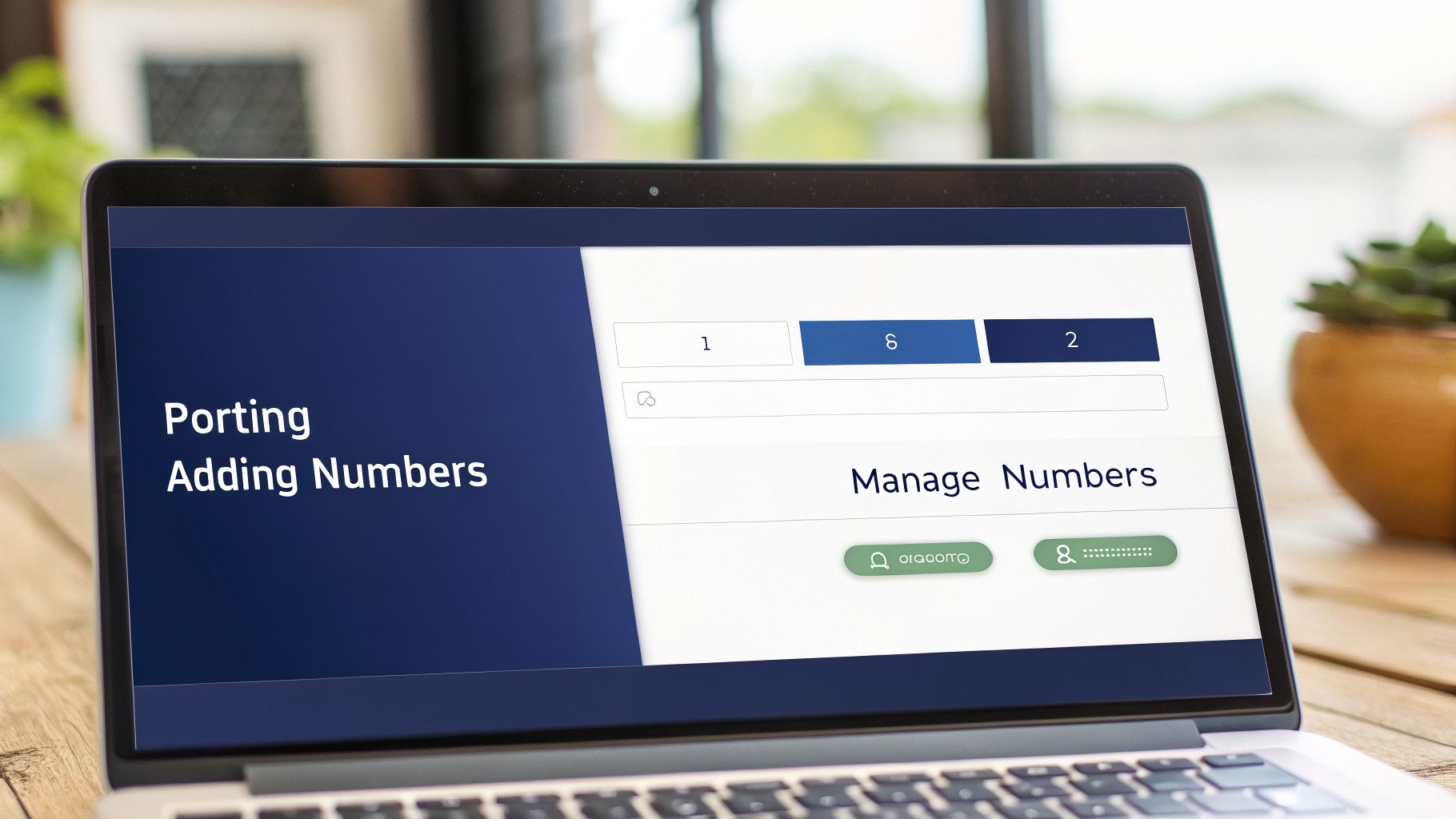
The first step is partnering with a VoIP provider. They’ll give you access to a self-service web portal, which becomes your command center for everything related to your phone numbers. This is where you'll get new DIDs and manage your existing ones without needing to call for tech support.
Choosing the Right DID Numbers
Not all phone numbers are created equal. The type of DID you choose sends a clear signal to your customers before they even dial. Your provider will offer a few different options, and each one serves a distinct business purpose.
Your main choices will be:
- Local Numbers: These numbers have area codes tied to a specific city or region. They’re perfect for building a strong community presence and making your business feel accessible and familiar to local customers.
- Toll-Free Numbers: With prefixes like 800, 888, or 877, these numbers let customers from anywhere in the country call you for free. They project a professional, established image for brands operating on a national scale.
- International Numbers: If you have clients in other countries, you can get DIDs that are local to them. This completely removes the cost and hassle of international dialing, making it much easier for your global customers to get in touch.
A smart strategy often involves a mix. You might have a primary toll-free number for your main business line, backed up by local DIDs in the key markets you serve. This approach gives you the best of both worlds—a national presence with a local touch.
The real benefit of a DID is how it functions, but the type of DID you choose is a branding decision. Think about who you want to call you and what kind of message you want to send before they even dial.
Bringing Your Existing Numbers with You
What if you already have business numbers your customers know and trust? You don't have to give them up. The process of moving your phone numbers to a new provider is called number porting, and it's a standard, regulated procedure designed to ensure you don't lose business continuity.
Your new provider will handle the entire porting process for you. You just need to give them the numbers you want to move and a copy of a recent phone bill. The transfer happens seamlessly in the background with zero service interruption, so you won't miss a single call.
Managing Your Numbers for Maximum Impact
Once you have your DIDs—both new and ported—the final step is putting them to work effectively. Your provider's online portal makes this easy. With just a few clicks, you can assign numbers to specific users, departments, or functions.
Here are some best practices for managing your numbers:
- Assign DIDs to Individual Users: Give every employee who needs one a direct line for professional, direct-dial communication.
- Create Departmental Numbers: Set up dedicated DIDs for "Sales," "Support," and "Billing" to route calls to the right teams automatically.
- Dedicate Numbers for Special Functions: Use a unique DID for your cloud fax line or for a 24/7 support hotline so you can track its specific usage.
- Scale as You Grow: As your business expands, adding new DIDs is instantaneous. You can get and assign a new number for a new hire in minutes, not days.
Effectively managing your DID numbers is what turns a collection of phone lines into an organized, professional, and highly efficient communication system.
Frequently Asked Questions About DID Numbers
Even after getting the basics down, you probably still have a few practical questions about how Direct Inward Dialing (DID) numbers will work for your business. Let's cut through the theory and get straight to the answers you're looking for on cost, setup, and day-to-day use.
What Is the Difference Between a DID and a Toll-Free Number?
Think of it this way: who foots the bill for the call? A DID number is usually a local number. When customers dial it, they pay their standard carrier rates, just like any other local call. It’s all about giving them a direct line and creating a local presence for your business.
A toll-free number (starting with 800, 888, 877, etc.) flips the script. It’s free for the customer to call because your business picks up the tab. While you can absolutely route a toll-free number to a DID, their jobs are different. The DID provides the direct-dial connection, while the toll-free number removes the cost barrier for customers to reach you.
Can I Keep My Existing Phone Numbers?
Yes, absolutely. This is one of the biggest worries for any business switching phone systems, and the answer is a firm yes. The process is called number porting, and it’s a standard, regulated procedure that lets you move your current business phone numbers over to a new VoIP provider.
A quality provider will manage this entire process for you from start to finish. This is key. It ensures your customers can keep calling the numbers they already know and have saved in their phones, giving you seamless business continuity with zero downtime.
Key Takeaway: Number porting is a safe and standard process. You own your phone numbers, and you can take them with you to any provider. You never have to worry about losing the brand equity you've built into them.
How Many DID Numbers Does My Business Need?
There’s no magic formula here—the right number of DIDs depends entirely on your goals and how your teams operate. But you can figure it out with a pretty straightforward approach.
A great place to start is by giving a DID to every employee who regularly talks to customers, partners, or vendors. It instantly makes your team more accessible and professionalizes your communications overnight.
From there, think strategically:
- Departments: Assign a unique DID to Sales, Support, and Billing. It’s the easiest way to streamline how inbound calls get to the right people.
- Marketing Campaigns: Use a different DID for each campaign—one for your Google Ad, another for a social media promo, a third for a print flyer. This is the simplest way to track which channels are actually making the phone ring and measure your ROI.
- Special Functions: Dedicate a number to specific tools, like a cloud fax line or a 24/7 emergency support hotline.
The beauty of a modern cloud phone system is its flexibility. You can start with just a handful of DIDs and add more instantly right from your provider’s web portal as your team grows or your needs change.
How Do DIDs Work for Remote Employees and Mobile Devices?
DIDs are the secret sauce for today's distributed workforce. They are a core piece of the tech that makes a true "work from anywhere" setup possible, keeping your team connected and professional no matter where they log in from.
When someone dials an employee’s assigned DID, your cloud PBX instantly checks the routing rules you’ve set up. It then intelligently sends the call to any connected device.
Here’s how that plays out in the real world:
- A call comes in to an employee's DID.
- The system can ring their desk phone, the softphone app on their laptop, and the business calling app on their smartphone—either one after the other or all at once.
- The employee answers on whatever device is most convenient at that moment.
Crucially, their personal cell number stays completely private through this whole process. When they make an outbound call using the business app, the caller ID always shows their professional DID, not their mobile number. This maintains a consistent, polished brand image and is vital for separating work and life for remote and hybrid teams.
Ready to see how DID numbers can transform your business communications? With SnapDial, you can get local, toll-free, and international DIDs managed from a single, easy-to-use portal. We handle the entire white-glove setup, including number porting, at no extra cost. Explore our features and get a quote today!