

A virtual PBX is a business phone system whose call control runs as software in a provider's data centre and reaches staff over the internet.
You might be considering one because your office phones no longer match how people work. The receptionist transfers calls to empty desks, staff use personal mobiles to return messages, and adding a new employee means contacting whoever understands the phone cabinet.
Moving the switchboard off-site can simplify those jobs. But it also changes what your business depends on, so the buying decision needs to cover network quality, outage behaviour and emergency calling alongside the features.
What a Virtual PBX Is in Plain Terms
Think of a virtual PBX as a switchboard you use without housing the machinery. Your business keeps its phone numbers and decides who should receive calls, while a provider operates the system that applies those decisions.
PBX means private branch exchange, the private switchboard that connects staff with one another and with outside callers. VoIP, short for Voice over Internet Protocol, is the technology that carries voice over internet-based networks. They aren't competing products: the PBX manages calls, and VoIP transports them.
The FCC's voice telephone services report distinguishes IP-PBX business connections from ordinary retail telephone service. That distinction helps explain why a business phone system is more than an internet connection with a handset attached: it also needs call-control software.
The switchboard without the cabinet
Say someone calls your office and wants to speak to accounts. An auto-attendant plays the recorded menu, the caller chooses accounts, and the system rings the relevant extension, a staff member's short internal number.
Those functions are software instructions. With a hosted system, you usually change them through a web portal rather than arranging work on an office switchboard.
The diagram shows the main jobs that move off-site.
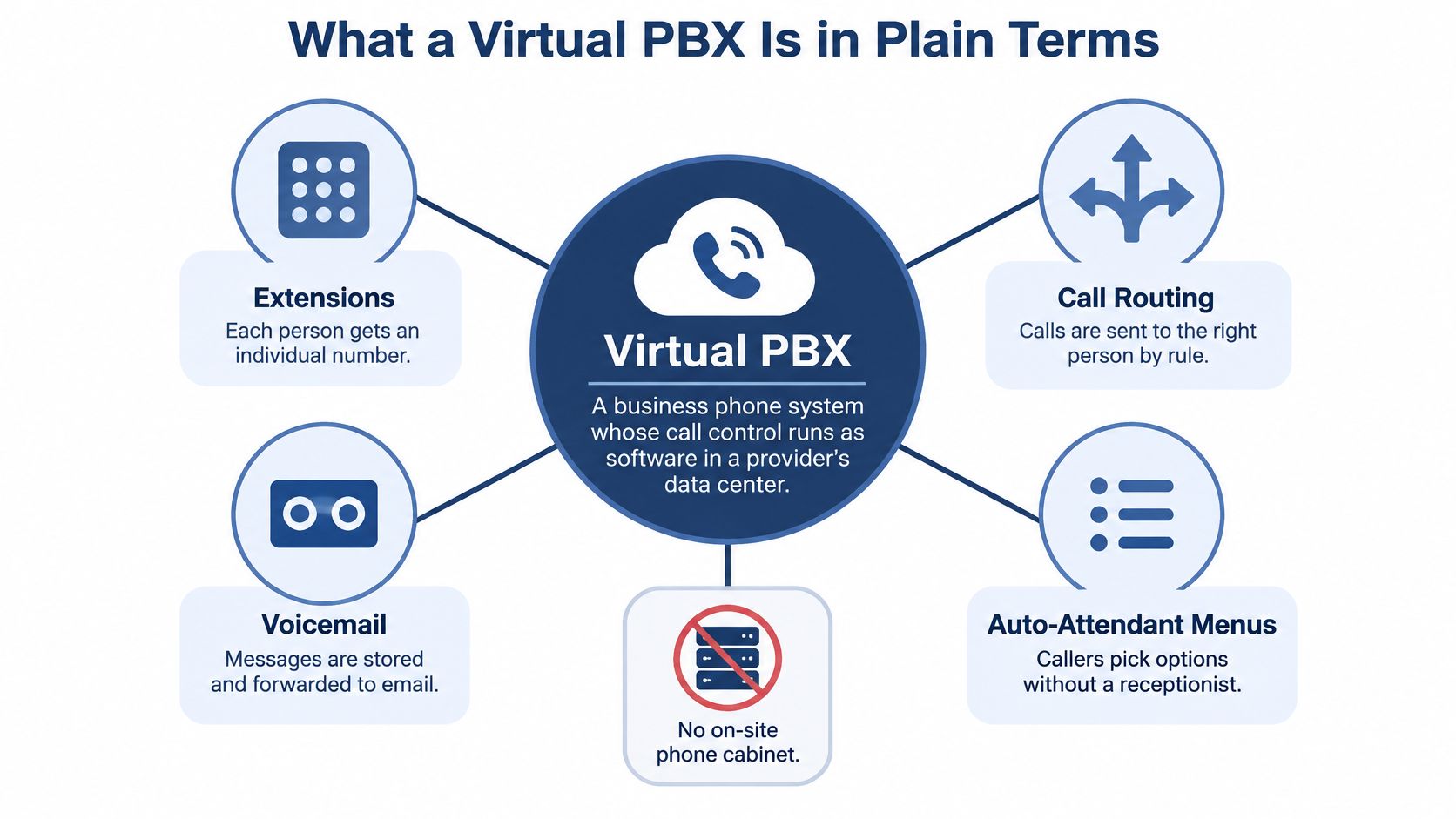
An office PBX is like running your own email server: you own equipment that someone must maintain and eventually replace. A virtual PBX is closer to hosted email, where you manage users while the provider runs the underlying machinery.
Comparison pages often use virtual PBX, hosted PBX and cloud PBX interchangeably. IP PBX is broader: it means a switchboard using IP networks and can also describe equipment kept on your premises.
The switchboard hasn't disappeared. Someone else now houses and maintains it.
To identify your current setup, look for a labelled phone-system cabinet in the communications cupboard, then check your service agreement. Desk phones alone won't tell you whether call control is local or hosted.
Virtual PBX Compared With an Office PBX
An office PBX gives your organisation direct control over equipment, with the purchasing and maintenance responsibilities that follow. A virtual PBX usually exchanges that ownership for a recurring subscription and dependence on connectivity to the provider.
Neither arrangement wins every comparison. The useful question is which responsibilities your office can manage reliably.
Office PBX and virtual PBX compared on the criteria that matter
| Factor | Office PBX | Virtual PBX |
|---|---|---|
| Where call control runs | Hardware cabinet in your office or communications room | Software in the provider's data centre |
| Upfront spend | Higher hardware commitment, including the PBX, cabling and handsets | Lower hardware commitment, mainly compatible phones or softphone apps |
| Ongoing cost | Maintenance, parts, carrier service and local IT time | Recurring subscription, commonly priced per user |
| Adding a user | Configure an extension, potentially adding cards or licences | Create the user in the web portal and connect their device |
| Adding a site | Configure another system or a connection between sites | Connect the location to the hosted system |
| Remote and mobile staff | May require VPN access, forwarding or additional configuration | Supported through compatible desktop or mobile apps |
| Software upgrades | Your organisation or maintenance contractor schedules the work | The provider manages platform upgrades |
| Internet or power outage | Separate analogue service may survive an internet failure; PBX equipment still needs power | Office devices need connectivity and power, or a working fallback route |
Read this as a pattern, not a scorecard. An existing office PBX that's supported, paid for and meeting your needs may be worth keeping. A hosted service isn't automatically cheaper once you include handsets, connectivity improvements and optional services.
For terminology behind the line connection itself, our VoIP versus POTS phone systems guide separates internet-based calling from traditional telephone service.
Rank the operational differences
Adding locations and supporting mobile staff often make hosted administration attractive. You can apply one set of business rules without treating every office as an unrelated phone installation.
The International Telecommunication Union's explanation of IP telephony provides background on the shift towards packet-based calling. For a business-focused companion, We Fix PC Laptop discusses FCC data on business VoIP adoption, useful context rather than a reason to replace functioning equipment.
Start your own comparison with the outage row, then rank remote access, administration and total cost. That order helps prevent a convenient feature from outweighing a continuity requirement.
How a Call Travels Through a Virtual PBX
Follow an incoming call to your main office number. The caller only hears a greeting and ringing, but the system has to locate a device, apply your rules and establish an audio connection.
The MVNO Index virtual PBX explanation describes the distinction between SIP signalling, which manages sessions, and RTP, which carries audio. That distinction becomes particularly useful when troubleshooting.
Follow the call from arrival to completion
The phone registers. Before the incoming call arrives, the desk phone or app registers with the provider using SIP, the Session Initiation Protocol. Registration tells the system that the extension is available at that device's network connection.
The public number receives a call. The provider identifies the dialled number and applies its routing rules. A business-hours schedule might select the daytime greeting or an after-hours destination.
The caller chooses a destination. The auto-attendant plays its menu and collects the caller's choice. That choice points to an extension, department or other configured destination.
The selected destination rings. The system can alert an individual, place the caller in a queue, or try a mobile destination where configured. A queue holds callers until someone becomes available rather than ringing every phone indefinitely.
The conversation begins. SIP manages session setup, while RTP packets transport the speech. A session border controller, or SBC, commonly helps manage traffic at the network boundary and connections between systems.
Unanswered calls reach voicemail. If the destination doesn't answer, the configured rule can send the caller to a mailbox. Transcription and email delivery may be available, but they need to be included and enabled.
The system stores the outcome. Call logs show information such as the destination and whether the call was answered. Recording, when enabled and appropriately governed, preserves the conversation rather than just its log entry.
This simplified visual follows the caller-facing route.
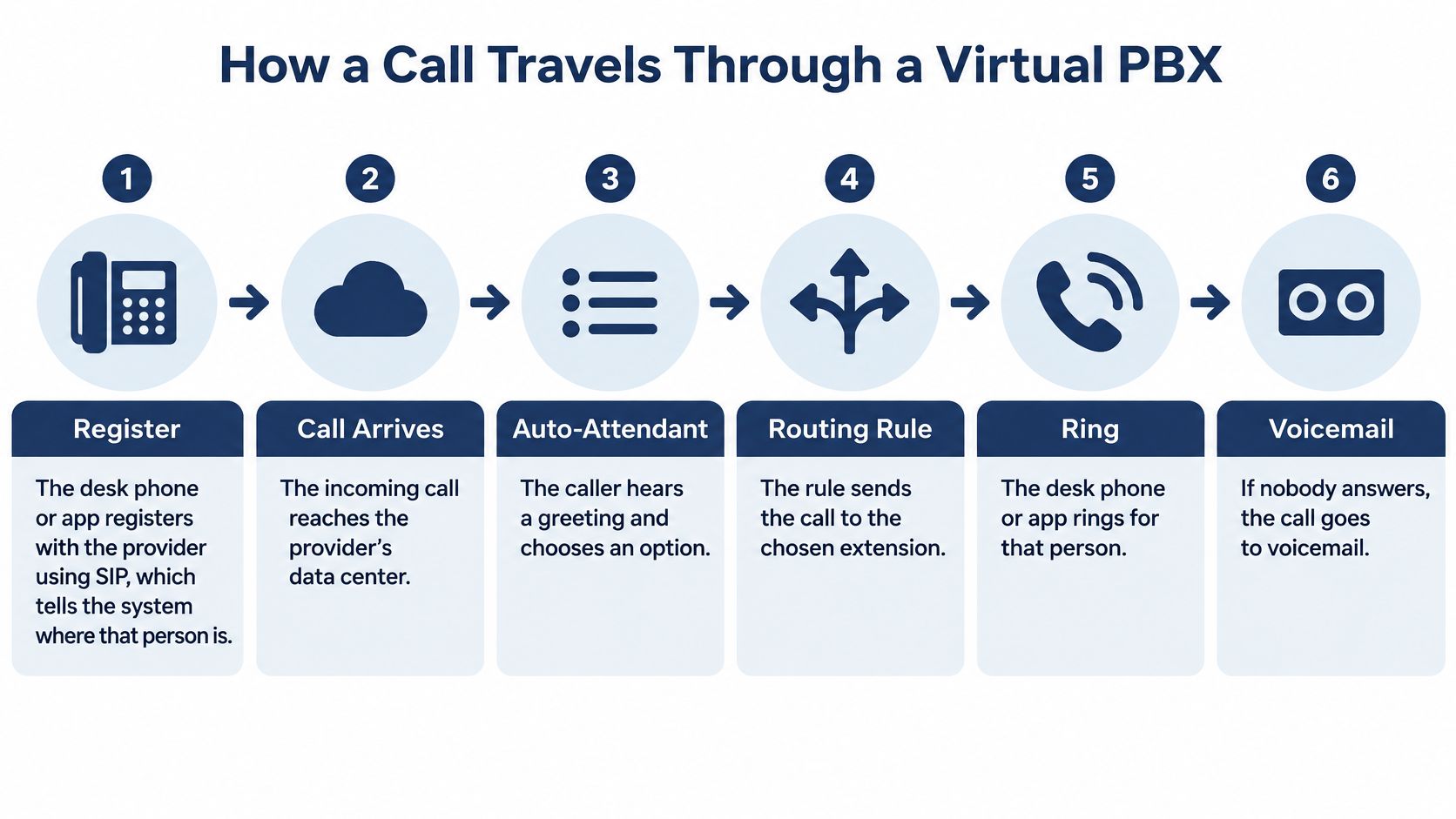
Signalling sets up the call; RTP carries the voice.
When a phone rings but nobody hears anything
Ringing doesn't prove that the audio path works. Firewall rules or network address translation, the router's handling of internal and external addresses, can allow call setup while blocking speech packets.
Give your installer the exact symptom: no sound, sound in only one direction, or audio that stops after answering. Don't change firewall settings at random or expose broad port ranges as a shortcut.
Place a test call through every intended route, including unanswered and after-hours destinations. Record where the expected behaviour stops, because that's a much better starting point than reporting that the phones don't work.
Features That Replace Office Hardware
The most useful features correspond to office jobs, not impressive specification lists. Start with the work your receptionist, administrator and staff currently do to keep callers connected.
A hosted system can let staff handle that work from an app or browser rather than a dedicated switchboard console.

Reception and staff reachability
An auto-attendant handles routine destination choices. It doesn't replace a receptionist's judgement, but it can stop staff repeatedly transferring the same straightforward enquiries.
Extensions identify people internally, while direct numbers let outside callers reach them without navigating the main menu. Outbound caller identification can present the business number instead of a personal mobile number.
Consider an accountancy with branch offices. Its administrator could route the main number to whichever team is staffed, instead of asking customers to find a different branch number.
Mobile routing serves a different job. A clinic could send after-hours business calls to an on-call mobile, while a field sales representative could answer through a softphone, an application that acts as a telephone.
Messages, records and busy periods
Visual voicemail makes messages accessible through an app, email or browser. Transcription helps staff decide what needs attention, although important names and details should still be checked against the recording.
The administrative portal replaces service visits for routine routing changes. Cloud faxing can replace a dedicated fax workflow, while call recording supports review and training when access, consent and retention are handled properly.
Support teams need more than a menu:
- Queues hold callers for available staff rather than sending everyone straight to voicemail.
- Queue callbacks offer an alternative to remaining on hold.
- Wait announcements and live statistics help callers understand the delay and supervisors spot a backlog.
For another small-office perspective, UpTime Web Hosting's guide to VoIP phone systems for small business is useful when turning these functions into a comparison checklist.
Use the video as a further prompt for questions about everyday operation.
Plans differ, and a label such as unlimited lines shouldn't substitute for checking simultaneous-call capacity and service terms. List the calls your office most often misses, then match each problem to a specific function and demonstrate it before buying.
Why Call Quality Depends on Your Network
A fast connection can still produce poor telephone calls. Voice travels in small packets that need to arrive consistently, so a broadband speed test alone won't establish whether the office is ready.
Listen to the symptom before choosing a fix. Different network faults can sound similar to a caller but require different investigations.
Match the sound to the fault
| What staff hear | Possible network problem | What to investigate |
|---|---|---|
| Missing syllables or gaps | Packet loss | Congestion, unstable Wi-Fi, faulty connections and router statistics |
| Awkward pauses or people talking over each other | Latency | Routing delays and queues during busy periods |
| Clipped, uneven or robotic speech | Jitter, meaning irregular packet arrival | Wireless interference, congestion and inconsistent traffic handling |
Adding bandwidth alone won't necessarily fix these problems. A faulty cable remains faulty on a faster broadband package, and an overloaded wireless connection can still interrupt a call.
Our guide to working out bandwidth needs for VoIP helps with capacity planning. Pair that calculation with measurements taken while staff are working.
Build a voice-ready network
The NIST guidance on securing VoIP systems recommends logically separating voice and data traffic, protecting voice gateways with strong authentication and access controls, and considering appropriate filtering or session border controls.
Give your IT contractor a concrete implementation checklist:
- Prioritise speech traffic. Configure voice-aware queuing so a large upload doesn't unnecessarily delay audio packets.
- Separate devices where practical. Use distinct voice and data subnets or virtual LANs, with documented configuration.
- Verify the media path. Check the provider's RTP requirements against firewall and router settings rather than guessing.
- Restrict administration. Limit management access, protect administrator accounts and remove unused accounts.
- Monitor suspicious activity. Investigate repeated failed registrations and unexpected calling destinations.
- Prepare alternate connectivity. Use a backup connection where losing the office link would stop essential work.
Security belongs in this discussion because stolen calling credentials can enable toll fraud, where someone places unauthorised chargeable calls through your account. Availability and access control aren't separate installation tasks.
Test from each site during its busiest working period, using wired phones and the wireless devices staff intend to use. Record latency, jitter, packet loss and the audible result, then repeat the same test after installation so you have a meaningful comparison.
Emergency Calls, Outages and Reliability Limits
Cloud-hosted doesn't mean always reachable. Emergency calling can depend on electricity, internet access and a correctly registered location, none of which should be assumed merely because an app opens successfully.
Ofcom's emergency-calling guidance says VoIP customers must be told plainly that access to emergency organisations can cease when power or the underlying internet connection fails. It also addresses providers' responsibility to maintain emergency access where possible.
Treat location as an administrative responsibility
A softphone used away from the office isn't automatically a reliable source of the caller's physical address. Establish how location is registered, how a worker changes it, and what happens when someone uses a device temporarily elsewhere.
Our E911 VoIP service guide provides further context for assessing emergency-location arrangements. The practical task is to give a named person responsibility for keeping those arrangements current.
Keep a working mobile phone available as a fallback, and check that its coverage is usable where staff would need it. Don't assume an office Wi-Fi calling arrangement provides an independent backup if it uses the same failed broadband connection.
Continuity rule: A provider can remain online while your office is unable to make or receive calls.
Put the failure scenarios in writing
Separate provider uptime from your business's ability to keep answering. An industry explanation of virtual phone systems from 8×8 identifies internet dependence as a reliability limitation, which is why an availability promise isn't a complete recovery plan.
Use these questions as a working checklist:
- Emergency access. Which desk phones, apps and forwarded destinations can place emergency calls, and what limitations apply?
- Location updates. How do remote staff register a changed address, and who checks that they've done it?
- Fallback routing. Where do inbound calls go when office broadband or electricity fails, and does that route require local equipment to remain online?
- Outage communications. Who informs staff, customers and emergency authorities when applicable, and through which channels?
Also establish what happens to queued callers, callbacks, voicemail access and recordings during a disruption. Different functions may remain available through different connections.
Request a written recovery procedure and rehearse it with normal test calls. Don't make an unarranged emergency-services call as part of routine testing; follow the applicable approved testing process.
Decide Whether a Virtual PBX Fits Your Office
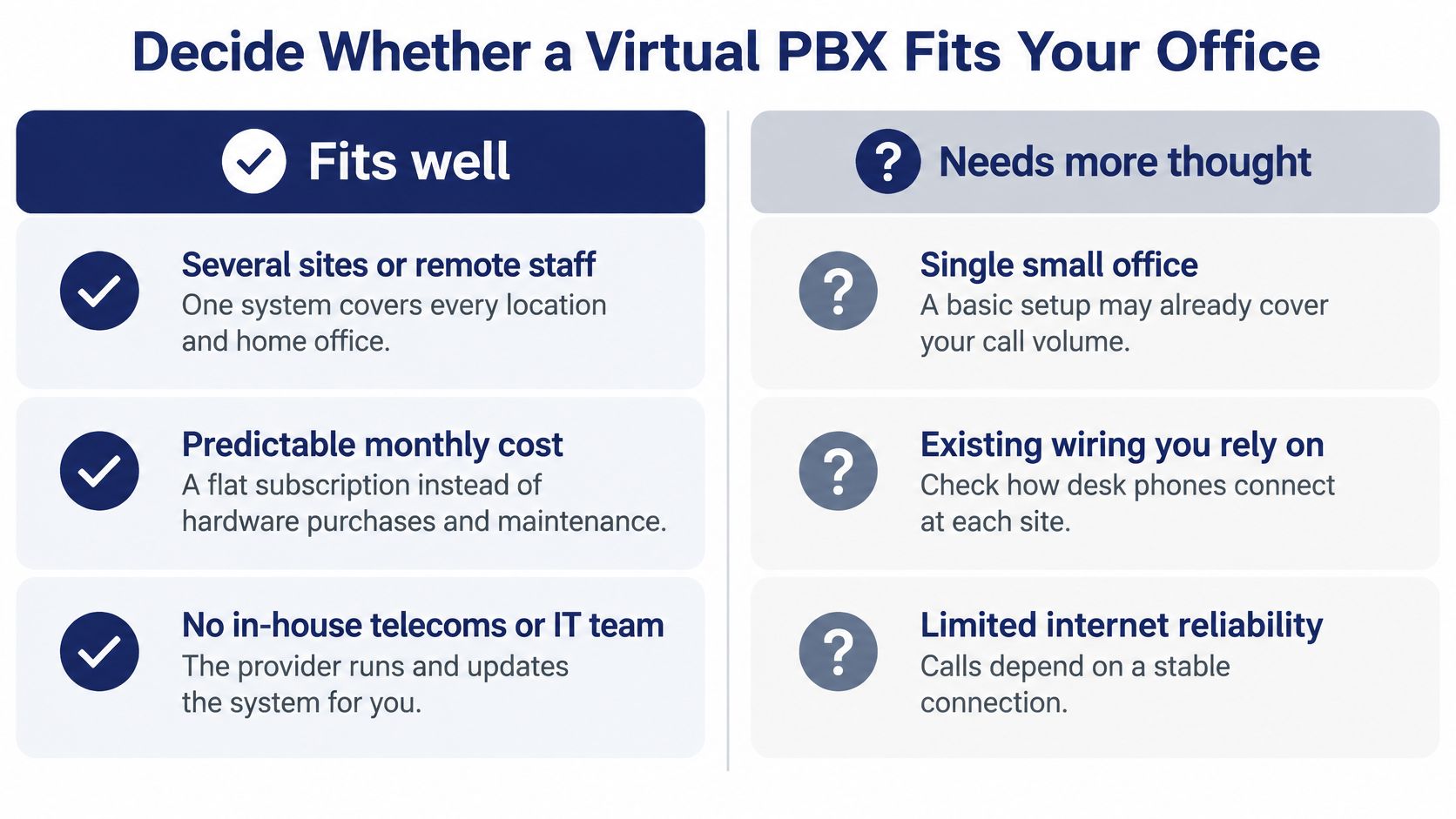
A virtual PBX is a strong candidate when you need shared administration across locations, mobile-ready calling and less responsibility for switchboard hardware. It deserves closer scrutiny when connectivity is unreliable or essential equipment still relies on a particular telephone connection.
A small office shouldn't move just because its system is old. Move when the replacement solves a defined operational problem and you can support its dependencies.
Use this comparison to frame the decision.
Make the decision against evidence
Before authorising a replacement, assemble a short acceptance checklist:
- Network readiness. Keep the peak-period call-test results, not just the advertised broadband speed.
- Feature fit. Confirm the required menu, mobile routing, voicemail and recording behaviour in a live demonstration.
- Contract clarity. Record subscription inclusions, optional charges, cancellation terms and responsibilities for support.
- Number transfer. Get the transfer sequence, authorisation requirements and recovery arrangements in writing before cancelling existing service.
- Emergency arrangements. Document device eligibility, location management and staff instructions.
- Fallback readiness. Confirm an independent calling option and assign responsibility for testing recovery.
Check alarms, lift phones, door-entry systems and other connected equipment separately. A normal voice call working through the new service doesn't prove that a specialist device will work or meet its service requirements.
Prove the route before moving the number
Use a test line to demonstrate a normal inbound call, a transfer, an unanswered call and the after-hours route. If recording is needed, confirm that the right people can retrieve it and that other users can't.
Assign an office administrator to approve greetings and destinations, and an IT owner to approve connectivity and security. Hosted maintenance reduces the equipment you manage; it doesn't remove the need for someone to own your business's call-handling decisions.
Our technicians handle setup, configuration and replacement of an existing VoIP phone system from start to finish, at no cost to the customer. Bring your routing checklist and outage requirements to the quotation conversation so the proposed setup can be assessed against real office needs.
The next step is a quote paired with a live test, not an immediate number transfer. Approve the replacement only when the people who answer your calls can demonstrate the behaviour you expect.
SnapDial offers hosted cloud VoIP for business calling and conferencing, with our technicians handling setup, configuration and replacement of your existing VoIP system at no cost to you. Visit SnapDial to request a quote or schedule a call, and bring your call-routing checklist so you can arrange a live demonstration before moving your numbers.