
Your phones may still work. That doesn’t mean your phone system is working for the business.
A common struggle for many small companies involves their phone setup. The owner is answering calls on one line, the office manager is forwarding calls manually, remote staff are using personal cell phones, and customers still hit voicemail when they needed a person. Nothing is fully broken, but everything has friction.
A modern voip phone system for small business fixes more than dial tone. It changes how quickly you respond, how professional you sound, how easily your team works from anywhere, and how confidently you can grow without rebuilding your communications stack every year.
Is Your Old Phone System Holding Your Business Back
A lot of small businesses reach the same point at roughly the same stage of growth.
You hire a few more people. Some work in the office, some don’t. Calls increase. Customers expect faster answers. Your old setup starts showing its limits all at once.

One missed call doesn’t seem like a system problem. Ten missed calls a week is a process problem. Busy signals, handwritten call notes, and “try my cell” workflows create the kind of mess that generates hidden business costs.
The old landline model also clashes with how teams work now. If your estimator is in the field, your bookkeeper is at home, and your customer service lead is covering two roles, a fixed desk-bound phone system stops being useful. It becomes an obstacle.
That’s why the market has shifted so decisively. The global VoIP market is projected to reach USD 415.20 billion by 2034, with SMBs representing over 45% of all customers, and 78% of U.S. small businesses already use VoIP, according to Speedflow’s VoIP industry review.
What the pain usually looks like
- Calls land in the wrong place: Customers press zero, ring the front desk, or leave voicemails no one checks promptly.
- Staff use workarounds: Employees give out personal numbers because the business line can’t follow them.
- Growth creates chaos: Adding a new employee or location means patching together another temporary fix.
Old phone systems rarely fail in one dramatic way. They fail by making every customer interaction slower, less clear, and less consistent.
If you’re still comparing internet calling to traditional lines, this breakdown of VoIP vs POTS phone systems is useful because it frames the decision around business fit, not nostalgia.
The right move isn’t “buy newer phones.” It’s replacing a rigid system with one that helps the business answer faster, route smarter, and support people wherever they work.
How a VoIP Phone System Actually Works
Most business owners hear “VoIP” and assume it’s complicated.
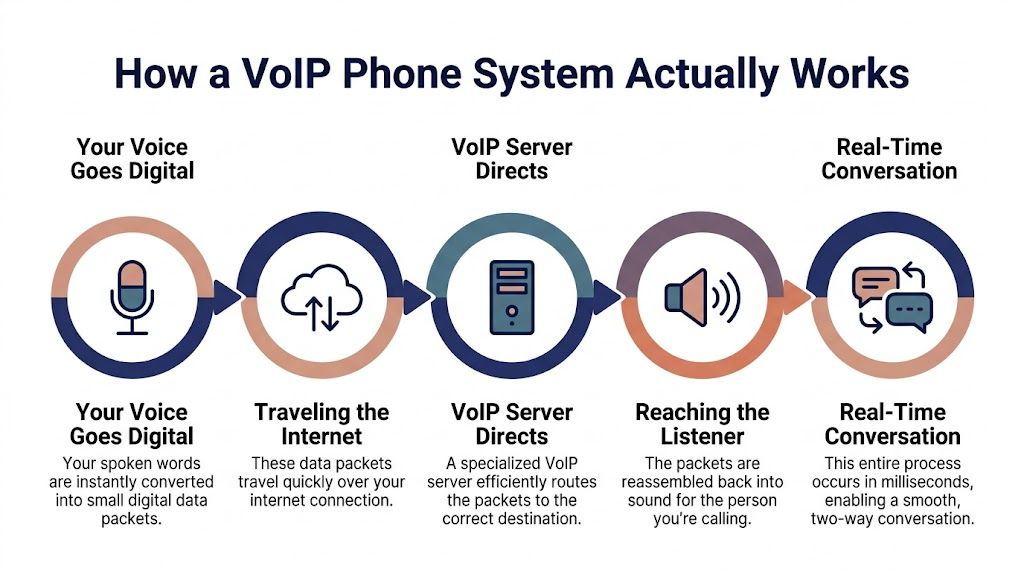
It isn’t. The easiest way to understand it is this. A traditional phone call is like mailing a paper letter through a physical delivery route. A VoIP call is like sending an email. Your message becomes digital, moves through the internet, and reaches the other person almost instantly.
Your voice becomes digital
When you speak into a VoIP phone, mobile app, or computer headset, the system converts your voice into digital data.
That data is broken into tiny pieces and sent over your internet connection. On the other end, those pieces are put back together so the other person hears your voice in real time.
The whole process happens so fast that it feels like a normal phone conversation.
Three things make it work
You don’t need a server room full of gear. In most small business setups, you need these basics:
- A stable internet connection: This is the road your call travels on.
- A VoIP provider: This is the platform that routes calls, manages numbers, and delivers features like voicemail, call queues, and auto attendants.
- A device to use: That can be an IP desk phone, a laptop, or a mobile app on a smartphone.
A practical setup can be very lean. According to GetVoIP’s business phone systems guide, VoIP can run with minimal equipment, and a business typically needs a modem, router, high-speed internet, and optional IP phones or adapters for older devices.
What the provider actually does
Many owners think the phone is the system. It isn’t. The provider is the system.
The provider handles your business number, extensions, routing rules, voicemail, ring groups, call forwarding, and management portal. That’s what lets one main number ring an office phone in one location, a salesperson’s app on the road, and a backup user if the first person doesn’t answer.
Practical rule: If a provider makes basic call routing feel mysterious during the sales process, expect admin headaches later.
Why this matters to a small business
Once your phone system is internet-based, it stops being tied to one wall jack or one office.
That’s the shift. You can move staff, add users, support hybrid work, and change call flows without treating every small update like a telecom project.
For a deeper plain-English walkthrough, this guide on how VoIP phones work is a helpful companion if you want to see the moving parts without getting dragged into telecom jargon.
What matters most is simple. VoIP turns business calling into software. Once that happens, your phone system becomes flexible, manageable, and much easier to scale.
Essential VoIP Features That Fuel Small Business Growth
The feature list matters less than what the features let your business do.
A good voip phone system for small business should help you look bigger than you are, respond faster than you used to, and keep the team connected without turning every call into manual work.

According to Nextiva’s VoIP statistics roundup, implementing a VoIP system with unified communications capabilities can save employees an average of 30 minutes daily. That same source notes IVR is used by 62% of contact centers, and businesses can save 40% on local calls, 90% on international calls, and 30% on teleconferencing.
Features that make a small company sound established
An auto attendant is one of the first upgrades that changes customer perception.
When callers hear a polished greeting and get routed to sales, service, or billing without relying on whoever happened to answer first, the business sounds organized. That matters for law firms, contractors, clinics, agencies, and any company where trust starts before a human picks up.
Business hours routing is just as valuable. During open hours, calls go to the team. After hours, they can route to voicemail, an on-call person, or a dedicated emergency path.
That kind of consistency is what separates a company with a phone number from a company with a customer communications process.
Features that reduce internal drag
Visual voicemail with transcription is easy to underestimate until your team starts using it.
A field manager doesn’t need to stop between jobs and replay six messages. They can scan transcriptions, find the urgent one, and return the right call first. The same logic applies to owners who spend their day in meetings or on site.
Call recording also helps more than most buyers expect. Not because every call needs auditing, but because recorded conversations reduce disputes, improve training, and preserve details that would otherwise live in someone’s notebook.
A good web portal matters for the same reason. If an office administrator can add a user, change a routing rule, or review call logs without opening a support ticket for every edit, the system starts saving time immediately.
Features that support work from anywhere
A mobile app is no longer a nice extra.
If employees answer calls from job sites, home offices, shared workspaces, or while traveling between appointments, they need to make and receive business calls without exposing personal numbers. The app should let them use the business identity consistently, not improvise around it.
That’s also where ring groups and call forwarding become practical growth tools. A sales inquiry can ring multiple people. A support call can go to the next available team member. A missed front desk call doesn’t have to die in one person’s inbox.
The strongest phone systems remove dependence on one specific employee being at one specific desk.
Features that improve the customer experience
IVR, call routing, and shared visibility are not just operational features. They affect whether a customer feels taken care of.
When someone calls a small business, they don’t expect enterprise complexity. They do expect clarity. They want the right department, a fast answer, and no need to repeat themselves three times.
Useful growth-focused features include:
- Auto attendant and IVR: Route callers to the right team without relying on a receptionist to sort every request.
- Call queues: Hold calls in order during busy periods instead of sending prospects to voicemail.
- Voicemail transcription: Let staff review messages quickly and prioritize urgent callbacks.
- Mobile and desktop apps: Keep the business reachable even when the team isn’t at headquarters.
- Call recording and logs: Help with training, quality control, and dispute resolution.
What works and what doesn’t
Some businesses overbuy. They load up on advanced tools they won’t use, then complain that the platform feels bloated.
Others underbuy. They choose a bargain system that can place calls but falls apart when they need routing, reporting, or a clean handoff between office staff and mobile workers.
What works is matching features to actual workflow.
If you run a service business, mobile calling, voicemail transcription, and call routing usually matter more than conference bells and whistles. If you run a support-heavy operation, queues, recordings, and admin controls matter more. If you’re growing across locations, centralized management becomes essential.
The right features don’t just reduce hassle. They help a small company operate with the speed and consistency customers usually associate with much larger organizations.
How to Choose the Right VoIP Provider
Most buyers start with price. That’s normal. It’s also where bad decisions begin.
The better question is this. Which provider will still fit when your team changes, your call flow gets more complex, and you need help fast instead of reading setup articles at night?
Start with service reality
A provider can have a polished website and still be painful to live with.
You want to know how support works when something urgent happens. Is there real phone support? Is it available around the clock? Will someone help with onboarding, number porting, and routing design, or are you expected to figure it out yourself?
This is similar to broader cloud buying discipline. If you want a useful framework for vendor evaluation, this article on how to choose a cloud provider is worth reading because the same principles apply here. Support, transparency, fit, and operational trust matter more than brochure language.
Look hard at pricing structure
A low seat price can hide an expensive system.
The issue isn’t just the monthly plan. It’s whether key functions are included or sold as add-ons. A provider may look affordable until you layer in recording, analytics, queue tools, extra numbers, device costs, and support tiers.
A straightforward quote should answer these questions clearly:
- What’s included by default: Core calling, voicemail, routing, apps, admin portal, and basic support.
- What costs extra: Advanced reporting, hardware, call recording retention, queue tools, or premium support.
- How billing scales: What happens when you add users, locations, or temporary staff.
Judge the admin experience
Many small businesses don’t need deep telecom expertise. They need a system that an office manager or IT generalist can run confidently.
Ask for a live view of the admin portal. Don’t settle for a slide deck. Have the provider show how to add a user, update business hours, change a greeting, and reroute calls for a holiday schedule.
If those routine tasks look clumsy in a demo, they won’t get easier after purchase.
Check scalability without drama
The right provider should support growth without forcing a hardware refresh every time the company changes shape.
That includes adding users quickly, supporting remote staff, handling multiple locations under one system, and making it easy to standardize call flows. A hosted platform such as SnapDial is one example of a service model built around cloud PBX management, mobile access, call routing, and white-glove setup, which is useful for businesses replacing older on-premise systems.
Don’t buy for today’s headcount alone. Buy for the next operational layer your business is likely to add.
Use a side-by-side checklist
A simple comparison table reveals gaps fast.
| Evaluation Criteria | Provider A (e.g., SnapDial) | Provider B | Provider C |
|---|---|---|---|
| Support hours and contact methods | |||
| Onboarding and number porting help | |||
| Mobile and desktop apps included | |||
| Auto attendant and routing tools | |||
| Call recording and voicemail options | |||
| Admin portal ease of use | |||
| Multi-location support | |||
| Hardware compatibility | |||
| Pricing transparency | |||
| Contract terms and flexibility |
Questions worth asking on every demo
- Show me how after-hours routing works.
- Show me how an employee uses the mobile app.
- Show me what happens if our office internet has an issue.
- Show me how to change greetings and call paths.
- Show me the full invoice structure, not just the starting price.
That last question saves a lot of regret.
The right provider should feel like an operational partner. If the sales process already feels slippery, expect the service relationship to feel the same.
Planning a Smooth Migration to VoIP Without Downtime
Most hesitation around switching phone systems comes down to one fear. You don’t want the phones to go dark in the middle of business.
That fear is valid. It’s also manageable when the migration is handled in phases instead of as a rushed cutover.

Start with an audit, not a purchase
Before anyone ports numbers or ships phones, map your current call flow.
List every main number, extension, hunt group, fax line, after-hours rule, and special routing need. Identify who answers first, who backs them up, and which calls must never get lost.
This is also the time to clean up bad habits. If your current setup only works because one employee knows all the exceptions, document those exceptions now.
Test the environment before you move traffic
A smooth VoIP rollout depends on preparation more than heroics.
Your provider should review network readiness, device choices, and user workflows before the first live number moves. If the office has weak internet stability, poor Wi-Fi design, or unmanaged call routing expectations, migration day will expose those issues fast.
A hosted model can simplify that process. If you’re comparing deployment styles, this overview of hosted VoIP is useful because it shows why many small businesses move away from maintaining phone infrastructure on-site.
Handle porting and cutover in stages
You can usually keep your current business numbers. That matters because changing public phone numbers creates confusion for customers and partners.
The cleanest migrations use a phased plan:
- Build the new call flow first: Record greetings, create menus, assign users, and test routing internally.
- Pilot with a small group: Let a few employees use the new system before the whole company moves.
- Schedule the port carefully: Choose timing that reduces business risk and gives staff coverage during the transition.
- Keep fallback paths ready: Forwarding rules and backup contact methods should be in place in case anything needs adjustment.
A no-downtime migration usually looks calm from the outside because the messy work happened earlier.
A short visual walk-through helps if you want to see the migration mindset in action.
White-glove support beats DIY during cutover
Some businesses can manage their own rollout. Most are better served by guided onboarding.
The difference shows up during the small but critical moments. Greeting changes. Ring order fixes. Device provisioning. User training. Number port updates. Those tasks don’t look hard until they all happen in the same week.
What works best is assigning responsibility clearly. Your team should own business rules and user decisions. The provider should own technical setup, testing support, and cutover coordination.
When both sides do their part, migration becomes a controlled project instead of a risky leap.
Decoding VoIP Costs Security and Reliability
A small business usually appreciates the full value of VoIP after the system is live. A missed call starts ringing the sales manager’s mobile instead of hitting a busy signal. A new hire gets a number and voicemail in minutes instead of waiting on a phone vendor. A storm knocks out the office internet, but customers still reach someone.
That is the standard to buy against.
Cost is more than the monthly seat price
The strongest financial case for VoIP is better control. You replace surprise repair bills, aging PBX hardware, and one-off carrier charges with a system that scales up or down as the business changes.
The monthly subscription is only part of the picture. Ask what is included for call recording, analytics, SMS, mobile apps, desk phone support, onboarding, and live support. Low advertised pricing often depends on add-ons, longer contracts, or support tiers that cost extra once you need help.
The Federal Communications Commission guidance on interconnected VoIP is a useful reminder that business phone service now sits in the same category as other core communications infrastructure. For a small company, that means evaluating VoIP the way you would evaluate payroll software or your CRM. Look at total operating impact, not just line-item price.
A good system also creates upside that never shows up on a carrier invoice. Faster call handling, cleaner routing, and easier remote coverage help the team capture more revenue from the calls you already pay to generate.
Security is mostly about controls and process
Owners often treat phone security as a black box. It is usually much simpler than that.
Start with account protection. Admin accounts need strong passwords and multi-factor authentication. User permissions should match job roles. Departed employees should lose access the same day they leave. Call recordings, voicemail access, and number management need clear ownership inside the company.
The Cybersecurity and Infrastructure Security Agency guidance for Voice over Internet Protocol focuses on practical risks such as weak authentication, poor network segmentation, and unpatched systems. Those are the same issues I see during small business deployments. The failures are rarely exotic. They usually come from loose admin habits and unclear ownership.
If a provider cannot explain how it handles encryption, account security, and admin logging in plain language, keep looking.
Reliability comes from design, not hope
VoIP reliability has less to do with magic uptime claims and more to do with what happens when a connection, device, or office fails.
A well-planned setup routes calls to backup destinations automatically. That can mean mobile phones, another location, or a receptionist service. Router settings should prioritize voice traffic so large file uploads and video calls do not wreck call quality. Staff should know how to answer from a laptop or mobile app if the office is unavailable.
Instead of pretending outages will not happen, the correct approach is ensuring calls follow the backup path.
That matters because a phone system now supports more than voice. Businesses comparing broader service workflows often end up reviewing inbound call center software solutions at the same time, especially if they need queueing, overflow handling, or distributed teams.
What a resilient setup includes
A dependable business voice setup usually includes:
- Automatic failover: Send calls to mobile devices, alternate users, or another site when the main endpoint is unavailable.
- Traffic prioritization: Configure QoS on the router so voice packets stay clear during heavy network use.
- Admin safeguards: Use role-based access, MFA, and audit visibility for number changes, routing edits, and recording access.
- User backup options: Make sure staff can work from desktop and mobile apps, not only desk phones.
- Clear support responsibility: Know who handles carrier issues, ISP trouble, device replacement, and after-hours escalations.
What works in practice
The best VoIP deployments are not the flashiest. They are the ones with predictable billing, sensible permissions, tested failover, and a provider that answers hard questions before the contract is signed.
What causes trouble is easy to spot too. Buying on headline price alone. Assuming cloud delivery removes the need for internal ownership. Waiting until an outage to find out where calls go.
Handled well, VoIP stops being a utility expense you tolerate. It becomes part of how the business stays reachable, protects revenue, and grows without rebuilding its phone system every two years.
Unlocking Advanced Call Center and Remote Work Capabilities
A growing business usually feels the limit of its phone system at the worst possible time. The front desk is juggling three callers, a salesperson is on the road, support is short-staffed, and nobody can see who has been waiting the longest. At that point, the phone system is no longer a utility. It affects revenue, response times, and the customer experience.
Modern VoIP gives small businesses tools that used to be reserved for larger contact centers. That matters if your team handles inbound support, appointment booking, intake, dispatch, or order questions. Calls can be routed by skill, priority, schedule, or location, so the right person gets the call faster instead of sending customers through a chain of transfers.
Queueing and callback options are especially useful during peak periods. Instead of pushing callers to voicemail or forcing them to wait on hold until they give up, the system can hold their place and return the call when someone is free. For businesses comparing platforms in this category, these inbound call center software solutions offer useful context around routing, queueing, and service workflows.
The business result is straightforward. Fewer missed opportunities, better use of staff time, and a customer experience that feels closer to what larger companies deliver.
Remote work is part of the same conversation. A phone system that supports distributed teams well gives each employee one business number, shared access to voicemail and call history, and the same call handling rules whether they are at a desk, at home, or between job sites. Customers get a consistent experience. Managers get clearer visibility into coverage and response.
There are trade-offs. App-based calling works well for many employees, but some roles still need dedicated hardware. Receptionists, dispatchers, and heavy call handlers often work faster on an IP desk phone with physical transfer keys, headset support, and predictable button layouts. Field staff and occasional users may be better served by a mobile or desktop app. The right setup depends on the job, not on a one-size-fits-all device policy.
Handled properly, these capabilities do more than cut phone costs. They help a small business operate with the responsiveness and flexibility customers expect from much larger organizations, without taking on enterprise-level complexity or forcing a disruptive change in how the team works.
Frequently Asked Questions About VoIP Phone Systems
Can I keep my current business number
Usually, yes. Number porting is a standard part of business phone migrations, and keeping your existing number is often the cleanest path for customer continuity.
Do I need desk phones to use VoIP
No. Many teams use desktop and mobile apps successfully. Desk phones still make sense for front desks, shared office roles, and employees who spend most of the day on calls.
Is VoIP only for larger companies
No. In many cases, smaller businesses benefit faster because they feel the limits of outdated phone systems more sharply. Flexible routing, mobile access, and easier administration solve real day-to-day problems early.
Will call quality be worse than a landline
Not if the system is set up properly. The biggest factor is connection quality and whether voice traffic is treated as a priority on the network.
Is it hard to train staff on a new system
Usually not. Most users only need to learn a few routines: answering calls, transferring, checking voicemail, and using the app. The admin side is where provider support matters more.
What should I ask for in a live demo
Ask the provider to show your exact workflow. Have them demonstrate after-hours routing, mobile calling, user setup, voicemail handling, and what happens if someone misses a call.
If you're replacing an aging PBX or patchwork landline setup, SnapDial is worth evaluating alongside other providers because it offers hosted VoIP, white-glove setup, mobile and desktop calling, call routing, call recording, visual voicemail with transcription, and advanced queue features in a cloud-based business phone system. The right next step isn’t guessing from feature lists. It’s booking a real demo, mapping your current call flow, and comparing how each provider would handle your business on day one.