

Your phones still work. That’s usually the problem.
A small business owner notices it in the same places every week. Calls ring to an empty desk because someone stepped out. A customer hears a busy signal at the worst possible moment. A receptionist juggles transfers manually while the rest of the team works from laptops, mobile phones, and home offices. The old phone system isn’t broken enough to force a change, but it’s slow enough, rigid enough, and expensive enough to hold the business back.
That’s where voip for small business stops being a tech upgrade and starts becoming an operational decision. You’re not just changing how calls travel. You’re changing how your company answers, routes, records, follows up, and stays reachable.
Is Your Old Phone System Holding Your Business Back
Most small businesses don’t outgrow their phone system all at once. They outgrow it one missed call, one manual transfer, and one “I’m away from my desk” moment at a time.
A legacy setup often creates friction in places owners care about most. Sales inquiries get trapped at the front desk. Service calls bounce between extensions. Staff can’t easily take the business number with them when they work remotely or move between locations. The result isn’t just annoyance. It affects responsiveness, customer confidence, and how professional the business feels.
The market has already moved. The global VoIP market is projected to grow from USD 132.5 billion in 2023 to USD 161.79 billion in 2025, with small and medium-sized businesses driving much of that shift as they replace aging PBX systems with cloud solutions. For new businesses, the move can cut initial communication setup costs by up to 90%, according to Speedflow’s VoIP industry review.
That matters because many businesses are still comparing a modern cloud phone system to a landline as if they’re just two versions of the same tool. They’re not. One is a fixed utility. The other is a communication platform. If you need a clearer baseline, this breakdown of VoIP vs POTS phone systems is a good place to see what changes when you move away from traditional lines.
Old phone systems usually fail in workflow first, not hardware first.
The practical question isn’t whether internet-based calling is “the future.” It’s whether your current setup still fits the way your team works today. For most small businesses with mobile staff, multiple locations, or any need for smarter routing, the answer is no.
Understanding VoIP for Your Small Business
VoIP stands for Voice over Internet Protocol. In plain terms, it means your calls travel over your internet connection instead of traditional copper phone lines.
The easiest way to explain it is this. Traditional phone service is like postal mail. It follows a fixed route and depends on a physical network built for one purpose. VoIP is more like email. It still delivers the message, but it does it over the internet, reaches you on different devices, and adapts far more easily to where and how you work.
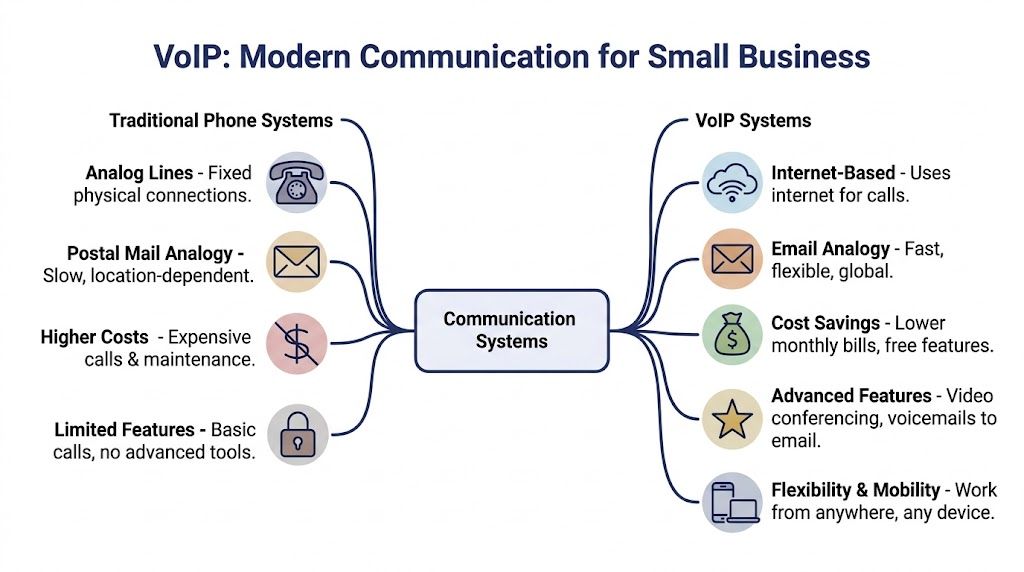
That’s why voip for small business has become such a practical fit. Your business number no longer has to live on a single desk phone in one office. It can ring an IP phone, a desktop app, a mobile app, or a combination of all three based on your rules.
How the call actually works
When someone speaks into a VoIP phone or app, the system converts the voice into digital data and sends it across the internet. On the other end, that data is turned back into audio.
You don’t need to manage that process yourself. What matters is the business effect. Calls become more flexible to route, easier to manage, and far less tied to a single physical office.
A small company usually notices the difference in simple ways:
- One business identity across devices so staff can answer the company line from a desk phone, laptop, or mobile phone
- Smarter call handling such as auto attendants, hunt groups, ring schedules, and voicemail delivery
- Centralized management through a web portal instead of service calls for every little change
- Easier expansion when you open a new office, add seasonal staff, or support hybrid work
Hosted VoIP and on-premise VoIP
This is the first real decision point.
Hosted VoIP, often called Cloud PBX, means the provider runs the phone system in the cloud. Your business uses the service through supported phones and apps, and the provider handles the backend infrastructure, updates, and maintenance.
On-premise VoIP means your business owns and manages the phone system hardware locally. You get more direct control, but you also take on more setup, more maintenance responsibility, and more internal complexity.
Here’s the practical difference:
| Model | What it means for your business | Best fit |
|---|---|---|
| Hosted VoIP | Lower upfront burden, faster deployment, provider-managed updates, easier remote access | Most small and midsize businesses |
| On-premise VoIP | More internal control, more hardware, more IT involvement, more maintenance | Businesses with specialized internal telecom requirements |
If your team wants business-grade calling without becoming a phone company in-house, hosted VoIP is usually the cleaner path.
Which model works better for most small businesses
In practice, most smaller organizations do better with hosted service. They want reliable calling, not another server to maintain. They want number porting, routing rules, call recording, and mobile access without assigning an employee to babysit telecom hardware.
On-premise systems still make sense in some environments. A business with unusual compliance needs, a highly customized local setup, or dedicated telecom staff may prefer tighter internal control. But that’s the exception, not the default.
For most owners and office managers, the better question is simpler. Do you want to manage phone equipment, or do you want your team to answer calls effectively? Hosted VoIP is built for the second goal.
Why Switching to VoIP Makes Business Sense
Switching to VoIP usually starts as a cost discussion. It should end as an operations decision.
A dated phone system slows a business down in small, expensive ways. Calls ring the wrong desk. Staff wait on a technician for simple changes. New hires need extra setup. If the internet, office, or front desk has a bad day, customer communication can stall with it. VoIP fixes many of those problems because the system is built to be configured and managed more like software than like fixed wiring.
Yes, monthly costs often improve. As noted in Nextiva’s VoIP statistics roundup, many small businesses report meaningful savings after switching, along with productivity gains from unified communications tools. But the stronger business case is usually time. Time saved by the person who answers calls. Time saved by the manager who changes routing. Time saved by the salesperson who can return a customer call from the company number while off-site.
Where the return usually shows up
In legacy phone setups, costs are spread across more than the phone bill. There are line charges, maintenance calls, replacement hardware, and the labor involved every time the business changes something basic.
Cloud VoIP changes that cost structure. You are paying for a service that is easier to adjust as the business changes.
The return usually shows up in a few practical areas:
- Lower telecom overhead because internet-based calling reduces dependence on traditional business lines
- Less hardware spending since hosted systems do not require the same onsite PBX investment
- Fewer service calls because many routine updates are handled by the provider or by your admin team in a portal
- Faster changes when adding users, updating call flows, or rerouting numbers does not require a site visit
- Better continuity during disruptions when calls can be redirected to mobile phones or another location
That last point matters more than many owners expect. A storm, power issue, office closure, or internet problem does not have to mean dead air for customers if the system is planned correctly.
Productivity gains come from better call handling
The biggest improvement is not the desk phone itself. It is what happens around the call.
VoIP gives small teams more control over how calls are answered, routed, tracked, and returned. A service business can send new inquiries to the office during business hours and to an on-call manager after hours. A sales team can keep outbound calls tied to the business number even when reps are traveling. A manager can review missed-call patterns and fix staffing gaps instead of guessing.
For teams that live inside customer records, direct connection between calling and sales workflows matters too. This guide on seamless integration with your CRM is worth reading because it explains how communication tools and sales context work better when they are connected instead of siloed.
A lower phone bill helps. A phone system that cuts response time, reduces missed calls, and keeps the business reachable during disruptions usually delivers the bigger return.
VoIP vs Legacy PBX A Cost and Feature Comparison
| Factor | Cloud VoIP (e.g., SnapDial) | Legacy On-Premise PBX |
|---|---|---|
| Upfront cost | Usually lower because core infrastructure is hosted | Usually higher because hardware is local |
| Monthly fees | Predictable subscription pricing in many cases | Service plus maintenance can be harder to forecast |
| Maintenance | Provider handles platform updates and core system upkeep | Business or outside technician handles maintenance |
| Scalability | Add users, devices, or locations through software and provisioning | Expansion often requires more hardware planning |
| Remote work support | Built into mobile and desktop apps | Often limited without extra configuration |
| Feature availability | Routing, recording, voicemail tools, apps, and integrations are generally easier to turn on | Features may require add-ons or more involved setup |
| Administration | Web portal for day-to-day changes | More dependency on specialist support |
| Business continuity | Easier to reroute calls to alternate devices during office disruptions | More exposed to location-specific equipment issues |
What actually affects the outcome
VoIP is not automatically better just because it is newer. The switch pays off when the rollout matches how the business really operates.
I have seen small companies save money and still end up frustrated because they skipped the basics. They kept a confusing call flow, chose a provider with weak support, or moved numbers without testing how calls should route for reception, sales, service, and after-hours coverage. A good migration fixes those issues during the move. It does not carry them into a new platform.
That is why the decision should be framed around use cases, not just price. How fast can you onboard a new employee? How are calls handled when the office closes early? Can a manager change routing without opening a support ticket? Those are the questions that tell you whether VoIP will improve the business or merely replace one phone system with another.
Key Features for Small Business Teams
A small business usually feels the difference in a phone system on a busy Tuesday at 10:15 a.m. Three customers call at once. The owner is in the field. The front desk steps away for five minutes. One caller needs support, one wants to buy, and one just needs billing. The right VoIP features keep that traffic organized instead of turning it into missed revenue and frustrated staff.
Small businesses often do not need a long feature checklist. They need a phone setup that matches how work happens.

Auto attendants and smarter routing
An auto attendant answers every call the same way your best receptionist would if that person could pick up instantly, every time. It gives callers a clear path and takes pressure off one employee who would otherwise act as the switchboard.
The practical value is consistency. Sales calls go to sales. Service calls go to service. After-hours calls follow a different path without anyone staying late to babysit the phones.
The features that usually matter most are:
- Ring groups so incoming calls can be shared across a team
- Time-based routing so business hours and after-hours coverage follow different rules
- Find me follow me so calls can ring a desk phone, mobile app, or laptop in a set order
- Location-based menus so multi-site businesses send callers to the right branch without confusion
A well-planned call flow makes a five-person company sound organized because it is organized. That matters during migration. If the routing logic is messy before the switch, the new platform will expose the mess faster, not fix it for you.
Mobile apps and a true mobile office
For many small businesses, this is the feature set that changes daily operations fastest.
A field supervisor can answer the main company line from a mobile app. A hybrid employee can place outbound calls from a laptop while showing the business number instead of a personal cell. A front-desk employee can cover calls from home during bad weather with no visible change to the customer.
That flexibility only works if the rollout is done properly. Mobile calling depends on network quality, headset quality, and user setup. Before turning mobile and softphone use on for the whole team, it helps to estimate how much bandwidth you need for VoIP so call quality holds up when staff are working across office Wi-Fi, home internet, and cellular connections.
Some businesses also want to move from a phone call into a meeting without switching tools. In those cases, integrated video conferencing can shorten handoffs for sales demos, technical support, and account reviews.
CRM integration and call context
A phone system becomes more useful when it stops operating in isolation.
With CRM integration, the person answering can often see who is calling, what the customer bought, whether there is an open ticket, and what happened on the last conversation. That saves time, but the bigger benefit is better context. Customers spend less time repeating themselves, and staff spend less time hunting through tabs while the caller waits.
In practice, this tends to help with four things:
- Faster response because customer details appear automatically
- Better handoffs because notes and call activity stay tied to the record
- Cleaner follow-up because missed calls and voicemails are easier to log
- Stronger accountability because managers can trace what happened on an account
This is one area where vendor selection matters. Some providers advertise CRM integration, but only support a narrow set of tools or require extra middleware. During evaluation, confirm which CRM platforms connect natively and what the workflow looks like for your staff, not just what appears on a feature page.
Call recording and visual voicemail
Call recording is useful when there is a clear reason to use it. Sales managers review real objections. Service managers check how calls are handled. Owners can verify what was promised to a customer. In regulated environments, recordings may also support documentation, provided notice and retention policies are handled correctly.
Visual voicemail solves a different problem. It turns voicemail from a slow audio inbox into something staff can scan and act on. With transcription, a manager can review messages between appointments and decide what needs an immediate callback.
Neither feature is valuable by default. Both need rules. Decide who gets recording access, how long files are kept, and which voicemail boxes should forward transcripts by email. Those choices affect privacy, storage, and day-to-day usability.
Queue management and reporting
As soon as a team handles steady inbound volume, simple call forwarding starts to break down. Calls stack up. Some employees get overloaded. Others sit idle. Customers hear ringing and assume nobody is available.
Queues add structure. They can spread calls across a group, play hold messages, offer callback options, and show whether the team is keeping up with demand. Reporting then shows where the strain is. You can see peak periods, missed call patterns, wait times, and whether a specific queue needs more coverage or a different schedule.
One provider in this category is SnapDial, which offers hosted VoIP with features such as auto attendant, call recording, visual voicemail with transcription, mobile apps, queue callback, reporting, and a self-service admin portal. Those are the kinds of tools small businesses often compare when replacing a legacy PBX with a cloud system.
The useful question is not whether a feature exists. It is whether that feature removes a real bottleneck. A queue matters when customers stop bouncing to voicemail. Reporting matters when a manager can spot a coverage problem and fix it before it starts costing business.
Creating Your Smooth Migration Plan to VoIP
Most migration problems come from poor planning, not bad technology. A smooth move to VoIP is usually straightforward when the business audits its current setup, prepares the network, and stages the rollout instead of rushing it.
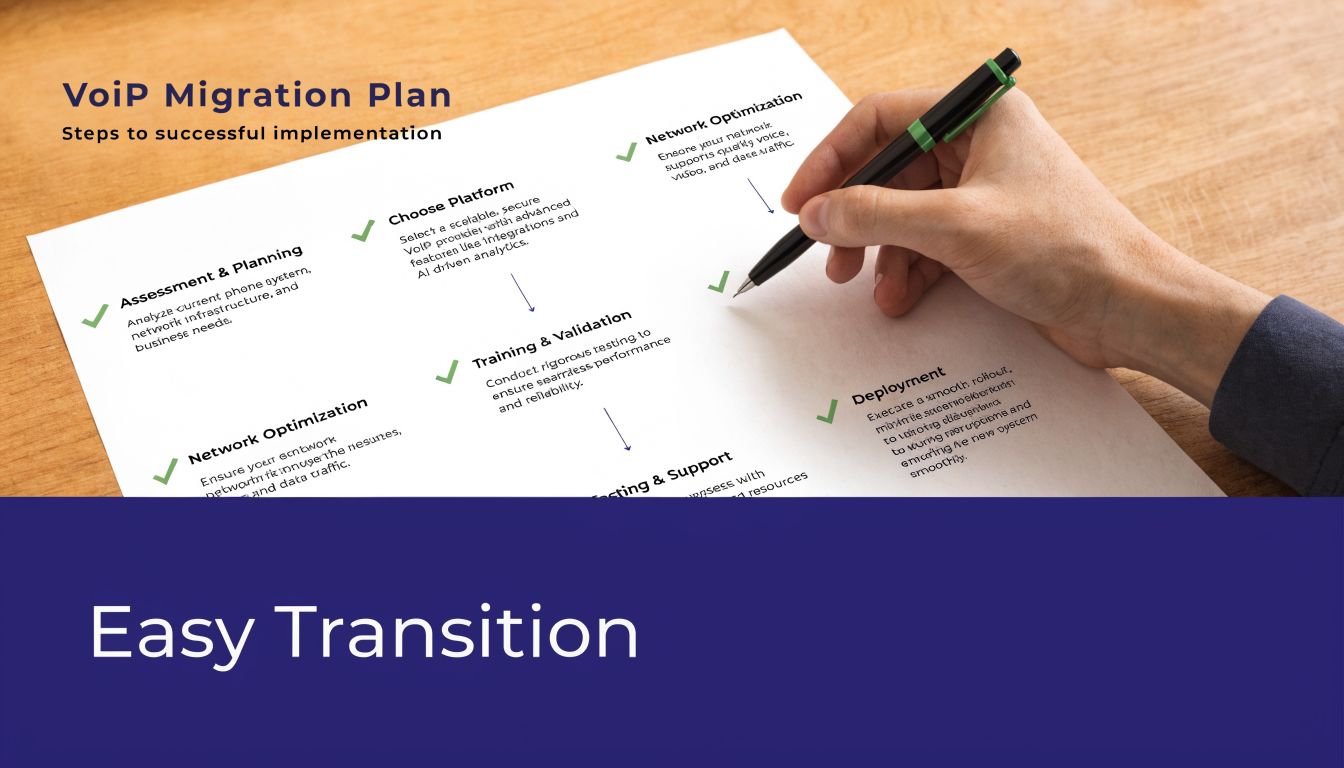
Start with an audit, not a shopping list
Before comparing providers, map how your phones are used today. You need a practical inventory, not a theoretical one.
Look at these areas first:
Current numbers and lines
List every main number, direct line, toll-free number, fax requirement, and any number that must be ported.Call flow reality
Document how calls should move, not just how they move today. Who answers first. Which calls need a menu. Which departments need overflow routing. What should happen after hours.User roles
Separate front-desk users, mobile employees, managers, support staff, and high-volume callers. They usually need different devices and routing rules.Must-keep features
Identify the essential features. Call recording, hunt groups, voicemail delivery, mobile apps, conference calling, or queue handling.
Practical rule: If a number brings in revenue, confirm its ownership details and porting information early. Number issues slow migrations more than handset setup.
A lot of businesses also underestimate network planning. If you’re not sure what your current internet connection can handle, use a provider resource that helps find out how much bandwidth you need for VoIP before deployment starts.
Prepare the network for voice traffic
VoIP depends on call quality, and call quality depends heavily on the network.
For reliable VoIP, each simultaneous call needs about 100kbps of dedicated bandwidth. Router-based Quality of Service, or QoS, matters because it gives voice traffic a fast lane and helps keep latency below 150ms, which reduces choppy audio and preserves a professional call experience, according to this VoIP setup guide for small business.
That doesn’t mean every small company needs a major network overhaul. It does mean you should answer a few questions before go-live:
- How many simultaneous calls do we expect during peak periods
- Is the internet connection stable enough for voice traffic
- Can the router prioritize voice traffic with QoS
- Are remote workers using connections that support business calling
- Do we need separate network policies for phones and general office traffic
Think of QoS like letting an ambulance move through traffic first. Email can wait a moment. Voice can’t. If the network treats every packet equally during congestion, phone calls are the first thing users notice.
A short explainer can help your team visualize the transition steps:
Stage the rollout and reduce risk
A steady migration usually works better than a “big bang” cutover.
A practical rollout often looks like this:
- Pilot first with a small group such as reception, a manager, and one sales or support user
- Test inbound and outbound paths including voicemail, transfer rules, caller ID behavior, and mobile app use
- Confirm number porting timelines and keep temporary forwarding options ready
- Train users by role because a receptionist, field rep, and admin all use the system differently
- Schedule cutover during a low-impact window so issues can be corrected without peak-hour pressure
Don’t skip security and caller trust
Security in business telephony isn’t only about encryption. It’s also about access control, call handling rules, and caller identity.
At a minimum, a business should ask how the provider protects administrative access, how recordings and logs are handled, and what controls exist around number spoofing and outbound caller identity. If your team relies heavily on outbound calling, ask whether the platform supports current caller authentication standards such as STIR/SHAKEN. That won’t solve every trust issue, but it’s part of presenting a more legitimate call identity to carriers and recipients.
The best migration plans don’t chase perfection on day one. They lock down the essentials, test thoroughly, and leave room to refine routing and user preferences after the business is live.
Choosing the Best VoIP Provider for Your Needs
Price matters, but it shouldn’t be the first filter. In small business telecom, the cheapest quote often hides the most expensive headaches. The provider you choose affects uptime, support burden, user adoption, and how painful future changes become.
The most overlooked issue is reliability. A top concern for businesses moving to VoIP is inconsistent internet performance, and 28% of SMB users report call drop rates above 5% in those conditions. That’s why businesses should ask providers directly about redundancy and automatic failover options such as cellular backup, as noted by Nextiva’s small business VoIP page.
Ask better questions than what does it cost
A provider review gets sharper when you move beyond features on a checklist.
Ask questions like these:
What happens if our office internet fails
Can calls reroute automatically to mobile devices or another location?Who helps during setup
Do you get guided onboarding, number porting help, and call flow design support?How is support delivered
Is there real phone support, ticket-only support, or a mix? What happens after hours?How are changes managed
Can your office manager update users, routing, greetings, and voicemail settings without opening a support request?Which phones and apps are supported
Some businesses want desk phones. Others want a softphone-first model. Many need both.
Reliability isn’t just whether the provider’s platform stays up. It’s whether your business can still receive calls when your own location has a problem.
What strong providers usually have in common
The better vendors tend to share a few practical traits:
| Criteria | What to look for |
|---|---|
| Support quality | Clear onboarding, responsive troubleshooting, and people who understand business call flows |
| Failover options | Automatic rerouting during local outages |
| Admin tools | A portal that makes common changes simple |
| Feature depth | Routing, recording, voicemail tools, mobile access, and reporting that fit your use case |
| Pricing clarity | Straightforward billing and fewer surprise add-ons |
| Deployment help | Number porting coordination, phone provisioning, and training assistance |
Where businesses often choose poorly
The first bad fit is a provider selected only because it has a low advertised seat price. By the time you add recording, support, hardware help, and setup time, the cheap option may no longer be cheap.
The second bad fit is overbuying. Some small businesses purchase a platform built for a much larger operation and end up paying for complexity they won’t use.
The third is underestimating support. A polished dashboard looks great in a demo, but when your main number is porting or a queue isn’t routing correctly, you need people who can fix the issue quickly. That’s when provider quality becomes obvious.
VoIP in Action Sample Business Configurations
A good phone system should fit the business, not force the business to fit the phone system. These sample setups show how voip for small business changes based on real operating needs. If you want more scenario ideas, these examples of VoIP show how different organizations structure their systems.
Multi-location retail
A retail company with several stores usually needs one main business identity but location-specific routing.
The main number can answer with a menu that sends callers to the nearest store, store hours information, or customer service. Each location can have its own ring group so no single employee has to catch every call. If one store doesn’t answer, overflow rules can send the call to a central desk or another location.
That setup reduces the “wrong store, wrong person” problem and keeps customers from hanging up after repeated transfers.
Professional services firm
A law office, accounting firm, or consulting practice often has a different challenge. The team is split between office, home, and client meetings, but the business still needs a steady, polished front door.
In that case, the phone system might route new inquiries to reception first, then send existing clients to their primary contact or practice group. Attorneys, accountants, or advisors can use mobile or desktop apps so they place and receive calls on the business number wherever they’re working. Voicemail delivery helps them respond quickly without sitting at a desk.
The customer experience stays consistent even when the team’s workday moves around.
Growing support team
A smaller support operation needs structure once call volume rises. That usually means queues, recorded greetings, hold treatment, wait-time messaging, and call recording for quality review.
Supervisors can watch queue activity, identify peak periods, and adjust staffing or routing rules when calls stack up. Queue callback is especially useful when the team is busy because it lets callers keep their place without sitting on hold.
This kind of setup helps a lean support team act with more discipline and less chaos. That’s often the difference between feeling overwhelmed and looking organized.
Transform Your Business Communications Today
An outdated phone system rarely fails all at once. It leaks efficiency, flexibility, and customer confidence a little at a time. That’s why moving to VoIP is usually less about replacing hardware and more about removing friction from how your business communicates.
The strongest results come from treating the change as a business project. Audit your current call flow. Prepare the network. Choose a provider with strong support and sensible failover. Then build a system that matches how your staff works, whether that means mobile apps, smarter routing, CRM context, or queue management.
VoIP gives small businesses something legacy systems struggle to provide. Reachability without rigidity.
If you’re evaluating hosted phone systems and want help mapping a practical migration path, SnapDial is one option to review. Its cloud PBX platform includes calling, conferencing, routing, mobile access, call recording, visual voicemail, and call center features, with white-glove setup and 24/7 Texas-based support. For a small business replacing a legacy PBX, that kind of hands-on deployment help can make the move much smoother.