

If you're running a business on an older phone system, you probably know the routine. Someone misses a call because they stepped away from their desk. A new hire needs an extension, which turns into a hardware project. A remote employee ends up using a personal cell phone because the office line can't follow them.
That friction is usually what pushes owners and office managers to start asking about VoIP, short for Voice over Internet Protocol. The name sounds technical, but the idea is simple. Instead of sending your conversation through a dedicated legacy phone line, VoIP sends it over an internet connection as digital data.
For small and mid-sized businesses, that change matters because the technology behind the call affects everything else. It affects how easy it is to add users, route calls, support hybrid work, run a call queue, or recover when something in the office goes offline.
A lot of articles stop at the definition. That doesn't help much when you're trying to decide whether to replace a PBX, support a call center, or unify phones across multiple locations. What is generally sought is how VoIP works in plain English, and why that technical design creates practical business benefits.
From Tangled Wires to a Future in the Cloud
A traditional office phone setup often grows by accident.
A company starts with a few desk phones. Then it adds a front desk line, a fax line, a conference phone, and a handful of workarounds. Over time, the phone system becomes one more thing nobody wants to touch because every change feels risky. Moving desks can break call flow. Expanding to a second location means duplicating hardware. Supporting remote staff turns into forwarding calls in clumsy ways.
That old model came from a different era. It assumed people worked in one building, at one desk, on one device. Business doesn't work like that anymore.
VoIP solves the flexibility problem by treating voice like data. If your email can reach you on a laptop or phone, your business calls can too. That doesn't mean every business must throw away every desk phone. It means the system behind the phone no longer has to be tied to a specific closet full of equipment.
Your phone system should follow your team, not the other way around.
This is why businesses replacing aging systems often move toward hosted calling. They want fewer maintenance headaches, easier changes, and a way to keep employees reachable whether they're at headquarters, at home, or on the road.
For call centers, the stakes are even higher. Routing, queues, recordings, and reporting all depend on a system that can adapt quickly. For growing companies, the question isn't just "Can we make calls?" It's "Can our phone system keep up with how we work?"
The Core Concept From Analog to Digital Voice
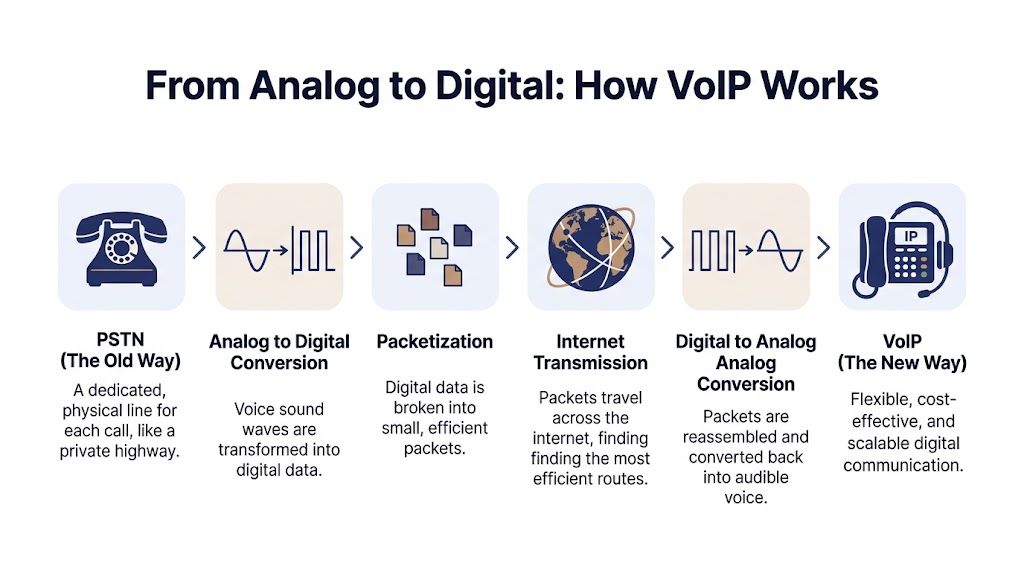
At its heart, how VoIP works comes down to one big shift. Your voice starts as sound, but the system turns it into digital information that can travel across an IP network.
The easiest way to understand this is to compare it with the old public switched telephone network, or PSTN.
With PSTN, a call behaves like reserving a private road between two places for the full conversation. That road stays dedicated to your call until you hang up. It's dependable, but it's also rigid.
With VoIP, the system works more like mailing a long message as many small postcards. Each postcard carries a piece of the conversation. The network moves those pieces efficiently, then the receiving side puts them back in order fast enough that the listener hears normal speech.
Your voice becomes data
When you speak into a handset, headset, or softphone, the device captures your voice as an analog sound wave. VoIP equipment then digitizes that audio. One common codec, G.711, samples voice and uses about 1 MB of data per minute according to this VoIP data usage explanation.
That conversion step is the first part people often find confusing. You're not sending "sound" through the internet in its original form. You're sending a digital representation of that sound.
Why compression matters
Once the voice is digitized, the system can compress it.
It's similar to zipping a file before sending it. The goal is to reduce how much data has to travel without making the call sound bad. Different codecs make different tradeoffs. Some preserve more audio detail. Others use less bandwidth.
VoIP also gains efficiency from something very human. People don't talk nonstop. During a normal conversation, one person speaks while the other listens, and there are pauses in between. The source above notes that silence suppression can save up to 50% of bandwidth during a call by not sending unnecessary audio data during silent moments.
Practical rule: VoIP isn't wasting capacity on a permanently reserved line. It uses network resources more efficiently by sending only what the conversation needs.
Packet switching is the real breakthrough
This packet-based design is what makes modern business calling flexible.
Instead of tying one call to one physical path, VoIP breaks voice into packets and sends them over IP networks. That opens the door to easier scaling, software-driven features, and communication that works across locations and devices.
A useful analogy is a book shipment. The old phone model is like sending the whole bound book through a single courier route that nobody else can use until delivery is complete. VoIP is like sending each page in labeled envelopes through the mail, then reassembling the book at the other end. If the labeling and sorting are done well, the reader still gets the full story.
That packet-switched model is the foundation for everything that makes VoIP practical for business. Call routing, mobile apps, cloud administration, and location independence all build on that core idea.
The VoIP Call Flow Unpacked Step by Step
A VoIP call has two jobs to do. First, the system has to set up the conversation. Second, it has to carry the voice itself.
Those two jobs are handled by different technologies. SIP manages signaling, and RTP over UDP carries the live audio.

SIP is the negotiator
When someone dials a number on an IP phone or softphone, the device doesn't just start sending voice immediately. It first sends a SIP INVITE to the phone system so the system can locate the destination and agree on the terms of the call.
You can think of SIP as the front-desk coordinator for the conversation. It handles questions like these:
- Who is being called
- Where should the call be sent
- Which codec should both sides use
- When has the call been answered
- When should the session end
That signaling layer is one reason VoIP supports useful business features so well. A system can decide whether to ring a desk phone, a mobile app, a queue, or another number because the call setup is software-driven.
RTP is the delivery service
After the call is established, RTP starts carrying the actual voice packets. Those packets typically travel over UDP, which is chosen because real-time audio needs speed more than perfection. If a packet arrives late, it's often less useful than moving on to the next one.
Here's the typical flow in plain language:
- You speak into a device. The phone or app captures your voice.
- The audio is digitized and compressed. Common options include G.711 at 85 to 100 Kbps or G.729 at about 30 Kbps according to this explanation of VoIP call setup and media transport.
- The system packetizes the audio. It wraps the voice data into RTP packets.
- The network forwards those packets. Routers move them toward the destination.
- The receiving device reassembles them. It converts the digital stream back into sound you can hear.
Why call quality can vary
If you've ever wondered why one internet call sounds excellent and another sounds choppy, the underlying reasons are detailed next.
VoIP depends on packets arriving quickly and consistently. The same source notes that quality stays strong when jitter is kept below 30ms and packet loss stays below 1%, while one-way delays over 150ms can create noticeable degradation such as echo or clipping.
That explains a common business complaint. The phone service isn't always the actual problem. Sometimes the network treats voice the same way it treats every other kind of traffic, so a large file upload or busy Wi-Fi environment interferes with the call.
A quick visual walkthrough
This short clip gives a helpful overview before you get into vendor comparisons or deployment planning.
SIP handles the conversation about the call. RTP carries the conversation itself.
That separation is one of the reasons VoIP systems can feel more intelligent than older business phone systems. Setup, routing, forwarding, failover behavior, and call control happen in the signaling layer, while the media layer focuses on getting voice from one person to another with minimal delay.
Cloud PBX vs On-Premise The Brains of Your Phone System
Once you understand how a call travels, the next question is where the phone system logic lives.
A PBX is the system that manages internal extensions, outside calling, routing rules, voicemail, and related business calling functions. In older deployments, that PBX sat physically in the office. In newer deployments, the PBX often runs in the provider's cloud environment and is delivered as a managed service. If you want a plain-language primer on the term itself, this overview of what a PBX system is is a useful companion read.
What changes when the PBX moves
With an on-premise PBX, your business owns and maintains the core system locally. That can appeal to organizations that want direct control over hardware and have in-house telecom expertise.
With a cloud PBX, the core call control runs offsite. Users still have phones, apps, extensions, and business numbers, but the operational burden shifts away from office equipment and toward the hosted platform.
For many SMBs, that architecture change matters more than the phone models on desks. It changes how quickly you can add staff, support remote users, recover from office disruptions, and roll out new features.
Cloud PBX vs. On-Premise PBX at a Glance
| Factor | Cloud PBX (Hosted VoIP) | On-Premise PBX |
|---|---|---|
| Upfront investment | Lower hardware burden because core system equipment isn't housed in your office | Higher initial commitment because the PBX hardware and related setup are local |
| Maintenance responsibility | Provider handles the underlying platform | Your team or telecom partner maintains the PBX |
| Scalability | Easier to add users, numbers, and locations through software | Expansion often requires hardware review and capacity planning |
| Remote work support | Built for users across phones, apps, and locations | Often needs extra configuration to support offsite staff smoothly |
| Feature updates | New capabilities are typically delivered through the hosted service | Updates depend on local system lifecycle and maintenance windows |
| Disaster recovery | Calling can remain manageable even if one office has a local outage | A site-specific problem can affect the PBX directly if it's housed there |
| Control model | Less physical ownership, more managed convenience | More direct local control, more hands-on responsibility |
When on-premise still makes sense
There are businesses that still prefer an on-site system.
A company with strict internal governance, specialized legacy integrations, or an IT team that wants direct control over every layer may choose that route. In those environments, the tradeoff can be worth it.
But many growing businesses aren't trying to become telecom operators. They want a system that works, can be changed quickly, and doesn't require someone to babysit hardware every time the company opens a new office or hires another team.
Why hosted calling fits modern operations
Hosted systems line up well with how businesses operate now.
A sales rep might start the day on a laptop, answer a call from a mobile app in the parking lot, and transfer that call to a support queue without the customer noticing. A multi-location company might want one unified phone experience even though staff are spread across cities. A customer service manager might want queue logic and reporting without building a telecom stack from scratch.
The more your business depends on flexibility, the more a software-driven phone system tends to make sense.
The important point isn't that one model is universally better. It's that the architecture should match your operating style. If your business values quick changes, simpler administration, and location independence, cloud PBX usually fits that reality better than a box in the server room.
Ensuring Crystal-Clear Call Quality and Network Security
Two concerns come up in almost every VoIP conversation. First, will the calls sound good? Second, is the system secure enough for business use?
Both are fair questions. Voice traffic is sensitive to timing, and internet-based systems need the right protections in place. The good news is that these aren't mysteries. They're engineering problems with known controls.

Quality comes down to timing and prioritization
Voice is less forgiving than email. If an email arrives a little late, nobody cares. If part of a sentence arrives late during a live call, people hear garble, gaps, or awkward overlap.
A lot of call quality depends on the codec in use and the condition of the network. According to this technical overview of codecs, QoS, SRTP, and SBCs, G.711 delivers toll-quality audio at about 100 Kbps, while G.729 reduces usage to about 30 Kbps. The same source notes that strong performance generally requires jitter below 20ms and packet loss under 0.5%.
Three terms matter most here:
- Jitter means packets aren't arriving at a steady rhythm.
- Packet loss means some packets never arrive.
- Latency means the audio takes too long to travel.
When business owners say, "The call sounded robotic," they're usually describing one of those conditions.
QoS gives voice a VIP lane
Quality of Service, or QoS, tells your network to treat voice traffic as high priority.
If someone in the office starts a large download while a customer call is in progress, QoS helps protect the call from getting stuck behind less urgent traffic. The source above points to DiffServ as a way to prioritize RTP voice packets over other data.
For a business owner, the practical takeaway is simple. Internet speed matters, but network behavior matters too. A fast connection without sensible prioritization can still produce inconsistent calls.
If you're evaluating readiness before a migration, this bandwidth planning guide for VoIP is a useful way to think through the voice side of your network needs.
A VoIP deployment succeeds when the network treats voice like a real-time service, not just another app.
Security is built in layers
The security side also gets easier to understand when you break it into parts.
SRTP encrypts the audio stream itself, which helps protect the call from eavesdropping while it travels across the network. SBCs, or Session Border Controllers, sit at the edge of the voice environment and protect against SIP-related threats and abuse.
A good hosted provider doesn't rely on one defensive tool. It uses layered protections. That can include encrypted media, controlled signaling, secure trunking, and managed boundaries between your users and the public internet.
What businesses should ask for
When you're comparing providers or planning an internal rollout, ask practical questions:
- How is voice traffic prioritized
- What protections are in place for signaling and media
- How are devices and trunks managed
- What support is available when users report quality issues
Those questions are more valuable than broad promises. Clear answers usually signal that the provider understands both the voice path and the security model behind it.
How VoIP Powers Modern Business and Call Centers
The technical design of VoIP matters because it enables the features businesses use every day.
A basic legacy system can ring phones. A modern VoIP system can decide where a call should go, how long it should wait, what the caller hears, which employee can answer from which device, and what happens if nobody is available. That difference is what turns phone service from a utility into an operational tool.
A front desk without a front desk
Take a small business with a lean staff. Customers call one main number. Instead of a receptionist manually transferring every call, the system can answer with an auto-attendant and route callers to sales, service, or billing.
That setup feels polished to the caller, but the reason it works is technical. SIP-based call control makes it possible to route and redirect sessions in software rather than by physically wiring lines to desks.
The same flexibility supports mobility. According to these VoIP productivity and feature adoption statistics, 92% of users use call forwarding and 88% use voicemail-to-email. Those aren't just nice extras. They solve everyday business problems, especially for hybrid teams.
A call center that reacts faster
Now consider a support team or contact center.
Calls don't just need to ring. They need to hit the right queue, follow routing logic, support overflow handling, and give managers visibility into what's happening. VoIP platforms make that possible because the call flow is controlled in software.
The same source notes that AI-powered routing is seeing 65% adoption and is projected to reduce costs by $80 billion by 2026. For a call center leader, that points to a broader shift. Voice systems aren't only transporting calls anymore. They're helping decide how calls should move through the business.
Productivity shows up in small moments
Most benefits don't look dramatic in the moment. They show up in tiny operational wins repeated all day.
- A manager changes routing rules without waiting for a hardware technician
- An employee answers from a mobile app when away from the desk
- A voicemail arrives as email so follow-up happens faster
- A supervisor reviews recordings and call logs to coach the team
- A queue callback option prevents customers from waiting on hold unnecessarily
The same source reports that 93% of businesses report an average of 32 minutes in daily productivity gains per employee after switching to VoIP.
If you'd like concrete examples of how companies use these tools in practice, these business examples of VoIP use cases show the variety well.
Modern business calling isn't about a phone on a desk. It's about making sure the right conversation reaches the right person with the least friction.
That's why the "how" matters. Once voice becomes software-driven, the phone system starts supporting customer experience, employee flexibility, and operational visibility all at once.
Your Migration Checklist for a Smooth Switch to VoIP
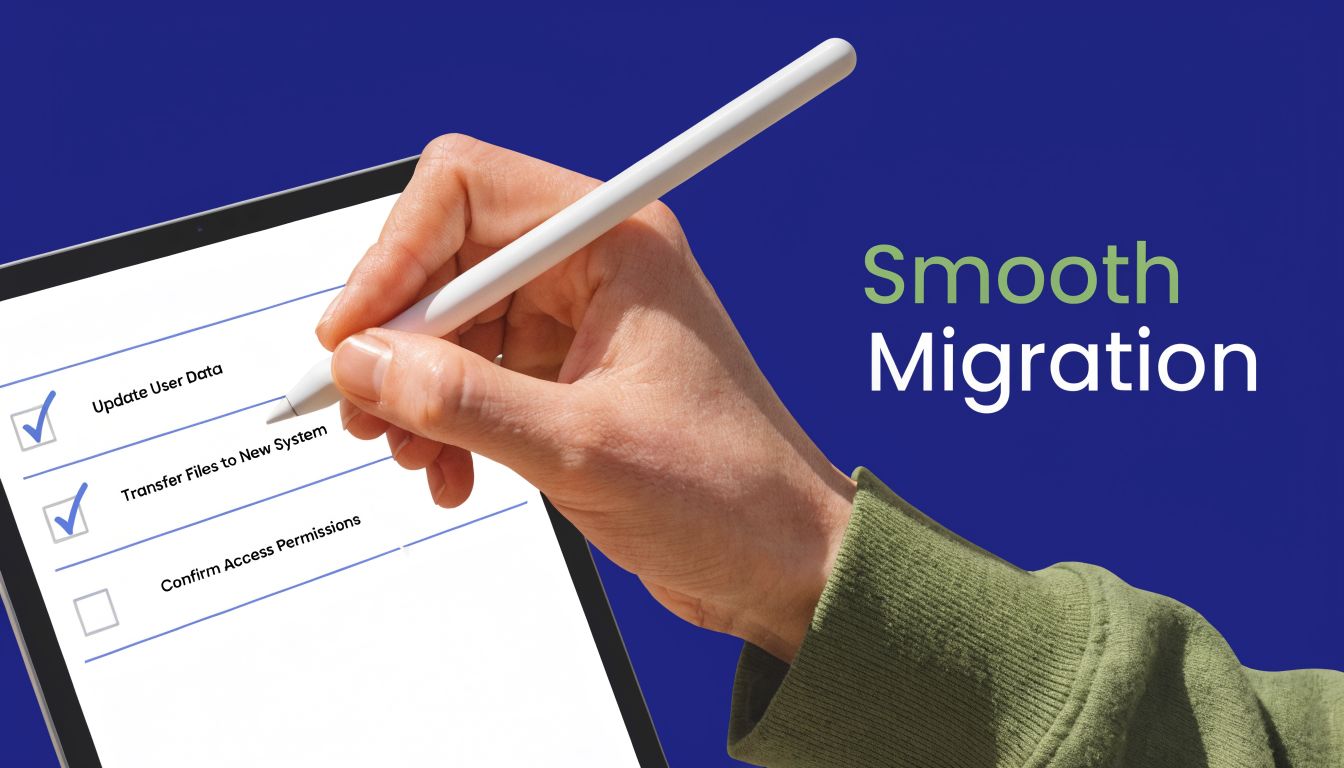
A phone migration feels intimidating when you think about everything at once. It gets manageable when you treat it like a staged business project.
Most problems happen before the first phone ever rings. They come from unclear requirements, rushed number porting, weak network prep, or poor communication with staff. A smoother rollout starts by slowing down the planning.
Start with your current reality
Before choosing features or phones, document how your business communicates today.
Write down which numbers matter, who needs direct lines, which departments need queues, and what your front-line call flow should sound like. Don't forget side cases such as after-hours routing, holiday schedules, shared voicemail boxes, conference rooms, and any analog devices you still rely on.
A simple internal checklist helps:
- Current numbers: List every main line, direct inward dial, fax number, and temporary number in use.
- Users and roles: Note who needs a desk phone, who can work from a softphone, and who needs mobile access.
- Call paths: Map what should happen for sales, service, billing, overflow, and after-hours calls.
- Compliance and records: Identify whether you need recording, retention, or supervisor visibility.
Check the network before shopping features
Businesses sometimes choose a phone system before confirming the network can support it cleanly.
Test your internet stability, not just your advertised speed. Look at how the office uses bandwidth during busy hours. Pay attention to Wi-Fi dead zones, remote users with inconsistent home internet, and locations where multiple services share the same connection.
If text communication is part of your customer workflow, it's also smart to think beyond voice during planning. This guide to VoIP text messaging capabilities is helpful for understanding how messaging can fit into a broader communications rollout.
Plan the move in phases
A good migration rarely depends on one giant cutover.
Instead, break the project into workable phases:
- Choose the service model that matches your business operations.
- Confirm number porting details early so your main business numbers aren't delayed.
- Select devices and apps based on real user behavior, not habit.
- Build the call flow before launch, including auto-attendants, queues, and business hours.
- Test with a pilot group so you catch issues before company-wide rollout.
- Train staff on the basics such as transfers, voicemail, mobile use, and presence settings.
Porting numbers is often the part businesses worry about most. The key is early coordination and a clear temporary plan while the transition is in progress.
Prepare people, not just phones
Even a technically solid migration can stumble if employees don't know what changed.
Keep the rollout communication simple. Tell staff what device or app they'll use, when the switch happens, how to sign in, how to retrieve voicemail, and who to contact for help. For reception, sales, and support teams, provide quick call-handling scenarios rather than long manuals.
Use a go-live checklist
Right before launch, verify a short list:
- Inbound routing works for main numbers and departmental paths
- Outbound calling works from every user group
- Voicemail delivery is correct for individuals and shared mailboxes
- Emergency calling details are accurate
- Failover options are understood if the office has a local internet issue
A clean migration isn't magic. It's just preparation done in the right order.
Frequently Asked Questions About How VoIP Works
What kind of internet connection do I need
You need an internet connection that is stable enough for real-time voice, not just fast on paper. Consistency matters because voice is sensitive to delay, jitter, and packet loss. Wired connections often produce more predictable results than crowded office Wi-Fi for desk phones and heavy call users.
Can I keep my existing phone numbers
In many cases, yes. Businesses commonly port existing numbers when moving to a new phone system. The important part is to start that process early and confirm the details of every number you want to preserve.
What happens if the internet goes down
If your office internet fails, cloud-based calling can often keep working through alternate paths such as mobile apps, call forwarding, or preconfigured failover routing. The exact behavior depends on how the system is set up. This is one reason hosted systems are attractive to distributed teams.
Is it difficult to manage a VoIP system
It doesn't have to be. Modern hosted systems are usually managed through a web portal rather than a hardware console in a back room. That makes everyday tasks such as adding users, adjusting routing, reviewing voicemails, or changing schedules much easier for office admins and IT staff.
Do I need special phones
Not always. Many businesses use IP desk phones, but some employees work fine with desktop softphones or mobile apps. The right mix depends on how each person works. A receptionist may want a physical phone. A remote salesperson may prefer a headset and app.
Is VoIP only for large companies
No. Small teams often benefit the most because they gain features that used to require much more expensive phone setups. The technology scales up well for multi-location companies and call centers, but it also works for offices that want less complexity and more flexibility.
If you're evaluating whether a hosted phone system fits your business, SnapDial is worth a look. It gives SMBs, multi-location teams, and call centers a cloud-based way to replace legacy PBXs without the usual disruption, with white-glove setup, business calling features, and support built around keeping your team reachable wherever they work.