

The video conferencing market was estimated at $7.0 billion in 2022 and $8.0 billion in 2023, with a projection of $21.0 billion by 2032 at an 11.8% CAGR, according to Market.us video conferencing statistics. That's not a niche software category anymore. It's core business infrastructure.
For an SMB owner, that changes the question. “What is video conferencing?” isn't really a definition exercise. It's an operations question. You're deciding how your team meets, how sales talks to prospects, how support handles complex issues, and whether your phone system, messaging, and meetings work together or stay fragmented.
What Is Video Conferencing Really?
Nearly every SMB already knows what a video call looks like. The buying mistake is assuming that a video call and a business video conferencing system solve the same problem.
For a business, video conferencing means live meetings with the controls, reliability, and administration needed to run actual work. That includes how people join, how meetings are scheduled, how content is shared, how calls are recorded, how permissions are managed, and how the platform connects to your phone system and messaging tools. Once video touches sales, hiring, support, or multi-site operations, it stops being a convenience feature and becomes part of your communications infrastructure.
From novelty to operating system for meetings
The history matters because it shows how far the category has moved. AT&T's Picturephone was commercialized at the 1964 New York World's Fair, and one historical summary notes that the service cost $27 for the first three minutes in 1964, or roughly $225 in today's money, according to this history of video conferencing. Early systems were expensive and specialized. They supported very limited use cases.
Current platforms are different in a way that matters to owners and managers. They are expected to work across laptops, mobile devices, desk phones, meeting rooms, and customer conversations without forcing staff to switch tools midstream. If your team is also investing in physical meeting spaces, conference room AV solutions often become part of the same operational decision.
What SMBs are actually buying
Business platforms differ from simple one-to-one video calls in their workflow depth. A basic app can handle a conversation. A business platform also supports scheduling, screen sharing, waiting rooms, captions, chat, recordings, user policies, device support, and admin controls across the company.
That distinction shows up fast in day-to-day operations:
- Telephony matters: Meetings alone do not handle call routing, voicemail, auto attendants, receptionist workflows, or hunt groups.
- Reliability matters: A dropped internal catch-up is annoying. A failed client review or support escalation costs trust.
- Security matters: Owners need control over who can join, what gets recorded, and how data is managed.
- Integration matters: Staff work faster when voice, video, chat, and contacts live in one system instead of four separate apps.
- Customer experience matters: People should not have to hang up, find a link, download another tool, and start over.
I usually tell SMB owners to ask a simple question: does this platform help the team complete work, or does it only host a meeting?
That defines video conferencing more usefully for a business buyer. It is the layer where meetings, collaboration, administration, and communications management come together.
The Technology Behind the Virtual Meeting Room
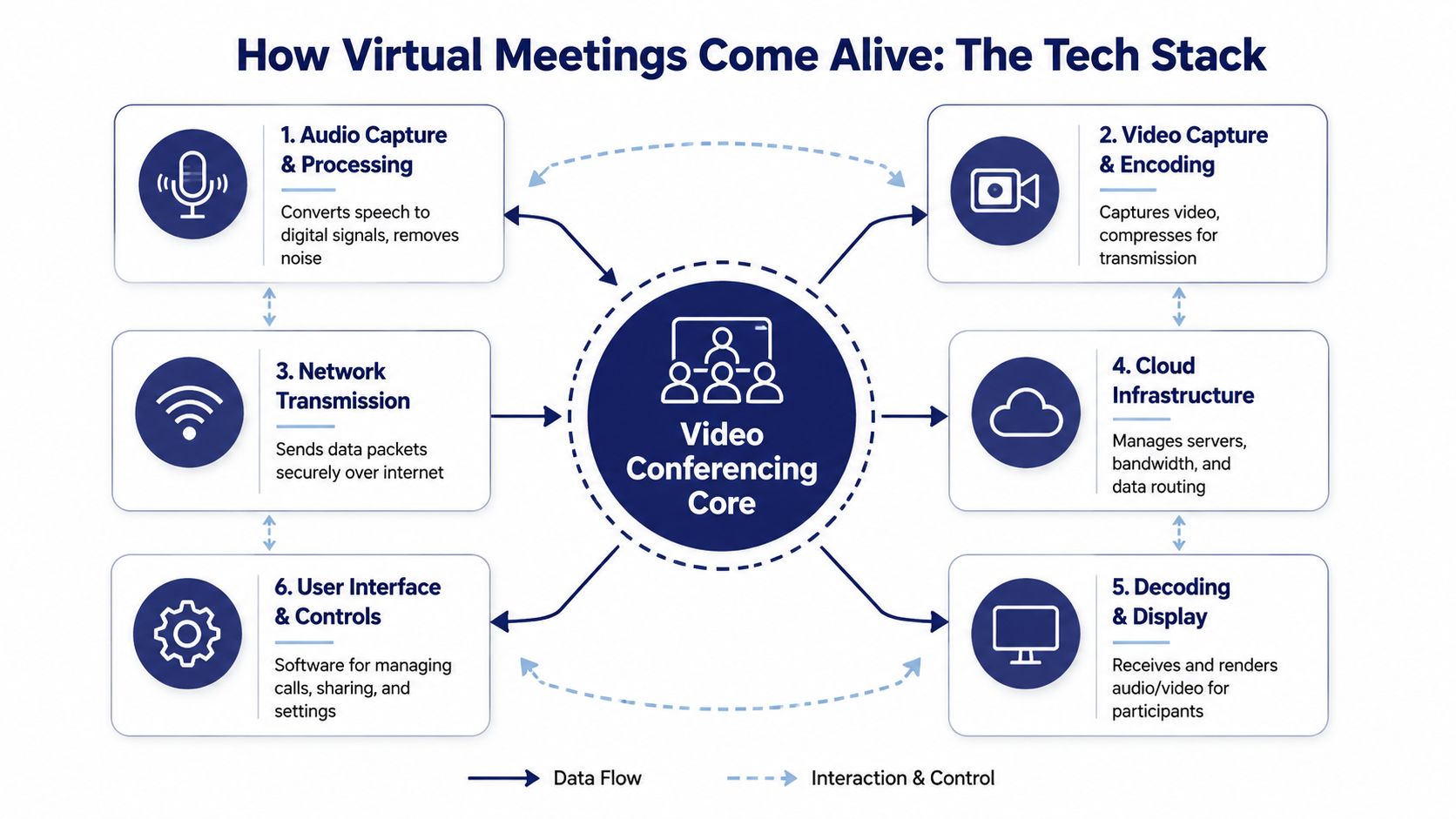
If the technical side feels opaque, use a shipping analogy. A video meeting works a lot like a delivery network. Your camera and microphone create the package. The software compresses it so it can travel efficiently. The network carries it. The device on the other end unpacks it and plays it back fast enough to feel live.
Codecs are the packers
A codec compresses audio and video for transmission, then decompresses it on the receiving side. Without that compression step, sending live video would demand far more network capacity than most businesses want to dedicate to every call.
One technical specification for enterprise endpoints requires H.264 SVC/AVC for video and G.722, G.722.1, MPEG-4, and AAC-LC for audio, as shown in this government technical specification PDF. You don't need to memorize the acronyms. What matters is that good platforms use standard methods to make audio and video efficient and compatible.
Protocols are the shipping rules
Standards such as SIP and H.323 are the addressing and handling rules. They help different systems understand how to connect, negotiate media, and keep a session alive.
That matters most when you're not running a pure laptop-and-headset environment. If you have room systems, desk phones with video, or executive conference setups, interoperability stops being a nice extra and becomes a requirement. Businesses planning physical meeting spaces often pair software decisions with conference room AV solutions so cameras, displays, microphones, and room controls work as one system.
Better room hardware won't rescue a weak network. It will only make the network problem easier to see.
Bandwidth is the truck size
Bandwidth determines how much media can move smoothly at once. Higher resolution and smoother motion need more capacity and more stability. That same technical specification requires support for 720p30, 1080p30, and preferably 1080p60, and sets a minimum 1 Mbps endpoint bandwidth for 1080p60 in the spec above.
Here's the operational takeaway:
| Technical factor | Business effect |
|---|---|
| Higher resolution | Sharper faces, slides, and demos |
| Higher frame rate | Smoother movement and less choppiness |
| Limited bandwidth | Freezes, blur, audio dropouts, lag |
| Stable connection | More natural conversation and fewer repeats |
Most call complaints aren't really “app problems.” They're packaging, transport, or compatibility problems. When owners understand that, they stop shopping for flashy features first and start asking the better question: will this platform work reliably across our actual devices, rooms, users, and locations?
Must-Have Features for Modern Business Teams
Feature lists get bloated fast, so it helps to separate tools that look nice from tools that change how work gets done. For SMBs, the right feature set should reduce friction in sales, support, management, and everyday coordination.
Features that solve real workflow problems
Screen sharing is the obvious one, but it matters because it shortens explanation time. A finance lead can walk through a forecast. A support rep can troubleshoot a settings issue live. A salesperson can show a proposal without sending five follow-up emails trying to clarify the same point.
Recording and transcription turn a meeting into a usable record. They help when someone misses a call, when a manager needs to confirm what was agreed, or when a customer handoff shouldn't depend on handwritten notes. Teams also use them to build repeatable internal knowledge, especially for onboarding and process training.
Chat, reactions, and side-channel collaboration sound minor until you run larger meetings. They let teams ask questions without interrupting, drop links and files in context, and keep momentum when several people need to contribute at once.
Features that shape professionalism
A lot of SMBs underestimate presentation quality. Customers notice when calls begin late, screen sharing is clumsy, or the host can't control the room.
Useful controls include:
- Waiting room and host controls: Let the organizer decide who enters and when.
- Mute management: Keeps background noise from derailing calls.
- Virtual backgrounds and layout controls: Help staff look consistent even when they're working from varied locations.
- Calendar integration: Cuts down on missed joins and “wrong link” confusion.
Features that support follow-through
The newest layer is assistive meeting technology. Microsoft Teams reported 320 million monthly active users in 2024, according to Statista's Teams usage chart, which tells you these tools are now part of everyday operations. Zoom also reported that AI Companion use grew from 500,000 to 2.8 million monthly active accounts within a year, according to Zoom's fiscal 2024 results.
That growth makes sense. Teams want practical help with meeting summaries, captions, and action tracking.
A feature matters when it removes a handoff, not when it adds another button.
A useful buying filter is simple. Ask of each feature: does this help us prepare, run, document, or act on meetings? If the answer is no, it's probably optional. If it helps your team avoid missed details, repeat conversations, or clumsy customer transitions, it belongs on the shortlist.
Tangible Business Benefits Beyond Travel Savings
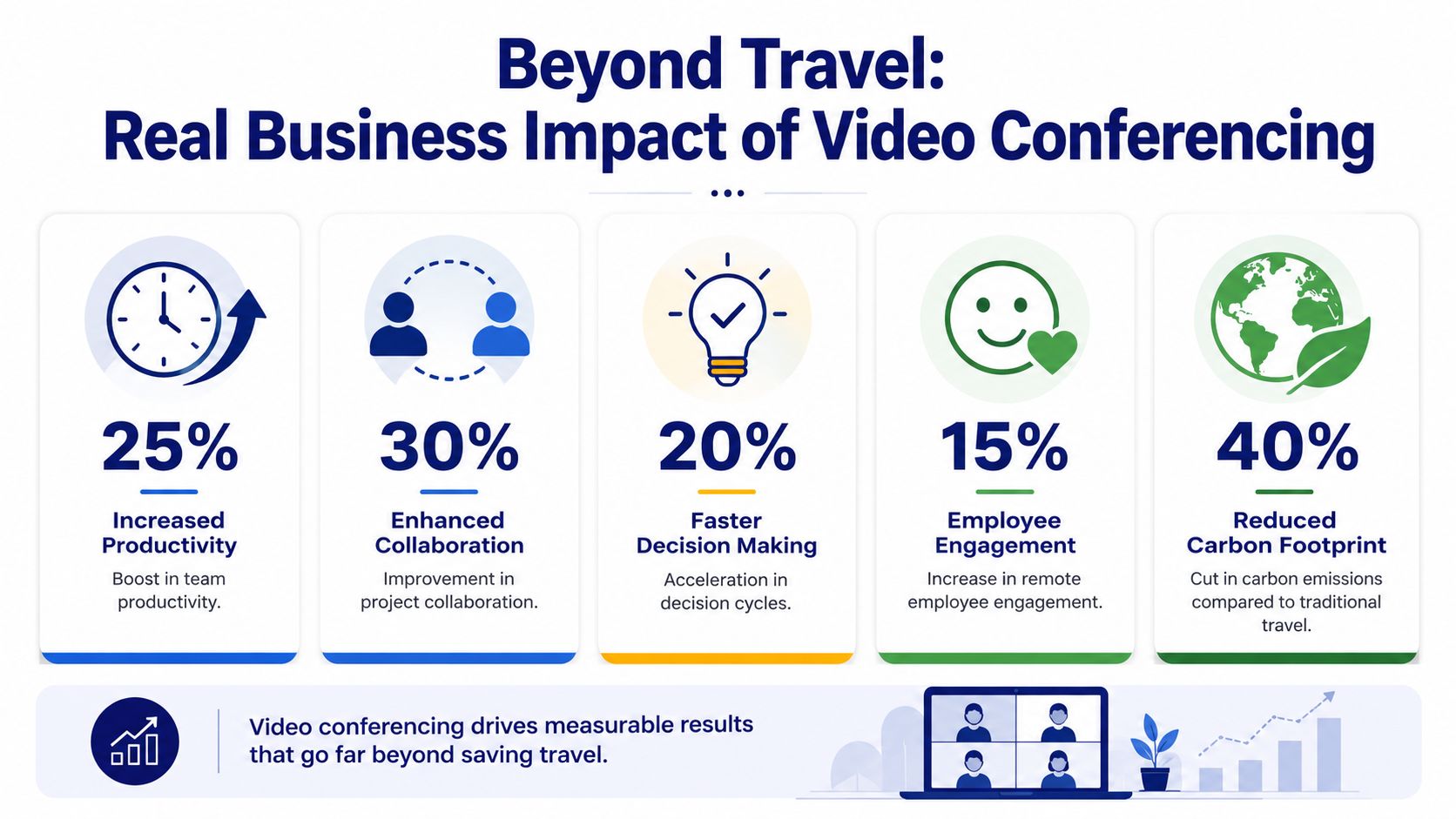
Travel savings are real, but they're not the main business case anymore. The bigger value is operational speed. Video lets a team move from delay to decision without waiting for everyone to be in the same room.
Faster decisions and cleaner coordination
A short live video meeting often resolves issues that would drag across email threads. Managers can read reactions, settle ambiguity, and assign next steps in one session. That matters in hiring, purchasing, project delivery, and customer escalations.
For multi-location companies, video also reduces the cost of distance in practical terms. Staff don't need to be in the same building to review work, train new hires, or bring in a specialist for a high-stakes customer conversation.
Better customer-facing communication
Externally, video gives SMBs a more capable service model. A support team can see a device problem instead of guessing. A consultant can review documents face to face. A salesperson can present with more context than a phone call allows.
That doesn't mean every customer wants video first. It means your business should be able to move to video when the issue benefits from visual context.
A few high-value use cases stand out:
- Sales demos: Buyers can see products, proposals, and workflows live.
- Technical support: Customers can show the problem instead of describing it poorly.
- Account reviews: Teams can keep relationships warm without on-site meetings.
- Hiring and onboarding: Managers can move candidates and new hires through a structured process without location getting in the way.
A stronger case for distributed teams
The market scale also tells the story. As noted earlier, the category has grown into a major communications segment, and the broader conversation has shifted from convenience to utility. Massive platform adoption and rising use of AI-assisted meeting features suggest businesses now treat video as a normal part of work rather than an occasional workaround.
That shift changes culture as much as logistics. Teams that use video well build stronger rhythm in hybrid environments because people don't have to choose between silence and travel. They have a middle ground that preserves human contact.
The benefit isn't “we saved a trip.” It's “we kept work moving.”
Comparing Deployment Options On-Premise vs Cloud
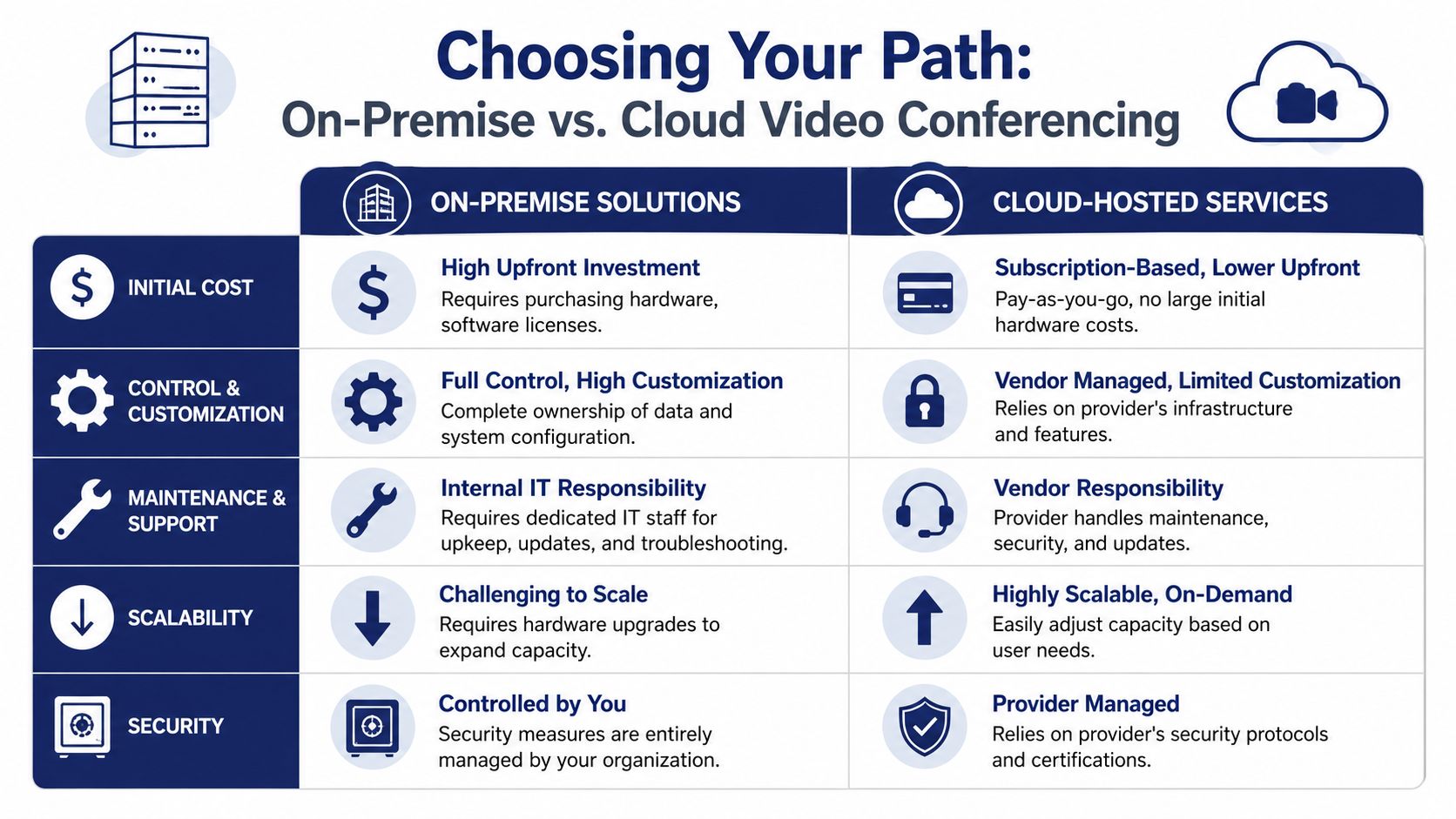
When SMBs shop for video conferencing, they usually end up choosing between two models. They can run more of the system themselves with on-premise infrastructure, or they can use a cloud-hosted service where the provider handles most of the backend.
Neither model is automatically right. The better fit depends on your IT capacity, risk tolerance, and how much operational complexity you want to own.
Side-by-side trade-offs
| Decision factor | On-premise | Cloud-hosted |
|---|---|---|
| Budget model | Higher upfront spend | Subscription-style operating cost |
| Control | More direct control over infrastructure | Provider manages most infrastructure |
| Maintenance | Internal team handles updates and support | Vendor handles updates and much of support |
| Scaling | Expansion can require more hardware and planning | Capacity is easier to adjust |
| Interoperability burden | Your team owns more of it | Provider often abstracts much of it |
For many SMBs, cloud wins for one reason: they don't want to become part-time conferencing engineers. They want meetings to work.
Why backend scale matters
Enterprise meeting platforms aren't just connecting two people. They're juggling participant count, media handling, and device interoperability at the same time. Cisco's WebEx Meeting Center data sheet states support for up to 1,025 concurrent users in a single meeting and up to 25 SIP or H.323 video conferencing screens or clients, according to the Cisco WebEx data sheet PDF.
That detail matters because it shows what's happening behind the curtain. A provider has to manage capacity, standards-based devices, and meeting stability simultaneously. In a cloud model, much of that complexity sits with the vendor rather than your internal staff.
If your company doesn't have a strong reason to own conferencing infrastructure, you probably don't want the maintenance burden that comes with it.
What works for most SMBs
On-premise can still make sense when a company needs unusual control, already has deep internal IT resources, or operates under strict internal infrastructure requirements.
Cloud-hosted service usually works better when the business wants:
- Predictable administration: Fewer moving parts for internal staff.
- Remote readiness: Easier support for mobile and hybrid users.
- Faster rollout: Less dependency on local hardware buildouts.
- Simpler scaling: Easier to add users, locations, or temporary demand.
This is also where unified providers enter the discussion. Instead of buying a stand-alone meeting tool and separately managing voice, a business might choose a hosted communications platform such as SnapDial, which combines cloud phone system functions with conferencing and unified communications workflows. That approach is often cleaner than bolting video onto a legacy PBX and trying to make separate tools behave like one system.
Navigating Security Privacy and Best Practices
A weak meeting setup creates business risk fast. One exposed recording, one guest in the wrong room, or one unreliable connection during a customer call can do more damage than the convenience of a free video app ever saves.
Security in video conferencing is usually discussed too broadly. For an SMB, the operational question is: can this platform protect meetings, control who sees what, and give admins clear oversight without making daily work harder? That is also the line between a basic video call tool and a business collaboration platform. Consumer-grade tools may get people on screen. Business systems need to handle permissions, retention, identity, and policy consistently across the company.
What to ask vendors and admins
The best buying conversations focus on controls, not feature count. A vendor can promise HD video and AI notes all day. What matters is whether your team can decide who gets in, what gets stored, and how long that data remains available.
Ask practical questions such as:
- Meeting access: Can hosts require passwords, use waiting rooms, restrict screen sharing, and remove attendees quickly?
- Recording controls: Who can start a recording, where does it live, and can admins set retention rules centrally?
- Transcript handling: Are AI transcripts and summaries optional, reviewable, and covered by policy before staff use them with customers?
- Admin permissions: Can IT or office managers manage users, guests, and role-based access from one place?
- Audit trail: Can the system show who joined, who recorded, and what settings were used?
- Accessibility: Are captions easy to enable for employees and clients who need them?
Those details matter because risk often sits in the gaps between tools. If video meetings, chat, and phone identities are managed separately, staff end up using workarounds. That is where privacy mistakes start.
Practical habits that prevent common mistakes
Most failures come from ordinary behavior. A sales rep forwards a standing meeting link. A manager records a sensitive call without a retention policy. An employee joins from home with a customer file open on a second monitor.
Good policy fixes a lot of this.
- Use host controls for any confidential discussion. Finance, HR, legal, and customer escalation meetings should never rely on an open link alone.
- Set recording rules before staff need them. Decide what can be recorded, who approves it, where it is stored, and when it is deleted.
- Train for visual privacy. Backgrounds, whiteboards, browser tabs, and shared screens expose more than people expect.
- Check the network before blaming the platform. Choppy audio and dropped video often come from weak Wi-Fi, overloaded home networks, or poor routing. Users experience that as a product failure either way.
- Plan for cross-border access. If staff travel or work internationally, local internet restrictions can affect whether meetings connect at all. Teams dealing with that issue can use this guide for businesses in China on VPNs as an operational reference.
One rule I give SMB clients is simple: if a meeting would have been held behind a closed office door, it should not be run with casual default settings online.
Security also has to be usable. If guest access is too hard, employees send personal links. If recording rules are unclear, files end up on laptops or random cloud drives. The strongest setup is the one staff can follow under pressure, with admin controls set centrally and plain-language rules for when to invite guests, when to record, and where meeting content belongs after the call.
The Future Is Unified Video and VoIP Integration
Standalone video tools are useful, but they create friction when they sit beside a separate phone system, separate messaging app, and separate customer contact workflow. Employees bounce between tools. Customers get transferred awkwardly. Admins manage multiple directories, rules, and reports.
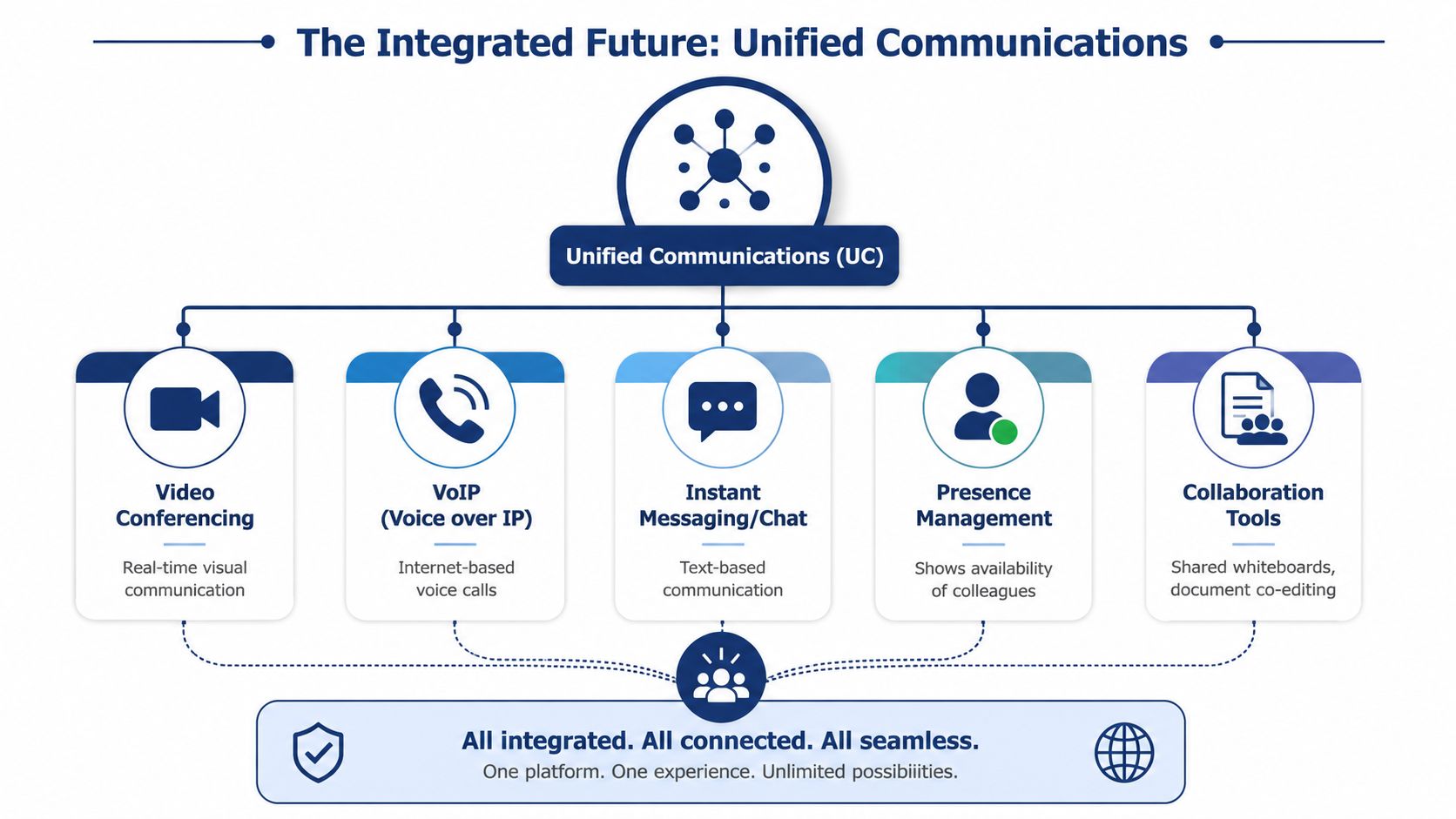
The better model is unified communications. That means voice, video, messaging, presence, and collaboration tools work as one system rather than a pile of separate products.
What unified communications changes in daily work
When video and VoIP are integrated, a user can move between channels without starting over. A support rep can escalate a voice call into a video session. A manager can see presence status, message a colleague, then launch a meeting from the same environment. A remote employee can answer business calls on mobile without losing the office identity.
That reduces process drag in a way SMBs feel immediately.
Consider the difference:
- Separate tools: Call the customer, email a meeting link, wait for them to join, restate the issue, then document the conversation elsewhere.
- Unified system: Start with the call, move to video when needed, keep the interaction in one communication flow, and preserve records under one admin model.
Why this matters for customer support and sales
Customer-facing teams benefit first because they handle the most handoffs. If a buyer asks for a live walkthrough or a support case needs visual troubleshooting, integrated communications let the employee act immediately.
For teams designing that kind of workflow, it helps to look at examples of how companies integrate Zoom for customer support so voice, meetings, and service operations connect more cleanly. The larger lesson isn't about one app. It's about removing the gap between conversation and resolution.
The phrase “what is video conferencing” is no longer sufficient. In real business use, video is becoming one channel inside a broader communications system.
What SMB owners should take from this
If you're replacing a legacy phone system, don't buy video in isolation. Ask whether the platform also helps with:
- Call routing and business telephony
- Mobile and remote staff access
- Messaging and presence
- Meeting controls and recordings
- Customer transitions from phone to video
That's the strategic advantage. A modern business doesn't just need meetings on screen. It needs one communication environment that supports internal coordination and customer contact without making staff stitch the experience together by hand.
If you're reviewing phone systems and want video, calling, and day-to-day communications to work as one stack, SnapDial is worth a look. It's a cloud-based business phone platform built around hosted VoIP and unified communications, with conferencing, call routing, mobile access, voicemail transcription, and admin controls designed for companies replacing legacy PBXs without taking on the burden of managing everything themselves.