
Your team makes a routine outbound call. The number is correct. The agent is trained. The customer needs the update, the estimate, or the return call. But the screen shows “Unknown,” an old employee name, or a chopped-up version of your business name that looks nothing like your brand.
That’s the moment a caller id name change stops being a minor settings issue and turns into an operating problem.
For small and mid-sized businesses, this gets worse during phone system changes. You port numbers, replace an old PBX, add remote users, split locations, and expect your identity to move with the number. Instead, customers on one network see the right business name, others see nothing, and a few still see the company you replaced months ago. If you don’t understand how caller ID name works, it feels random. It isn’t random. It’s just messy.
Why Your Caller ID Name Is Costing You Business
A missed call used to be an inconvenience. Now it’s often the default outcome when your identity doesn’t look trustworthy.
A sales rep calls a warm lead after a form fill. A billing clerk calls about a declined payment. A service manager returns a message about an urgent issue. The customer sees a number they don’t know and a caller name they don’t trust, then ignores it. That happens all day in businesses that think phone identity is “basically handled.”
The cost isn’t limited to missed sales. It hits customer support follow-ups, collections, appointment confirmations, dispatch, recruiting, and account management. When your call shows as a generic label or the wrong name, people don’t just skip the call. They start associating your number with uncertainty.
Trust broke before your team ever spoke
Caller ID trust is damaged enough that 69% of American consumers have missed important calls because they distrusted the Caller ID information, according to Kixie’s explanation of how caller ID display names work. That number matters because it changes how you should think about outbound calling. You’re not only competing for attention. You’re trying to clear a credibility check that happens before anyone answers.
For business owners, this creates three common failure points:
- Revenue loss: Leads go cold when callbacks look suspicious.
- Service friction: Customers don’t pick up order updates, support responses, or renewal reminders.
- Brand confusion: Old entity names, personal names, or blank caller ID make your company look disorganized.
Practical rule: If the displayed name would confuse a first-time customer, assume it’s hurting answer rates.
A bad display name makes a legitimate business look risky
Customers don’t know your backend. They don’t know you just migrated carriers. They don’t know your main number was recently ported. They only know what appears on the screen.
That’s why CNAM, the system behind caller ID names in the US, matters so much. It’s the hidden layer that decides whether your business appears recognizable, stale, or absent. Most businesses only discover it after something breaks.
A proper caller id name change fixes more than cosmetics. It restores continuity between your number, your brand, and the customer’s decision to answer. If you rely on outbound calling for any part of operations, getting this right isn’t optional.
Understanding the Caller ID Name Ecosystem
A business owner changes a caller ID name on Monday, sees the new label in the admin portal, places a test call, and assumes the problem is solved. By Wednesday, one customer still sees the old company name, another sees only the number, and a third sees something generic. That result is normal in telecom, even though it feels broken.
Most business owners expect one national caller ID database. CNAM does not work that way.
Your caller ID name sits inside a patchwork of carrier records, third-party lookup providers, cached data, and mobile display rules that do not update on the same schedule. A number can be correct in one source, stale in another, and blank in a third. The receiving carrier decides which source to query and what to show the called party.
That is why the same outbound number can display differently across Verizon, AT&T, T-Mobile, cable voice providers, and smaller regional carriers. In many cases, your phone system sent the call correctly. The inconsistency happened in the lookup chain on the receiving side.
How the lookup actually works
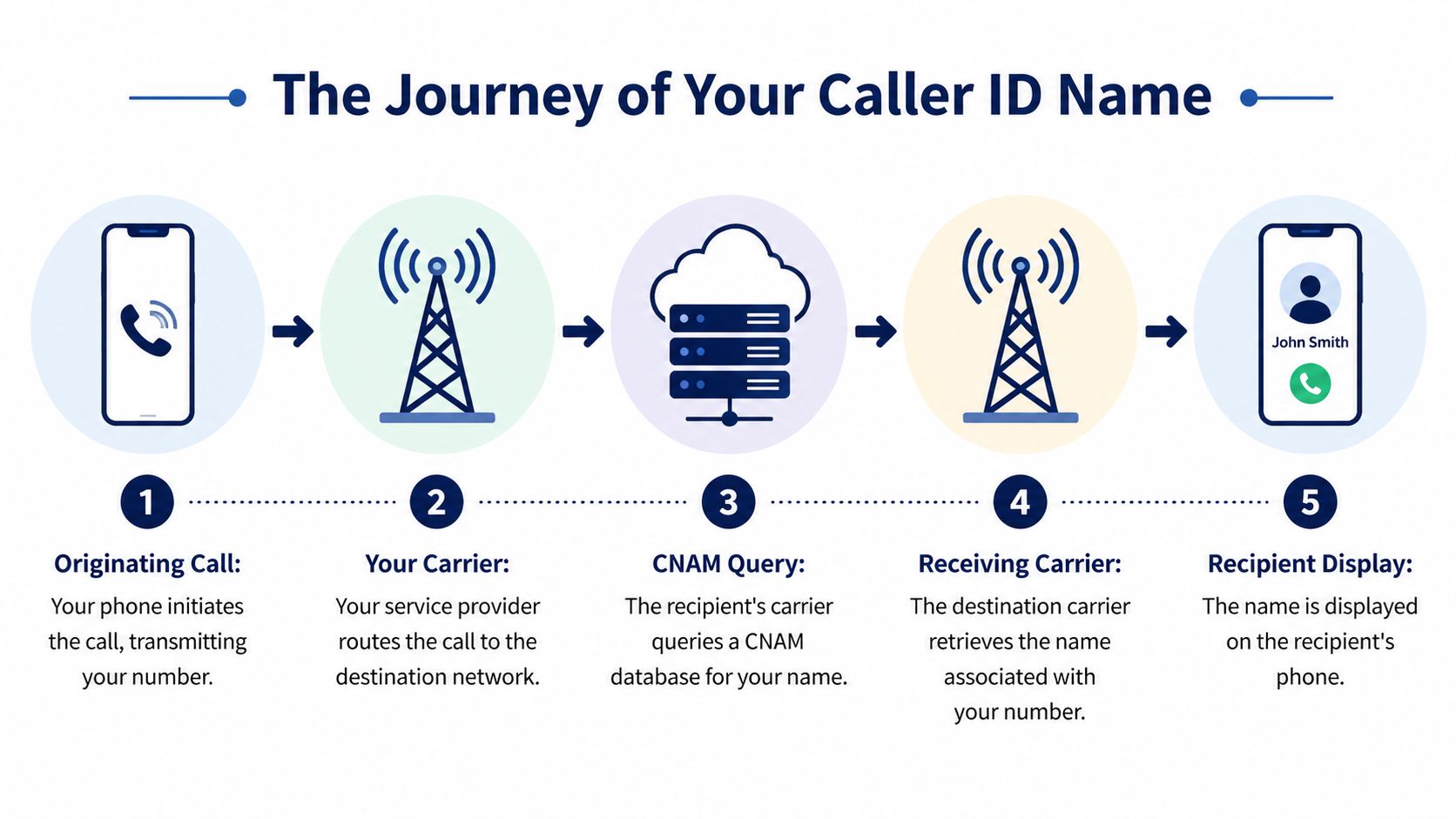
The process is simple on paper and messy in production:
- Your system places the call. The outbound number is passed with the call setup.
- The receiving carrier accepts the call. That carrier controls the display logic.
- A name lookup is attempted. The carrier checks its own CNAM source or a partner database.
- The returned record is used if available. That record may be current, old, blank, or overridden by the carrier’s own policies.
- The customer sees the result. At that point, your submitted name is only one input in a larger chain.
The trade-off is scale versus consistency. Large lookup networks process enormous query volume, but the ecosystem is still fragmented. Even a major CNAM provider can only serve the carriers and partners connected to it, on the refresh schedules those carriers use.
Why changes don’t show up everywhere at once
Propagation is uneven because carriers treat caller ID data differently.
Some carriers cache records for a while before they refresh them. Some rely on internal data first. Some use third-party dips only in certain situations. Mobile apps and handset manufacturers can add another layer by pulling business identity from sources outside traditional CNAM.
This is the part many providers gloss over. A caller id name change is not like editing a website field and publishing it live. It is closer to submitting a correction into a chain of loosely synchronized telecom systems, then waiting to see which networks pick it up and when.
That is why these four customers can all receive the same call and see different outcomes:
- One sees your new business name
- One sees the previous company name
- One sees only the number
- One sees a generic business label
None of that automatically means the request failed. It usually means the update is still working through different carrier paths, or a carrier is relying on a source you do not control directly.
Why businesses struggle to manage this on their own
The hardest part is not filing the request. It is knowing who actually owns each part of the process.
Your VoIP provider may submit the CNAM update. The upstream carrier may provision it. The terminating carrier may query a separate source. The customer’s device may display something else entirely. When those layers are split across multiple vendors, support turns into finger-pointing fast.
That is why I usually recommend a managed VoIP setup over a patchwork of carriers, forwarding apps, and disconnected numbers. With a provider that actively manages business identity, you have one place to submit updates, confirm provisioning status, and troubleshoot inconsistent display results. If you want a clearer picture of how that works, SnapDial’s caller ID services for business numbers show the kind of centralized control most companies are missing.
What businesses usually get wrong
These assumptions cause most caller ID confusion:
| Assumption | Reality |
|---|---|
| “Changing the number updates the name too” | The telephone number and CNAM record are separate items |
| “If my portal shows the right name, customers will too” | Your admin view can be accurate while downstream carriers still display old data |
| “Every mobile carrier shows the same caller ID name” | Display behavior varies by carrier, device, and lookup source |
| “A completed port fixes identity records” | Ports often expose stale CNAM data that still needs manual cleanup |
Businesses get better results when they treat caller ID as an ongoing carrier-data issue, not a one-time account setting. That mindset changes the questions you ask, the tests you run, and the kind of provider support you need.
How to Initiate Your Caller ID Name Change
A caller id name change goes smoothly when you prepare it like a telecom task, not a branding note.
The biggest mistake I see is submitting a vague request such as “please update our caller ID to the company name.” That’s not enough. Carriers and upstream providers need precise data, and if you run multiple locations or recently ported numbers, you need a clean inventory before anyone touches the records.
Gather the information first
Before you submit anything, collect four basics.
- Exact display name: Decide the precise business name you want tied to the outbound number. Keep it short, readable, and consistent with what customers already know.
- Number list: Identify every phone number that needs the same display name. Don’t assume all DIDs in your account should use one label.
- Business identity records: Have your legal business information and any proof of ownership ready if your provider asks.
- Use case notes: Mark which numbers are sales, service, billing, recruiting, or location-specific, because one-size-fits-all naming often creates confusion.
A clean spreadsheet helps. List the number, current displayed name if known, desired name, department, and whether the number was recently ported. That document saves time when support asks follow-up questions.
Decide what name should actually appear
This sounds simple until you try to fit a real business into caller ID constraints.
For most businesses, one of these choices makes sense:
| Option | Best use | Risk |
|---|---|---|
| Legal entity name | Regulated or formal communications | Customers may not recognize it |
| DBA or brand name | Most outbound sales and support | May need shortening |
| Location-based brand | Multi-location local presence | Can fragment branding if overused |
| Department label plus brand | Billing or service callbacks | Can become too long or unclear |
Use the name customers would recognize instantly, not the name your accounting system prefers.
If your agent says “Thanks for calling Green Valley Dental” but the phone says “GV Holdings LLC,” the mismatch starts the call with doubt.
Submit the request through your provider
Traditional carriers often make this clunky. You log into an account portal, hunt for caller ID settings, then discover the portal only controls a portion of what you assumed it controlled. In some cases, support must push the request to an upstream carrier. In others, mobile and business numbers follow different workflows.
Business VoIP platforms usually make this easier because the admin has one place to manage numbers and outbound identity. The exact labels vary by vendor, but the workflow is generally straightforward:
- Log into the admin portal
- Open the phone numbers or DID management section
- Select the target number or group
- Find outbound caller ID or CNAM settings
- Enter the approved display name
- Submit and save
- Open a support case if the provider requires manual validation
If your provider offers account-level and user-level caller ID settings, check both. I’ve seen businesses update the company-level name while a user extension still pushes a personal name on outbound calls.
Watch for multi-location pitfalls
Multi-site businesses create their own caller ID problems.
One office wants the parent brand. Another wants the local market name. A third wants a department identifier because that number only handles appointments. All of those requests can be valid, but unmanaged variation is how businesses end up with a fractured identity across locations.
Use a naming standard before you submit changes. For example:
- Main numbers: brand-first naming
- Departmental outbound lines: brand plus department where space allows
- Local branches: city or clinic name only if customers know that version
Write the standard down. If you don’t, every admin change becomes a new naming experiment.
Confirm whether the request applies to all outbound routes
Some businesses assume “caller ID name” means every outbound path is covered. It may not.
Check these scenarios:
- Desk phones vs mobile app calls
- Main company number vs direct inward dial numbers
- Call queue outbound callbacks
- Auto attendant transfers
- Call center campaigns using local presence
Different outbound methods can present different numbers, and if the number changes, the name lookup may change too.
Here’s a useful walkthrough before you start testing live traffic:
Document the request like a change record
Treat the submission as a formal telecom change. Save the request date, the numbers included, the exact text submitted, and any ticket number. If the change doesn’t propagate cleanly, you’ll need that paper trail.
I recommend keeping a short internal note with:
- Submitted by
- Submitted on
- Numbers affected
- Requested display name
- Expected business reason
- Provider confirmation or case ID
That gives operations, IT, and support one source of truth when employees start saying, “It still looks wrong on my phone.”
A caller id name change is never just typing new text into a field. The work is in defining the right name, applying it to the correct numbers, and keeping the request tight enough that your provider can push it cleanly through the carrier chain.
Managing Propagation and Verifying Your New Name
Submitting the change is the easy part. Waiting is where most businesses lose patience.
The first problem is timing. For SMBs migrating to VoIP, CNAM propagation can lag well behind what people expect. Verified data notes that updates taking 72 hours for mobile can stretch to 7-14 days for VoIP numbers, and 40-60% of calls can initially show errors while records sync across carrier databases, as summarized in this carrier change reference.
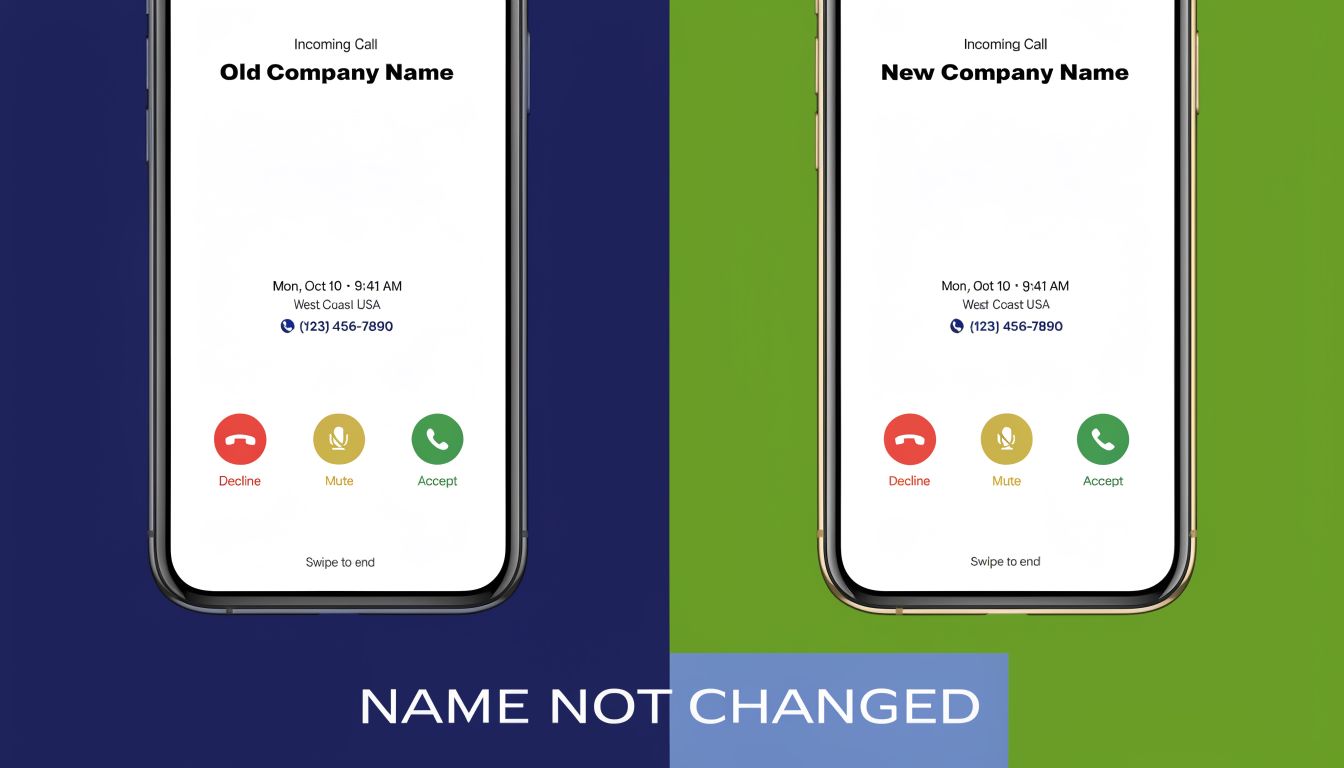
If you’ve changed providers or ported numbers recently, that lag can feel like the system ignored your request. Often it didn’t. The update hasn’t reached every place that matters.
What propagation really looks like in practice
Propagation is uneven. You may see the new name appear quickly on one test phone and remain stale elsewhere for days. That happens because receiving carriers don’t all refresh or query the same way.
A realistic rollout looks more like this:
- Early success on a few devices: encouraging, but not final
- Mixed displays across major carriers: normal during propagation
- Old name on recently cached networks: common
- Blank or generic name on unsupported routes: also common
Don’t announce success internally after one good test call.
Build a verification checklist
The fastest way to stop guessing is structured testing. Assign one person to coordinate it so the results stay organized.
Use a checklist like this:
- Test from the exact outbound number you updated
- Call phones on different major mobile networks
- Test both mobile and landline endpoints if available
- Record the date, time, destination carrier, and displayed name
- Repeat tests over several days instead of relying on one pass
A simple spreadsheet is enough. What matters is consistency.
Field advice: Test the number customers actually receive, not just your main company line. Many businesses verify the wrong outbound path.
What to do if one network still shows the old name
If a specific carrier keeps returning stale data after the expected window, narrow the problem before opening another support ticket.
Check these questions first:
| Check | Why it matters |
|---|---|
| Is the outbound number definitely the one you updated? | Users often test from a different line without realizing it |
| Was the number recently ported? | Older records can linger after migrations |
| Does the issue happen on one carrier only? | That points to downstream cache or sync behavior |
| Do all users see the same mismatch? | Device-specific display behavior can confuse the diagnosis |
When you contact your provider, give them evidence, not frustration. Include the number you called from, the destination carrier, the incorrect displayed name, and the dates tested. A clean escalation gets better results than “caller ID still broken.”
Set expectations with stakeholders
This part matters more than most admins realize. If leadership expects instant uniform results, propagation turns into a credibility issue for IT and operations.
Tell stakeholders up front that caller ID name updates can appear in phases. Explain that the request may be accepted immediately while downstream display behavior remains inconsistent for a period. That keeps employees from opening duplicate tickets and keeps managers from assuming the phone system is failing.
If you’ve just completed a migration, add caller ID verification to your cutover checklist. Don’t treat it as an afterthought. Businesses often validate call routing, voicemail, and devices, then forget the very first thing customers see.
Legal Compliance and Building Trust with STIR/SHAKEN
A caller id name change used to be mostly a branding task. It isn’t anymore.
Now it also sits inside a broader trust framework shaped by call authentication. STIR/SHAKEN is the mechanism carriers use to validate that the calling number matches authoritative records, and the attestation level affects whether a verified caller identity is more likely to be presented to the recipient, as described in TNSI’s overview of caller authentication best practices.
Why your name and your number have to agree
If your displayed identity doesn’t line up cleanly with the number you’re using, you create friction at the exact point where networks are trying to reduce spoofing and abuse. That doesn’t mean every mismatch causes a blocking event. It does mean inconsistency works against trust.
In plain language, carriers want signals that make sense together:
- The calling number should belong to the party using it
- The caller identity attached to that number should be accurate
- The origin of the call should support the level of trust being claimed
When those elements align, your calls are easier to treat as legitimate. When they don’t, your business can look sloppier than it is.
Why this matters beyond telecom policy
Phone scams trained people to distrust inbound calls. That’s part of the reason caller identity has become a security topic, not just a marketing one. If you want a broader explanation of how voice impersonation attacks work, this guide on vishing in cyber security gives helpful context for non-telecom teams.
That risk environment is one reason the FCC moved further on caller name verification rules in its October 2025 Open Meeting, as noted earlier. For businesses, the takeaway is straightforward: don’t separate “compliance” from “branding.” The systems increasingly treat them as related.
A correct caller name is one of the first low-friction trust signals your business can control.
What to review inside your calling environment
You don’t need to become a protocol expert, but you do need to audit your setup with a trust lens.
Review these items:
- Ownership alignment: Make sure the outbound numbers are assigned and documented correctly
- Name consistency: Use the same business identity customers expect when they answer
- High-risk workflows: Payments, account changes, and sensitive customer service callbacks deserve extra scrutiny
- Escalation paths: If calls are being questioned by customers, verify whether the issue is CNAM, attestation, analytics, or all three
Teams that want a more focused explanation of the authentication side can review this STIR/SHAKEN resource to understand how modern business calling environments are adapting.
The practical compliance posture
The strongest posture is simple. Use accurate outbound numbers, keep caller names current, avoid mismatches between displayed identity and spoken introduction, and document changes when you migrate providers or port lines.
That won’t solve every spam-labeling problem. It does eliminate the avoidable mistakes that make a legitimate business look suspicious.
Best Practices for Caller ID Branding and Testing
Most businesses approach caller ID defensively. They just want it to stop being wrong. That’s not enough.
Once your records are stable, caller ID becomes a branding surface. A small one, but an influential one. Verified and branded caller ID implementations have produced 20–40% higher answer rates, and some branded calling deployments show up to 50% increase in answer rates, according to NobelBiz’s review of verified caller ID performance.
Choose the name customers recognize fastest
The best caller ID name isn’t always your formal company name. It’s the version that creates immediate recognition with the least ambiguity.
Use these criteria:
- Recognition first: Pick the name customers already know from invoices, trucks, storefronts, emails, or your website
- Clarity over completeness: Shorter, cleaner names beat legally perfect but unfamiliar labels
- Consistency with speech: The rep’s first line should match the display closely
- Department use only when helpful: “Billing” or “Service” can help, but only if it stays recognizable
If your agent says one name and the screen shows another, the customer has to resolve the discrepancy in real time. Many won’t bother.
Test the script with the display
Caller ID doesn’t work alone. It works with the opening seconds of the call.
A strong pairing looks like this:
| Displayed name | Agent opening |
|---|---|
| Green Valley Dental | “This is Green Valley Dental calling about your appointment.” |
| Northside HVAC | “This is Northside HVAC following up on your service request.” |
| Luma Billing | “This is Luma Billing calling about your recent payment.” |
A weak pairing sounds disconnected. The display says one thing, the rep says another, and the customer starts evaluating risk instead of listening.
The closer your displayed name is to your spoken introduction, the less cognitive work the customer has to do.
Treat caller ID like an optimization lever
After the technical cleanup, keep testing.
Try practical comparisons where your environment allows it:
- Brand name only versus a longer formal version
- Parent brand versus a local market label
- Department-inclusive naming versus a simpler company-only display
You don’t need a complicated lab setup. Look for clear differences in answer behavior, call quality feedback, and whether customers sound immediately oriented or immediately skeptical.
The businesses that benefit most from caller ID branding don’t treat it as a one-time fix. They treat it as part of outbound operations.
Troubleshooting Common Caller ID Name Issues
When caller ID breaks, the symptom rarely tells you the underlying cause. Use the pattern below to narrow it down quickly.
Caller ID Troubleshooting Guide
| Symptom | Likely Cause | Recommended Solution |
|---|---|---|
| Name shows correctly on some phones but not others | Different carriers or devices are pulling different CNAM data | Keep testing across networks for several days and document carrier-specific results before escalating |
| Old business name still appears | Cached records or stale data remained after a port or provider change | Confirm the exact number updated, gather examples, and ask your provider to review downstream propagation |
| Only the number appears | Receiving network may not return CNAM consistently, or the record hasn’t propagated | Verify the submitted name, wait through the expected sync window, then retest on multiple carriers |
| Personal employee name appears instead of company name | User-level outbound caller ID settings may override company defaults | Review extension, user, softphone, and queue-level outbound identity settings |
| Displayed name is truncated or awkward | The requested business name is too long or poorly formatted for caller ID display | Shorten the name to a cleaner brand version and resubmit |
| Main line looks right but callbacks from queues look wrong | Different outbound routes are using different numbers | Audit queue, auto attendant, and campaign callback numbers separately |
| Customers think the call is spoofed | The displayed identity, number ownership, and spoken intro don’t align well | Standardize the name, confirm number assignment, and review any suspected spoofed DIDs guidance your team uses internally |
Keep your troubleshooting notes simple. Record the outbound number, date, destination network, displayed result, and whether the issue is consistent or intermittent. That small habit cuts resolution time because you stop reporting “it looks wrong” and start reporting a specific carrier behavior.
If your business is replacing an old phone system or struggling to keep caller identity consistent across locations, SnapDial is built for exactly that kind of cleanup. Their cloud business phone platform gives teams a managed way to control numbers, routing, remote users, and outbound calling identity without the usual carrier runaround. If you want help getting your caller ID under control during a migration, it’s a practical place to start.