
Your phones sound fine at 8:30 a.m. By 10:00, sales hears clipped words, support agents ask callers to repeat themselves, and video meetings start freezing at the worst moments. Internet speed tests may still look “good,” which makes the problem harder to pin down.
That pattern often points to jitter.
If you're an IT manager or office admin trying to keep cloud calling stable, jitter is one of the most useful network terms to understand. It explains why a connection can be fast on paper but still sound unreliable in real life. It also gives you a practical way to troubleshoot call quality instead of guessing.
The Core Concept of Network Jitter Explained
A bad VoIP call usually gets described as “laggy,” but two different problems can cause that feeling. One is latency, which is the total delay. The other is jitter, which is the inconsistency in delay from one packet to the next.
A simple analogy helps. Think of a train route. If every train arrives late by the same amount, that’s latency. Annoying, but predictable. If one train arrives on time, the next is late, and the next shows up early, that’s jitter. The schedule becomes hard to trust.
Voice and video calls hate that unpredictability. They don't just need packets to arrive. They need them to arrive in a steady rhythm.

Jitter is about timing, not raw speed
When people search for what is jitter in networking, they often assume it means “slow internet.” That’s close, but not quite right. Jitter measures the variation in packet delay, not the average speed of the link.
For a cloud phone call, your network sends a constant stream of small packets. If those packets arrive at evenly spaced intervals, the conversation sounds natural. If they bunch up, arrive unevenly, or land out of order, the phone system has to guess how to rebuild the audio stream. That’s when voices turn robotic or words disappear.
This is also why a user can say, “My bandwidth is fine, but calls still sound broken.” They may be right. Throughput and stability are different things.
Practical rule: Low latency with high jitter can still ruin a phone call. Consistency matters as much as speed for real-time traffic.
If you want a stronger networking foundation behind these concepts, these comprehensive Network+ study resources do a good job of explaining packet flow, latency, and QoS in plain language.
How jitter is calculated
You don't need to be a network engineer to understand the math. The key idea is simple: compare the delay of one packet to the next and look at how much that delay changes.
One practical example comes from Dialpad’s jitter explanation. If packet latencies are 20 ms, 45 ms, 25 ms, and 10 ms, the differences are:
- Between 20 and 45 ms: 25 ms
- Between 45 and 25 ms: 20 ms
- Between 25 and 10 ms: 15 ms
Average those differences and the result is 20 ms of jitter.
That number tells you how uneven the packet timing is. It does not tell you how long the trip is overall. That’s why latency and jitter are related, but not identical.
Why this matters more for calls than downloads
Email, web pages, and file downloads can tolerate messy packet timing because they aren't happening live. The application can wait a little, reorder the data, and keep going. A phone call doesn't have that luxury. It has to play audio in real time.
That’s why voice systems are more sensitive to packet timing than many other business apps. If you want a plain-language look at packet flow and endpoint behavior, this overview of how VoIP phones work is helpful for connecting the network side to the phone side.
The short version is this: latency makes conversations feel delayed, but jitter makes them sound broken.
Why Jitter Is the Enemy of Modern Business Communication
At 10:00 a.m., your internet looks fine on paper. Email works. CRM pages load. The support team is logged into the cloud phone system. Then the complaints start. Customers ask agents to repeat themselves. A sales call turns awkward because key words drop out. The network is up, but the conversation is breaking.
That is why jitter creates so many business problems. It targets the part of communication people notice first. Timing.
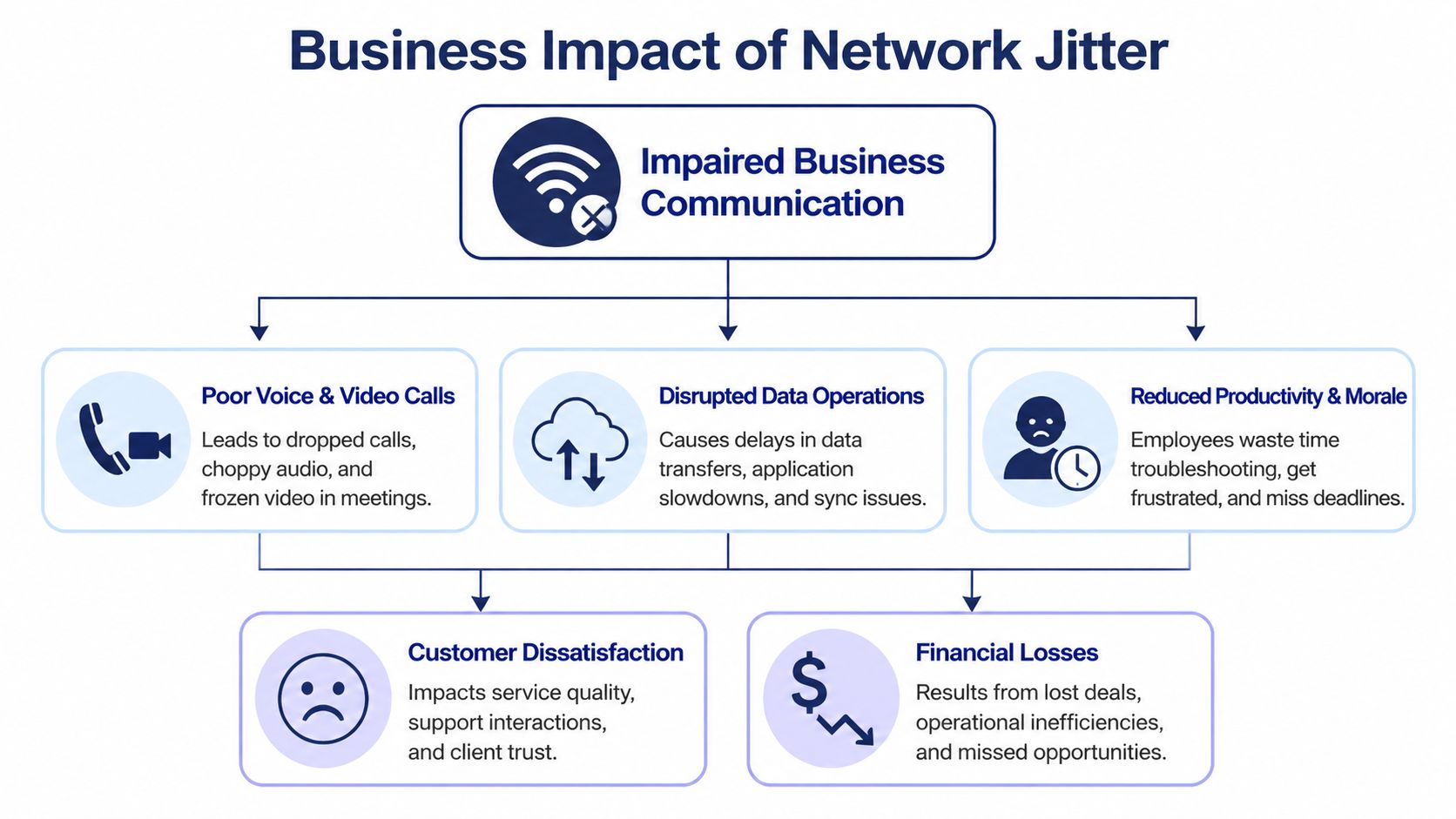
A file can arrive a little late and still be usable. A live conversation cannot. Voice and video depend on a steady flow of tiny data packets arriving in order and on time. When that flow becomes uneven, the person on the other end does not hear "network variation." They hear chopped speech, strange pauses, or audio that sounds synthetic and hard to follow.
Why voice traffic suffers first
Voice works like a live assembly line. Each audio packet has to arrive in a steady rhythm so the receiving device can play speech naturally. If packets bunch up and then arrive late, the phone or softphone has only a few options. It can wait and create delay, try to smooth the audio with a jitter buffer, or drop packets and let the call sound broken.
For an SMB, that often shows up in ordinary moments that carry real revenue risk. A receptionist mishears a caller’s name. An account manager talks over a client because the audio stutters. A support agent sounds clear in the office, while the customer hears fragments and assumes your company is unreliable.
That last part matters. Callers usually blame the business, not the network.
Why the rest of the office may seem fine
This confuses many IT managers the first time they troubleshoot it. Staff say, "The internet is working," and they are partly right. Browsing, email, and file syncing can tolerate inconsistent packet timing because those apps can pause, reorder data, and recover without anyone noticing much.
Cloud VoIP does not get that luxury. It has to deliver each moment of speech in real time.
So you can have a network that feels healthy for general office work and still have a poor calling experience, especially during busy periods or in teams that spend all day on live customer conversations.
The business cost is operational, not just technical
Jitter is not only an audio-quality issue. It changes how people work.
In a call center, even small call quality problems reduce agent confidence and slow call handling. Conversations take longer because people repeat names, numbers, and next steps. Supervisors hear inconsistent performance across teams and may coach the wrong problem, focusing on agent behavior when the actual issue is packet timing.
In a small business, the effect is often less visible but just as expensive. Sales calls lose momentum. Internal meetings stretch past their scheduled time. Remote staff turn cameras off, avoid using softphones, or switch to mobile phones because they no longer trust the system.
A few warning signs usually appear together:
- Customer-facing calls feel less polished: Prospects notice broken audio fast, even if they cannot explain why.
- Teams repeat themselves more often: Meeting time gets wasted on clarifying details that should have been heard the first time.
- Agents lose pace in queue-based support: Call handling becomes less consistent, and frustration rises on both sides of the call.
- IT gets vague complaints: Users report that phones are "weird," "choppy," or "randomly bad," which often points to timing problems rather than a full outage.
For businesses that rely on cloud VoIP, jitter deserves attention because it affects customer experience, staff efficiency, and confidence in the phone system. If you manage IT for an SMB or contact center, that is the practical lens to use. Treat jitter as a service quality problem with business consequences, then troubleshoot it methodically.
Identifying the Top Causes of High Network Jitter
Most jitter problems aren't mysterious. They usually come from a short list of causes, and each one leaves a different trail. The trick is to look at the network the way a troubleshooter would. Ask what changed, where congestion happens, and which devices compete with voice traffic.
One useful reminder is that jitter isn't just a niche engineering metric. In July 2015, Brazil’s ANATEL set a maximum network jitter threshold of 50 ms at the 95th percentile for broadband operators, underscoring how important jitter is for real-time communication and pointing to network congestion as a major cause, as noted in this ANATEL jitter summary.
Congestion is the first place to look
The most common cause is simple. Too much traffic hits the network at the same time, so packets wait in line. Voice packets that should arrive in a smooth cadence start arriving unevenly.
A familiar SMB example is a cloud backup or large sync job kicking off during business hours. The internet connection may still be up, and users may still browse normally, but voice quality drops because routers and firewalls start queuing packets under load.
If your complaints cluster around busy times of day, congestion is the likely lead suspect.
Wireless interference and unstable paths
Wi-Fi adds convenience, but it also adds variability. Signal strength changes, interference appears and disappears, and roaming between access points can alter timing in ways voice traffic notices immediately.
Routing issues can do something similar. If packets take different paths across the network or upstream provider routes shift under load, delay becomes less predictable. You may not see a complete outage. You’ll just hear a call that sounds inconsistent.
Look for patterns, not isolated complaints. If users report problems at the same time each day or only from certain locations, the network is giving you a clue.
Hardware limits and configuration mistakes
Some jitter issues come from devices that are technically working but no longer handling real traffic well. Older routers, overloaded firewalls, weak switches, and bad cabling can all add irregular delay.
Configuration mistakes matter too. A classic example is poor or missing QoS, where voice packets get treated like every other packet. Another is SIP ALG behavior on some routers and firewalls, which can interfere with SIP traffic in unhelpful ways. If that’s on your checklist, this guide on what SIP ALG is and how to disable it is worth reviewing.
A practical way to sort causes is to group them like this:
- Traffic issues: backups, sync jobs, uploads, crowded WAN links
- Wireless issues: weak signal, interference, busy office Wi-Fi
- Device issues: aging router, stressed firewall, faulty cable
- Policy issues: no QoS, misconfigured traffic handling, SIP ALG problems
That short list solves a lot of mystery.
How to Measure and Monitor Jitter on Your Network
You can’t fix jitter well if you only rely on complaints like “the phones sound weird.” You need a baseline. Then you need repeatable tests you can run at different times of day.
For an SMB moving to a cloud PBX, a practical first step is baselining the network with free tools. One simple approach is to analyze the standard deviation from a ping -n 100 test to see whether jitter goes beyond the critical 30 ms threshold for quality VoIP, as explained in this overview of SMB jitter testing methods.
Start with simple tests you can run today
If you manage a small office, begin with tools you already have.
Run repeated ping tests from affected locations
Test from the desks, call center pods, or remote workstations where users report trouble. A one-off ping isn’t enough. You want repeated samples.Compare quiet hours and busy hours
If the network behaves well early in the morning but worsens mid-day, that points toward load-related jitter instead of a constant physical fault.Separate wired from Wi-Fi results
Test a wired device and a wireless device in the same area. If wired looks stable and Wi-Fi looks erratic, you’ve narrowed the problem quickly.
More advanced teams often add tools like iperf3 or full monitoring platforms, but basic repeated testing already gives you evidence for troubleshooting and for conversations with your ISP or VoIP provider.
Know what numbers matter
Use clear thresholds so you’re not guessing what “good” means.
| Application | Acceptable Jitter | Quality Impact |
|---|---|---|
| VoIP | Under 30 ms | Supports clear business calling when other key network conditions are also healthy |
| Video conferencing | 30 to 50 ms | May still work, but visible sync and smoothness issues become more likely as jitter rises |
| General file transfers and email | Less sensitive qualitatively | Usually affected far less because these apps can tolerate timing variation |
Those VoIP and video ranges come from the verified benchmarks covered earlier in the cited materials, including the voice benchmark in the Auvik source and the video tolerance range referenced in the verified data.
Build a monitoring habit, not a one-time test
Jitter is often intermittent. That means a speed test at noon on a calm day may miss the actual problem. Monitoring works better when you collect repeated samples over time and compare them with user complaints.
A practical monitoring routine looks like this:
- Check the same locations regularly: front desk, support area, remote VPN user, conference room
- Note business context: was there a backup, large upload, all-hands video meeting, or software rollout?
- Keep a simple log: date, time, wired or Wi-Fi, observed symptoms, test result
If you’re building that process, these business network monitoring best practices can help you think beyond one-off tests and toward ongoing visibility.
Good troubleshooting data answers three questions: where did it happen, when did it happen, and what else was happening on the network at that moment?
That kind of record turns “our phones feel unreliable” into a solvable problem.
Practical Steps to Reduce Jitter and Improve Call Quality
Once you’ve confirmed jitter is the issue, fix the network in order of impact. Start with the changes that improve packet timing the fastest. Save hardware replacement and provider escalation for after you’ve handled local causes.
Prioritize voice traffic first
If your router, firewall, or switch supports QoS, use it. Voice traffic should not wait behind large file uploads, cloud backups, or other less time-sensitive traffic.
This is usually the highest-value fix because it addresses the root issue in many SMB environments. When voice gets priority treatment, packet timing becomes more predictable.
For teams deciding whether desk phones should stay on Wi-Fi or move to Ethernet, this guide to Wi-Fi VoIP phones helps frame the trade-offs in a business setting.
A practical order of operations looks like this:
- Move critical phones to wired connections: Reception desks, executive offices, and call center stations benefit most from consistency.
- Apply QoS on the edge device: Prioritize voice and other real-time traffic ahead of bulk transfers.
- Shift heavy jobs out of business hours: Backups and syncs can degrade call quality even when no one notices general slowness.
- Review old hardware: If the firewall or router is always under strain, policy changes alone may not be enough.
Understand what jitter buffers can and can’t do
VoIP systems often use a jitter buffer to smooth uneven packet arrival. That helps, but it’s not magic.
According to Cisco Meraki guidance summarized here on jitter buffer behavior, optimal buffer sizes typically range from 20 to 50 ms on stable links, and can extend to 100 to 200 ms on high-variability networks. The trade-off is clear. A bigger buffer can hide more jitter, but it also adds noticeable delay to the call.
That’s why buffer tuning is a balancing act, not a cure. If the network is unstable, increasing the buffer may reduce choppiness while making conversations feel slower and less natural.
Operator advice: Use jitter buffers as a safety net, not as a substitute for fixing congestion, Wi-Fi instability, or poor QoS.
This short video gives a useful visual explanation of how packet timing and remediation fit together:
Use a practical remediation checklist
Not every office needs a full redesign. Many need a disciplined cleanup.
Try this checklist:
Test wired versus wireless
If wired calls improve immediately, reduce dependence on Wi-Fi for critical voice endpoints.Audit high-usage events
Look for backups, file sync tools, camera uploads, and large cloud transfers during support or sales hours.Check edge equipment settings
Review QoS, SIP-related settings, and firmware status on the router or firewall.Segment where appropriate
Separate voice-sensitive traffic from noisier traffic when your network design allows it.Retest after every change
Don’t change five things at once. You want to know which action was effective.
A steady, boring network is what voice wants. That’s the target.
Working with Your VoIP Provider to Eliminate Jitter
A support queue at 10:15 a.m. is a costly place to discover a voice problem. Agents are asking callers to repeat themselves, supervisors hear clipped audio on escalations, and your help desk gets the same vague complaint from every department: “the phones are breaking up.”
That is the moment to bring your provider a clean case, not a general frustration.
A productive ticket should include the time of the affected calls, the users or extensions involved, whether the problem hit one office or several, and what changed recently on the network. That gives the provider something they can trace across their platform, carrier routes, and call logs. Without that detail, you are more likely to get basic first-line advice instead of a real investigation.
Ask for evidence you can compare
Your goal is to find out where the problem starts. On your LAN. Across the ISP path. Or inside the provider’s voice platform.
Ask questions that lead to evidence:
- What call quality metrics can you share for the affected calls?
- Can you show jitter, latency, and packet loss for the exact timestamps we reported?
- Do the issues line up with one site, one group of users, one ISP circuit, or one carrier route?
- Are you seeing problems before the call reaches your platform, or after it leaves it?
- Which phone, headset, and firmware combinations do you recommend for our setup?
Those questions change the conversation. Instead of “our calls sound bad,” you are asking the provider to verify a pattern and show their findings.
Hardware can also be part of the answer. A poor headset, aging desk phone, or inconsistent firmware version can make diagnosis harder than it needs to be. If you are reviewing supported desk phone options, a trusted Yealink partner for businesses can help you compare business-grade devices and deployment choices.
Push for a shared troubleshooting process
A good provider should explain what they checked and what they ruled out. For example, they might confirm that their platform showed clean media delivery while your office internet circuit showed instability during the same period. Or they may find the opposite: your local tests were clean, but a carrier path used for certain calls had problems.
That distinction matters for SMBs and call centers. It tells you whether to spend time on internal network fixes, escalate to your ISP, or press the VoIP provider for route changes or deeper platform review.
If support answers stay generic, ask for the case to be reviewed by an engineer and request a written summary of findings. Keep it simple. “Here are three call examples, all from the same office, all between 2 and 3 p.m., all affected in the same way. What do you see on your side?” That is a much easier case for a provider to work than “calls are choppy sometimes.”
Good troubleshooting is a joint effort. You bring timestamps, affected users, test results, and a clear pattern. Your provider brings call records, platform metrics, carrier visibility, and device guidance. When both sides work from the same evidence, jitter stops being a mystery and becomes a fixable operational issue.
If your team is tired of choppy calls, unreliable queues, and support that only tells you to “check your internet,” it may be time for a better phone partner. SnapDial helps businesses replace legacy systems with a managed cloud PBX, white-glove onboarding, and real human support available around the clock.