
You're usually asking “how do i record a phone call” for one of three reasons. You need a record of a customer conversation. You want to protect your business when details get disputed. Or your team is trying to improve how calls are handled and you've realized memory isn't a process.
The technical part matters, but the bigger issue is operational. A one-off recording on a phone is a tactic. A repeatable, legal, searchable recording workflow is a business system. If you blur those two, you get the usual mess: missing recordings, uneven audio, no consent trail, and staff using different apps with no shared standard.
First Things First The Legality of Call Recording
Before you record anything, deal with consent rules. Most small businesses often get sloppy with these, especially when owners assume “if I'm on the call, I can record it.” Sometimes that's true. Sometimes it isn't.
A key legal milestone came in 1988, when the U.S. Electronic Communications Privacy Act shaped how call recording is regulated. As of 2023, 38 states follow one-party consent and 12 states follow all-party consent, including California and Florida, and the EU's GDPR, effective May 25, 2018, requires explicit consent for recordings, according to Google's call recording help documentation.
What one-party and all-party consent mean
One-party consent means one participant in the conversation can consent to the recording. If you're on the call, that may be enough under that state's rule.
All-party consent means everyone on the call needs to know and agree before recording starts.
That sounds simple until your office is in one state, your salesperson is remote in another, and your customer is somewhere else entirely. At that point, you're not dealing with a personal phone habit. You're dealing with cross-jurisdiction risk.
Practical rule: If your business calls across state lines or internationally, use clear disclosure at the start of the call instead of trying to guess which rule is safest.
The safest operational approach
For most businesses, the cleanest method is to standardize disclosure:
- Use a recorded announcement: “This call may be recorded” is common for inbound calls.
- Train outbound staff: They should disclose recording before discussing sensitive details.
- Document the policy: Your team needs one rule, not personal improvisation.
- Get legal guidance for edge cases: Healthcare, finance, legal services, and cross-border teams shouldn't rely on internet summaries.
There's also an ethical side to this. Secret recording may feel convenient in the moment, but it usually creates more risk than value in a business setting. Customers and employees react better when the rule is consistent and plainly stated.
Why this matters beyond compliance
Recording laws don't just affect whether you can hit record. They affect how you design the whole workflow. If your business records calls, you need a repeatable way to notify callers, store recordings securely, and limit who can access them.
That's why consumer methods often break down in business use. They focus on capturing audio. They don't solve disclosure, retention, permissions, or auditability.
Recording Calls on iPhone and Android
On smartphones, recording is rarely a clean built-in feature. That's not because the phones aren't capable. It's because mobile operating systems and carriers have spent years restricting direct call capture for privacy and policy reasons.
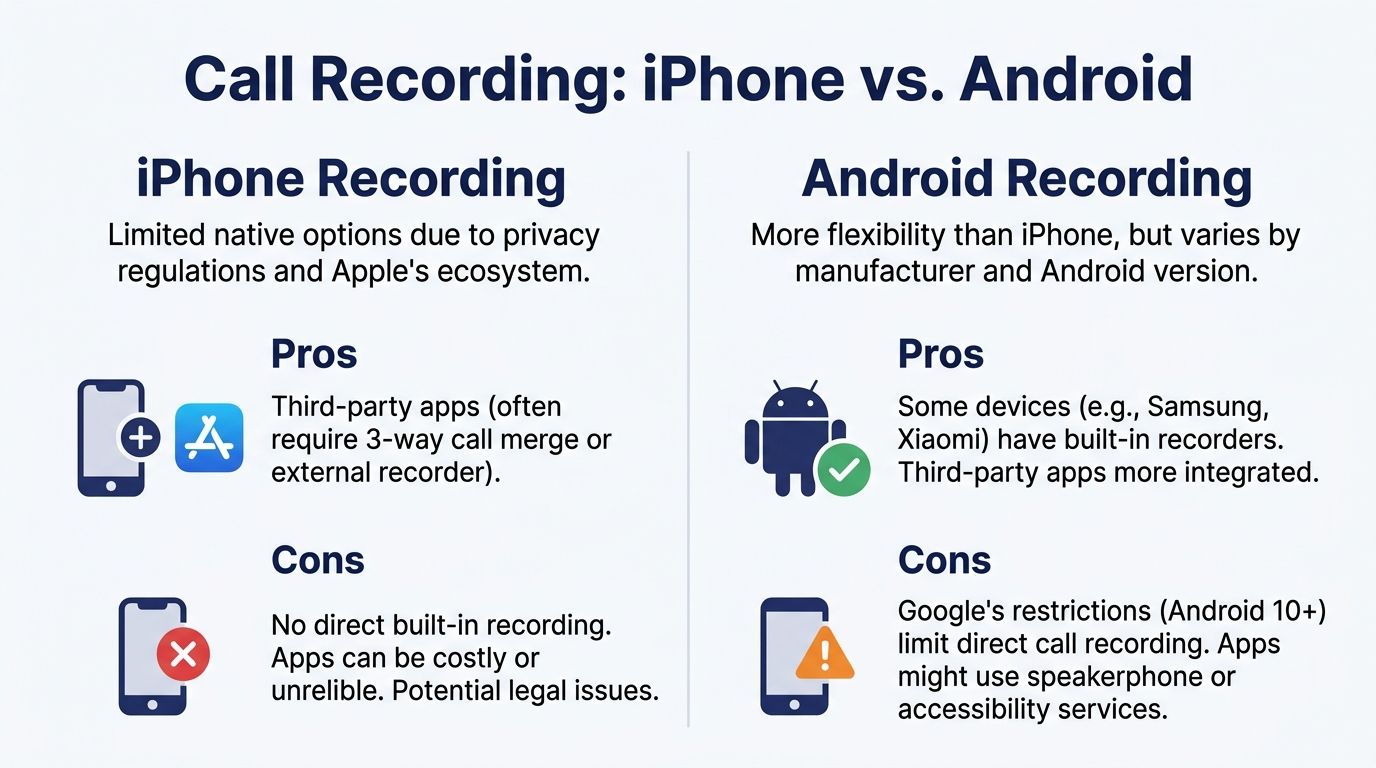
For day-to-day users, that leaves two practical paths. Either your device supports some native recording behavior, or you use a third-party workaround. On iPhone, the workaround is usually the main solution. On Android, it depends heavily on the device, version, carrier, and region.
The common workaround on mobile
Most third-party recording apps don't magically tap into your phone audio. They use a three-way conference call merge. The app dials a recording line, then merges that line into your live call so the service can capture the conversation remotely.
That process usually looks like this:
- Start or answer the main call.
- Open the recording app.
- Dial the app's recording number.
- Merge the calls.
- End the recording by disconnecting the third line when you're done.
It works, but it's clunky. You have to remember the sequence every time, and if your staff forgets one step, there's no recording.
A practical walkthrough like AIDictation's iPhone recording guide can help if you're trying to make an iPhone-based method work for occasional use.
What works and what fails
The three-way method is usable for ad hoc recording, but it has real reliability limits. Apps such as TapeACall use a three-way merge with success rates of 90 to 95 percent on strong 4G or 5G connections, but that can fall to 70 percent on WiFi handoffs, and the method is vulnerable to audio desync and quality loss without HD voice, based on this Beside guide to recording calls safely.
That failure pattern matters more than people think. A missed social call is annoying. A missed customer authorization, verbal approval, or complaint escalation is a business problem.
If you only need to record one call once in a while, a mobile app can be enough. If several employees need dependable recordings every day, that same setup becomes fragile fast.
iPhone versus Android in practice
A simple comparison helps:
| Device | Typical reality | Main trade-off |
|---|---|---|
| iPhone | Usually relies on third-party merge methods | Better ecosystem consistency, weaker direct recording options |
| Android | Some devices offer more flexibility | Experience varies by brand, carrier, and software rules |
Here's the part owners often miss: the phone model isn't the problem. The process is. If recording depends on each employee remembering app steps, checking carrier behavior, and verifying the file saved correctly, you don't have a controlled process. You have scattered habits.
That's why mobile recording makes sense as a stopgap, not as the foundation for a business workflow.
Methods for Landlines and Older Phone Systems
Some businesses still have a desk phone at the front desk, an analog line for a back office, or an aging PBX that nobody wants to touch because “it still works.” In those environments, recording usually means adding hardware around the phone instead of using software inside the system.
That approach can work, but it creates islands of data. The recording ends up on one device, with one person, in one format, and usually without any easy way to search or share it later.
What people use on older systems
The usual methods are straightforward:
- Inline handset recorders: These sit between the handset and the phone base and capture audio locally.
- External voice recorders: Put the call on speakerphone and record the room audio.
- Call-in recording services: Similar in spirit to mobile merge recording, where a separate service joins the call.
Each method has a weakness. Hardware has to be installed, tested, and physically managed. Speakerphone recording depends on room noise. Manual recording depends on human memory.
Why legacy recording turns into a management problem
The issue with old setups isn't just sound quality. It's workflow friction.
A typical small business ends up with questions like these:
- Who started the recording?
- Where is the file saved?
- Did anyone disclose recording to the caller?
- Can a manager retrieve that call without touching the physical device?
- How long are these files kept?
Those are process questions, not gadget questions.
A lot of businesses that still use analog gear are in transition. If that's you, an adapter can keep older phones usable while you modernize the backend. For such transitions, a VoIP to analog phone adapter becomes relevant. It helps bridge old handsets into a newer calling environment, which is often more practical than replacing every endpoint at once.
Why firms move away from hardware recording
The business case for retiring legacy call handling is pretty direct. VoIP systems with recording enabled showed 98% call completion rates compared with 92% on legacy PBX systems, according to Nextiva's discussion of business call recording.
That doesn't mean every old phone system fails every day. It means older setups are harder to manage as a process. They rely on physical hardware, fragmented storage, and one-off workarounds. Once a company needs centralized access, staff accountability, and cleaner retrieval, those workarounds start costing more time than they save.
The Professional Solution Built-in VoIP Call Recording
If you're recording calls for business reasons, the clean answer is to move recording into the phone system itself. Not into a separate app. Not into a desk-side gadget. Into the calling platform.
That changes the question from “how do i record a phone call on this device?” to “which calls should the business record, who can access them, and how long should they be kept?”

What built-in recording changes
With a cloud PBX or hosted VoIP setup, recording happens at the server level. That means the user doesn't have to merge calls, launch an app, or hope their mobile OS cooperates.
According to TapeACall's overview of business recording workflows, systems like this can provide server-side recording that bypasses mobile limitations, and an admin can set global recording policies in a web portal, with recordings captured in HD voice and made available with AI transcription.
That matters because it solves four recurring business problems at once:
| Problem | Consumer approach | Built-in VoIP approach |
|---|---|---|
| Starting the recording | User must remember | Policy can automate it |
| File storage | Scattered by device or app | Centralized |
| Access control | Often informal | Managed by admin roles |
| Retrieval | Hunt through phones and apps | Searchable portal |
How setup usually works
A proper setup is less dramatic than people expect. The work is mostly administrative:
- Decide which calls should be recorded.
- Apply policy by user, extension, or queue.
- Add caller disclosure where needed.
- Define retention and access permissions.
- Review files and transcripts in one place.
That's the business-process lens. Recording isn't a button. It's a policy tied to your call flow.
For teams evaluating an integrated option, business call recording in SnapDial is one example of how this is handled inside a hosted VoIP platform rather than through third-party phone apps.
Operational takeaway: The more your team depends on recorded calls, the less sense it makes to leave capture to individual devices.
Why this approach scales better
A small office can tolerate messy tools for a while. A multi-location business or support team can't. Once several people handle inbound and outbound calls, managers need consistent capture and consistent retrieval.
That's where integrated recording earns its keep:
- Training becomes easier: Supervisors can review actual customer interactions instead of relying on memory.
- Dispute resolution is faster: You can pull the call rather than debate what was said.
- Remote teams stay aligned: Staff in different locations work from the same system and policy.
- Search beats scavenging: A portal with call logs, dates, and transcripts is far more useful than audio files on personal devices.
A lot of owners first approach recording as insurance. That's valid. But once a system is organized properly, recordings also become operational data. You can hear where intake breaks down, where agents rush, where callers get transferred poorly, and where sales conversations lose momentum.
Here's a short product view of what that kind of workflow looks like in practice:
Where consumer tools still fit
Consumer tools still have a place. If a solo operator needs a temporary way to record occasional calls, a third-party app may be enough. The mistake is trying to stretch that consumer method into a company standard.
That's where I see businesses lose time. One employee uses an iPhone app. Another uses speakerphone and a voice memo. Someone else forgets to record at all. Then management assumes they have “call recording” when they only have a patchwork.
A professional setup doesn't just capture audio. It creates a process your team can follow without improvising.
Best Practices for Managing Call Recordings
Once calls are being recorded, the main work starts. Capturing audio is easy compared with handling it responsibly. If recordings contain customer details, employee conversations, payment discussions, or service complaints, you need rules around access, storage, and retention.
Many small businesses are exposed because a 2025 Vonage survey of 500 SMBs found that 62% were unaware of the legal risks of recording calls involving people in different states, leading to a 28% rate of disputes, as noted in this video summary of cross-border recording risk.
Build a policy your team can actually follow
A practical recording policy should answer five questions:
- Which calls are recorded
- How callers are notified
- Who can listen to recordings
- How long files are kept
- How recordings are deleted or exported
If your staff has to guess any of that, the policy is too loose.
Recordings create a second layer of responsibility. You're not just handling a phone call anymore. You're handling stored customer data.
Treat recordings like sensitive business data
Businesses often secure email and billing systems but forget that call recordings can be just as sensitive. If a support call includes account details or a sales call includes contract terms, the recording deserves controlled access.
That means:
- Limit permissions: Supervisors, compliance staff, and designated managers should have access based on role.
- Use secure storage: Don't leave files scattered across laptops or personal cloud drives.
- Review vendor security posture: If a recording platform stores customer conversations, basic security due diligence matters. A practical benchmark for what to look for is visible in these fast SaaS pentest results, which show the kind of security validation teams should expect from software handling business data.
Make recordings usable, not just archived
A pile of audio files isn't helpful. Searchability matters. So does transcription.
If your platform supports speech-to-text, use it with some discipline. Transcripts make it easier to review patterns, spot repeat issues, and coach staff without replaying every minute of audio. For teams using speech tools inside their phone workflow, the speech-to-text configuration guide is the sort of operational document admins should keep handy.
Keep retention realistic
Retention doesn't need to be extreme. It needs to be intentional.
A short table helps frame the issue:
| Recording type | Practical retention mindset |
|---|---|
| Routine service calls | Keep long enough for quality review and normal dispute handling |
| Sales and approvals | Keep according to your internal policy and any legal obligations |
| Sensitive calls | Restrict access more tightly and review retention carefully |
The right schedule depends on your industry, risk profile, and legal advice. What matters is consistency. Random retention is hard to defend and harder to manage.
Frequently Asked Questions About Call Recording
Some call recording questions don't need a long explanation. They need a direct answer.
| Question | Answer |
|---|---|
| Can I record a phone call on my iPhone? | Sometimes, but usually not as a simple built-in function for business use. Many iPhone users end up relying on third-party services that add a recording line through a conference merge. That can work for occasional use, but it's not ideal for repeatable company workflows. |
| Can Android phones record calls more easily? | Sometimes. Android gives you more variation, which can be helpful or frustrating depending on the device and carrier. Some phones offer better native support than others, but the experience isn't consistent across all Android setups. |
| What's the easiest way to record one call for personal reference? | A third-party mobile app is usually the fastest route if your phone and carrier support the merge process. Just make sure you handle consent properly before recording. |
| What's the easiest way to record calls for a team? | Put recording inside the business phone system. That gives you centralized capture, shared policy, and easier retrieval. Once multiple employees are involved, consistency matters more than convenience on any one phone. |
| Is speakerphone plus a second recorder good enough? | It can work in a pinch. It's rarely ideal. Audio quality is weaker, background noise becomes part of the file, and there's usually no structured storage or easy search afterward. |
| Should I tell the other person the call is being recorded even if I think my state allows one-party consent? | Yes, that's the safer business habit. It reduces confusion, helps with cross-state situations, and gives your team one standard instead of forcing them to interpret laws call by call. |
| Are recordings useful beyond dispute resolution? | Yes. Teams use them for quality review, staff training, confirming instructions, and checking whether calls are being routed and handled the way management expects. |
| Do I need transcripts? | Not always, but transcripts make recordings far more useful. They speed up review, help with searching, and reduce the time managers spend listening to full calls just to find one detail. |
| What's the biggest mistake small businesses make with call recording? | They treat it like a device feature instead of a process. The result is fragmented tools, inconsistent consent, and recordings that exist but can't be managed properly. |
| If I only need this occasionally, do I still need a full phone system solution? | Not necessarily. For very light use, a consumer app may be enough. The moment recordings become important to customer service, sales management, compliance, or remote-team oversight, a system approach makes more sense. |
If your business has outgrown one-off apps and manual workarounds, take a look at SnapDial. It's a cloud business phone system that can bring call handling, recording, routing, and administration into one managed workflow so your team isn't piecing together separate tools every time a call matters.