
You're on hold, hearing the same music loop again, while the person on the other end of the line says “your call is important to us.” Or you're staring at a clinic booking page, refreshing because every slot seems to vanish before you can click it. Or you're standing in a bank, looking at a screen that tells you nothing useful about how long you'll be there.
That frustration isn't just about waiting. It's about not knowing what's happening, what your place is, or when service will happen. A queue management system solves that problem by turning waiting from a vague experience into a tracked process that staff can monitor and customers can understand.
The same idea shows up in very different places. A bank branch uses kiosks, tickets, and screens. A hospital may use virtual check-in and priority routing. A call center uses a phone queue, callbacks, wait-time announcements, and agent dashboards. The form changes, but the purpose stays the same, to make demand visible and manageable instead of messy and hidden.
A queue management system, or QMS, is software plus supporting tools that monitors, predicts, and controls customer flow across physical and voice-based service channels. In plain English, it helps organizations manage who waits, where they wait, how they move forward, and what information they see while they're waiting.
The Moment a Queue Becomes a Problem
The line stops feeling normal the moment people feel invisible in it. A caller who hears only hold music and no clue about their place in the queue starts to assume they have been forgotten. A walk-in customer who cannot tell whether service is a few minutes away or much later feels the same uncertainty. That is why queue trouble usually begins as an information problem before it becomes a staffing problem.
Losses show up when patience runs out. In the research brief, 75% of customers abandon a queue after 5–10 minutes of waiting with no information, while real-time updates can reduce perceived wait time by 35–50%. The same brief also notes that queue management can cut actual wait times by 40–60%, reduce walkouts by up to 50%, and raise daily throughput by 25–35%. Those figures point to fewer abandoned calls, fewer missed visits, and less strain on front-desk teams. queue management statistics
A queue management system changes waiting from guesswork into something a business can track. Instead of asking customers to stay patient and hope for the best, the system can show position in line, estimate wait time, and route service by rule.
Practical rule: if customers keep asking “how much longer?” and staff keep answering with guesses, the queue is already broken.
That same problem appears in both physical spaces and phone-based service. In a branch, the queue may begin at a kiosk or reception desk. In a call center, it begins the moment the caller enters the live queue through a phone system or inbound call center software guide setup that handles routing and wait control. In both settings, the software has the same job, keep service order visible, predictable, and manageable.
A queue management system does more than move people faster. It gives service teams a way to see demand as it happens, direct it, and explain it clearly. That is why it appears in banks, hospitals, airports, retail stores, government counters, and support hotlines. Market estimates also show that the category has become much broader. One estimate places the QMS market at USD 38.97 billion in 2025 and projects USD 77.13 billion by 2031 at a 12.05% CAGR for 2026 to 2031, while other market definitions produce smaller figures. queue management system market
A useful distinction matters here. Queue management controls how people or calls move through service. Appointment scheduling reserves a time slot before service starts. A clinic booking page can help someone choose a visit time, but it does not manage a live line of callers waiting for the next available agent. That is the difference most explainers blur, and it matters for SMBs that need to manage both booked demand and live arrivals.
Anatomy of a Queue Management System
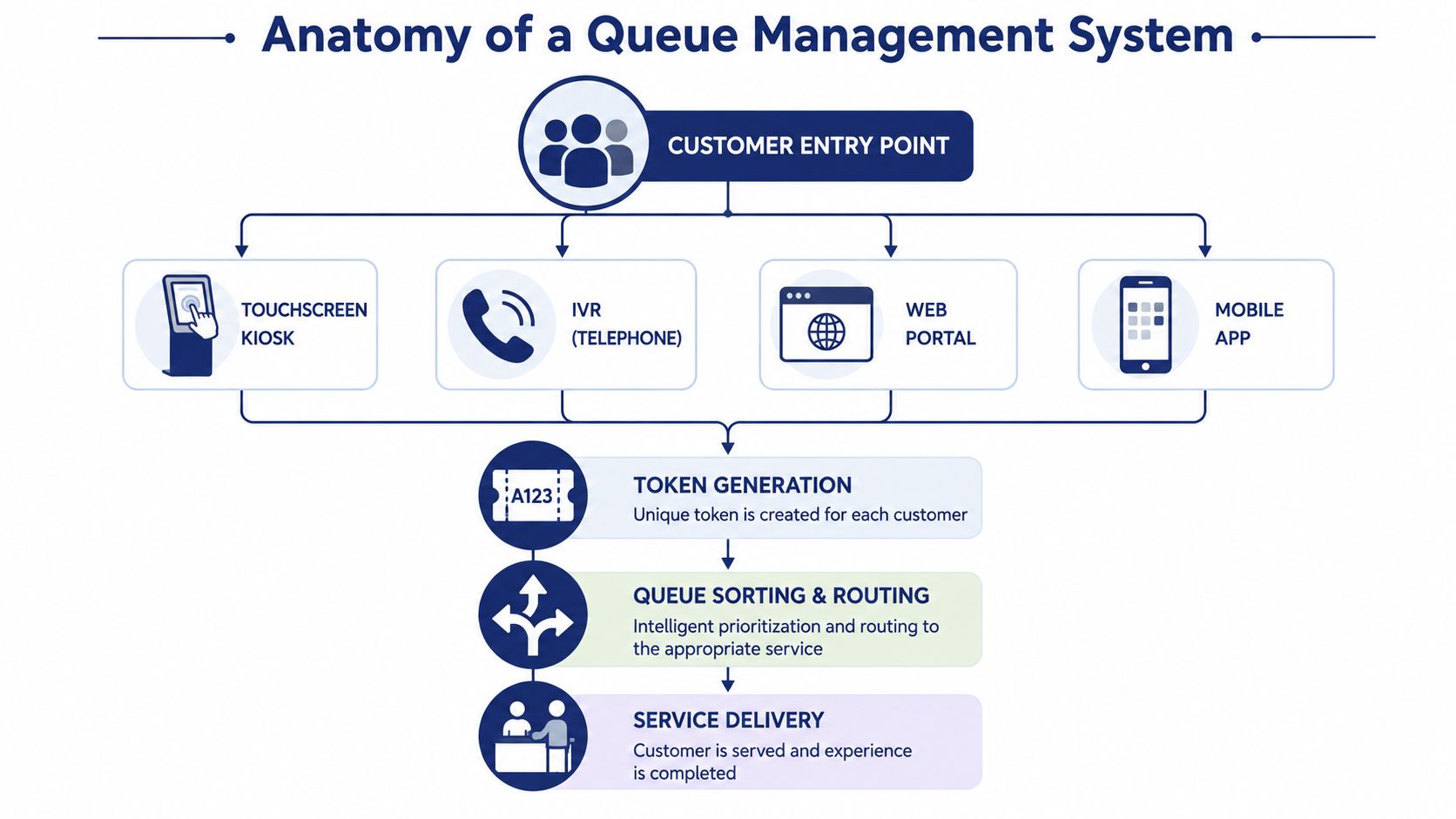
A queue system works best when each step does one job well. The customer experience usually begins with intake, then moves to token creation, queue placement, live updates, and finally service delivery. That sequence sounds simple, but it's the reason the whole system feels smooth when it's designed properly.
Intake comes first
Intake is the entry point. In a bank, that might be a kiosk or a receptionist. In a call center, it might be an IVR menu, a web form, or a mobile app that lets someone request help. The goal is to capture the request in a structured way so the system can decide what happens next.
Token generation and routing do the heavy lifting
Once the request is captured, the system generates a token or ticket and places the customer into the correct queue. Rules matter. A branch might route elderly customers to a priority queue, while a support desk might send a VIP account to a senior agent. The technical brief from the literature describes this as separating request handling, validation, token assignment, live queue updates, status tracking, and admin control, which makes the system easier to scale as traffic grows. queue processing architecture
Notifications and dashboards keep everyone aligned
The customer shouldn't have to guess what's happening, and staff shouldn't have to manage the line manually all day. Notifications can warn the customer when service is near, and dashboards let supervisors see queue length, status, and service order in real time. If you want a practical call-center primer, inbound call center software guide is useful for seeing how intake, routing, and agent handling fit together in a live phone environment.
A good QMS makes waiting visible. Once the wait is visible, it becomes easier to measure, route, and improve.
That's why modular design matters. A queue system usually isn't one giant app, it's a set of smaller parts that handle intake, routing, updates, and reporting separately. The result is a system that can absorb spikes in traffic without forcing every component to fail at once. For a call-queue implementation example, the internal SnapDial call queues documentation shows how queue rules and service order can be managed inside a hosted phone platform.
Core Features Inside a Modern Call-Center QMS
A call-center QMS doesn't need a flashy brochure to be useful. It needs a few features that work together cleanly, so callers stay informed and agents don't spend half the day trying to untangle who should be answered next.
The features that matter most
Inbound queues hold callers until an agent is free. Skill-based routing sends people to the right person or department instead of the next available seat. Queue callbacks let callers keep their place without sitting through hold music. IVR and auto-attendant menus sort basic requests before a live agent ever picks up. Wait-time announcements tell callers what to expect, while real-time wallboards show supervisors what's happening right now. Historical reporting shows patterns after the rush ends.
That feature mix shows up in hosted business phone systems too. SnapDial's call center automation software is one example of a platform that combines routing, queue handling, callbacks, and live reporting in one place.
What each feature does for the business
- Inbound queues: keep callers in an orderly sequence.
Why you care: staff stop answering randomly, and service order stays fair. - Skill-based routing: sends billing questions to billing, technical issues to support.
Why you care: callers reach the right person faster. - Queue callbacks: hold the place in line without making the caller stay on the line.
Why you care: fewer abandoned calls and less frustration. - IVR menus: let the caller choose the reason for calling.
Why you care: the queue can sort demand before a human agent gets involved. - Wait-time announcements: share an estimate while the caller waits.
Why you care: even imperfect information feels better than silence. - Wallboards and reports: show live load and past trends.
Why you care: supervisors can react before the backlog grows.
A modern QMS doesn't just answer phones. It gives a call center a way to decide which call gets handled by whom, in what order, and with what level of visibility. That's a major difference from a plain phone tree, where callers are routed but the waiting process itself remains mostly invisible.
Why SMBs and Call Centers Invest in Queue Management
A line becomes expensive the moment waiting turns into lost business. A caller who hangs up may never try again. A visitor who sees a crowded counter may leave for a competitor. An agent who spends the day sorting an unmanaged flow of calls or walk-ins is paid to keep people moving, but gets trapped managing confusion instead.
That problem shows up in both physical spaces and phone-based service. In a bank, hospital, or kiosk, queue management keeps arrivals in order. In a call center or VoIP setup, it does the same job for live callers, but with routing, holds, and callbacks instead of a literal line. Small businesses often need the second version, because the queue is happening inside the phone system, not at a front desk.
Wait behavior gives that pressure some context. The research brief says customers often abandon a queue after a short wait with no information, and it also notes that patience has become shorter over time. Those findings help explain why businesses feel more pressure now than they did before. queue management statistics
For SMBs, the value usually comes from protecting demand that is already arriving. A better queue can reduce walkouts, improve how agents are used, and keep peak periods from spiraling into disorder. Sales teams, support desks, service businesses, and local operations all feel that difference because every missed contact can show up quickly in revenue or customer goodwill. If you are also trying to match staffing to fluctuating demand, AI staff augmentation experts is a useful lens for thinking about capacity planning, even though queue handling itself is a separate operational layer.
A QMS also gives supervisors something steadier than guesswork. Queue length, service time, and abandonment patterns reveal where the line is clogging, so routing or staffing can be adjusted before callers start dropping off in larger numbers. That matters most when demand rises and falls through the day instead of staying flat.
The business case is not abstract. It means fewer missed calls, fewer abandoned customers, and less time paying people to sort chaos by hand.
The tradeoff is real. A QMS costs money and takes setup time, so it does not pay back in every environment. The return depends on call volume, how sharply demand changes, and how costly a missed lead is in a given industry. A small operation with steady traffic may only need a simple phone menu, while a high-volume support team can justify more detailed queue logic because it has more to gain from controlling the line.
Queue Management System vs Appointment Scheduling
A lot of explainers blur these two tools together, but they solve different problems. An appointment scheduler reserves a future slot. A queue management system manages live demand. That difference matters more than it first appears.
A scheduler assumes the calendar will mostly hold. A QMS assumes reality will interrupt the plan, people will walk in, callers will arrive unexpectedly, and service order may need to change in real time. That makes it better for businesses that mix appointments with unscheduled traffic, or for teams that need to absorb spikes without breaking the customer experience.
| Scenario | Appointment Scheduling | Queue Management System |
|---|---|---|
| Dental office with nearly all planned visits | Strong fit, because the day is mostly booked in advance | Usually unnecessary overhead |
| Urgent-care clinic with walk-ins and appointments | Helpful, but not enough on its own | Better fit, because demand changes in real time |
| Government counter with mixed traffic | Limited by static booking assumptions | Better fit, because it can route live arrivals |
| Support hotline with unpredictable call volume | Weak fit, since callers don't book a slot | Strong fit, because the line is dynamic |
A dental office is the cleanest example of when scheduling wins. Most visits are planned, the schedule is predictable, and a full queue engine would add complexity the staff may never use. An urgent-care clinic is the opposite. It needs live intake, prioritization, and the ability to keep people informed while the line changes.
The contrarian point is simple. More automation isn't always better. If your service is highly predictable and almost fully appointment-based, a calendar tool is often enough. If the work includes walk-ins, surges, or variable call volume, a QMS earns its place fast.
A Typical Call-Center Workflow With a Cloud PBX
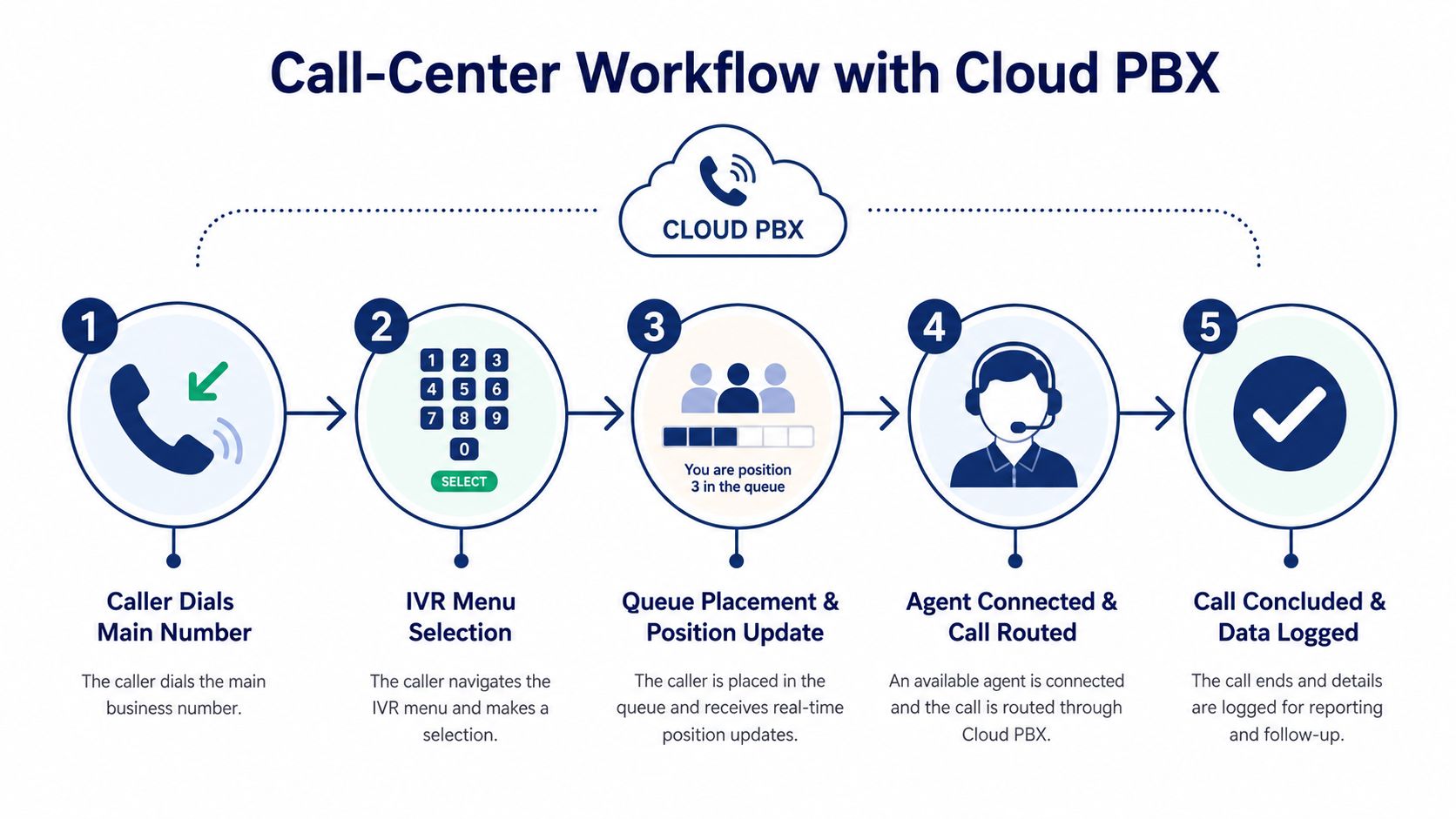
The easiest way to understand a call-center QMS is to follow one caller from start to finish. The caller dials the main number, the phone system answers, and the queue logic decides what happens next.
- Caller dials the main number. The cloud PBX receives the call and sends it into the business phone flow.
- IVR menu selection. The caller chooses a department or issue type, which helps sort the request before it reaches an agent.
- Queue placement and position update. The system puts the caller into the proper queue and can announce estimated wait time or position.
- Agent connected and call routed. Routing rules match the caller with the right available person.
- Call concluded and data logged. The system records the outcome, which feeds reporting and follow-up.
A hosted platform like SnapDial handles these stages inside the same call environment, so the queue isn't a separate island from the rest of telephony. That matters because supervisors can see the call journey, not just the final answer. For a broader enterprise view of how large support operations organize that journey, the enterprise call center solutions guide is a useful reference point.
The value of the workflow is visibility. When callers know where they are in line, they're less likely to hang up. When supervisors can see the queue, they're less likely to firefight blind. When the system logs the call, the business gets data it can use later for staffing and routing decisions.
Visibility reduces both customer frustration and supervisor panic. If the queue is measurable, it's easier to manage before it turns into a pileup.
A cloud PBX also creates room for broader integrations. CRM screen pops can show who's calling. Ticketing systems can open cases automatically. Quality-monitoring tools can review outcomes later. That's how queue data starts to connect with the rest of the business instead of staying trapped in the phone system.
Implementation Checklist and KPIs to Watch First
The first deployment should stay focused. Don't start by trying to automate every edge case. Start with the call scenarios that matter most, then define the queues and routing rules that match them.
What to configure first
- Define critical call scenarios. Identify the calls that create the most volume or frustration.
- Select queues and routing rules. Decide which department or skill should handle each scenario.
- Configure agent groups and skills. Match people to the work they can handle well.
- Set up reporting dashboards. Make sure supervisors can see the data.
- Set callback eligibility rules. Decide when callers can leave the line and keep their place.
A practical reporting page matters just as much as the routing rules. If no one checks the dashboard, the queue will drift back into guesswork. If you want a metric to start with, the call abandonment rate guide gives a focused view of one of the clearest warning signs.
First-week KPIs for a new queue management system
| KPI | What It Measures | Target Benchmark |
|---|---|---|
| Average speed of answer | How long callers wait before an agent picks up | Track daily and compare by queue |
| Abandonment rate | How many callers hang up before service | Lower is better |
| Service level | How quickly calls are answered within your chosen threshold | Commonly used by support teams |
| Longest wait in queue | The worst wait experienced that day | Watch for outliers |
| Agent occupancy | How much time agents spend handling calls versus idle | Used to balance staffing |
The early mistakes are predictable. Teams overbuild IVR menus, forget callback fallback when volume spikes, and ignore dashboards after launch. Each one removes the benefit the system was meant to create.
A good first month is boring in the best way. Calls land in the right place. Customers know what's happening. Supervisors see the pattern. That's the point.
Questions SMBs Still Ask About Queue Management
Do very small businesses need a QMS? Not always. If your service is almost entirely scheduled and your call volume is low, a simple auto-attendant may be enough. The moment you start losing callers to hold time, the case for a real queue becomes stronger.
How is a QMS different from a help desk ticket tool? A ticket system tracks work after it's been received. A QMS controls the live moment when demand first enters the business. They can work together, but they're not the same thing.
What should an SMB expect to spend? It depends on features, users, and whether hardware is involved. Cloud-based systems are usually easier to start with than physical ticketing setups, especially if the team wants to avoid installation overhead.
Can a QMS sit on top of my current phone system? Often, yes. That's usually the cleaner path for SMBs that don't want a full replacement. If your current setup already handles calling well, the queue layer can add routing, callbacks, and reporting without forcing a full rip-and-replace.
A queue system is worth serious consideration when waiting stops being passive and starts costing you business. If your team needs call routing, queue callbacks, wait-time announcements, and clearer reporting in one cloud phone platform, take a look at SnapDial. It's built for businesses that want queue management to feel operational, not complicated, and it can help you turn missed calls into a process you can manage.