

Your office phone system usually doesn't fail at a convenient time. It breaks when the receptionist can't transfer a call, when a salesperson is working from home and misses a lead, or when a customer hears a busy signal because the old PBX has hit another limit.
That's why more owners are asking about voip on the cloud. They don't want a telecom science project. They want a phone system that works across desks, mobile devices, and locations without another hardware headache. They also want a straight answer to the question most vendors rush past. What happens when the internet goes down?
A cloud phone system can absolutely solve the cost, flexibility, and mobility problems that legacy systems create. But the decision isn't just whether to move calling to the internet. It's whether you'll build a phone environment that's easier to manage and strong enough to keep operating when a branch loses power, an ISP has a bad day, or a home office connection drops mid-call.
What is Driving the Switch to Cloud VoIP
An aging phone system traps a business in yesterday's operating model. It assumes your people sit in one office, answer calls from one desk, and rely on one physical box in one closet. That model breaks fast when teams go hybrid, open a second location, or need better call handling without buying more hardware.
The switch to cloud VoIP is happening because businesses have already felt those constraints. Nearly a third of businesses already use VoIP (31%), and U.S. companies added more than 35 million VoIP lines between 2010 and 2018, reaching 41.6 million lines total, according to Tech.co's VoIP statistics roundup. The same source says organizations report average savings of 30% to 50% after switching, with some saving more. During the pandemic era, VoIP and video conferencing usage reportedly grew 212%, which pushed cloud communications from a nice upgrade into a core operating system for distributed work.
Old phone systems create business drag
Legacy PBXs don't just look dated. They slow down simple decisions.
- Adding users takes too long. Many older systems require hardware cards, technician visits, or awkward workarounds.
- Remote work becomes clumsy. Calls have to be forwarded, cell numbers get exposed, and managers lose visibility.
- Maintenance keeps piling up. Every move, add, or change depends on aging equipment that fewer vendors want to support.
A modern hosted platform fixes that by moving call control out of the office and into managed infrastructure. That makes the phone system easier to change, easier to scale, and easier to tie into broader collaboration workflows like those described in these key advantages of unified communications.
Practical rule: Businesses rarely switch because they love new phone technology. They switch because the old system keeps making normal work harder than it should be.
Why the timing matters now
This isn't an early-adopter market anymore. It's a mature buying decision. Owners who wait too long usually end up paying twice. First in maintenance and missed flexibility. Then again in a rushed replacement when the old system fails for good.
Cloud VoIP also matches how companies operate now. Staff move between office, home, warehouse, and road. Customers expect calls to reach the right person without friction. Admin teams want web-based control instead of service tickets for every extension change.
That mix of cost control, mobility, and easier administration is why cloud telephony has gone mainstream. For most SMBs, the question isn't whether cloud calling is viable. It's whether the provider and network plan are good enough to make it reliable in the messy conditions of daily business.
How Cloud VoIP Architecture Really Works
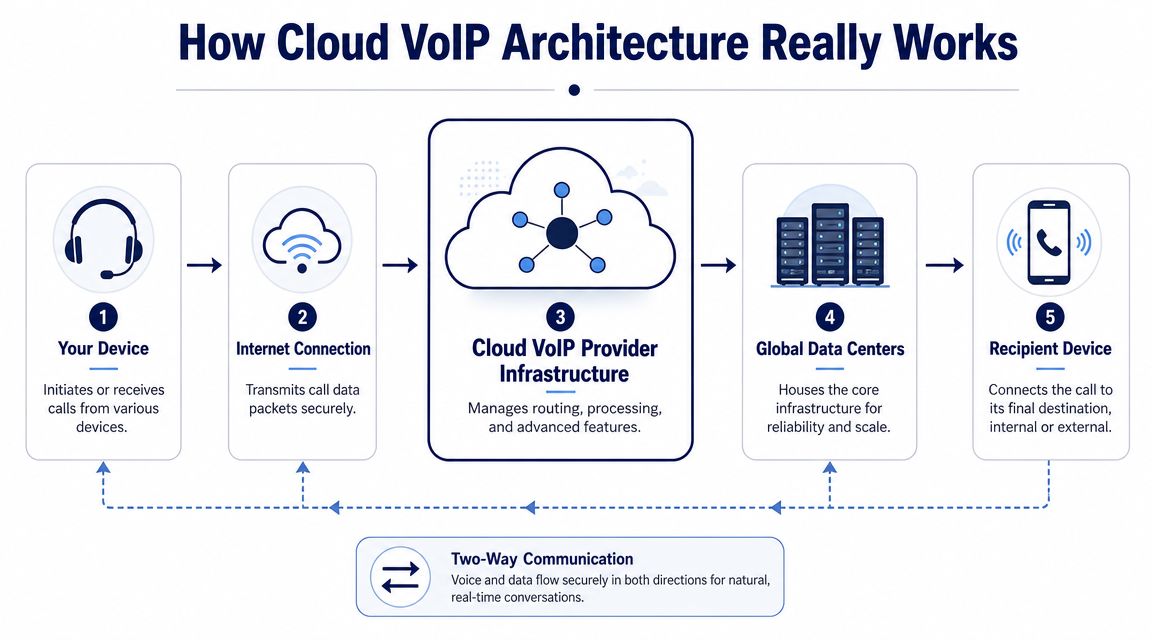
A cloud phone system is easier to understand if you stop thinking about desk phones and start thinking about software. The difference is similar to old installed software versus a cloud app. With old telephony, the brains of the system sit in your building. With cloud VoIP, those brains sit in the provider's managed infrastructure, and your devices connect to it over the internet.
That shift changes what you own, what you maintain, and how quickly you can make changes. If you want a plain-language walkthrough, this overview of how VoIP works is a useful companion to the architecture basics below.
The PBX moves out of your building
In a traditional setup, the PBX is the control box that handles extension dialing, routing, voicemail, and call rules. In cloud VoIP, that logic runs from the provider's platform instead.
That matters because features like call forwarding, voicemail-to-email, auto attendants, and mobile extensions are delivered from cloud servers, which means scaling happens through software provisioning rather than hardware upgrades, as explained by MyVelox's cloud-based VoIP overview.
Three parts make the system work
At a practical level, most hosted systems depend on three pieces:
Provider platform
The routing logic is located here. It decides where calls go, what greeting plays, whether a queue answers first, and how voicemail or transcription is handled.Your internet connection
Voice travels as data packets. If your network is stable and properly configured, calls sound clean. If it isn't, users hear the result immediately.Your endpoints
These are the devices people use. Yealink desk phones, laptop softphones, mobile apps, and conference phones can all act as endpoints in the same system.
Cloud VoIP isn't "a phone on the internet." It's a remotely managed call-control platform that happens to use internet connectivity as its transport.
What actually happens during a call
A user places a call from a desk phone or app. The device sends signaling and voice traffic through the internet to the hosted platform. The platform checks the rules attached to that user, number, or queue, then routes the call to another extension, another office, a mobile user, voicemail, or the public phone network.
Because the intelligence lives in software, admins can change behavior without replacing boxes. A support line can ring a queue in the morning, overflow to mobile devices at lunch, and route after-hours calls to an answering service, all through policy changes rather than rewiring.
What works well and what doesn't
Cloud architecture works very well when a business needs flexibility. New users can be added quickly. Multi-site companies can share one directory and one call flow. Remote staff can present the same business identity whether they're at headquarters or in a spare bedroom.
What doesn't work is treating the internet as an afterthought. A hosted phone system is only as good as the network path between your users and the provider. Businesses that skip network planning often blame the phone platform for problems caused by weak Wi-Fi, overloaded uplinks, or poor local power protection.
Cloud VoIP versus On-Premise PBX Systems
Some businesses still ask whether they should keep an on-premise PBX and ride it out for a few more years. Sometimes that's reasonable. If you have a specialized environment, local telecom expertise on staff, and stable requirements, an on-site system can still fit. But for most SMBs, the decision comes down to where they want complexity to live.
With on-premise PBX, complexity stays in your building. With cloud VoIP, most of it moves to the provider.
The market has already made the direction clear
This isn't a niche category anymore. A market summary cited by SQ Magazine's VoIP statistics page says the global VoIP services market was valued at $161.79 billion in 2025 and is projected to reach $415.20 billion by 2034, with an 11.04% CAGR over that period. That doesn't tell you which provider to buy, but it does tell you cloud communications are a durable market with long-term investment behind them.
Cloud VoIP vs. On-Premise PBX: A Comparison
| Factor | Cloud VoIP (Hosted PBX) | On-Premise PBX |
|---|---|---|
| Upfront cost | Lower hardware burden, usually subscription-based | Higher initial hardware and installation burden |
| Scaling users | Add users and features in software | Often requires hardware capacity planning and upgrades |
| Remote work support | Built for mobile apps, softphones, and distributed teams | Usually possible, but often more complex to configure |
| Maintenance | Provider handles core platform upkeep | Your team or vendor manages system maintenance |
| Feature updates | New capabilities can be delivered centrally | Updates may depend on firmware, licenses, or hardware limits |
| Site dependency | Relies heavily on internet and local network readiness | More local control, but still vulnerable to site-level failures |
| Admin experience | Usually web-based and centralized | Often tied to vendor tools or legacy interfaces |
Five decision points that matter
Cost isn't just the monthly bill
A lot of owners compare hosted pricing to what they already paid for a PBX years ago. That's the wrong comparison. The appropriate comparison is current operating burden versus future flexibility. On-prem systems can look cheaper if you ignore maintenance contracts, aging handsets, technician calls, and the cost of slow changes.
Flexibility favors hosted systems
A cloud system fits companies that hire, move, and reassign people regularly. If your office manager needs to add a user before Monday morning, software-based provisioning beats waiting on a parts order.
Remote and hybrid work expose old systems fast
On-prem PBX often feels bolted together. You can usually make it work, but the experience gets messy. Mobile apps, softphones, and shared call handling are more natural in hosted environments.
If your phone system treats off-site staff like exceptions, the platform is working against your business model.
Maintenance is either your problem or the provider's
Some IT teams want direct control of telephony hardware. Most SMBs don't. They want a service they can manage without becoming phone engineers.
Upgrade paths look very different
Hosted systems generally evolve through platform updates. On-prem systems age in chunks. You hit a limit, then face a bigger forklift decision later.
For businesses in field service, trades, and dispatch-heavy environments, it helps to compare phone systems for home services with your actual workflow in mind, especially if inbound call handling drives revenue.
A final practical step is to understand what role the phone system itself plays. This primer on what a PBX system is helps clarify what you're replacing when you move from hardware to hosted service.
Key Business Benefits for Modern Workplaces
The best argument for voip on the cloud isn't technical elegance. It's that normal business tasks get easier. Calls reach people faster. Teams stop improvising with personal cell phones. Admin staff can adjust routing without opening a support ticket for every small change.

A remote team can still sound like one company
A small sales team with staff in different cities doesn't need separate local systems and ad hoc call forwarding. With a hosted setup, each person can answer from a desk phone, browser, or mobile app while presenting the same company identity to customers.
That fixes a common problem. The customer calls one published number, but the business answers as if everyone sits under one roof. Transfers, hunt groups, and voicemail remain consistent even when the team is dispersed.
Customer-facing teams gain call handling that used to feel out of reach
A growing support desk usually hits the same wall. Calls are coming in, but nobody has a clean way to queue them, announce wait times, or send overflow calls elsewhere. Cloud telephony solves that because the call flow is software-driven.
That opens the door to practical improvements such as:
- Auto attendants that route cleanly instead of forcing a receptionist to manually sort every call.
- Queueing and ring groups that spread inbound volume across teams.
- Voicemail delivery and transcription that let staff respond faster without checking a physical handset.
- Mobile extensions that keep reachable employees inside the business call flow.
One option in this category is SnapDial, which provides hosted VoIP, mobile apps, a self-service web portal, auto attendant features, and call center tools like queue management and reporting. That's useful for companies replacing older PBXs while trying to unify office, remote, and customer support calling in one system.
Multi-location businesses stop acting like separate islands
Businesses with a headquarters, branch office, and warehouse often end up with inconsistent greetings, fragmented directories, and different answering habits by location. A cloud platform can centralize the rules without forcing every location to behave identically.
One site might need a receptionist model. Another might route by department. A third might rely mostly on direct inward dialing. Hosted systems let you support those differences while keeping administration under one umbrella.
Strong cloud phone deployments improve consistency without flattening the way each location actually works.
Administration gets lighter
This benefit gets overlooked because it isn't flashy. But it's one of the most valuable. A web portal is far easier to manage than a phone closet full of old assumptions. Office managers can review call logs, update users, adjust greetings, and manage routing through software instead of vendor callbacks and manual patchwork.
The payoff isn't just convenience. It's response time. When the business changes, the phone system can change with it.
Planning Your Migration to Cloud VoIP
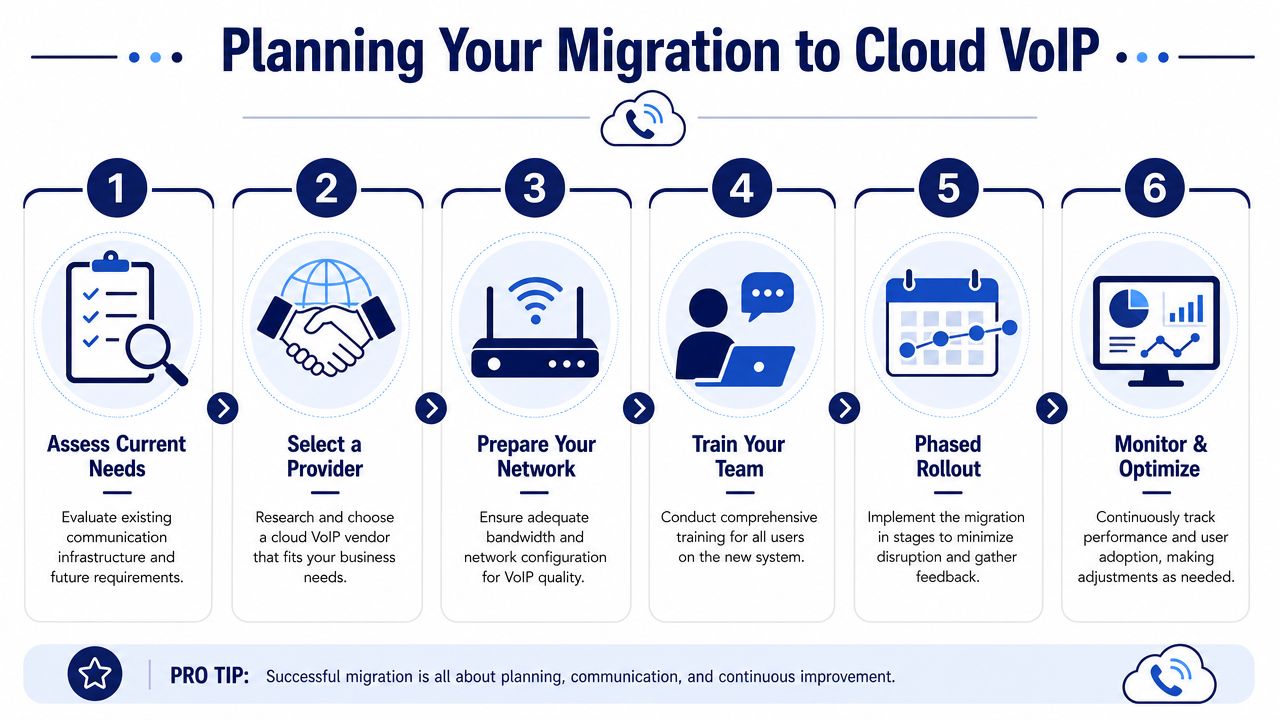
Most phone migrations go wrong for predictable reasons. The business buys features before mapping call flows. It ports numbers before training users. Or it assumes that because "we have internet," voice quality will take care of itself.
A better approach is to treat migration as an operations project, not a handset purchase.
Start with the network, not the phones
Voice is unforgiving. Email can arrive late and nobody notices. A phone call exposes network problems instantly.
A practical baseline is about 100 Kbps of dedicated upload and 100 Kbps of dedicated download per concurrent VoIP call, and congestion on a shared connection can cause jitter and packet loss, according to Intermedia's guidance on VoIP bandwidth requirements. That's why uplink planning matters as much as raw internet speed.
Before rollout, check:
- Concurrent call patterns so you know how many simultaneous calls a site needs to support.
- Uplink contention from backups, cloud apps, cameras, or guest Wi-Fi that can interfere with call quality.
- Wi-Fi versus wired usage because many call quality complaints start with weak wireless design, not the phone service itself.
- QoS policy readiness so voice traffic isn't competing blindly with everything else.
This walkthrough is a useful visual reference for what a cloud migration involves in practice:
Audit the way calls actually flow
Don't migrate the diagram in someone's head. Document what happens now.
List your main numbers, after-hours routing, holiday schedules, voicemail boxes, call groups, fax dependencies, paging needs, and any special handling for sales, support, or dispatch. Then mark what should stay, what should change, and what should disappear.
A strong migration plan usually includes these decision areas:
User profiles
Desk-phone users, mobile-first users, reception roles, shared-area phones, and contact center agents all need different setups.Number strategy
Decide which numbers will port, which should retire, and which temporary forwarding paths are needed during cutover.Call flow design
Keep menus simple. Businesses often rebuild old phone trees that frustrated callers in the first place.
Resilience planning is part of the project
This is the part many guides skip. A hosted system still depends on your local access path and power. If a branch loses internet, cloud software alone won't save the desk phones sitting on dark switches.
Independent outage analysis summarized by the Uptime Institute found that power and network problems drive most significant outages, which is why resilience planning has to be part of modern VoIP deployment design, not an optional add-on, as discussed in this Uptime Institute outage analysis reference.
What works in practice:
- Dual-WAN or secondary internet access at locations where missed calls are expensive.
- Cellular failover for smaller sites that need a practical backup path.
- UPS protection for routers, switches, and key network gear so brief power interruptions don't kill voice immediately.
- Alternate call routing that can send calls to mobile apps, another branch, or an answering service during a site outage.
What doesn't work is assuming mobile apps alone equal continuity. They're part of a backup plan, not the whole plan. If your authentication, routing, and team processes aren't thought through ahead of time, people still scramble when the outage starts.
Field-tested advice: Design failover before go-live. During an outage is the worst time to discover nobody knows where the main support number should ring.
Roll out in phases when possible
A phased deployment gives you room to catch issues with porting, training, endpoint behavior, and call routing before every user is affected. Start with a small group that reflects real usage. Then fix what they surface.
The best migrations don't just "go live." They stabilize, then improve.
Frequently Asked Questions About Cloud VoIP
Can I keep my existing business phone numbers
Usually, yes. Most businesses port their existing numbers into the new platform so customers don't have to learn anything new. The main caution is timing. Number porting should be coordinated with your cutover plan, testing window, and any temporary forwarding you may need.
Do I need all new phones
Not always. Some companies use desk phones from brands like Yealink, while others rely more on softphones and mobile apps. The right mix depends on the role. Reception desks, common areas, and call-heavy staff often benefit from physical handsets. Mobile employees may not.
Is cloud VoIP secure
It can be, but security depends on configuration and admin discipline. Strong passwords, role-based access, careful control over forwarding rules, and review of account changes matter a lot. Centralized platforms are easier to manage, but they also make admin credentials more important.
What happens if the internet or power goes out
This is the most important question. Power and network problems drive many significant outages, so modern cloud voice planning should include cellular failover, QoS settings, and UPS protection for network equipment, based on the Uptime Institute analysis referenced earlier in the article. The right answer isn't "it won't happen." The right answer is a documented failover plan for each site and team.
Will call quality be as good as a traditional phone line
It can be excellent if the network is ready. Most quality complaints come from congestion, poor Wi-Fi, weak local network design, or lack of prioritization for voice traffic. Hosted VoIP performs well when the business treats network readiness as part of the phone system, not a separate issue.
If you're evaluating hosted calling and want a system that fits how modern teams work, SnapDial is one option to review. It offers cloud-based business phone service, unified communications features, managed setup, and support for companies replacing legacy PBXs while needing dependable routing for office, remote, and customer-facing teams.