
A customer calls your main number at 4:57 p.m. Sales is on another call. The office manager already left. The owner is driving. The caller hears ringing, then voicemail, and moves on to the next vendor.
That scenario is why call forwarding options matter. Not as a phone-system checkbox, but as an operating decision. Every forwarding rule answers a business question: who should get this call, under what condition, and what should happen if they can't answer?
Businesses have been solving this problem for a long time. The modern framework started on September 1, 1968, when the FCC approved Immediate Call Forwarding, turning a manual operator-assisted process that averaged 15 minutes into an automated function that worked in under 3 seconds. That decision set the foundation for the call handling tools businesses still depend on today.
If missed calls are already costing you opportunities, it helps to think bigger than "turn on forwarding." You need a workflow. You need to know when unconditional forwarding makes sense, when conditional rules are safer, and when a routing menu or app-based answer path does a better job. If your team is already tracking missed call notification strategies, forwarding is usually the next layer that closes the gap.
Never Miss a Critical Call Again
A lot of companies wait too long to fix call handling because the problem hides in plain sight. One missed call doesn't look like a systems issue. It looks like a busy afternoon. Ten missed calls across a month starts to look different.
The practical shift is simple. Stop treating forwarding as a convenience feature and start treating it as part of business continuity. If a location loses service, if a manager is tied up, or if your front desk is short-staffed, inbound calls still need a path that makes sense.
Calls don't become less important because your primary device, desk, or employee isn't available.
That is the purpose of call forwarding options. They preserve availability without forcing every call through the same person or place.
For some businesses, the answer is straightforward. A solo consultant may want every business call redirected to a mobile device. A medical practice may need after-hours coverage to send urgent callers elsewhere while routine inquiries go to voicemail. A multi-location company may need backup routing when one site goes offline. Different setup, same principle: remove dead ends.
The Foundation Unconditional and Timed Forwarding
Unconditional forwarding sends every inbound call to another number immediately. The original device does not ring, and no one at that endpoint gets a chance to answer first.

It works like a permanent mail forward. You redirect everything to one destination and remove the decision at the point of call.
That simplicity can be useful, but only in the right workflow. I usually recommend unconditional forwarding when the business has already decided that one person, one service, or one location should own every call for a period of time. If that decision is not firm, this setting often creates new blind spots while solving missed calls.
When unconditional forwarding works
Use it when ringing the original endpoint adds no operational value.
- Owner-operated businesses: A consultant, attorney, or contractor may want the published office number to reach a mobile phone every time.
- Temporary office closures: During a move, staff training, weather disruption, or telecom outage, the main number can route straight to an answering service or backup site.
- Dedicated campaign numbers: If a marketing or referral number should always land with one team, unconditional forwarding keeps reporting and handling consistent.
There is also a management benefit. Fewer routing rules usually means fewer setup mistakes, fewer support tickets, and less confusion about who was supposed to answer.
Where it falls short
Unconditional forwarding is blunt by design. It reduces dead ends, but it also strips out flexibility that many growing businesses need once call volume rises.
Desk phones stay silent. Reception loses the chance to intercept. Teams miss internal context such as which line was called first, who was available locally, and whether the caller should have stayed with the primary office.
That trade-off matters in regulated or service-sensitive environments. A healthcare office, legal practice, or financial firm may need tighter control over where calls go after hours, who is allowed to receive them, and whether forwarded calls expose personal mobile numbers or route to an unapproved voicemail box. The feature is simple. The compliance implications often are not.
Timed forwarding is usually the better operational fit
Timed forwarding applies the same forwarding idea on a schedule. During business hours, the number can ring the main desk or queue. After hours, weekends, holidays, or planned closures, calls can follow a different path.
For many businesses, that is the cleaner answer because ownership changes by time of day rather than by caller type.
Common use cases include:
- After-hours coverage: Send calls to an on-call technician, answering service, or duty manager once the office closes.
- Lunch breaks or shift gaps: Route calls elsewhere during known periods when the front desk is unstaffed.
- Multi-location operations: Apply different schedules by office so each site follows local hours without changing the published number.
Timed forwarding also avoids a common mistake. Businesses often use unconditional forwarding as a quick after-hours fix, then forget to turn it off. The result is Monday morning calls still bypassing the office. A schedule removes that failure point.
Practical rule: Choose unconditional forwarding when one destination should own every call, full stop. Choose timed forwarding when call ownership changes based on hours, staffing, or coverage windows.
A simple test helps. Ask whether the original number should ever ring during normal operations. If the answer is never, unconditional forwarding fits. If the answer is yes during some periods and no during others, timed forwarding is the safer setup.
Gaining Control with Conditional Call Forwarding
A prospect calls your top salesperson at 4:57 PM. She is finishing another call, her mobile signal is weak, and the caller will not try three times. Conditional call forwarding is what keeps that revenue opportunity from turning into a missed call report.
Unlike full-time forwarding or schedule-based rules, conditional forwarding protects the first answer point while giving the call a controlled escape path. That matters when you want the intended person to answer whenever possible, but you also need coverage when they are busy, away from signal, or do not pick up in time.
The three conditions that do the heavy lifting
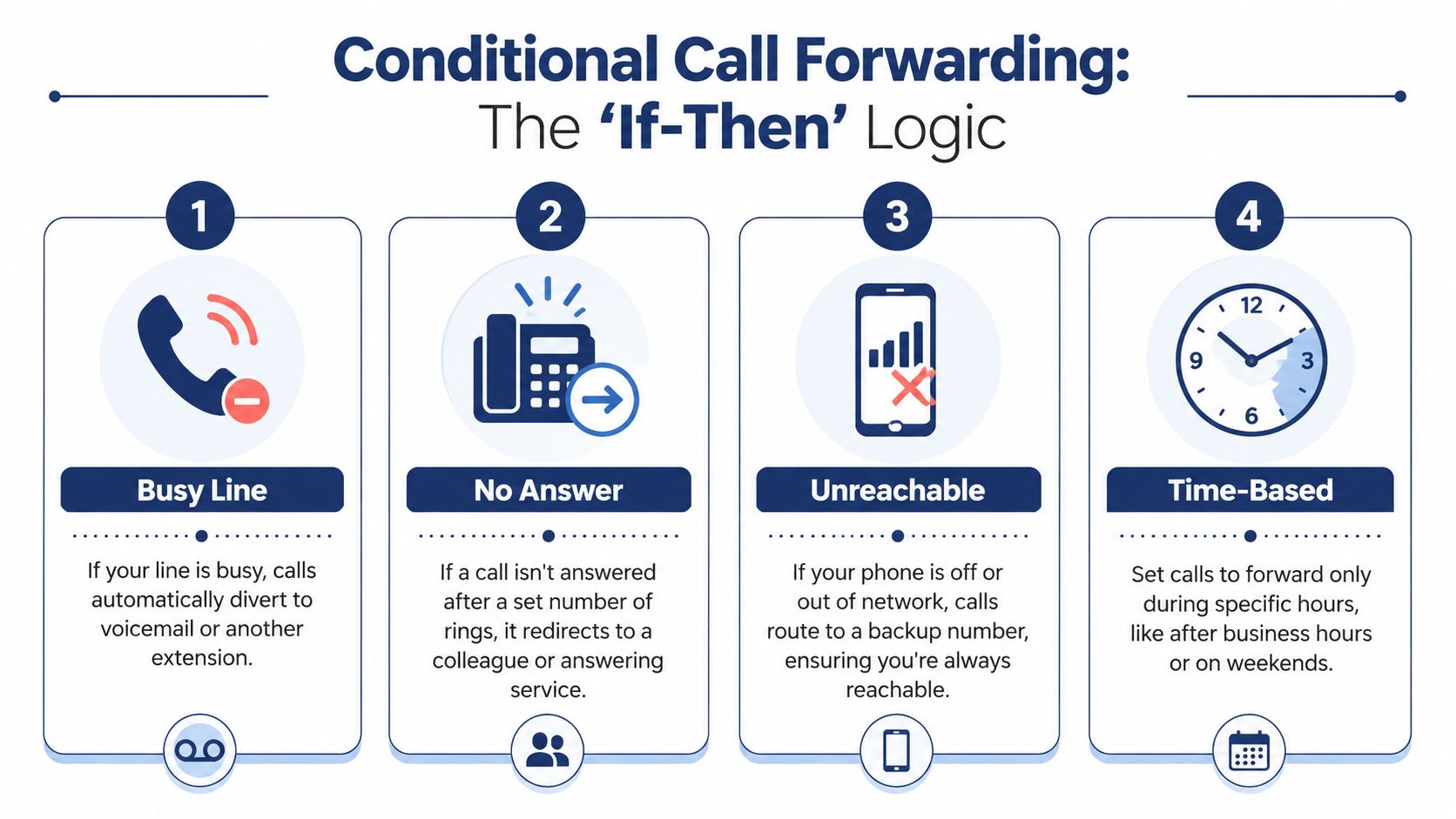
Busy forwarding sends the call elsewhere when the user is already on another call. This is a practical fit for sales, support, and owner lines where a busy signal creates immediate caller drop-off.
No-answer forwarding waits for a defined ring window, then routes the call to backup coverage. The ring time is not a cosmetic setting. Set it too short and calls leave the primary user before they have a fair chance to answer. Set it too long and the caller hangs up before the transfer happens. For many teams, 15 to 20 seconds is a good starting point, then adjust based on answer behavior.
Unreachable forwarding takes over when the device is off, out of coverage, deregistered, or otherwise unavailable. This is the rule that protects field staff, traveling employees, and any business with single points of failure on mobile devices.
Together, these options form the core of a practical business call routing workflow, not just a failover feature.
Why conditional rules work better in day-to-day operations
Conditional forwarding solves a different problem than the options covered earlier. The question is no longer who should own every call, or who should own calls at certain hours. The question is what should happen when the right person cannot take the call right now.
That distinction affects customer experience, staffing, and reporting.
A good conditional setup reduces missed calls without hiding accountability. The primary user still sees demand for their line. The backup path only engages when it should. That gives managers a clearer view of whether a role is understaffed, whether ring times are too long, or whether calls are being pushed to personal mobiles too often.
It also lowers the risk of informal workarounds. Teams often start by posting cell numbers, asking coworkers to cover ad hoc, or forwarding everything to whoever complains least. That may keep calls moving for a week. It creates poor visibility, inconsistent caller handling, and compliance issues if sensitive calls end up on unmanaged devices.
Call Forwarding Options at a Glance
| Forwarding Type | Trigger Condition | Best Use Case |
|---|---|---|
| Unconditional | Every incoming call | Temporary full redirect of a number |
| Busy | User is already on a call | Sales or support roles with high call volume |
| No answer | User doesn't answer in time | Backup coverage for mobile or desk users |
| Unreachable | Device is off or out of network | Field staff, travel, outage protection |
| Time-based | Business hours or schedule window | After-hours and weekend call handling |
| Selective | Caller identity matches list | VIP, partner, or executive-routing workflows |
How to layer rules without creating support problems
Start with one owner for the call.
Then define one backup destination that matches the business function, not a person of convenience. A hunt group, department queue, answering service, or shared team line is usually easier to manage than forwarding into a chain of individual cell phones.
Use unreachable forwarding as the fast-fail rule. If a device cannot connect at all, there is no reason to make the caller wait through a long ring cycle.
Keep the path short. I usually advise clients to stop at three stages: primary user, team backup, final overflow. Beyond that, troubleshooting gets ugly fast, and callers start repeating themselves to multiple people.
One more point matters here. Conditional forwarding can interact badly with voicemail if both the carrier and the phone system try to answer first. Decide whether voicemail should live at the user level or the system level, then disable the competing layer. If you do not, unanswered calls can loop, cut to the wrong mailbox, or disappear into carrier voicemail before your team ever sees them.
Advanced Routing for VIPs and Teams
At 4:55 p.m., a top client calls with an urgent issue. If that call enters the same path as routine traffic, the business takes an avoidable risk. Advanced forwarding rules exist to protect revenue, speed up response for the right callers, and keep team coverage predictable.

Basic forwarding handles availability. Advanced routing handles priority and ownership. That distinction matters once a business has account tiers, executive contacts, field staff, or shared inbound teams.
Selective forwarding for high-value callers
Selective call forwarding sends calls from specific numbers to a different destination while everyone else follows the normal path. It works well for account managers, legal teams, executive assistants, and service groups that need tighter control over a small set of inbound relationships.
Common uses include:
- VIP client protection: Key accounts reach a direct extension, mobile device, or live backup during peak periods.
- Partner and vendor escalation: Approved suppliers, site contacts, or leadership numbers bypass a general queue.
- After-hours exception handling: A narrow list reaches the on-call contact without sending all callers to the same place.
The limitation is upkeep. These rules depend on caller ID matching, and provider lists are usually small. CenturyLink notes that selective call forwarding lists are limited and vary by region in its guide to using selective call forwarding for specific callers. In practice, that makes selective forwarding a good fit for a tightly managed VIP list, not for a large client roster that changes every week.
There is also a compliance angle. If your team forwards VIP calls to personal mobile numbers, confirm how call records, voicemail access, and retention are handled. That is especially important for firms in healthcare, legal, financial services, or any environment where business communications may need to be documented.
Simultaneous and sequential ringing for teams
Caller-based routing solves one problem. Team-based ringing solves another. If you are deciding how a shared number should behave, it helps to compare classic forwarding with broader call routing strategies for business teams.
Simultaneous ring alerts multiple people at once. The first qualified person to answer takes the call. This setup fits sales teams, receptionist overflow, and service desks where response speed matters more than assigning the call to one specific person.
Sequential ring sends the call through a defined order. Reception first. Then office manager. Then regional lead. Then answering service, for example. This setup works better when the business needs a clear chain of responsibility.
The trade-off is straightforward. Simultaneous ring improves pickup rates but can create confusion if two people call the customer back or assume someone else handled it. Sequential ring preserves accountability but adds delay if each step rings too long.
I usually recommend a simple test. If any trained team member can resolve the issue, use simultaneous ring. If the call involves approvals, client ownership, or location-based responsibility, use sequential ring and keep the sequence short.
A short visual walkthrough can help if you're comparing team answer patterns:
What works in practice
Growing businesses usually do best with a mixed model:
- Use selective forwarding for a small, controlled group of priority callers
- Use simultaneous ring for shared lines where fast pickup matters
- Use sequential ring only where escalation order affects accountability or compliance
That structure protects important relationships without turning every inbound call into a custom exception. It also keeps administration manageable, which is often the difference between a routing plan that looks smart on paper and one the team can maintain six months later.
Modern Alternatives IVR and Mobile App Forwarding
A lot of businesses frame the problem too narrowly. They ask which call forwarding option they should enable, when the better answer might be not to forward the call blindly at all.
IVR gives callers a decision point
An auto attendant or IVR is not traditional forwarding, but it often solves the same business problem better. Instead of redirecting every caller to one number, it greets them and offers paths such as sales, support, billing, or after-hours service.
That change matters because it adds intent before the handoff. Calls aren't just moved. They're sorted.
IVR is usually the better fit when:
- Departments need separation: Sales shouldn't answer support overflow by accident.
- You want a more professional first touch: Callers hear clear options instead of immediate transfer behavior.
- Different teams need different hours or destinations: Billing can close earlier than support without changing the published main number.
Mobile app answering is better than forwarding to a personal cell
For hybrid teams, forwarding to a personal mobile number is often the quickest workaround and the weakest long-term choice. It blurs work and personal calling. It can hide business context. It can make transfers and logging harder.
Using a business phone app is cleaner. The employee still answers on a smartphone, but the call stays inside the business phone system. That usually means the business caller ID remains intact, and the user can still access features such as transfer, voicemail handling, and call records.
If you're comparing setups, this is the practical dividing line. A forwarded cellular call is just a redirected call. A mobile business app turns the phone into a managed endpoint. If you're evaluating how to forward calls from a cell phone, it's worth deciding whether you need a simple redirect or a full mobile office workflow.
Forwarding is best when you need a fallback. App-based answering is better when mobile staff are part of the real phone system.
That distinction becomes more important as more employees work remotely, travel frequently, or rotate on-call coverage.
Configuration Best Practices and Troubleshooting
A forwarding setup usually looks fine until the first messy call flow hits it. A customer calls after hours, the call reaches an employee's cell, that employee cannot transfer it, and nobody logs the conversation. The rule worked. The workflow failed.
That is the difference good teams account for during setup. Call forwarding is not just a routing feature. It is a live operating process with owners, fallback paths, and compliance consequences.
The setup checklist that prevents most issues
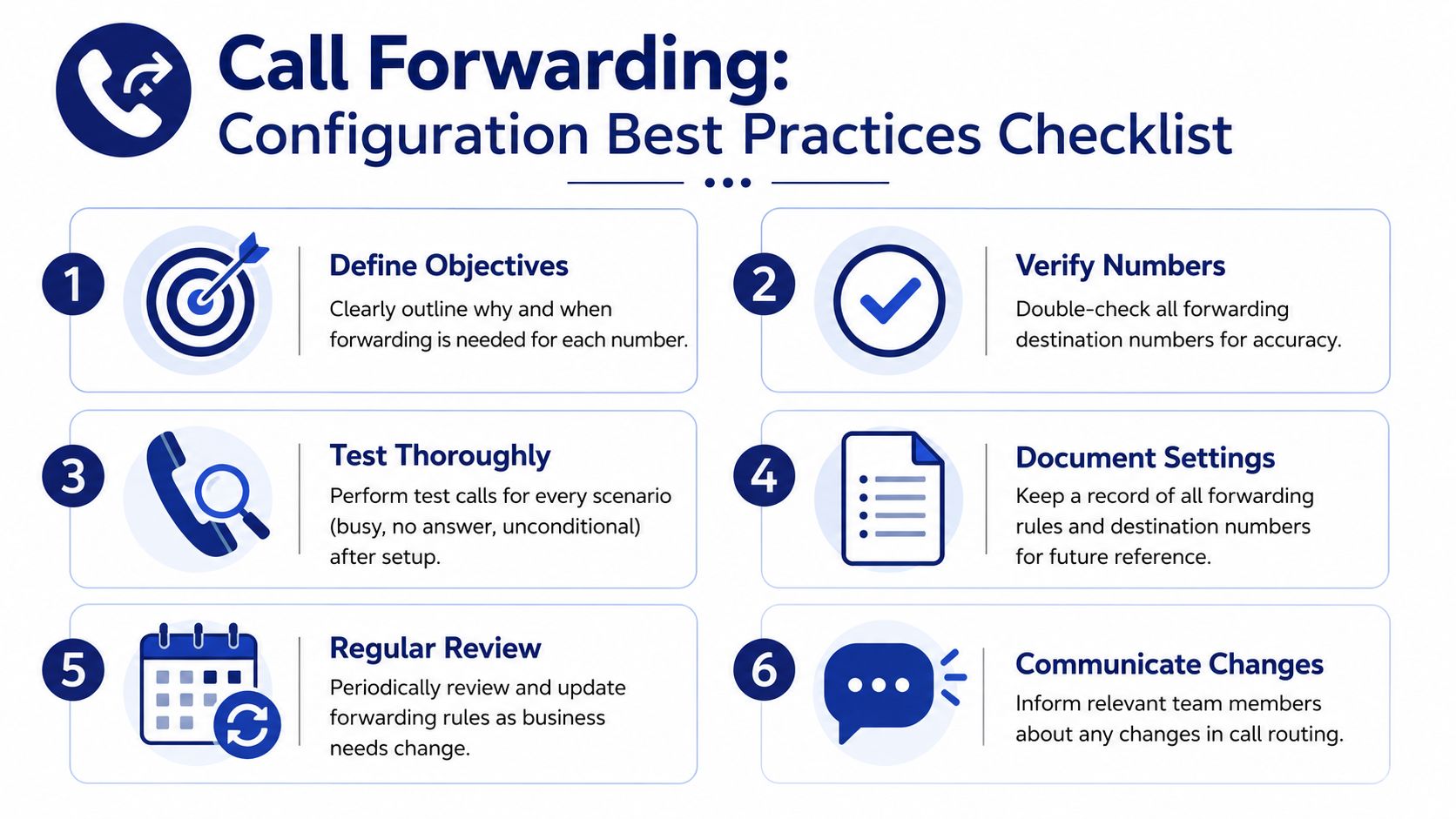
Before any rule goes live, define what problem it is solving. Overflow coverage, after-hours answering, outage backup, and VIP handling all need different logic. Teams that skip that step usually pile multiple goals into one rule and get inconsistent results.
Use this checklist before publishing or changing routing:
- Set the purpose first: Tie each rule to one business outcome.
- Verify every destination number: One wrong digit creates silent failures.
- Test each condition on its own: Check busy, no answer, unreachable, and schedule-based forwarding separately.
- Assign ownership: Make it clear who receives the call and who is responsible for follow-up.
- Review the setup on a schedule: Staff turnover, number changes, and carrier updates can break an older configuration.
I also recommend testing from outside numbers, not just internal extensions. Internal tests often miss caller ID behavior, external transfer limits, and voicemail handoff problems.
Watch for loops and dead ends
Forwarding loops are common, especially in small businesses that add rules over time. One line forwards to a backup user. That backup user already has their own failover rule. A shared hunt group sends the call back into the same chain. The result is ringing, delay, or voicemail in the wrong place.
Dead ends are just as costly. If the final destination is an unmonitored mailbox, an old number, or a phone that stays on Do Not Disturb, forwarding only hides the missed call.
Field note: The last destination in any forwarding path should have a named owner or a mailbox someone checks every day.
That one rule prevents a surprising number of service failures.
Edge cases matter
Forwarding behavior can change based on where the rule lives. Some rules are set at the carrier level. Others are controlled on the handset or inside the phone system. In mixed environments, one employee may have forwarding active on their device while the business system is trying to apply different logic upstream.
That creates hard-to-find problems. Calls may bypass the main system, fail to follow schedule rules, or land on a destination that cannot accept the transfer. Dual-SIM phones, personal devices used for business, and legacy carrier features add another layer of risk.
The practical fix is simple. Document where forwarding is configured, who can change it, and which system takes priority. Without that, "forwarding is on" tells you almost nothing.
Compliance and visibility are part of configuration
Forwarding decisions also affect recordkeeping. If calls leave your main phone system and go to an answering service, voicemail platform, or AI layer, your team may lose visibility into who answered, what was captured, and whether records were stored under your policy.
This matters more in businesses that record calls, handle payment details, discuss health information, or rely on shared call history for service follow-up. Convenience is useful. Auditability is what protects the business when something goes wrong.
WellReceived's article on call forwarding and answering service workflows explains the operational side clearly. Once another layer answers the call, your process depends on how that provider relays messages, updates records, and hands work back to your team.
Treat every forwarding destination as part of the customer workflow, not just a number in a routing table.
Choosing Your Call Forwarding Strategy with SnapDial
The best call forwarding option depends on the problem you're trying to solve.
If one person should always take the call, unconditional forwarding may be enough. If you want the primary user to answer first, conditional forwarding usually fits better. If caller type matters, selective rules help. If teams share responsibility, simultaneous or sequential ringing is often the stronger design. If callers need choices before they reach a person, IVR beats basic forwarding.
That is the pattern to keep in mind. Don't start with features. Start with workflow.
Ask these questions:
- Who should get this call first?
- What should happen if they don't answer?
- Does the answer change after hours?
- Do VIPs, partners, or emergency callers need a different path?
- Will the business still have visibility if the call is redirected?
When businesses answer those questions clearly, the right setup usually becomes obvious. The hard part is not turning forwarding on. The hard part is designing a path that works every day, under pressure, with real staff and real callers.
If you want help building that path, SnapDial gives growing businesses a cloud phone system with flexible routing, mobile-ready calling, IVR, call recording, visual voicemail, and a self-service portal to manage rules without guesswork. Their team also handles white-glove setup and provides 24/7 support, which is valuable when you need call forwarding options that work reliably across offices, remote staff, and after-hours coverage.