
A lot of owners wait too long to replace a phone setup because it still technically works. Calls come in. Desks still ring. The front office knows a few transfer codes by memory. Then the cracks show up where it hurts most: a prospect gets voicemail instead of sales, a caller hears a busy signal at the worst possible moment, or a remote employee answers from a personal cell and sounds disconnected from the company.
That's usually when the issue becomes obvious. A business phone system isn't just plumbing anymore. It shapes how fast you respond, how professional you sound, how easily your staff collaborates, and whether customer demand turns into booked work or slips away.
Why Your Old Phone System Is Costing You Customers
A common pattern shows up in small and mid-sized companies. The owner thinks they have a sales problem, a staffing problem, or a customer service problem. In reality, they have a call handling problem.
A customer calls during lunch and nobody can see the missed call until much later. A service business gets two calls at once and the second caller hears a busy tone. A project manager working off-site can't take the business line without forwarding everything to a personal number. None of those failures feel dramatic in the moment. They subtly chip away at trust.
Missed calls aren't just missed conversations
The hidden cost of an aging system isn't only maintenance. It's the revenue tied to calls that never reach the right person, or reach them too late. If you're relying on a patchwork of desk phones, manual forwarding, and voicemail boxes nobody checks quickly, you're creating friction for both customers and staff.
That's why tools like missed call notification matter in practice. They close the gap between “someone tried to reach us” and “we responded while the opportunity still mattered.”
Practical rule: If your team can't see and act on missed calls quickly, your phone system is working against your sales process.
The market has already moved
This shift isn't theoretical. The global VoIP market, which underpins modern cloud business phone platforms, reached $176 billion in 2025 and is projected to reach $389 billion by 2034, with 70% of businesses already integrating VoIP and saving up to 75% on communication costs, according to VoIP market adoption data.
That matters because businesses rarely adopt core telecom infrastructure at this scale unless the old model is failing them. Owners are moving because hosted systems are easier to manage, easier to scale, and better suited to how teams work now.
An old phone system used to be a nuisance. Today it can block growth.
The Core Choice Hosted VoIP vs Legacy PBX
The main decision is simpler than vendors make it sound. You're choosing between owning and maintaining phone infrastructure on-site, or consuming it as a managed cloud service.
A legacy PBX is like keeping a physical server rack in the closet. It can work well if you want tight local control and you're comfortable supporting hardware, carriers, handsets, wiring, and failover planning yourself.
A hosted VoIP business phone system is closer to using cloud software. The provider runs the core platform. Your team uses apps, IP phones, browser tools, and an admin portal to manage users and routing.
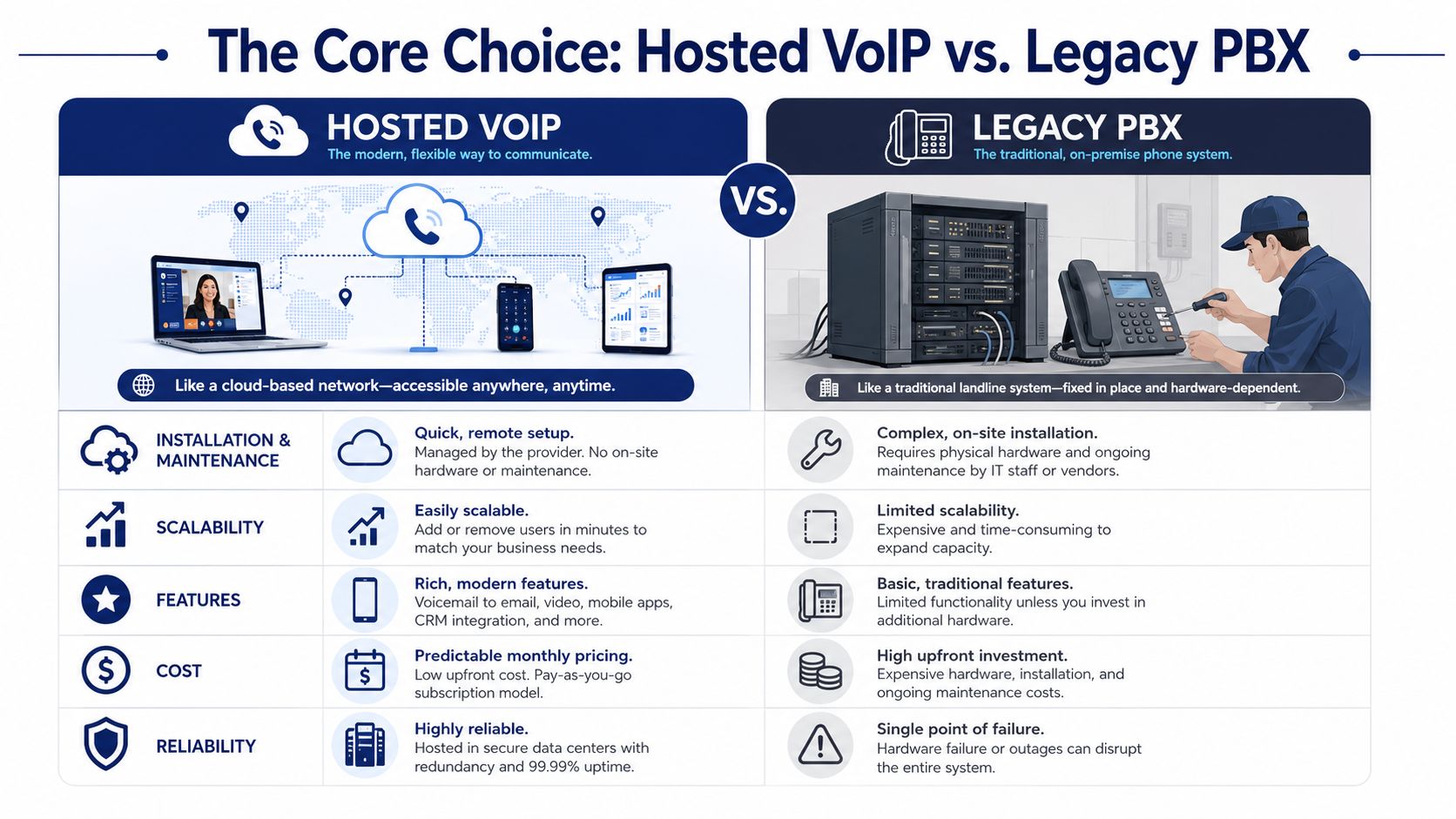
Hosted VoIP vs Legacy PBX at a glance
| Factor | Hosted VoIP (Cloud PBX) | Legacy PBX (On-Premise) |
|---|---|---|
| Installation & maintenance | Provider-managed platform with web-based administration | Hardware on-site, plus maintenance and vendor coordination |
| Scalability | Add users, numbers, and routing changes quickly | Expansion often requires hardware planning and manual setup |
| Remote work | Built for mobile and off-site access | Usually requires workarounds or added components |
| Features | Strong fit for apps, transcription, call routing, and analytics | Often depends on model, licenses, and hardware limits |
| Cost structure | Ongoing operating expense | Higher capital expense plus maintenance responsibilities |
| Failure risk | Relies on provider architecture and internet readiness | Local hardware can become a single point of failure |
A short product demo helps if your team is split on the choice:
Where legacy PBX still makes sense
Some companies keep on-premises PBX because they want direct control over hardware, or they have unusual site constraints. That can be reasonable. But SMBs often underestimate the operational drag.
Every office move, every new extension, every after-hours routing change, and every handset replacement can turn into a mini project. You're not just paying for a phone system. You're paying with staff time and management attention.
Where hosted VoIP usually wins
Hosted VoIP fits most SMBs better because communications have become fluid. Staff work from home, in the field, across multiple locations, and on mobile devices. The system has to follow them.
That's also why replacing old gear should include an exit plan for what you're removing. If you're retiring handsets and telecom hardware, one practical option is to donate IP phone equipment through an IT asset recovery partner instead of letting it collect dust in storage.
A phone platform should be easy to change after deployment. If simple moves and adds feel risky, the architecture is already outdated.
Must-Have Features of a Modern Phone System
Feature lists get bloated fast. The better way to evaluate a business phone system is by asking one question: what operational problem does each feature solve?
That keeps you from overbuying shiny add-ons and underbuying the tools your staff will use every day.
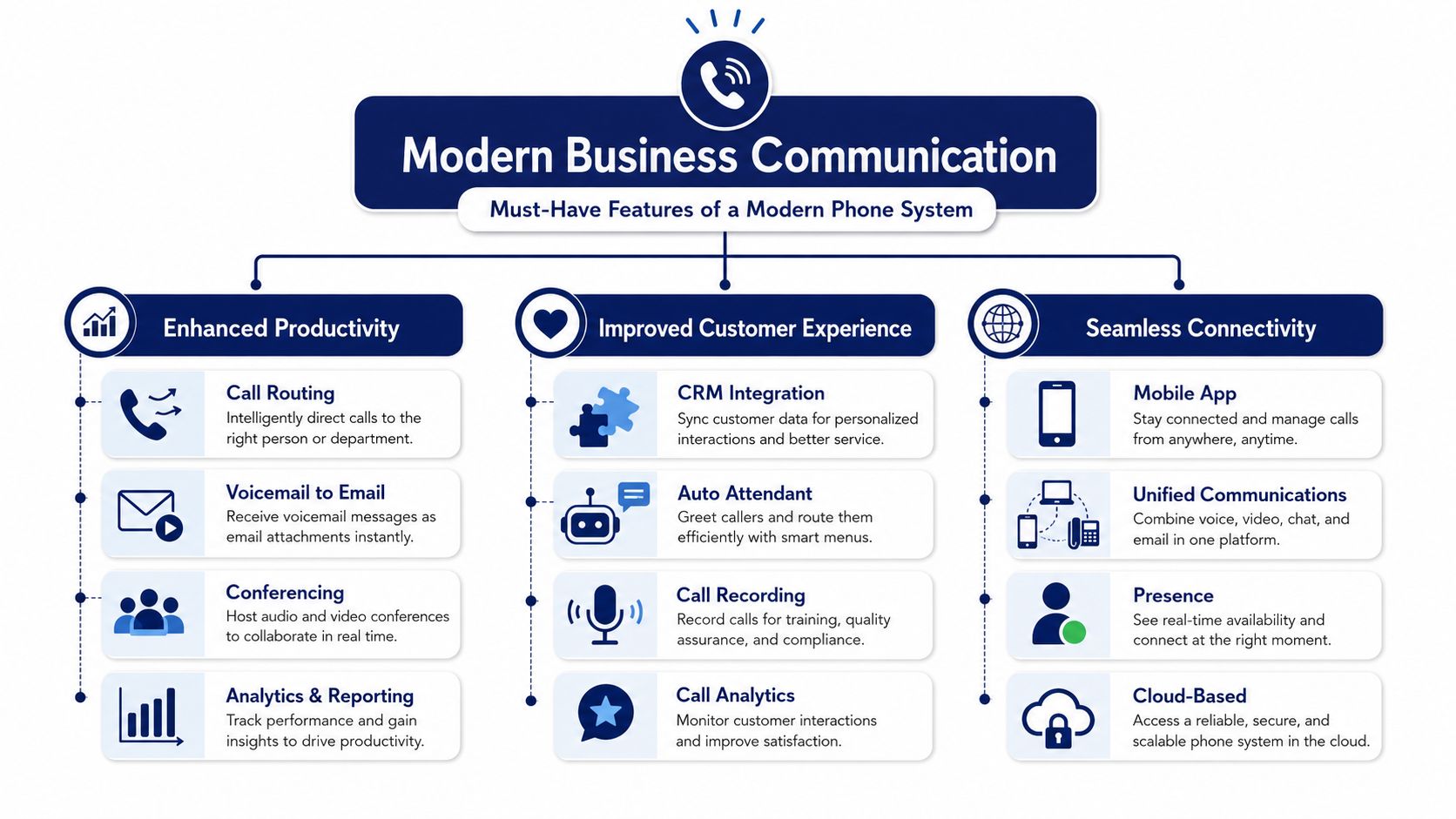
Customer experience tools
Start with the caller's first minute. If that experience feels confusing, every downstream team pays for it.
Auto attendant and IVR give callers a clear path without forcing a receptionist to manually sort every call. For a small company, that's one of the fastest ways to sound organized and route people correctly.
Call routing and smart queues matter when demand spikes. Good routing stops the “ring everyone and hope someone answers” approach. Queues are what prevent overflow from turning into abandoned calls and frustrated buyers.
Wait-time messaging and queue callback become important once your call volume becomes uneven. They don't just smooth operations. They reduce the stress on callers who would otherwise hang up and try a competitor.
Team productivity tools
Modern systems separate themselves from traditional setups. The best features remove little delays that pile up all day.
Modern systems use HD Voice with audio up to 20kHz, compared with 3.4kHz on legacy lines. They also offer visual voicemail with transcription that can reduce message response times by over 40%, and softphone apps that create a real mobile office without a second SIM card, based on modern phone feature benchmarks.
That sounds technical, but the business effect is simple. Calls sound clearer. Messages get handled faster. Staff can use one business identity across desktop and mobile instead of juggling personal numbers.
For companies comparing options, a cloud-based VoIP phone system should make those workflows standard, not optional extras hidden behind complicated licensing.
Management and control tools
Most owners don't need telecom complexity. They need visibility and control.
A good admin portal should let an office manager or IT lead make normal changes without opening a support ticket every time. Add a user. Change a ring group. Update holiday routing. Pull call logs. Review recordings. That's what practical control looks like.
Call recording and analytics also matter, but not for vanity dashboards. They help supervisors answer useful questions:
- Where are calls getting stuck: Look for queues, extensions, or time windows where callers wait too long or give up.
- Which teams need coaching: Recordings reveal whether an issue is training, process, or workload.
- How is demand shifting: Call logs often expose staffing mismatches before customers complain.
Better telecom management usually comes from simpler administration, not more knobs to turn.
Unlocking Growth for SMBs and Remote Teams
Small businesses don't need a giant enterprise stack. They need a phone system that helps them look responsive, stay reachable, and absorb growth without breaking process.
That's why modern cloud calling matters most when a company is in motion. Hiring. Expanding locations. Letting staff work from home. Covering longer service hours. Those changes expose every weakness in old telecom.

Why SMBs benefit first
A polished call experience lets a ten-person business sound much larger than it is. Callers reach departments, hear professional greetings, and get routed cleanly instead of bouncing between extensions or voicemail boxes.
That's not cosmetic. It changes how buyers judge reliability. A smaller firm can compete well if it answers quickly, routes correctly, and follows up consistently.
For distributed teams, the value is even more direct. VoIP has seen 212% growth since 2020, and 67% of mobile workers report that it boosted productivity and helped them resolve problems faster, according to VoIP remote work performance data.
Why remote and hybrid teams need one system
The biggest mistake I see is treating remote work as an exception. Once even part of your team works outside the office, personal phones, manual forwarding, and scattered apps create confusion fast.
A unified setup fixes that. Staff use one business identity across desk phones, laptops, and mobile devices. Supervisors can still manage routing, availability, and reporting centrally. Customers don't have to guess who's in the office and who isn't.
If your company has multiple locations or hybrid staff, unified communications for business stops the split between “office calling” and “everybody else improvises.”
Remote work doesn't lower the bar for phone professionalism. It raises it.
Your Buying and Deployment Checklist
The wrong way to buy a business phone system is to start with brands and feature grids. The right way is to start with operational requirements, then test whether a provider can implement them cleanly.
A failed deployment usually isn't about one missing feature. It happens because the buyer didn't define call flows, didn't test the network, didn't train staff well, or didn't set baseline performance metrics before changing anything.
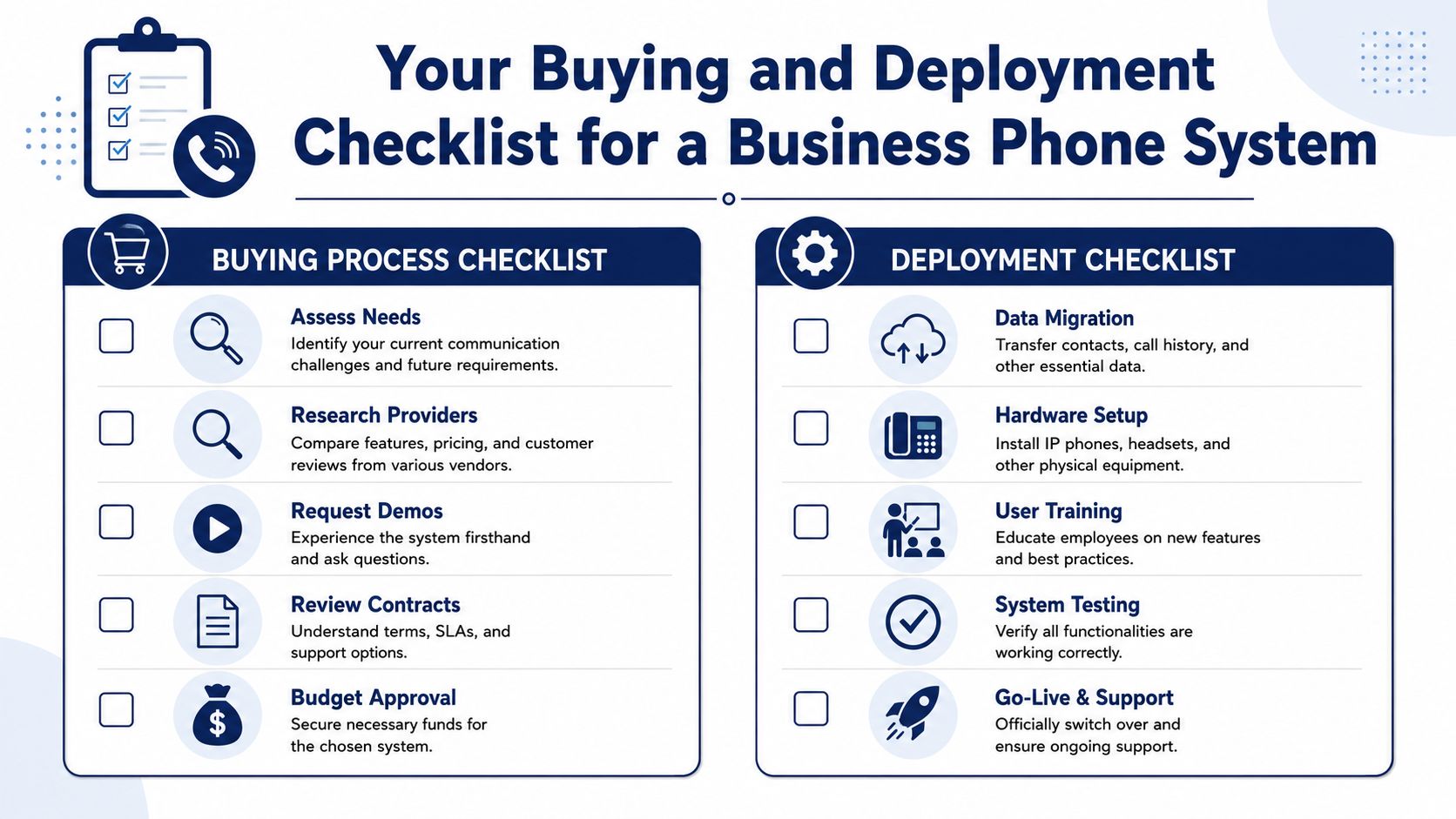
Buying checklist
Use these questions before you sign anything.
- Map your real call flow: List how calls should move during business hours, after hours, lunch coverage, seasonal spikes, and staff absences. If you can't describe your desired routing clearly, the vendor can't configure it correctly.
- Define who answers what: Separate sales, service, billing, dispatch, and leadership paths. Many businesses create one main number and then discover later that nobody agreed on ownership for overflow calls.
- Check support quality carefully: Ask who handles onboarding, number porting, training, and live support. “Managed” means different things across vendors.
- Look for plain administration: Request a demo of the admin portal. If routine tasks look buried or confusing, your team won't use it well.
- Ask about AI practicalities: 65% of underserved small business owners prioritize AI-powered tools, and many guides still focus on enterprise deployments, so SMBs should ask providers about affordable features such as natural language IVR and smart queue analytics, based on underserved SMB AI adoption findings.
One useful differentiator in this stage is deployment support. For example, SnapDial offers white-glove setup and handles migration work end-to-end, which is valuable for companies that don't want their office manager acting as an accidental telecom engineer.
Deployment checklist
Once you've chosen a provider, execution matters more than the sales demo.
Audit internet and device readiness
Confirm your connection, switching environment, handsets, headsets, and mobile usage policy are ready for cloud calling. Weak local networking creates “phone system problems” that are really LAN problems.Lock down number porting and call routing
Verify every phone number, extension plan, hunt group, holiday schedule, voicemail destination, and failover rule before the cutover date.Train by role, not by feature list
Reception needs transfer and queue skills. Managers need reporting and recordings. Mobile staff need softphone habits. Generic training wastes time.Run a pilot
Put a small team live first if possible. Sales, front desk, or service dispatch will reveal routing issues quickly because they use the system hardest.
Measure before and after
A migration without baseline metrics makes ROI harder to prove. Track your pre-launch state first, then compare after go-live.
Use a simple scorecard:
| Measure | Before migration | After migration |
|---|---|---|
| Missed calls | Track weekly pattern | Review whether alerts and routing improved response |
| Busy signals or overflow | Note where callers get blocked | Check if queues and extra call handling removed bottlenecks |
| Speed of callback | Record current response habits | Compare follow-up consistency after launch |
| Voicemail handling | Check how long messages sit | Review whether transcription changes response behavior |
| User admin effort | Estimate how many changes need outside help | Measure whether internal admins can handle routine updates |
You don't need fancy analytics on day one. You need a disciplined before-and-after view.
Ensuring Security Compliance and Positive ROI
Security becomes very concrete the moment your team discusses invoices, legal matters, patient details, contracts, or payment issues by phone. If voice traffic isn't properly protected, your telecom stack becomes a risk surface, not just a utility.
A dependable cloud phone system should guarantee 99.99% uptime, which equals less than 53 minutes of downtime annually, and it should use end-to-end encryption to protect voice data, according to cloud VoIP reliability and security guidance. The same architecture also allows routing rules and features to be deployed in minutes through a web portal.
What to verify on security
Don't stop at “the provider says it's secure.” Ask specific questions.
- Encryption: Confirm voice traffic is protected in transit.
- Redundancy: Ask how the provider handles outages and failover across infrastructure.
- Admin control: Review who can change routing, access recordings, and manage user permissions.
- Broader security posture: If your telecom project is part of a wider modernization effort, it helps to review general guidance on safeguarding business data online so phone security isn't treated separately from the rest of your IT environment.
How to think about ROI
Most buyers calculate ROI too narrowly. They compare the old monthly phone bill to the new one and call it done. That misses the real value.
Include four buckets:
- Direct telecom savings from removing old hardware and carrier complexity.
- Administrative savings from faster changes, simpler user management, and less dependence on outside technicians.
- Productivity gains when staff can answer, transfer, and follow up from any device with less friction.
- Revenue protection from fewer missed calls, fewer blocked callers, and better response speed.
Security and ROI are connected. A phone system that is hard to manage often becomes both a financial drain and an operational risk.
SnapDial in Action Real World Use Cases
A good business phone system should fit the way a company works, not force the company to reorganize around telecom constraints.
The multi-location accounting firm
An accounting firm with staff across two offices needs calls to follow the client relationship, not the building. During tax season, reception has to route quickly, partners need mobile access to the business line, and client discussions need protected voice handling.
In that environment, centralized routing, mobile apps, visual voicemail, and encrypted cloud calling solve a real operational problem. The office manager can adjust call flows without waiting on a technician, and client communication stays inside one business system.
The growing e-commerce support team
An online retailer hits sharp call spikes during promotions and holidays. The old setup sends too many callers to voicemail, and supervisors can't see what's happening until complaints pile up.
Queue management, callback options, wait-time announcements, and real-time statistics change that picture. Support leads can see congestion while it's happening and make staffing decisions before service levels slip.
The field-service company
A service company with technicians on the road often struggles with personal-cell chaos. Customers call one number, but the actual response depends on who happens to answer.
A hosted setup with mobile apps, clear routing rules, and role-based voicemail keeps the customer experience consistent. If that company is also tightening its broader cyber posture, it may make sense to review outside support options such as SME cyber security services alongside the phone migration.
If you're replacing an outdated PBX or trying to make a cloud phone rollout stick, SnapDial is worth a close look. It gives SMBs a hosted business phone system with calling, conferencing, routing, transcription, call center features, and white-glove setup, so you can focus on the call flow and business outcomes instead of wrestling with telecom complexity.