

The voicemail that hurts you most usually isn't the long rambling one. It's the short one that says, “Call me back today,” followed by a phone number mumbled while your front desk is busy, your sales rep is in the field, and your office manager is triaging ten other things.
That's how leads get lost and service issues age into complaints. The message exists, but nobody hears it in time. Or they hear it later, replay it three times, and still aren't sure whether the caller said 518 or 510.
Voicemail transcription software changes that dynamic. It turns voicemail from an audio queue into text your team can scan, search, route, and act on. That matters more than most owners realize. Audio is slow. Text moves.
If you're already trying to streamline how your team handles spoken communication, it also helps to discover voice to message app features that support faster message capture and response workflows. The important point is simple: when messages become readable instead of just listenable, they stop piling up and start moving through the business.
Why Your Business Is Drowning in Voicemails
Most voicemail problems don't start with volume alone. They start with friction.
A customer leaves a message after hours. Your receptionist sees the notification the next morning but doesn't have time to listen right away. A salesperson checks voicemail between appointments, can't play the audio clearly in a noisy parking lot, and flags it for later. Later turns into tomorrow. Tomorrow turns into a missed opportunity.
That's normal in businesses still treating voicemail like a private audio inbox instead of shared operational data.
Where the breakdown usually happens
The issue isn't that voicemail is obsolete. It's that traditional voicemail asks too much from busy people:
- It demands uninterrupted attention. Someone has to stop, listen, replay, and often take notes.
- It hides urgency inside audio. A hot lead and a low-priority inquiry look the same until someone listens.
- It doesn't route itself well. Audio files sitting in one person's mailbox don't help the rest of the team.
- It creates avoidable memory errors. Names, callback numbers, and addresses are easy to mishear.
The business doesn't lose the deal because voicemail exists. It loses the deal because voicemail stays trapped in audio too long.
Why text changes the response speed
Once a voicemail appears as text in email or an app, the workflow improves immediately. A manager can skim the message in seconds. A rep can forward it to the right person. A support lead can tag it as urgent without stopping to listen to every recording.
That shift sounds small until you look at how teams work. Email gets checked. Text gets scanned. Search gets used. Audio gets postponed.
The companies that handle voicemail well don't necessarily receive fewer messages. They process them faster, with fewer handoffs and less guesswork. That's why voicemail transcription software isn't a novelty feature. For many SMBs, it's the line between “we got the message” and “we acted on it in time.”
How Voicemail Transcription Actually Works
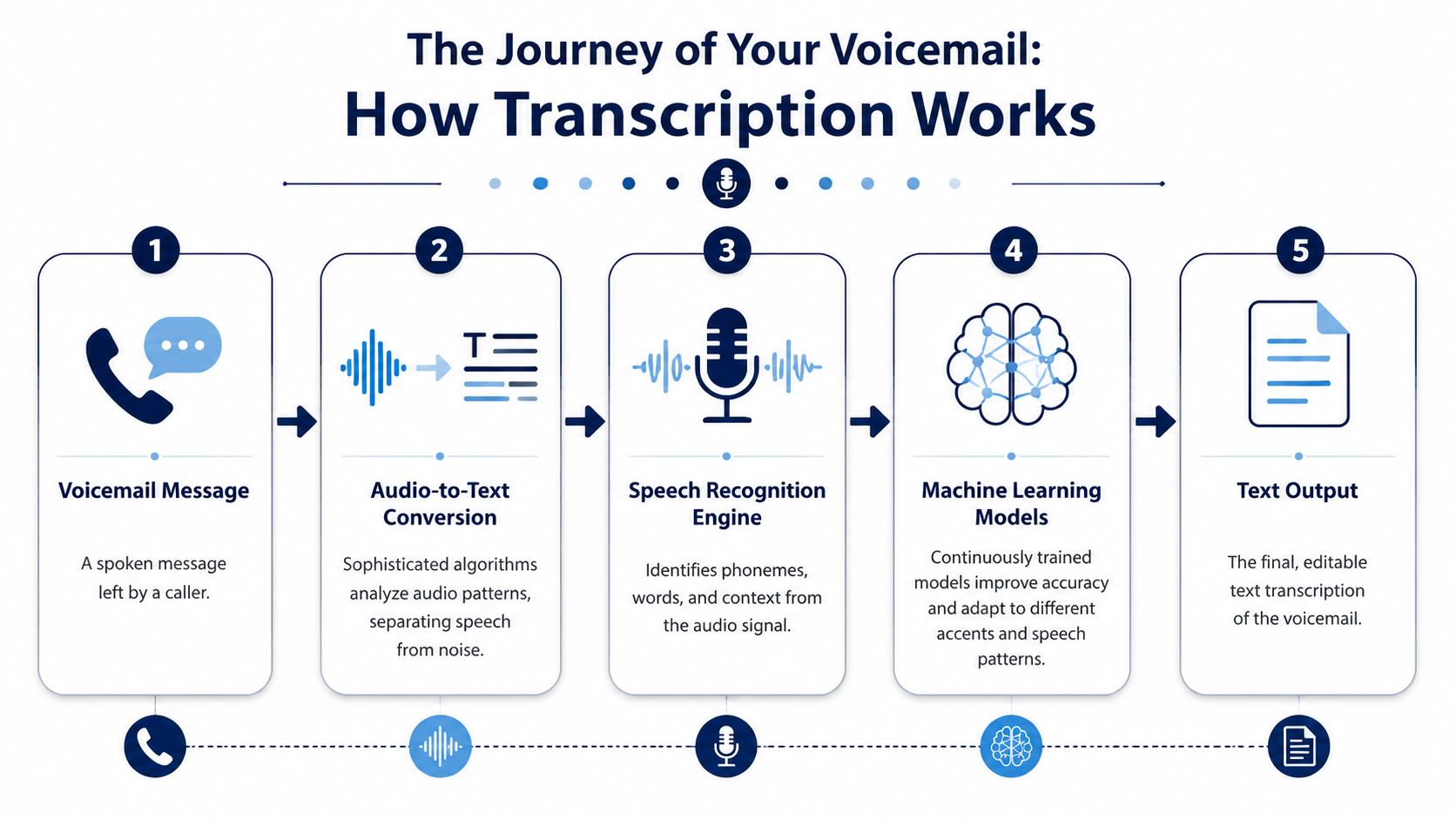
Think of voicemail transcription as a digital assistant for your phone system. A caller leaves a message, the software captures the audio, a speech engine converts spoken words into text, and the transcript gets delivered where your team can use it.
At the core is Automatic Speech Recognition, usually shortened to ASR. ASR listens for sound patterns, breaks speech into recognizable units, and maps those sounds into words. Modern business systems typically achieve 80-95% overall accuracy for general voicemail content, with specialized systems reaching up to 99% accuracy for phone numbers, according to GetNextPhone's overview of voicemail transcription technology.
What happens after someone leaves a message
In most business deployments, the process looks like this:
- The caller leaves a voicemail. The system records the audio file.
- The file is sent for processing. This usually happens automatically in the background.
- The ASR engine analyzes speech. It separates speech from noise and converts spoken language into text.
- The transcript gets delivered. Depending on the setup, that may be by email, SMS, portal, or app alert.
- The original audio stays available. Your team can still replay the recording if anything in the text looks unclear.
Cisco describes this kind of workflow in practical terms. Its Unity Connection SpeechView Standard transcribes the first 120 seconds of a voice message and sends the text to the email inbox within minutes, while keeping the original audio attached for review in a secure, role-based environment with strong encryption, as outlined in Cisco's SpeechView overview.
Why the better systems feel invisible
When voicemail transcription is configured well, users barely think about the mechanics. They just see a message show up in the same place they already work.
That's why setup matters. Routing, notification rules, user permissions, and mailbox behavior need to be configured inside the phone environment, not bolted on carelessly afterward. If you're evaluating a deployment path, this guide to configure speech to text shows the kind of settings administrators should expect to manage.
For a broader plain-English primer on the underlying process, it's also worth taking a minute to Understand transcription with Zilo AI. The more you understand the mechanics, the easier it is to judge whether a tool will help your team or just create another inbox.
The Real Story on Transcription Accuracy and Security
The first question owners ask is usually the right one: Will the transcript be accurate enough to trust?
The honest answer is yes, often, but not always perfectly. Good systems handle everyday voicemail very well. They still struggle when callers mumble, rush through details, call from a loud jobsite, or speak with accents the model hasn't handled well.
Accuracy is about conditions, not just vendors
Much marketing copy falters by treating accuracy as one universal score. In practice, transcription accuracy depends on at least four variables:
- Audio quality
- Background noise
- Language support
- How clearly the caller speaks
Built-in and native tools can work fine for casual use, but they have hard limits. According to SpeakWrite's comparison of voicemail-to-text options, iOS Live Voicemail and Android Visual Voicemail are limited to English and Spanish, while professional services and stronger AI models offer broader multilingual support and, in some cases, 99% or higher accuracy when using advanced AI or human-verified workflows.
That doesn't mean every business needs premium transcription for every mailbox. It means you should match the tool to the risk. If your voicemails mostly involve basic callback requests, standard AI transcription may be enough. If messages contain addresses, medical details, legal instructions, technical terms, or multilingual callers, mistakes get expensive fast.
The weak spot most teams ignore
The biggest day-to-day failure point isn't average dictation. It's non-native speakers and noisy environments.
Google Voice support notes that transcription errors happen “especially if the caller has a foreign accent or is in a very noisy environment,” and users describe some errors as “very concerning” in this support discussion. That's consistent with what many IT managers already know from experience: the transcript is a fast triage tool, not a substitute for judgment.
Practical rule: Treat the transcript as the first read. Treat the audio as the final check whenever the message includes money, scheduling, compliance, or a hard-to-hear callback number.
Security matters more than convenience
Accuracy gets the attention. Security deserves equal weight.
Business voicemail often contains customer names, internal instructions, payment issues, staffing details, and service addresses. Once that audio leaves the handset and moves through cloud processing, you need to know how access is controlled and how data is protected.
A serious business platform should give you a clear answer on:
| Area | What to look for |
|---|---|
| Access control | User-level permissions and role-based access |
| Delivery path | Secure handling of transcripts sent by email or message |
| Storage | Retention rules for audio and text |
| Auditability | The ability to return to the original voicemail recording |
| Admin control | Central settings instead of unmanaged user apps |
The safest choice usually isn't the flashiest app. It's the system that fits your operational controls and keeps voicemail inside a managed communications environment.
Business Use Cases That Directly Drive ROI
The return on investment from voicemail transcription software rarely shows up as one giant line item. It shows up in dozens of small wins your team stops losing.
A sales rep reads a voicemail in the parking lot between appointments and calls back before a competitor does. A support supervisor searches yesterday's transcripts and spots three messages describing the same service problem. An office admin forwards a text transcript to the field team without replaying audio over speakerphone.
Those aren't edge cases. That's ordinary business speed.

Sales and response time
Sales teams benefit first because voicemail is often where buying intent lands after hours. A transcript in email lets a rep scan the message immediately, identify urgency, and call back with context.
That's especially useful for mobile teams. Listening to several voicemails in sequence is slow. Reading them is faster and easier to prioritize. The rep doesn't need a quiet office to know which callback matters now.
Support and operational follow-through
Support teams get a different kind of value. Searchable transcripts make recurring issues easier to spot, share, and escalate. Audio files aren't good at revealing patterns. Text is.
Verbit puts the core productivity case plainly. Transcriptions “speed up review” and “allow easy search,” but the bigger payoff comes when teams operationalize the text inside business systems, as explained in Verbit's guide to voicemail transcription productivity. That's where the workflow moves from passive reading to action.
If your team wants voicemail to trigger actual work instead of a manual copy-paste routine, look at how a CRM with VoIP integration supports routing, assignment, and follow-up inside the systems people already use.
Where ROI really shows up
The practical gains usually fall into three buckets:
- Faster triage: Managers can review more messages in less time.
- Cleaner handoffs: Staff can forward text to the right person without rewriting the caller's message.
- Fewer missed follow-ups: A transcript can become a task, a ticket note, or a CRM activity instead of sitting in voicemail limbo.
If a voicemail stays in one person's mailbox, it's a reminder. If it enters a workflow, it becomes work that actually gets done.
Businesses often overvalue the convenience of reading voicemail and undervalue the operational gain of routing it well. The second is where the primary ROI lies.
How to Choose the Right Transcription Solution
The buying decision usually comes down to this: Do you want a standalone app, or do you want transcription built into the business phone system?
Both options can work. They just solve different problems.
Standalone apps versus integrated systems
A standalone transcription tool is often attractive because it's easy to test. You can start quickly, compare transcripts, and avoid a broader phone migration. That makes sense for a small team with simple needs and light call volume.
An integrated business phone solution usually makes more sense once voicemail handling affects multiple people, departments, or locations.
Here's the practical comparison:
| Option | Best for | Trade-offs |
|---|---|---|
| Standalone app | Small teams testing transcription quickly | More app switching, separate billing, weaker admin control |
| Carrier-native feature | Basic personal use | Language and noise limitations, less flexibility |
| Integrated business phone system | SMBs with shared workflows and oversight needs | Requires more upfront planning, but creates cleaner long-term operations |
What to evaluate before you sign
Don't buy based on a demo transcript alone. Evaluate the messy parts.
According to SpeakWrite's review of voicemail-to-text tools, built-in carrier tools like iOS Live Voicemail are often limited to certain languages and can struggle with noise, while stronger third-party and business phone platforms offer better multilingual support and accuracy. That's a real dividing line if your callers include field staff, multilingual customers, or jobsite contacts.
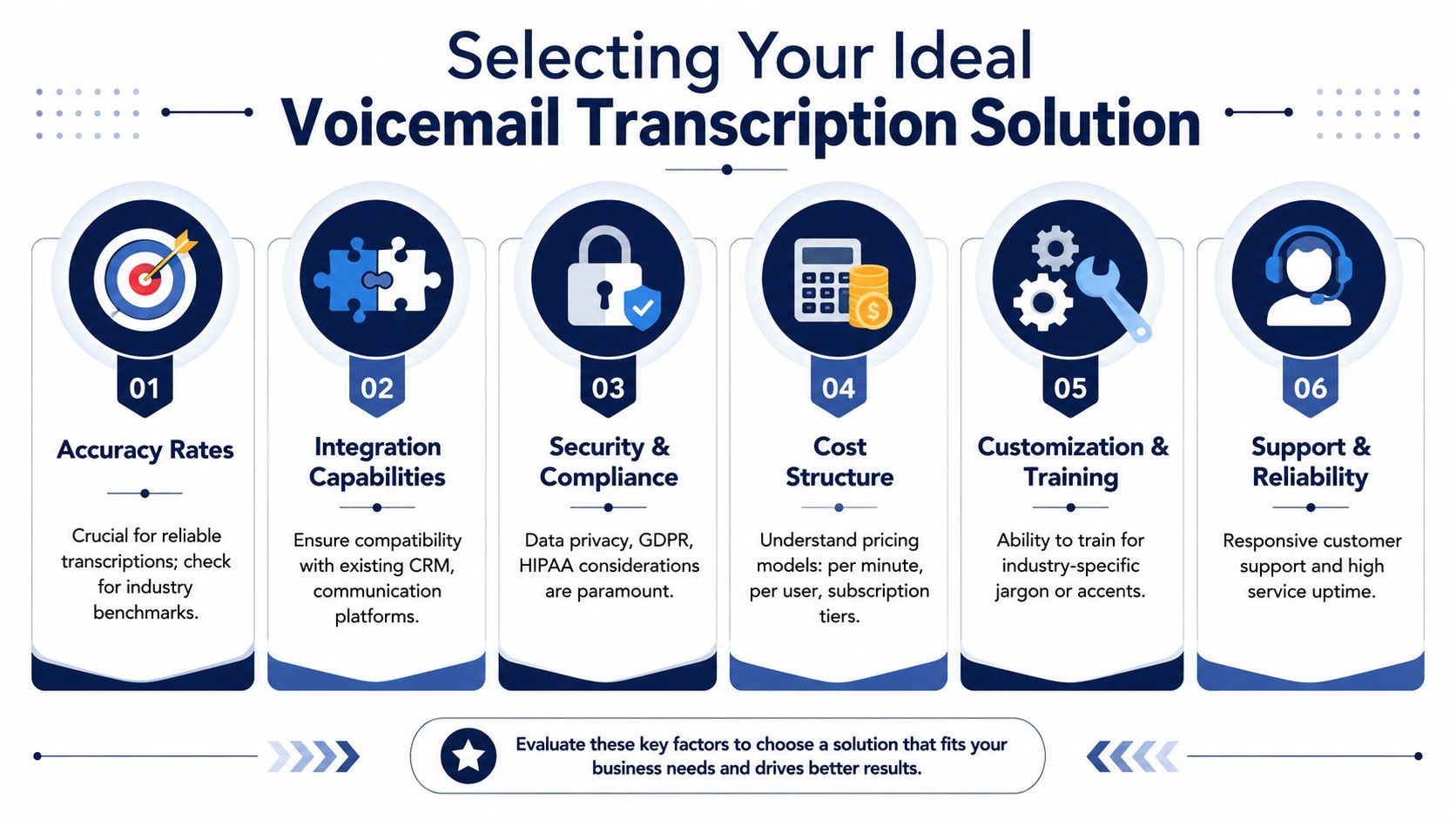
Use this checklist when comparing vendors:
- Accuracy under stress: Ask how the system handles accents, noise, and jargon.
- Language fit: Verify support for the languages your callers use.
- Workflow fit: Confirm where transcripts appear and who can access them.
- Admin control: Check whether users can be managed centrally.
- Security posture: Look for managed access, retention controls, and secure delivery.
- Cost logic: Decide whether you want one bundled communications bill or another software subscription.
The cheapest option often becomes the expensive one
Low-cost tools look efficient until someone has to babysit them. Separate apps create more training, more support tickets, more user confusion, and more points of failure.
By contrast, integrated systems tend to reduce friction because voicemail, routing, user management, and message delivery live in one place. That doesn't guarantee better outcomes by itself. It does make it easier to enforce consistent workflows across the business.
Choose the option your team will use correctly on a Tuesday afternoon, not the one that looked clever in a ten-minute demo.
Putting Your Transcription Software to Work
Buying voicemail transcription software is the easy part. Getting value from it depends on the workflow you build around it.
Start with a narrow goal. Don't roll it out as “AI voicemail.” Roll it out as a response system: urgent messages get flagged, sales inquiries get assigned, support issues get routed, and unclear transcripts get checked against audio.
A rollout plan that works
This is the operating discipline many teams need:
- Set notification rules first: Decide which users get transcripts by email, portal alert, or both.
- Define triage ownership: Someone should own first review for shared mailboxes.
- Train for exceptions: Staff should know when to trust the text and when to replay the recording.
- Route, don't just read: A transcript should lead to a callback, task, note, or escalation.
- Review transcript quality: Pay attention to patterns in missed names, numbers, accents, or background noise.
Voicemail transcription is moving from convenience feature to standard business capability. The broader voice technology market behind it is projected to grow from USD 9.66 billion in 2025 to USD 23.11 billion by 2030, at a 19.1% CAGR, according to MarketsandMarkets' speech and voice recognition forecast.
Don't stop at the transcript
The transcript is only useful if it enters the rest of your communication flow. For many teams, the simplest win is to forward voicemail to email so messages arrive where people already work.
After that, think bigger. Patterns in voicemail can reveal customer frustration, recurring product issues, and service bottlenecks. Teams that want to go beyond faster callbacks can learn how to turn customer feedback into growth by analyzing what callers repeatedly say, not just whether a single message was answered.
A good rollout doesn't ask employees to change how they think. It puts the message where they already act.
The businesses that get the most from voicemail transcription software treat it as part of a larger communication system. They set expectations, train for edge cases, and build a habit of converting messages into action quickly.
If you're replacing an old PBX or trying to stop voicemail from becoming a daily bottleneck, SnapDial is worth a look. Its cloud phone platform includes visual voicemail with transcription, mobile-ready calling, and the admin controls SMBs need to keep message handling organized instead of scattered across user devices and disconnected apps.