
Your phone rings while your support rep is already helping someone. Two more callers hit the main line, one gets voicemail, one hangs up, and a supervisor learns about both only after an angry email arrives. That's the point where many small businesses realize they don't have a staffing problem alone. They have a call flow problem.
A basic business phone system can place and receive calls. It can't reliably organize a busy inbound support operation. If your team handles customer questions, appointment changes, billing issues, or service requests all day, you need software that decides where calls go, what callers hear, what managers can track, and how the team recovers when volume spikes.
Most buying guides drift toward outbound sales tools. That's useful for dial-heavy teams, but it leaves a gap for the businesses that mainly answer inbound calls and need cleaner routing, simpler compliance controls, and a migration path that won't break the front desk on Monday morning.
Understanding Small Business Call Center Software
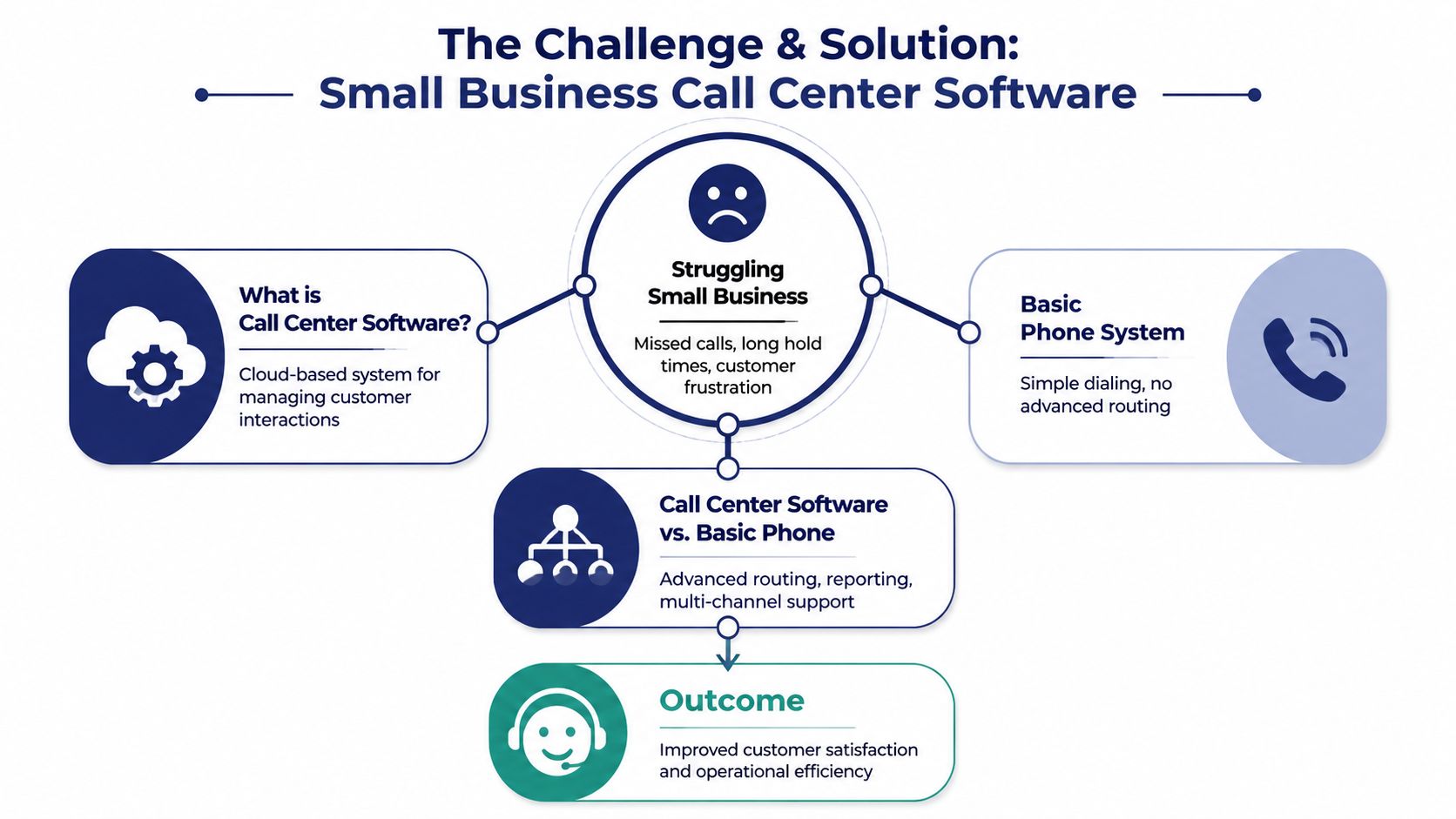
Small business call center software is the operating system for inbound customer conversations. It sits between your published phone number and your agents, then handles the practical work a basic PBX usually can't: greeting callers, routing them to the right queue, holding their place in line, logging activity, and giving managers visibility into what's happening.
What it actually does
Think of a basic phone system like a single receptionist with a notepad. Calls come in, someone answers, and they try to transfer the caller to the right person. That works until everyone's busy, the right person is away, or five calls arrive at once.
Call center software adds structure. An IVR menu is like the host stand at a busy restaurant. It asks a few questions up front and sends each guest to the right place. Queues are the waiting list. Routing rules are the seating chart. Reporting is the manager's end-of-shift summary that shows what went wrong and when.
That's why the line between voice-only systems and broader customer engagement platforms matters. If you need a clean explanation of the distinction, this breakdown of call center vs contact center is useful before you compare vendors.
Why SMBs are moving away from legacy systems
Cloud systems have become the default direction for a reason. The global contact center software market reached $49.64 billion in 2025 and is projected to grow at a 23.21% CAGR to $400.19 billion by 2035, reflecting rising SMB adoption of cloud-based features, according to contact center software market projections from Precedence Research.
That growth isn't just a finance story. It reflects a practical shift in what small businesses can buy. Features that once required bulky on-premise equipment and specialist telecom support are now available through browser-based or app-based systems that are easier to roll out and easier to change.
Practical rule: If your support process depends on one person “knowing how calls usually get handled,” you need software, not memory.
Where people get confused
A lot of teams hear “call center” and assume they need a giant operation with rows of headsets. They don't. A five-person service desk can still benefit from call center software if calls need to be prioritized, tracked, and answered consistently.
The simpler way to frame it is this:
- Basic phone system: lets people call your business.
- Small business call center software: manages how your business handles those calls.
- Cloud deployment: lets you change that handling without replacing office hardware every time the workflow changes.
For an SMB IT manager, that difference is the whole buying decision.
Exploring Core Call Center Features
Most inbound teams don't need every advanced feature on day one. They do need a stable base. If the basics are weak, fancy AI won't save the experience.
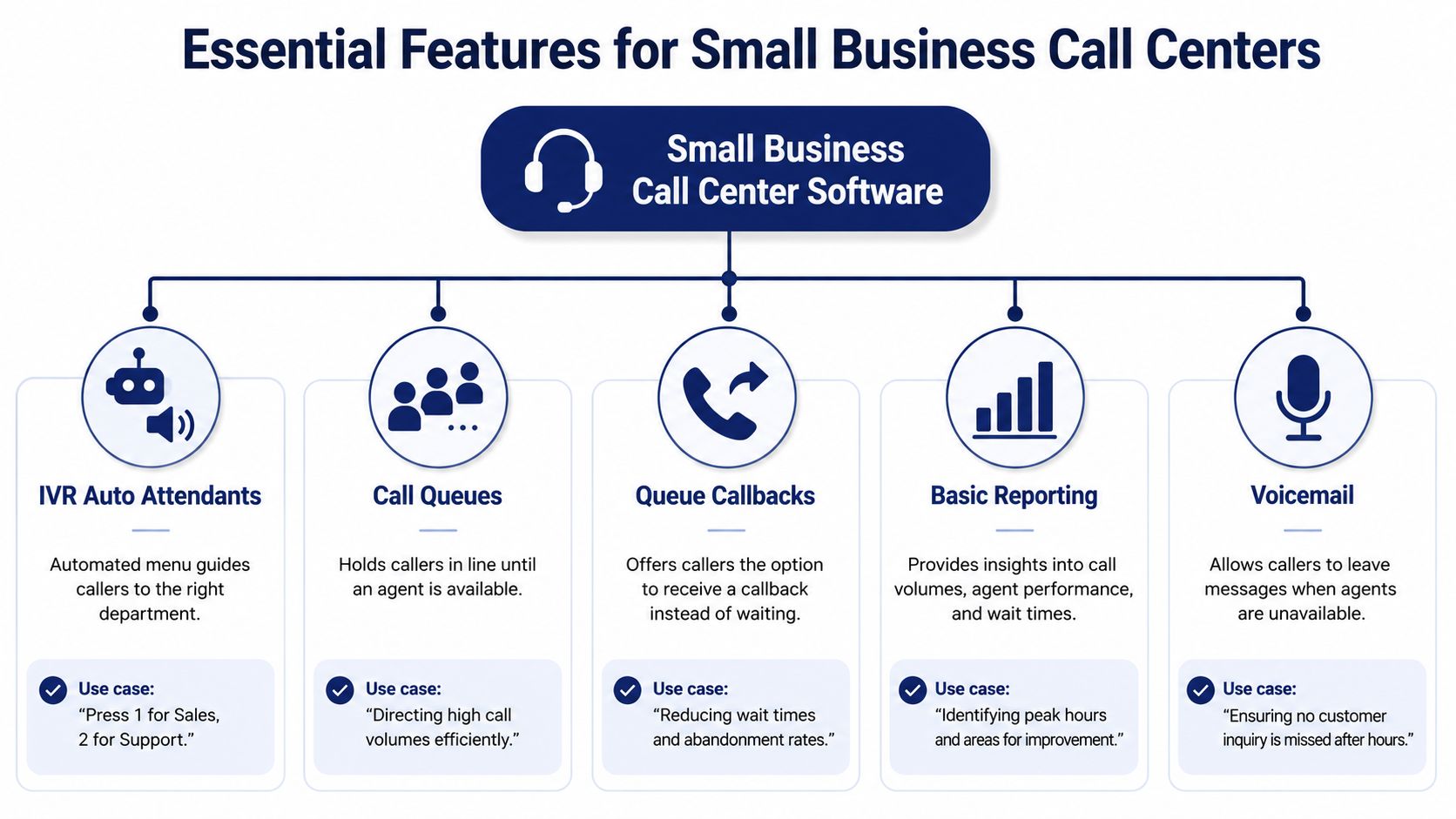
The five features that carry the load
IVR auto attendants
This is the greeting and menu layer. Callers hear options like billing, scheduling, or support, then choose where they need to go. A good IVR saves agents from acting like switchboard operators. If you want a plain-language explanation, this guide on what an IVR system is is a solid primer.Call queues
When all agents are busy, queues hold calls in a structured line instead of dropping them into a voicemail black hole. For inbound support, this is the feature that turns chaos into an ordered backlog.Queue callbacks
During lunch rushes, Monday mornings, or weather events, callers don't want to sit on hold. A callback option keeps their place and returns the call when an agent is free. That reduces frustration without forcing you to overstaff for your busiest hour.Basic reporting
Managers need to know when call spikes happen, which queues are overwhelmed, and whether certain issues create repeat calls. Reporting doesn't have to be complicated. It just has to answer, “What's happening, and when does it break down?”Voicemail and message handling
After-hours calls and overflow calls still matter. Voicemail should route clearly, notify the right people, and fit into the support workflow instead of becoming a separate inbox no one owns.
A short walkthrough helps here:
Why routing quality matters more than people think
Modern small business call center software uses skill-based routing and Automatic Call Distribution, which reduce average handle time by 15–25% compared to static queues, according to small business contact center benchmarks on G2.
That sounds technical, but the idea is simple. If a warranty question lands with the warranty-trained rep first, the customer gets help faster and your team avoids transfers. Static queues treat every agent like they're interchangeable. Inbound support teams know that's rarely true.
A queue is not a strategy. It's just a parking lot unless the routing rules behind it are thoughtful.
One technical point worth checking
Voice quality still depends on the network underneath your cloud phone setup. If your provider or MSP is reviewing traffic behavior and transport basics, this practical guide to UDP for service providers gives enough context to understand why real-time voice behaves differently from email or web traffic.
For most SMB buyers, the lesson is straightforward: buy the features your callers feel first. Menus, queue logic, callbacks, announcements, and reporting have a bigger effect on day-to-day support than a long list of outbound dialer options you may never use.
Examining Advanced Call Center Features
Once the basics are steady, advanced tools start making a real difference. Advanced tools allow a small inbound team to act larger than it is, not by rushing agents, but by removing repetitive work and surfacing context sooner.
A day in an AI-assisted inbound queue
A customer calls about a password reset, a shipping change, or a store-hours question. An AI voice agent answers first, verifies the reason for the call, and handles the routine issue if the workflow is simple. According to Sobot's overview of cloud call center software for small business, AI voice agents can resolve up to 40% of inbound calls without human intervention.
If the issue gets more complex, the call moves to a live agent with context attached. The agent sees the caller's menu selections, transcript history, and likely intent instead of starting with, “Can you explain that again?”
That handoff is where advanced software earns its keep.
The features that matter for inbound support
Here are the capabilities I'd look at after the core stack is in place:
- Smart queue management: prioritizes calls by issue type, VIP status, business hours, or agent skills.
- Real-time transcription: gives supervisors and agents searchable conversation records without waiting on manual notes.
- Knowledge suggestions during calls: surfaces likely answers while the agent is talking.
- Sentiment cues: helps flag conversations that are getting tense and may need escalation.
- Whisper, barge-in, and takeover: lets supervisors coach in the moment when a new rep is struggling or a customer situation turns sensitive.
- Omnichannel continuity: keeps voice, SMS, and messaging conversations tied to the same customer context.
If you're comparing these capabilities, it helps to review how call center automation software changes routing, handoffs, and repetitive support work.
What this looks like in practice
A plumbing company's support desk gets a burst of calls after a storm. The AI layer handles routine appointment confirmations. The urgent leak calls get bumped ahead in the queue. A new agent takes a panicked homeowner call, starts missing a key troubleshooting step, and the supervisor uses whisper coaching to guide the conversation without interrupting the customer.
That's not about replacing people. It's about protecting the moments where a human should spend attention.
Use automation to remove repetition, not empathy. The hard calls still belong with trained people.
The common mistake is buying advanced features because they sound modern. Buy them because they solve a visible inbound bottleneck: repeated verification, unnecessary transfers, long holds, weak coaching, or disconnected customer history.
Evaluating Benefits and ROI
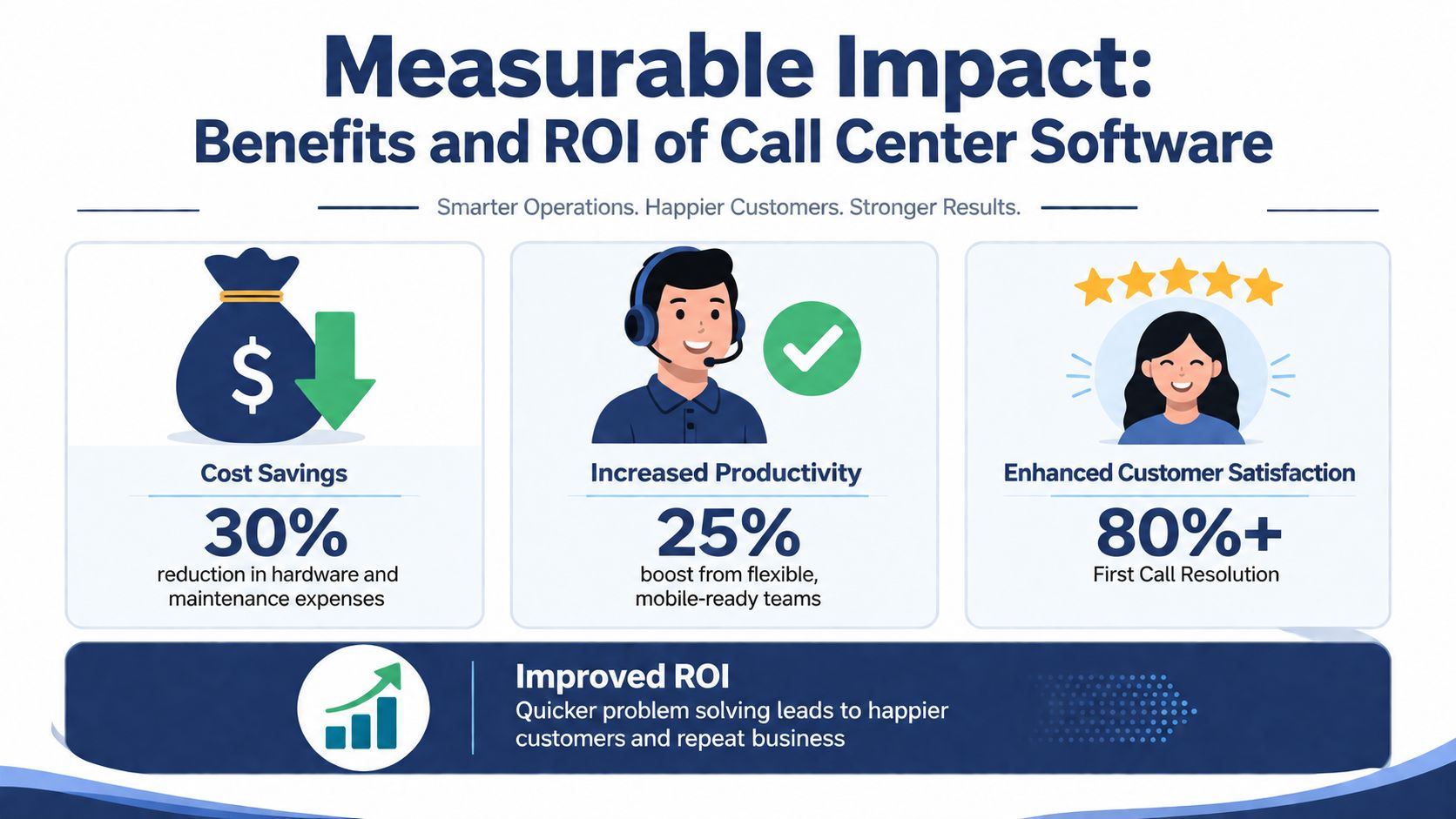
Most SMB IT managers get asked the same question: “Will this save money, or is it just a nicer interface?” The honest answer is that ROI usually comes from a mix of fewer missed calls, less agent waste, smoother routing, and better customer retention. It's rarely one dramatic line item.
Start with the operational outcome
In 2025, global call center software achieved 80%+ first call resolution benchmarks, driven by AI routing and real-time features that tie directly to operational efficiency, according to Giva's call center statistics roundup.
For an inbound support team, that benchmark matters because repeat calls are expensive in ways most spreadsheets miss. Every unresolved call creates extra queue pressure, more context switching for agents, and more customer frustration.
A practical ROI model for SMBs
You don't need a finance department to build a useful model. Use four buckets:
| ROI input | What to measure | Why it matters |
|---|---|---|
| Call handling | Repeated transfers, missed calls, voicemail backlog | Shows process waste |
| Labor efficiency | Time spent on routing, note cleanup, repeat explanations | Reveals hidden support cost |
| Customer outcome | Resolved-on-first-contact patterns, complaint trends | Connects operations to service quality |
| Legacy burden | Maintenance hassle, admin complexity, support overhead | Captures the cost of old systems |
A simple formula works well:
ROI = (value gained from efficiency + value protected from fewer missed opportunities – total project cost) / total project cost
Keep the math suited to your environment. Don't force precision where you don't have clean data. If your current phone setup can't show abandoned calls, estimate qualitatively and refine after deployment.
Where the gains usually show up first
- Fewer avoidable transfers: callers reach the right agent sooner.
- Lower hold pain: callbacks and announcements prevent pileups.
- Cleaner coaching: supervisors can spot weak points faster.
- Better use of small teams: mobile and remote staff can still answer within the same workflow.
- Less front-desk overload: agents stop acting as manual dispatchers.
Workstation setup also affects productivity more than many teams expect. If you're redesigning an in-office support area, these examples of effective call center workstations help when you're balancing acoustics, supervision, and agent comfort.
How to present ROI to leadership
Don't pitch “modernization.” Pitch fewer broken moments.
Show leadership the current failure points: calls that ring out, after-hours messages that sit too long, customer questions that bounce between staff, and supervisors who can't see queue trouble until customers complain. Then connect each issue to a software feature that reduces it.
That framing works because it's grounded in operations, not buzzwords.
Executing Implementation and Migration
The most successful migrations aren't the fastest. They're the ones that remove surprises before go-live. If you're replacing a legacy PBX or a patchwork of hunt groups, treat the move like an operations project, not just a telecom swap.
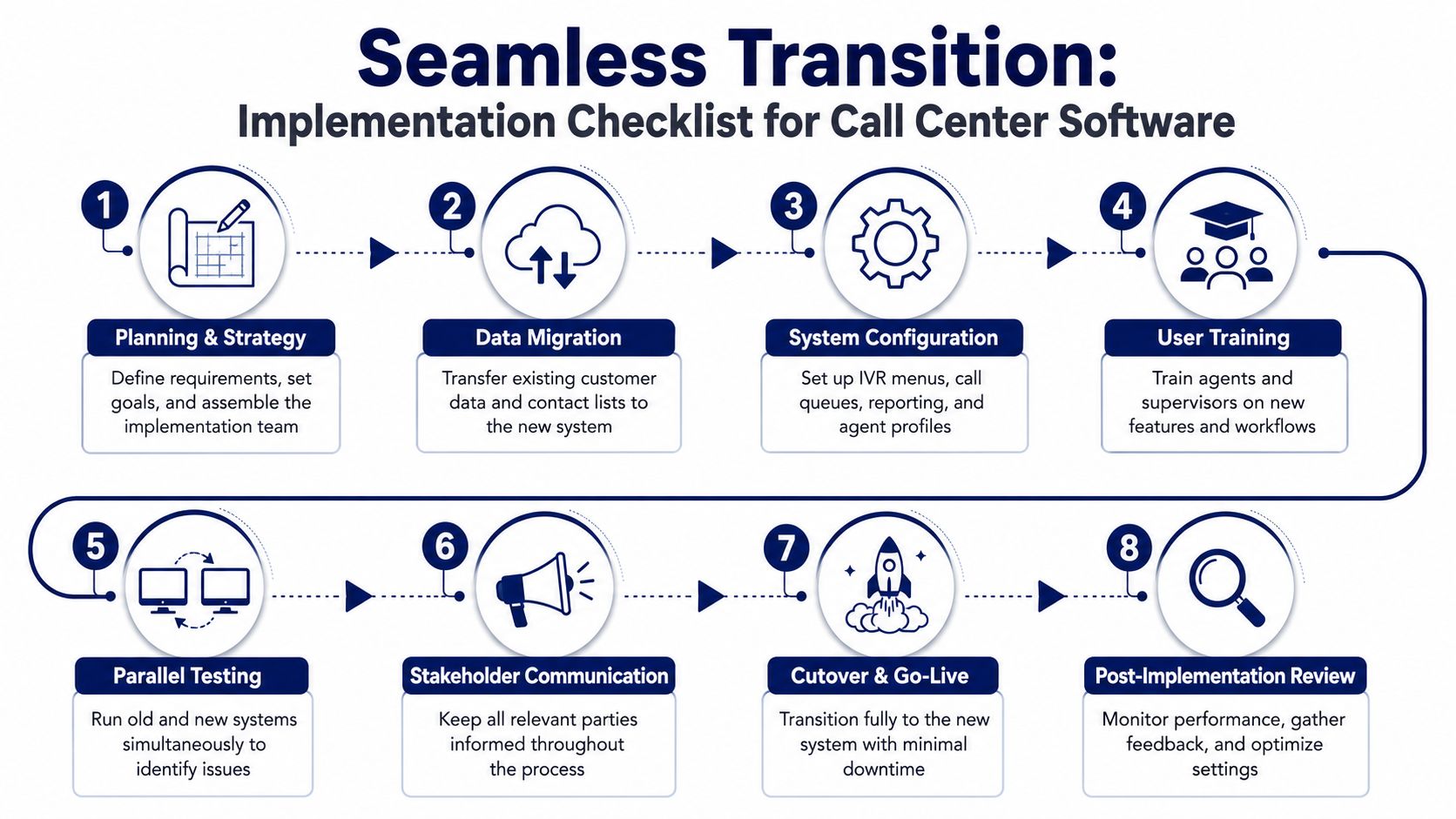
The migration checklist that keeps teams calm
Define call flows first
List your real inbound scenarios: support, billing, dispatch, after-hours urgent issues, holiday schedules, and overflow paths. If you skip this, you'll recreate old confusion in a new system.Inventory numbers, users, devices, and recordings
Gather every main number, direct line, extension, queue, voicemail box, and routing rule. Don't rely on memory. Legacy systems often have hidden dependencies.Map compliance-sensitive workflows
Identify which calls may involve payment data, health information, recorded consent, or retention rules. Compliance settings should be designed before the first test call.
Migrations fail quietly when teams copy old settings without asking whether those settings still make sense.
Build, test, then cut over
Configure the new environment
Create IVRs, queues, greetings, business hours, failover rules, voicemail destinations, and supervisor permissions.Train by role, not all at once
Agents need call handling, transfer behavior, and app use. Supervisors need reporting, monitoring, and coaching tools. Front-desk staff need a different workflow from queue agents.Run parallel testing
Test the old and new paths side by side where possible. Call in as a customer. Try edge cases. Press the wrong IVR option on purpose. Leave voicemails after hours. Trigger overflow.Prepare stakeholder communication
Give managers a launch date, staff a cheat sheet, and frontline employees a one-page “what changes for me” note. Keep it short and practical.
Watch the first two weeks closely
- Monitor live patterns after cutover
Review queue times, missed calls, voicemail handling, and agent feedback daily at the start. Small changes to routing rules often solve most early complaints.
Common traps show up in the same places every time:
- Recording storage gets overlooked
- Mobile apps are enabled but not trained
- Holiday schedules are missing
- Overflow and failover rules are too shallow
- No one owns voicemail response times
A calm migration comes from rehearsal. If a support call matters enough to your business, test it before a customer does.
Assessing Security Compliance and Pricing Models
Inbound support teams often handle information that carries legal or contractual obligations, yet many software roundups barely touch compliance. That gap matters because 60% of SMB call centers focus on inbound support while existing market guidance often misses their compliance and IVR needs, according to Nextiva's analysis of small business call center software content gaps.
What to verify on security and compliance
Start with your own workflow, not the vendor's brochure. Ask what data agents hear, see, store, record, and export. That tells you which controls matter.
A practical review usually includes:
- Call recording controls: Can you turn recording on or off by queue, user, or call type?
- Access permissions: Can supervisors, agents, and admins see only what they should?
- Retention options: Can recordings and logs be kept or deleted according to policy?
- Audit visibility: Can you review who changed routing, users, or settings?
- Sensitive-data handling: How does the system support workflows involving payment or protected customer information?
If your team operates in a regulated environment, bring your compliance lead or outside advisor into the vendor review early. Don't treat it as a final checkbox.
How pricing models affect real cost
Pricing usually lands in three buckets:
| Model | Good fit | Watch for |
|---|---|---|
| Per-seat subscription | Stable teams with predictable staffing | Add-on charges for recording, analytics, or support |
| Usage-based | Seasonal or variable call volume | Harder monthly forecasting |
| All-inclusive plan | Teams that want simpler budgeting | Verify what “included” actually covers |
The key isn't finding the cheapest sticker price. It's identifying what gets billed separately. Setup help, advanced routing, queue tools, faxing, analytics, storage, and support access can all change total cost.
For inbound support teams, I'd rather see a slightly higher but clearer monthly number than a low entry price surrounded by operational add-ons.
Choosing the Right Vendor and Why SnapDial
Vendor selection gets easier when you stop asking, “Which platform has the most features?” and start asking, “Which platform solves our inbound support workflow with the least operational friction?”
The criteria that matter most
For SMBs replacing a legacy system, I use five filters:
- Routing depth: Can it handle IVR, queues, callbacks, announcements, and role-based paths cleanly?
- Admin simplicity: Can your team make normal changes without opening a support ticket every time?
- Support quality: When something breaks, can you reach a person quickly?
- Integration flexibility: Does it fit the CRM and workflows you already use?
- Total cost of ownership: Does the actual monthly cost stay predictable?
If CRM alignment is part of your buying process, this guide to selecting a free CRM platform for 2025 is a useful companion for evaluating what your phone system should connect to.
Vendor evaluation criteria comparison
| Criteria | Importance | SnapDial Score | Typical SMB Score |
|---|---|---|---|
| Inbound queue and IVR coverage | High | Strong | Varies |
| Uptime commitment | High | Strong | Varies |
| Setup assistance | High | Strong | Varies |
| Support access | High | Strong | Mixed |
| Unlimited line flexibility | Medium | Strong | Mixed |
| Built-in fax availability | Medium | Strong | Often limited |
| Real-time queue management | High | Strong | Varies |
| Reporting and call logs | High | Strong | Usually adequate |
| Mobile office support | High | Strong | Varies |
| Pricing predictability | High | Strong | Mixed |
One option in this category is SnapDial, a cloud PBX and hosted VoIP platform for SMBs that includes Auto Attendant, unlimited lines, call recording, visual voicemail with transcription, mobile apps, cloud faxing, queue callback, wait-time announcements, real-time statistics, detailed reporting, white-glove setup, and 99.999% uptime with 24/7 Texas support, based on the publisher information provided for this article. For an inbound-focused team, that matters because it combines core phone system needs with queue management and administrative tools in one environment.
A practical way to decide
Ask each vendor to walk through three live scenarios:
- A customer calls support during peak volume.
- A caller needs after-hours urgent routing.
- A supervisor needs to review queue trouble and coach an agent.
If the demo gets fuzzy, the rollout will too. The best fit is usually the vendor that can show clear handling for ordinary support days, not just polished enterprise demos.
If you're replacing an aging PBX or trying to organize a small inbound support team without adding unnecessary complexity, SnapDial is worth evaluating. Focus on your real call flows, ask hard questions about routing and compliance, and request a migration plan that shows exactly how your numbers, queues, and staff will move without disrupting customer service.