
If your business is growing, your phones usually tell you before your reports do. More calls pile into the queue. Front-desk staff become accidental dispatchers. Sales calls mix with support calls. Customers repeat themselves, get transferred twice, and hang up annoyed. Owners often read that as a staffing problem.
Most of the time, it's a workflow problem.
A small team can handle a surprising amount of volume when the phone system stops treating every call like a blank slate. That's where call center automation software earns its keep. It doesn't just answer calls. It sorts intent, routes work, reduces admin, captures call data, and gives agents cleaner handoffs. For an SMB, that usually matters more than having a giant support team.
Why Your Business Needs Call Center Automation Now
You don't need enterprise scale to feel enterprise-level call pain. A plumbing company with seasonal surges, a medical office managing appointment traffic, or an e-commerce brand dealing with order updates can all hit the same wall. Calls arrive faster than people can triage them, and quality drops before headcount catches up.
That's why call center automation software has moved into the mainstream. The global call center software market was worth over USD 41.7 billion in 2025 and is projected to grow at a 21.9% CAGR from 2026 to 2033, according to Giva's call center statistics roundup. That kind of market growth matters for one reason: automation is no longer a specialty purchase for huge contact centers. It's becoming a standard operating layer for customer service.
Growth exposes process weaknesses
When owners tell me, “We just need more people answering phones,” I usually look at the call path first. Are common questions reaching live agents? Are repeat callers forced through the same verification steps? Are urgent callers stuck behind routine status checks? If the answer is yes, adding people helps less than expected because the system keeps creating avoidable work.
A better approach is to separate calls into three buckets:
- Routine requests: order status, hours, directions, balance checks, appointment reminders
- Needs routing: language preference, department selection, account type, location
- Needs judgment: complaints, exceptions, escalations, emotional conversations
Automation handles the first two well. Your staff should spend most of their time in the third bucket.
Practical rule: If a customer asks the same question every day, software should handle the first step before an agent ever picks up.
Customers already expect faster paths
People don't care whether your team is small. They care whether they got help quickly and without friction. That's one reason many SMBs are also expanding beyond voice into messaging and self-service. If you're thinking about how voice fits with chat-based support, this guide to WhatsApp API for customer interaction is useful because it shows how businesses can create faster service paths outside the traditional phone queue.
The shift happening now is simple. Businesses that automate triage and routine work protect service quality while they grow. Businesses that don't usually end up paying for the same problem twice, first in labor, then in lost customers.
Understanding Call Center Automation
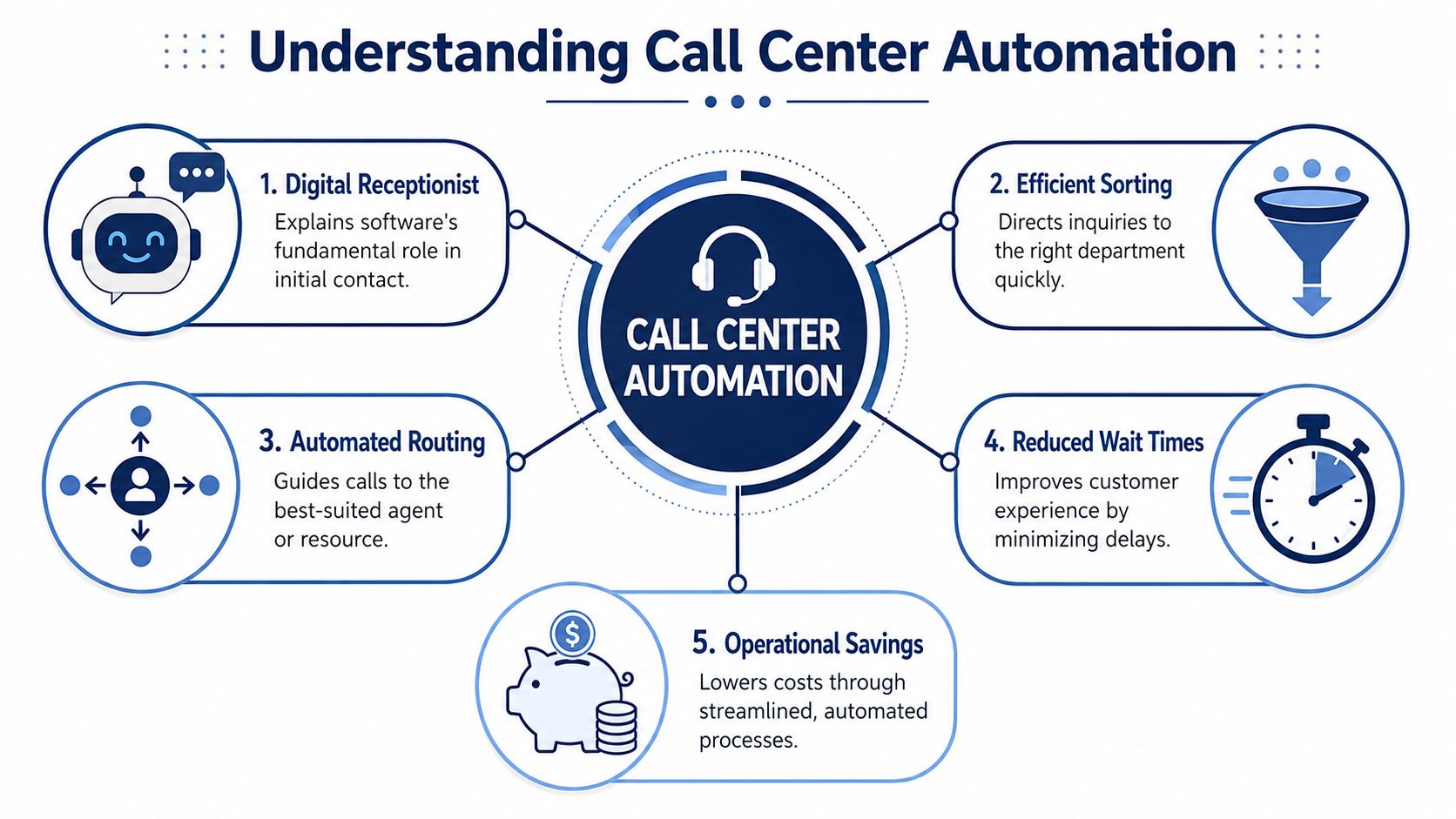
Think of call center automation software as a digital receptionist plus workflow engine. It greets the caller, figures out why they're calling, decides what should happen next, and records what happened after the interaction ends. The software doesn't replace every human step. It removes the unnecessary ones.
What happens when a call comes in
A typical flow looks like this:
- The caller reaches your phone system.
- An IVR, or interactive voice response menu, captures intent through keypad choices or spoken input.
- ACD, or automatic call distribution, applies routing rules based on skill, department, queue conditions, or agent availability.
- The system sends the call to self-service, a queue, or the best-fit agent.
- After the call, the platform writes details back to your CRM or customer record.
Salesforce describes this core architecture clearly. The system first captures caller intent via IVR, then uses ACD rules to route the call based on skills, department, or availability, which helps eliminate misroutes and reduces repetitive agent work in the process, as outlined in Salesforce's overview of call center software workflows.
What IVR and ACD actually mean in plain English
A lot of owners hear these terms and tune out because they sound technical. They're not complicated.
| Term | Plain-English meaning | Why it matters |
|---|---|---|
| IVR | The phone menu or voice prompt that asks what the customer needs | It gathers intent early |
| ACD | The routing logic that decides where the call goes | It gets calls to the right person faster |
| CRM sync | The software updates customer records automatically | It cuts manual note entry |
| Self-service | The caller completes a task without an agent | It reduces queue pressure |
Used well, these parts create order. Used badly, they create phone-tree frustration.
Good automation feels invisible
The best systems don't make callers “work the menu.” They reduce effort. A customer with a billing question shouldn't listen to six options. An existing client shouldn't have to repeat account details after already entering them. An agent shouldn't spend the end of every call typing notes that software could capture.
For teams exploring AI on top of phone workflows, it helps to see how those layers fit together. This overview of AI agents for customer support is a good reference for where automated handling ends and human support should take over.
Bad automation is rigid. Good automation quietly removes steps.
That's the right mental model. You're not buying a robot call center. You're building a cleaner path from customer intent to resolution.
Key Features That Drive Efficiency and ROI
The feature list on a vendor site can get long fast. For most SMBs, only a handful of capabilities consistently move the needle. The question isn't “How many features are included?” It's “Which features reduce labor, shorten delays, and improve service without adding admin overhead?”

Zendesk highlights three of the most valuable areas in modern platforms: AI-assisted routing, transcription and summarization, and workforce optimization. It also notes that automatic post-call summaries shorten wrap-up time and improve CRM record completeness in its guide to call center software capabilities. Those are practical gains, not cosmetic ones.
The features worth prioritizing first
Here's where I'd focus first if you want ROI without overcomplicating the rollout:
- Intelligent routing: Calls go to the right queue or agent based on intent, availability, or skill. This reduces transfers and prevents specialists from wasting time on basic requests.
- Post-call transcription and summaries: Agents finish one conversation and move to the next with less manual note-taking. Records are usually more complete because the system captures details consistently.
- Queue callback: Customers keep their place in line without sitting on hold. That improves the experience during spikes and lowers pressure on the queue.
- Voicemail transcription: Teams can scan messages quickly and prioritize follow-up instead of replaying recordings one by one.
- CRM integration: Call metadata, notes, and interaction history sync automatically, which cuts duplicate data entry.
- Workforce tools: Scheduling, forecasting, and live queue visibility help managers react sooner when traffic shifts.
What each feature changes operationally
Not all efficiency gains show up the same way. Some reduce labor directly. Others protect revenue by preventing missed calls or sloppy handoffs.
| Feature | Operational effect | Business impact |
|---|---|---|
| AI-assisted routing | Fewer misroutes and transfers | Better use of agent time |
| Call summaries | Less after-call admin | Faster agent availability |
| Callback options | Less queue friction | Better customer experience |
| CRM sync | Cleaner records | Better follow-up and reporting |
| Workforce optimization | Better staffing coverage | Fewer service breakdowns during peaks |
One overlooked area is what happens after the call data is captured. If you want to understand patterns in objections, repeat issues, and coaching gaps, a strong conversation analytics software guide can help you evaluate what to do with those transcripts rather than just store them.
For many SMBs, the simplest high-impact combination is routing plus summaries plus CRM sync. That mix cuts wasted motion on both ends of the call.
Don't ignore the plumbing
Fancy automation fails when the underlying systems don't talk to each other. If call data never reaches your customer records, managers still fly blind and agents still re-enter notes. That's why VoIP CRM integration matters so much. The return comes from connected workflows, not isolated features.
The best ROI usually comes from removing repetitive work that your team already does every day. That's the easy test. If the task happens constantly, follows a repeatable pattern, and doesn't require judgment, automate it.
Automation in Action Real World Use Cases
Automation gets easier to evaluate when you stop looking at features and start looking at recurring business problems. Most SMBs don't need abstract promises. They need to know what changes on Monday morning.
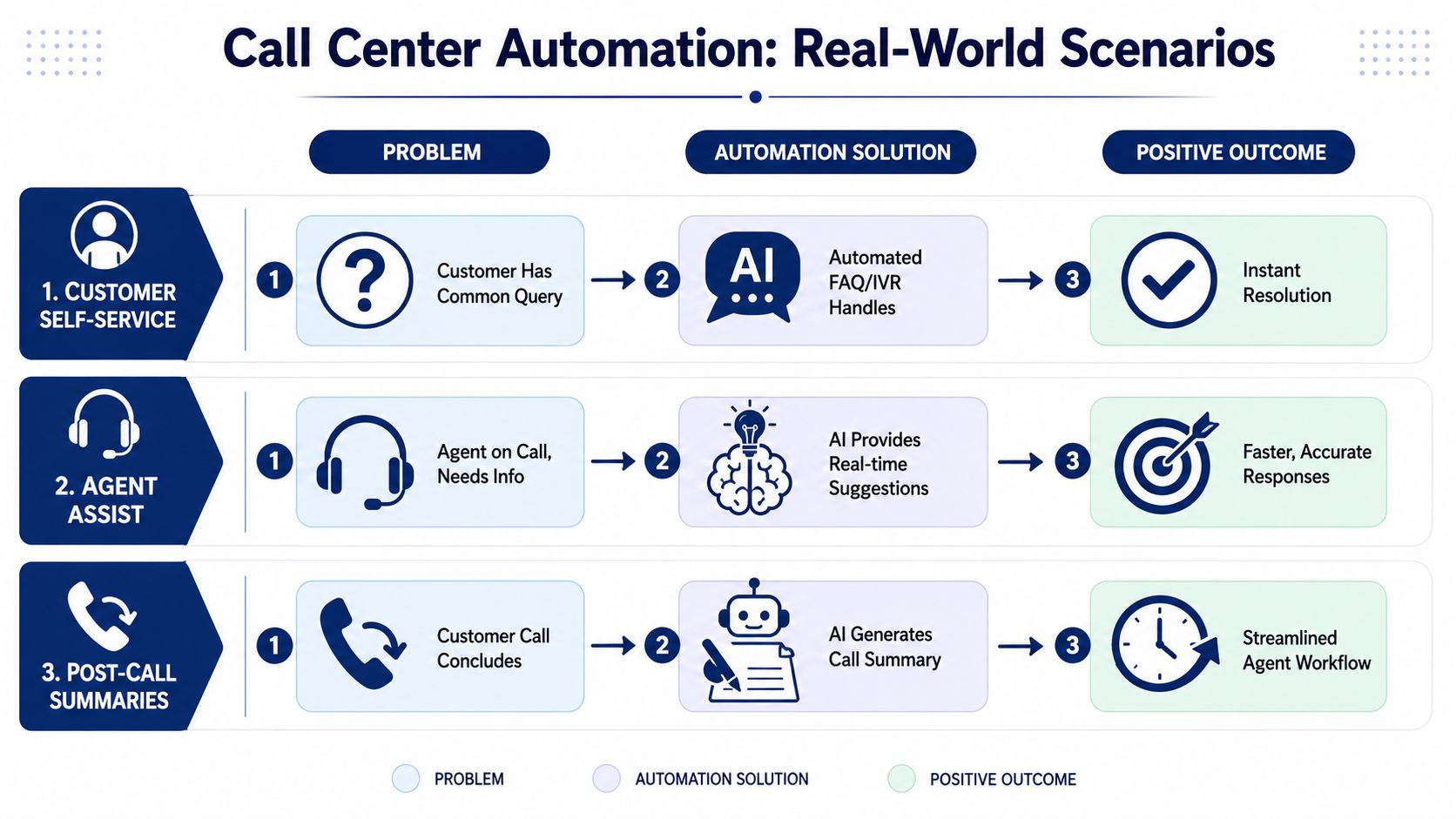
This visual shows three common automation patterns that show up across industries.
E-commerce and repetitive order traffic
An online retailer usually sees the same cluster of calls again and again. “Where's my order?” “Can I change my delivery address?” “Did my payment go through?” If every one of those reaches a live agent first, the support team spends most of its day on predictable tasks.
A better setup uses self-service for order status and basic account lookup, then routes exceptions to live staff. Now agents spend more time on damaged shipments, returns with edge cases, and upset customers who need judgment, not scripts.
Healthcare and the transfer problem
In healthcare, the pain point is often misrouting. Patients call for referrals, billing, scheduling, prescription questions, or provider-specific issues. If the initial intake is weak, staff transfer callers from desk to desk and patients lose confidence quickly.
Good automation helps by capturing the reason for the call early and routing by specialty, location, or function. That doesn't remove people from the process. It gets the patient to the right team with less friction.
Later in the workflow, follow-up reminders and post-call notes matter just as much. Administrative staff spend less time chasing routine communication and more time handling cases that need personal attention.
For teams trying to scale that kind of mixed human-plus-automation environment, this resource on managing your AI workforce is worth reading because it frames automation as an operating model, not just a software toggle.
A short walkthrough can also help make these scenarios more concrete:
Home services and missed revenue
A service business like HVAC, electrical, plumbing, or field maintenance often loses money in the gap between inbound demand and scheduling capacity. Calls come in while techs are on site, office staff are overloaded, and potential jobs drift into voicemail.
Automation helps in three practical ways:
- Call handling after hours: The system captures intent, urgency, and callback details.
- Appointment routing: New jobs, existing jobs, billing, and emergency requests follow different paths.
- Reminder workflows: Customers get confirmations and fewer details slip through the cracks.
The best use case is usually the boring one. If a process happens every day and frustrates everyone, automate that first.
For businesses with larger inbound volumes or overflow needs, it also helps to understand how inbound call center services fit alongside internal automation. Some teams need software. Some need software plus outsourced coverage. The right answer depends on where your calls break down.
Your Roadmap to a Successful Implementation
Buying software is easy. Changing daily behavior is hard. That's why many businesses end up with expensive features that never become part of the existing workflow.
CMSWire cites AmplifAI research showing that 88% of contact centers are deploying AI, but only 25% have successfully integrated it into daily operations, which means the gap is rarely access to tools. It's execution and workflow design, as reported in this roundup of call center AI adoption statistics.
Start with your current call flow
Before you configure anything, map what happens now. Not the ideal version. The actual version.
List the common reasons people call, who currently answers, where transfers happen, what information agents collect, what systems they open, and what they do after the call ends. Most owners discover two things right away: the same requests repeat constantly, and different employees handle them in different ways.
Build the rollout in phases
A good implementation usually follows this sequence:
Map inbound demand
Identify the call types you receive most often. Separate routine, routeable, and judgment-heavy interactions.Choose your first automation targets
Pick the highest-volume, lowest-complexity workflows first. Basic routing, order status, voicemail transcription, and call summaries are common starting points.Design the handoff rules
Decide when automation should continue and when it should stop. If the caller is upset, confused, or outside the expected path, the system should escalate cleanly.Connect your systems
CRM, ticketing, scheduling, and reporting should share information. If they don't, the agent still has to do manual cleanup later.Train the team on the new workflow
Teach staff how the new call path works, what the system captures automatically, and when they should override it.
What usually goes wrong
Most failed projects break in one of these places:
- Too much too soon: Teams automate too many paths before they understand the exceptions.
- Weak ownership: Nobody owns the workflow after launch, so issues sit unresolved.
- No escalation design: The system handles the easy stuff but creates messy handoffs when confidence drops.
- Poor agent buy-in: Staff think the software is there to monitor them, not remove busywork.
Field note: Launch one high-volume workflow that your team already hates doing manually. Early wins create trust faster than training decks.
Treat launch as the beginning
The first version won't be perfect. That's normal. What matters is whether you review call paths, listen for breakdowns, and adjust routing or prompts based on real interactions.
A successful rollout isn't measured by whether the system went live. It's measured by whether your team uses it, trusts it, and sees less friction in the day-to-day work.
How to Choose the Right Automation Software
Most buyers compare call center automation software the wrong way. They stack up feature lists, ask about AI, and stop there. That leads to flashy demos and disappointing rollouts.
The better question is this: Will this platform make our service operation easier to run every week?
The criteria that matter most
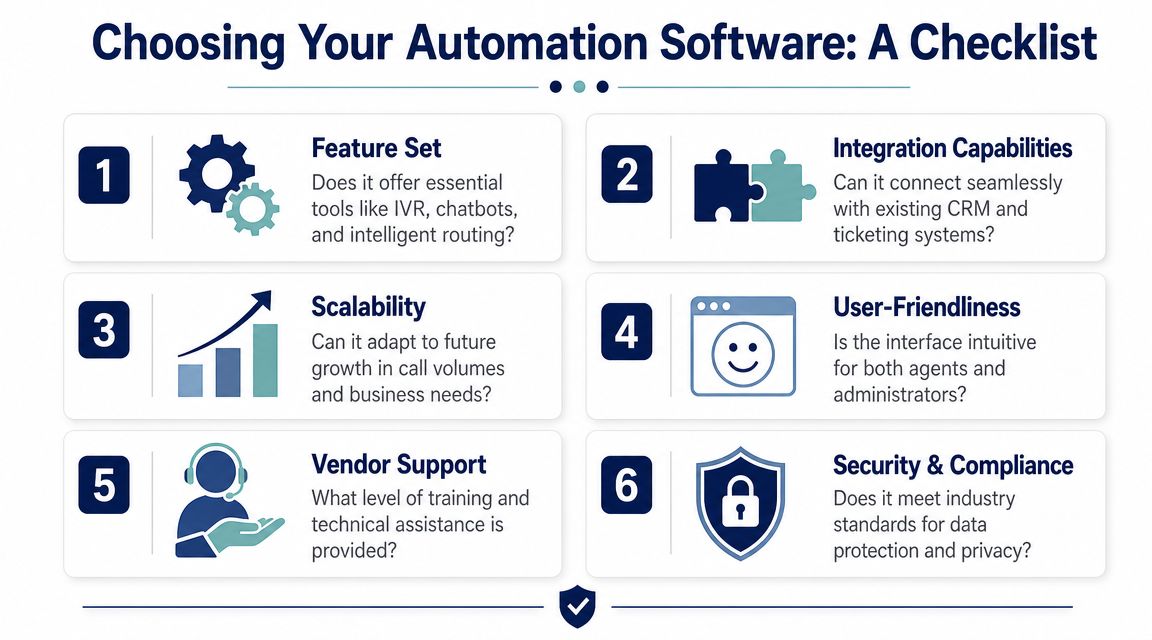
When evaluating vendors, I'd push on these areas first:
- Workflow fit: Can the system support your real call patterns, not just a generic support desk model?
- Integration depth: Does it connect to your CRM, ticketing system, scheduling tool, or customer database without brittle workarounds?
- Ease of administration: Can a manager update menus, routing logic, and user settings without opening an IT project?
- Scalability: Will it still work when you add locations, remote staff, or new queues?
- Support quality: When something breaks, do you get actual help or just a knowledge base article?
- Reporting clarity: Can you see what happened in the queue, where calls went, and where customers got stuck?
Use a practical ROI lens
You don't need a complex finance model to estimate value. Start with a simple equation:
| ROI input | What to examine |
|---|---|
| Labor saved | Time agents stop spending on repetitive call handling and after-call admin |
| Missed-call reduction | Fewer lost sales or service opportunities from overflow and poor routing |
| Service quality improvement | Fewer transfers, cleaner records, faster follow-up |
| Administrative burden | How much effort the system adds for setup, upkeep, and reporting |
If a platform saves agent time but creates constant admin work for supervisors, the value is weaker than it looks in a demo.
Ask how the system fails
This is where most buying guides fall short. Bland.ai points out that buyers should track metrics such as false-escalation rate and fallback frequency, and ask how the system handles uncertainty in its guidance on contact center automation use cases. That's one of the smartest screening questions you can ask.
If a vendor can't explain what happens when the AI is unsure, you'll probably end up shifting frustration downstream to your staff and customers.
Ask questions like these:
- When the system has low confidence, what does it do next?
- How does it preserve context during escalation to a human?
- Can we review low-confidence interactions and tune the workflow?
- How are fallback paths configured for edge cases?
Buying for the happy path is easy. Buying for the messy path is what protects customer experience.
The right software doesn't just automate success cases. It handles uncertainty without turning every exception into a customer complaint.
Frequently Asked Questions About Call Center Automation
Will automation replace my agents
Usually, no. In well-run SMB environments, automation takes the repetitive front end of the workload and leaves judgment, empathy, and exceptions to people. That means agents spend less time on routing, lookup, and note entry, and more time on sales conversations, problem solving, and escalations.
Is call center automation software affordable for a small business
It can be, especially when you start with a narrow use case instead of trying to automate every channel at once. The mistake is overbuying. Begin with the workflows that create the most wasted time, such as basic routing, voicemail handling, or post-call documentation. That gives you a cleaner path to ROI and keeps change management manageable.
Is setup too complicated for a smaller team
It depends on the platform and the complexity of your workflows. The software itself is only part of the work. You still need someone to map call flows, define routing logic, connect business systems, and tune the handoff rules. Smaller teams usually do best with a phased rollout and a vendor that helps with implementation instead of just handing over the admin portal.
What should we automate first
Start with tasks that are frequent, repetitive, and low-risk. Good first candidates include call routing, self-service for common questions, voicemail transcription, and automated summaries after calls. Leave nuanced complaints, retention conversations, and unusual exceptions with live staff until the workflow is proven.
If you're replacing an older phone system or trying to bring order to inbound call volume, SnapDial is worth a look. Its cloud phone platform includes business calling, Auto Attendant and IVR, smart queue tools, visual voicemail with transcription, reporting, mobile-ready access, and white-glove setup, which is especially useful for SMBs that want the operational benefits of automation without taking on a complicated deployment themselves.