
Your office phone rings, then rings again, then dumps into voicemail while your team is already on another call. A customer leaves a message, someone forwards it manually, and by the time a rep gets back to them, the opportunity's colder than it should be. That's the core cost of an aging phone system, not the monthly bill, but the lost momentum, the awkward transfers, and the constant cleanup work nobody planned for.
Small business phone systems have moved far beyond dial tone. The market for them was valued at USD 1,131.8 million in 2021 and is projected to grow at 8.3% CAGR from 2023 to 2033, which is a strong signal that cloud-based and VoIP-based systems are now a durable business category, not a fad (Archive Market Research). If you're still treating the phone as a utility, you're probably paying for that mistake in missed calls, slow handoffs, and admin overhead.
Why Your Current Phone System May Be Holding You Back
A lot of SMBs don't notice the breakage at first. The system still dials out, the desk phones still light up, and the voicemail still works, at least most of the time. Then growth happens, maybe a second location opens, maybe remote staff come on board, and suddenly the old PBX starts acting like a bottleneck instead of infrastructure.
The issue isn't just age, it's fit. Traditional telephony was built for office-centric teams and predictable call flows, while modern businesses need mobility, call visibility, and the ability to route traffic without opening a hardware ticket every time someone joins or leaves (REVE Soft). That gap is why cloud-based systems keep replacing legacy gear.
What usually breaks first
The first symptoms are usually mundane. A caller gets stuck in the wrong extension. A transfer fails because nobody remembers the sequence. An employee on the road can't answer a customer call without giving out a personal number. Those aren't edge cases, they're signs the system was never designed for the way your team works.
Then the hidden costs show up. Maintenance drags on your internal IT team, upgrade cycles become an annual nuisance, and every hardware change turns into a mini-project. That's the part comparison charts often ignore, because they focus on feature boxes instead of the hours your staff burns keeping the phone system alive.
The decision you're really making
You're not choosing between “old” and “new.” You're choosing between owning complexity and outsourcing it. Hosted systems shift a lot of that burden to the vendor, while on-premises PBX keeps control close to home, but also keeps the upkeep close to home.
Practical rule: If your team has outgrown one office, one receptionist, and one simple call flow, the phone system should already be on a cloud path.
If you're evaluating options for customer-facing teams, the related guidance on customer service for small business is useful because call handling and service quality are tightly linked. The rest of this guide is about separating genuine operational fit from shiny feature lists.
Hosted VoIP Versus On-Premises PBX Tradeoffs
The tradeoff in plain English
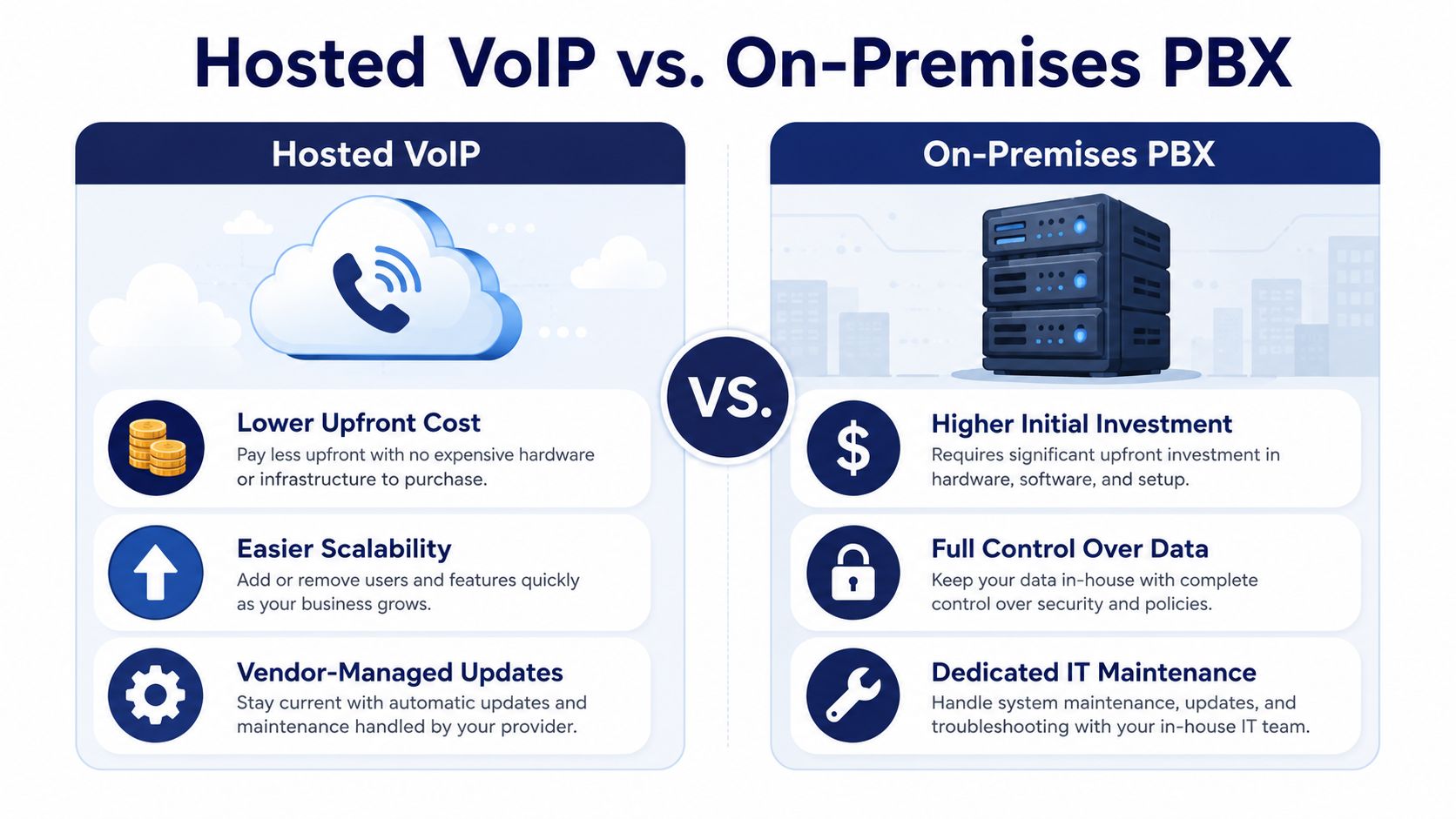
Hosted VoIP is the cleaner buy for most small businesses. You get centralized call control, routing, voicemail, mobile access, and admin changes without buying and maintaining a box in the office. The market trend backs that up, since cloud-based systems are now part of the mainstream SMB communications stack, not a niche experiment (Archive Market Research).
On-premises PBX still has a place, but the reasons need to be specific. If you have unusual compliance requirements, unusually strict data control needs, or a large existing telecom investment you're trying to amortize, there can be a case for keeping hardware in-house. For everyone else, the maintenance burden usually outweighs the comfort of ownership.
My view: most SMBs don't need to own a phone system anymore, they need to operate one.
That's why hosted systems win on total cost of ownership. You're not just comparing sticker price, you're comparing onboarding time, maintenance, replacement cycles, and how much internal expertise each option consumes. Hosted VoIP also scales better when you add locations or remote users, because the system follows the employee instead of the employee adapting to the hardware.
| Factor | Hosted VoIP | On-Premises PBX |
|---|---|---|
| Upfront spend | Lower, because the infrastructure is vendor-managed | Higher, because hardware and installation sit with you |
| IT burden | Lower, because updates and core platform maintenance are usually managed by the provider | Higher, because your team owns patching, upgrades, and troubleshooting |
| Growth handling | Easier to add users and locations | Harder, because expansion can require physical changes |
| Remote work | Built for mobile access and softphones | Usually awkward without extra layers |
| Control | Less direct control over the stack | More direct control over data and hardware |
| Long-term flexibility | Strong for changing teams | Strong only if you're willing to keep investing in the box |
For teams trying to compare modern hosted options with older architectures, a detailed look at business phone system installation can help frame the migration work, not just the end-state. And if you're comparing products, keep in mind that hosted platforms often bundle the admin layer, call routing, and mobility that PBX buyers would otherwise stitch together manually.
Must-Have Features for Modern Business Communications
Start with call handling, not bells and whistles
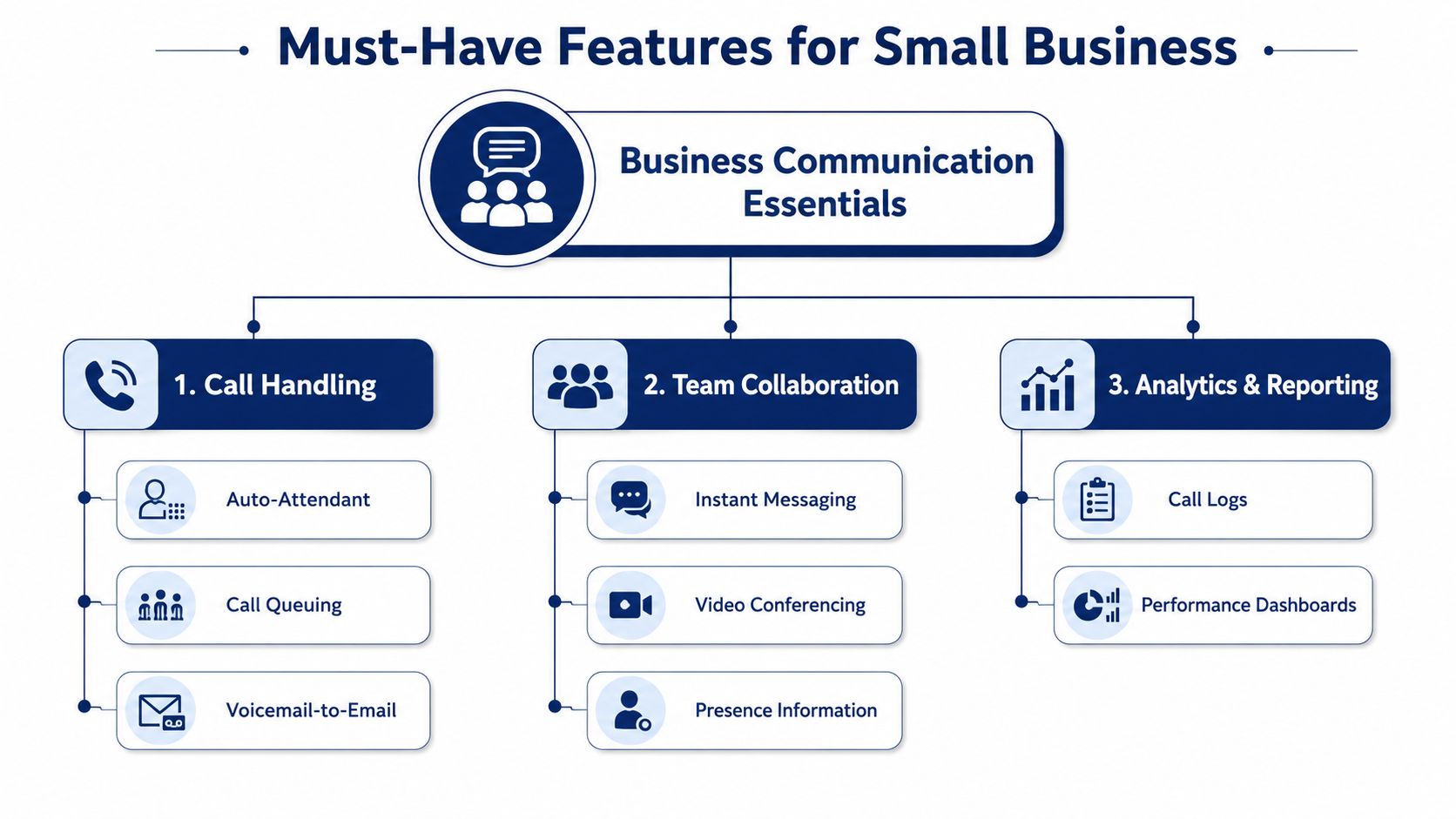
Auto attendant, IVR, ring groups, and call queues are not luxury features. They're the difference between a caller reaching the right person and a caller giving up. For businesses handling support or sales calls, queue callbacks, wait-time announcements, and reporting matter more than cosmetic extras because they control what happens when demand spikes (Silver Lining).
The important part is configurability. If the system can route based on department, time of day, or overflow logic, you can stop relying on one person to manually rescue every incoming call. That saves real time, and it makes the business look more organized to the customer.
Mobility and administration should be boring
Mobile apps, browser-based admin, call logs, and voicemail-to-email belong in the baseline, not the premium tier. VoIP systems are internet-dependent call platforms, so the system has to work for a desk worker, a field rep, and a manager reviewing call activity from home (Vonage resources). If your team can't answer and manage calls from anywhere, the platform hasn't really solved the modern SMB problem.
A self-service portal is just as important as the mobile app. Managers should be able to adjust users, routing, voicemails, and call logs without submitting a ticket every time someone changes roles. That's the difference between a system that scales with your staff and a system that slows them down.
AI is useful only when it fits the workflow
AI-powered transcription, summaries, and coaching are real features, but they're not universal requirements. Recent buyer guidance has pushed AI voicemail transcriptions and recaps to the front of the conversation, yet many businesses still just need reliable forwarding, visual voicemail, and mobile access. The right question is whether AI reduces follow-up work for your team, or whether it's just another layer to manage (U.S. Chamber).
Useful filter: if a feature doesn't change call handling, response time, or admin effort, it's probably optional.
For teams that need customer-facing structure, practical cybersecurity tools for SMBs is a good reminder that communications and protection should be planned together, not separately. Security belongs in the same vendor scorecard as routing and mobility, not in a later cleanup phase.
Migration and Setup Checklist for a Smooth Transition
Audit first, port second
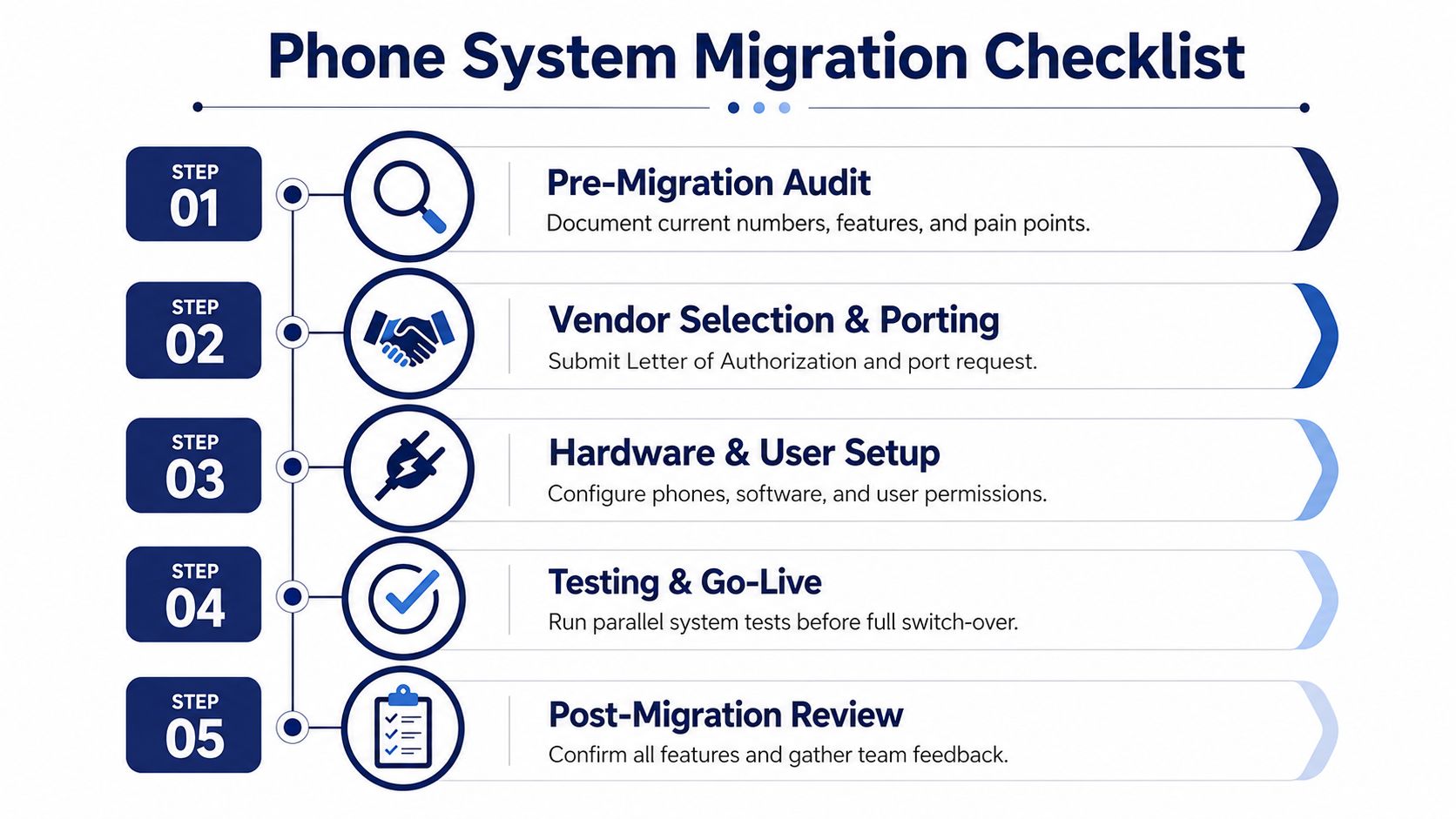
The cleanest migrations start with a real inventory. Document every number, every hunt group, every voicemail box, every auto-attendant path, and every feature people still use, even if nobody remembers why. Skipping that step is how companies lose a strange but business-critical routing rule on cutover day.
Porting should happen only after that audit. The vendor needs the right ownership details, the right numbers, and a clean map of what's moving. If your internal team is juggling this alongside day-to-day operations, white-glove setup is worth paying attention to, because it keeps the configuration burden off staff who already have full-time jobs.
Practical rule: don't flip the switch until someone has tested the call flow exactly as customers will experience it.
Build for the network, not just the phones
A hosted phone system is only as good as the network it runs on. WAN quality, QoS, and failover matter because cloud VoIP depends on the internet the same way email and video meetings do. If the connection is shaky, your “new” phone system will feel broken even if the vendor did everything right.
User provisioning should happen before go-live, not after. Create extensions, assign roles, set greetings, verify voicemail delivery, and test mobile access while the old system is still available. That gives you room to fix mistakes without leaving customers stranded.
The cleanest rollouts also include a parallel test window. Have staff place internal and external test calls, confirm routing, and check voicemail-to-email before announcing the migration complete. If you're comparing setup models across vendors, the SnapDial installation overview gives a useful reference point for what a managed rollout looks like.
What a controlled cutover looks like
A controlled transition has three traits. First, no one is guessing where calls go. Second, the team knows who owns escalation if something fails. Third, employees get simple instructions, not a training dump.
If the vendor offers setup assistance, use it. The goal isn't to make IT heroic, it's to make the switch predictable.
Security and Compliance Considerations for VoIP Systems
Internet-based calling changes the risk model. You're no longer just protecting a phone line, you're protecting call recordings, voicemails, call logs, user accounts, and sometimes customer data embedded in conversations. That's why security should be treated as a core selection criterion, not a checkbox after you've picked a pricing plan.
Ask vendors about protection, not promises
You want clear answers on encryption, disaster recovery, uptime SLAs, and how the provider handles stored voice data. Cloud vendors can usually invest more in hardened infrastructure than a small business can justify alone, but only if they disclose their security posture and incident response process. The selection standard should be simple: if a vendor can't explain how it protects call data, move on.
Compliance matters too, especially if your business handles regulated or sensitive information. Call recordings and voicemail archives can become liabilities if they're stored carelessly or retained longer than needed. That's why security and compliance belong in the same conversation as admin access and call routing.
Treat caller identity and fraud prevention as operational basics
Fraud, spoofing, and unauthorized access are practical threats, not abstract ones. A cloud PBX should give you sane controls around user authentication, access permissions, and call handling policies so the system isn't wide open the moment someone leaves the company.
The simplest evaluation question is this, who can access recordings, voicemails, and admin tools, and how is that access revoked when roles change? If the answer takes a long time to explain, the platform probably isn't ready for a serious deployment.
For a useful companion lens, caller ID authentication belongs on your review list because identity trust and outbound call reputation are part of the same operational picture. And if you're building a broader security stack around communications, the earlier SMB cybersecurity resource is worth keeping nearby.
Bottom line: the right phone system should reduce risk, not create a new category of it.
Real-World Use Cases Across Different Business Models
A good phone platform doesn't look the same in every company. The best setup for a five-location retailer is different from the best setup for a support desk or a remote sales team. That's why feature checklists are only half the story, the operating model matters just as much.

Multi-location businesses need one phone identity
When a business has several offices, the worst setup is a separate PBX in each one. That creates inconsistent routing, uneven admin practices, and far too much local dependency. A cloud system gives leadership one admin layer, one call-flow model, and one place to manage users across sites.
The payoff is less about technology and more about consistency. Staff don't need to remember which office has which rule, and supervisors don't have to bounce between systems to understand call behavior. That matters when customers expect the same experience no matter which location they call.
Support teams need queue control, not just ring tones
Call centers and customer support teams care about how calls are treated while they wait. Queue callbacks, wait-time announcements, real-time statistics, and detailed reporting are the features that reduce chaos and help supervisors manage traffic with intent. Those are the tools that turn an unstructured line into an operating process (Silver Lining).
Analytics begins to matter. Managers need to see where calls back up, which queues are overloaded, and whether staffing matches demand. Without that visibility, every busy period becomes guesswork.
Remote and hybrid teams need the office to follow them
Remote staff don't want a separate communication stack just because they're not sitting in the office. Mobile apps, softphones, browser controls, and shared routing let them answer work calls without exposing personal numbers. That's the core value of cloud PBX for hybrid teams, the office number still works, even if the office is spread across kitchens, cars, and home desks.
The right setup makes the employee location irrelevant to the customer. That's the standard to aim for.
Questions to Ask Vendors and How SnapDial Delivers
The vendor conversation should be blunt. Ask how pricing works, what setup includes, whether call routing changes require a support ticket, and what happens when your team adds locations or remote users. Also ask about contract flexibility, support availability, hardware options, and whether the platform can handle queue management without a separate add-on.
A lot of teams also need a way to tie phone work into broader task tracking, and that's where optimise workflows with monday.com can be relevant if you're coordinating sales, support, and operations around the same customer interactions. Phone systems don't live in a vacuum, they sit inside a process.
What to demand before you sign
- Transparent pricing: You should know what's included, what's extra, and what changes the monthly bill.
- Real setup help: If the vendor expects your team to build the system from scratch, that's not a service model, that's a handoff.
- A usable admin portal: Routing, voicemail, user changes, and logs should be manageable without friction.
- Support that answers quickly: A phone system failure shouldn't turn into a ticketing marathon.
- Scalability without drama: Adding users, phones, or locations shouldn't require a redesign.
SnapDial fits that checklist as a hosted VoIP and cloud PBX option with all-inclusive pricing, white-glove setup, 24/7 Texas support, Auto Attendant and IVR, call routing, visual voicemail with transcription, cloud faxing, and queue management features for support-heavy teams. It also includes a self-service web portal for user and routing changes, plus a curated range of Yealink IP phones for businesses that still want desk hardware.
If you're comparing systems on total cost of ownership rather than just feature count, that's the right lens. The best buy isn't the one with the longest checklist, it's the one that reduces missed calls, lowers admin burden, and keeps your team reachable wherever they work.
A CTA for SnapDial.