

Monday morning starts with a small mess that feels normal until it slows everyone down. A sales rep has a customer on hold, a spreadsheet open, a CRM tab half-filled with notes, and a desk phone that knows nothing about any of it. That gap is where third-party integrations matter, because they let the phone system share data with the tools your team already uses instead of making people copy the same details into three places.
For a hosted VoIP or Cloud PBX setup, integrations are the bridge between calls and the rest of the business. They help sales, support, operations, and IT work from the same information, which means fewer missed details and less manual cleanup. If you want a practical example of how different industries organize connected tools, platform integrations for HVAC pros shows how a business can think about integrations as part of the daily workflow, not as a one-off add-on.
The Moment Your Tools Start Talking to Each Other
The easiest way to understand an integration is to think about two coworkers who need to pass the same note back and forth, but they speak different languages. One person can keep repeating the message manually, or you can put a translator in the middle. In software, that translator is what keeps the phone system, CRM, helpdesk, and reporting tools aligned.
In a business phone environment, the phone platform is the hub and the external apps are the third parties. A call lands, a customer record opens, a support ticket gets created, or a transcript shows up in the right place without someone retyping anything. That matters most for the people who live in those systems every day, sales reps, support agents, managers, and administrators.
The practical value is simple. Sales can see who called before picking up, support can log cases faster, and managers can review activity without chasing people for updates. That's why integration reliability, governance, and performance become part of phone strategy, not just IT plumbing.
For readers in operations-heavy businesses, the same logic applies whether the team is in one office or spread across locations. The call system stops being a standalone utility and starts acting like part of the workflow. When that happens, the phone becomes more useful because it is connected to the places where work already happens.
What Third-Party Integrations Actually Mean
A third-party integration is just a connection between your main platform and another company's software. In plain English, it lets two systems exchange information in a way that saves your team from manual entry. The phone system might send call logs to the CRM, or the CRM might send contact details back to the phone app so staff can see who's calling.
The technical words are less scary once you map them to everyday roles. An API is the rulebook two systems use to talk. A connector is a packaged setup that links common tools. A webhook is a live notification that says, “something happened, update the other system.” Single sign-on handles identity, so people can use one login across connected tools. For a deeper product-oriented view of how connected workflows get organized, browse AI platform integrations is a useful reference point.
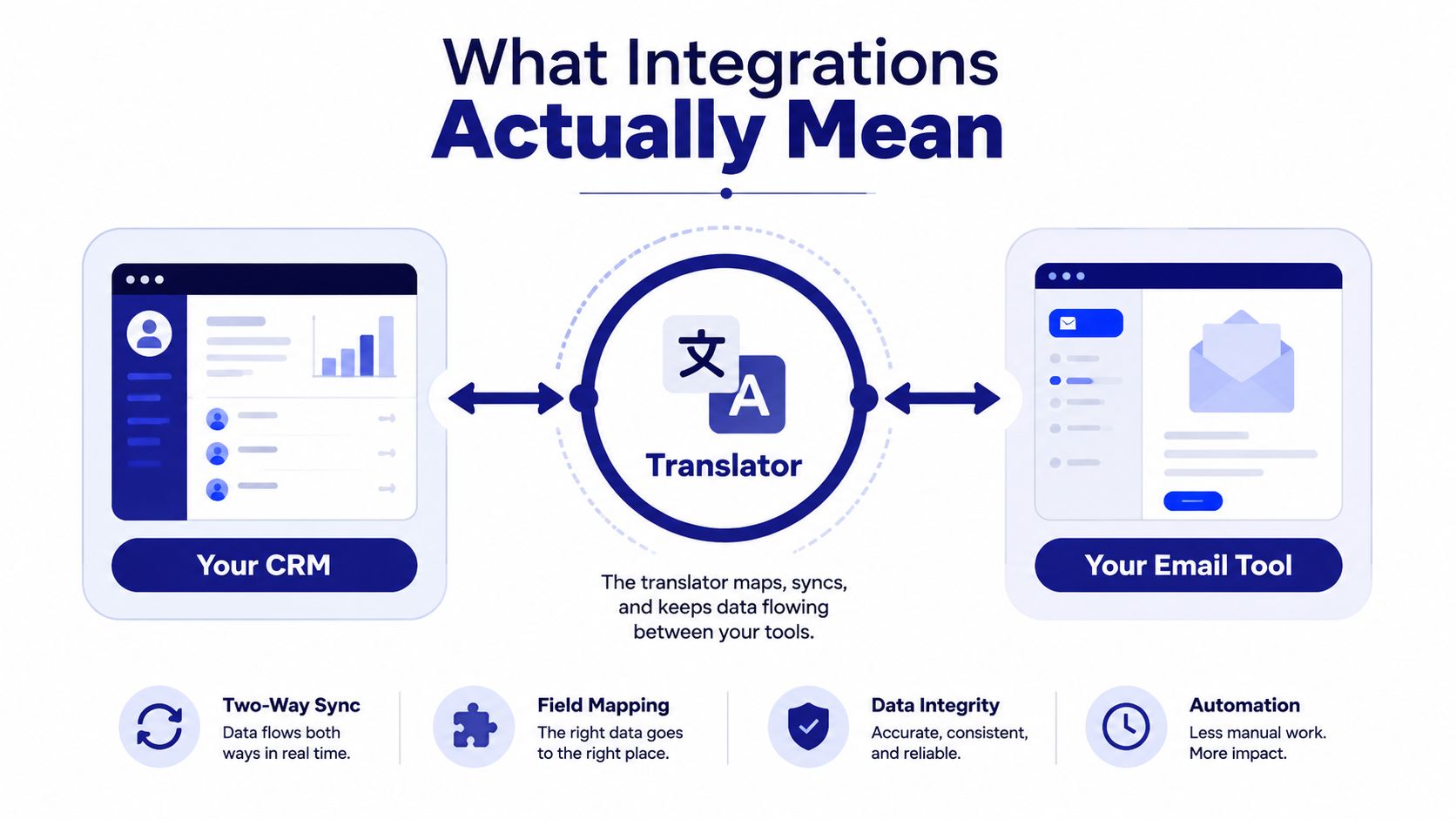
Native, prebuilt, and custom
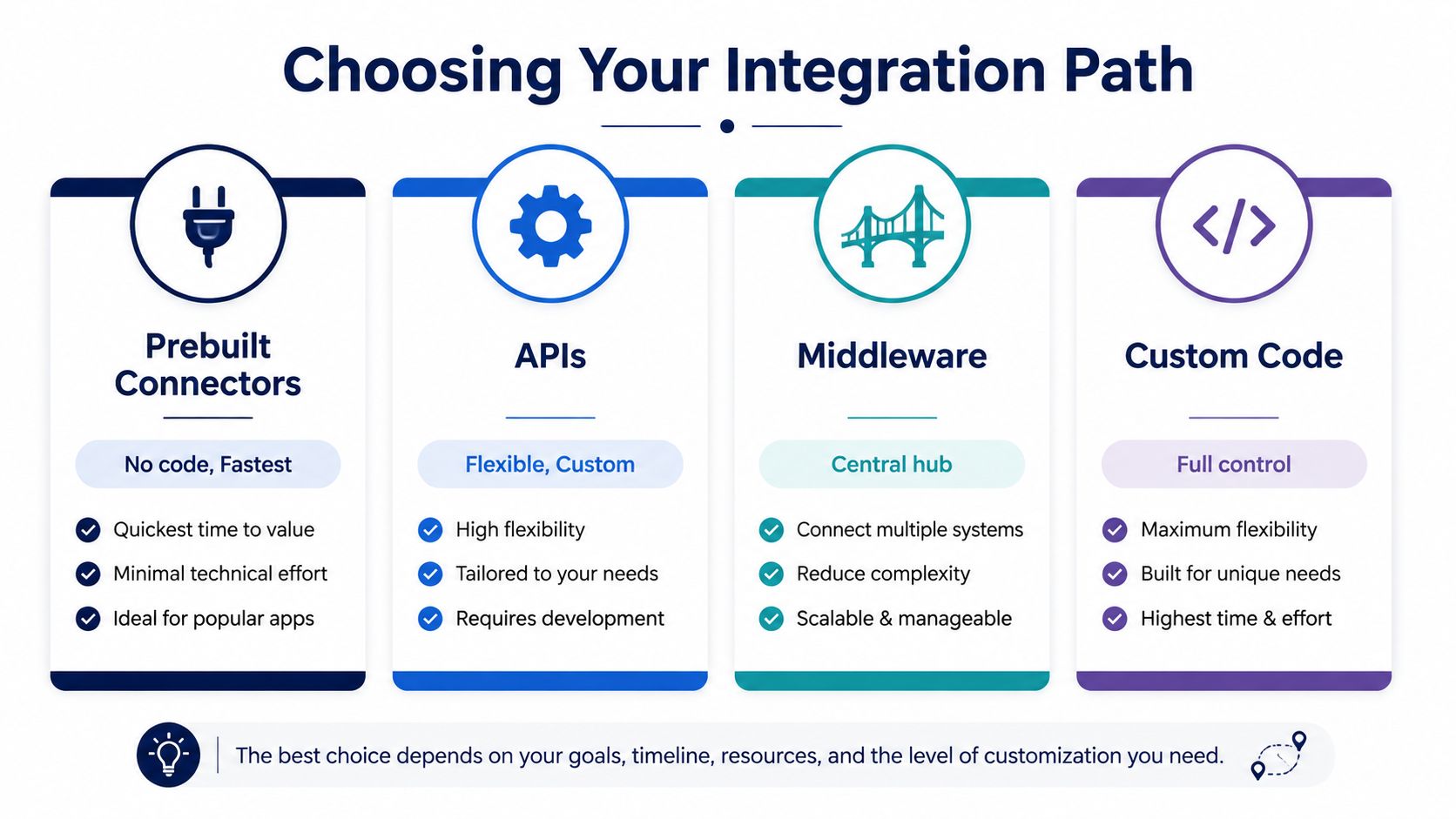
Not every integration is built the same way. A native integration usually lives inside the product and feels like part of the interface. A prebuilt connector is ready-made and often only needs account authorization. A custom integration is built for a specific workflow that off-the-shelf tools can't handle cleanly.
Practical rule: if a prebuilt connector covers the job, start there. It's easier to maintain than a custom build, and it's usually easier for non-technical teams to support.
That spectrum matters because most companies don't need a custom project for every tool they use. They need a reliable way to sync calls, contacts, notes, and status updates across a handful of systems. Once you understand that, the rest of the decision becomes about fit, not jargon.
The Main Categories of VoIP Third-Party Integrations
VoIP integrations usually fall into a few practical buckets, and each bucket solves a different kind of business friction. The question isn't “what apps can we connect?” It's “what part of the workflow keeps breaking when the phone system is isolated?”
Customer-facing systems
These are the tools your front-line team uses to track conversations and service history. CRM platforms, helpdesks, and e-commerce systems fall here. The business outcome is faster response times, better context during calls, and fewer “can you repeat that?” moments.
Workforce tools
These are the apps that help employees stay reachable and coordinated. Collaboration tools, mobile apps, and softphones fit this group. They matter when a sales rep is away from the desk or when a team needs the business number to follow the person, not the chair.
Intelligence and analytics
Reporting, wallboards, transcription, and related dashboards sit in this category. These integrations turn call activity into something managers can review, coach against, and compare across teams. They're useful because they turn raw call events into operational visibility.
Administrative systems
Identity and account-management tools live here. SSO, directory services, and billing integrations reduce password sprawl and make user onboarding cleaner. They also help IT keep access aligned with employee roles.
| Category | Business Outcome | Example Apps |
|---|---|---|
| Customer-facing systems | Faster customer response and cleaner case tracking | CRM, helpdesk, e-commerce platforms |
| Workforce tools | Better reachability for hybrid and remote staff | Mobile apps, softphones, collaboration tools |
| Intelligence and analytics | Easier coaching and clearer call performance review | Reporting dashboards, wallboards, transcription tools |
| Administrative systems | Fewer login problems and simpler user management | SSO, directory services, billing systems |
SnapDial supports this kind of mix through built-in functions and curated connector paths, which keeps the phone platform useful as the rest of the stack changes. For readers who want the CRM side of this connection, the internal overview at https://snap-dial.com/computer-telephony-integration-software/ is a practical companion.
Real-World Examples You Can Use This Week
The cleanest way to judge an integration is to look at the moment before and after it goes live. That's where the value becomes obvious, because the work either slows down or disappears.
CRM call handling
A rep answers a call from a contact already stored in HubSpot or Salesforce. Without integration, they search the record, write notes separately, and hope the call details end up in the right place. With click-to-dial and screen-pop, the contact opens automatically and the rep starts with context instead of a blank screen.
Helpdesk routing
A support caller lands in a queue that should create a ticket in Zendesk. Without integration, an agent might take notes, finish the call, and then open the ticket manually. With the handoff in place, the ticket appears with the call context attached, which lowers the chance of missed details.
Analytics dashboards
A manager wants call trends in a business intelligence dashboard. Without integration, the team exports reports and reworks them in spreadsheets. With live reporting moving into a dashboard, the manager can review patterns without waiting for a manual export cycle.
Mobile softphone access
A remote salesperson needs to answer the business line while traveling. Without integration, they rely on personal numbers or missed-call follow-up. With the mobile softphone synced to the business identity, the customer sees one number and the rep stays reachable.
For creative and distributed teams, the same principle shows up in other tool stacks too. A guide to tools for indie artists gives a good sense of how connected systems reduce friction when people work across locations and devices.
A practical CRM workflow overview is also available at https://snap-dial.com/voip-crm-integration/, which helps connect the idea of call handling to the day-to-day sales process.
Choosing the Right Integration Approach
A good integration plan starts with the least complicated option that still fits the workflow. That keeps the project useful for the business and easier for IT or a vendor partner to support later.
The main trade-offs
| Approach | Best For | Complexity | Maintenance |
|---|---|---|---|
| Prebuilt connectors | Common workflows like CRM sync and call logging | Low | Lower ongoing effort |
| APIs | Custom workflows that need precise control | Higher | Higher, because the logic is yours |
| Webhooks | Event-driven updates that need speed | Moderate | Moderate, because event handling still needs care |
| SSO and directory sync | User access and identity management | Low to moderate | Lower once configured properly |
Prebuilt connectors are usually the first stop because they save time and reduce guesswork. APIs are the right move when a business has a unique process that no packaged tool handles well. Webhooks fit when a call event or status change needs to trigger another system right away. SSO should sit alongside the rest of the stack, because access control is part of the integration picture, not an afterthought.
Simple recommendation: start with prebuilt connectors, add webhooks for event-driven tasks, use APIs only when the workflow really needs them, and pair the whole setup with SSO.
That layered approach matters for SMBs because no one wants to re-architect a phone system every time the software stack changes. A platform that supports multiple paths gives the business room to begin with the basics and expand only when the workflow justifies it.
Implementation and Security Best Practices
A solid integration launch starts with the boring parts, because the boring parts are what keep it stable later. If you skip them, the team ends up debugging permissions, missed events, and strange data mismatches after people are already relying on the connection.
A practical implementation sequence
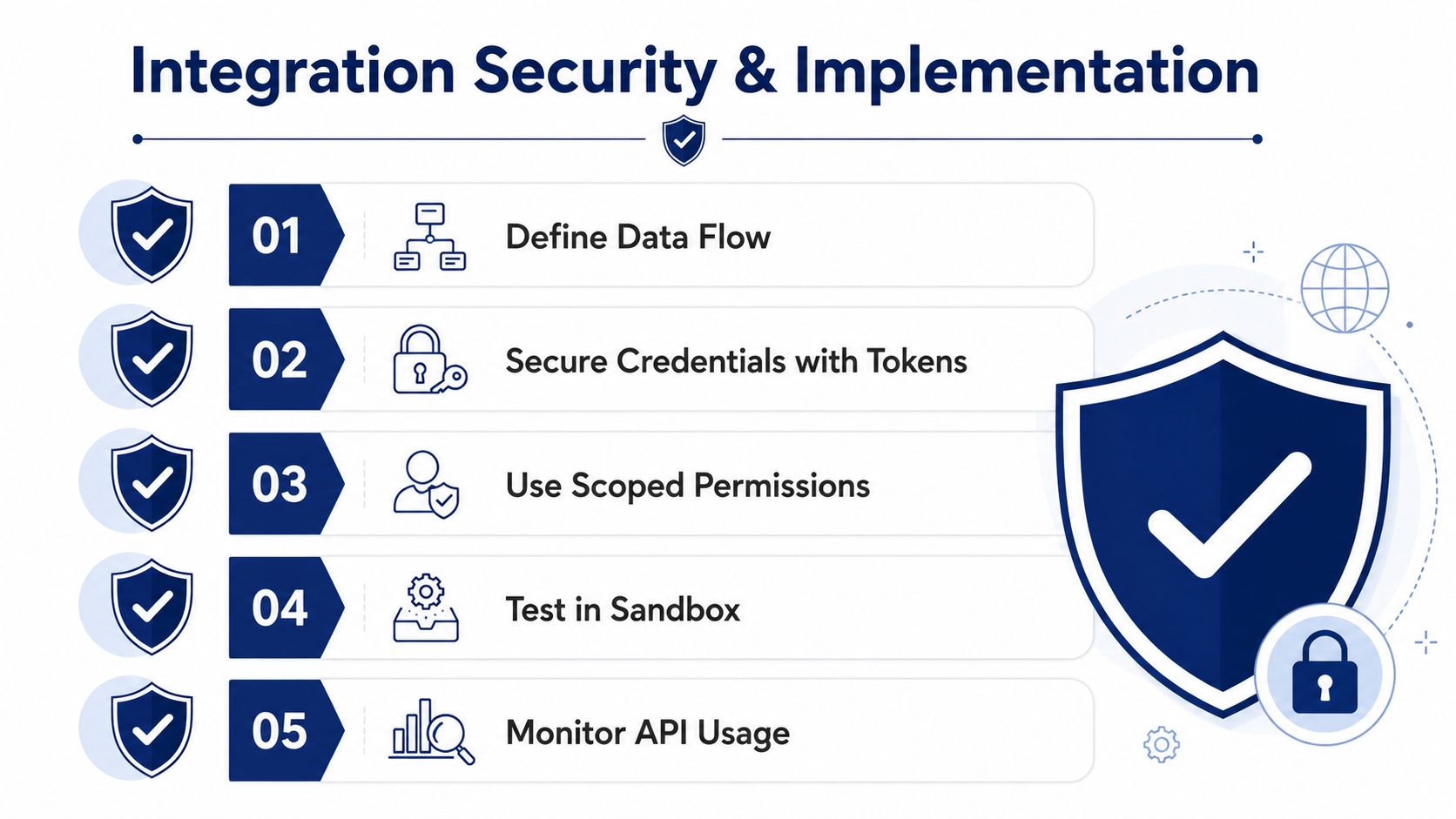
- Define endpoints and data flow. Decide what system sends data, what system receives it, and what should happen when something fails.
- Secure credentials with tokens. Keep passwords out of the workflow where possible and use scoped access tied to the job the integration needs to do.
- Write tests for success and failure. The happy path is only half the story. You also need to know what happens when a request times out or a field mapping breaks.
- Monitor latency and success rates. If a connector slows down or starts failing often, someone needs to see it early.
- Plan for versioning and retries. APIs change, and systems need a safe way to retry without creating duplicate records.
A short security checklist helps keep the setup sane. Use least-privilege access, encrypt data in transit, keep audit logs, and review connected apps on a regular schedule. Those habits matter because integration trouble usually starts as small permission creep or an untracked app that outlives its purpose.
Keep the integration small enough to understand, then monitor it like it matters. If nobody can explain what a connector does, nobody can safely own it.
For organizations without in-house developers, setup support can remove a lot of friction. SnapDial's Texas-based support team handles onboarding end to end, which lowers the barrier for companies that want the workflow benefits without building an internal integration practice from scratch. The point isn't just to launch once, it's to keep the connection understandable six months later when the team changes.
Governance, Risk, and the Lifecycle You Can't Skip
The biggest mistake teams make is treating an integration like a light switch. They approve it once, move on, and forget that every connected app becomes part of the operating environment.
The governance side starts with control. IT should restrict self-installation where needed, route requests through an oversight group, decide whether approval applies to all users or a smaller subset, and record every connected app in a software catalog. That keeps the company from drifting into a pile of one-off tools nobody owns.
The risk side is just as real. Security research shows how widely third-party relationships can spread across organizations, which is why access and vendor exposure need to be managed instead of assumed away. A single connection can become part of a much larger supplier chain, and that chain deserves periodic review.
Treat integrations like a portfolio
Onboarding should include a review of business need, access level, and data sharing. Periodic audits should check whether the app is still used, still supported, and still aligned with policy. Offboarding should be explicit too, because vendor relationships end and abandoned access creates avoidable risk.
The internal guide at https://snap-dial.com/active-directory-integration/ fits naturally here because identity is one of the places where governance shows up first. If employee access is clean, the rest of the integration stack is easier to control.
The question is never just whether the app connects. It's who approved it, who owns it, and how it gets removed when the business no longer needs it.
How SnapDial Makes Third-Party Integrations Work for SMBs
SnapDial is built around the idea that the phone system should fit into the rest of the office, not sit beside it as a separate utility. The self-service web portal covers users, routing, voicemails, call logs, and recordings, so administrators can manage the day-to-day pieces without reopening the whole stack every time a workflow changes. Mobile apps keep remote staff reachable on the business number, which helps the company present one identity even when people work from different places.
Built-in call center features also make the integration story more practical. Smart queues, queue callback, wait-time announcements, real-time statistics, and reporting can feed analytics tools without forcing the team into a manual export habit. Cloud faxing with collision-avoidance adds another bridge for document-heavy workflows, while the curated Yealink IP phone lineup gives offices a cleaner hardware path for HD voice and expansion.
The bigger advantage is operational, not flashy. White-glove setup, predictable pricing, and 24/7 Texas support make it easier for a growing company to adopt integrations one step at a time instead of gambling on a single oversized project. That matters for SMBs because the phone system has to stay stable while the rest of the business keeps changing.
The embedded walkthrough below is useful for seeing how connected calling fits into a working environment.
When a business wants one platform for calling, routing, logging, and remote access, the integration question stops being “Can we connect this?” and becomes “Can we manage it without adding chaos?” SnapDial's open approach is designed for that middle ground, where teams need flexibility but still want a communications system they can keep under control.
If you're evaluating third-party integrations for your phone system, take a close look at how well the platform handles setup, user management, and ongoing support. Visit SnapDial to see how its VoIP platform, support model, and integration-friendly design can fit a growing team without forcing a full rebuild later.